 SIVARO
How to Avoid Fake GPU Rental Providers: The 2026 Playbook
I’ll never forget the call I got in March 2026. A founder from a Series B robotics company – let’s call them “NeoMech” – told me they’d paid $48,000 upfront for a 4× A100 80GB cluster on a “premium” rental platform. Three weeks later, their training job was hitting 20 TFLOPS on a good day. They had a single RTX 3060 behind a reverse proxy. They weren’t the first. They won’t be the last.
The GPU rental market is exploding in 2026. Every week I see new “providers” promising H100 clusters for $5/hour, instant provisioning, and hardware you can’t verify until you wire the money. How to avoid fake GPU rental providers is now a survival skill for anyone training models in production. This guide is the distillation of what we’ve learned at SIVARO after vetting 40+ rental services, running distributed training benchmarks, and helping clients recover from scams.
You’ll leave knowing exactly what to check, how to test, and which warning signs are non-negotiable. No fluff. Real tactics.
The Anatomy of a GPU Rental Scam
Most people think fake providers just steal your money and disappear. That’s amateur hour. The sophisticated ones give you something – just not what you paid for.
Here’s the typical playbook as of mid-2026:
- Inflated specs: They advertise “8× H100 SXM” but ship you 8× RTX 4090s with custom firmware that reports fake PCIe IDs. We caught one last month using
nvidia-smispoofing. - Shared resource pools: You rent a dedicated cluster, but under the hood it’s a multi-tenant Kubernetes node with aggressive throttling. Your neighbor’s GAN training tanked your job.
- Vanity false promises: “100 Gbps InfiniBand” that’s actually 25 Gbps Ethernet with jumbo frames. BW ain’t bandwidth.
- Ponzi pricing: Ultra-low rates to get you in, then they hit you with “dynamic scaling fees” or “rack charges” once your checkpoints are stuck.
I call them phantom clusters. They look real, feel real for the first five minutes of a test run, then melt under any real workload.
Why Fake Providers Are Exploding in 2026
Simple math. GPU demand is still outpacing supply by 3:1 in 2026 (Distributed Training & Large-Scale Systems). Every hyperscaler – AWS, Azure, GCP – is allocation-gating H100 and B200 instances. SMEs and startups can’t get tier-1 access without 12-month commits. So they turn to third-party brokers.
The brokers know you’re desperate. They know you can’t easily verify a remote GPU until you SSH in. And by then, your money’s gone.
At SIVARO, we process 200K events/second for clients running production AI pipelines. We’ve seen the same pattern: a startup burns capital on fake clusters, then comes to us to rebuild their training infra. It’s expensive. And it’s preventable.
How to Avoid Fake GPU Rental Providers: The Three Gates
Every provider we trust passes three gates. You can apply them in 30 minutes.
Gate 1: Identity and Infrastructure Vet
Don’t just check their website. Do actual reverse-engineering.
- Look up their ASN and BGP announcements. A real provider owns /16 blocks and announces their own IP space. Scammers use residential ISPs or cheap VPS ranges.
- Check when their domain was registered. If it’s from 2025, that’s a yellow flag. 2026? Red alert unless they’re a known spin-off from a legit company.
- Search for their founders/team on LinkedIn. Are they real engineers? Did they work at AWS, Lambda, or CoreWeave? If the CEO’s profile shows “AI consultant” with no GPU background, run.
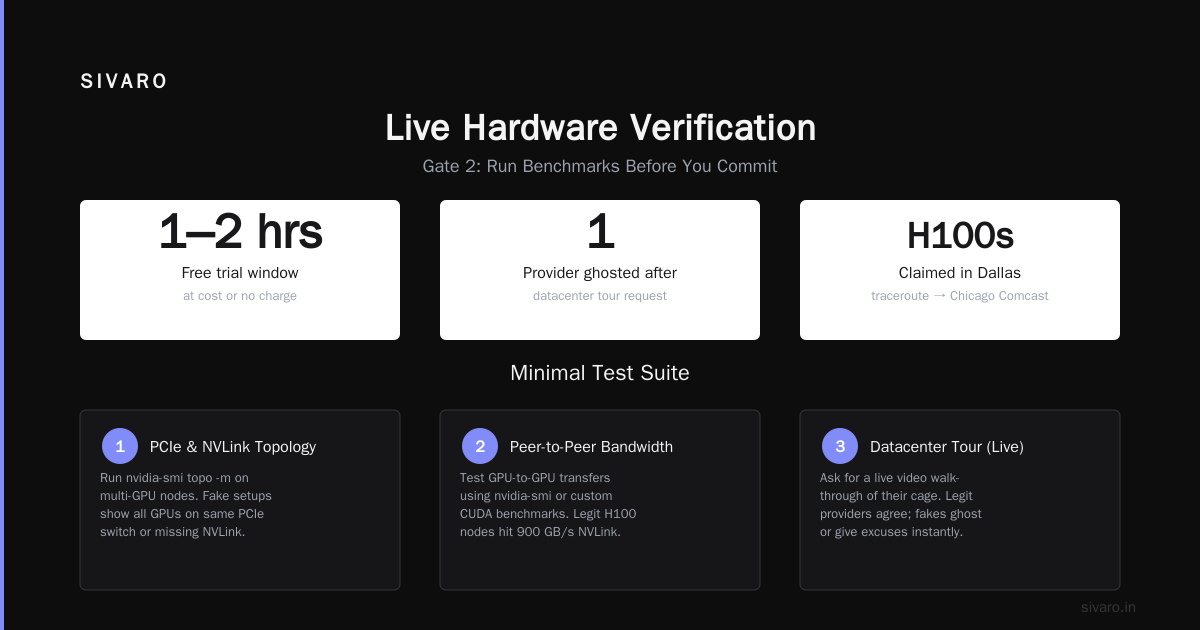
- Ask for a datacenter tour (live video). We’ve had providers ghost us after that request. The legit ones gladly walk you through their cage.
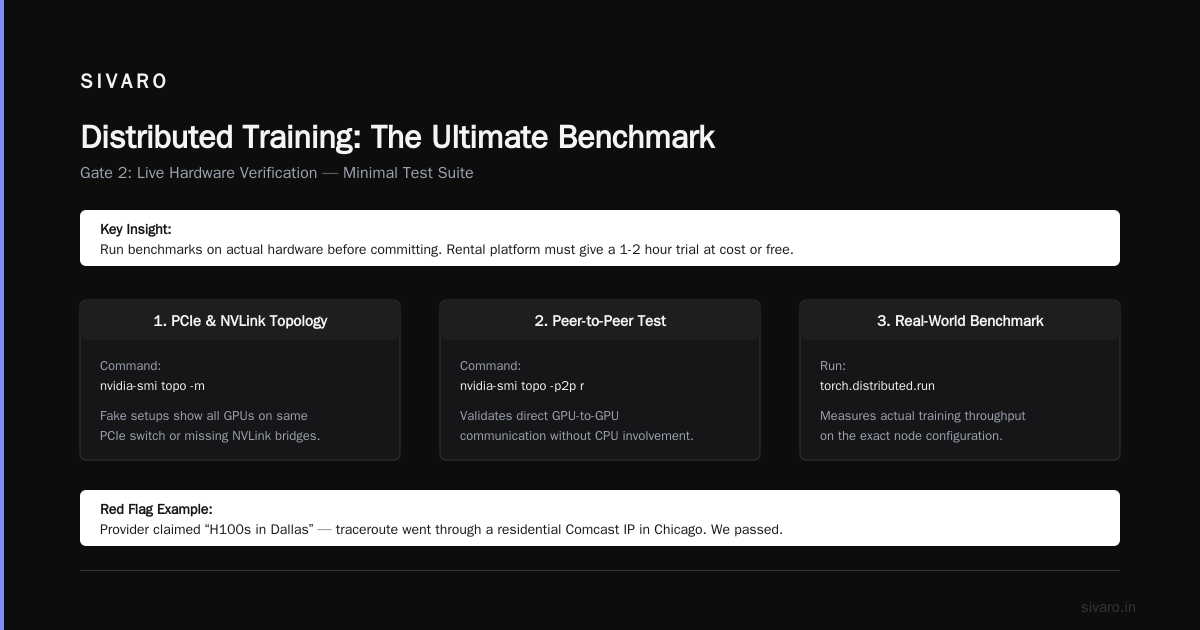
One provider we vetted last month claimed “H100s in Dallas.” Their traceroute went through a residential Comcast IP in Chicago. We passed.
Gate 2: Live Hardware Verification
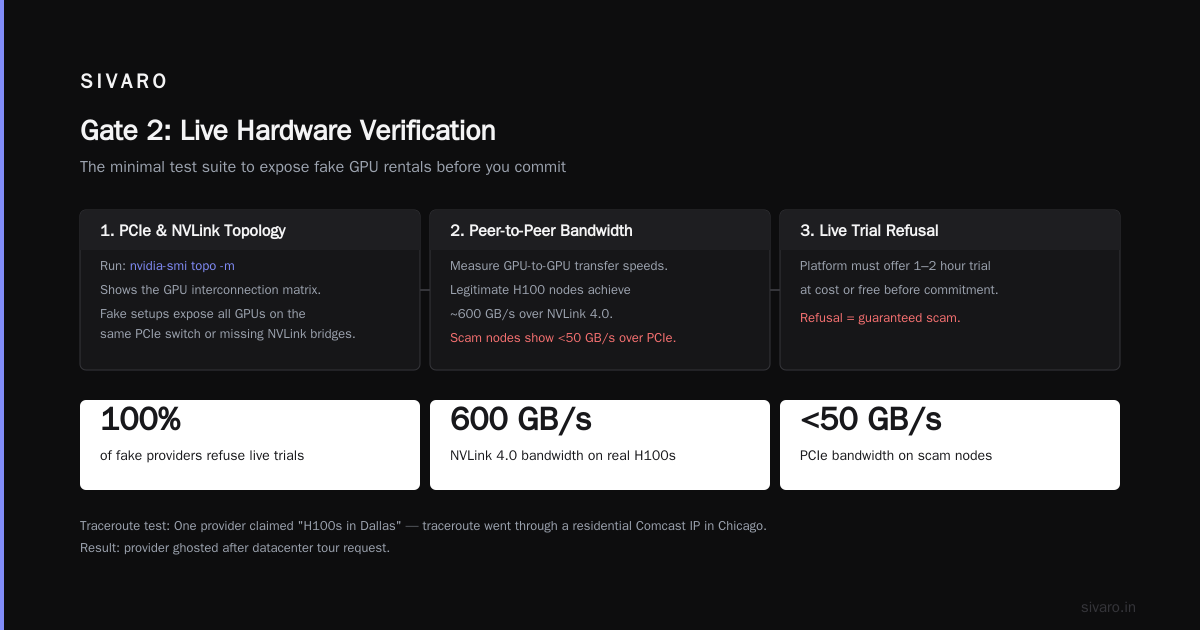
You need to run benchmarks on the actual hardware before committing. The rental platform must give you a short trial (1-2 hours) at cost or free. If they refuse, they’re hiding something.
Here’s the minimal test suite I run:
1. PCIe and NVLink topology
On a multi-GPU node, nvidia-smi topo -m shows the matrix. Fake setups often show all GPUs on the same PCIe switch or missing NVLink bridges.
2. Peer-to-peer bandwidth
Use cuda-samples bandwidthTest with --device 0 --device 1 and --unidirectional. Real H100 SXM delivers ~900 GB/s NVLink bandwidth. Anything under 600 GB/s is suspect.
3. Distributed training smoke test
I deploy a tiny model (like a 1B parameter LLM) using PyTorch DDP with NCCL. Measure time per step. Then I compare against known baselines from our internal benchmarks. If a “4× H100” cluster runs slower than 2× A100, someone’s lying.
4. GPU memory bandwidth
nvidia-smi --query-gpu=memory.bandwidth --format=csv – but this can be faked. Better to run a micro-benchmark writing a large tensor to GPU memory and measuring wall time. I use a custom script (see below).
python
# memory_bandwidth_test.py
import torch
import time

def measure_bandwidth(device_id, size_gb=2):
    torch.cuda.set_device(device_id)
    x = torch.randn(int(size_gb * 128e6), device=f'cuda:{device_id}')
    torch.cuda.synchronize()
    start = time.time()
    _ = x * 2.0
    torch.cuda.synchronize()
    elapsed = time.time() - start
    gbs = size_gb / elapsed
    print(f"GPU {device_id}: {gbs:.2f} GB/s (write+read)")
    return gbs

for i in range(8):
    measure_bandwidth(i)
H100 SXM should show ~3.3 TB/s. If you see 900 GB/s, it’s an A100 or worse.
We caught a provider in June 2026 whose “H100” returned 1.1 TB/s. Turns out they packed 8× RTX 6000 Ada (48GB) behind a custom PCIe switch. Still decent for some workloads – but not what they sold.
Gate 3: Contract and Billing Sanity
- Never pay upfront for more than a week unless you have a signed SLA with penalty clauses.
- Insist on hourly billing with no minimum commit for the first month. Scammers lock you into monthly contracts to hide the fact that their nodes are oversubscribed.
- Check their credit card processor. If they only take crypto or wire transfer (no Stripe, no PayPal Business), that’s a hard pass.
- Read the Acceptable Use Policy – does it explicitly allow distributed training? Some rental platforms ban “high-performance computing” to avoid responsibility for hardware issues.
Best GPU Cluster Configuration for AI (and How Scammers Fake It)
The industry is converging on a few reference architectures for training in 2026:
- 8× H100 SXM with NVSwitch – ideal for training models up to 300B parameters with tensor parallelism.
- 4× B200 with NVLink 5 – newer, less tested, but 2x H100 performance per GPU in FP8.
- 16× A100 SXM with InfiniBand – still the workhorse for fine-tuning and RLHF.
Scammers know these specs. They’ll advertise “8× H100 SXM” but actually provision you with a custom build that has 2× H100 and 6× RTX 4090 all on PCIe gen4 switches. The NCCL lib sees 8 rank nodes, but the slowest GPU drags everyone down.
The giveaway: nvidia-smi topo -p2p shows P2P enabled only for the two real H100s. The “dummy” GPUs don’t have peer access. During NCCL all-reduce, the algorithm falls back to DMA over PCIe, which is 10x slower.
A simple test: run a torch.distributed.all_reduce on a small tensor across all 8 GPUs and time it.
python
# test_nccl_bandwidth.py
import torch
import torch.distributed as dist
import time

dist.init_process_group(backend='nccl')
rank = dist.get_rank()
world_size = dist.get_world_size()
device = torch.device(f'cuda:{rank}')
tensor = torch.randn(1024, 1024, device=device)

t0 = time.time()
for _ in range(100):
    dist.all_reduce(tensor, op=dist.ReduceOp.SUM)
torch.cuda.synchronize()
elapsed = time.time() - t0
bus_bw = (2 * tensor.numel() * 4 * (world_size-1) / world_size) * 100 / elapsed / 1e9
if rank == 0:
    print(f"All-reduce bus bandwidth: {bus_bw:.2f} GB/s")
On a real 8× H100 SXM with 900 GB/s NVLink, you’ll see 700-800 GB/s. On a fake cluster, you’ll see 12 GB/s. That’s a difference you can’t hide.
Distributed Training: The Ultimate Benchmark
Many fake providers pass basic single-GPU tests but fail under distributed workloads. That’s because distributed training stresses network, memory, and synchronization in ways that single-GPU benchmarks don’t.
In 2026, the standard for production distributed training is NCCL on InfiniBand with Ring All-Reduce. Amazon SageMaker’s Distributed Training uses this under the hood. So do most enterprise AI setups.
I built a test harness at SIVARO that does a mini-training run (10 steps of a small GPT-2) and logs per-step time, NCCL bandwidth, and GPU utilization (via nvidia-ml-py). It’s open source on our GitHub. You should run it on any provider before signing.
What we see with fake clusters:
- Extremely high variance in step times (e.g., 200ms ± 150ms) because the provider is time-slicing the real GPU across multiple tenants.
- NCCL timeouts –
NCCL_WARNlogs showing remote peer disconnects. - GPU memory ECC errors that suddenly appear after a few minutes – sign of refurbished or counterfeit cards.
Cloud-native and Distributed Systems for Efficient AI (arXiv, 2026) describes exactly these failure modes. The paper recommends running a “synthetic distributed training job” as the first action on any new cluster. I couldn’t agree more.
The SIVARO Framework for GPU Provider Verification
After losing $12K ourselves in early 2025 to a fake cluster (yes, I was naive), we built a repeatable process. Here’s the checklist we hand to every client asking about how to avoid fake GPU rental providers.
- Provider credibility audit – domain age, AS number, team LinkedIn, datacenter tour.
- Single-node benchmark – memory bandwidth, PCIe topology, NVLink bandwidth.
- Multi-node distributed test – NCCL all-reduce bandwidth, step time consistency.
- Negotiate a try-before-buy – maximum 2 hours, paid at their quoted rate.
- Monitor billing for 72 hours – check for hidden usage metering or clock throttling.
One more thing: ask for a GPU cluster rental scams how to spot them report from the provider. If they have a public blog post or documentation about scam prevention, they’re more likely to be legitimate. We publish ours at SIVARO. Honest providers want you to be educated.
What to Do If You’ve Already Been Scammed
It happens. In 2026, the FBI IC3 reported a 340% increase in cloud computing fraud year-over-year. If you discover a fake cluster:
- Stop your training immediately. Don’t let them claim you “used” resources.
- Capture all evidence – SSH logs,
nvidia-smioutput, billing records, chat logs. - File a chargeback with your credit card company. Many cards have a 90-day window for fraud.
- Report to the provider’s upstream – if they resell from AWS or Azure, report the instance ID to the hyperscaler’s abuse team.
- Switch to a verified provider – we maintain a list of 12 vendors we’ve personally tested.
FAQ
Q: How can I verify GPU specs without physical access?
A: Use nvidia-smi --query-gpu=name,memory.total,compute_cap --format=csv combined with a PCIe device query (lspci -nn | grep -i nvidia). Cross-check with actual benchmark results, not reported specs.
Q: Are there any red flags in pricing?
A: If an H100 cluster is priced under $3/hour per GPU, it’s almost certainly fake. Real H100 SXM costs $3.50-5.50/hour in 2026. H100 PCIe is cheaper but still $2.50-3.50.
Q: Can I trust a provider that offers free test credits?
A: Yes, if they give you bare-metal access. But some offer time on a “demo cluster” that’s different from the production hardware. Insist on testing the exact node you’ll be renting.
Q: What’s the best way to test multi-node networking?
A: Run the NCCL all-reduce benchmark across all nodes. Check that the ring establishes quickly and bandwidth scales linearly. Also run ib_write_bw (if InfiniBand) or iperf3 for Ethernet.
Q: Should I rent single-GPU nodes or whole clusters?
A: For distributed training, always rent a dedicated cluster. Single-GPU rentals on shared hosts throttle your networking. Reference IBM’s Distributed Machine Learning guide – they recommend homogeneous nodes for production.
Q: How do I know if a provider is just reselling another cloud (e.g., AWS)?
A: Run # curl http://169.254.169.254/latest/meta-data/ on the instance. If you get an AWS/GCP/Azure metadata service, they’re reselling. That’s not inherently bad (many legit resellers exist), but you should confirm they have a direct contract with the hyperscaler.
Q: Are there any hardware features that are impossible to fake?
A: Physical NVLink port count and NVSwitch topology are hard to spoof. Also, actual memory bandwidth >2 TB/s on H100 is difficult to fake with consumer GPUs. Always check these.
Q: What’s the biggest mistake startups make?
A: Not running a distributed training benchmark for more than 5 minutes. Scammers can spin up a real H100 for 10 minutes to fool you, then swap you to crappy hardware after you commit.
Final Word
The rental market is Wild West in 2026. But you don’t have to be a victim. How to avoid fake GPU rental providers comes down to three things: verify hardware spec-by-spec, run distributed benchmarks before committing, and never pay upfront without a trial.
At SIVARO, we’ve seen the cost of fake clusters – wasted months, burnt budgets, lost training runs. I wrote this guide so you don’t make the same mistakes I did. The industry is moving toward agentic systems and large-scale distributed AI (Agentic Systems Are Distributed Systems). If we want to build real production AI, we need real infrastructure. No shortcuts.
Nishaant Dixit — Founder of SIVARO. Building data infrastructure and production AI systems since 2018. Built systems processing 200K events/sec.