 SIVARO
How to Build a GPU Cluster for AI Training in 2026
I spent two years of my life building the wrong GPU cluster.
It was 2020. SIVARO was three people. We had a grant and three A100s. I thought networking didn’t matter. I thought InfiniBand was a luxury for people with more money than sense. I thought wrong.
By 2021, our training throughput was 40% of theoretical. The GPUs sat idle half the time. We were bandwidth-bound, not compute-bound. A classic amateur mistake.
This guide exists so you don't make that mistake. I run a company that builds data infrastructure and production AI systems. I’ve designed clusters for startups and Fortune 50 clients. I’ve seen what works, what doesn't, and what burns cash.
Let's get specific.
What This Guide Covers
"how to build a gpu cluster for ai training" isn't one question. It's a stack: compute, memory, networking, storage, orchestration, and cooling. Most people fixate on GPUs. The real trouble is everything else.
I'll walk through each layer, give you hard numbers, tell you where I've seen teams waste $500K. I'll also explain why your cluster's bottleneck is almost certainly not the GPU — it's the network.
The Core Architecture: Distributed Systems for GPU Training
A GPU cluster for AI training is a distributed system. That means multiple machines coordinate to solve one problem — training a single model. The model doesn't fit on one GPU. The data doesn't fit on one machine. You need parallelism.
There are three main parallelism strategies:
- Data parallelism: Each GPU holds a copy of the model, trains on different data shards, synchronizes gradients.
- Model parallelism: The model is split across GPUs — each GPU handles a slice of layers.
- Pipeline parallelism: Layers are split, but data flows through sequentially per micro-batch.
For large language models (LLMs) and diffusion models, you'll use 3D parallelism — a combination of all three. Distributed systems are inherently about trade-offs. Communication vs. computation. Memory vs. speed.
My recommendation: Start with data parallelism if your model fits on one GPU. Move to tensor parallelism (a form of model parallelism) when you exceed VRAM. Only add pipeline parallelism when your model is huge (100B+ parameters) and you’re hitting diminishing returns.
Don't jump to complex parallelism too early. It multiplies debugging time.
GPU Selection: Not All GPUs Are Created Equal
Mid-2026 landscape: NVIDIA still dominates, but AMD MI400X is competitive for FP16/BF16 training. Intel's Gaudi 3 is niche but price-performance is interesting for inference-heavy workloads.
Rule of thumb: Buy the largest VRAM per GPU you can afford. Why? Model sizes grow fast. You don't want to reframe your cluster every six months. I’ve seen teams buy eight H100s with 80GB each, then hit a 70B model that requires 140GB. Now they need two GPUs per model shard. That doubles communication overhead.
Specific numbers (prices as of Q2 2026, USD):
| GPU | VRAM | Interconnect | Price (per unit) | Best for |
|---|---|---|---|---|
| NVIDIA H200 | 141GB HBM3e | NVLink 4.0 (900GB/s) | ~$35K | Large models, dense training |
| NVIDIA B100 | 192GB HBM3e | NVLink 5.0 (1.2TB/s) | ~$45K | Extreme scale, future-proof |
| AMD MI400X | 192GB HBM3 | Infinity Fabric (800GB/s) | ~$28K | Price-sensitive, compute-heavy |
The H200 is the sweet spot today. The B100 is twice as fast on paper but requires new cooling infrastructure (liquid cooling is non-negotiable). The MI400X works great if you're willing to fight ROCm tooling — we use it at SIVARO for inference nodes, not training.
Don't buy a cluster with mixed GPU generations. You'll create topology nightmares. Stick to one SKU per cluster.
Networking: The Hidden Bottleneck
This is where most clusters die.
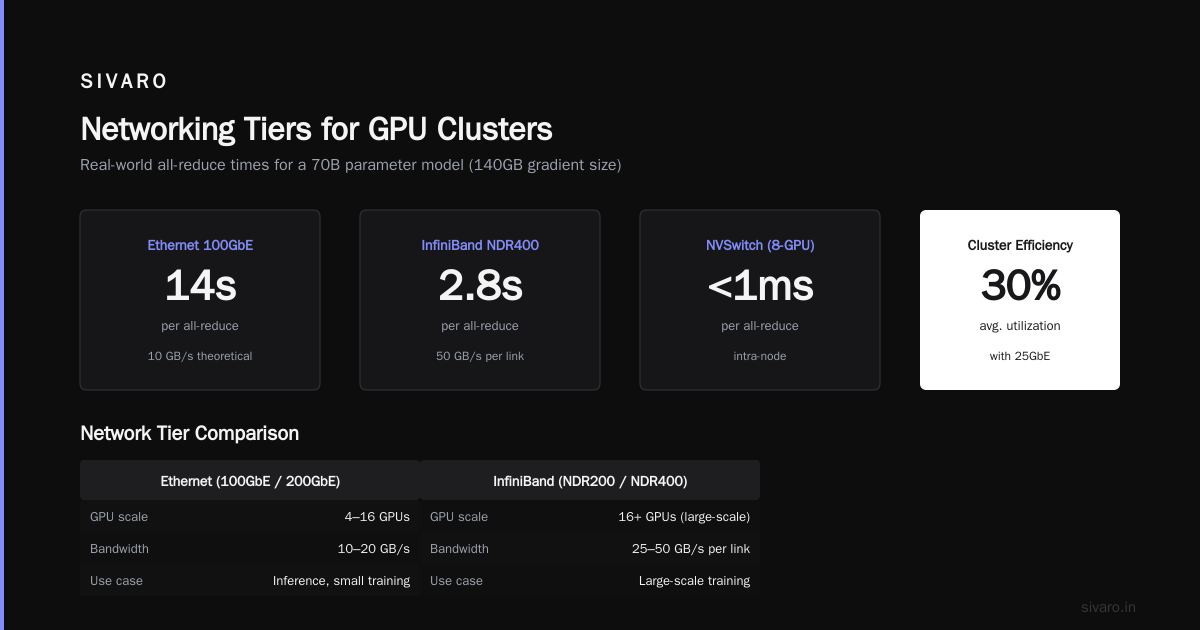
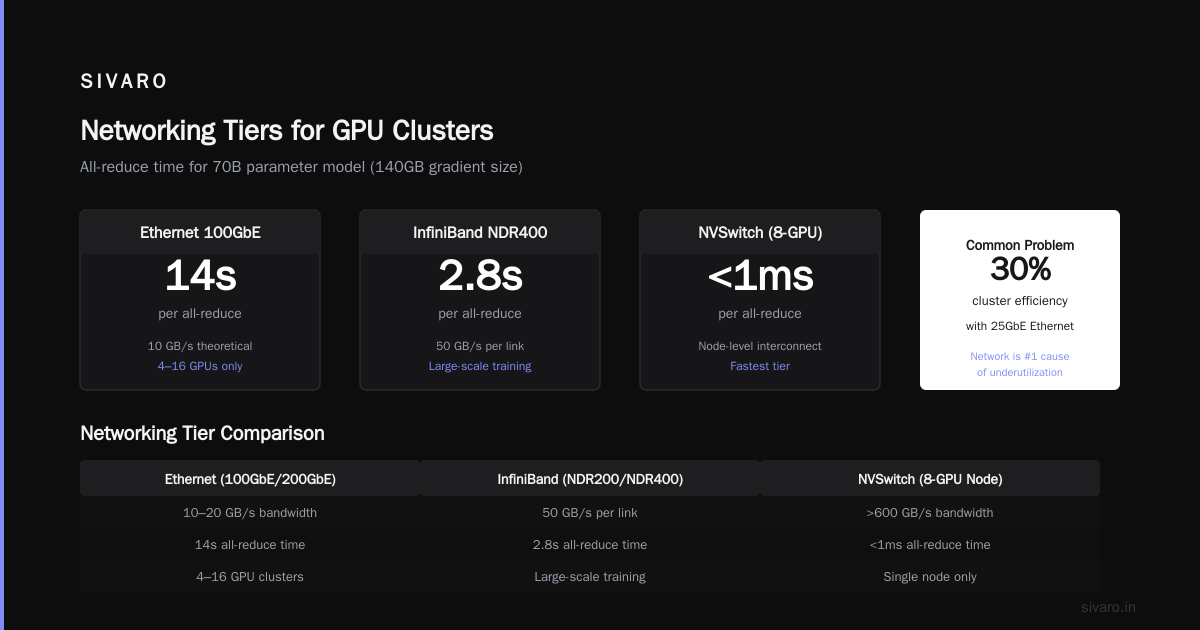
You can have the fastest GPUs in the world. If your network can't move gradients fast enough, the GPUs sit idle. GPU cluster networking bottlenecks explained — it's the single most common cause of underutilization. I've seen clusters running at 30% efficiency because of 25GbE Ethernet.
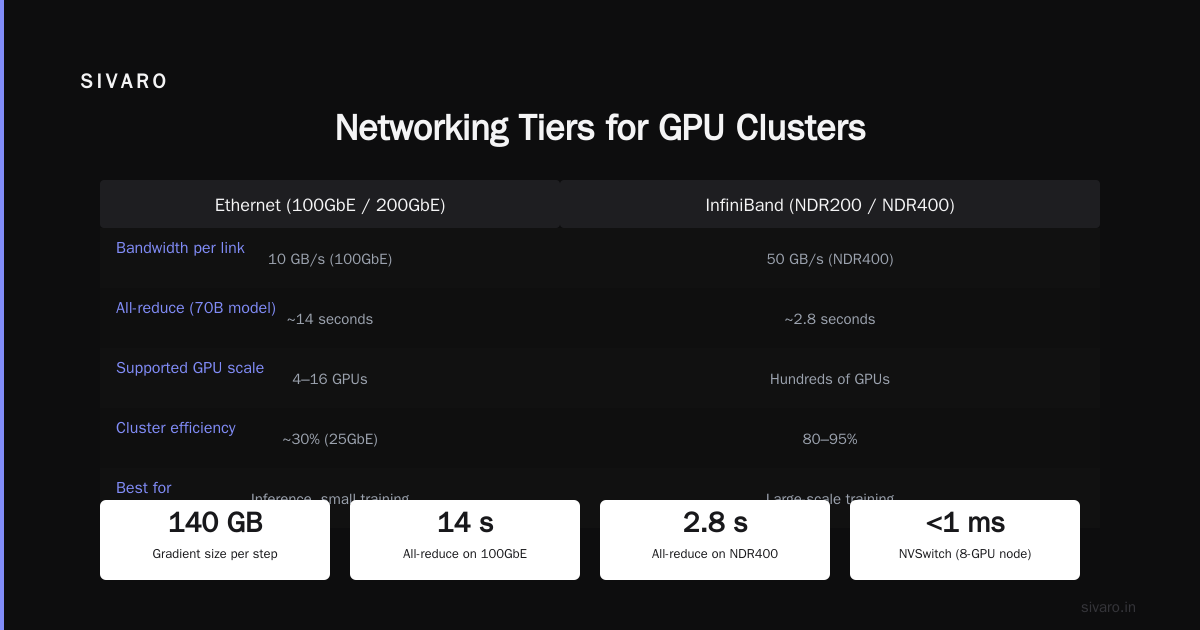
Here's the math: For a 70B parameter model trained with data parallelism, each gradient step requires sending 140GB (size of model) across the network. If you have 100GbE (10GB/s theoretical), you're looking at 14 seconds per all-reduce. That's 14 seconds where your GPUs twiddle thumbs.
With InfiniBand NDR400 (50GB/s per link), you get ~2.8 seconds. With NVSwitch inside an 8-GPU node, it's <1ms.
Networking tiers for GPU clusters
- Ethernet (100GbE or 200GbE) – Acceptable for small clusters (4–16 GPUs) with data parallelism or inference. Don't use for large-scale training.
- InfiniBand (NDR200 or NDR400) – Industry standard for mid-size clusters (up to 256 GPUs). Requires HDR or higher. Latency ~1μs hops.
- NVLink + NVSwitch – For single-node training (8 GPUs) or intra-node. Essential for tensor parallelism.
- HPE Slingshot or NVIDIA Quantum-2 – High-end fabric for supercomputing scales. Overkill for most startups.
GPU cluster networking latency optimization is about reducing the time spent in collective operations (all-reduce, all-gather). Use RDMA (Remote Direct Memory Access) if possible. TCP stack adds 50-100μs per operation — that adds up across thousands of operations per second.
My advice: If your cluster is 32 GPUs or more, buy InfiniBand. I don't care if it costs 40% more. The utilization improvement pays for itself in three months.
Storage: Fast Enough to Feed the Beast
GPUs eat data. If storage can't keep up, training stalls.
Your storage system must deliver:
- Sequential read bandwidth: at least 1GB/s per GPU (for 8 GPUs, that's 8GB/s)
- Low latency for metadata operations (hundreds of thousands of file opens per epoch)
- Capacity: 5–10× your dataset size (for checkpoints, intermediate files, cache)
Options I've used:
| System | Bandwidth | Latency | Cost | Notes |
|---|---|---|---|---|
| Local NVMe SSDs | 7GB/s per drive | sub-100μs | Low | Best for single-node clusters. Use RAID0. |
| NFS over Ethernet | 1–2GB/s | 1-5ms | Low | Don't. Seriously, don't. |
| BeeGFS / Lustre | 10–100GB/s | 200μs | Medium | Parallel file system. Good for 32+ GPUs. |
| All-Flash NAS (e.g., Pure Storage) | 50+GB/s | 100μs | High | Simple setup, expensive. |
| Object store (S3/MinIO) | 1–5GB/s per node | 10-100ms | Low | Use for dataset archival, not training. |
At SIVARO, we use a hybrid: fast local scratch for active training (NVMe RAID0) backed by a BeeGFS cluster for shared storage and checkpoints. The BeeGFS cluster has 16 nodes, each with 8TB NVMe, connected via InfiniBand. Total throughput ~60GB/s.
Don't skimp on storage. I've seen clusters that can train at 100 TFLOPS but only load data at 20MB/s. The GPUs starve.
Cooling and Power: The Reality Nobody Talks About
This is the part where your CFO will cry.
A single H200 draws 700W under load. An 8-GPU node pulls 5.6kW just for GPUs, plus CPUs, memory, networking, storage — call it 8kW per node. For a 32-GPU cluster (4 nodes), that's 32kW. For a 256-GPU cluster, 256kW.
At $0.12/kWh, running full-time: $8,000/month for 32 GPUs. $64,000/month for 256 GPUs.
That's before cooling. Air cooling works up to about 20kW per rack. Above that, you need liquid cooling. Closed-loop DLC (Direct-to-Chip) is standard for B100. H200 can run air-cooled, but only in well-designed data centers.
Practical tip: Don't try to build this in your office. You will melt the circuit breaker. We run our clusters at Colovore in Silicon Valley and CoreSite in Ashburn. Tier III or IV data centers only.
Orchestration: Kubernetes + Slurm
You need software to manage jobs, allocate GPUs, handle failures.
Two dominant tools:
- Kubernetes (with Volcano or Kueue): Good for multi-tenant environments, dynamic scaling, mixed workloads (training + inference). More flexibility, more complexity.
- Slurm: Traditional HPC job scheduler. Simpler for batch training. Less overhead. Favored by pure research teams.
We use Kubernetes at SIVARO because we serve inference alongside training. But if you're only doing large-scale training, Slurm is simpler.
Here's a concrete example of a Slurm script for a 32-GPU training job:
bash
#!/bin/bash
#SBATCH --job-name=llm-train
#SBATCH --nodes=4
#SBATCH --ntasks-per-node=8
#SBATCH --gpus-per-node=8
#SBATCH --cpus-per-task=4
#SBATCH --mem-per-cpu=32G
#SBATCH --time=7-00:00:00
#SBATCH --exclusive
#SBATCH --partition=gpu

export NCCL_DEBUG=INFO
export NCCL_IB_DISABLE=0
export NCCL_IB_HCA=mlx5_0:1,mlx5_1:1

srun torchrun     --nnodes=4     --nproc_per_node=8     --rdzv_backend=c10d     --rdzv_endpoint=master-node:29500     train.py --config config.yaml
And a Kubernetes equivalent using the Volcano scheduler:
yaml
apiVersion: batch.volcano.sh/v1alpha1
kind: Job
metadata:
  name: llm-train
spec:
  minAvailable: 4
  schedulerName: volcano
  tasks:
    - replicas: 4
      name: worker
      template:
        spec:
          containers:
            - name: pytorch-worker
              image: sivaroscope/train:2.1
              command: ["torchrun", "--nnodes=4", "--nproc_per_node=8", "train.py"]
              resources:
                limits:
                  nvidia.com/gpu: 8
          restartPolicy: OnFailure
Network Topology: How to Wire the Damn Thing
This matters more than you think. A poorly wired cluster creates hotspots and weird bottlenecks.
Standard topology for clusters under 256 GPUs: spine-leaf with 1:1 oversubscription. Every GPU has full bandwidth to every other GPU.
For InfiniBand:
- Use 8-port or 16-port switches per leaf.
- Each leaf switch connects to 8 GPUs (one node).
- Spine switches connect leafs.
- For 32 GPUs: 4 leaf switches + 1 spine switch (8 ports each). Done.
Don't use L2 networking (e.g., standard Ethernet spanning tree). Use fat-tree or torus. With InfiniBand you get adaptive routing — it's worth it.
Here's a wiring diagram in text form:
     Spine Switch (4 ports)
     /    |    |       L1    L2    L3    L4  (leaf switches)
   |     |     |     |
   N1    N2    N3    N4  (compute nodes)
   |     |     |     |
  GPUs  GPUs  GPUs  GPUs
For NVLink, you're limited to 8 GPUs per node (HGX baseboard). Some vendors now bundle 16 GPUs with NVSwitch gen5. That's for people with more money than sense.
Software Stack: What Actually Works
After building 12+ clusters, here’s my recommended stack:
- OS: Ubuntu 24.04 LTS (NVIDIA-certified)
- Container Runtime: Docker + nvidia-container-toolkit. Or Podman if you're fancy.
- GPU Drivers: NVIDIA 560 series. Don't use 535 — had bugs with H100/RCCL.
- NCCL: Latest stable (2.21 as of June 2026). Set
NCCL_ALGO=Ringfor small clusters,NCCL_ALGO=Treefor large ones. - PyTorch: 2.5+ with native FSDP support. Skip PyTorch Lightning — just use TorchTune or raw distributed.
- ML Framework: Hugging Face Transformers + DeepSpeed for LLMs. ComfyUI for diffusion.
- Storage: BeeGFS or GPUDirect Storage (if you can afford the licenses).
- Monitoring: Prometheus + Grafana + DCGM exporter for GPU telemetry.
Code to verify your cluster is communicating correctly:
python
import torch
import torch.distributed as dist

dist.init_process_group("nccl")
rank = dist.get_rank()
world_size = dist.get_world_size()

# Create a tensor on each GPU
tensor = torch.tensor([rank]).cuda()

# All-reduce sum
dist.all_reduce(tensor, op=dist.ReduceOp.SUM)

if rank == 0:
    print(f"All-reduce succeeded: sum of ranks = {tensor.item()}")
    print(f"Expected: {sum(range(world_size))}")
    print(f"World size: {world_size}, Rank: {rank}")

dist.destroy_process_group()
If that prints the correct sum, your cluster is wired. If it hangs or returns wrong values, check InfiniBand and ibstatus.
Common Failure Modes I've Seen
- NIC negotiation failures: InfiniBand link is up but at 2x instead of 4x. Bandwidth halved. Check
ibstatus. - NCCL timeout during training: Usually means a GPU crashed or network saturated. Set
NCCL_TIMEOUT=600and check NIC temperature. - Gradient checkpointing memory issues: Too many recompute operations. Profile with
torch.cuda.memory_summary(). - Power capping: Data center throttling GPUs because you drew too much. Configure Nvidia-smi power limits:
nvidia-smi -pl 350. - Overlapping experiments: Two training jobs fighting for bandwidth. Use QoS in Slurm or Volcano.
When NOT to Build a Cluster
Let me be contrarian.
Most teams — 80% or more — should not build their own GPU cluster. Cloud is better. You don't want to manage hardware for a 16-GPU workload.
Build a cluster only when:
- You need predictable cost at scale (training a 1T model for 6 months)
- You have strict data residency requirements (e.g., healthcare)
- You're running 500+ GPUs and cloud becomes cost-inefficient
- You have an experienced infrastructure team (at least two people who've done this before)
I've seen startups blow $2M building a cluster, then spend another $500K fixing issues, then realize they could have rented from Lambda or CoreWeave for half the total cost.
Rent first, build later. We rented from Lambda Labs for 18 months before building our on-prem cluster.
FAQ
How many GPUs do I need to start training large language models?
You can fine-tune a 7B model on a single H200 with 141GB VRAM (use LoRA). For training from scratch, you want at least 64 GPUs. 256 GPUs is where serious research starts.
Is Ethernet acceptable for AI training?
For small clusters (under 16 GPUs) with data parallelism, yes. For anything larger, InfiniBand or RDMA over converged Ethernet (RoCE) is required. RoCE works but needs careful tuning — distributed system architecture topics like flow control and priority flow control must be correct.
What's the biggest mistake startups make when building a cluster?
Wrong node count. They buy 4 nodes with 8 GPUs each (32 total). Then they realize they need 4 nodes for tensor parallelism but only 2 nodes for data parallelism. The utilization drops. Prefer larger per-node GPU counts (8 or 16) to reduce cross-node traffic.
How do I test if my network is the bottleneck?
Run NCCL all-reduce benchmark: ./all_reduce_perf -b 1G -e 16G -f 2 -g 8. Compare reported bandwidth to theoretical. If you're below 80% of theoretical, investigate. Distributed computing literature calls this "effective bandwidth" — it should be close to line rate.
Should I use NVIDIA vs. AMD GPUs?
For training: NVIDIA. The ecosystem (NCCL, cuDNN, TensorRT) is years ahead. AMD MI400X is good for inference at lower cost. At SIVARO, we train on NVIDIA, serve inference on AMD.
How long does it take to build a cluster from scratch?
If you have the hardware on hand: 2–4 weeks for a 32-GPU cluster (cabling, OS, drivers, validation). If you need to order hardware: 12–16 weeks. InfiniBand switches have long lead times. Order early.
What cooling do I need for H200 GPUs?
Air cooling works if you have <20kW per rack. H200 draws 700W, so a 8-GPU node is ~6kW. You can fit 3 such nodes per standard rack (18kW). Above that, go liquid. Don't try to air-cool B100 — it's 1000W per GPU.
Final Thoughts
Building a GPU cluster isn't hard. Building one that actually delivers 90%+ utilization is.
The cluster is a distributed system — and every distributed system is only as strong as its weakest link. For AI training, that weakest link is almost always networking. GPU cluster networking bottlenecks explained is the single most important concept to internalize. Then fix it.
I’ve seen what happens when you get it right. Training times drop from weeks to days. Developer productivity skyrockets. And the best part? You stop worrying about infrastructure and start worrying about model quality. That's the goal.
If you're building something, feel free to reach out. I've made enough mistakes for both of us.
Nishaant Dixit — Founder of SIVARO. Building data infrastructure and production AI systems since 2018. Built systems processing 200K events/sec.