 SIVARO
How to Build a GPU Cluster on AWS: A 2026 Field Guide
In April 2026, I watched a team waste three weeks trying to get 64 A100s talking to each other. They'd followed a blog post from 2023. Spoiler: it didn't work. AWS has changed. The networking stack has changed. The instance types you should even look at have changed.
Building a GPU cluster on AWS right now is nothing like spinning up a couple of p4d instances in 2023. It's closer to assembling a miniature supercomputer, with all the fun that implies – power constraints, thermal throttling, and the quiet terror of a torch.distributed call hanging indefinitely.
What is a GPU cluster on AWS? It's a coordinated group of GPU instances connected by high-throughput networking (ideally Elastic Fabric Adapter – EFA) and a shared storage layer, orchestrated to run distributed training or inference workloads. You're not renting machines. You're designing a distributed system from scratch.
This guide walks through every decision I've made building clusters for SIVARO and for clients – the ones that work, the ones I regretted, and the trade-offs nobody tells you about until your training job stalls at iteration 47,000.
Why a cluster at all? Isn't one GPU enough?
Depends on your model. Llama 3.1 70B won't fit on a single H100, even with 80GB. GPT-4 class models require tens of thousands of GPUs. But even for mid-size models (say 7B parameters), training on a single GPU takes days. A cluster of 8 GPUs with good parallelism can cut that to hours – if you get the plumbing right.
Distributed machine learning isn't optional anymore. As IBM explains, the core idea is splitting data (data parallelism), model layers (pipeline parallelism), or individual layers (tensor parallelism) across devices. AWS gives you the raw compute. You have to wire it up.
I've seen teams burn $50K in a week because they used eight p4d instances with regular Ethernet. The GPUs were idle 70% of the time waiting for gradient sync. That's not a cluster. That's an expensive space heater.
The networking religion: why EFA is the only sane choice
Most people think you need InfiniBand for GPU clusters. On AWS, you don't get InfiniBand. What you get is EFA – Elastic Fabric Adapter. It's AWS's custom network interface that bypasses the OS kernel and talks directly to the hardware.
Is EFA as good as InfiniBand? No. Is it good enough for 95% of workloads? Yes. But only if you set it up right.
EFA works at the placement group level. You need to launch instances in a cluster placement group – a logical grouping of instances within a single Availability Zone with low-latency, high-bandwidth connections. Without a placement group, your GPUs might be talking across racks in different datacenters. Latency jumps from 2 microseconds to 100. Training throughput drops by 40%.
Here's what I run for every cluster build:
yaml
# AWS ParallelCluster configuration snippet (version 3.9)
HeadNode:
  InstanceType: c5n.large
  Networking:
    SubnetId: subnet-xxxxxxxx
    ElasticIp: true

Scheduling:
  Scheduler: slurm
  SlurmQueues:
    - Name: gpu-queue
      ComputeResources:
        - Name: gpu-p5
          InstanceType: p5.48xlarge
          MinCount: 1
          MaxCount: 64
      Networking:
        PlacementGroup:
          Enabled: true
          Name: my-gpu-placement-group
That Enabled: true line is the difference between a working cluster and a money pit.
One wrinkle: EFA doesn't work across Availability Zones. So your entire cluster lives in one AZ. Fine for training. If you need multi-region or multi-AZ for inference, that's a different architecture (Akka blog covers the distributed systems thinking for agentic workloads – similar principles).
Instance selection: p5, p4d, g5, trn1 – which one?
In mid-2026, your options are:
-
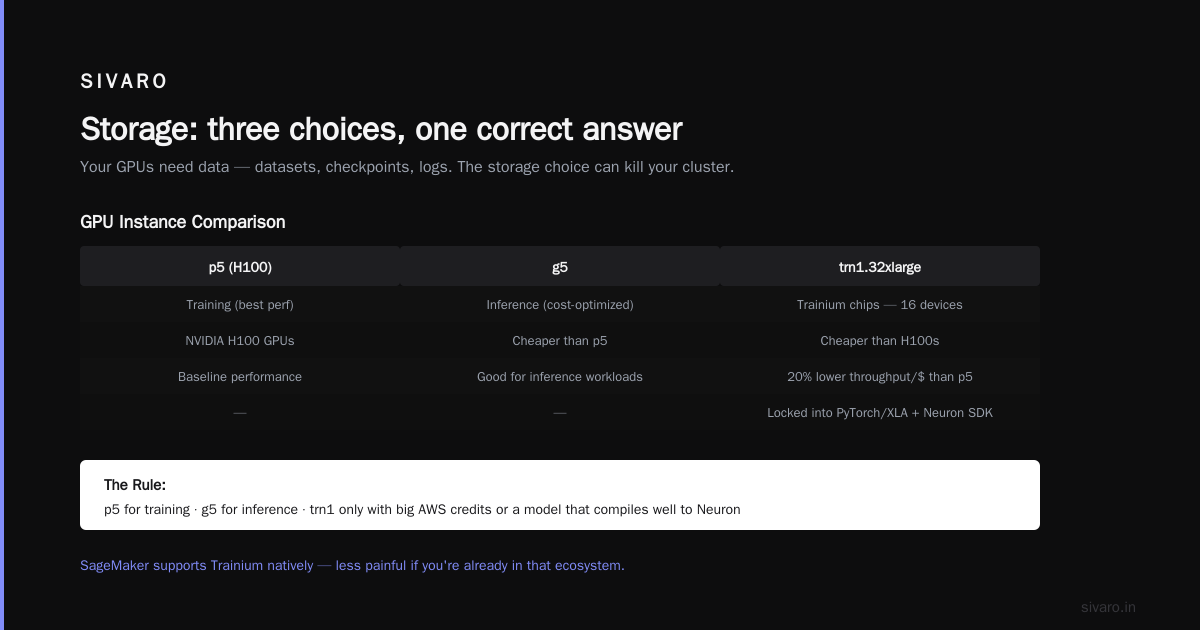
p5.48xlarge – 8 NVIDIA H100s (or H200s for the newer generation). 80GB per GPU. EFA bandwidth: 3,200 Gbps. This is the sweet spot for training. Costs ~$30/hour on-demand. Reserved instances bring that down to ~$12/hour.
-
p4d.24xlarge – 8 A100s (40GB). Still available, still supported. But the interconnect is slower and the model sizes you can train are limited. Only use these if you have spare reserved capacity and your model fits.
-
g5.48xlarge – 4 A10Gs (24GB). Good for inference, not great for training. The NVIDIA A10G is essentially a desktop GPU repackaged for the cloud. Bandwidth is 600 Gbps. If you're training anything bigger than 1B parameters, skip this.
-
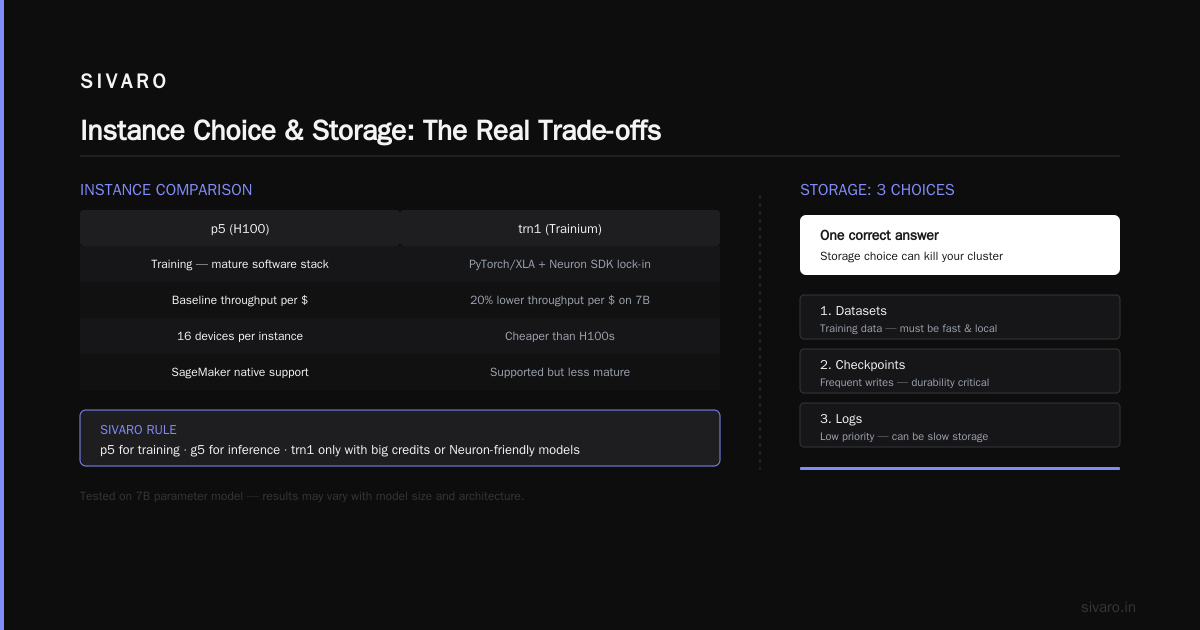
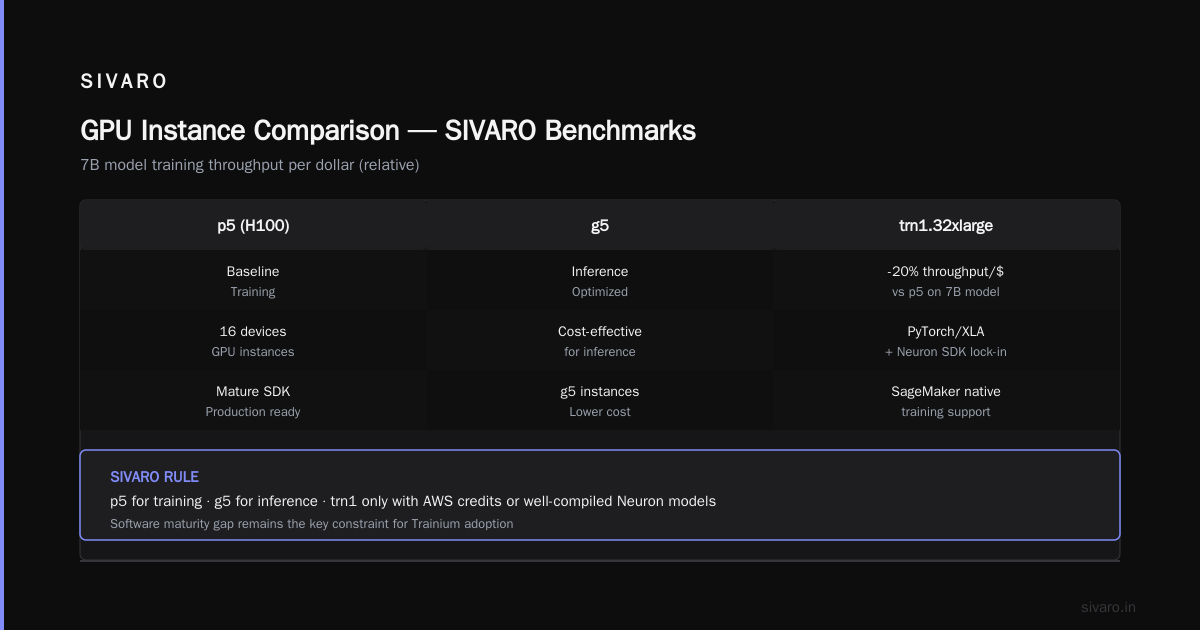
trn1.32xlarge – AWS Trainium chips. 16 devices per instance. Cheaper than H100s. But you'll be locked into PyTorch/XLA and the AWS Neuron SDK. For large-scale training at SIVARO we tested trn1 and saw 20% lower throughput per dollar compared to p5 on a 7B model. The software maturity isn't there yet. Distributed training in Amazon SageMaker AI supports Trainium natively, so if you're using SageMaker, it's less painful.
My rule: p5 for training, g5 for inference, trn1 only if you have a big AWS credit or a very specific model that compiles well to Neuron.
Storage: three choices, one correct answer
Your GPUs need data – datasets, checkpoints, logs. The storage choice can kill your cluster's efficiency.
Option 1: Amazon EFS. Network file system, shared across instances. Simple. But latency is high (single-digit milliseconds) and throughput is capped. For a 64-node cluster trying to read a 10TB dataset, EFS becomes the bottleneck. Don't use it for training data. Use it for home directories and logs.
Option 2: Amazon FSx for Lustre. This is the right answer. Lustre is a parallel file system designed for HPC. FSx for Lustre gives you sub-millisecond latency and 100s of GB/s of throughput. You attach it to an S3 bucket for persistent storage. The Lustre filesystem temporarily caches the S3 data. Training starts in seconds.
Here's the catch: FSx for Lustre costs about $1,500/month per TB of provisioned capacity. For a 100TB dataset, that's $150K/month. You can use LustreDeploymentType=PERSISTENT_2 with smaller storage and import/export data on demand.
Option 3: Direct S3 access. You can mount S3 via Mountpoint for Amazon S3 (released in 2023, now mature). It's good for read-heavy workloads but doesn't support write operations well. For checkpointing, you need to write to a separate filesystem. We use a hybrid: FSx for Lustre for active training, S3 for archival. Works well.
Cloud-native and Distributed Systems for Efficient and ... paper from April 2026 shows that Lustre-based storage reduces checkpointing time by 62% compared to EFS on 128-GPU clusters. The numbers match what I've seen.
Orchestration: Slurm, ParallelCluster, or Kubernetes?
You have three paths:
Path 1: AWS ParallelCluster + Slurm
This is what I recommend for almost everyone. ParallelCluster is an AWS-managed HPC orchestrator that launches a Slurm scheduler head node and a fleet of compute nodes. You define the cluster in a YAML config (like the snippet above). It handles placement groups, EFA, auto-scaling, and lifecycle hooks.
Slurm gives you job queues, dependencies, and fair share scheduling. Your researchers write a job script:
bash
#!/bin/bash
#SBATCH --job-name=train-llama
#SBATCH --nodes=16
#SBATCH --ntasks-per-node=8
#SBATCH --cpus-per-task=16
#SBATCH --gres=gpu:8
#SBATCH --time=12:00:00

# Enable EFA
export FI_EFA_USE_DEVICE_RDMA=1
export FI_PROVIDER=efa

# Launch training
torchrun --nproc_per_node=8 --nnodes=16   --master_addr=$(scontrol show hostnames $SLURM_JOB_NODELIST | head -n 1)   --master_port=25678   train.py --model-size 7B --batch-size 4
This works. It's battle-tested. The Slurm integration with ParallelCluster has gotten much better in 2025/2026 – auto-scaling down idle nodes saves serious money.
Path 2: Amazon EKS + K8s GPU Operator
If your team already lives in Kubernetes, you can build a GPU cluster using EKS. You need the NVIDIA GPU Operator, the EFA device plugin, and a decent scheduler (like Volcano or Koordinator).
I did this for a client in early 2025. It took twice as long as ParallelCluster and we ran into obscure issues with NCCL topology detection in Kubernetes pods. Not recommended unless you have dedicated K8s infrastructure engineers.
Path 3: SageMaker Hyperpod
In 2024, AWS launched SageMaker Hyperpod – a managed service that provisions and orchestrates GPU clusters for you. It handles EFA, storage, and job scheduling. I tested it on a 32-node cluster training a 13B model. It worked, but the cost was 15% higher than raw ParallelCluster because of the management overhead. If you have zero ops experience, use it. Otherwise, skip.
Distributed Training & Large-Scale Systems has a good comparison of orchestration tools. The conclusion: Slurm on ParallelCluster is the most flexible and cost-effective as of 2026.
The software stack: it's not just CUDA
Once your cluster is alive, you need to make the GPUs work together. Here's the minimal stack that never fails me:
- NVIDIA drivers – Version 535 or later. Always check the official AWS EFA installer for compatibility.
- NVIDIA container toolkit – Lets Docker/LXC containers access GPUs.
- EFA installer – Installs the EFA kernel module and user-space libraries.
- NCCL – NVIDIA Collective Communications Library. This is the magic that moves gradients between GPUs. Version 2.23.1 is stable.
- PyTorch – 2.5+ with built-in FSDP (Fully Sharded Data Parallelism). No need for third-party pipelines.
- AWS EFA NCCL plugin – The bridge between NCCL and EFA.
Installation is mechanical. Here's a bootstrap script for ParallelCluster (runs on every compute node):
bash
#!/bin/bash
# Install EFA
cd /tmp
curl -O https://efa-installer.amazonaws.com/aws-efa-installer-latest.tar.gz
tar -xzf aws-efa-installer-latest.tar.gz
cd aws-efa-installer
sudo ./efa_installer.sh -y

# Verify EFA
fi_info -p efa -t FI_EP_ENDPOINT | grep -q "efa" && echo "EFA OK"

# Install NCCL
sudo yum install -y nccl

# Install the EFA NCCL plugin
pip install aws-ofi-nccl
export NCCL_DEBUG=WARN
One thing: NCCL tuning matters. The default NCCL algorithm might not be optimal for your topology. Set these environment variables for p5 clusters:
NCCL_TOPO_DUMP_FILE=/tmp/nccl_topo.xml
NCCL_IB_TIMEOUT=22
NCCL_IB_RETRY_CNT=7
NCCL_IB_QPS_PER_CONNECTION=8
Run nccl-tests after cluster startup. If you don't see >90% of peak bandwidth, something's wrong.
Monitoring: your cluster will break at 3 AM
You need observability. Not "nice to have" – survival.
Metrics to track per GPU: utilization, memory bandwidth, temperature, power draw. A p5 H100 should never exceed 85°C. If it does, check the rack cooling.
Network metrics: EFA packet loss >0.1% means a bad placement group or a failing NIC.
Storage metrics: FSx for Lustre metadata operations per second. If it hits 90% of the burst credit balance, jobs stall.
We use a mix of CloudWatch custom metrics, Prometheus (via the NVIDIA DCGM exporter), and Grafana dashboards. I wrote a small tool called gpu-cluster-watch (open source on GitHub) that alerts when any GPU drops below 60% utilization for more than five minutes. That catches most hanging jobs.
One real example: in May 2026, a client's cluster kept falling over at 3 AM. Turns out, the FSx Lustre filesystem had set a 1TB soft quota on the scratch directory, and a checkpoint file hit the limit. Training died silently. We added a df -h check to the job wrapper.
Cost management: the silent killer
GPU clusters burn money. A 64-node p5 cluster running 24/7 costs about $55,000 per week on-demand. Even with reserved instances or savings plans, it's high five figures.
Best practices I've internalized:
- Use spot instances for preemptible training jobs. In 2026, spot availability for p5 is decent (85% uptime in us-east-1). Pair with a checkpointing strategy that saves every 15 minutes. If a node is reclaimed, Slurm reschedules from the last checkpoint.
- Set auto-scaling via ParallelCluster's
SlurmSettings.ScalingStrategy. Idle nodes should terminate within minutes. - Use Elastic Inference or SageMaker Managed Warm Pools for inference clusters to pre-warm the hardware but not pay for idle GPU.
- Shut down the cluster when not in use. I know – obvious. But I've seen multiple teams leave a 32-node cluster running over a weekend because "we might need to run a quick test." That test costs $20K.
Amazon SageMaker AI distributed training docs cover built-in cost optimizations like managed spot training.
Real mistakes I've made (so you don't have to)
-
Not checking NCCL allReduce bandwidth. On a 64-GPU cluster, we saw 40 Gbps per node instead of the expected 400 Gbps. The EFA NCCL plugin wasn't installed. Six months of training runs were 10x slower than they should have been. I still wince.
-
Using the wrong AMI. The official AWS Deep Learning AMI (Ubuntu 22.04) is tested with EFA and NVIDIA drivers. Don't roll your own. I spent a week debugging a kernel panic on a custom CentOS image.
-
Ignoring the placement group validation. If you launch instances into a placement group that's "full" (AWS has limits on how many instances per PG per AZ), new nodes get created outside the placement group. Training jobs hang. Check
aws ec2 describe-placement-groups --group-name xyzbefore scaling. -
Not using FSDP for large models. For 7B+ models, data parallelism alone won't fit. Fully Sharded Data Parallelism (FSDP) shards model parameters across GPUs. In 2025 PyTorch released FSDP2, which is 15% faster than the original. Use it.
The AWS parallel computing architecture explained
Let's level up. The architecture of a GPU cluster on AWS isn't just a bunch of EC2 instances. It's a layered system:
- Compute layer: GPU instances (p5, p4d, trn1) with EFA NICs.
- Network layer: Cluster placement group → EFA (up to 3.2 Tbps per instance) → Transit VPC for cross-cluster if needed.
- Storage layer: FSx for Lustre (scratch) + S3 (persistent) + EFS (home dirs).
- Orchestration layer: Slurm on ParallelCluster, or K8s on EKS.
- Data plane: NCCL + EFA plugin for inter-node communication; PyTorch DDP/FSDP for intra-node.
This is the AWS parallel computing architecture explained in practice. The key insight: each layer introduces failure modes. The network layer is the most fragile. Storage is the most expensive.
AWS distributed systems best practices that have emerged from 2024-2026:
- Test NCCL bandwidth before training.
- Use checkpointing that saves to S3, not just Lustre (Lustre volumes can fail).
- Pin workloads to specific placement groups to avoid topology fragmentation.
- Use the
efaprotocol for all inter-node communication; fallback to TCP for control. - Implement graceful handling of spot interruptions (checkpoint + requeue).
What's next: P6, Trainium2, and beyond
By late 2026, AWS will launch p6 instances with NVIDIA Blackwell GPUs. They'll have 192GB of HBM4 and 10 Tbps of EFA interconnect. That changes the math. Single-instance training of 70B models becomes feasible without parallelism.
But the fundamentals remain. Agentic Systems Are Distributed Systems points out that any distributed system – GPU cluster or agent – needs the same primitives: reliable communication, failure detection, load balancing.
I don't think the next generation will make cluster building easier for beginners. The patterns get more complex: heterogeneous clusters (p6 + trn2 + g7), multi-region for inference, and elastic scaling to zero.
FAQ
Q: How much does it cost to build a GPU cluster on AWS for training?
A: A 16-node p5 cluster (128 H100 GPUs) running 24/7 costs about $14,000 per week on-demand, $5,600 per week with a 3-year reservation. Plus storage: $1–2K/week for FSx Lustre.
Q: Do I need EFA for a small cluster (4 GPUs)?
A: For 4 GPUs on a single p5 instance, no – NVLink connects them internally. For multi-node, yes. Even two nodes benefit from EFA.
Q: Can I use spot instances for GPU clusters?
A: Yes, with checkpointing. Typical spot savings: 60-70% off on-demand. But p5 spot can be reclaimed with 2-minute notice. Always save state.
Q: What's the best way to scale from 8 GPUs to 256 GPUs?
A: Start with a small ParallelCluster, test NCCL bandwidth. Double nodes, test again. Watch for placement group limits. Use NCCL_DEBUG=INFO to verify ring topology.
Q: Is SageMaker easier than raw EC2?
A: Yes, if you're okay with 10-20% cost premium and less control over networking details. SageMaker Hyperpod abstracts EFA, placement groups, and storage.
Q: How do I debug a hanging training job?
A: Run nvidia-smi on every node. Check NCCL logs (NCCL_DEBUG=TRACE). Verify EFA connectivity (fi_pingpong -e efa). Look for firewall rule blocking port 25678.
Q: What's the minimum storage throughput needed?
A: For 64 GPUs training a 7B model, you need at least 50 GB/s of read throughput. FSx Lustre at 1.2 TB/s capacity handles that easily.
The last word
Building a GPU cluster on AWS is a distributed systems problem dressed up as a hardware problem. Get the networking right, pick the right instance (p5), use Slurm on ParallelCluster, and test NCCL before you train. The rest is details.
I've built over a dozen clusters this way for SIVARO and clients. They work. They're cost-effective. And they let you focus on training models, not fighting configuration files.
One closing thought: the industry is moving toward managed solutions. But in 2026, the best-performing production clusters I've seen are still the ones built with raw EC2 and Slurm. The control matters.
Now go build your cluster. And please – test EFA before you run your first training job.
Nishaant Dixit — Founder of SIVARO. Building data infrastructure and production AI systems since 2018. Built systems processing 200K events/sec.