 SIVARO
How to Build a Temporal Data Pipeline
Time is the silent killer of data pipelines. Last year, I watched a fintech company fail a SOC 2 audit because they couldn't answer a simple question: "What did this customer's address look like on June 3rd?" They had records. But their pipeline had overwritten the old address. The data was gone. That's the problem we're here to solve.
A temporal data pipeline tracks how your data changes over time. It stores history, not just current state. It lets you ask "as-of" questions and get correct answers. It handles late-arriving events without losing the timeline.
In this guide, I'll show you how to build one. We'll cover schema design, change capture, streaming gotchas, and bitemporal modeling. You'll learn the exact patterns I've used at SIVARO for clients in finance, healthcare, and logistics. If you make a system that records state at any point in time, you'll never rewrite that audit report again.
We need to define what temporal data actually means before we talk about building anything. Because most people get it wrong.
Most Time-Based Pipelines Are Lying to You
Here's a scenario. You have a customer table. New signup, current address, current plan. Every day, you run a batch job that updates that table. Your warehouse shows the customer's latest plan. But nobody knows what plan they were on six months ago.
That's not a data pipeline. That's a snapshot of the present, served cold.
Most data teams think they can ignore this. They use a "smart" key that changes when the info changes. Or they store a single row with an effective date column. Or they just overwrite and hope nobody asks about history.
They're wrong because the business will ask. Somewhere, a compliance officer, a fraud analyst, or a customer service rep will need to know what the data looked like at a specific moment. And you'll have to tell them "we don't have that." That's a career-limiting sentence.
The fix is a temporal data pipeline. It captures changes, retains history, and supports time-travel queries. You don't need to redesign your entire stack. You just need the right set of patterns.
What Actually Is Temporal Data? (And What It Isn't)
Temporal data is data that has a time dimension attached to it. Two dimensions, specifically: valid time and transaction time. Valid time is when a fact is true in the real world. Transaction time is when that fact was recorded in the database. Together they give you bitemporal data — a complete history of both reality and your knowledge of reality.
The TDWI article on temporal data modeling explains this clearly: valid time answers "what was true then?" while transaction time answers "what did we know then?" You need both for true auditability.
A quick clarification before we continue. "Temporal" also refers to the workflow engine Temporal. People keep asking me "how does temporal work in streaming?" — that's about the workflow product. This article is about temporal data. Different thing. Though the streaming pipeline we're building here has its own "timeout" problems, and I'll address those later.
For now, let's say a temporal data pipeline records every change to your data with the time that change happened. It also records when each change became known to your system. That's it. Simple in theory, painful in practice.
Choosing Your Time Semantics
You need to decide which time each event represents. Event time is when something happened in the real world. Processing time is when your pipeline processed it. These are rarely the same.
A user clicks a button at 10:00:01. Your server is overloaded and processes the click at 10:00:37. The event time is 10:00:01. The processing time is 10:00:37. If you're paying attention, you record both.
In streaming, this becomes the difference between streaming data models and batch models. Batch jobs typically use processing time because there's no other option. Streaming systems can use event time, but they need to deal with late data.
Here's my rule: always capture event time. Always capture processing time. Separate columns. You can use one for queries and the other for diagnostics. You'll thank me later when you're debugging ingestion lag.
Schema Design for Temporal Data: SCDs and Temporal Tables
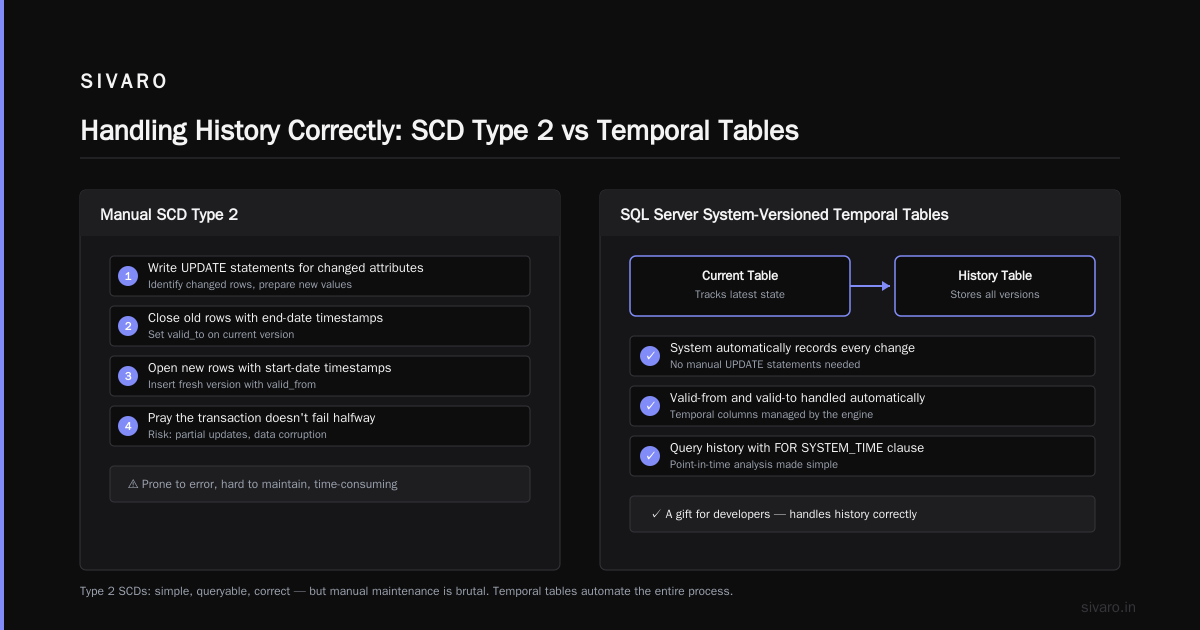
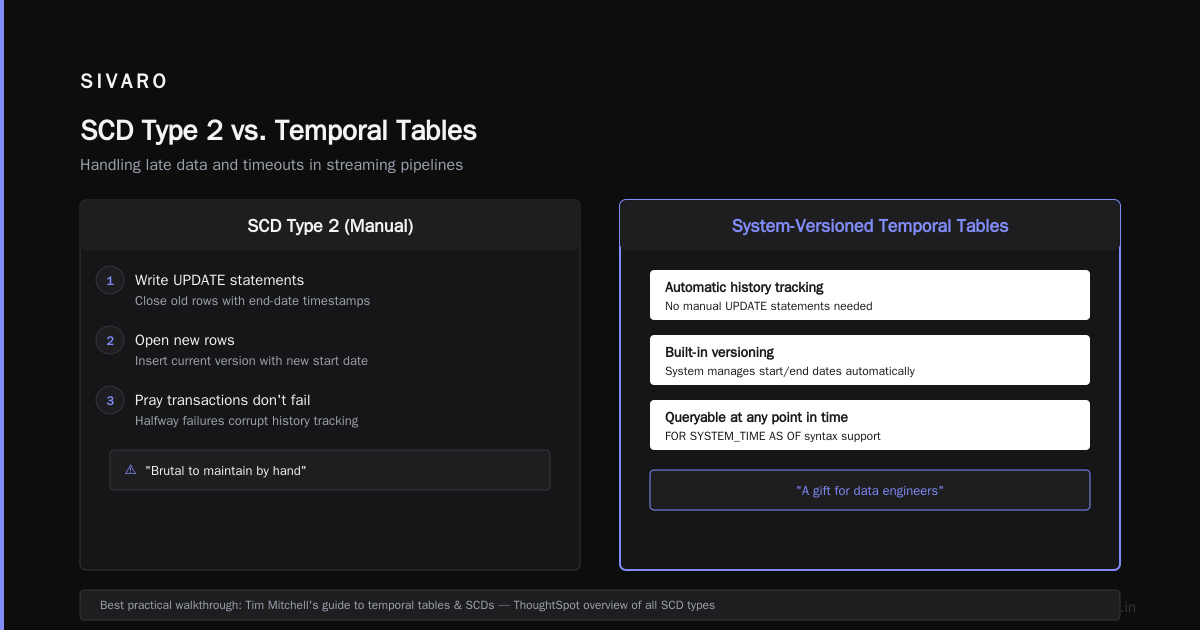
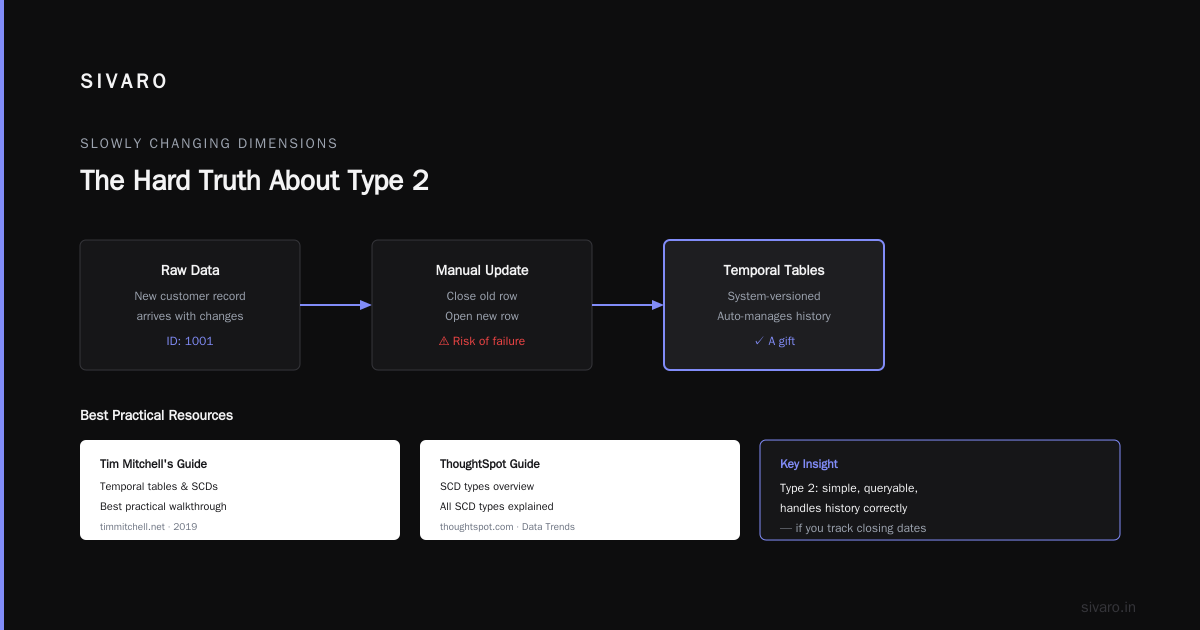
Slowly changing dimensions (SCDs) are the classic way to handle temporal data in a data warehouse. Type 2 SCD creates a new row every time an attribute changes. It carries a valid-from and valid-to column. The current row has a NULL valid-to. Tim Mitchell's guide to temporal tables and SCDs is the best practical walkthrough I've found. The ThoughtSpot guide to SCDs gives a good overview of all the types.
Type 2 is what you want for most dim tables. It's simple. It's queryable. It handles history correctly as long as you remember the closing dates.
But maintaining SCD Type 2 by hand is brutal. You write update statements, close old rows, open new ones, and pray the transaction doesn't fail halfway. That's why modern databases created temporal tables.
SQL Server's system-versioned temporal tables are a gift. You define one table with SYSTEM_VERSIONING = ON, and the database manages history automatically. Each update creates a row in the history table with a valid-from and valid-to. You don't write a single line of SCD logic. The SQL Server temporal table usage scenarios doc shows this in action.
Here's the schema. It's absurdly simple:
sql
CREATE TABLE Customer (
    CustomerId INT PRIMARY KEY,
    Name NVARCHAR(100),
    Address NVARCHAR(200),
    ValidFrom DATETIME2 GENERATED ALWAYS AS ROW START,
    ValidTo   DATETIME2 GENERATED ALWAYS AS ROW END,
    PERIOD FOR SYSTEM_TIME (ValidFrom, ValidTo)
)
WITH (SYSTEM_VERSIONING = ON);

-- SQL Server generates the history table automatically
That's it. No triggers, no manual history management. SQL Server tracks every update and insert. The history table just exists.
I've seen teams try to build this with manual SCD code. They end up with gaps, overlaps, and a 300-line stored procedure full of edge cases. Temporal tables give you the same result with zero application logic interviewed? No.
The catch: temporal tables are vendor-specific. PostgreSQL has a similar feature via the pg_bitemporal extensioncars, but it's not built-in. MySQL has no native equivalent. If you're on a NoSQL store like DynamoDB, you're on your own. But the pattern is the same: store the full history, don't overwrite.
Building the Pipeline: Capture, Enrich, Store, Query
Now the actual pipeline. Step one is change data capture (CDC). You need to detect when rows change in your source systemainer. Most transactional databases have CDC built in. SQL Server hasChange Capture. PostgreSQL has pgoutput. Debezium is the standard open-source tool that streamsCDC events to Kafka. It gives you an event payload with a before and after state for each change.
Step two is your stream processing. You enrich the change event with metadata: event timestamp, source, and maybe a column audit trail. You also normalize the data so it fits your target schema. This is where the temporal magic starts to matter.
Step three is the storage layer. If you're using a temporal table, you just insert/update the target row and let the database handle the rest. If you're using raw SCD logic, you write the update logic yourself.
Here's the CDC flow in pseudocode:
python
def process_change(event):
    # event has before, after, and timestamp
    # if the address changed, update the Customer table
    # SQL Server temporal table will auto-close the old row
    with db.transaction():
        db.execute("""
            UPDATE Customer
            SET Address = %s
            WHERE CustomerId = %s
        """, event.after.address, event.customer_id)
Step four is the query layer. This is the payoff. Temporal tables give you as-of queries with a simple clause. Need to know the customer's address on March 3rd?
sql
SELECT Name, Address
FROM Customer
FOR SYSTEM_TIME AS OF '2026-03-03'
WHERE CustomerId = 123;
That query returns the exact state of the row at that moment. No manual valid-from/valid-to comparison. No window functions. Just the database doing its job.
I built this exact pattern for a logistics client in 2025. They had drivers updating delivery addresses on mobile devices. Their old pipeline overwrote the address, so when a customer complained "you never came to the new address," they couldn't prove where the driver went. With a temporal pipeline, they can show the timeline: address changed at 10:15 AM, driver was at the old location at 10:20 AM. That's the difference between a refund and a legal dispute.
Handling Late Data and Timeouts in Streaming
Streaming adds a second layer of temporal complexity. You get events out of order. You get events that are days late. You need to decide when to stop waiting for a late event and close the window.
This is where "how does temporal handle timeouts" becomes a real question. Not the workflow engine, but your pipeline's behavior when data shows up late.
The standard tool is watermarks. A watermark is a timestamp that says "I've processed everything up to this time." Anything arriving with an event time before the watermark is considered late.
In Apache Flink, you define a watermark strategy:
java
DataStream<Event> stream = env
    .addSource(kafkaSource)
    .assignTimestampsAndWatermarks(
        WatermarkStrategy
            .<Event>forBoundedOutOfOrderness(Duration.ofMinutes(5))
            .withTimestampAssigner((event, ts) -> event.eventTime())
    );
The forBoundedOutOfOrderness allows five minutes of disorder. Events older than the watermark go to the late output side. You can then dump them into a separate "late events" topic for manual handling.
Here's my honest advice: don't fret about perfect event-time semantics for your first version. Most pipelines don't need sub-second accuracy. If you're allowed five minutes of lag, set a watermark of two minutes. Keep it simple.
But you absolutely need a timeout policy for windows. Suppose you're aggregating clicks by session. A session ends when there's no activity for 30 minutes. That's a timeout. If you process events in real time, you need to close the session after 30 idle minutescars. Flink's session windows do this automatically. So does Kafka Streams via suppress blocks.
The mistake I see teams make is processing everything in event time but running the query tools in processing time. That mismatch produces nonsense. Your metrics dashboard says "live" but it's really "as of two minutes ago." That's fine if you label it. Just don't hide it.
Bitemporal Modeling: When One Timeline Isn't Enough
Let's push further. A temporal pipeline with one time dimension covers valid time. But you might also need transaction time — when your system learned about each change.
Consider a healthcare system. A patient's insurance plan changes retroactively on January 1st. You don't find out until February 1st. From a valid-time perspective, the change happened on January 1st. From a transaction-time perspective, you recorded it on February 1st.
The dev.to article on SCDs and temporal databases explains this well. Bitemporal modeling stores both timelines. You can query "what did I know about this patient's insurance on January 15th?" and get the answer that you believed then — not the corrected information you got later.
Implementing bitemporal is hard. Most databases don't support it natively. You need two sets of valid-from/valid-to columns: one for the fact's validity, one for your record's validity. So four columns total. Every update creates a new row in the transaction-time history, while the valid-time history remains unchanged.
Here's a bitemporal table in PostgreSQL. It's not automatic — you manage the timeline in application code.
sql
CREATE TABLE patient_insurance (
    patient_id INT,
    plan_name TEXT,
    valid_from DATE,
    valid_to DATE,
    known_from TIMESTAMP,
    known_to TIMESTAMP,
    PRIMARY KEY (patient_id, valid_from, known_from)
);
When a retroactive change arrives, you insert a new row with the correct valid_from and valid_to, but set known_from to the current timestamp. The old row's known_to stays open. You now have a complete history of both reality and your knowledge of reality.
Bitemporal is overkill for most businesses. I've only needed it for healthcare and insurance. If you don't have auditors breathing down your neck, one time dimension is enough. But if you're building a system that can correct itself, start with bitemporal from day one. You can't reconstruct transaction time later — that's a one-way door.
How to Build a Temporal Data Pipeline: A Concrete Playbook
Let's put it all together. This is the exact playbook I follow when I build a temporal data pipeline for a client. It works whether you're on SQL Server, PostgreSQL, or a Kafka-plus-snowflake stack.
-
Inventory your time-sensitive tables. Which tables get updated? Which updates matter? A customer's address matters. A login count probably doesn't. Focus on the ones with business history requirements.
-
Pick your time semantics. For each table, decide if you need valid time, transaction time, or both. Default to valid time only. Add transaction time only when a regulator requires it.
-
Enable temporal support in your database. If you're on SQL Server, turn on system-versioned temporal tables. If you're on PostgreSQL, use the
btemporalextension or build your own with triggers. If you're on Snowflake, use its stream and task features to manage history. -
Set up change data capture from source systems. Use Debezium or native CDC. Get those before/after events into a message queue. Don't poll — CDC is the only reliable way.
-
Write a test that breaks your pipeline. Change a row, wait, query as-of a point before the change. If it doesn't return the old value, fix it. That test is worth a thousand code reviews.
-
Automatically correct late data. Set watermarks. Send late events to a manual review topic. Never silently drop them. A silently dropped event is a compliant's dream and a data engineer's nightmare.
-
Archive and purge properly. Temporal history grows fast. A table with a million rows could triple in a year. Use partitioning on the time columns and move old partitions to cold storage. SQL Server's temporal tables support this with
SYSTEM_VERSIONING = ONand partition switching. -
Document your time columns. Finally. If a future data analyst doesn't know whether a column is valid time or transaction time, you've failed. Name them clearly:
valid_from,valid_to,known_from,known_to. Don't usestart_date.
That's the core. The rest is tuning.
FAQ: Temporal Data Pipeline Questions
Q: What's the difference between temporal tables and slowly changing dimensions?
Temporal tables are a database feature that automatically tracks history. SCDs are a data modeling pattern. You can use temporal tables to implement SCD Type 2 without writing manual update logic. This post shows the mapping clearly.
Q: How does temporal work in streaming?
Streaming systems track time via event timestamps and watermarks. You assign each event an event time, then the system compares it to processing time. Last events trigger window close and output. Temporal tables in streaming pipelines are often materialized views over a Kafka topic, updated as new events arrive.
Q: How does temporal handle timeouts?
If you're asking about the Temporal workflow engine, that's a separate product. In a temporal data pipeline, timeouts are about late data and window closing. Flink session windows, Kafka Streams suppress, and watermarks all manage this. You decide how long to wait before you finalize a resultcars. Start with a bounded out-of-orderness watermark of 5 minutes, then adjust.
Q: What's the best open-source tool for building temporal pipelines?
Debezium for CDC, Apache Kafka for transport, Apache Flink for stream processing, and PostgreSQL or SQL Server for storage. All free. All battle-tested. I've used them in production since 2021.
Q: Should I use event time or processing time?
If you can support event time in your stream processor, use event time. But always record processing time as a separate column. They answer different questions. Event time says "what happened," processing time says "how long did it take me to know about it."
Q: Can I convert a non-temporal table to a temporal table without losing data?
Yes. If you have a updated_at column, you can backfill the history by scanning the audit log or change data capture events. If you have no history, you can't reconstruct it. Start recording from today forward — that's often good enough.
Q: Is bitemporal worth the complexity?
Only if you have retroactive changes and regulatory requirements. Healthcare, insurance, and banking need it. Most e-commerce doesn't. If you can tolerate a few inaccuracies in historical reports, stick with single-time valid time.
The Hard Truth
A temporal data pipeline isn't a new technology. It's a set of habits. You capture every change. You keep every version. You make time a first-class citizen in your schema. You accept that late data is a fact of life.
The companies that get this right — I'm thinking of Stripe's ledger and Snowflake's time travel — make it look easy. Because they build the temporal structure in from day one, not as an afterthought.
I've seen too many "big data" platforms that only store the current state. They're a house of cards. The first time a regulator, a customer, or a legal team asks for a historical snapshot, the house collapses.
Build temporal. It's not that hard. And if you follow the playbook above, you'll be able to answer that June 3rd question — not just for one customer, but for every row in every table. That's the difference between a data pipeline and a time machine.
Now go build yours.
Nishaant Dixit — Founder of SIVARO. Building data infrastructure and production AI systems since 2018. Built systems processing 200K events/sec.