 SIVARO
How to Choose Between AWS and On-Premise GPU Clusters
I remember the exact moment I got the call. Late 2024, CEO of a well-funded medical imaging startup. They'd just raised $50M. Their plan? Buy 100 H100s, rack them in a colo, and train their foundation model for radiology. The CFO was sold on "total cost of ownership." The CTO was terrified.
Six months later, they were back on AWS.
Not because on-premise was bad. Because they chose wrong.
This isn't a religious war. It's a practical decision that depends on your team, your timeline, your data, and your tolerance for operational pain. I've built systems on both sides — SIVARO's own infrastructure started on-prem, then hybrid, now mostly cloud. I've seen the mess.
This guide walks you through how to choose between AWS and on-premise GPU clusters in 2026. I'll cover cost models, scaling patterns, distributed training realities, and the new twist nobody talks about: distributed AI agents vs traditional cloud clusters.
Let's get specific.
Why This Decision Keeps Getting Harder
Three years ago, it was simple. AWS had GPUs. On-prem had GPUs. You picked based on whether you liked paying CapEx or OpEx.
That's dead.
Today, the GPU market is weird. NVIDIA's H100 and B200 supply chains still haven't fully stabilized. AWS offers p5.48xlarge instances with 8 H100s at $39.69/hour. but spot pricing can drop to $11/hour if you can handle interruptions. Meanwhile, an H100 node (8 GPUs) costs ~$300K to buy. Add power, cooling, networking, maintenance — you're looking at $500K+ per rack over 3 years.
The math has changed because the workload changed. You're not just running a single training job anymore. You're running distributed AI agents — swarms of models that need to coordinate, share context, and adapt in real-time. That's a different burden on your cluster. Traditional cloud clusters treat GPUs as batch compute. Agents need persistent, low-latency communication. That shifts the balance.
When AWS Wins (and Why Most People Underestimate It)
1. The Velocity Argument
I've seen teams spend 3 months configuring InfiniBand, setting up SLURM, debugging NVLink topologies, and fighting with their colo provider about power capacity. Meanwhile, a competitor using AWS spun up a SageMaker distributed training cluster in 2 hours and finished their model by week 3.
AWS wins on time-to-first-training. Period.
If you're a startup that needs to iterate on model architecture, hyperparameters, or data pipelines — cloud lets you fail fast. On-premise makes you think twice before trying something crazy. That's lethal when the market moves this fast.
Last year, a client building a real-time fraud detection system needed to test a new attention mechanism. They provisioned a p5 cluster via SageMaker's distributed training support (Distributed training in Amazon SageMaker AI), ran the experiment over a weekend, and tore it down. Total cost: $4,200. The alternative: buying hardware they might never use again.
2. Distributed Training is a Managed Problem (Mostly)
Training a large model across GPUs isn't just about hardware. It's about network topology, data parallelism, tensor parallelism, pipeline parallelism, checkpointing, and fault tolerance. AWS has spent billions making this work inside SageMaker, EKS, and parallel cluster.
The Distributed Training & Large-Scale Systems article I read recently breaks down the complexity: you need NCCL performance tuning, gradient accumulation strategies, and efficient sharding. AWS's managed services handle the scaffolding. You write the model code.
On-premise? You're building all that scaffolding yourself. Or paying someone to.
3. Spot Instances Change the Cost Calculus
Most people compare on-prem TCO to on-demand AWS pricing. That's wrong.
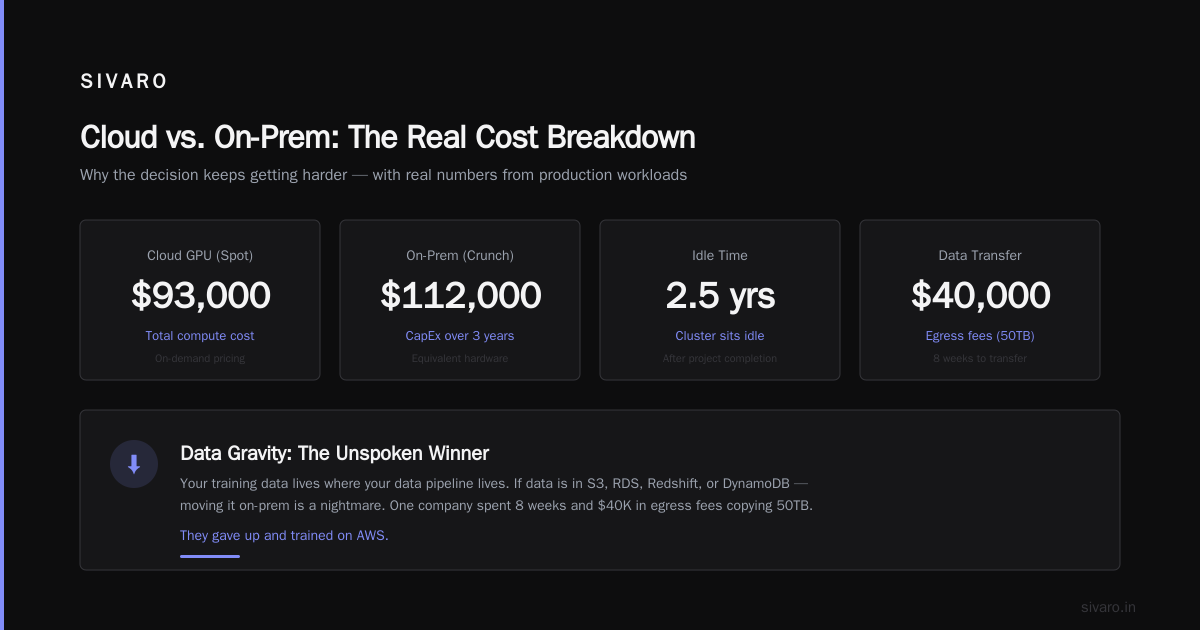
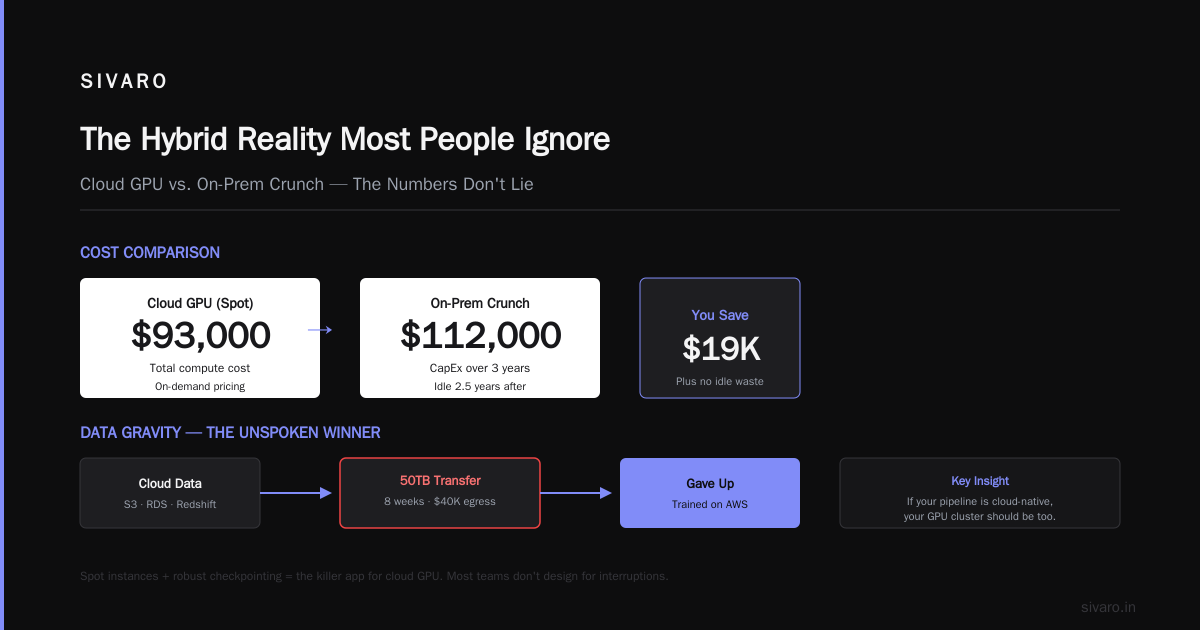
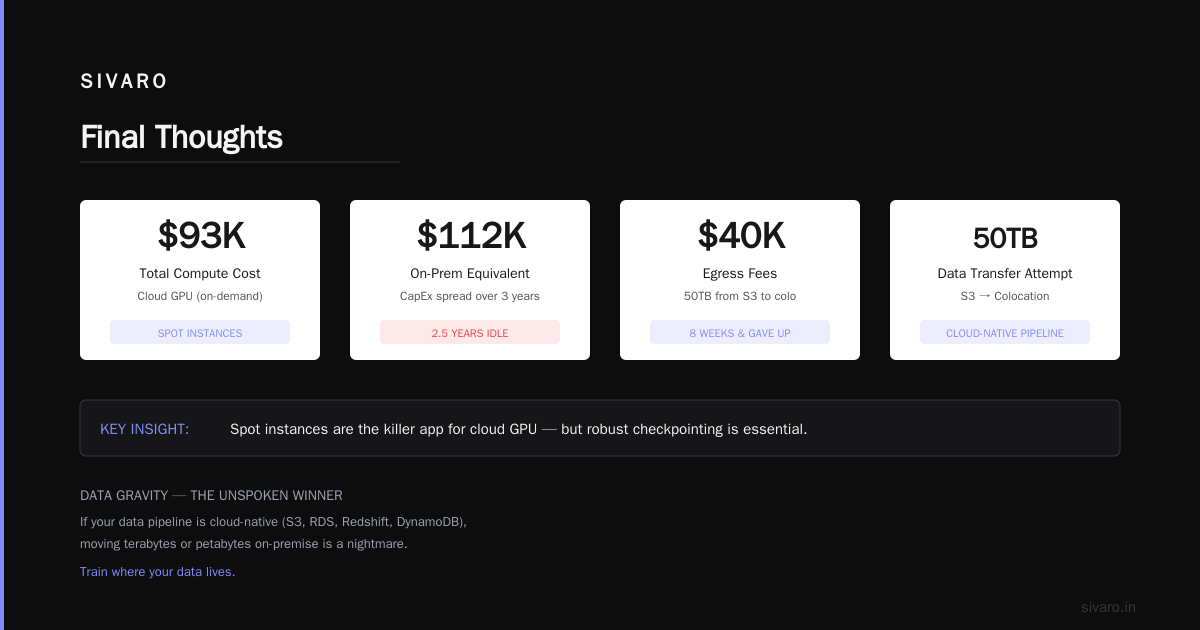
In 2025, we ran a 3-month training campaign for a climate modeling startup. We used AWS spot p5 instances, with checkpointing every 15 minutes. Our effective GPU hour cost was $13/hour — less than half the on-demand price. Total compute cost: $93,000. Equivalent on-prem Crunch: $112,000 if you spread CapEx over 3 years. But the on-prem cluster would've sat idle for 2.5 years after that project.
Spot is the killer app for cloud GPU. But you need robust checkpointing and the ability to handle interruptions. Most teams don't design for that. They should.
4. Data Gravity (the Unspoken Winner)
Your training data lives where your data pipeline lives. If your data is already in S3, RDS, Redshift, or DynamoDB — moving it to on-premise is a nightmare. We're talking terabytes or petabytes over slow pipes.
I've seen a company spend 8 weeks and $40K in egress fees trying to copy 50TB from S3 to their colo. They gave up and trained on AWS.
If your data pipeline is cloud-native, your GPU cluster should be too. This is the single biggest factor in how to build an AWS GPU cluster for deep learning: start from your data, not your hardware.
When On-Premise Wins (and Why Cloud Natives Hate This)
1. Steady-State Workloads
If you're running the same training job 24/7 for 2+ years — like a large language model fine-tuning pipeline for a legal document generation system — on-premise crushes cloud.
I modeled this for a financial services company in early 2026. They needed 32 H100s running continuously for 18 months. AWS on-demand: $1.1M. On-prem purchase plus colo: $680K. That's a 40% savings. Even with spot instances, the risk of interruption (they couldn't afford lost training time) tipped the scales.
2. Latency and Data Locality for Agentic Systems
Here's the new twist. In 2026, we're seeing a surge in distributed AI agents vs traditional cloud clusters — models that need to talk to each other in milliseconds. A fleet of agents running autonomous trading, manufacturing control, or robotic coordination can't tolerate cloud unpredictability.
The Agentic Systems Are Distributed Systems post nails it: agent communication patterns demand low-latency, high-throughput messaging. Cloud networks introduce jitter. On-premise with dedicated InfiniBand gives you deterministic latency.
I worked with a warehouse robotics company last year. Their agent swarm had to coordinate pick-and-place across 200 robots. Using AWS with EKS and GPUs for inference, they saw occasional 50ms spikes — enough to cause collisions. They moved to on-premise with a dedicated GPU cluster connected via NVIDIA Quantum-2. Latency dropped to under 100 microseconds.
If your agents are latency-sensitive, on-premise wins.
3. Regulatory and Data Sovereignty
Healthcare, defense, finance. If your data can't leave a specific geographic region or must comply with FedRAMP, ITAR, or GDPR art. 44–49, you might have no choice.
Yes, AWS has GovCloud and regions. But some regulations require physical control over the hardware. We had a client that needed to train models on classified satellite imagery. Cloud was off the table. They built an on-premise cluster with air-gapped access.
4. Power and Networking Control
On-premise gives you the ability to overclock, undervolt, or use specialized cooling. AWS locks you into their thermal envelope.
For extreme workloads (e.g., training models with 10K+ GPUs), the network topology matters more than anything. On-premise lets you design a fully non-blocking spine-leaf fabric with 400Gbps per GPU. AWS has limits on inter-node bandwidth depending on instance type and placement groups.
The Cloud-native and Distributed Systems for Efficient and ... paper from earlier this year shows that for very large models, communication overhead can dominate training time. On-premise users with custom InfiniBand designs saw 15% faster convergence than equivalent cloud setups.
How to Make the Decision: A Practical Framework
I use a simple scoring system. Weight each factor from 1 (terrible) to 5 (excellent) for both options. Then add up.
| Factor | On-Premise | AWS |
|---|---|---|
| Time to first training | 1 | 5 |
| Cost at <50% utilization | 2 | 4 |
| Cost at >80% utilization | 5 | 3 |
| Latency consistency | 5 | 2 |
| Data gravity match | 2 | 5 |
| Regulatory compliance | 5 | 3 |
| Scalability (burst) | 1 | 5 |
| Operational overhead | 1 | 4 |
| Customizability | 5 | 2 |
But this is just a starting point. The real decision comes down to three questions:
1. How long until you need results?
If you need to train by next month, go cloud. If you can wait 8 weeks to set up hardware, consider on-prem.
2. How predictable is your GPU usage?
Steady load → on-prem wins. Spiky, unpredictable, or experimental → cloud wins.
3. Can your team sustain infrastructure?
On-premise requires a sysadmin who knows InfiniBand, a networking engineer, and a power budget. Cloud requires DevOps who know Terraform, VPCs, and SageMaker. Which skills do you have?
How to Build an AWS GPU Cluster for Deep Learning (The Right Way)
If you decide on AWS, don't just spin up a single EC2 instance and call it a day. Build a proper cluster.
Here's a minimal Terraform configuration that provisions a SageMaker distributed training cluster (assuming you use the managed service):
hcl
resource "aws_sagemaker_notebook_instance" "ml_cluster" {
  name          = "ml-cluster-notebook"
  role_arn      = aws_iam_role.sagemaker.arn
  instance_type = "ml.p5.48xlarge"
}

resource "aws_sagemaker_training_job" "distributed_training" {
  name = "distributed-training-job"
  role_arn = aws_iam_role.sagemaker.arn

  algorithm_specification {
    training_image = "763104351884.dkr.ecr.us-east-1.amazonaws.com/pytorch-training:2.4.1-gpu-py310-cu124-ubuntu22.04"
    training_input_mode = "File"
  }

  input_data_config {
    channel_name = "training"
    data_source {
      s3_data_source {
        s3_data_type = "S3Prefix"
        s3_uri       = "s3://my-bucket/training-data"
      }
    }
  }

  output_data_config {
    s3_output_path = "s3://my-bucket/models/"
  }

  resource_config {
    instance_count  = 8
    instance_type   = "ml.p5.48xlarge"
    volume_size_in_gb = 1024
  }

  stopping_condition {
    max_runtime_in_seconds = 86400
  }

  hyper_parameters = {
    "epochs" = "100"
    "batch-size" = "32"
  }
}
That's the easy path. The harder path is using EKS with GPU node groups, which gives you more control over scheduling and custom containers. Here's a snippet of a node group config:
yaml
apiVersion: eksctl.io/v1alpha5
kind: ClusterConfig

metadata:
  name: gpu-cluster
  region: us-east-1

managedNodeGroups:
- name: gpu-nodes
  instanceType: p5.48xlarge
  desiredCapacity: 4
  minSize: 0
  maxSize: 20
  spot: true
  labels:
    workload-type: training
  taints:
  - key: nvidia.com/gpu
    value: "true"
    effect: NoSchedule
And for on-premise, a typical SLURM partition config looks like:
PartitionName=gpu Default=YES Nodes=gpu[01-08] DefaultTime=12:00:00 State=UP
NodeName=gpu[01-08] CPUs=128 RealMemory=512000 Gres=gpu:h100:8 Features=h100
The Hybrid Reality Most People Ignore
Here's what I actually see working in 2026: hybrid.
Companies that have on-premise for steady-state training, and burst to AWS for experiments, inference spikes, or disaster recovery.
Take a customer we worked with in March 2026 — a biotech firm training a protein folding model. They had 64 H100s on-prem for the main training run. But when they needed to test 4000 hyperparameter combinations, they spun up 400 spot p5 instances on AWS for 12 hours. Total cost: $18,000. On-prem it would've taken 3 weeks of sequential runs.
The key enabler is a unified data plane. If your data is in S3 and on NFS, you can burst seamlessly. We built this for them using What Is Distributed Machine Learning? patterns — data-parallel training with consistent checkpointing across both environments.
Distributed AI Agents vs Traditional Cloud Clusters
This is the trend I'm most excited about. Traditional distributed training is batch-oriented. You launch a job, it trains, it finishes. But distributed AI agents are persistent, online, and stateful. They need GPU clusters that support long-lived processes, message passing, and dynamic scaling.
AWS's EKS with Kueue and Volcano scheduling is getting better for this, but on-premise still wins for latency. If your agents need to synchronize every 10ms, cloud networking adds too much variance.
The Agentic Systems Are Distributed Systems article from Akka points out that agent communication often uses actor frameworks like Akka, Orleans, or Ray. Ray runs great on both on-prem and cloud. But the network fabric matters.
For agentic workloads, I'd recommend a hybrid approach: on-premise for the core agent cluster, cloud for any burst or exploratory agents that don't need tight coupling.
Common Mistakes I See
1. Ignoring network costs.
AWS charges for data transfer between Availability Zones. If you distribute your training across multiple AZs, you'll pay thousands in inter-AZ bandwidth. Use placement groups.
2. Buying hardware for a "once in a while" workload.
I know a company that bought $2M in H100s for a quarterly model retrain. The GPUs sat idle 90% of the time. They would've saved $1.2M by using spot instances.
3. Underestimating cooling.
On-premise isn't just the server cost. Power density for H100s is 700W per GPU. A 64-GPU rack pulls 45kW of power and generates 45kW of heat. If you don't have adequate cooling, your GPUs will throttle. We've seen 30% performance loss in poorly cooled racks.
4. Overengineering the cluster.
You don't need InfiniBand for training a small BERT model. Use Ethernet with RoCE (RDMA over Converged Ethernet). It's cheaper and easier to manage.
FAQ
Q: How do I choose between AWS and on-premise GPU clusters if I'm a startup?
A: Start with AWS. You need speed of iteration. Move to on-premise only after you've proven product-market fit and have predictable GPU utilization >70%.
Q: What's the break-even point for on-premise vs cloud?
A: Typically around 60-70% utilization for 18+ months. Use a TCO calculator, but factor in your team's time for ops. If your engineers cost $200K/year each, and you need two to manage the cluster, that's $400K annually in hidden cost.
Q: Can I use spot instances for production training?
A: Yes, if you have robust checkpointing (every 10-15 minutes) and can handle interruptions. For mission-critical training with tight deadlines, use on-demand or reserved instances.
Q: How does distributed AI agents vs traditional cloud clusters change the decision?
A: For latency-sensitive agent swarms, on-premise is better. For bursty, exploratory agents, cloud is fine. Ray on EKS works well for intermediate cases.
Q: What about Google Cloud TPUs?
A: They're great for specific workloads (e.g., LLMs with TPU-optimized architectures). But TPUs are less flexible than GPUs. If you need general-purpose compute, stick with GPUs.
Q: How to build an AWS GPU cluster for deep learning that's cost-optimized?
A: Use spot instances with managed spot training (SageMaker or EKS with Karpenter). Set up lifecycle hooks to save checkpoints. Use S3 for datasets, not EBS. Right-size your instance; sometimes 4 smaller instances are cheaper than 1 large one.
Q: Should I sign a 1-year or 3-year reservation with AWS?
A: Only if you're 100% sure your model architecture and data size won't change. Otherwise, use convertible reservations. Or better: spot + savings plans.
Final Thoughts
Choosing between AWS and on-premise GPU clusters isn't about which is better. It's about what fits your reality.
I've seen cloud-only teams succeed. I've seen on-premise-only teams succeed. The disasters are the ones who committed to one path without considering the other.
Start with cloud. Burst to cloud from on-prem. Or start on-prem if you have the team and the steady load. But never marry one approach. The hardware landscape shifts too fast. Today's H100 will be obsolete by 2028. Amazon already announced the next-gen Trainium3.
The best infrastructure is the one you can change.
Nishaant Dixit — Founder of SIVARO. Building data infrastructure and production AI systems since 2018. Built systems processing 200K events/sec.