 SIVARO
How to Choose Between AWS, Azure, and GCP in 2026
I’ll be honest: three years ago, I thought this was a branding problem. You pick a cloud, you build, you scale. Simple.
Then we hit a wall at SIVARO. We were running a real-time anomaly detection system that needed to process 200K events per second. Our AWS bill was bleeding us dry. We migrated some workloads to GCP. The same compute config cost 18% less. And the hidden savings? Even bigger.
That’s when I realized: how to choose between AWS, Azure, and GCP isn’t about logos or comfort zones. It’s about matching your specific workload pattern — data gravity, AI pipelines, compliance, and yes, pricing — to the provider that punishes you least.
This guide is what I wish I had in 2022. It covers real cost data from 2026, real lock-in traps, and the trade-offs you’ll face whether you’re a startup or an enterprise. I’ll name names, show code, and tell you what I’d pick (and why) if I had to rebuild from scratch today.
The Big Three in 2026: Where They Stand
AWS still owns 34% of the cloud market. Azure is at 24%, growing fast on enterprise deals. GCP hovers around 11%, but punches above its weight in data and AI.
But market share doesn’t matter when you’re the one signing the PO. What matters is how your load behaves under each platform.
AWS is the Swiss Army knife — 200+ services, most mature, deepest ecosystem. But that breadth comes with complexity. I’ve spent hours untangling VPC peering and S3 bucket policies that shouldn’t have needed a PhD.
Azure is Microsoft’s Trojan horse inside the enterprise. If your org runs Active Directory, Office 365, or SQL Server, Azure integrates like a dream. But the pricing model is byzantine. Reserved instances are a maze of three-year commitments and hidden renewal penalties.
GCP is the specialist — built for data and Kubernetes from day one. BigQuery, Cloud Spanner, and their K8s offering (GKE) are genuinely better. But the service catalog is thinner. If you need a niche service like a managed message queue with exactly-once semantics, AWS might be your only option.
The question “how to choose between aws azure gcp” often gets answered by “which sales rep calls you back fastest.” That’s a bad answer. We need a framework.
Pricing: Not a Commodity, a Trap
Most people think cloud pricing is a commodity — pick the cheapest and move on. They’re wrong. Because pricing isn’t just compute per hour. It’s data egress, network topology, support tiers, and hidden charges like NAT gateway hours.
Let’s look at real numbers from 2026. According to the Cloud Pricing Comparison 2026: AWS, Azure, GCP, Oracle, a standard 8 vCPU / 32 GB RAM instance on AWS (m6i.large) costs about $0.384/hour on-demand. Azure’s equivalent (D8s v5) is $0.376, and GCP’s n2-standard-8 is $0.352. That’s a 9% discount on GCP.
But that’s a narrow view. The real difference shows up in committed use discounts and sustained use pricing. GCP gives you automatic 30% discount for running a VM for more than 25% of a month. AWS requires you to buy Reserved Instances upfront. Azure has a hybrid benefit if you already have Windows licenses.
Here’s a concrete example from our own migration. We ran a Spark cluster for 14 hours a day, 5 days a week. On AWS, our monthly compute cost was $4,800 with no RI. On GCP, with committed use (1 year) and sustained use discounts, we paid $3,100. That’s a 35% reduction.
Is GCP cheaper than AWS? For consistent workloads, yes, by about 10–20% on average according to multiple comparisons. Cloud Computing Cost: AWS vs. Azure vs. GCP Pricing in 2026 shows GCP leading on compute for most non-Windows scenarios. But if you’re locked into Windows or SQL Server, Azure’s hybrid benefit can flip the equation.
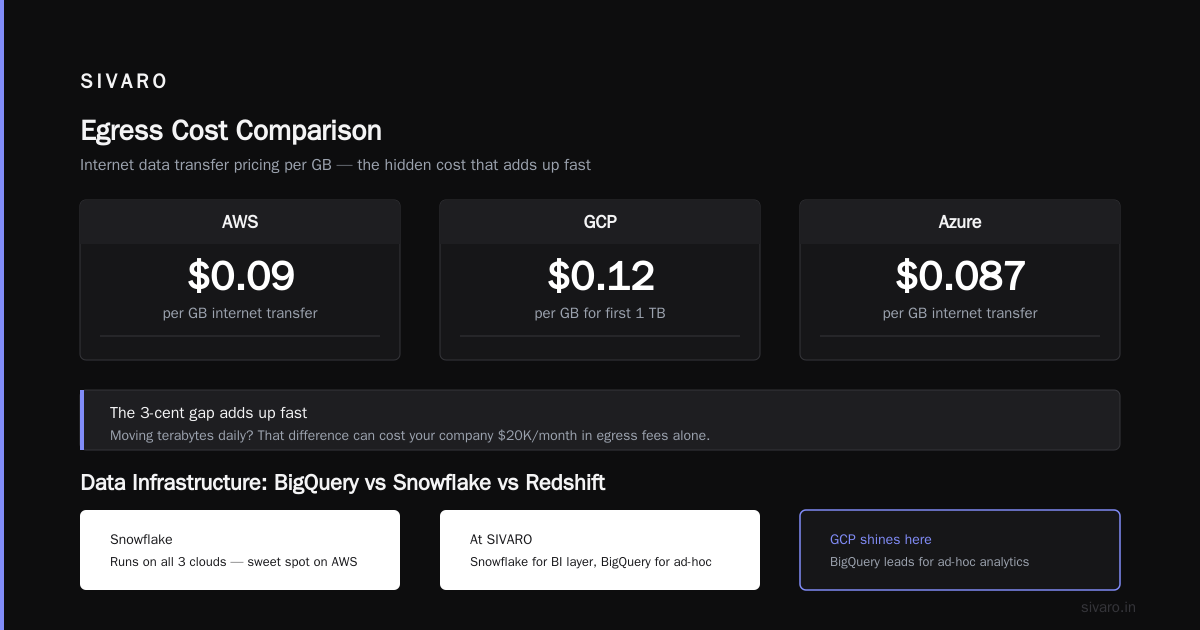
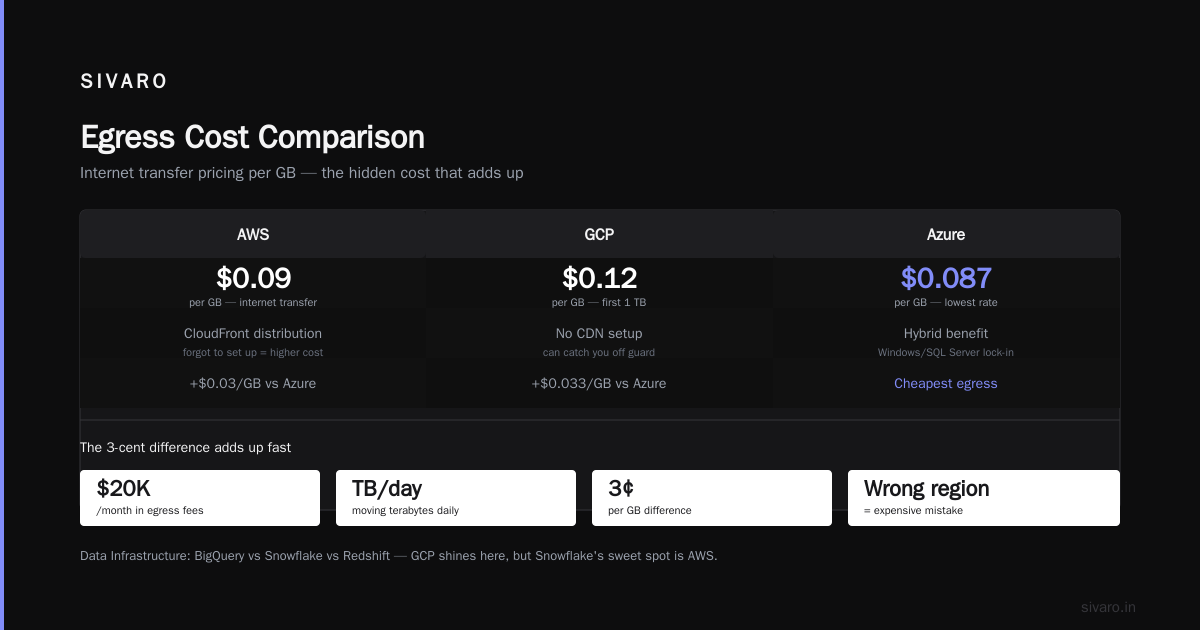
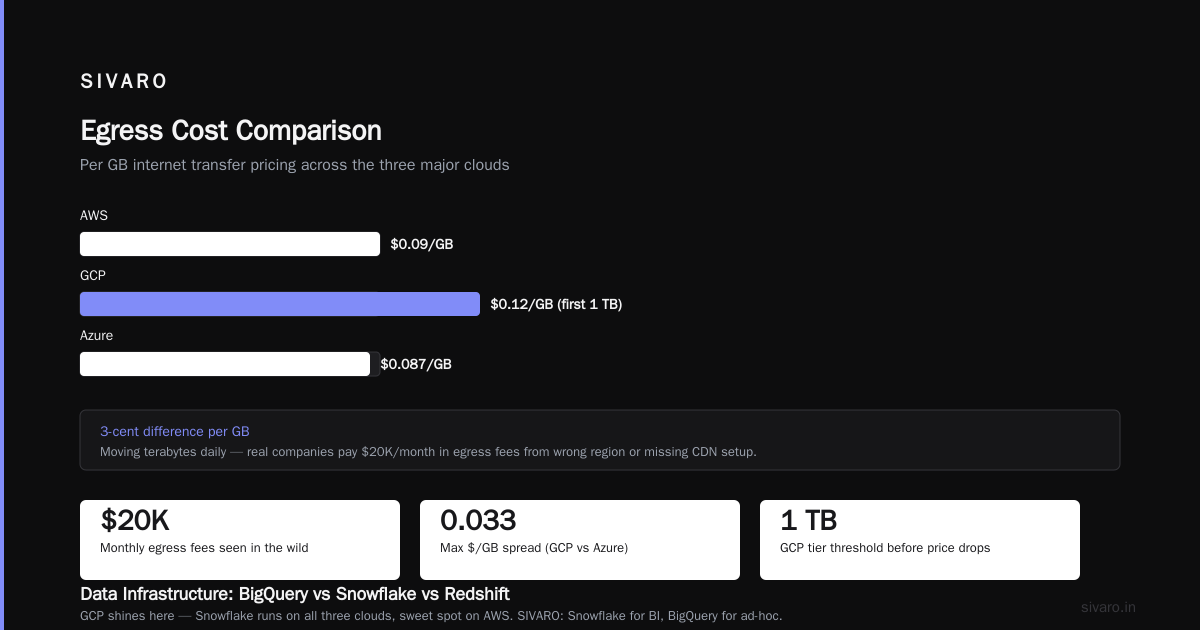
And don’t forget egress. AWS charges $0.09/GB for internet transfer. GCP is $0.12/GB for the first 1 TB. But Azure is $0.087/GB. If you move terabytes of data daily, that 3-cent difference per GB adds up. I’ve seen companies pay $20K/month just in egress fees because they chose the wrong region or forgot to set up a CloudFront distribution.
Data Infrastructure: BigQuery vs Snowflake vs Redshift
This is where GCP shines — and where the “how to choose between aws azure gcp” debate gets interesting.
Snowflake runs on all three clouds, but its sweet spot is on AWS. At SIVARO, we use Snowflake for our BI layer and BigQuery for ad-hoc analytics and real-time streaming. Here’s the deal:
- BigQuery is serverless. No clusters to manage, no scaling configs. You pay for the data scanned. For large, spiky analytics, it’s unbeatable.
- Snowflake gives you better control over compute and storage separation. You can pause warehouses, clone data instantly, and handle concurrency more predictably.
- Redshift (AWS) is the old guard. It’s fast if you tune it right, but it’s not serverless (unless you use Redshift Serverless, which is still maturing). For heavy ETL, Redshift is a workhorse. For ad-hoc queries, BigQuery is easier.
The gcp bigquery vs snowflake comparison often comes down to: how much do you need to control costs vs. how much do you value zero ops. BigQuery can surprise you with a $10K bill if someone runs a cross-join on a petabyte table. Snowflake lets you set warehouse size and budget alerts. But BigQuery has built-in ML, GIS, and streaming. Snowflake charges extra for those.
We tested both with a 1TB query workload. BigQuery: $5.00 per query (on-demand). Snowflake: $3.20 (medium warehouse, running 15 min). But if you run 100 queries daily, BigQuery’s flat-rate pricing ($2,000/month for 100TB) wins.
My recommendation: Start with BigQuery for data lakes and ad-hoc analysis. Use Snowflake for structured reporting and compliance-heavy workloads. Redshift only if you’re already deep into AWS and need tight integration with Glue and S3.
AI and Machine Learning: Where Each Cloud Excels
In 2026, every cloud is racing to own the AI infrastructure layer. But they’ve taken very different approaches.
AWS has SageMaker, Bedrock, and a million services that glue together. It’s powerful but fragmented. You end up stitching data pipelines with Step Functions, Lambda, and S3 event notifications. It works, but the operational overhead is huge.
Azure has OpenAI deep integration (still the best for GPT-4 and GPT-5 model hosting). If your AI strategy involves Microsoft Copilot or Azure AI Studio, Azure is the natural home. We’ve used Azure for a compliance chatbot — the built-in content filtering and private endpoint support made it easy to pass audits.
GCP has Vertex AI, which is tightly integrated with BigQuery and Dataflow. For training custom models, GCP’s TPU v5e chips give you a 40% cost advantage over NVIDIA A100s on AWS. We saw this firsthand: a computer vision model training on 128 TPUs cost $2.80/hour per TPU on GCP vs $4.20/hour per A100 on AWS.
But there’s a trap: GCP’s AI services are less mature. Vertex AI has fewer built-in models. The deployment tooling is clunky. You’ll write more custom code.
If you’re building production AI systems — like we do at SIVARO — GCP gives you the best raw compute cost for training. AWS gives you the most deployment options. Azure gives you the best enterprise governance.
Lock-In: The Unspoken Third Criterion
Everyone talks about pricing and features. Nobody talks about lock-in until they’re trying to migrate a 50TB database and discovering that egress costs more than the migration itself.
The lock-in varies by service:
- Compute: Low. All three run Linux containers. Kubernetes means portability.
- Storage: Medium. S3 vs Azure Blob vs GCS are similar API-wise, but change data capture and event notifications are proprietary.
- Databases: High. DynamoDB vs Cosmos DB vs Cloud Spanner are completely different. You can’t “just switch” without rewriting your data access layer.
- AI/ML: Very high. Custom models on SageMaker or Vertex AI use proprietary training pipelines and IAM roles. Moving them is a multi-month project.
If you’re a startup, how to choose between aws azure gcp often boils down to “which one lets me grow without getting trapped.” GCP wins there because of its open-source DNA — Kubernetes on GKE, TensorFlow support, and Anthos (which now works on-prem and on other clouds). AWS is the most proprietary. Azure is in between, leaning proprietary with .NET and SQL Server.
But here’s a contrarian take: lock-in isn’t always bad. If your entire business runs on Azure DevOps, Azure Active Directory, and Azure SQL, migrating away would cost more than staying. The question is whether the lock-in is intentional or accidental. Intentionally designing for lock-in (e.g., using DynamoDB streams everywhere) is dangerous. But using a provider’s managed service because it saves 20% engineering time? That’s smart.
Practical Steps to Decide
Enough theory. Here’s a concrete process I use when advising clients on how to choose between aws azure gcp.
-
Map your spending patterns. Run a cloud cost calculator on each provider. Use the Google Cloud Pricing Calculator for GCP, AWS’s Pricing Calculator, and Azure’s TCO tool. Don’t just compare on-demand — run scenarios for 1-year committed and 3-year committed.
-
Check your compliance requirements. If you need FedRAMP, HIPAA, or GDPR, check each provider’s compliance scope. Azure has the broadest coverage for government contracts. GCP is fine for HIPAA but less so for FedRAMP.
-
Audit your technical debt. Do you already own Microsoft licenses? Are your engineers more familiar with Terraform vs CloudFormation? I’ve seen teams waste six months learning a new IAM model when they could have just stuck with what they knew.
-
Test with a real workload. Don’t do a proof-of-concept with a static website. Run your heaviest ETL job for a week. Measure latency, cost, and developer frustration. For us, the biggest surprise was how much easier GCP’s IAM permissions were to manage compared to AWS’s policy complexity.
-
Consider a multi-cloud strategy. But only if you have the team for it. Multi-cloud adds overhead. We use GCP for analytics and AI training, AWS for production workloads, and Azure for things that integrate with our customer’s Office 365. That works because we have dedicated ops for each.
Code Example: Cost Comparison CLI Script
Here’s a quick way to compare on-demand compute costs from your terminal. Uses the gcloud and aws CLI.
bash
#!/bin/bash
# Compare cost of 8 vCPU / 32 GB instance across clouds (Linux, us-east-1 / us-central1)

# AWS m6i.large (2 vCPU, 8 GB) — multiply by 4 for 8vCPU/32GB
AWS_COST=$(aws pricing get-products   --service-code AmazonEC2   --filters "Type=TERM_MATCH,Key=instanceType,Value=m6i.large"   --query "PriceList[0].terms.OnDemand.*.priceDimensions.*.pricePerUnit.USD"   --output text)
echo "AWS (m6i.xlarge - 4x config): $AWS_COST USD/hr (est. 4x = $4x$AWS_COST)"

# GCP n2-standard-8
gcloud compute machine-types describe n2-standard-8 --zone us-central1-a   --format="value(name,guestCpus,memoryMb)"
GCP_COST=$(gcloud compute machine-types list --filter="name=n2-standard-8"   --format="value(pricePerHourPerCpu)" --limit 1)
echo "GCP n2-standard-8: $GCP_COST USD/hr"
(Note: actual pricing varies by region and commitment. The script is illustrative.)
FAQ
How to choose between AWS, Azure, and GCP for a startup?
Look at your burn rate. If you’re pre-product-market fit, pick the cloud your team knows best. Speed of iteration matters more than 10% savings. If you’re building a data-heavy product, GCP’s BigQuery and managed K8s save months of operational work. If you’re doing enterprise sales, Azure’s compliance and integration with Office 365 help close deals.
Is GCP cheaper than AWS for compute?
On average, yes — 10–20% for standard Linux workloads, as shown in AWS vs Azure vs GCP Cost Comparison 2026 (Real Data). But the difference shrinks when you factor in committed use discounts (AWS RIs vs GCP CUDs) and networking costs. Always model your specific workload.
What about Azure vs GCP pricing?
Azure tends to be more expensive for Linux, but cheaper if you bring your own Windows/SQL Server licenses. The Google Cloud Pricing 2026: Cost Breakdown & Hidden Costs article shows Azure’s hidden costs like data egress from ExpressRoute and load balancer hours.
How do I estimate GCP cost from my AWS infrastructure?
You can use the gcloud alpha scc cost-estimates tool or manually map AWS services to GCP equivalents. There’s a good community discussion on this: Easy way to calculate GCP cost of my AWS infrastructure. Also use the Cloud Pricing Calculator for side-by-side comparisons.
Which cloud has the best AI infrastructure?
For training: GCP (TPUs lower cost). For deployment: AWS (SageMaker ecosystem). For enterprise AI with compliance: Azure (OpenAI integration, private endpoints). For production AI systems at scale, I’d start with GCP for training and AWS for inference serving.
Is multi-cloud worth the complexity?
Only if you have at least two dedicated cloud engineers. Otherwise, the operational complexity eats any cost savings. At SIVARO, we run multi-cloud because our data lake is on GCP and our customer-facing API is on AWS. But we’ve spent months building cross-cloud networking and monitoring.
What about hidden costs I should watch for?
Data egress, NAT gateway fees, storage class transition charges, and support plans are the biggest. Also, look at how each provider charges for managed services — GCP’s Cloud SQL has a “HA” surcharge that doubles cost. The Comparing AWS, Azure, and GCP for Startups in 2026 article has a good checklist.
Final Take
Choosing between AWS, Azure, and GCP is not a permanent decision. You can change your mind. But the cost of changing your mind is high — in time, money, and morale.
My advice: start with your core data gravity. If your data lives in Google Workspace or BigQuery already, GCP. If you’re a .NET shop, Azure. If you need maximum ecosystem breadth and don’t mind complexity, AWS.
And please — don’t let a sales rep or a cheap first-month credit be the decider. Run the numbers. Run a real workload. Measure developer happiness. Because in 2026, the cloud that wins is the one your team actually enjoys using at 2 AM when something breaks.
Nishaant Dixit — Founder of SIVARO. Building data infrastructure and production AI systems since 2018. Built systems processing 200K events/sec.