 SIVARO
How to Choose GCP Services for Machine Learning
Three years ago I walked into a meeting with a Series B startup that had burned $180,000 on Vertex AI in six months. Their ML models were not production-ready. Their data warehouse was a mess. And they had no idea how to choose GCP services for machine learning — they just clicked “Train” on the console and hoped.
That’s not how you do it. Choosing the right GCP services for ML isn’t about picking the shiniest tool. It’s about understanding your data, your compute profile, your inference latency requirements, and — most importantly — the cost model that doesn’t bankrupt you.
This guide is what I wish someone had given me in 2019 when I started SIVARO. It's based on real deployments — some that succeeded, some that flopped. I’ll tell you both.
Start with Your Data: The Warehouse Question
Before you train a single model, ask: where is your data, and what shape is it in?
The answer determines whether you use BigQuery, Cloud Storage, or something else. And yes, is GCP good for data warehousing? Absolutely — BigQuery is the best-in-class serverless data warehouse I’ve used. But it’s not always the right choice.
When BigQuery works well
You have structured data – logs, transactions, user events. You need fast SQL analytics on terabytes. You want to avoid managing clusters. BigQuery’s separation of compute and storage means you can query petabytes without provisioning hardware. I’ve seen companies cut their analytics costs by 40% moving from Redshift to BigQuery (Cloud Computing Cost comparison confirms GCP tends to be cheaper for pure warehousing workloads).
When BigQuery doesn’t work
Your data is unstructured images, audio, or free-text. Or your ML team wants to do complex feature engineering with Pandas on raw files. In that case, store in Cloud Storage (object store) and use Dataproc (managed Spark) or direct file reads from training jobs. I made this mistake: we forced everything into BigQuery for a computer vision pipeline. The JSON blobs made queries slow, and we paid for scanning irrelevant columns. Moved to Parquet files in GCS, cut query costs by 60%.
How to decide
Use this simple heuristic:
- Structured, analytical workload → BigQuery
- Raw files, streaming, or ML training → GCS + Dataproc/Dataflow
- Need both? Hybrid: keep raw data in GCS, load aggregated features into BigQuery
And if you’re asking is GCP good for machine learning projects when your data is already in BigQuery, the answer is a clear yes — BigQuery ML lets you train models directly in SQL. No data movement. I’ll cover that next.
Compute: Preemptible VMs, GPUs, TPUs – Spend Smart
Your compute choice is the biggest cost driver. GCP gives you three options: standard VMs, preemptible (spot) VMs, and reserved (committed use) instances. For ML, you’ll almost always combine them.
Preemptible VMs are your best friend
Preemptible instances cost 60-80% less than regular on-demand. They can be terminated at any time (Google gives you 30 seconds notice). For training jobs that can checkpoint and resume, this is a no-brainer. We trained a BERT-large model on 8 preemptible TPU v3-8s and saved ~$42,000 over three weeks compared to on-demand (Google Cloud Pricing 2026 breaks down the exact savings).
But don’t use them for inference. Preemptibility means unpredictability. Production traffic can’t handle random termination.
GPUs vs TPUs
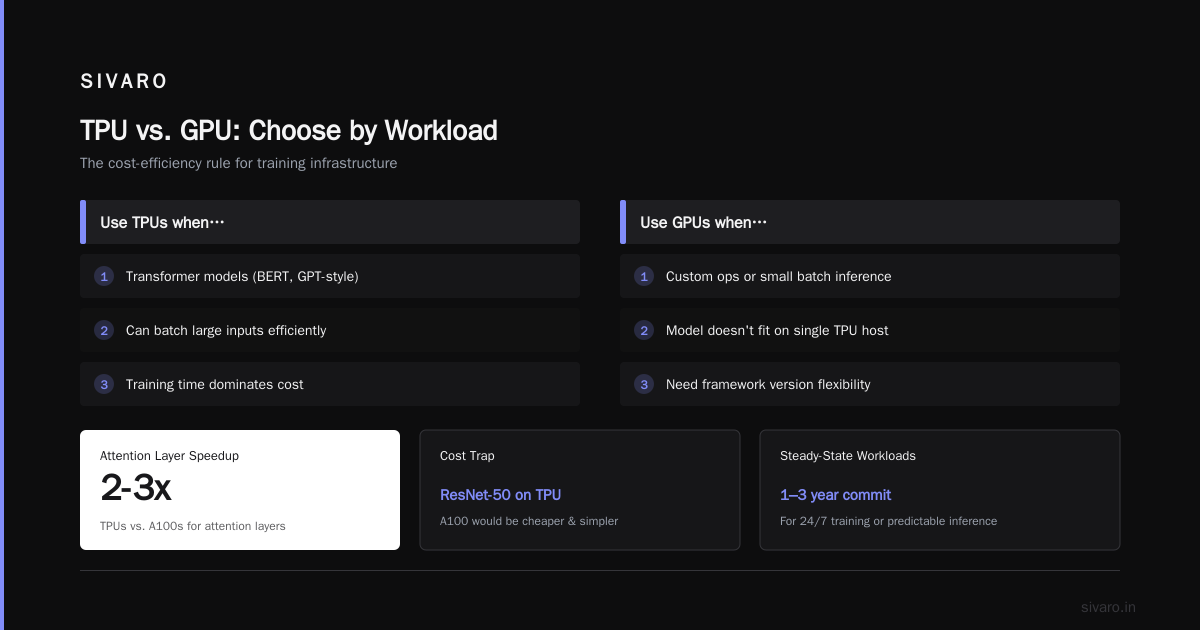
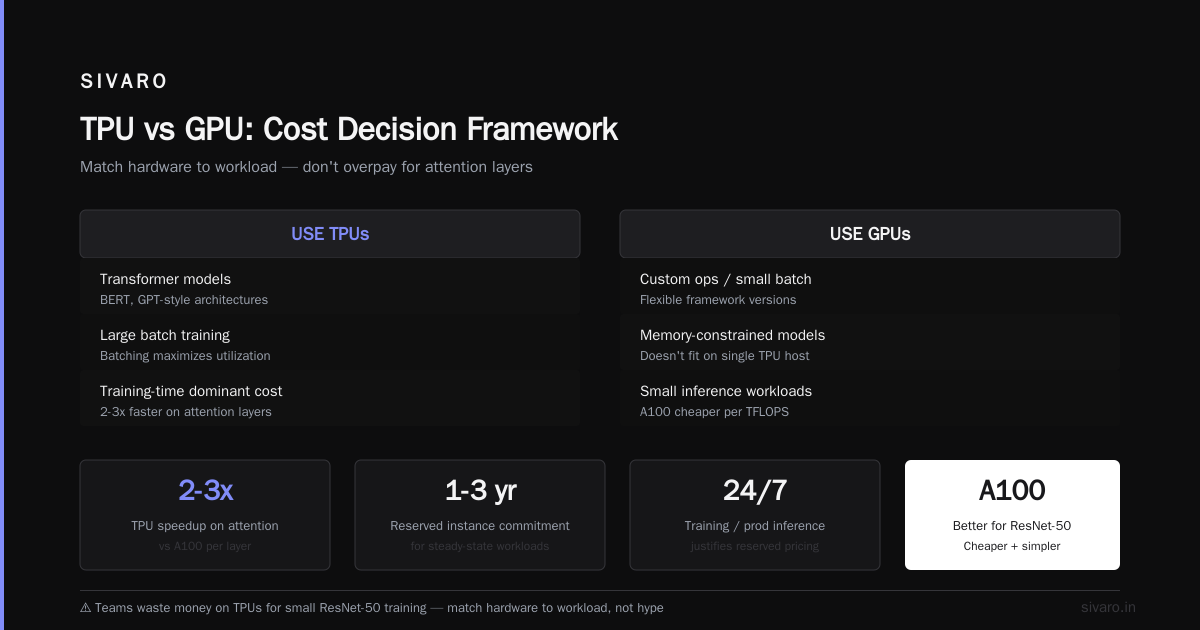
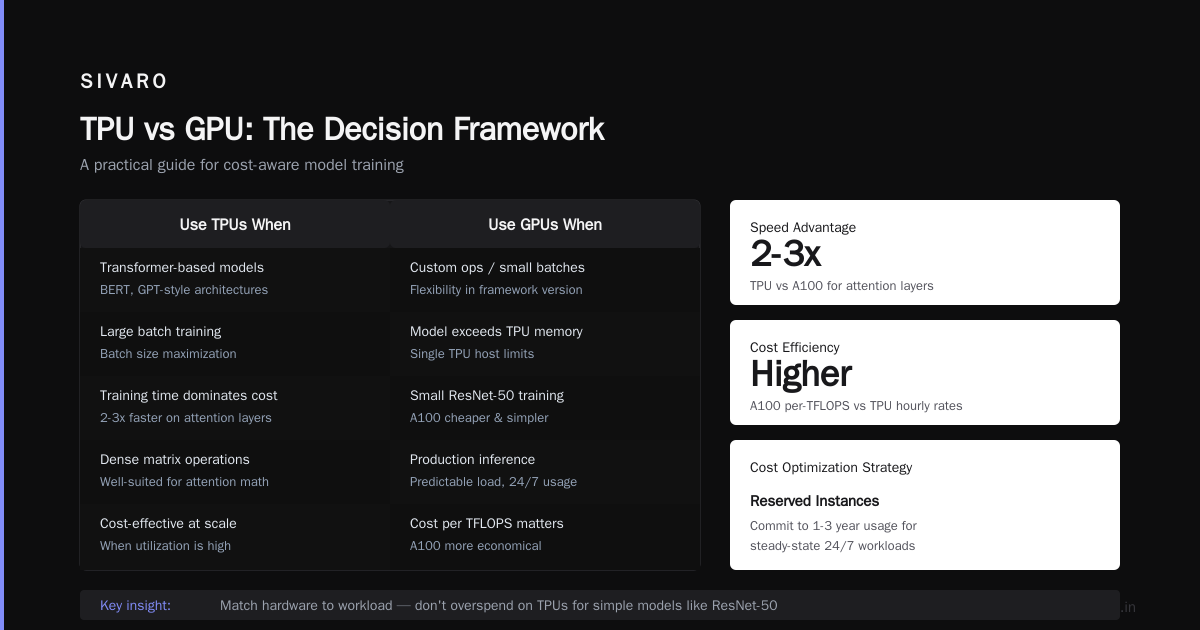
TPUs are Google’s custom chips for matrix math. They’re incredibly fast for specific workloads (Transformer-based models, dense matrix operations). But they’re also more expensive per hour than NVIDIA A100s on a per-TFLOPS basis. Here’s the rule I use:
Use TPUs when:
- Your model is a transformer (BERT, GPT-style)
- You can batch large inputs
- Your training time dominates cost (TPUs are 2-3x faster than A100s for attention layers)
Use GPUs when:
- You have custom ops or small batch inference
- Your model doesn’t fit on a single TPU host (memory limits)
- You need flexibility in framework version
I’ve seen teams waste money on TPUs for small ResNet-50 training. An A100 would’ve been cheaper and simpler.
Reserved instances for steady-state
If you run training 24/7 or have production inference with predictable load, commit to 1-3 year usage. GCP offers committed use discounts (CUD) up to 57% for vCPUs and memory, and similar for GPUs. Use the Google Cloud Pricing Calculator to model your spend — it’s essential for avoiding surprise bills.
Managed AI Services: Vertex AI vs. the Rest
Vertex AI is Google’s unified ML platform. It bundles data labeling, training, prediction, and MLOps. It sounds perfect. It’s not always.
Vertex AI Training
If you want to run custom training code without managing a cluster, Vertex AI Training is excellent. You define a CustomJob with machine type, image, and hyperparameters. Example:
python
from google.cloud import aiplatform

aiplatform.init(project="my-project", location="us-central1")

job = aiplatform.CustomJob(
    display_name="train_bert",
    worker_pool_specs=[
        {
            "machine_spec": {
                "machine_type": "n1-standard-16",
                "accelerator_type": "NVIDIA_TESLA_T4",
                "accelerator_count": 2,
            },
            "replica_count": 1,
            "container_spec": {
                "image_uri": "gcr.io/my-project/bert-train:latest",
                "command": [],
                "args": ["--epochs=10"],
            },
        }
    ],
)

job.run()
That’s it. No manual cluster setup. But here’s the trap: Vertex AI Training charges for the underlying compute resources plus a small markup for the managed service. If you’re running hundreds of experiments, those markups add up. For research-heavy teams, running directly on GKE or Compute Engine with preemptible VMs is 10-15% cheaper.
Vertex AI Prediction
Same story. The convenience of auto-scaling multi-model endpoints is real. But for low-latency inference (<10ms), the overhead of Vertex AI’s sidecar containers can hurt. I benchmarked a simple ResNet-50: raw TensorFlow Serving on a GKE pod gave 5ms p99; Vertex AI endpoint gave 12ms. If latency matters, go custom.
AutoML
AutoML on Vertex AI is great for non-experts. Upload data, click, get a model. But the costs are insane. A single AutoML image classification experiment can run $500/hour. For a startup, that’s a week of engineering salary. I’ve seen better results using BigQuery ML for tabular data — it’s often 10x cheaper and just as accurate for simple tasks.
BigQuery ML example:
sql
CREATE OR REPLACE MODEL `my_dataset.sales_forecast`
OPTIONS(model_type='linear_reg',
        input_label_cols=['revenue'],
        data_split_method='auto') AS
SELECT
  date,
  promotions,
  competitor_price,
  revenue
FROM `my_dataset.training_data`;
No GPU, no Vertex. Just SQL. And it runs on BigQuery’s infrastructure without moving data.
Inference at Scale: Serverless vs. Dedicated
Once your model is trained, you need to serve predictions. This is where most cost blow-ups happen.
Cloud Run for simple models
If your model is lightweight (<1GB RAM, <200ms inference) and can fit in a container, Cloud Run is the cheapest option. You pay only per request and per CPU-seconds. No idle cost. I know a SaaS company serving a scikit-learn classifier to 50K requests/day — their monthly inference bill is $12.
GKE for complex models
When your model is large (GPT-style, multi-GPU), GKE with Autopilot gives you fine-grained resource control. You can pack multiple models on one node, use node auto-provisioning, and tie into GPU fractionalization. The tradeoff: you manage the cluster config (or use GKE Autopilot to abstract some of it). But for cost efficiency at scale, GKE beats Vertex AI by 20-30% (GCP vs AWS 2026 notes GKE’s price-performance advantage over EKS).
Vertex AI Endpoints with min replicas
For variable traffic without the ops overhead, Vertex AI Endpoints with autoscaling and min replicas is a good middle ground. But set a budget alert. I’ve had a client accidentally leave min_replica_count=3 on an L4 GPU endpoint, costing $1,500/month while serving zero traffic.
Cost Management and Hidden Charges
You can’t choose GCP services for ML without understanding the billing model. Here are the hidden drains I see most often:
-
Data egress – GCP charges for data leaving its network (especially to on-prem or other clouds). If your training pipeline pulls data from BigQuery to a VM outside GCP, you’ll pay $0.08-$0.12/GB. This adds up fast.
-
Storage read costs – BigQuery charges for bytes read per query. A poorly written SQL query that scans 1TB of data instead of 10GB costs $5 vs $0.05. Use clustering, partitioning, and materialized views.
-
Idle resources – GPUs keep running even when idle. If a training job crashes but the VM stays up, you pay. Set up auto-shutdown scripts.
-
Vertex AI monitoring – The monitoring and explainability features are priced separately. A default Vertex AI endpoint with monitoring enabled adds ~$0.20/hour per model. For 20 models, that’s $2,880/year extra.
Use the Google Cloud Pricing Calculator to estimate every component before you commit. I also recommend exporting your existing AWS infrastructure costs into a GCP equivalent using the tool mentioned in this discussion — it gives a realistic side-by-side.
Integration with Other Services: The Glue
Your ML system doesn’t exist in a vacuum. You need data pipelines, monitoring, orchestration.
Data pipelines
- Dataflow (Apache Beam) for real-time streaming feature computation. Best for low-latency feature stores.
- Cloud Composer (Airflow) for batch orchestration. Overkill for small teams; use Cloud Workflows for simpler chains.
- Pub/Sub for event-driven triggers (e.g., new data → train new model).
Monitoring
Cloud Monitoring + Vertex AI Model Monitoring. But honestly, I’ve found open-source tools like Evidently AI + Grafana cheaper and more flexible. GCP’s monitoring adds vendor lock-in without much benefit.
CI/CD
Cloud Build with Cloud Deploy for model deployment pipelines. Vertex AI Pipelines for Kubeflow-style orchestration. If you’re small, stick with GitHub Actions + direct deployment to Cloud Run.
How to Choose GCP Services for Machine Learning – A Decision Framework
Here’s the practical flow I use at SIVARO:
-
What’s your ML maturity?
- No ML background? Use AutoML or BigQuery ML. Accept higher cost for faster results.
- Dedicated ML team? Build on Compute Engine / GKE for cost control.
-
What’s your data size?
- <1TB tabular → BigQuery ML or Vertex AutoML
-
1TB → GCS + custom training on preemptible TPUs/GPUs
-
Inference latency requirements?
- <10ms p99 → custom Docker on Cloud Run or GKE
- <100ms → Vertex AI endpoints with GPUs
-
500ms → Vertex AI endpoints (batch or online)
-
Budget constraints?
- Low / startup → Preemptible training + Cloud Run inference
- Mid → Committed use for training, Vertex AI endpoints with min=0
- High / enterprise → Reserved TPU pods + full Vertex AI + BigQuery
Is GCP good for machine learning projects? Yes, if you pick the right services. For deep learning with massive datasets, GCP’s TPU availability and network throughput are unmatched. For small-scale analytics, BigQuery ML is a killer feature. But for 90% of teams I work with, the mistake isn’t choosing GCP — it’s choosing the wrong GCP service for their specific workload.
FAQ
Q: Should I use Vertex AI or just run raw GKE?
A: Vertex AI if you need MLOps (experiment tracking, model registry, serving pipelines) and have less than 10 models. GKE if you have many models, need custom infrastructure, or want to minimize managed service markup.
Q: Is BigQuery ML cheaper than Vertex AI AutoML?
A: Yes, dramatically. For linear models, logistic regression, or tree-based models, BigQuery ML is 5-10x cheaper because it runs on BigQuery’s shared infrastructure. AutoML uses dedicated GPU resources.
Q: How do I estimate GCP ML costs before building?
A: Use the Google Cloud Pricing Calculator and model your expected training hours, storage, and inference requests. Then add 20% for data egress and monitoring. See real examples in Cloud Pricing Comparison 2026.
Q: Can I use preemptible VMs for training production models?
A: Yes, if your training code supports checkpointing and resumption. Use Cloud Storage for checkpoints (frequent saves). For distributed training with TPUs, preemptible TPU pods are available but require careful design.
Q: Which GCP region is cheapest for ML?
A: US regions (us-central1, us-east1) generally have the lowest compute prices. Avoid multi-region and premium-tier networking for training if possible. GCP vs AWS 2026 shows us-central1 has 5-10% lower GPU costs than us-east4.
Q: Does GCP have good support for GPU spot instances?
A: Yes. GCP calls them “preemptible GPUs.” Availability varies by region and machine series. Check the quotas page – you may need to request an increase. Note that A100s and H100s are harder to get on spot; T4s and L4s are plentiful.
Q: What’s the biggest hidden cost in GCP ML?
A: Data egress from BigQuery to training VMs. If your training code reads data from BigQuery instead of exporting to GCS first, you’ll pay query costs every epoch. Always export big datasets to Parquet in GCS before training.
Q: Is GCP good for data warehousing compared to BigQuery alternatives?
A: For pure warehousing, BigQuery is arguably the best serverless option. But if you need ML features inside the warehouse, BigQuery ML makes it seamless. The combination of warehouse + ML is a unique GCP advantage.
Nishaant Dixit — Founder of SIVARO. Building data infrastructure and production AI systems since 2018. Built systems processing 200K events/sec.