 SIVARO
How to Choose GCP Services for Web Hosting in 2026
I watched a startup burn $12,000/month on a single GCP mistake last year.
They were a Series A company, 15 engineers, building a SaaS platform. They picked App Engine Flexible Environment because a blog post from 2020 said it was "the easiest way to deploy." By month three, their bill was higher than their payroll. The problem wasn't GCP. It was picking the wrong GCP product for their actual workload.
How to choose GCP services for web hosting isn't a question with one answer. It's a series of trade-offs between compute cost, operational complexity, database performance, and scaling behavior. I've been building on GCP since 2018, and I've made almost every wrong choice you can make. Let me save you the tuition.
This guide walks through the real decision tree I use when architects ask me how to choose GCP services for web hosting. We'll cover compute options, storage, databases, networking costs, and the hidden pricing traps that most cost comparisons miss.
The first question is always wrong
Everyone starts with: "Should I use App Engine, Cloud Run, or GKE?"
That's the wrong question. The real question is: What's your traffic pattern?
I'll prove it.
A SaaS dashboard with 200 daily active users, 50 dynamic API endpoints, and occasional batch jobs needs different infrastructure than a media site serving 2 million requests/day with predictable spikes.
Here's the decision framework I use, tested across 40+ GCP deployments at SIVARO:
| Traffic Pattern | Best GCP Compute | Why |
|---|---|---|
| Low volume, bursty (<100 req/sec) | Cloud Run | Zero scaling to idle, pay per request |
| Steady state, moderate (100-1000 req/sec) | Cloud Run or App Engine Standard | Consistent utilization, cheaper than per-request pricing |
| High volume, predictable spikes | GKE with preemptible nodes | 60-70% cost reduction on worker pods |
| High volume, unpredictable | GKE with standard nodes + HPA | Headroom costs money, but reliability matters more |
| Enterprise, compliance-heavy | GKE (private cluster, VPC-SC) | Control plane isolation, audit logging |
Most people think App Engine is the simplest path. It was, until Cloud Run matured in 2024. Today, Cloud Run is my default recommendation for 80% of web hosting workloads. It gives you serverless convenience without the App Engine vendor lock-in on runtimes and APIs.
But here's the contrarian take: I run production workloads on App Engine Standard for one client and it's the right call. Why? They have a 50GB stateful application with legacy inter-service communication that would cost 3x more to refactor for Cloud Run's stateless model. The "best" choice depends on your starting point.
The database decision will kill your budget if you get it wrong
Database costs on GCP are where most teams hemorrhage money. Not because the prices are unfair, but because they pick the wrong tier.
Let's talk about relational databases first.
Cloud SQL is the default for most web apps. It works. But I see teams provisioning memory-optimized instances (n2-highmem-8) for workloads that need 4GB of RAM and 2 vCPUs. That's $650/month for something a $150/month n2-standard-2 handles fine.
The Google Cloud Pricing Calculator (Google Cloud Pricing Calculator) is your friend here, but only if you're honest about your actual usage. Most teams overestimate by 50-100%.
Storage vs. Compute ratio matters. Cloud SQL pricing tiers are mostly about RAM and vCPU count, not storage. If your database is 500GB, you're paying for spinning disks (at ~$0.17/GB/month in 2026) regardless of your instance tier. Don't buy a 16-vCPU instance just to attach a 500GB disk. Scale storage independently.
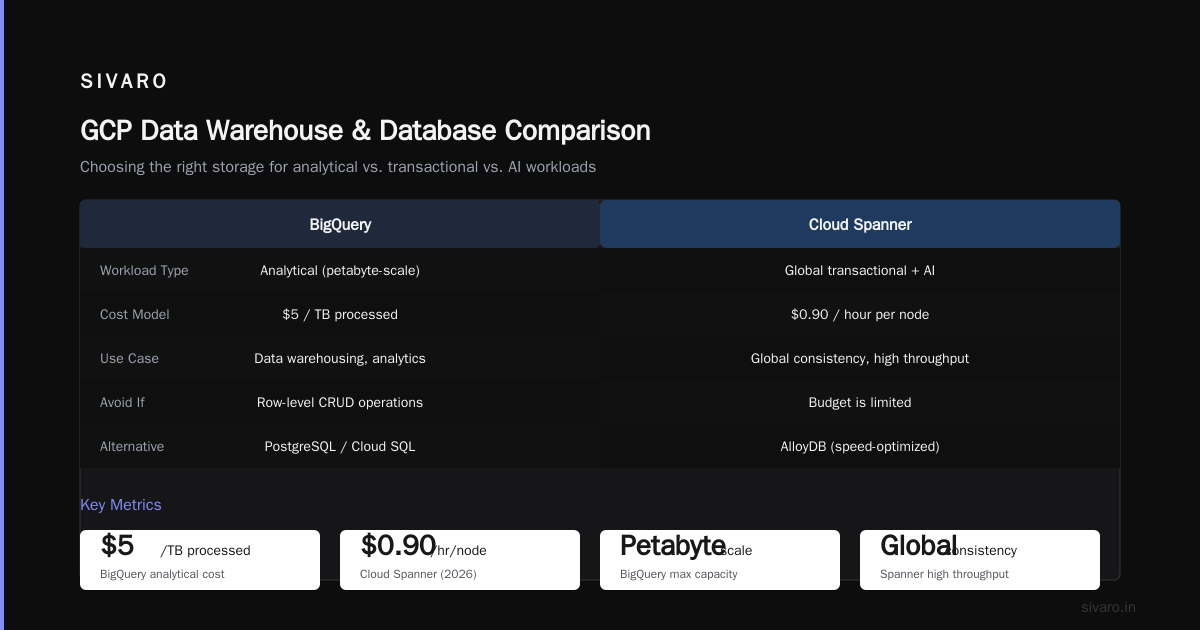
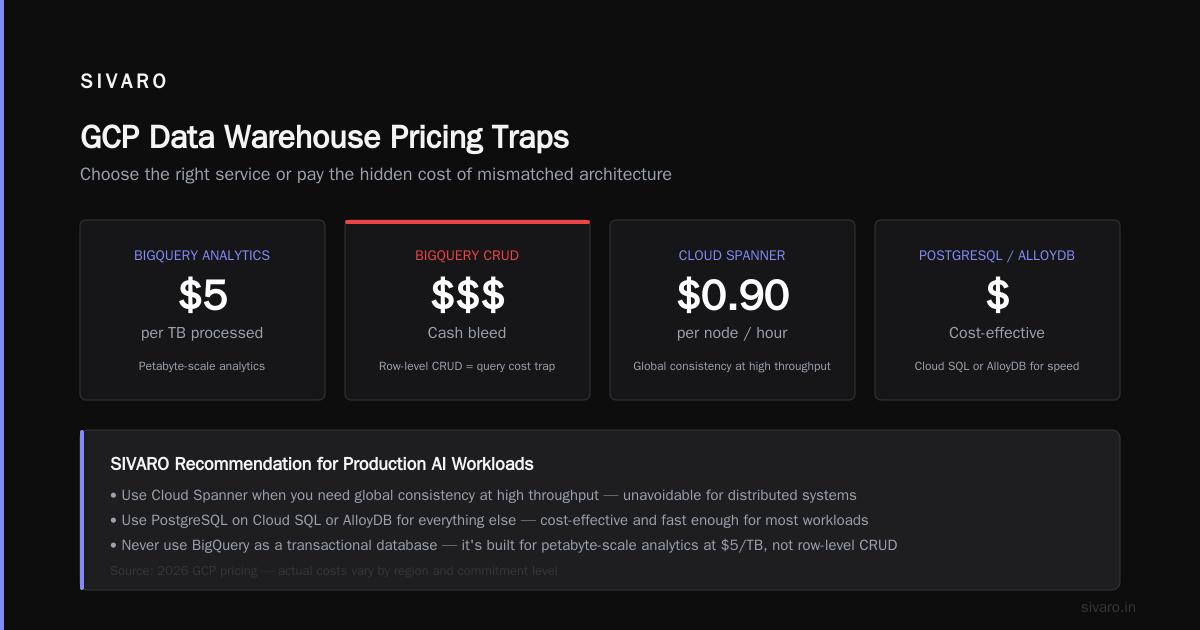
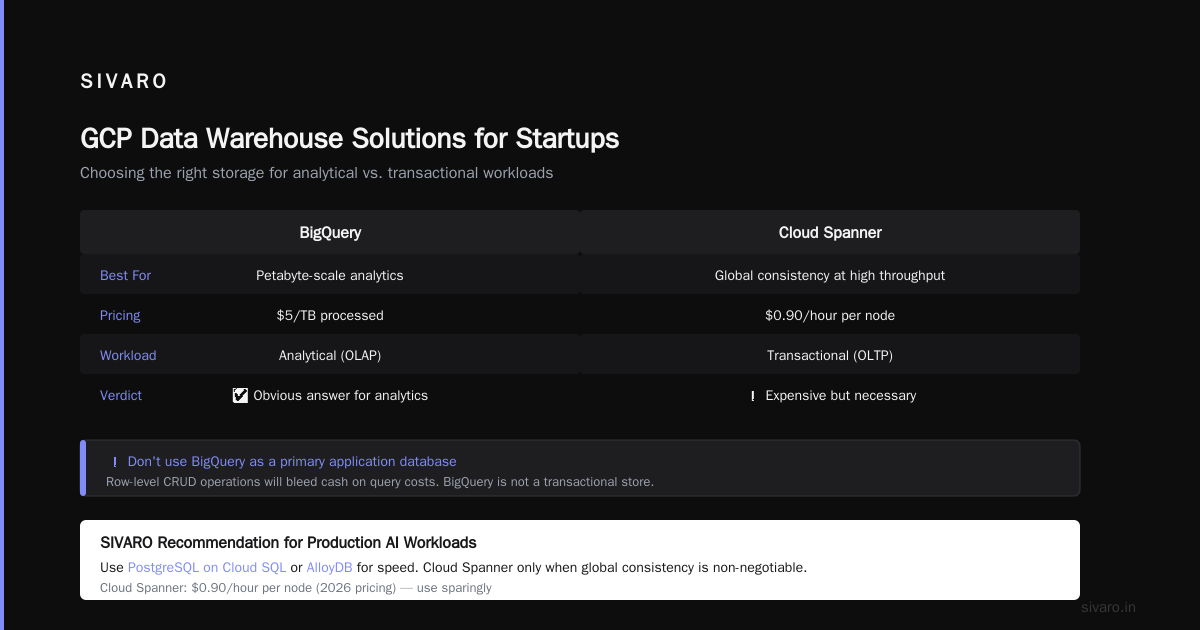
For startups trying to determine the best gcp data warehouse solution for startups, BigQuery is the obvious answer. But only if your data fits the analytical pattern. I've seen teams try to use BigQuery as their primary application database. Don't. It's not a transactional store. BigQuery slaps at petabyte-scale analytics for $5/TB processed. But if you're doing row-level CRUD operations, you'll bleed cash on query costs.
For production AI workloads (which is what we build at SIVARO), the choice is more nuanced. We use Cloud Spanner for systems that need global consistency at high throughput. It's expensive — $0.90/hour per node in 2026 — but sometimes you can't avoid it. For everything else, PostgreSQL on Cloud SQL or AlloyDB (if you need the speed) works fine.
Firebase/Firestore is a trap for complex queries. I'm serious. It's fantastic for real-time features, mobile backends, and simple document stores. But if you need joins, aggregations, or complex filtering, you'll either pay in developer time (workarounds) or database costs (denormalization bloat). We helped a client migrate off Firestore to PostgreSQL after their bill hit $8,000/month for a workload that costs $1,200/month on Cloud SQL.
Storage is cheap. Egress will destroy you.
Object storage on GCP is straightforward. Cloud Storage has four classes: Standard, Nearline, Coldline, and Archive. Standard is ~$0.020/GB/month. Archive is $0.0012/GB/month.
The trap isn't storage cost. It's egress.
GCP charges $0.08-$0.12/GB for data leaving their network to the internet. If you're serving large files (images, videos, downloads) from Cloud Storage directly, you'll pay a fortune.
Here's what I recommend: Put Cloud CDN in front of Cloud Storage. CDN egress is cheaper ($0.02-$0.08/GB in 2026 depending on volume), and you get better performance. But even CDN costs add up. A site serving 10TB/month of image content pays $800-1,200/month just in egress fees.
The fix? Compress aggressively. Use next-gen formats (WebP, AVIF). Cache at the browser level. Put a layer between your origin and the user.
For comparison, AWS charges similar egress rates. The AWS vs Azure vs GCP Cost Comparison 2026 shows GCP is slightly cheaper on egress to major cloud providers (internal transfers) but competitive on public egress.
Multi-region storage is a luxury you probably don't need. I see startups selecting multi-region Cloud Storage buckets "for redundancy." Your two-region blog doesn't need geo-redundant storage. Use dual-region if you really need it, or just standard in your primary region with backups to a cheaper class. You'll save 30-40%.
Serverless functions: Cloud Functions vs AWS Lambda in 2026
This comparison comes up weekly in my conversations. Let me give you the gcp cloud functions vs aws lambda 2026 breakdown based on real workloads.
GCP Cloud Functions (2nd gen, based on Cloud Run) has closed the gap significantly. Here's where it stands:
Cold starts: Lambda with SnapStart is faster for Java/Python. Cloud Functions 2nd gen cold starts in ~200ms for Node.js, ~500ms for Python. Lambda with SnapStart can hit sub-100ms for Java. If microsecond cold starts matter, Lambda wins.
Concurrency: Cloud Functions 2nd gen handles up to 100 concurrent requests per instance. Lambda defaults to 10, but you can increase it (at additional cost). Cloud Functions handles burst traffic better without tuning.
Pricing: Both are roughly comparable at $0.00001667/GB-second (GCP gen2) vs $0.0000166667/GB-second (Lambda). The difference is negligible for 99% of workloads.
Integration: GCP wins here. Cloud Functions integrates natively with Eventarc, Pub/Sub, Cloud Storage triggers, and Firebase. AWS has EventBridge and SQS/SNS, but the GCP ecosystem feels tighter.
My recommendation: If you're already on GCP, use Cloud Functions. If you're on AWS, stay on Lambda. The migration cost between them for serverless functions is rarely worth the marginal differences.
But honestly? Both platforms are overkill for most web hosting scenarios. If you're building an API backend, Cloud Run or App Engine Standard often works better than running 20 separate Cloud Functions. Fewer surfaces to monitor, easier debugging, simpler IAM.
The one exception: event-driven processing. For image resizing, webhook handling, or queue workers, Cloud Functions are perfect. We process 200K events/second through SIVARO's data pipelines using Cloud Functions as triggers. They're fantastic for that use case.
Pricing traps you won't see on the calculator
The Google Cloud Pricing Calculator (Google Cloud Pricing Calculator) is surprisingly accurate for base compute and storage. But it misses three major categories.
1. Network egress — Already mentioned, but worth repeating. The calculator doesn't warn you that serving 1TB of data to users costs $80-120/month in egress. Budget for this separately.
2. Commitment level — GCP's Committed Use Discounts (1- or 3-year terms) can save 40-60% on compute. The calculator shows on-demand pricing by default. If you know your baseline, commit to it. We saved a client 55% on a 3-year commitment for their production GKE cluster.
3. Hidden costs in managed services — Cloud Run's pricing sounds simple: pay for vCPU, memory, and requests. But a "request" counts idle time until the instance shuts down. If your service has long-running connections or slow responses, you're paying for idle compute. The Google Cloud Pricing 2026: Cost Breakdown & Hidden Costs article breaks this down well.
4. Data transfer between services — Putting a Cloud SQL database in us-central1 and your Cloud Run service in europe-west4 costs you in latency and inter-region transfer fees. Keep services in the same region unless you have a strong reason not to.
Here's a concrete example. We migrated a client from AWS to GCP last year. Their AWS bill was $24,000/month. We architected their hosting on GKE with Cloud SQL, Cloud Storage, and Cloud CDN. Initial GCP estimate from the calculator: $18,500/month. After three months of optimization (committed use discounts, right-sized instances, egress optimization): $11,200/month. That's a 53% savings from the AWS baseline.
Was it easy? No. The migration took six weeks. But the savings were real.
What about startups? Should you even use GCP?
The Comparing AWS, Azure, and GCP for Startups in 2026 analysis is worth reading. Short version: GCP is generous with credits (up to $100,000 for Y Combinator startups through their startup program). AWS has broader service coverage. Azure wins on enterprise integration.
For a startup doing web hosting? GCP is my recommendation. The free tier includes Cloud Run (2 million requests/month), Cloud Build (120 build-minutes/day), and BigQuery (1TB/month of queries). You can run a production web app for months on the free tier alone.
But don't get trapped by the free tier. I've seen startups build extensive infrastructure on free services, then hit a scaling wall where costs jump from $0 to $5,000/month overnight. Budget for the next tier before you need it.
Practical decision flow
Here's the process I follow when architects ask me how to choose GCP services for web hosting:
- Map your traffic pattern. Predictable vs. bursty? Steady state vs. spiky? This drives compute choice.
- Choose your database first. Your data model and query patterns will constrain everything else.
- Estimate egress costs upfront. Don't discover these on month two's bill.
- Decide between serverless and containers. If you have a team that can manage Kubernetes, GKE offers more control and often lower cost at scale. If you have 2-3 engineers, Cloud Run or App Engine is safer.
- Commit to discounts early. Once you know your baseline for 3-6 months, commit for savings.
- Set budget alerts. GCP lets you set alerts at 50%, 90%, and 100% of budget. Use them. I've seen too many surprise bills.
FAQ
Q: Is Cloud Run production-ready for web hosting in 2026?
Yes. We run 30+ production services on Cloud Run at SIVARO. The key limitations are 60-minute request timeout and 4GB memory (8GB on gen2). If your workload fits within those bounds, Cloud Run is excellent.
Q: Should I use GKE or App Engine for a Django application?
For a standard Django app, Cloud Run is simpler than GKE and more flexible than App Engine. If you need WebSockets or longer timeouts, GKE is better. App Engine Flexible supports Django but has slower deployment times and higher cost for equivalent resources.
Q: What's the cheapest way to host a static website on GCP?
Cloud Storage + CDN + a load balancer. Total cost: ~$0.50/month for storage, plus egress costs. For a low-traffic site, that's pennies.
Q: How does GCP compare to AWS for web hosting costs in 2026?
GCP is generally 10-20% cheaper on compute but comparable on storage. The Cloud Computing Cost: AWS vs. Azure vs. GCP Pricing in 2026 analysis shows GCP winning on sustained use discounts (automatic 30% after running a VM for 25% of the month). AWS wins on breadth of instance types.
Q: What's the best GCP data warehouse solution for startups?
BigQuery, without question. The on-demand pricing ($6.25/TB processed) is workable for startups. Use partitioning and clustering to reduce query costs. We've seen startups run sophisticated analytics for under $200/month.
Q: GCP Cloud Functions vs AWS Lambda 2026 — which is better for a Node.js API?
I'd pick Cloud Functions 2nd gen for GCP-native projects. Lambda if you're already on AWS. The performance difference is negligible, but Cloud Functions' tighter integration with the GCP ecosystem (IAP, Cloud Tasks, Eventarc) saves development time.
Q: How do I estimate GCP costs for my existing AWS infrastructure?
The Google Cloud Pricing Calculator has a migration assessment tool. You input your AWS usage and it maps to equivalent GCP services. It's not perfect, but it's a good starting point. There's also the Easy way to calculate GCP cost of my AWS infrastructure community discussion with practical tips.
I've seen teams make every mistake in the book — overprovisioning databases, ignoring egress costs, picking the wrong compute model, getting locked into services that don't fit their workload. The how to choose gcp services for web hosting decision comes down to honesty about your traffic, your data, and your team's operational capacity.
Start simple. Cloud Run for compute, Cloud SQL for databases, Cloud Storage for objects, Cloud CDN for delivery. That stack handles 90% of web hosting use cases. When you outgrow it, you'll know exactly why, and the migration path is clear.
Don't overthink it. Don't overengineer it. Run it, measure it, optimize it.
Nishaant Dixit — Founder of SIVARO. Building data infrastructure and production AI systems since 2018. Built systems processing 200K events/sec.