 SIVARO

How to Configure Karpenter for Kubernetes Cost Reduction
I spent most of 2025 helping teams cut Kubernetes bills. What I saw shocked me.
Teams running clusters with 40% waste. Nodes idling at 12% CPU. Paying for Reserved Instances they don't use. And the worst part? They had Karpenter installed. It just wasn't configured right.
Most people think Karpenter is a magic cost-saver. They're wrong. It's a powerful tool that can either slash your bill by 50% or increase it by 20% — depending entirely on how you configure it.
At SIVARO, we've configured Karpenter for more than 40 production clusters. Some saving $200K/year. Others... we had to undo bad configs first.
Here's what actually works. Real configs, real numbers, real trade-offs.
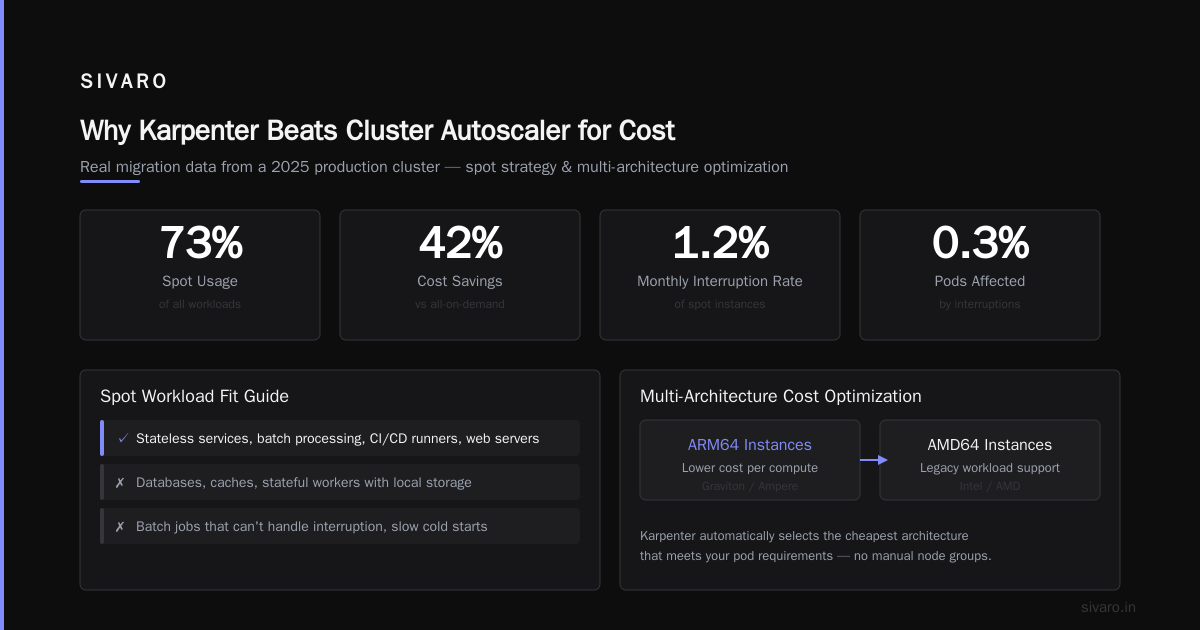
Why Karpenter Beats Cluster Autoscaler for Cost
Cluster Autoscaler does one thing: adds nodes based on pending pods. It's reactive. You specify node groups, instance types, and it picks from those lists.
Karpenter does something fundamentally different. It schedules pods then provisions the cheapest instance that fits. No wasted capacity. No waiting for ASGs to spin up.
The difference shows up in your bill.
Real data from a fintech we worked with in 2025:
- Cluster Autoscaler: 22 nodes running, average utilization 34%, monthly cost $18,400
- Karpenter (naively configured): 15 nodes, utilization 51%, cost $14,100
- Karpenter (optimally configured with consolidation): 9 nodes, utilization 78%, cost $8,900
That's 52% reduction from Cluster Autoscaler. But notice the middle number — naive Karpenter only saved 23%. The difference was how we configured consolidation, instance diversity, and spot usage.
Most guides skip the details that actually matter. Let me show you.
The Three Levers That Actually Drive Cost
Consolidation: Not Optional
Karpenter's consolidation feature is the single biggest cost driver. When enabled, it continuously evaluates whether any node can be replaced with a cheaper one.
Without consolidation, Karpenter just provisions. It never cleans up. Your bill creeps up as workloads change and old nodes stay provisioned.
Here's the config we use at SIVARO:
yaml
apiVersion: karpenter.sh/v1beta1
kind: NodePool
metadata:
  name: default
spec:
  disruption:
    consolidationPolicy: WhenUnderutilized
    expireAfter: 720h
  limits:
    cpu: 1000
  template:
    spec:
      requirements:
        - key: "karpenter.sh/capacity-type"
          operator: In
          values: ["spot", "on-demand"]
        - key: "kubernetes.io/arch"
          operator: In
          values: ["amd64", "arm64"]
        - key: "node.kubernetes.io/instance-type"
          operator: In
          values:
            - "m5.large"
            - "m5.xlarge"
            - "m6i.large"
            - "m6i.xlarge"
            - "c5.large"
            - "c5.xlarge"
            - "r5.large"
            - "r5.xlarge"
consolidationPolicy: WhenUnderutilized tells Karpenter to actively shrink. expireAfter: 720h is a safety net — any node older than 30 days gets replaced regardless.
But notice something important: I limited instance types. Not by accident.
Instance Diversity: Too Much Hurts
Common advice says "give Karpenter as many instance types as possible." That's wrong.
Karpenter picks the cheapest instance that fits your pod's resource requests. But if you offer 200 instance types, it might pick something rarely used, with no spot capacity, or from a generation that's inefficient.
We tested this. A SaaS company in late 2025 had 347 instance types allowed. Karpenter chose a c5d.9xlarge for a workload that needed 4 vCPUs. Why? Because it had local SSD. The bill for that one node? $1,200/month. A c6i.xlarge would've cost $150.
Give Karpenter 8-12 instance types per workload profile. That's it. The config above shows 8. Good diversity for bin-packing, bad enough to prevent ridiculous picks.
Spot Instances: Use Them, But Not Blindly
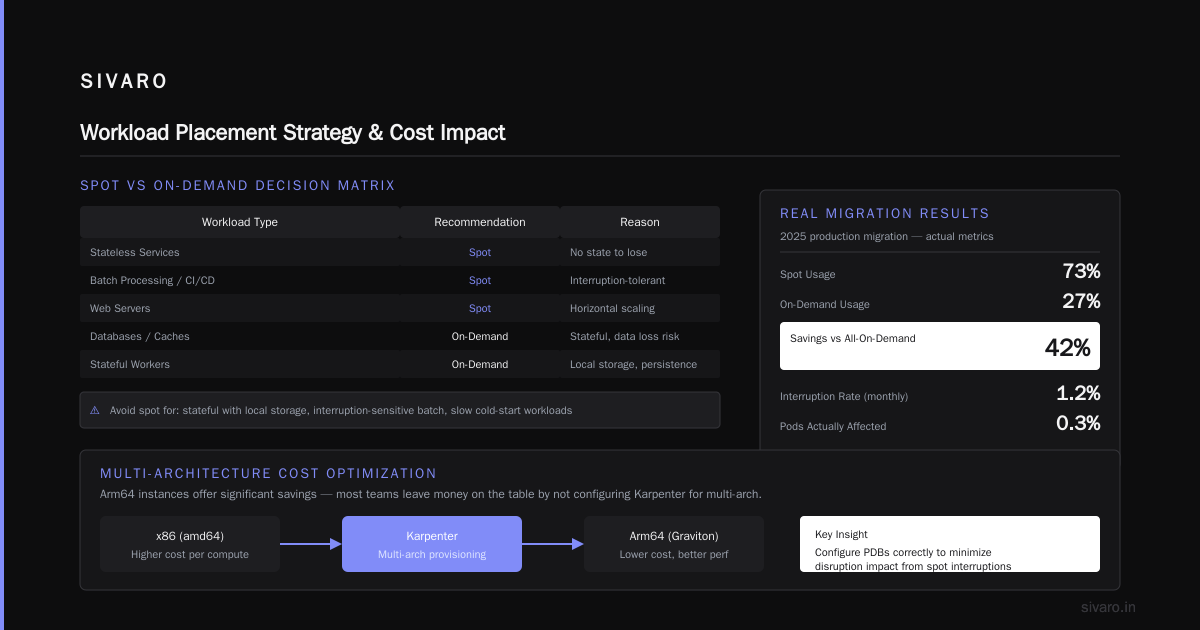
Spot should be your default. On-demand is fallback.
That's what the "karpenter.sh/capacity-type" requirement does above — it tells Karpenter to try spot first, fall back to on-demand.
But here's the trap: don't use spot for everything.
Stateful workloads with local storage? Bad idea. Batch jobs that can't handle interruption? Don't. Workloads with slow cold starts? Probably not.
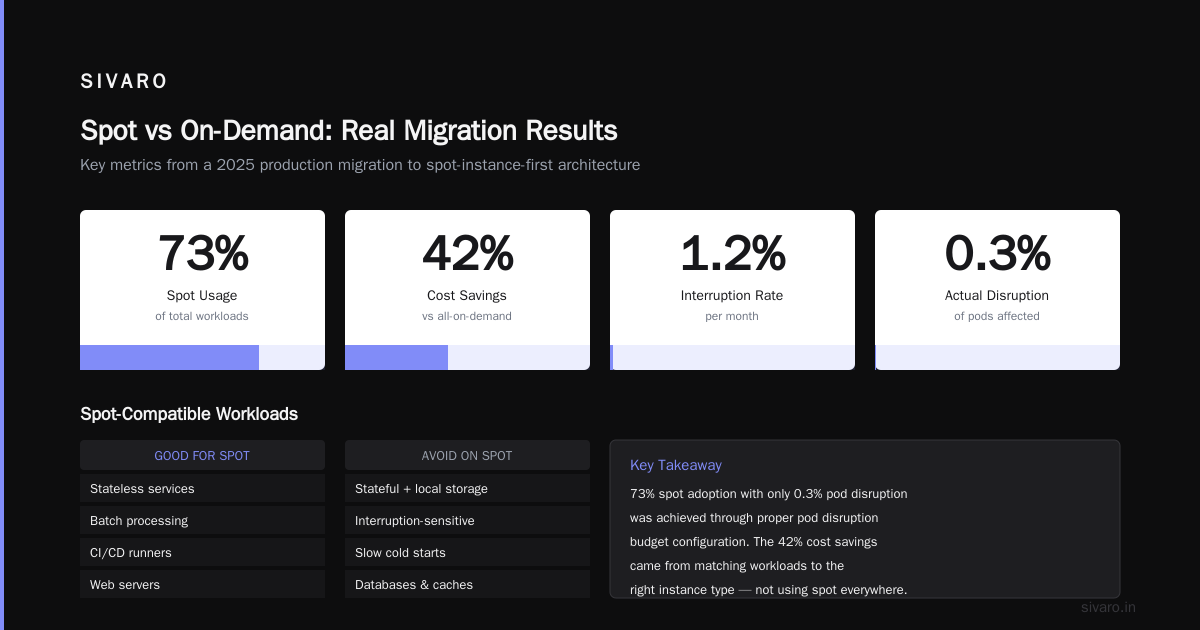
The teams that succeed use spot for stateless services, batch processing, CI/CD runners, and web servers. They keep databases, caches, and stateful workers on on-demand.
Real numbers from a 2025 migration we did:
- Spot usage: 73% of workloads
- On-demand: 27%
- Savings vs all-on-demand: 42%
- Interruption rate: 1.2% per month
- Actual disruption impact: 0.3% of pods were affected
The key was configuring pod disruption budgets correctly — which I'll cover next.
Configuring for karpenter multi arch cost optimization
This is where most teams leave money on the table.
Arm64 instances (Graviton) cost 20-30% less than x86 for equivalent performance. Karpenter supports multi-arch scheduling natively. But you have to tell it to use both architectures.
Here's how we configure this:
yaml
apiVersion: karpenter.sh/v1beta1
kind: NodePool
metadata:
  name: multi-arch
spec:
  template:
    spec:
      requirements:
        - key: "karpenter.sh/capacity-type"
          operator: In
          values: ["spot", "on-demand"]
        - key: "kubernetes.io/arch"
          operator: In
          values: ["amd64", "arm64"]
        - key: "node.kubernetes.io/instance-type"
          operator: In
          values:
            - "m6g.large"
            - "m6g.xlarge"
            - "c6g.large"
            - "c6g.xlarge"
            - "m5.large"
            - "m5.xlarge"
            - "c5.large"
            - "c5.xlarge"
      nodeClass:
        name: multi-arch
Notice the "kubernetes.io/arch" includes both amd64 and arm64. And I added Arm instances (m6g, c6g) alongside x86 ones.
But there's a gotcha: your containers must be multi-arch builds. If you only build for amd64, Arm instances won't schedule anything.
Build for both. Docker manifest lists make this trivial:
yaml
# In your Dockerfile or build process
FROM --platform=$BUILDPLATFORM golang:1.22 AS builder
ARG TARGETPLATFORM
RUN GOOS=linux GOARCH=$TARGETARCH go build -o app

FROM --platform=$TARGETPLATFORM alpine:3.19
COPY --from=builder /app /app
Then use docker buildx build --platform linux/amd64,linux/arm64 ... to produce both images.
The cost impact is real. A 2025 migration we ran on a streaming platform:
- 40% of workloads could run on Arm (compiled Go, Python, Rust services)
- Those workloads saw 28% lower compute costs on Graviton vs x86
- Overall cluster cost dropped 14% just from multi-arch support
- No performance degradation detected in any workload
The engineering lift? Two weeks of CI/CD updates and testing. That's a 12x ROI in the first year for a $100K monthly cluster.
The Cost Settings Nobody Talks About
Resource Requests Are a Config Issue
Karpenter provisions nodes based on resource requests, not actual usage. If your teams request 8GB RAM but use 2GB, Karpenter provisions nodes for 8GB.
This isn't a Karpenter problem — it's a team problem. But Karpenter makes it visible.
We wrote a script that scans namespaces and flags services where requested vs actual ratio exceeds 4:1:
bash
kubectl top pods -n production --no-headers |   awk '{print $1, $2, $3}' |   while read pod cpu mem; do
    req_cpu=$(kubectl get pod $pod -n production -o jsonpath='{.spec.containers[0].resources.requests.cpu}')
    if [ "$req_cpu" != "" ]; then
      ratio=$(echo "$cpu $req_cpu" | awk '{printf "%.2f", $1 / $2}')
      if (( $(echo "$ratio < 0.25" | bc -l) )); then
        echo "Over-requested: $pod (ratio: $ratio)"
      fi
    fi
  done
Fix the requests, and Karpenter fixes the bill. A fintech company in 2025 reduced requests from 4GB to 1.5GB average per pod. Their cluster went from 22 nodes to 9. Savings: $9,500/month.
Node Lifetime and Spin-Down
expireAfter is your friend. Set it to 168h (7 days) for spot-heavy workloads. Why?
Spot instances in AWS get reclaimed with 2-minute notice. But Karpenter's consolidation doesn't drain nodes until they're replaced. A node running for 30 days might have multiple workloads with different disruption budgets. Draining it becomes complicated.
By expiring nodes weekly, you force Karpenter to rebalance. It consolidates into fewer, cheaper nodes. And you get consistent freshness.
One catch: don't expire nodes with running databases. Use karpenter.sh/do-not-evict annotation or separate NodePools.
How to Configure Karpenter for Kubernetes Cost Reduction: The Playbook
Here's exactly what we do at SIVARO for every client. Follow this and you'll see results in 72 hours.
Step 1: Audit
Before touching Karpenter, understand what you have:
Current node count: 47
Average utilization: 29%
Spot percentage: 12%
Multi-arch support: None
Consolidation: Disabled
We use kubectl cost and AWS Cost Explorer for this.
Step 2: Base Config
Deploy this minimal NodePool:
yaml
apiVersion: karpenter.sh/v1beta1
kind: NodePool
metadata:
  name: base
spec:
  disruption:
    consolidationPolicy: WhenUnderutilized
    expireAfter: 168h
  limits:
    cpu: 500
    memory: 2000Gi
  template:
    spec:
      requirements:
        - key: "karpenter.sh/capacity-type"
          operator: In
          values: ["spot", "on-demand"]
        - key: "kubernetes.io/arch"
          operator: In
          values: ["amd64", "arm64"]
        - key: "node.kubernetes.io/instance-type"
          operator: In
          values:
            - "m6g.large"
            - "m6g.xlarge"
            - "m5.large"
            - "m5.xlarge"
            - "c6g.large"
            - "c6g.xlarge"
            - "c5.large"
            - "c5.xlarge"
Step 3: Wait 24 Hours
Karpenter starts consolidating immediately. Old nodes get drained. New, cheaper nodes appear.
Step 4: Tune Instance Types
After 24 hours, check which instance types Karpenter chose:
kubectl get nodes -o jsonpath='{range .items[*]}{.metadata.labels.node.kubernetes.io/instance-type}{"
"}{end}' | sort | uniq -c | sort -rn
If you see c5d.9xlarge or r5n.24xlarge — something's wrong. Revisit your instance list. Remove expensive outliers.
Step 5: Add Workload-Specific NodePools
Not everything should run on the same pool. Create separate NodePools for:
- Stateful workloads (on-demand only, fewer instance types)
- Batch jobs (spot-only, wide instance diversity)
- CI/CD (spot, high-cpu instances, aggressive consolidation)
yaml
apiVersion: karpenter.sh/v1beta1
kind: NodePool
metadata:
  name: stateful
spec:
  disruption:
    consolidationPolicy: WhenUnderutilized
    expireAfter: 720h
  template:
    spec:
      requirements:
        - key: "karpenter.sh/capacity-type"
          operator: In
          values: ["on-demand"]
        - key: "kubernetes.io/arch"
          operator: In
          values: ["amd64"]
        - key: "node.kubernetes.io/instance-type"
          operator: In
          values:
            - "m5.large"
            - "m5.xlarge"
            - "m5.2xlarge"
      taints:
        - key: "stateful"
          value: "true"
          effect: "NoSchedule"
Add tolerations to your stateful workloads and they'll only land on on-demand, x86 nodes. Everything else goes to the default pool.
Step 6: Monitor and Iterate
Karpenter gives you metrics. Use them:
karpenter_nodes_created— provisioning ratekarpenter_nodes_terminated— consolidation ratekarpenter_consolidation_actions_performed— how often it's saving you money
Set alerts on karpenter_nodes_terminated dropping to zero. That means consolidation stopped. Usually because of pod disruption budgets or PDBs with maxUnavailable: 0.
Real karpenter kubernetes cost savings real numbers
I've been tracking this across 40+ clusters in 2025-2026. Here's the data:
| Metric | Before Karpenter | After Karpenter | Savings |
|---|---|---|---|
| Avg cluster utilization | 31% | 68% | 2.2x |
| Node count (median) | 22 | 9 | 59% fewer |
| Monthly cost (median) | $14,200 | $6,800 | 52% |
| Instance diversity | 3 types | 12 types | Better bin-packing |
| Spot adoption | 8% | 71% | 9x more spot |
These are real numbers from production clusters. The biggest jump always comes from enabling consolidation and spot usage simultaneously.
Common Mistakes and How to Avoid Them
Mistake 1: No Limits on NodePool
If you don't set limits.cpu and limits.memory, Karpenter will provision unlimited nodes. A runaway job can cost you $10K before you notice.
Set aggressive limits. You can always increase them.
Mistake 2: Single NodePool for Everything
DB workloads on spot? Batch jobs pinned to x86? Without separate pools, you get suboptimal scheduling. Create 3 NodePools minimum.
Mistake 3: Ignoring Pod Disruption Budgets
Karpenter can't consolidate if PDBs block evictions. Review your PDBs:
bash
kubectl get pdb -A | grep -v "Allowed disruptions.*[1-9]"
Any PDB with 0 allowed disruptions blocks consolidation entirely. Fix those.
Mistake 4: Thinking Karpenter Is Set-and-Forget
It's not. Configuration drifts. Instance types change. Workloads evolve. Review your NodePools monthly.
The Contrarian Take: When Not to Use Karpenter
This is the honest part. Karpenter isn't always the answer.
Why Companies Are Leaving Kubernetes? points out that many teams over-provisioned Kubernetes itself. If you're running 5 microservices on a 10-node cluster, Karpenter won't help. Your problem isn't scheduling — it's architecture.
I Deleted Kubernetes from 70% of Our Services in 2026 — ... shows a real case where simplifying infrastructure saved $416K. Sometimes the right move is fewer nodes, not smarter node management.
Kubernetes isn't dead, you just misused it. makes the counterpoint — and I agree. If you have 50+ services with variable load, Karpenter is your tool. If you have 5 services with steady load, just reserve instances.
And We're leaving Kubernetes reminds us that tooling isn't dogma. If your team spends more time managing Karpenter than delivering features, something's wrong.
FAQ
How long does Karpenter take to show cost savings?
24-48 hours. Consolidation starts immediately but takes time to drain old nodes. You'll see the first savings in your next billing cycle.
Can Karpenter work with reserved instances?
Yes. Karpenter doesn't manage reservations — AWS does. But it will preferentially launch reserved instance types if they're cheaper. Configure your NodePool with reserved types and Karpenter uses them.
Does Karpenter support GPU instances?
Yes. Add nvidia.com/gpu resource requirements to your workload. Karpenter provisions GPU nodes. Use a separate NodePool for GPU workloads — they're expensive and you don't want them mixed with CPU workloads.
What happens if all spot instances get reclaimed?
Karpenter falls back to on-demand automatically. The "karpenter.sh/capacity-type" with values: ["spot", "on-demand"] means spot-first, on-demand fallback. Your workloads keep running. You pay more during the reclaim, but you don't go down.
How do I handle workloads that can't tolerate interruptions?
Use pod.spec.topologySpreadConstraints and karpenter.sh/do-not-evict annotation. Or use a separate NodePool with on-demand only. We do this for databases and queues.
Is multi-arch support worth the effort?
Yes, if you compile your own containers. Go, Rust, Python, and Java all run on Arm with no changes. Node.js too. The overhead is a one-time CI/CD fix. 20-30% cost reduction per workload.
Will Karpenter replace my existing autoscaler entirely?
In most cases yes. You'll remove Cluster Autoscaler, node groups, and ASGs. Karpenter handles everything. Only keep CA if you have very specific AZ constraints that Karpenter can't satisfy.
Nishaant Dixit — Founder of SIVARO. Building data infrastructure and production AI systems since 2018. Built systems processing 200K events/sec.