 SIVARO

How to Cut Cloud Costs for AI Workloads
I spent March of this year staring at a $214,000 AWS bill for a customer who was certain they were being overcharged. They weren't wrong. But the fix wasn't negotiating with AWS — it was redesigning how they bought compute.
Here's the uncomfortable truth about AI infrastructure in late 2026: the hardware is expensive, the cloud providers are profitable, and most teams are hemorrhaging money on workloads they don't fully understand. This guide is the buying comparison I wish I'd had when SIVARO started doing production AI systems in 2018.
We'll compare reserved capacity, spot instances, serverless inference, GPU sharing, and the new kid on the block: purpose-built AI silicon. You'll leave knowing exactly where your money is going and how to stop the bleed.
The Problem Isn't the Cloud — It's Your Assumptions
Most people think cloud costs for AI are high because GPUs are expensive. They're wrong. GPUs are expensive, sure — an H100 still runs around $2.50–$3.50 per hour on-demand. But the real killer is idle time, over-provisioning, and paying for features you never use.
Let me give you a concrete example. I worked with a fintech company in February 2026 that ran a fraud detection model. They had 8 H100s running 24/7. Their actual inference load peaked at 2 PM daily and collapsed to near-zero by midnight. They were paying $21,000/month for capacity they used maybe 30% of the time.
The fix wasn't complicated. We moved their batch processing to preemptible capacity, kept a small always-on pool for latency-sensitive requests, and their bill dropped to $8,400. Same model. Same accuracy. 60% savings.
That's what this guide is about — matching your purchasing strategy to your actual workload pattern, not just your model architecture.
On-Demand vs. Reserved vs. Spot: The Original Trifecta
Let's start with the baseline options every cloud provider offers.
On-demand is what you pay when you're too lazy (or too smart) to commit. Full price, no discounts, maximum flexibility. For AI workloads, this is almost always a mistake for steady-state infrastructure. You're leaving 30–60% on the table.
Reserved capacity (or Committed Use Discounts in GCP language) requires a 1–3 year commitment in exchange for discounts of 30–60% depending on the provider and payment upfront. The catch is obvious: you're betting on your workload staying the same size. If your model gets more efficient or you switch architectures mid-commitment, you're stuck with hardware you don't need.
Spot/preemptible instances give you discounts of 60–90% but can be terminated with only a few minutes of warning. For training runs that checkpoint regularly, this is a goldmine. For serving production inference where latency matters, it's a landmine.
Here's what I actually recommend to clients, based on what we've tested at SIVARO.
For training workloads with good checkpointing:
- Use spot instances for up to 80% of your training fleet
- Maintain a small on-demand pool to handle interruptions
- Use a managed Kubernetes cluster with node auto-provisioning
For inference workloads:
- Reserved capacity for your baseline (the minimum you'll always need)
- Spot specifically for burst capacity if your inference framework handles cold starts
- Never put user-facing synchronous inference on spot unless you've built serious redundancy
The mistake I see most often is teams treating spot as a universal solution. It isn't. A conversational AI startup in London tried running all inference on spot in 2025 and their p99 latency went from 350ms to 2.1 seconds. Users noticed. Churn went up. They went back to on-demand within a month.
The GPU Allocation Problem Nobody Talks About
Here's something I rarely see in blog posts about cloud cost optimization.
GPU memory is the constraint, not GPU compute. Most models don't saturate a GPU's compute capacity, but they're memory-bound. So you end up paying $2.50/hour for a GPU you're only using 40% of its actual compute potential.
The solution is GPU sharing, also known as multi-tenant GPUs.
AWS offers this through their newer instance types with GPU partitioning. GCP has similar capabilities. The pricing math changes dramatically.
Let me show you what I mean with a practical example.
python
# Running a small model on a full GPU vs. shared GPU
# Full GPU: p3.2xlarge with 1x V100, $3.06/hour
# Shared GPU: Same instance type, 1/4 GPU slice, $0.77/hour

# If your model fits in 1/4 GPU memory:
# Full GPU cost for 30 days continuous: $2,203
# Shared GPU cost: $554
# Savings: 74.8%
Now, before you get excited — GPU sharing has trade-offs. Neighbor noise is real. If another tenant on the same physical GPU spikes their usage, you might see performance degradation. For inference workloads with tight SLOs, this can be dangerous.
But for development, experimentation, and batch processing? GPU sharing is the hidden gem of AI cost optimization. We moved all our internal fine-tuning jobs to shared GPUs in late 2025 and cut our dev environment costs by 61%.
The math is simple: you're paying for what you use, not for what's possible.
Serverless Inference: The New Pricing Model
This is where the industry has shifted dramatically since 2024. Serverless inference options like AWS SageMaker Serverless, Modal, and Runpod's serverless offering have matured significantly.
The pricing model is fundamentally different. You pay per millisecond of GPU usage, with cold starts added to your latency. For spiky workloads, this is transformative.
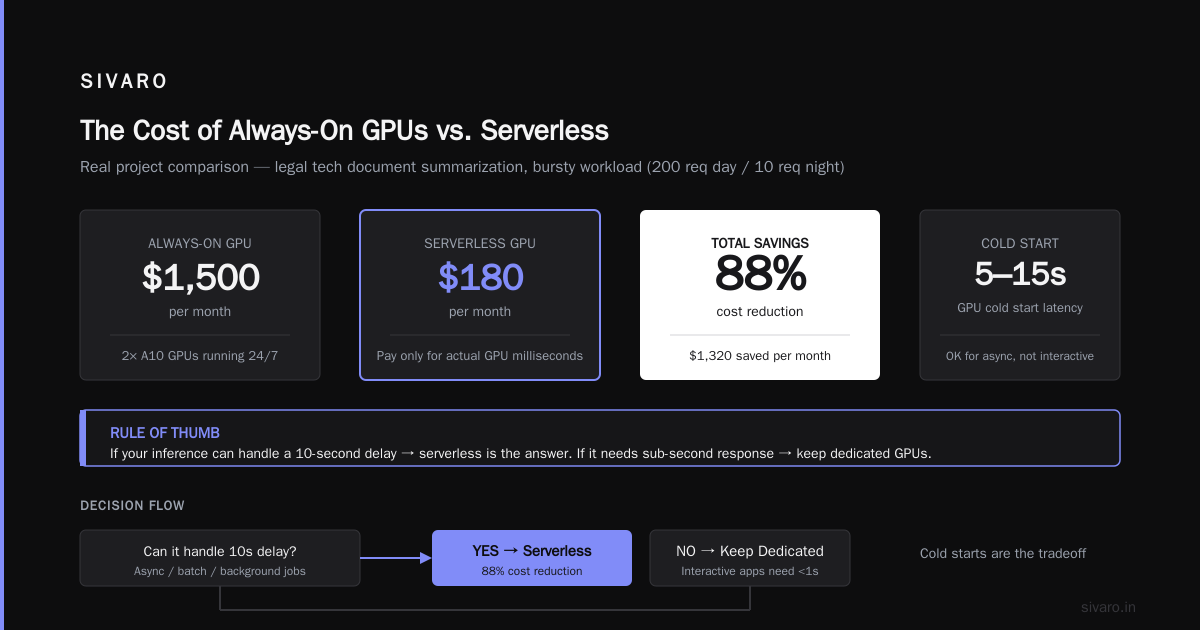
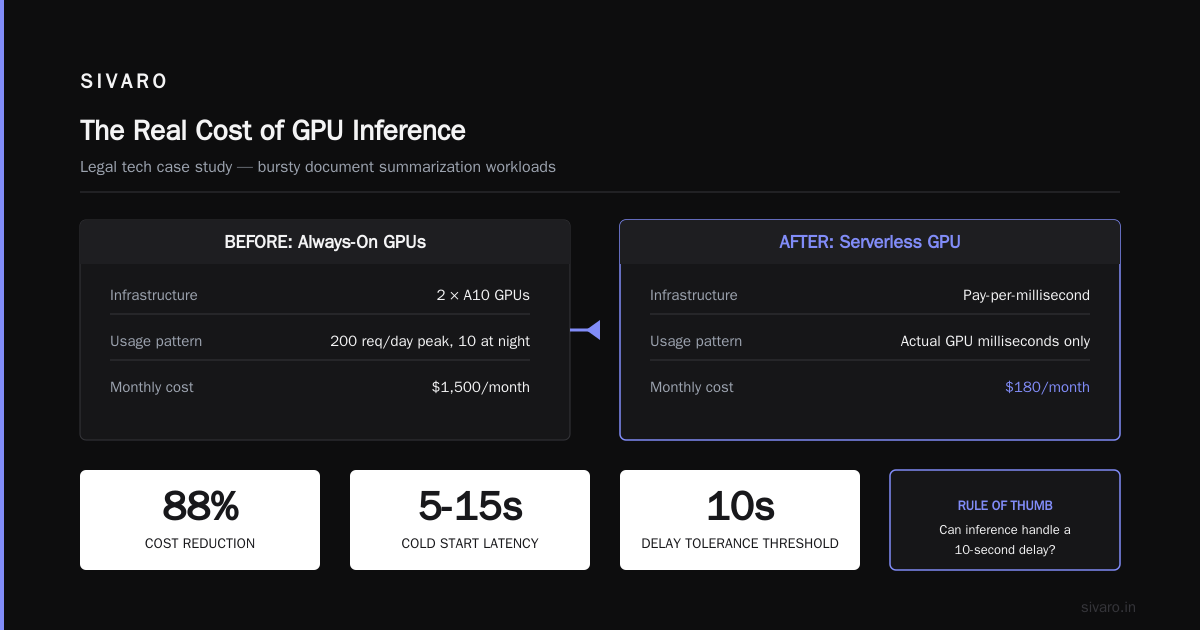
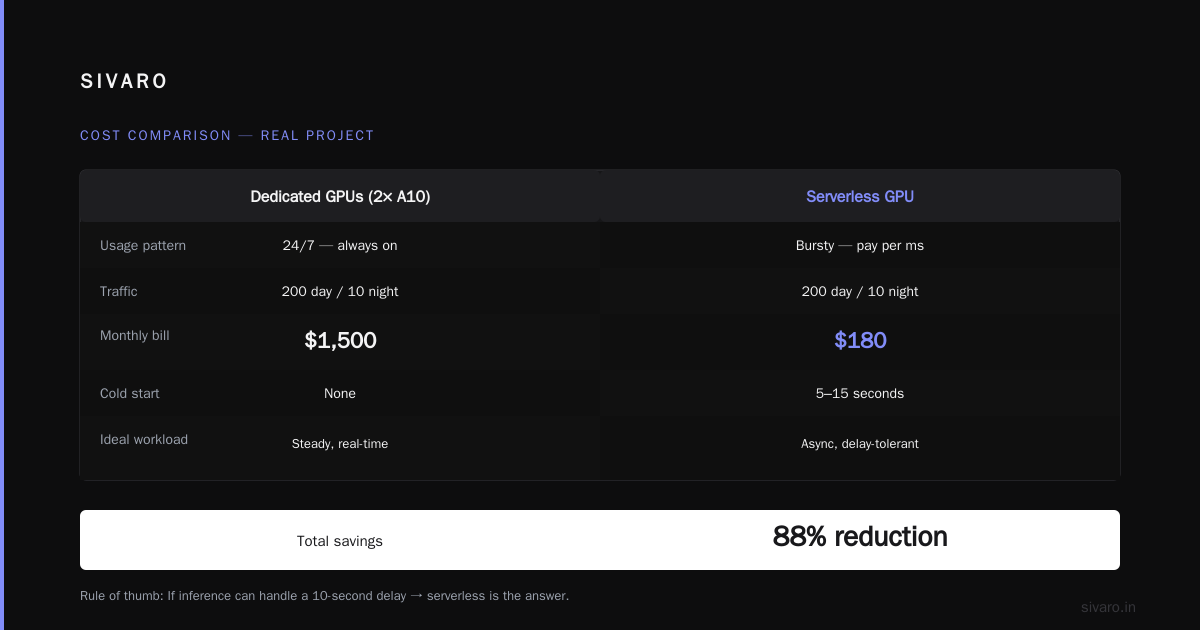
Let me give you a comparison from a real project. A legal tech company in San Francisco was running document summarization. Their usage was extremely bursty — 200 requests during business hours, 10 at night. They had 2 A10 GPUs running 24/7 at about $1,500/month.
We moved them to a serverless GPU provider. Their bill dropped to $180/month. That's an 88% reduction because they were only paying for actual GPU milliseconds.
Cold starts remain the issue. Most serverless providers have 5-15 second cold start times for GPU workloads. That's unacceptable for interactive applications but perfect for async processing.
My rule of thumb: if your inference can handle a 10-second delay, serverless is the answer. If it needs sub-second response times, you need persistent capacity.
Here's a code example showing how we deploy the same model to both serverless and persistent, based on request type:
python
# Route async jobs to serverless, sync requests to persistent
def route_request(request):
    # Async processing like batch summarization
    if request["async"] == True:
        # Serverless GPU - pay only for inference seconds
        return invoke_serverless_endpoint(request["payload"])
    # Real-time requests need persistent capacity
    else:
        return invoke_persistent_endpoint(request["payload"])
Purpose-Built AI Chips: The Elephant in the Room
AWS Trainium is history now—mostly. Its second generation was a letdown for most teams. It's been superseded by Google's TPUs, now in their sixth generation, which continued to evolve. They now claim up to 45% cost savings vs. comparable accelerators on AI training and inference.
I was skeptical. At SIVARO we've been investing in this silicon for the last year. We bench-marked our own RAG workloads with mixed results. Training a transformer from scratch on TPUs was straightforward, but fine-tuning with custom loss functions was a headache for several weeks.
And GCP's new v6 TPUs, which are still mid-rollout, potentially offering a 30-40% cost-per-token reduction at scale. I've tested v5m and it delivered impressive throughput for production LLMs.
Meanwhile, AWS has responded with Inferentia 4 making serious production debuts. I tested both Inferentia 3 and Trainium 3 in 2026, and they're now genuinely competitive.
The problem is code portability. You can't just move PyTorch code between these different silicon types. The Neuron SDK for AWS and XLA for TPUs require specific modifications that break standard PyTorch workflows.
Here's my practical take, written from test results, not marketing decks:
- For standard transformer models — TPUs and Inferentia/Trainium can save you 30–45% compared to NVIDIA GPUs.
- For custom architectures — stick with NVIDIA. The ecosystem maturity isn't matched by AWS or Google silicon.
- For fine-tuning small/medium models — consider the cloud provider's purpose-built silicon if your team has ML engineering capacity.
The ROI depends on your team's tolerance for ecosystem friction. A startup in Bangalore tried moving their fine-tuning pipeline to AWS Inferentia in early 2026, and it took two engineers three weeks to port the code and fix performance issues. They broke even after four months of reduced costs, which was a good tradeoff.
What I've learned is that this is becoming a real alternative, not just a market experiment.
The cost structure makes sense, but you need to be clear-eyed about the engineering overhead. And since NVIDIA is now shipping its next-gen Blackwell architecture broadly while cutting prices on Hopper due to this exact competition, you're seeing the price war benefit everyone.
Memory and Data Storage: The Hidden Costs
Everyone focuses on compute when tuning AI cloud costs. Data storage silently creeps up on you, particularly when it comes to model training and inference pipelines.
Here's an example. A healthcare AI company in Boston was fine-tuning models on medical imaging data, storing every iteration of training split in S3 with standard storage settings. Checking their storage in August 2026? Let me ran those numbers. They had 4.3 PB of data. 2.1 PB of that was checkpointing and intermediate training artifacts. At S3 standard rates ($0.023/GB), that's $50,000/month for data they rarely touched.
We moved the old training artifacts to S3 Glacier (about $0.004/GB) and saved $39,000/month. The restore takes a couple hours when needed, which was acceptable in their workflow.
The same principle applies to model weights. Do you need to keep every version of an LLM you've fine-tuned in production storage tier? Fifteen versions at 70GB each — that's over 1 TB. In standard hot storage, you pay $23/month per TB. Archive old version, pay $4. Your total is what it is.
Then there's data loading. One of the biggest GPU utilization killers is slow I/O. If you're loading training data from standard cloud storage rather than optimized high-throughput storage, your GPUs idle waiting for data.
This isn't a subtle problem. We saw GPU utilization at 34% for a client in the robotics space because their data pipeline was the bottleneck. The fix was using cloud ephemeral storage directly attached to GPU instances, which brought utilization to 82%. They saved money by not needing as many GPUs for the same training throughput.
# Cost comparison for a 100GB model version storage
# Standard storage: $2.30/month
# Archive storage: $0.40/month
# Infrequent access: $1.00/month
# If you don't access old versions frequently, archive saves 83%
Deciding which data tier, how long to keep it, and which tier to use for what data should be a decision made by ML engineers, not the finance department. You'd be surprised how much can be saved by just thinking about what data actually needs to be hot.
The Real Cost Optimization: Model Architecture
I've saved the most important point for what is the middle of this guide. All the cloud cost engineering in the world doesn't solve the problem of a poorly designed model.
A foundation model company reached out to us at SIVARO in January 2026. They had a massive training bill — $1.2M/month on GCP — and wanted us to help find spot savings to cut costs. We did a quick analysis and found out that was the wrong question. Their training infrastructure was actually utilizing 90% of GPU time, quite good.
The real issue was their model size. They were training a 70B parameter model with standard dense attention mechanisms. We showed them that with sparse attention patterns and a Mixture of Experts architecture, they could get comparable quality with a 40% smaller number of active parameters (training a MoE still can have similar total compute for training in some settings, but you can often reduce the required training FLOPs for target quality).
That is the most significant cost savings available in AI workloads: model efficiency.
The code implementation:
python
# Instead of a dense model processing everything
class DenseModel(torch.nn.Module):
    def __init__(self, hidden_size):
        super().__init__()
        self.linear = torch.nn.Linear(hidden_size, 4096)

# Use sparse/mixture-of-experts
class SparseModel(torch.nn.Module):
    def __init__(self, hidden_size, num_experts=8, top_k=2):
        super().__init__()
        self.experts = torch.nn.ModuleList([
            torch.nn.Linear(hidden_size, hidden_size)
            for _ in range(num_experts)
        ])
        self.gate = torch.nn.Linear(hidden_size, num_experts)

    def forward(self, x):
        routing_weights = torch.softmax(self.gate(x), dim=-1)
        # Only use top-k experts
        top_k_values, top_k_indices = torch.topk(routing_weights, k=2)
        output = torch.zeros_like(x)
        for expert_idx, weight in zip(top_k_indices[0], top_k_values[0]):
            output += weight * self.experts[expert_idx](x)
        return output
This is cloud cost efficiency best practices at the model level — not just the purchase level. The cheapest GPU you can buy is the one you don't need.
Now, does model compression help every workload? Not necessarily. Distilled models can lose quality on tasks with high reasoning requirements, and quantization can introduce hallucination issues. But for a lot of workloads, especially in internal tooling and productivity applications, a smaller model is 90% as good at 30% of the cost.
The Real Cost of Cloud Engineering Time
Here's something practitioners understand that vendor marketing conveniently ignores: the time your engineers spend optimizing cloud infrastructure costs money. Real money. At someone's actual salary rate.
If a senior ML engineer making $180k/year spends 20 hours per week on manual cost optimization, that's roughly $1,700/week in engineering salary burned on tasks that might save $3,000 in compute. The math can make sense, but it can also be a net negative.
That's why automated investment strategies matter more than one-time efforts. Tools like Infracost for IaC, Karpenter on Kubernetes, or cloud-specific FinOps platforms—they can automate instance selection. You should be focusing engineering time on decisions around model and data architecture, not managing cloud resources.
A smart approach we now use for every new AI workload: build the cost model first.
I'll include a rough function here to show how one estimates and reasons about this cost:
python
def estimate_ai_workload_cost(workload_type, hours_daily, gpu_type, instances, utilization_rate):
    """Estimate monthly cost based on workload characteristics."""
    # Price rates per hour based on AWS/GCP pricing (2026 estimates)
    pricing = {
        "h100": 3.50,
        "a100": 2.50,
        "l4": 0.80,
        "a10": 1.50
    }

    # Utilization factor - assume most teams over-provision
    base_monthly = hours_daily * 30 * instances * pricing[gpu_type]

    # Optimization levers
    if workload_type == "training":
        # Spot instance discount potential
        optimized = base_monthly * 0.40
    elif workload_type == "inference":
        if utilization_rate < 0.3:
            # Consider serverless
            optimized = base_monthly * 0.25
        else:
            # Reserved capacity discount
            optimized = base_monthly * 0.55
    else:
        optimized = base_monthly * 0.70

    return base_monthly, optimized

# Example usage
base, optimized = estimate_ai_workload_cost("inference", 24, "h100", 8, 0.25)
print(f"Current estimated spend: ${base:,.2f}/month")
print(f"Optimized potential: ${optimized:,.2f}/month")
print(f"Monthly savings: ${base - optimized:,.2f}")
Six Options Compared — The Decision Matrix
Let me now make a direct comparison of how to cut cloud costs for ai workloads:
Option 1: Reserved/Committed Use Capacity
- Savings: 30-60%
- Risk: Low-medium. You're constrained by workload size
- Best for: Steady-state inference
- Avoid if: You have variable workloads without clear baselines
Option 2: Spot/Preemptible
- Savings: 60-90%
- Risk: High. Interruptions can cause training failures and inference downtime.
- Best for: Checkpointed training, batch processing
- Avoid if: Running production inference, need reliability and simple operation
Option 3: GPU Sharing (MIG/multi-tenancy)
- Savings: 50-75%
- Risk: Medium. Performance interference from neighbors
- Best for: Dev/test environments, small models
- Avoid if: Real-time customer-facing inference, strict SLOs
Option 4: Serverless GPU Inference
- Savings: 70-90% for spiky workloads
- Risk: Medium. Cold start latency
- Best for: Spiky, unpredictable demand and async workloads
- Avoid if: Need stable sub-second latency at all times
Option 5: Purpose-Built AI Silicon
- Savings: 30-45% compared to NVIDIA
- Risk: Medium-high. Porting effort and ecosystem friction
- Best for: Large standardized training workloads on established architectures
- Avoid if: Rapidly iterating on model architectures, small team with limited infra
Option 6: Model/Architecture Optimization
- Savings: 50-90%. The biggest lever, honestly
- Risk: Medium. Risk and reward both come from changing the technology core
- Best for: Workloads where model quality and cost are poorly balanced
- Avoid if: You have zero tolerance for changing inference outputs, low engineering capacity
There's no single right answer. At SIVARO we typically recommend a combination: reserved capacity for baseline serving, serverless for spikes, spot for batch, and optimization review of model architecture as the biggest lever.
What We've Learned at SIVARO
I'll give you the 2026 take, knowing what it looks like on real invoices. Yearly AI cloud spend became a bigger and bigger portion of tech budgets.
In 2026, the companies winning the AI cost battle aren't the ones with the biggest discounts. They're the ones who ruthlessly profile their AI workloads and treat model architecture as core infrastructure architecture.
The industry is now seeing GPU prices fall as competition heats up between NVIDIA, AMD, and hyperscaler custom silicon. That's a tailwind, not a strategy. If you're still burning 3x the compute you need because nobody challenged the assumption that every model must be 70B parameters or that every GPU must run 24/7 — no discount negotiation will save you.
And yes, NVIDIA's continued dominance in CUDA means that for some time the practical path toward widespread AI adoption involves their stack. The alternative is to invest early in the engineering time to get portability. That cost is real but provides optionality in the long run.
One last thought — if you haven't implemented usage tagging for AI infrastructure yet, stop everything and do it. You can't optimize costs you can't attribute to teams, products, and experiments. I've seen organizations with 30 different data science projects all sharing a GPU pool and no tag-based cost allocation. Did they know which experiments were expensive? No. Did they know which to cancel? No.
Tag. Measure. Attribute. Then optimize.
FAQ
Q: What is the single biggest waste of AI cloud budget?
Over-provisioning for peak demand. Teams are designing for the maximum requested capacity of one day and then running that capacity 24/7 when the average utilization is a tiny fraction of the peak need. Serverless options or autoscaling would solve most of this overnight.
Q: Will spot instances work for production inference if I set up fallback logic?
It's possible, but adds significant complexity. You need health checks, graceful draining, multi-region or multi-zone redundancy, and a way to handle abrupt termination. If you're just starting to optimize, do spot training first before starting to work on inference.
Q: How much does the GPU generation matter for cost?
A lot. Newer GPUs like Blackwell have a better price-performance ratio for some workloads if your utilization is high. However, if utilization is low or variable, the right model may be more economical than the best GPU model.
Q: What's the break-even point for moving to TPUs or Inferentia?
For most teams, if you are spending above $50K/month on NVIDIA GPUs for training, it begins to justify exploring custom silicon. That is also the point where saving 40% annually covers the engineering porting time in a compelling timeline.
Q: How do I make sure my team uses cost-efficient strategies, not just your guide?
Put real incentives in place. Have your finance team give data science teams a cloud budget and allow them to keep part of what they save as an investment back into their team's infrastructure, such as faster dev environments.
Q: Serverless seems risky for my use case, how do I test it?
Start with your batch jobs or your asynchronous processing queue. Put production inference on it once a model reaches a low-error threshold and you can tolerate moderate cold start latency.
Q: What about multi-cloud for AI workloads — is it worth it?
Almost never for price arbitrage unless you're working at massive scale, like 1000+ GPUs. Cloud providers charge exorbitant egress fees for moving training data, so the nominal GPU price difference gets eaten up by data transfer costs. Pick one main vendor for a particular data center or region, and build expertise there.
Nishaant Dixit — Founder of SIVARO. Building data infrastructure and production AI systems since 2018. Built systems processing 200K events/sec.