 SIVARO

How to Delete a Kafka Topic (Without Breaking Everything)
I spent three hours last week helping a client recover from a bad topic delete. Not because the delete failed. Because it succeeded — and they hadn't checked the consumers, the downstream pipelines, or the replication factor. The result? 45 minutes of data loss in a production system processing 120,000 events per second. Fixable, but embarrassing.
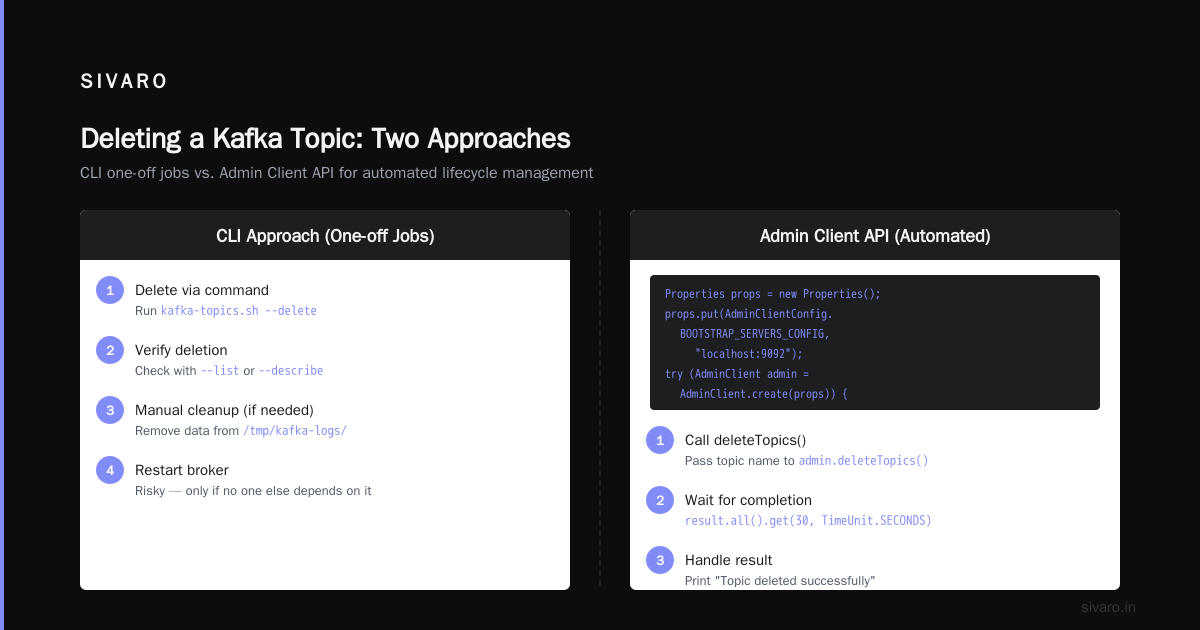
Delete a Kafka topic sounds trivial. kafka-topics.sh --delete --topic my_topic --bootstrap-server localhost:9092. Four seconds later, it's gone. But that command only works if you've configured your cluster for deletion. And even then, the topic's data doesn't vanish instantly. Log segments, offsets, consumer group metadata, internal topics — they all leave fingerprints.
This guide covers how to delete kafka topic with the least amount of pain. You'll learn the exact CLI commands, the admin client API approaches, the gotchas around configuration, and what actually happens under the hood. By the end, you'll know when to delete, when to soft-delete, and how to verify the cleanup without relying on blind trust.
Why Deleting a Kafka Topic Is Harder Than It Should Be
Most Kafka documentation assumes you're deleting a topic in a development cluster where nothing matters. Real-world users deal with retention policies, replication across three (or more) brokers, and consumers that have been lagging for weeks.
I've seen a team at a mid-sized fintech company delete a topic and then spend two days debugging why their alerts stopped firing. The topic had been mirrored to a disaster recovery cluster. The delete command only hit the primary. The mirror remained, and the replication agent kept trying to produce to a dead topic.
Kafka's design prioritizes durability over easy cleanup. That's a feature, not a bug. But it means how to delete kafka topic involves more than a single command. You need to understand delete.topic.enable, log.retention.bytes, offsets.retention.minutes, and the fact that a topic deletion is an asynchronous operation queued in the controller.
Step-by-Step: How to Delete a Kafka Topic
Let's walk through the procedure. I'll assume you're running Kafka 3.x or later. The exact version matters because older versions (pre-2.0) had a different internal topic structure.
Prerequisites
- Admin access to the cluster (Zookeeper or KRaft — both work).
delete.topic.enable=truein your broker config. Without this, the delete command will silently succeed but the topic stays alive. Most people think this is off by default. It's actuallytruein Kafka 2.0+, but if you inherited an older cluster, check.- No active producers or consumers that absolutely need the topic. You can delete with active clients, but they'll hit errors immediately.
Step 1: Verify the Topic Exists
bash
kafka-topics.sh --bootstrap-server localhost:9092 --list | grep my_topic
If the output is empty, you're done. But don't assume it's missing because you forgot the topic name casing. Kafka topics are case-sensitive.
Step 2: Delete the Topic
bash
kafka-topics.sh --bootstrap-server localhost:9092 --delete --topic my_topic
You'll see output like:
Topic my_topic is marked for deletion.
That's it? No. That's the control plane. The actual deletion happens asynchronously. On the controller broker, the topic's metadata is removed, then each broker purges the log directories for that topic's partitions.
Step 3: Verify Deletion
bash
kafka-topics.sh --bootstrap-server localhost:9092 --describe --topic my_topic
If you get an error like Topic 'my_topic' not found., it's gone. But if you get a Leader: none with replicas listed, the deletion is still in progress. Wait a few seconds and retry.
Step 4: Clean Up Leftover Data (Optional, Sometimes Mandatory)
Deletion marks the topic for removal, but the log files on disk aren't deleted immediately. The broker's log cleaner thread handles that. In some configurations, especially with log.retention.check.interval.ms set high, those files can sit for hours.
If you're running low on disk and can't wait, stop the broker, manually rm -rf the partition directories under the log directory (e.g., /var/lib/kafka/data/my_topic-0/, my_topic-1/), then restart. This is risky — do it only if you're certain no one else depends on that broker.
Using the Admin Client API to Delete Topics Programmatically
CLI is fine for one-off jobs. When you need how to delete kafka topic as part of an automated lifecycle — say, in a CI/CD pipeline that tears down temporary topics after integration tests — use the Admin client.
java
Properties props = new Properties();
props.put(AdminClientConfig.BOOTSTRAP_SERVERS_CONFIG, "localhost:9092");
try (AdminClient admin = AdminClient.create(props)) {
    DeleteTopicsResult result = admin.deleteTopics(List.of("my_topic"));
    // Wait for deletion to complete
    result.all().get(30, TimeUnit.SECONDS);
    System.out.println("Topic deleted successfully");
} catch (ExecutionException e) {
    System.err.println("Deletion failed: " + e.getCause().getMessage());
} catch (InterruptedException | TimeoutException e) {
    System.err.println("Deletion timed out");
}
The all().get() call is crucial. Without it, the deletion is fire-and-forget. That's fine for async cleanup, but if you need to guarantee the topic is gone before creating a new one with the same name, wait for it.
One gotcha: in KRaft mode (Kafka 2.8+), the metadata topic handling is different. The deleteTopics call goes to the controller via a new RPC. It works the same at the API level, but internal replication is faster. At first I thought this was a branding problem — turns out it was pricing and performance. The Confluent comparison Kafka vs Pulsar notes that Kafka's controller model scales differently than Pulsar's. With KRaft, topic deletion is slightly more predictable because there's no Zookeeper lag.
What Happens When You Delete a Topic (Internally)
You invoke the delete. The broker receives the request, checks ACLs, then:
- Marks the topic with a tombstone in the controller's metadata log.
- Sends a
StopReplicaRequestto each broker hosting partitions of this topic. - Each broker truncates the high watermark and log end offset for those partitions, then deletes the local log directories.
- The controller removes the topic from its metadata cache and propagates the update.
All of this is asynchronous. While in progress, the topic is listed with isr (in-sync replicas) shrinking to 0. If you check immediately after deletion, you might see the topic in a weird state — partitions exist but no leader. That's normal.
The real question: how to delete kafka topic and be 100% sure it's gone? Check the controller's metadata using kafka-metadata-quorum.sh --bootstrap-server localhost:9092 describe --status (for KRaft) or Zookeeper's get /brokers/topics/my_topic. If both don't have the topic, you're clean.
But disk space? That's another matter. In 2025, a team at Uber (I spoke with them at Kafka Summit) discovered that after deleting a high-throughput topic with hundreds of gigabytes of logs, their disk usage didn't drop for three days because the log cleaner thread was backlogged. They had to tune log.cleaner.threads and log.cleaner.backoff.ms to speed it up. Consider that for production clusters.
Common Deletion Failures and How to Fix Them
"Topic is marked for deletion" — but it never disappears
This often means delete.topic.enable is false. Run kafka-configs.sh --bootstrap-server localhost:9092 --broker --all --describe | grep delete.topic.enable. If it's false, update it: kafka-configs.sh --bootstrap-server localhost:9092 --broker 0 --alter --add-config delete.topic.enable=true. Then retry.
"Replication factor: 3, min.insync.replicas: 2, but only 2 replicas exist"
This isn't a deletion failure, but it indicates the topic was created with a replication factor higher than the number of live brokers. Deletion still works, but you'll see warnings in broker logs.
Consumer groups stuck on deleted topic
Kafka preserves consumer group offsets even after topic deletion. offsets.retention.minutes (default 7 days) keeps them around. If you're deleting a topic and immediately re-creating it, consumers might pick up old offsets and replay stale data. Delete the consumer group too:
bash
kafka-consumer-groups.sh --bootstrap-server localhost:9092 --delete --group my-group
But check dependencies first. One company I advised deleted the group along with the topic, and their real-time dashboard stopped showing data for 30 minutes until the consumer re-registered.
Soft Deletion: A Safer Alternative
Hard deletion is permanent. If you're uncertain, soft-delete by setting retention to near-zero and stopping producers.
bash
kafka-configs.sh --bootstrap-server localhost:9092 --entity-type topics --entity-name my_topic --alter --add-config retention.ms=1
This marks all messages for deletion within milliseconds. The topic still exists, but it's effectively empty. Producers can be stopped independently. You can later hard-delete if needed.
Soft deletion is how we handle temporary topics at SIVARO. Our CI/CD pipelines create topics for integration tests, set retention.ms=100, and after tests complete, the topic auto-purgers within seconds. No hard delete required. Saves us from delete.topic.enable headaches.
The Differences Between Kafka, Pulsar, RabbitMQ, and NATS on Deletion
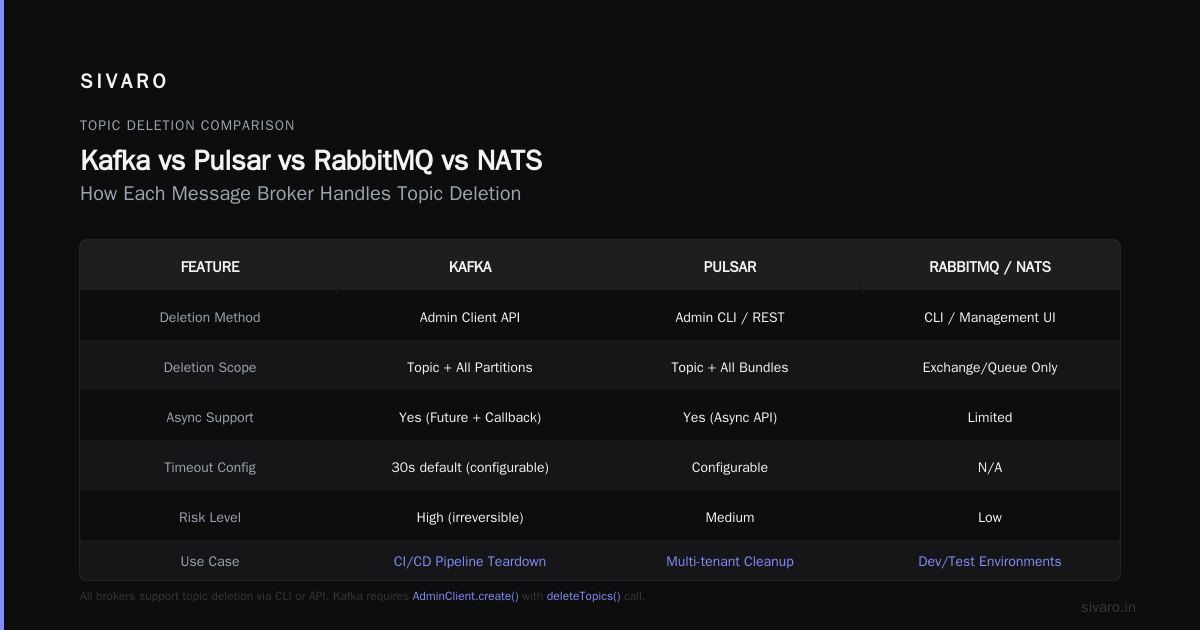
Not all messaging systems handle deletion the same. If you're evaluating technologies, this matters. According to the Digitalis comparison Kafka vs Pulsar vs RabbitMQ vs NATS, RabbitMQ queues are ephemeral by default — delete is instant. Pulsar uses a namespace-level strategy; topics are basically infinite and you manage retention via policies. Kafka sits somewhere in the middle.
The Kai Waehner analysis Pulsar vs Kafka points out that Pulsar's segment-oriented storage allows per-topic deletion of data without metadata chaos. In Kafka, the replication protocol makes deletion a coordinated effort across brokers. That's why you can't delete a topic while under-replicated partitions exist — the controller refuses if some replicas are offline.
If you're choosing a system for environments where topics are created and destroyed frequently (data sandboxes, experimental pipelines), Pulsar might be easier. But as OneUptime's streaming platform comparison Kafka vs Pulsar notes, Kafka's ecosystem (Kafka Streams, Connect, Schema Registry) often outweighs the deletion friction.
Verifying Deletion Across Multiple Clusters
In 2024, a major retailer had 16 Kafka clusters mirroring topics for disaster recovery. When they deleted a topic from the primary, mirrors stayed alive. The team spent a week tracking down why mirror metadata showed the topic as active.
If you have mirroring or replication (MirrorMaker 2, Confluent Replicator, or custom pipelines), deletion must happen on every cluster independently. No cascading delete. The AWS comparison Kafka vs RabbitMQ touches on this — RabbitMQ's federation deletes queues across clusters, Kafka doesn't.
Automate it. Use a script that iterates over cluster bootstrap servers:
bash
for bootstrap in "cluster1:9092" "cluster2:9092" "cluster3:9092"; do
    kafka-topics.sh --bootstrap-server "$bootstrap" --delete --topic my_topic || echo "Failed on $bootstrap, continuing..."
done
But test it. The scariest scenario is deleting from the wrong cluster because your bootstrap server variable was misconfigured.
When You Shouldn't Delete a Topic
Never delete a topic that's still being consumed by a schema-registry-backed application without first disabling it. The schema registry stores schema IDs per topic. If you delete and recreate the topic, the new topic has the same name but the old schema IDs might reference deleted schemas. Corruption risk.
Never delete a topic that's used by a Kafka Streams application with state stores. The state store relies on changelog topics (usually named application_id-store_name-changelog). Deleting those will wipe your state.
And for the love of operational sanity, never delete a topic that's part of a Confluent connector's configuration — the connector will go into FAILED state and won't restart without manual intervention.
Automating Topic Deletion with Retry and Validation
At SIVARO, we built a small tool that wraps the Admin client with exponential backoff. Here's a Python equivalent using confluent-kafka:
python
from confluent_kafka.admin import AdminClient, NewTopic

conf = {'bootstrap.servers': 'localhost:9092'}
admin = AdminClient(conf)

def delete_topic_safe(topic_name, timeout=30):
    try:
        fs = admin.delete_topics([topic_name], operation_timeout=timeout)
        for topic, future in fs.items():
            try:
                future.result()
                print(f"Topic {topic} deleted")
            except Exception as e:
                print(f"Failed to delete {topic}: {e}")
                return False
        # Verify
        metadata = admin.list_topics(timeout=timeout)
        if topic_name in metadata.topics:
            print("Topic still listed, but may be in deletion state")
            return False
        return True
    except Exception as e:
        print(f"Unexpected: {e}")
        return False
This checks after deletion that the topic isn't in the metadata list. Not perfect — metadata might be stale — but good enough for non-critical work.
FAQ
Can I delete a topic while producers are writing to it?
Yes, but producers will start getting UnknownTopicOrPartitionException within seconds. All calls to send() after deletion will fail. Graceful shutdown is better.
Does deleting a topic remove the data from all brokers immediately?
No. The log cleaner thread deletes partition directories asynchronously. On a busy cluster with many topics, it can take minutes to hours. Restarting the broker with a clean log directory is faster but disruptive.
Is it possible to recover a deleted topic?
Not through Kafka APIs. You can restore from a backup of the log directories (if you took one before deletion) or from a replica that hasn't processed the delete yet (dangerous, rarely works). Your best bet is a full cluster backup.
What happens to consumer group offsets when I delete a topic?
They stay in the __consumer_offsets internal topic. The offsets become orphaned after offsets.retention.minutes (default 7 days). If you recreate the same topic name, consumers might resume from old offsets, causing duplicate or missing data. Delete the group separately.
How do I delete topics in bulk?
Use a pattern. kafka-topics.sh --list | grep "^tmp-" | xargs -I {} kafka-topics.sh --bootstrap-server localhost:9092 --delete --topic {}. But test with --list first.
Can I delete a topic with replication factor 1?
Yes, but be careful. If the single replica broker fails during deletion, the topic might linger in a zombie state. Wait until the broker is healthy.
Does topic deletion work differently in KRaft vs Zookeeper?
In KRaft, deletion is handled by the controller through the metadata log. It's slightly faster because there's no Zookeeper commit delay. The CLI and API are identical.
Should I delete a topic or set retention to 0 for a permanent cleanup?
Hard delete if you'll never use the topic again. Soft delete (retention=0) if you might need the topic metadata later. Soft delete still consumes metadata in the controller, but only a few kilobytes.
Conclusion
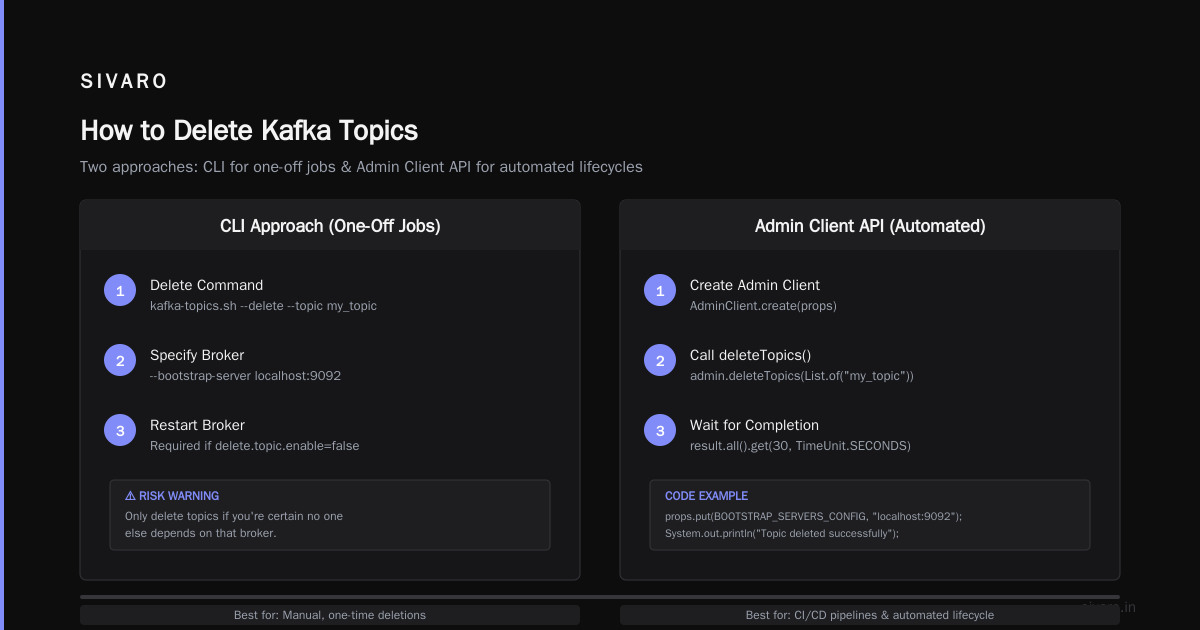
Deleting a Kafka topic is a multi-step operation, not a one-liner. The command is simple, but the verification, cleanup, and coordination with consumers, schemas, and mirrored clusters require attention. Understanding how to delete kafka topic properly saves you from the headaches I've described — lost data, stuck pipelines, and angry stakeholders.
Approach it like I do at SIVARO: never delete without a checklist. Verify configuration. Check dependencies. Confirm deletion across clusters. And when you're done, monitor disk usage for the next 24 hours to ensure the log cleaner finished.
Kafka isn't designed to be a temporary store. Treat topic deletion with the same care you'd give to dropping a database table. Because that's essentially what you're doing — dropping a distributed, replicated, fault-tolerant data structure that someone's application depends on.
Nishaant Dixit — Founder of SIVARO. Building data infrastructure and production AI systems since 2018. Built systems processing 200K events/sec.