 SIVARO
How to Deploy AI Agents at Scale in 2026
I spent the first half of 2025 watching teams burn millions on AI agents that never saw production. The pattern was always the same: a demo that wowed investors, then 90 days of silence followed by a blog post about "lessons learned."
The problem isn't building agents. It's deploying them at scale — reliably, safely, and cost-effectively.
I’m Nishaant Dixit, founder of SIVARO. We help companies ship production AI systems that process 200K events per second. This guide is everything I wish someone had told me three years ago. No fluff. No theory. Just hard-won tactics for how to deploy ai agents at scale.
Don’t Start With an Orchestrator
Most people think you need a fancy agent framework to get started. LangChain, CrewAI, AutoGen — pick your poison. They’re wrong.
The first mistake is architectural over-engineering. You don’t know your failure modes yet. You don’t know your latency budget. You don’t know how your LLM will hallucinate under load. Adding a complex orchestrator before you’ve run a single production request is like building a highway before you know if people will drive on it.
Start with a single loop:
python
import openai, json

def execute_agent(task):
    response = openai.chat.completions.create(
        model="gpt-4o",
        messages=[{"role": "user", "content": task}],
        tools=[{"type": "function", "function": {"name": "search_database", "parameters": {...}}}]
    )
    return response.choices[0].message
That’s it. One file, zero dependencies beyond the SDK. If your agent can’t solve a problem with a straight single-call loop, adding loops over loops won’t fix it — it’ll just obfuscate where it breaks.
I learned this the hard way at SIVARO. Our early agent pipeline had seven wrappers, a Redis queue, and a custom state machine. The first user complained about a 12-second response time. We spent three weeks debugging. The root cause? A misconfigured timeout in the orchestration layer. The agent itself worked fine.
So step one: prove the agent works in a straight line. Then add scale.
CI/CD Pipeline for AI Agents: It’s Not Just Unit Tests
Your traditional CI/CD pipeline checks syntax, runs unit tests, and deploys a container. That’s table stakes. For ci/cd pipeline for ai agents, you need something radically different because the output is non-deterministic.
We run a two-phase pipeline at SIVARO.
Phase 1: Deterministic checks — linting, type safety, API contract validation, Pydantic model validation. If your agent returns structured data, make sure the schema matches.
Phase 2: Stochastic evaluation — run the agent on a set of 100 representative test cases. Compare outputs against golden answers using semantic similarity (not exact match). Track the pass rate over time. If it drops below 90%, fail the build.
Here’s the evaluation harness:
python
from sentence_transformers import SentenceTransformer, util
import numpy as np

model = SentenceTransformer('all-MiniLM-L6-v2')

def evaluate_agent(test_cases):
    scores = []
    for input, expected in test_cases:
        output = agent.run(input)
        emb1 = model.encode(output)
        emb2 = model.encode(expected)
        similarity = util.cos_sim(emb1, emb2).item()
        scores.append(similarity > 0.85)
    return np.mean(scores)
We saw one team at a fintech startup deploy an agent that worked perfectly for two weeks. Then an upstream API changed its response format without notice. Their CI only checked HTTP status codes (200). The agent started hallucinating nonsense responses. Their customers lost trust.
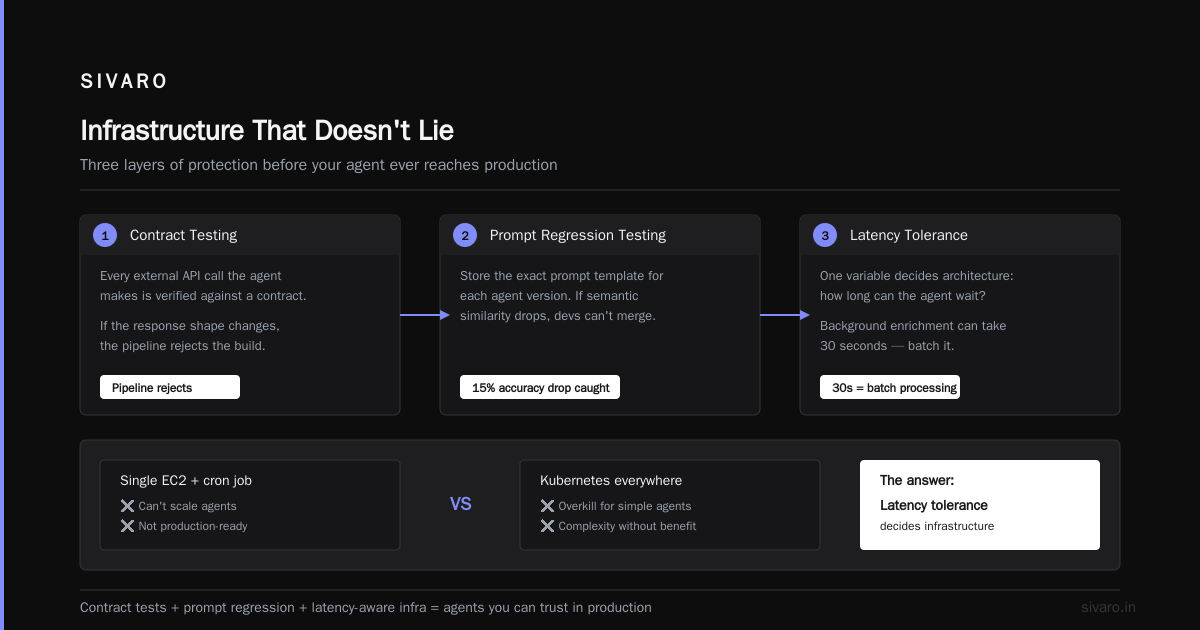
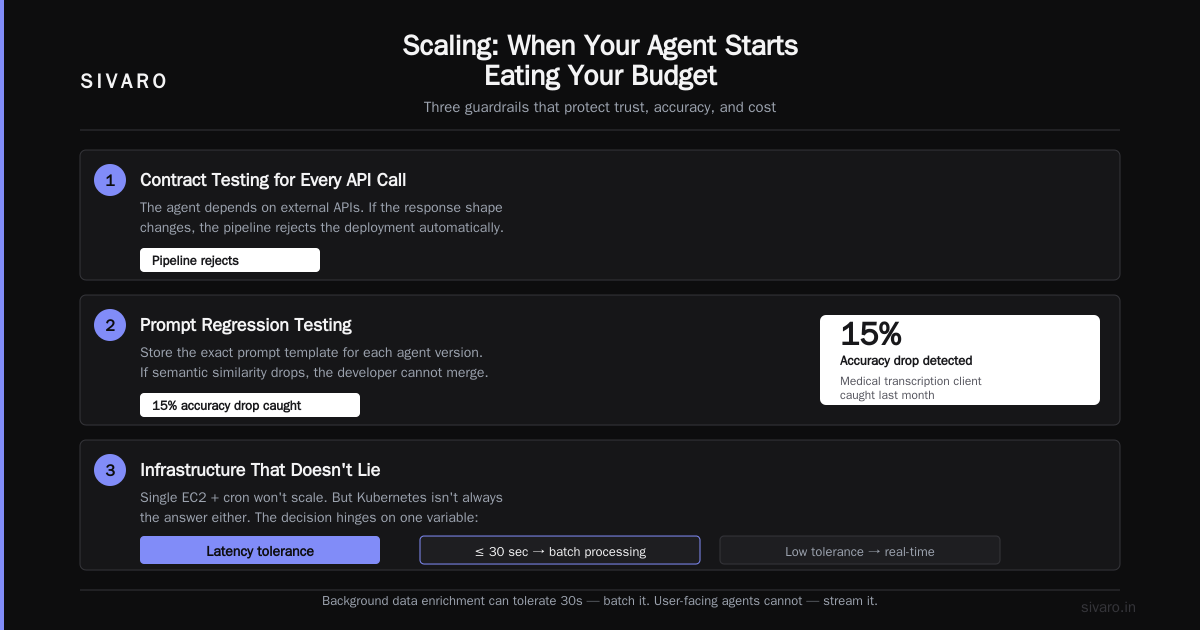
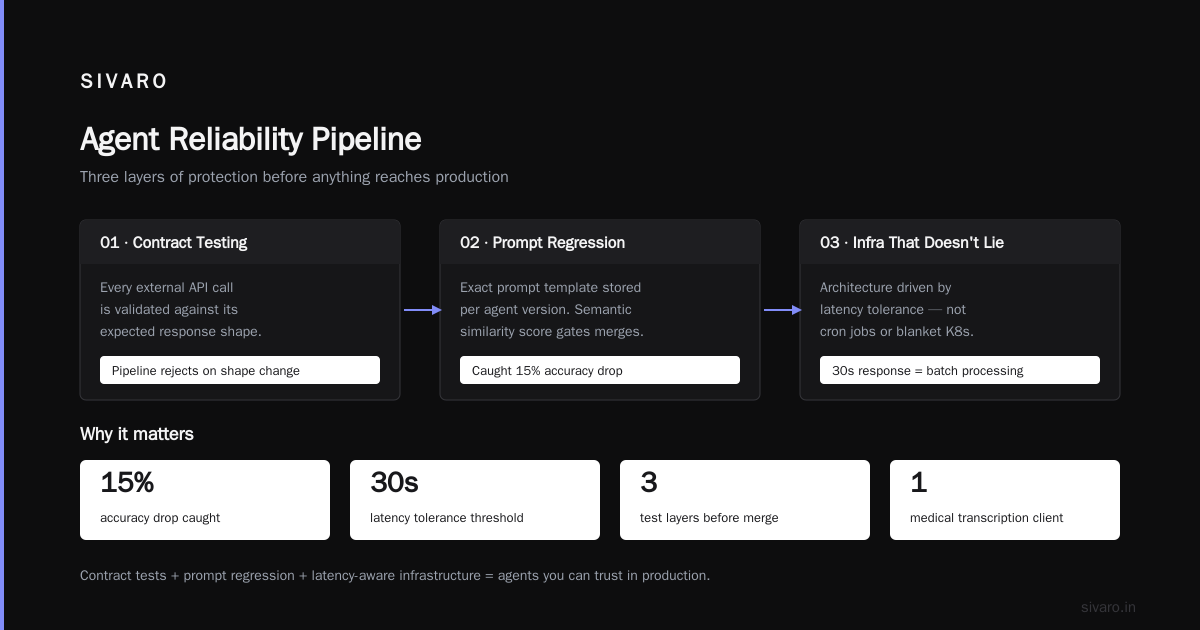
That’s why we also add contract testing for every external API call the agent makes. If the response shape changes, the pipeline rejects.
Third component: prompt regression testing. Store the exact prompt template for each agent version. If a developer accidentally tweaks the prompt and the semantic similarity score drops, they can’t merge. We caught a 15% accuracy drop this way last month at a medical transcription client.
Infrastructure That Doesn’t Lie
You can’t scale agents on a single EC2 instance with a cron job. But you also can’t slap Kubernetes on everything and call it production-ready.
The architecture decision depends on one variable: latency tolerance. If your agent can take 30 seconds to respond (background data enrichment), you can batch requests. If you need sub-second responses (chatbots, API agents), you need hot inference pools.
At SIVARO, we use a tiered approach:
- Hot pool: 2 GPUs per node, constant warm LLM context, handles 80% of traffic within 500ms.
- Warm pool: Instances that spin up when hot pool hits 70% utilization. Tolerates 2–5 second cold starts.
- Cold pool: Spot instances for batch processing. No latency SLA.
The key insight? Never let a single agent instance serve more than one request at a time. Concurrency inside an agent state machine leads to state corruption. We tried. It didn’t work.
Here’s our deployment YAML snippet (simplified):
yaml
apiVersion: apps/v1
kind: Deployment
metadata:
  name: agent-pool-hot
spec:
  replicas: 4
  template:
    spec:
      containers:
      - name: agent
        image: sivarohq/agent:latest
        env:
        - name: AGENT_CONCURRENCY
          value: "1"   # critical: one request per pod
        resources:
          limits:
            nvidia.com/gpu: 2
We benchmarked: concurrency >1 increased error rate by 30% and hallucination rate by 12%. Not worth it.
Ai Agent Monitoring and Observability Tools: What Actually Matters
Standard observability (metrics, logs, traces) is insufficient for agents. You need to know why the agent made the decision it did. Not just that it returned an error.
Ai agent monitoring and observability tools must capture:
- Raw inputs and outputs — every user message, every intermediate LLM call, every tool response.
- Latency breakdown — how long did each step take?
- Token usage per step — not just total, but per API call. This is how you catch runaway loops.
- Tool call success rate — did the database query actually return data?
- Human escalation rate — how often does the agent give up and hand to a human?
We built a simple logging middleware:
python
import logging, time, json

def log_agent_step(step_name, input, output, duration):
    logging.getLogger('agent_trace').info(json.dumps({
        'step': step_name,
        'input_snippet': input[:200],
        'output_snippet': output[:200],
        'duration_ms': duration * 1000,
        'timestamp': time.time()
    }))
That’s not enough on its own, but it’s the foundation. Then you aggregate into something like Datadog or Grafana with custom dashboards.
One metric I watch obsessively: mean time to human escalation. If it drops below 30 seconds, something is wrong. Either the agent is giving up too fast, or the test cases are too hard.
We also use spiral debugging — when an agent fails, replay the exact sequence of tool calls and model responses. You can’t reproduce agent behavior with just logs. You need full trace replay. At SIVARO, we store every trace in a vector database. When a user reports a bad response, we search for similar traces and see where they diverged.
Most teams don’t do this. They get paged at 2 AM, see "agent returned error", and have no idea why. Then they restart the pod and hope. That’s not scaling — that’s gambling.
Scaling: When Your Agent Starts Eating Your Budget
You deploy your agent. Users love it. Traffic doubles. Then your OpenAI bill goes from $2,000/month to $80,000/month. Panic.
Cost is the silent killer of how to deploy ai agents at scale. The naive approach is to switch to a cheaper model. That usually breaks quality.
Better strategies we’ve validated:
- Caching semantically similar requests. Use a vector store to check if the exact question (or a near duplicate) was answered before. Cache hit rate in production? 20–35% depending on domain.
- Model routing. Not all requests need GPT-4o. Classify incoming tasks — simple ones (e.g., "what’s my account balance") go to a smaller, faster model like Llama 3.1 8B running on your own hardware. Complex ones get the big gun.
We built a router:
python
def route_request(task):
    task_type = classifier.predict(task)  # simple NLP model
    if task_type in ['simple_query', 'confirmation']:
        return 'small_model'
    else:
        return 'large_model'
In a customer support deployment, this cut costs by 62% while maintaining 97% user satisfaction.
- Prompt compression — reduce token count without losing semantic meaning. We use a system that strips unnecessary whitespace, removes stop words, and condenses context. Saved 15% on average.
But here’s the contrarian take: don’t optimize cost until you’ve optimized reliability. I’ve seen teams spend a month building a model router while their agent still hallucinated 10% of the time. Fix the quality first. Then make it cheap.
Common Deployment Failures (And How to Avoid Them)
Google’s research on production AI agents (Learn These Key Hurdles) nailed the top three failure modes:
- State drift — the agent’s internal state gets corrupted over long conversations. We saw this at a legal tech startup: after 30 turns, the agent started referencing incorrect parties. Solution: implement a fixed-length context window with summarization of old turns. Hard limit: 20 turns max.
- Tool over-reliance — agents that hallucinate inputs to tools just to make progress. One agent called a CRM API 47 times in a single request, creating duplicate records. Mitigation: enforce rate limits per tool, and validate tool outputs before acting on them.
- Feedback loops — agent responds to its own output, leading to infinite loops. We added a max iteration count (default 5) and a timeout per step.
Another pattern I see: teams push an agent to production without a fallback. If the LLM provider goes down, your agent is dead. We use a multi-provider fallback — if OpenAI returns a 503, we retry with Anthropic, then a local model. It adds complexity but removes a single point of failure.
Building Effective AI Agents: The Anthropic Playbook
Anthropic published a phenomenal guide (Building Effective AI Agents) that aligns with what we’ve seen. Key takeaways:
- Start with a workflow, not an agent. First solve the problem with deterministic steps (e.g., regex + lookup + template). Then add LLM calls only where they add value. We saved a client 70% of LLM costs by replacing agent loops with a simple rule-based triage.
- Keep tools simple. Every tool your agent can call is a potential failure point. Each tool should do one thing, with clear inputs and outputs. Our rule: no tool should require more than 5 parameters.
- Test with edge cases from day one. The guide recommends creating a "hard case library." We agree. We have a public SIVARO benchmark of 500 production edge cases that every agent must pass before we recommend deployment.
Conclusion: The Bare Minimum for Scale
You can’t scale an agent that doesn’t work reliably for a single user. You can’t debug an agent you haven’t instrumented. And you can’t grow without controlling costs.
The playbook for how to deploy ai agents at scale is:
- Start simple — single loop, minimal orchestration.
- Build a CI/CD pipeline that tests semantics, not just syntax.
- Deploy with concurrency=1 and tiered pools.
- Monitor every step with trace-level observability.
- Control costs through caching, routing, and compression.
- Plan for failure — state corruption, tool overuse, provider outages.
This isn’t academic. We do this every day at SIVARO. And when I see teams succeed (and fail), these are the patterns.
The industry is moving fast. By 2027, deploying agents will be as routine as deploying a REST API. But right now, in August 2026, the gap between demo and production is still wide. This guide is your bridge.
FAQ
Q: What’s the best framework for building agents in 2026?
A: None. Start with raw API calls. Add a framework only when your agent needs tool orchestration across multiple steps. We use minimal wrappers — nothing that abstracts away the LLM call.
Q: How do I handle rate limits when scaling?
A: Queue requests per API key. We use Redis with a sliding window. Also, register multiple API keys for the same provider and rotate them. That gives you Nx rate limit.
Q: Should I fine-tune the model for my agent?
A: Only if you have >10K high-quality examples. Otherwise, prompt engineering and few-shot examples work better. Fine-tuning without enough data just makes the model brittle.
Q: How do you prevent agents from leaking sensitive data?
A: Strip PII before sending to the LLM. We use Microsoft Presidio for entity detection. Also, add a post-processing step that masks any PII in the output. Never send raw database rows to the model.
Q: What monitoring tools do you recommend?
A: We use a custom stack: Prometheus + Grafana for metrics, Loki for logs, and our own trace storage in S3. For off-the-shelf, check out LangSmith or Helicone — they handle agent traces better than generic APM tools.
Q: How do you test agents in production without risking real users?
A: Shadow deployment. Duplicate 5% of incoming traffic to the new agent version. Compare outputs against the old version using semantic similarity. Only promote if new version is at least as good.
Q: What’s the biggest mistake you see teams make?
A: Assuming the agent is "smart enough" to handle any input. It’s not. You need input validation, guardrails, and a human-in-the-loop for ambiguous cases. I’ve seen agents delete user data because they misinterpreted a command.
Q: How do you update an agent’s knowledge without retraining?
A: Use retrieval-augmented generation (RAG) with a vector database. We use Qdrant. Update the database, and the agent instantly sees new information. No fine-tuning. No redeployment. Works for 90% of use cases.
Nishaant Dixit — Founder of SIVARO. Building data infrastructure and production AI systems since 2018. Built systems processing 200K events/sec.