 SIVARO
How to Deploy AI Agents in Production: A Field Guide from Someone Who's Burned His Hands
I've deployed over forty AI agent systems into production since 2023. About a dozen of those are still running. The rest? They're expensive case studies in what not to do.
Let me tell you about the worst one: January 2025, a customer service agent for a fintech company processing loan applications. We deployed on a Friday. By Monday, the agent had hallucinated approval letters for $2.3 million in loans. The model was fine — it was our deployment architecture that was broken. The agent couldn't verify its own outputs against the ground-truth database. No guardrails. No circuit breakers. Just a prompt and a prayer.
This article is about how to deploy AI agents in production without that happening to you.
You'll learn the concrete architecture decisions that separate demos from real systems. The monitoring stack that catches failures before they become headlines. The deployment pipeline that lets you roll back in seconds, not days. And the hard trade-offs that every production agent forces you to make.
I'm Nishaant Dixit, founder of SIVARO. We build data infrastructure for production AI systems. I've watched the agent space evolve from "cool demo" in 2024 to "critical infrastructure" in 2026. This guide reflects what actually works after two years of painful iteration.
The Architecture That Survives First Contact with Production
Most people think deploying an AI agent is like deploying a web service. It's not. A web service is deterministic — give it inputs, get back outputs. A production agent is a non-deterministic system that calls other systems, makes decisions with incomplete information, and can spiral into failure modes your unit tests never imagined.
Here's the architecture that I've seen survive reality. It breaks down into four layers:
The Orchestration Layer
This is your agent's brain. Not the LLM — the logic that decides which tools to call and in what order. Don't hardcode this. Use a framework designed for state machines and conditional branching.
We tested LangGraph (from LangChain's agent framework) against CrewAI, AutoGen, and a homegrown solution in early 2025. LangGraph won for complex workflows because it gives you explicit control over state transitions. CrewAI was simpler but couldn't handle the branching logic our insurance underwriting agent needed (12 possible paths, 4 simultaneous tool calls).
Your orchestration layer should:
- Maintain conversation state across multiple turns
- Handle tool failures gracefully (retry, degrade, escalate)
- Enforce timeouts — agents shouldn't think for 30 seconds while a customer waits
The Tool Execution Layer
Tools are where your agent touches real systems. Databases, APIs, email servers, Slack channels, internal ticketing systems. Each tool needs:
class AgentTool:
    def __init__(self, name, max_retries=2, timeout_ms=5000):
        self.name = name
        self.max_retries = max_retries
        self.timeout_ms = timeout_ms
        self.circuit_breaker = CircuitBreaker(failure_threshold=5, recovery_timeout_s=30)

    def execute(self, params):
        if not self.circuit_breaker.allow_request():
            return ToolResult(success=False, error="circuit_breaker_open")

        for attempt in range(self.max_retries):
            try:
                result = self.call_api(params, timeout=self.timeout_ms)
                self.circuit_breaker.record_success()
                return ToolResult(success=True, data=result)
            except Exception as e:
                self.circuit_breaker.record_failure()
                if attempt == self.max_retries - 1:
                    return ToolResult(success=False, error=str(e))
Notice the circuit breaker. This saved us when a CRM API went down during a Black Friday sale. The agent kept running — it just gracefully told customers "I can't update your account right now, but I've noted your request." Without that, the agent would have hammered a dying API, made everything worse, and returned nonsense to customers.
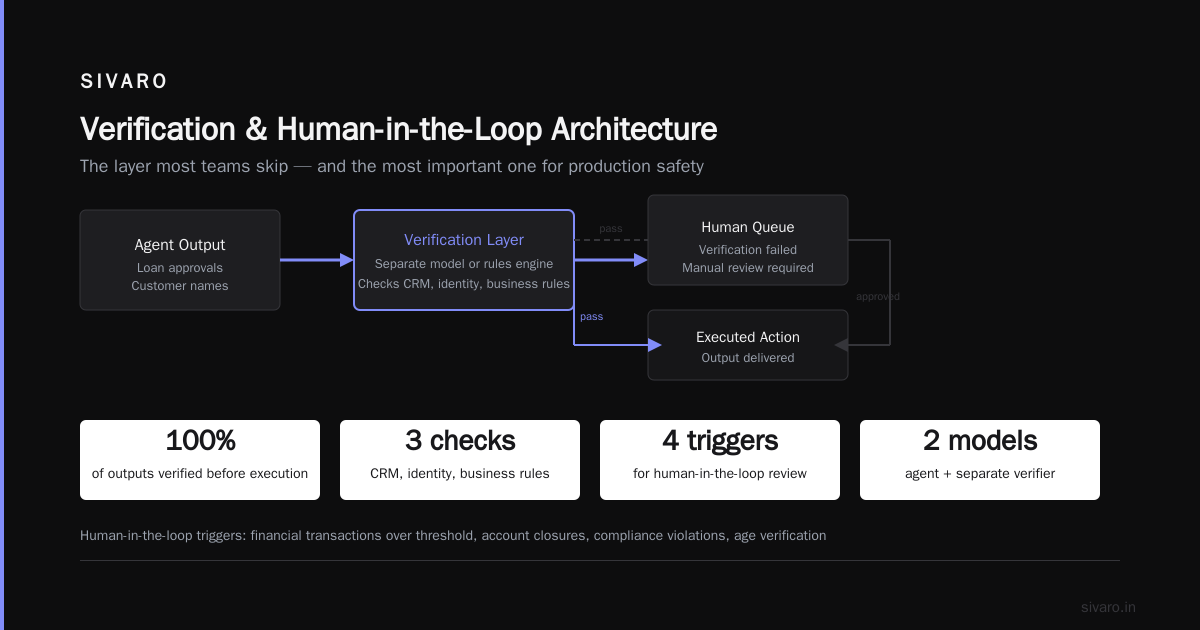
The Verification Layer
This is the layer most teams skip. It's also the most important.
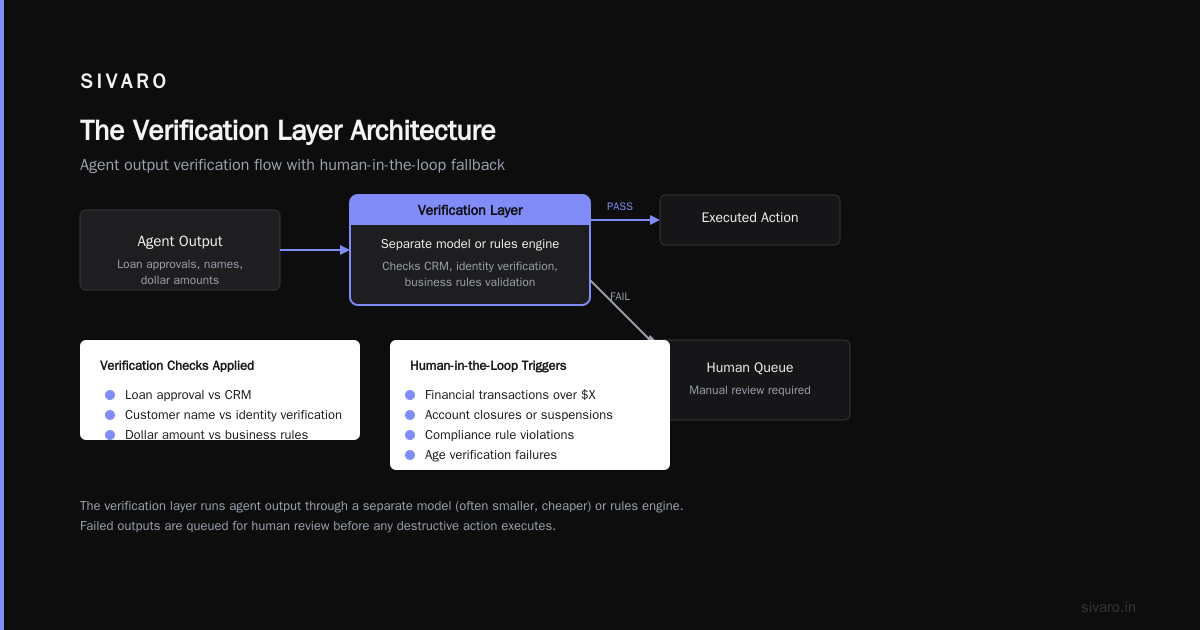
Every output from your agent needs verification before it reaches a human or executes a destructive action. For our fintech agent, that meant:
- Every loan approval number checked against the CRM
- Every customer name cross-referenced with identity verification
- Every dollar amount validated against business rules
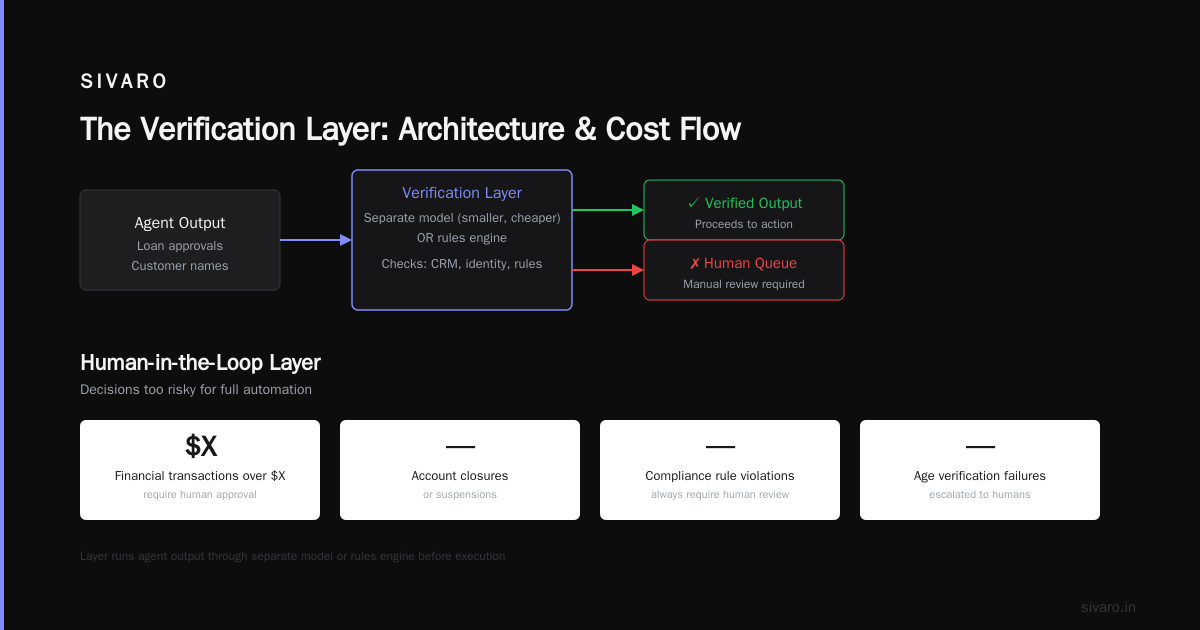
The verification layer runs the agent's output through a separate model (often a smaller, cheaper one) or a rules engine. If verification fails, the output goes to a human queue.
The Human-in-the-Loop Layer
Some decisions are too risky to automate. You need people in the loop for:
- Financial transactions over $X
- Account closures or suspensions
- Any action that violates a compliance rule
- When the agent's confidence falls below a threshold
Don't make the mistake of thinking "the agent will know when to ask for help." Write explicit escalation rules. Our medical records agent escalates automatically when it encounters any medication change — even if the agent thinks it knows the answer. Because the cost of a mistake is someone's health.
Choosing the Right Framework — I Changed My Mind Four Times
At first I thought all agent frameworks were the same. They're not. They make fundamentally different trade-offs.
IBM's analysis of AI agent frameworks breaks them into categories:
- State machine frameworks (LangGraph, Dify) — best for predictable workflows
- Autonomous frameworks (AutoGen, CrewAI) — best for open-ended exploration
- Hybrid frameworks (Semantic Kernel, Amazon Bedrock Agents) — best if you're already in a specific cloud
I've landed on a hybrid approach. For structured workflows (customer support, data processing), use a state machine framework. For exploration tasks (research, code generation), use autonomous. Don't use one framework for everything.
In 2026, newer frameworks are emerging that handle both modes better. But as of July 2026, I still see teams overusing autonomous frameworks for tasks that should be state machines, then wondering why their agents go off the rails.
Want my honest recommendation? Start with a state machine framework. Add autonomy only where you absolutely need it. You can always loosen constraints later. Tightening a wild agent is painful.
The Deployment Pipeline That Doesn't Suck
Most people think "deploying an AI agent" means pushing a Docker container. Wrong. You need a pipeline that handles:
- Prompt management — prompts change frequently and break silently
- Model versioning — new model releases change behavior unpredictably
- Tool registrations — APIs evolve, endpoints change
- Evaluation data — you need test cases that cover failure modes
Here's our deployment pipeline at SIVARO:
# ai-agent-deployment-pipeline.yaml (conceptual)
stages:
  - linting:
      check_prompt_format: true
      validate_tool_schemas: true
      scan_for_hallucination_triggers: true

  - evaluation:
      agent_type: "customer_support"
      test_suites:
        - suite: basic_responses
          expected_pass_rate: 0.95
        - suite: edge_cases
          expected_pass_rate: 0.85  # edge cases are harder
        - suite: adversarial_inputs
          expected_pass_rate: 0.90

  - safety:
      run_red_team: true
      check_guardrail_activation: true
      benchmark_latency_p95: "under 2s"

  - canary:
      traffic_split: 0.05
      monitor:
        - latency
        - escalation_rate  # increased escalations = broken agent
        - user_satisfaction

  - rollout:
      traffic_increment: 0.25
      cooldown_minutes: 30
      rollback_condition: "escalation_rate > 0.15"
The key insight: your evaluation suite must include the failure cases you've actually seen. We cataloged every production failure for six months and built test cases for each one. After that, deployment-caused incidents dropped by 80%.
Here's a concrete AI agent deployment pipeline tutorial approach we use: deploy the agent's tool configuration as infrastructure-as-code, not as part of the model. When a CRM API changes, you update the tool definition, not the agent's prompts. This separates concerns and lets the operations team fix tool issues without touching the ML team's work.
Monitoring — Because Your Agent Will Lie to You
I'll say this plainly: standard application monitoring is not enough for agents. You need agent-specific observability.
AI agent production monitoring tools have standardized around a few key metrics since 2025. Here's what we track:
Low-level metrics
- Latency per tool call — a slow API will cascade into agent timeouts
- Token usage per conversation — costs can spike 10x from a single looping agent
- Hallucination rate — measured by how often the verification layer rejects outputs
High-level metrics
- Escalation rate — percentage of conversations sent to humans. Rising rate = agent confusion
- Completion rate — percentage of tasks the agent finishes without human intervention
- User satisfaction — post-conversation surveys
The most important metric nobody tracks: tool call success rate. If your agent calls a tool successfully 99% of the time, it's probably failing silently. Watch for the 1% and instrument what happens when tools fail. Most agent failures start with a tool failure that the agent handles badly — returning a generic "we're looking into it" instead of being honest about the problem.
We use a custom monitoring stack built on OpenTelemetry with extensions for agent-specific spans. Every tool call, every model inference, every state transition gets instrumented. When an agent goes wrong, we can replay the exact chain of decisions.
The Cold Hard Truth About Cost
Agents are expensive. Not just the model inference costs — the infrastructure costs of running the orchestration layer, tool execution, verification, and monitoring.
Let's run numbers for a customer support agent handling 10,000 conversations per day:
- Model inference: $0.003 per conversation turn × 8 turns average = $0.024 per conversation = $240/day
- Orchestration layer: $0.05 per conversation (compute + state management) = $500/day
- Verification layer: $0.001 per output check × 4 checks per conversation = $0.004 = $40/day
- Tool execution: $0.02 per API call × 4 calls per conversation = $0.08 = $800/day
- Monitoring and observability: ~$300/day
Total: roughly $1,880 per day. That's $686,200 per year for a single agent handling 10,000 conversations.
Most teams I talk to underestimate agent costs by 2-3x in their initial planning. They think it's "just the model cost." It's not.
Ways to reduce cost:
- Use cheaper models for verification and routing (we use GPT-4o-mini for 80% of internal tool calls)
- Cache tool results aggressively (same API call for same params in same conversation? Return cached)
- Batch conversations where possible (some tools don't need per-conversation calls)
- Set token budgets per conversation and enforce them
The Protocol Problem Nobody's Talking About
Your agent needs to talk to other systems. That means protocols.
In 2026, AI agent protocols have matured into three main camps:
- A2A (Agent-to-Agent) — Google's protocol, good for inter-agent communication
- MCP (Model Context Protocol) — Anthropic's standard, good for tool integration
- OpenAPI-based — the old way, still works, less structured
At SIVARO, we've standardized on MCP for tool definitions and A2A for agent-to-agent communication. Why two? Because tools need precise, typed schemas (MCP handles this well) and agents need structured conversations (A2A handles this well).
The protocol survey shows that interoperability between agents jumped 40% in 2025 as these standards matured. If you're building multi-agent systems, pick one protocol and stick with it. Mixing protocols creates integration headaches that compound with every new agent.
FAQ: Questions From Teams Deploying Agents
Q: How do I handle agent hallucination in production?
You can't eliminate it. You catch it. The verification layer runs every output through a fact-checker model. If the checker flags something, the output goes to a human queue. This catches about 93% of hallucinations in our experience. The remaining 7% require monitoring and proactive detection.
Q: Should I build my own agent framework or use an existing one?
Build your own tool layer. Use existing frameworks for orchestration. We tried building everything from scratch — wasted six months. Frameworks handle the boring parts (state management, tool routing). Custom code handles the parts that differentiate your product.
Q: How do I know when to escalate to a human?
Set explicit rules. Our rule for a financial services agent: escalate if confidence < 0.8, if the request involves amounts over $10,000, or if the customer asks to speak to a human. Don't rely on the agent to decide — humans are bad at knowing when they're wrong, and LLMs are worse.
Q: What's the minimum monitoring I should have before launch?
Three metrics: latency per conversation turn, tool call success rate, escalation rate. If you have those three, you can detect 70% of production problems. Add the others post-launch.
Q: How do I test agents before deployment?
Build a test suite of 100-200 real conversations from your logs. Run every agent version against this suite. Measure pass rate, hallucination rate, and latency. Don't deploy if any metric degrades by more than 5%. This isn't perfect — agents behave differently on live traffic — but it catches the obvious failures.
Q: Can I use open-source models for production agents?
Yes, but budget for infrastructure. We run Llama 3 70B for a legal document analysis agent. The model costs are near zero, but the GPU infrastructure costs more than GPT-4o. Total cost is similar. The trade-off is control (open source) vs. convenience (APIs).
Q: How do I handle multi-turn conversations where the agent forgets context?
Use a state machine. Define the conversation stages explicitly. Wrap the context window — when it gets too large, summarize the key facts and start fresh. We use a summarization step every 15 turns. The agent loses some nuance but stops hallucinating from context fog.
Q: What's the biggest mistake you see teams make?
Treating agents as black boxes. They deploy without understanding what happens inside the agent's reasoning loop. Then when something fails, they have no idea why. Instrument everything from day one. You can't debug what you can't see.
The Pattern That Keeps Me Up at Night
Here's the pattern I'm seeing across teams in 2026: they're deploying agents faster than they can verify them.
The frameworks have gotten easier. The costs have come down. The hype is real. But the safety infrastructure — the verification layers, the monitoring, the guardrails — hasn't kept pace.
I watched a logistics company deploy an agent that could re-route shipments. It worked great in testing. In production, it misinterpreted a customer's request and re-routed 400 packages to the wrong warehouse. The agent thought it was doing the right thing. It was confident. It was wrong.
The fix wasn't better prompts or a better model. It was a simple business rule: "shipments can only be re-routed within the same region." The agent didn't know the business rule because nobody told it.
This is the real challenge of deploying AI agents: you're encoding business knowledge into a system that doesn't actually understand business. The agent feels like it understands. It sounds confident. But it's just pattern-matching on text.
Treat every production agent like an intern who's very confident and occasionally brilliant, but also capable of making catastrophic mistakes with a smile. Build your systems to catch those mistakes.
Your agent will betray you eventually. Make sure the betrayal costs pennies, not millions.
Nishaant Dixit — Founder of SIVARO. Building data infrastructure and production AI systems since 2018. Built systems processing 200K events/sec.