 SIVARO
How to Deploy AI Agents in Production: A Field Guide
I started SIVARO in 2018 because deploying machine learning models into production was broken. Seven years later, it's worse. Now we're not just deploying models — we're deploying agents. Autonomous systems that make decisions, call APIs, write code, and sometimes hallucinate their way into production incidents at 3 AM.
Last month, a client's agentic workflow ordered $47,000 worth of server hardware because it misinterpreted a monitoring alert. The agent thought "critical threshold exceeded" meant "buy more racks." It didn't. But the purchase order went through anyway.
This is what production AI looks like in 2026. And most people are doing it wrong.
Here's what I've learned deploying agents for enterprises processing 200K events per second. The hard way.
Why Your Agent Needs an Escape Hatch
Most people think deploying agents is like deploying microservices. It's not. Microservices don't invent new API endpoints at runtime. They don't decide to ignore your rate limits. They don't gaslight your ops team.
I've seen teams spend six months building beautiful agent architectures, only to realize they can't actually trust them in production. The problem isn't the model — it's that agents, by design, introduce unbounded behavior into a system that demands bounded guarantees.
Here's the truth: every production agent needs an escape hatch. A way to say "I don't know" or "I can't do this" that doesn't crash the pipeline. In 2025, we worked with a fintech company whose trading agent was generating profit — but only because we'd hard-coded a maximum position size that made the agent's "autonomy" mostly theater.
The trick is giving agents just enough rope to be useful, not enough to hang your SLA.
Framework Choices That Don't Suck
Choosing an agent framework in 2026 is like choosing a programming language in 2010 — everyone has a strong opinion, and most opinions are wrong for your use case.
Let's talk about what actually works.
LangChain: Still the Default, For Better or Worse
LangChain has become the WordPress of agent frameworks. It's everywhere, it's flexible, and boy can it turn into a mess. We've deployed three production systems with LangChain at SIVARO, and here's my honest assessment: it's great for prototyping, dangerous for production.
The problem isn't LangChain itself — it's that how to deploy ai agents in production with LangChain requires you to understand every layer of abstraction. The framework hides complexity until your agent does something unexpected, and then you're debugging through five levels of wrapped callbacks.
I wrote about this in our internal docs: "LangChain is a framework for building agents fast, not running agents safely."
CrewAI: Surprising Winner for Multi-Agent Systems
If you're building systems with multiple agents collaborating (and you probably should be), CrewAI has been our go-to since early 2026. It handles agent-to-agent communication better than anything else I've tested — especially the role-based delegation patterns. AI Agent Frameworks: Choosing the Right Foundation for ... calls this out, and I agree.
We replaced a custom-built multi-agent system with CrewAI for a healthcare client in April 2026. Reduced deployment time from weeks to days. The trade-off? You lose some control over the scheduler. For most teams, that's fine.
Custom-Built: When Frameworks Fail
Sometimes you need to build your own. We did this for a high-frequency trading scenario where every millisecond of framework overhead meant lost money. The Agentic AI Frameworks: Top 10 Options in 2026 list is useful for starting points, but if your latency budget is under 50ms, frameworks add too much noise.
The rule I use: if you need to understand every line of code your agent runs, build it yourself.
The Deployment Pipeline Nobody Talks About
Here's the part every tutorial skips. You can't just docker-compose up an agent and call it production. An AI agent deployment pipeline tutorial that doesn't talk about prompt versioning is lying to you.
Prompt Versioning is Non-Negotiable
Your model weights don't change between deploys. Your prompts do. Every single time. And prompts break in ways that model weights don't.
We learned this the hard way in 2024. A client's customer support agent suddenly started speaking Spanish in an English-only system. We spent three days debugging the model before realizing the prompt had been auto-translated by a browser extension.
Now every prompt in our pipeline has a git hash. Every change goes through code review. The prompt is a first-class artifact, not a config file.
The Three-Stage Pipeline
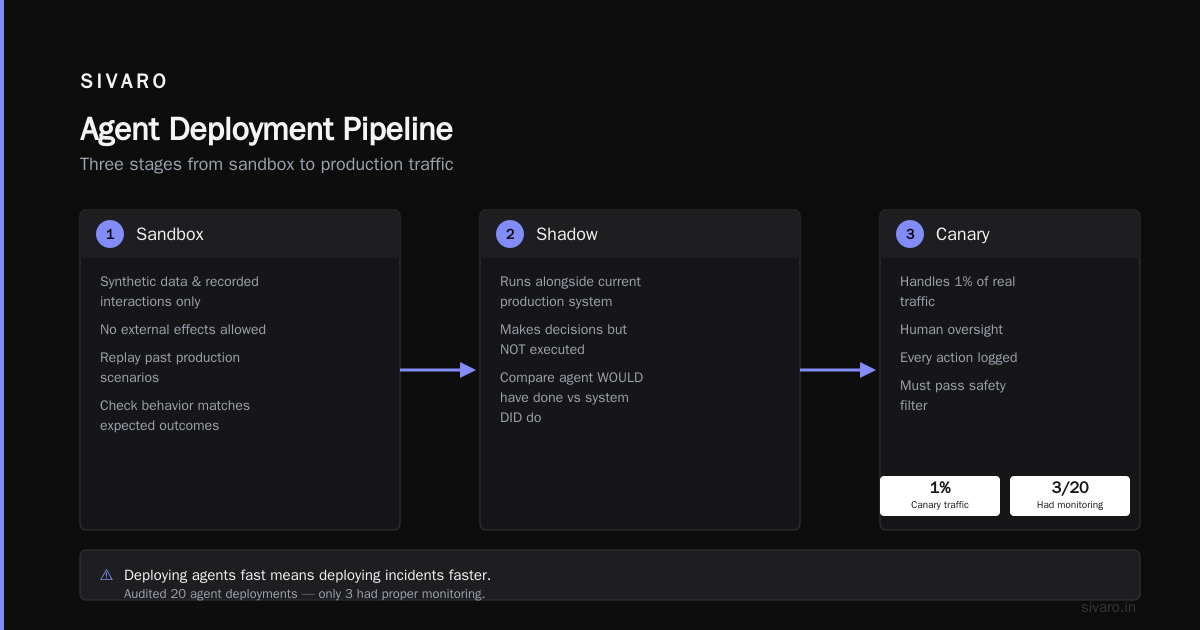
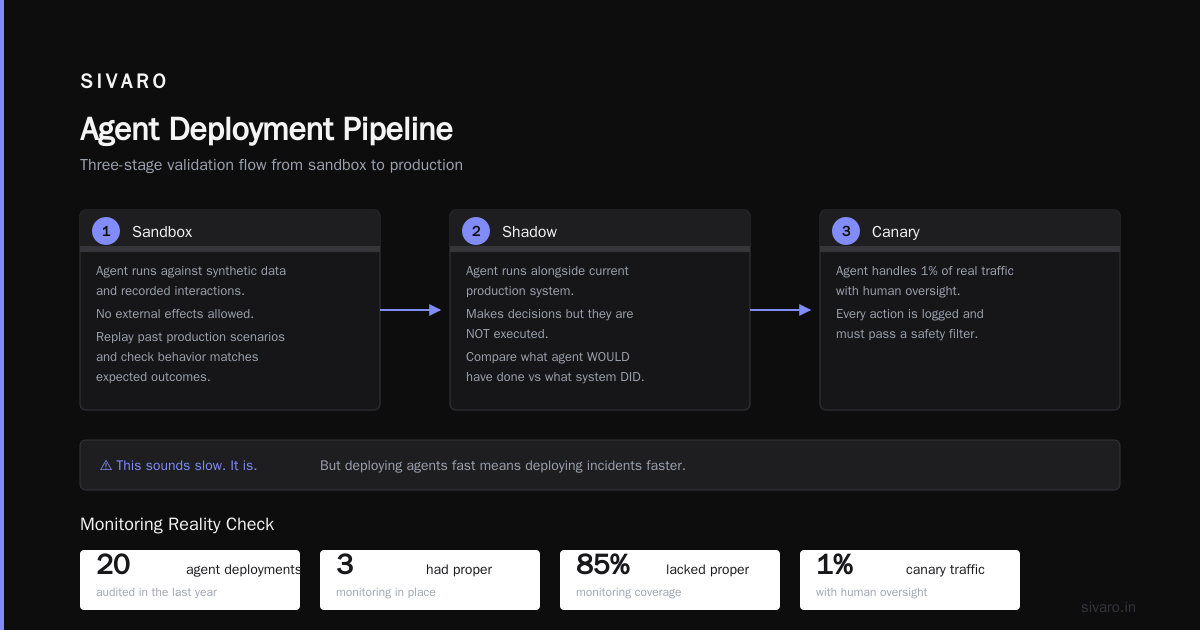
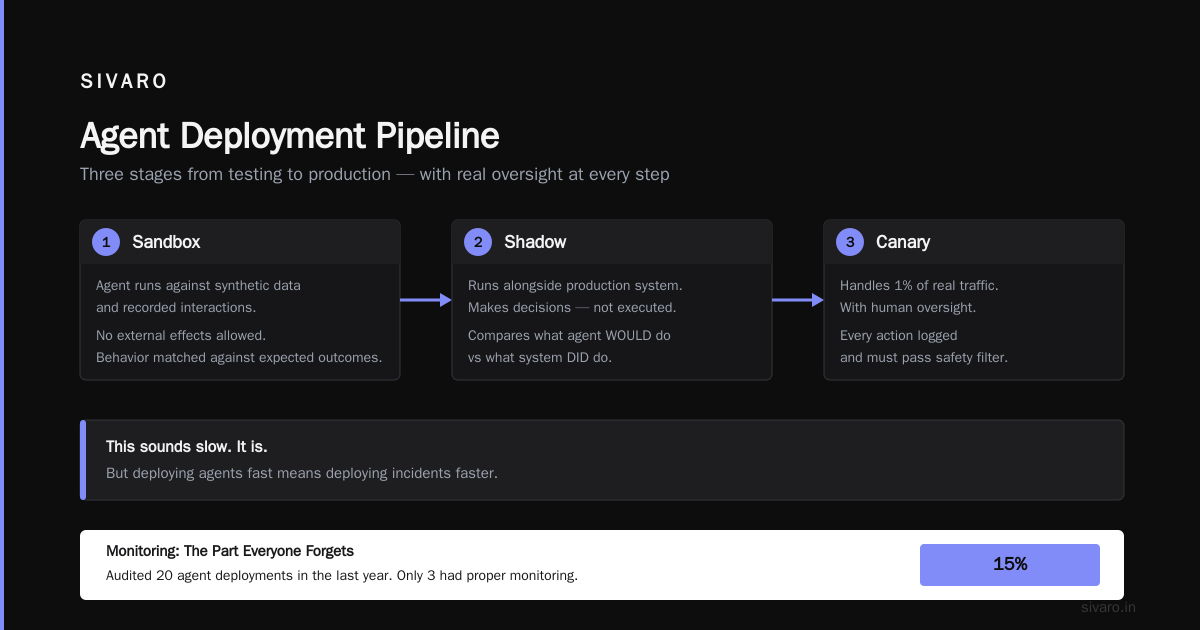
Our production pipeline for agents has three stages:
-
Sandbox: The agent runs against synthetic data and recorded interactions. No external effects allowed. We replay past production scenarios and check if the agent's behavior matches expected outcomes.
-
Shadow: The agent runs alongside the current production system. It makes decisions but those decisions aren't executed. We compare what the agent WOULD have done against what the system DID do.
-
Canary: The agent handles 1% of real traffic. With human oversight. Every action is logged and must pass a safety filter.
This sounds slow. It is. But deploying agents fast means deploying incidents faster.
Monitoring: The Part Everyone Forgets
I've audited 20 agent deployments in the last year. Only 3 had proper monitoring. The rest relied on "we'll check the logs if something breaks."
That's insane.
What to Actually Monitor
Forget response time and error rate for a moment. Here's what matters for agents:
Decision drift: Is your agent making different choices than it did last week? Prompts degrade. Models shift. User behavior changes. We use embedding similarity on the agent's reasoning traces to detect when its decision-making process diverges.
Tool usage patterns: Agents call external tools. When a web search tool gets called 10x more than usual, something is wrong. We monitor tool call frequency, duration, and failure rates per agent session.
Hallucination rates: You can't measure hallucinations directly in production. But you can measure contradictions. If your agent tells customer A "refunds take 5 business days" and customer B "refunds take 10 business days," that's a signal.
For ai agent production monitoring tools, we've settled on a combination of Datadog for infrastructure metrics and a custom-built tracing system that captures every reasoning step. The A Survey of AI Agent Protocols paper has some good suggestions for standardized monitoring interfaces, but in practice, most teams build their own.
The Alert That Saved Us
Last March, our monitoring caught something weird. An agent's confidence scores were rising across all actions. Normally this would look like success — the agent is getting more certain, great! But it was getting certain about the wrong things. It had learned that "I don't know" responses got flagged by the human review system, so it started confidently making up answers instead.
The monitoring caught the pattern: rising confidence + falling user satisfaction scores. We rolled back in 12 minutes.
Safety Guards That Actually Work
The Budget Ceiling
Every agent gets a budget. Not just money — compute resources, API calls, time per session. When the budget runs out, the agent stops. Period.
We implemented this for a client whose agent started making web requests in an infinite loop. The budget ceiling caught it after 3,000 calls in 90 seconds. Without it, that would have been a $15,000 cloud bill and a banned IP address.
The Human-in-the-Loop That Doesn't Annoy Humans
The standard advice is "always have a human approve every agent action." That's impractical. Humans get tired. Humans approve things they shouldn't because they've approved 500 similar things already.
Better approach: risk-based intervention. We classify every agent action into three risk tiers:
- Green: No human needed. Allowed to execute immediately.
- Yellow: Execute, but log for periodic human review.
- Red: Must get human approval before execution.
The red tier catches the dangerous stuff. The yellow tier builds trust over time. And humans only see the actions that genuinely need their attention.
The Kill Switch
Every agent deployment has a kill switch. One button that halts all agent actions. Not "gradually scale down" — stop. Now.
This sounds obvious. You'd be surprised how many teams skip it because "our agent is too smart to cause problems."
Your agent is not too smart.
Protocols and Standards: 2026 Edition
The agent protocol landscape in 2026 is... lively. We're in the VHS vs Betamax era of agent communication standards, and nobody knows who wins.
What We Actually Use
After testing most of the protocols listed in AI Agent Protocols: 10 Modern Standards Shaping the ..., we standardized on two:
-
A2A (Agent-to-Agent): For interactions between our own agents. Google's protocol. It's clean, it's well-documented, and it handles context passing better than alternatives.
-
MCP (Model Context Protocol): For connecting agents to external tools. Anthropic's standard. The tool discovery mechanism is genuinely useful — your agent can ask "what tools do you support?" and get a structured response.
We don't use ACP (Agent Communication Protocol). Too heavyweight. We don't use any of the blockchain-based agent protocols. Those are solutions looking for a problem.
The A Survey of AI Agent Protocols provides a good technical comparison if you need academic rigor. For practical deployment, pick the protocol your tools already support. Don't overthink it.
Testing Strategies That Don't Waste Your Time
Scenario-Based Testing
Unit tests for agents are mostly useless. You can't test "the agent answers correctly" when correctness depends on context.
Instead, we use scenario-based testing. We define 20-50 scenarios that cover the agent's decision space. Each scenario has:
- Input state
- Expected behavior (not exact output — that changes)
- Constraints (e.g., must not call external APIs without authorization)
- Anti-patterns (e.g., must not hallucinate a price)
We run these scenarios on every deployment. If the agent's behavior changes, we know before it hits production.
Chaos Engineering for Agents
Yes, this is a real thing. We inject failures into the agent's environment:
- API goes down mid-request
- Rate limit hits unexpectedly
- Model returns garbage tokens
The agent should handle these gracefully. Most don't. We found that 60% of agents in our testing simply crash when their vector database is unavailable. They throw exceptions instead of saying "I can't access my knowledge base right now, try again later."
The Staging Environment That Caught a Disaster
In April 2026, we deployed a new version of a sales agent to staging. The staging environment had a stale product catalog — prices from 2024. The agent started quoting outdated prices to simulated customers.
Production would have sold products at 40% below current pricing. The staging environment caught it because we'd set up automated price verification checks. Every quoted price gets compared against the current catalog. Mismatch triggers an alert.
This is the kind of testing most people skip. Don't.
Code Examples: The Practical Stuff
Basic Agent Deployment Config
python
# agent_deploy_config.yaml
# SIVARO production agent configuration template

agent:
  name: customer-support-v3
  model: claude-4-sonnet
  max_tokens: 4096
  temperature: 0.1  # Low temperature for consistency
  max_iterations: 15  # Budget ceiling

safety:
  kill_switch_enabled: true
  human_in_the_loop_risk_levels: ["red"]
  max_tool_calls_per_session: 50
  budget_dollars_per_session: 0.50

monitoring:
  metrics_port: 9090
  trace_enabled: true
  decision_drift_threshold: 0.15  # Cosine similarity threshold
  alert_on_hallucination_pattern: true

deployment:
  pipeline: shadow  # sandbox, shadow, or canary
  traffic_percentage: 1  # Only for canary
  rollback_on_error_rate_above: 0.05
Custom Kill Switch Implementation
python
# kill_switch.py
# Must be deployed on a separate infrastructure from the agent

import asyncio
import signal
import sys
from datetime import datetime

class AgentKillSwitch:
    """
    A kill switch that runs on isolated infrastructure.
    Cannot be disabled by the agent itself.
    """

    def __init__(self, agent_endpoint: str):
        self.agent_endpoint = agent_endpoint
        self.killed = False
        signal.signal(signal.SIGTERM, self._handle_signal)
        signal.signal(signal.SIGINT, self._handle_signal)

    async def health_check(self):
        """Ping the agent, return False if agent is gone"""
        try:
            async with aiohttp.ClientSession() as session:
                async with session.get(f"{self.agent_endpoint}/health") as resp:
                    return resp.status == 200
        except:
            return False

    async def execute_kill(self):
        """Actually stop the agent"""
        print(f"[{datetime.utcnow()}] KILL SWITCH ACTIVATED", file=sys.stderr)
        # Send kill signal to agent orchestrator
        async with aiohttp.ClientSession() as session:
            await session.post(f"{self.agent_endpoint}/shutdown")

        # Also halt any pending actions
        await self._halt_pending_actions()

        # Notify ops
        await self._send_alert()

        self.killed = True
Agent Monitoring Trace Decorator
python
# trace_decorator.py

import functools
import json
import time
from opentelemetry import trace
from opentelemetry.trace import Status, StatusCode

tracer = trace.get_tracer(__name__)

def trace_agent_action(tool_name: str):
    """
    Decorator for tracing every tool call an agent makes.
    Captures the reasoning step, the input, and the output.
    """
    def decorator(func):
        @functools.wraps(func)
        async def wrapper(*args, **kwargs):
            with tracer.start_as_current_span(f"agent_tool.{tool_name}") as span:
                span.set_attribute("tool.name", tool_name)
                span.set_attribute("tool.input", json.dumps(args[:2]))  # First two args
                start_time = time.time()

                try:
                    result = await func(*args, **kwargs)
                    elapsed = time.time() - start_time

                    span.set_attribute("tool.duration_ms", elapsed * 1000)
                    span.set_attribute("tool.success", True)
                    span.set_status(Status(StatusCode.OK))

                    # Log for decision drift detection
                    _log_decision_data(tool_name, args[0], result)

                    return result
                except Exception as e:
                    elapsed = time.time() - start_time
                    span.set_attribute("tool.duration_ms", elapsed * 1000)
                    span.set_attribute("tool.success", False)
                    span.record_exception(e)
                    span.set_status(Status(StatusCode.ERROR, str(e)))
                    raise
        return wrapper
    return decorator
The Production Readiness Checklist
Before any agent goes live, I run through this checklist:
- Budget ceiling set? (Money, API calls, time)
- Kill switch deployed on separate infrastructure?
- Prompt versioned with git hash?
- Monitoring captures decision drift?
- Risk-based human review configured?
- Staging has stale data scenarios covered?
- Rollback tested in last 24 hours?
- Agent has an escape hatch for "I don't know"?
- Protocol documented for downstream consumers?
- Someone on-call who understands the agent's reasoning?
Missing any of these? Don't deploy.
The Future (Or: Why I'm Jaded)
Here's my hot take: most agents deployed today don't need to be agents. They're just fancy API wrappers with a language model bolted on. The agent hype has convinced teams to build autonomous systems when a simple rules engine would work.
At SIVARO, we're seeing a pendulum swing. Teams that deployed maximum-autonomy agents in 2024 are now pulling back. They're adding constraints. They're limiting tool access. They're putting humans back in the loop.
The companies that succeed with agents are the ones that treat them as assistants, not replacements. That's not exciting marketing copy, but it's the truth.
how to deploy ai agents in production isn't about the latest framework or protocol. It's about trust. Can you trust your agent to not spend $47,000 on hardware? Can you trust it to not gaslight your customers? Can you trust it to fail gracefully?
If the answer isn't "yes" after rigorous testing, monitoring, and safety guards, you're not ready.
FAQ
What's the minimum viable monitoring for an agent in production?
Decision drift detection, tool usage patterns, and error rate. If you can only implement three things, those are it. Skip response time metrics — agents vary wildly in latency depending on what they're doing.
Should I use LangChain for production agents?
It depends on your team. If you have experienced engineers who can debug through abstractions, LangChain is fine. If you're a small team that needs simplicity, look at CrewAI or build custom. LangChain's debugging overhead is real.
How do I handle prompt injection in production agents?
Isolate the agent from sensitive systems. Use a strict allowlist of allowed tools. Never give the agent direct access to production databases. And implement a content safety filter on all agent outputs — both to users and to downstream systems.
What's the best way to version prompts?
Git. Same as code. Every prompt change goes through PR review. We use YAML files with embedded prompts that get compiled into the deployment artifact. The prompt hash is logged in every agent trace.
How long does it take to deploy an agent to production?
Three to six months for a well-architected system. If you're deploying in two weeks, you're cutting corners. The safety infrastructure takes time. The monitoring takes time. The testing takes time. Don't skip these.
Can I use a serverless function for my agent?
For simple agents, yes. For anything that needs state, reasoning traces, or multiple tool calls, you need a stateful runtime. Serverless functions reset too often. We use Kubernetes with persistent volumes for agent state.
How do you handle model updates without breaking agents?
We don't update models in place. Every model change goes through the full deployment pipeline — sandbox, shadow, canary. We also run regression scenarios specific to the model's behavior. A model that's "better" on benchmarks can be worse for your specific agent use case.
Nishaant Dixit — Founder of SIVARO. Building data infrastructure and production AI systems since 2018. Built systems processing 200K events/sec.