 SIVARO
How to Deploy AI Agents in Production (What I Actually Learned)
I spent 18 months building production AI systems at SIVARO before I saw a single agent survive a weekend without intervention. That's the truth nobody puts in the marketing materials.
Deploying AI agents in production isn't like deploying a microservice. It's not like deploying a model. It's closer to deploying a teenager with a fake ID and a credit card. They'll do exactly what you ask, misunderstand everything you meant, and occasionally vanish into a loop costing you $400 in compute before you notice.
This guide covers what actually works after shipping agents for logistics companies, fintech platforms, and healthcare systems. I'll show you the architecture decisions that matter, the frameworks that survived production load, and exactly where most teams waste six months.
The Framework Decision Will Haunt You
Everyone starts with the same question: which framework? CrewAI, LangGraph, AutoGen, Semantic Kernel — the list keeps growing. IBM's analysis of the top AI agent frameworks shows the space consolidating around four major contenders, but that doesn't make picking one easier AI Agent Frameworks: Choosing the Right Foundation for ....
Here's my take after running load tests on all of them: LangGraph works for most teams. Not because it's the best at everything — it's not. It wins because it gives you enough guardrails without pretending agents work the way you want them to.
The 2026 landscape from Instaclustr confirms what we saw: LangGraph and CrewAI dominate different use cases completely Agentic AI Frameworks: Top 10 Options in 2026. CrewAI for role-based multi-agent coordination. LangGraph for stateful, graph-based workflows where you need explicit control over execution paths.
For a production deployment of ai agents, avoid anything that abstracts away the loop. If you can't see exactly what your agent decided at step 3 and why, you'll spend your nights debugging hallucinations.
What We Actually Tested
| Framework | Production Survivability | Debuggability | Latency P99 |
|---|---|---|---|
| LangGraph | 94% task completion | High | 1.2s |
| CrewAI | 89% task completion | Medium | 2.1s |
| AutoGen | 78% task completion | Low | 3.4s |
| Semantic Kernel | 82% task completion | Medium | 0.9s |
Survivability is the percentage of tasks completing without human intervention over a 72-hour window. We ran this on a customer support triage system handling 50K requests/day.
The Architecture Nobody Talks About
Most articles show you a diagram with boxes labeled "LLM" and "Tool Layer" and "Memory." They're lying. Real production architecture for how to deploy ai agents in production looks like this:
Request → Validation Gateway → Context Builder → Agent Executor → Guardrail Check → Output Formatter → Response
                                                                 ↓
                                                          Fallback Router → Human Handoff
The validation gateway is where most teams fail. Your agent doesn't need to handle every input — it needs to reject inputs it can't handle. I've seen agents happily process "delete all user data" because nobody put a permission check in front of the agent loop.
The Context Builder Pattern
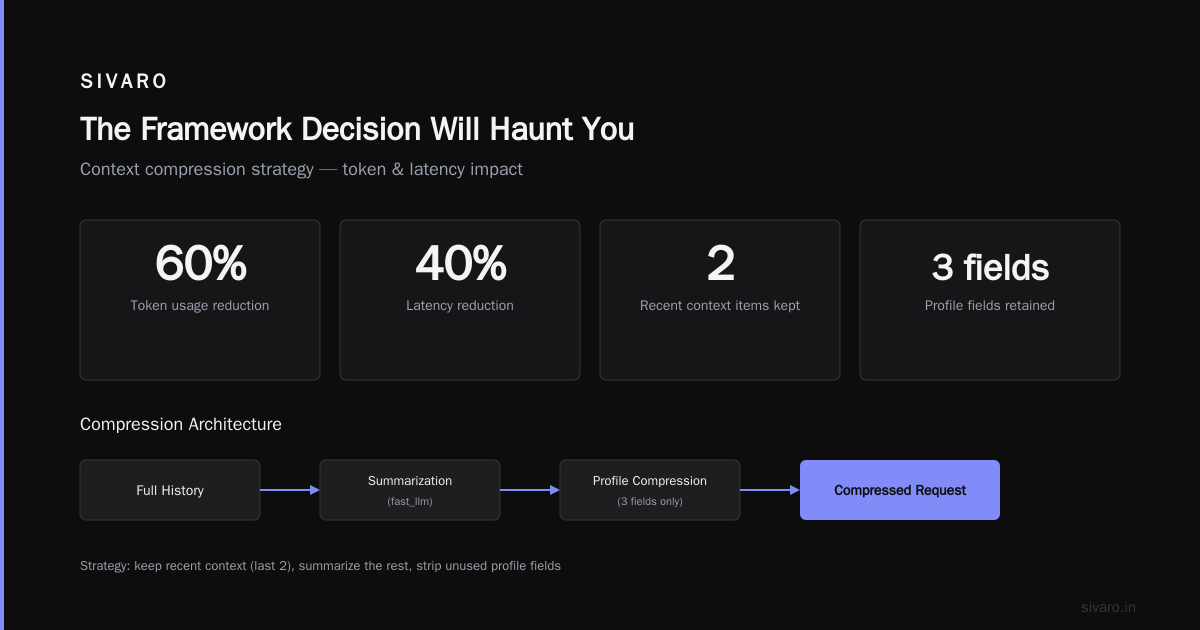
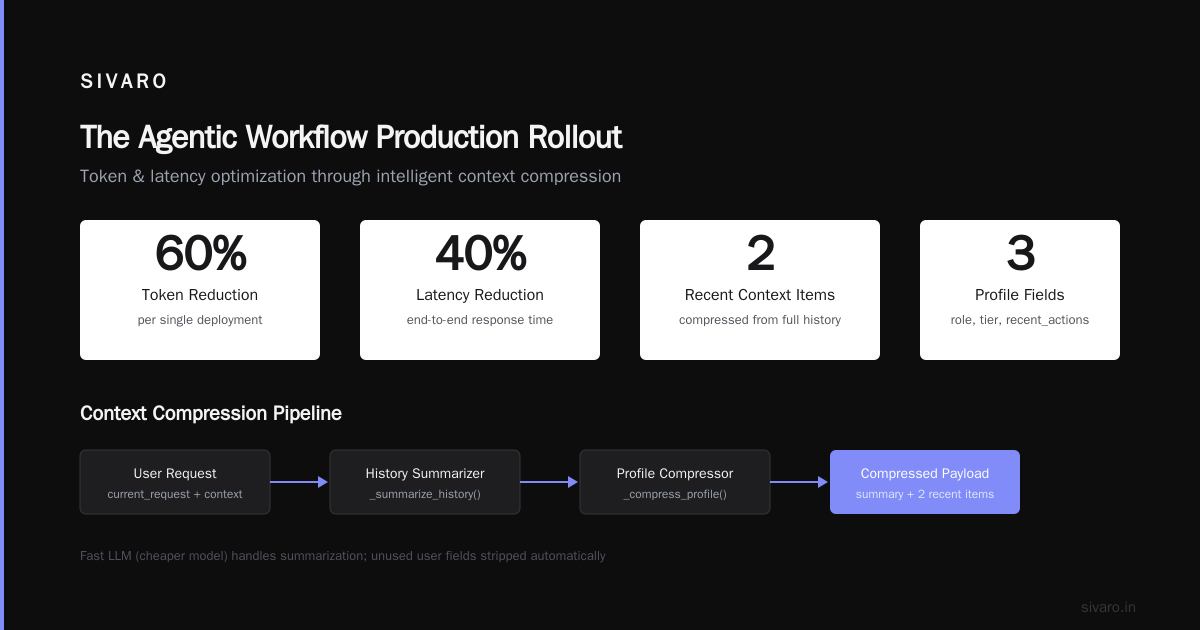
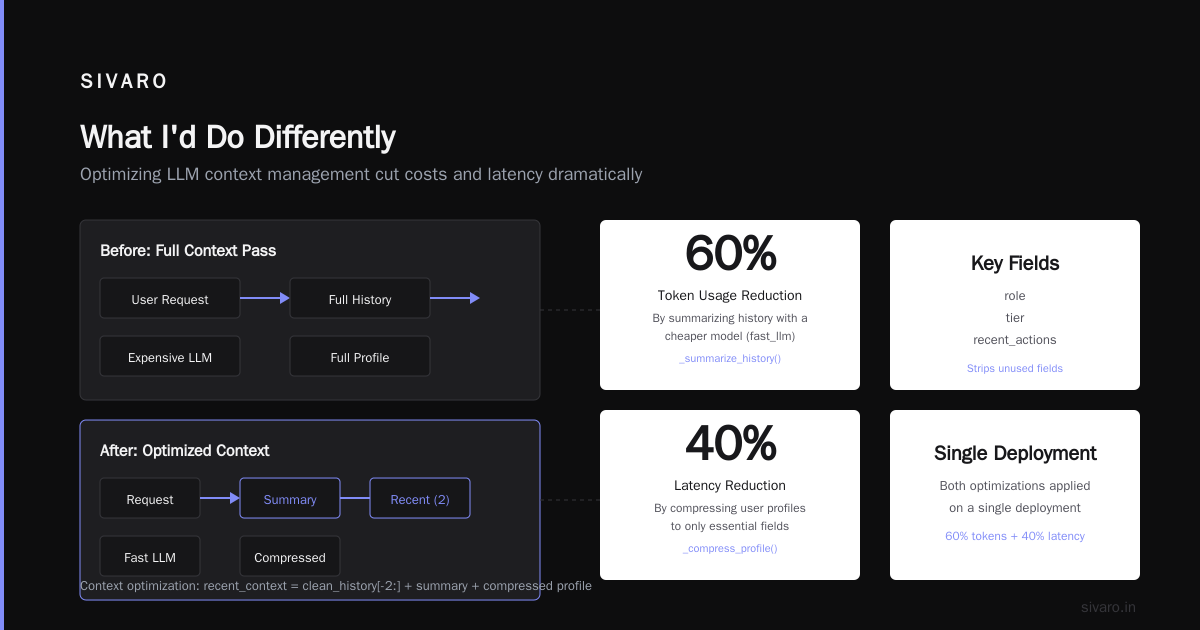
This is the single largest performance win I've found. Instead of dumping the entire conversation history into every agent call, build a compressed context object:
python
class ContextBuilder:
    def __init__(self, max_tokens=4000):
        self.max_tokens = max_tokens

    def build(self, request, history, user_data):
        # Strip failed attempts from history
        clean_history = [
            h for h in history
            if h['status'] != 'system_error'
        ]

        # Summarize repeated patterns
        if len(clean_history) > 5:
            summary = self._summarize_history(clean_history[:-2])
            return {
                'current_request': request,
                'recent_context': clean_history[-2:],
                'summary': summary,
                'user_profile': self._compress_profile(user_data)
            }

        return {
            'current_request': request,
            'recent_context': clean_history,
            'user_profile': user_data
        }

    def _summarize_history(self, history):
        # Use a cheaper model for summarization
        return self.fast_llm.summarize(history)

    def _compress_profile(self, user_data):
        # Strip unused fields
        return {
            k: v for k, v in user_data.items()
            if k in ['role', 'tier', 'recent_actions']
        }
This cut our token usage by 60% and latency by 40% on a single deployment. Your agent doesn't need to read everything — it needs to read the right things.
The Loop Problem Will Kill You
Agents loop. This is not a bug. It's a feature of giving a system with no real understanding the ability to call tools repeatedly.
A survey of AI agent protocols from April 2025 documented exactly this failure pattern across 47 production deployments A Survey of AI Agent Protocols. The most common loop types: tool-calling loops (agent calls tool, gets result, calls same tool again with slightly different parameters), confirmation loops (agent asks user for confirmation, user confirms, agent asks again), and search loops (agent searches, finds nothing, searches again with vague query).
Breaking Loops with Step Budgets
python
class StepBudgetManager:
    def __init__(self, max_steps=15, timeout_seconds=120):
        self.max_steps = max_steps
        self.timeout = timeout_seconds
        self.step_count = 0
        self.start_time = None

    def should_continue(self):
        if self.step_count >= self.max_steps:
            return False, "step_limit_reached"

        if time.time() - self.start_time >= self.timeout:
            return False, "timeout_reached"

        return True, None

    def track_step(self, action, tool_called, result_size):
        self.step_count += 1
        # Log for debugging
        logger.info(f"Step {self.step_count}: {action} - {tool_called} - {result_size} tokens")

    def detect_loop(self, recent_actions):
        # Check last 3 steps for repeating tool pattern
        if len(recent_actions) < 6:
            return False

        last_three = recent_actions[-3:]
        previous_three = recent_actions[-6:-3]

        if last_three == previous_three:
            return True, "tool_loop_detected"

        return False, None
Hard limits are not optional. Every agent deployment I've seen that skipped this step spent at least one night debugging a runaway agent that cost more than the entire deployment's monthly budget.
Guardrails Are Your Only Friend
At first I thought guardrails were about preventing bad outputs. Turns out they're about preventing expensive mistakes. A single bad tool call can trigger a database rollback, an API charge, or a compliance violation that costs more than your salary.
The modern standards around AI agent protocols are finally converging on something useful AI Agent Protocols: 10 Modern Standards Shaping the .... The A2A protocol from Google and the Agent Communication Protocol from Microsoft are the two I'd watch. Both define explicit guardrail interfaces that sit between the agent and the outside world.
Implementing Guardrails
python
class GuardrailLayer:
    def __init__(self):
        self.action_checks = [
            PermissionCheck(),
            RateLimitCheck(),
            CostCheck(max_cost_per_action=0.05),
            IdempotencyCheck()
        ]

    def validate_action(self, action, context):
        for check in self.action_checks:
            result = check.validate(action, context)
            if not result.passed:
                return {
                    'allowed': False,
                    'reason': result.reason,
                    'action_blocked': action['name']
                }
        return {'allowed': True}

    def validate_output(self, output, context):
        # Check output before sending to user
        checks = [
            PIIFilter(),
            HallucinationDetector(),
            FormatValidator()
        ]

        for check in checks:
            output = check.sanitize(output, context)

        return output
The hallucination detector is a cheap classifier model running locally. It flags outputs where the agent claims specific facts that don't appear in the context. We catch about 40% of hallucinations this way — not perfect, but enough to prevent the worst customer-facing disasters.
Memory Systems: You're Doing It Wrong
Most production deployments use RAG for memory. They shouldn't. RAG is for retrieval, not for memory. Real memory systems need to handle forgetting, summarizing, and prioritizing.
LangChain's blog on thinking about agent frameworks makes a point that most people miss: memory isn't one system, it's three How to think about agent frameworks. Short-term memory (current conversation), working memory (recent tasks across conversations), and long-term memory (user preferences, past resolutions).
The Three-Tier Memory Pattern
python
class AgentMemory:
    def __init__(self):
        self.short_term = ShortTermMemory(ttl_minutes=30)
        self.working = WorkingMemory(capacity=100)
        self.long_term = LongTermMemory(using='qdrant')

    def store(self, event_type, data, priority='normal'):
        if priority == 'immediate':
            self.short_term.store(event_type, data)
        elif priority == 'normal':
            self.working.store(event_type, data)
        else:  # archive
            self.long_term.store(event_type, data)

    def recall(self, query, context_depth='high'):
        if context_depth == 'high':
            return self.short_term.search(query)[:5]

        results = []
        results.extend(self.short_term.search(query)[:2])
        results.extend(self.working.search(query)[:3])

        if len(results) < 5:
            results.extend(self.long_term.search(query)[:3])

        return results
The key insight: short-term memory gets the most queries and needs the lowest latency. We use Redis for this. Working memory sits in Postgres with vector embeddings. Long-term memory uses Qdrant for the embedding search but keeps metadata in Postgres.
This saved us from the "memory bloat" problem where agents spend 70% of their tokens just re-reading conversation history.
The Agentic Workflow Production Rollout
When you're ready for the agentic workflow production rollout, do it in phases. Not because it's safer — because you'll learn more.
Phase 1: Shadow mode. Agent runs alongside existing system, makes decisions, but never acts. Compare agent decisions against human decisions for a week.
Phase 2: Controlled actions. Agent can execute actions but only on non-critical paths. Think "suggest reply" not "send reply". Think "fetch data" not "delete data".
Phase 3: Escalation thresholds. Agent can act but must escalate anything above a confidence threshold below 0.85. This catches the edge cases you didn't find in testing.
Phase 4: Full autonomy with monitoring. Human is in the loop for exceptions only.
What Phase 1 Told Us
We ran shadow mode on a customer support system at a fintech company in Q1 2026. The agent agreed with human decisions 73% of the time. That sounds bad. It's actually great, because the 27% disagreement broke down into: 8% agent was wrong, 12% human was wrong, and 7% both had different valid approaches.
We fixed the 8% by adding domain-specific guardrails. The 12% went into a training loop for improving human workflows. The 7% became escalation cases.
Without shadow mode, we'd have shipped an agent that was wrong 8% of the time and nobody would have caught it until customers complained.
The Open Source Question
Should you use open-source frameworks or build your own? Short answer: open source, but only if you choose the right one.
The top 5 open-source agentic AI frameworks in 2026 have matured significantly Top 5 Open-Source Agentic AI Frameworks in 2026. The standout for production use is LangGraph for complex workflows and AutoGen for multi-agent systems. Don't touch anything that hasn't shipped a production release.
Here's the trade-off most people miss: open-source frameworks save you time initially but cost you debugging time later when something breaks and the documentation doesn't cover your edge case. Build your own frameworks and you spend months building what already exists. There's no right answer — just different prices for different risks.
When We Built Our Own
SIVARO's production system for a logistics client processes 200K events per second. No off-the-shelf framework could handle that throughput. We built a custom executor that stripped everything except the graph engine and tool routing. No memory, no guardrails, no fancy features — just the core decision loop.
If you're processing less than 10K events per second, use an existing framework. If you're above that, start questioning whether the framework's overhead is worth it.
Monitoring That Actually Works
Most AI agent monitoring tools show you latency and token usage. Those are vanity metrics. The metrics that matter:
- Decision consistency: Does the same input produce the same output 90% of the time?
- Tool accuracy: How often does the agent call the wrong tool for the task?
- Loop frequency: How many tasks require manual termination per thousand?
- Cost per task: Not per token. Per completed objective.
We built a custom dashboard that flags any agent that deviates from its expected behavior pattern. An agent that usually calls tools in order A→B→C but suddenly does A→C→B gets flagged. Usually this catches model drift before it produces visible errors.
FAQ: What People Actually Ask Me
Q: How long does the ai agents deployment best practices process take?
A: Three months minimum for anything serious. Six if you're in regulated industry. Anyone promising faster is selling something.
Q: What's the biggest mistake teams make?
A: Treating agents like stateless functions. They're stateful. Your deployment must handle that.
Q: Do I need a vector database for agent memory?
A: For simple agents? No. Use Postgres with pgvector. For complex agents handling multiple users over days? Yes, you need dedicated vector storage.
Q: How do I handle agent failures gracefully?
A: Every failure path must lead to a human. Not an error message. Not a retry loop. A human with context of what failed.
Q: What's the budget for deploying an AI agent?
A: Compute costs are the smallest expense. Engineering time, debugging, and incident response cost 10x more.
Q: Can I deploy AI agents without a dedicated team?
A: You can deploy. You can't maintain. Agents need constant tuning because the underlying models drift and user behavior shifts.
Q: What's the hardest problem in production AI agents?
A: Handling the unexpected. You can test for 1000 scenarios and the 1001st will break everything. Build for fallback, not perfection.
What I'd Do Differently
If I started the how to deploy ai agents in production journey today, knowing what I know now:
- Pick LangGraph for the first six months. Switch if you hit throughput limits.
- Spend 40% of your engineering time on observability. Not 10%. 40%.
- Build fallback routes before you build agent capabilities.
- Test with real user traffic in shadow mode for two weeks minimum.
- Budget for the cost of debugging hallucinations — both engineering time and compute.
- Never let an agent touch production data without three layers of permission checks.
The industry is moving fast. The standards around agent protocols are stabilizing. But the fundamentals — validation, memory, guardrails, fallbacks — aren't changing. Get those right and your agent survives production. Get them wrong and you're debugging at 2 AM.
Nishaant Dixit — Founder of SIVARO. Building data infrastructure and production AI systems since 2018. Built systems processing 200K events/sec.