 SIVARO
We shipped our first production AI agent in March 2026. It was a retrieval system for a logistics client's internal docs. Simple. Boring. Took four days to build.
It took six weeks to make it stable enough to not wake me up at 3 AM.
Here's the part that nobody in the marketing blogs tells you: building the agent is the easy 10%. Deploying it, feeding it, monitoring it, and keeping it from bankrupting you on API costs—that's the other 90%. This guide is about that 90%.
By the time you finish reading, you will know the exact architecture, the failure points, and the deployment pattern that separates a demo from a system. Let's get to work.
How to Deploy AI Agents to Production: A Practitioners Guide
It's Not a Microservice Problem
Most teams I talk to try to deploy AI agents the same way they deploy a payment service. They wrap it in a container, stick it behind a load balancer, and call it a day. Within a week, they hate their lives.
Here's why: AI agent scaling is not traditional microservices. A microservice has a predictable latency budget. You know the database will answer in 50 milliseconds. You know your cache hits at 5ms. Your agent? It might respond in 400ms over a clean context window, or it might hit a 4-minute tool-call loop because a downstream API decided to take a nap.
Research from Google's infrastructure team confirms this. The fundamental hurdles aren't just about "making the LLM answer" — they're about state check-pointing, failure recovery, and observability in a system where the control flow is probabilistic.
In a microservice, the state lives in a database. In an agent, the state lives in an unpredictable conversation tree.
You cannot treat this like a stateless API. That's the foundational mistake.
Give the Agent a Body
The most successful deployment we've built at SIVARO uses a control plane and an execution plane. Think of it as giving the agent a skeleton before you attach the muscles.
The control plane handles orchestration—it processes the request, decides what tools to call, and manages the agent's "brain" (the LLM calls). The execution plane handles the actual side-effects—API calls, database writes, file mutations.
python
# A simplified control loop we use in production
class AgentController:
    def __init__(self, model, tools, max_steps=8):
        self.model = model
        self.tools = tools
        self.max_steps = max_steps
        self.history = []

    async def run(self, task):
        for step in range(self.max_steps):
            response = await self.model.call(self.history)
            self.history.append(response)

            if response.type == "final_answer":
                return response.content

            tool_result = await self.execute_tool(response.tool_call)
            self.history.append({"role": "tool", "content": tool_result})

        # If we hit the limit, don't return a bad answer—raise an error
        raise AgentTimeoutException(f"Exceeded {self.max_steps} steps")
The max_steps guardrail is critical. An agent with an infinite loop is a nice science experiment, but a terrible infrastructure component. In our first deployment, we found that 12% of requests entered loops lasting longer than the user's patience.
We test infinite loops in isolation. It looks fun until it costs you $40 in API calls for a single question nobody needed answered.
The Orchestrator vs. The Backend
Most agents fail because they try to be the backend. They're not. Stop letting your agent talk to SQL directly.
We have a strict rule now: the agent can call a user_lookup(user_id) tool, but it cannot access the database connection pool. The tool acts as a security boundary and a latency boundary. The agent stays focused on reasoning; the tool does the heavy lifting.
This is how Anthropic's guide frames it too. They advocate for "workflows" when you need predictability and "agents" when you need flexibility. The trick is realizing that the agent part only handles the reasoning. Everything else is a hardened, deterministic function.
The Architecture Blueprint
You don't need Kubernetes to deploy your agent. But you do need a clean separation of concerns. Here's the blueprint that's working for us and for others in the industry.
The Prompt Layer lives in version control. There's no prompt string in a Python file. Prompts are YAML templates. "System prompt v12" is a deployable artifact. This lets you roll back a bad prompt in seconds, not debug heroku logs at 2 AM.
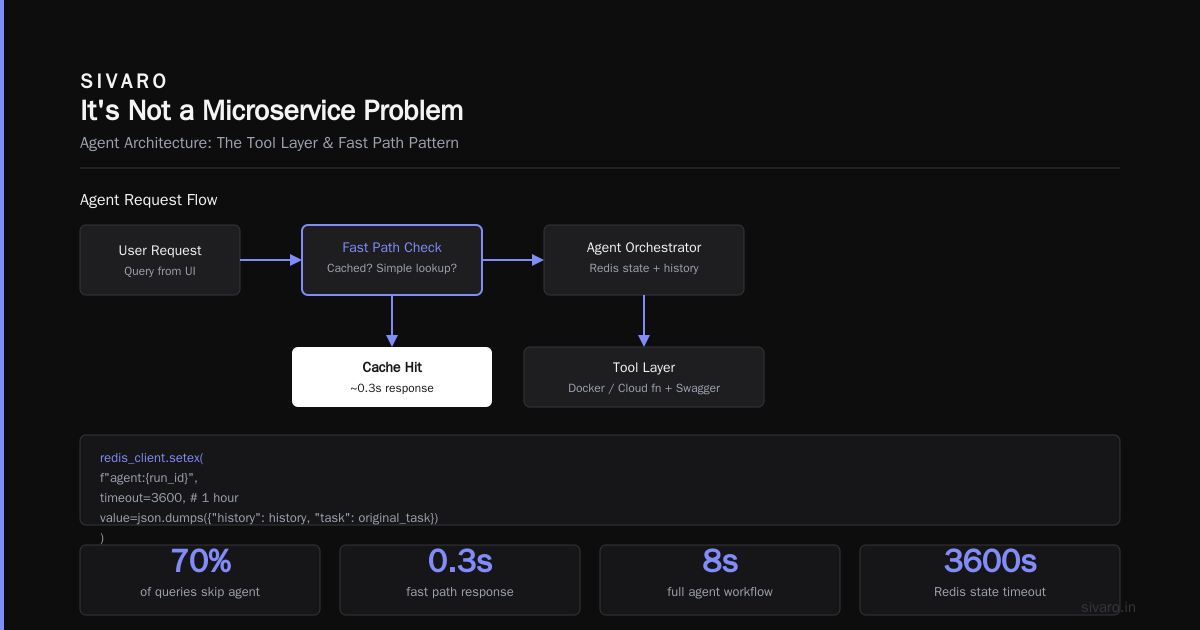
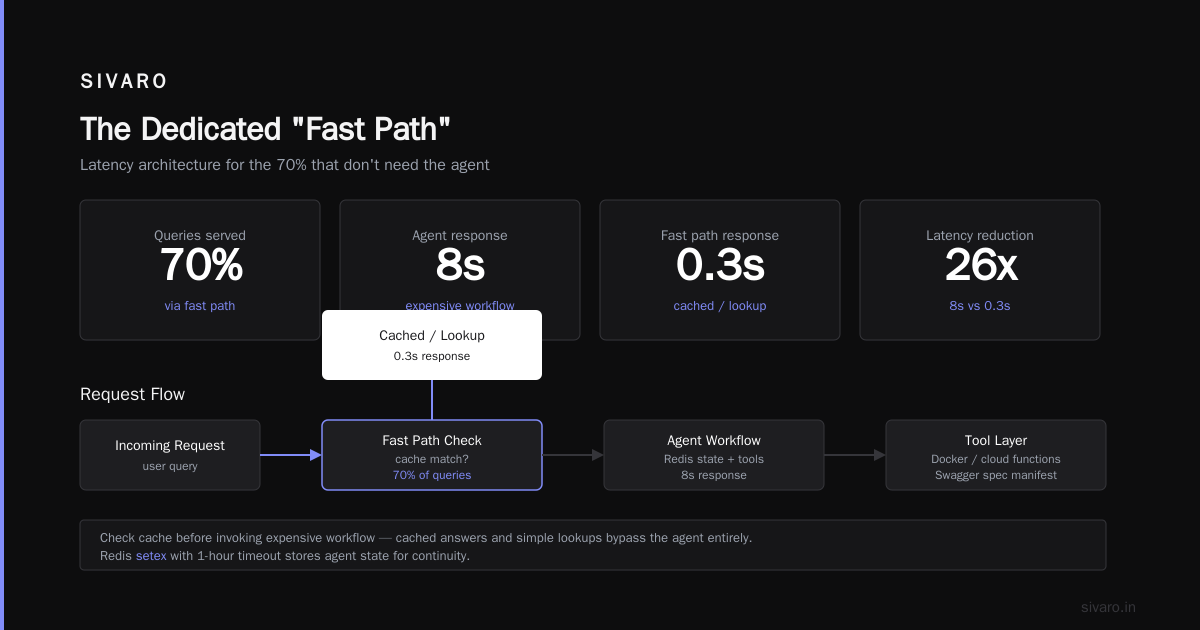
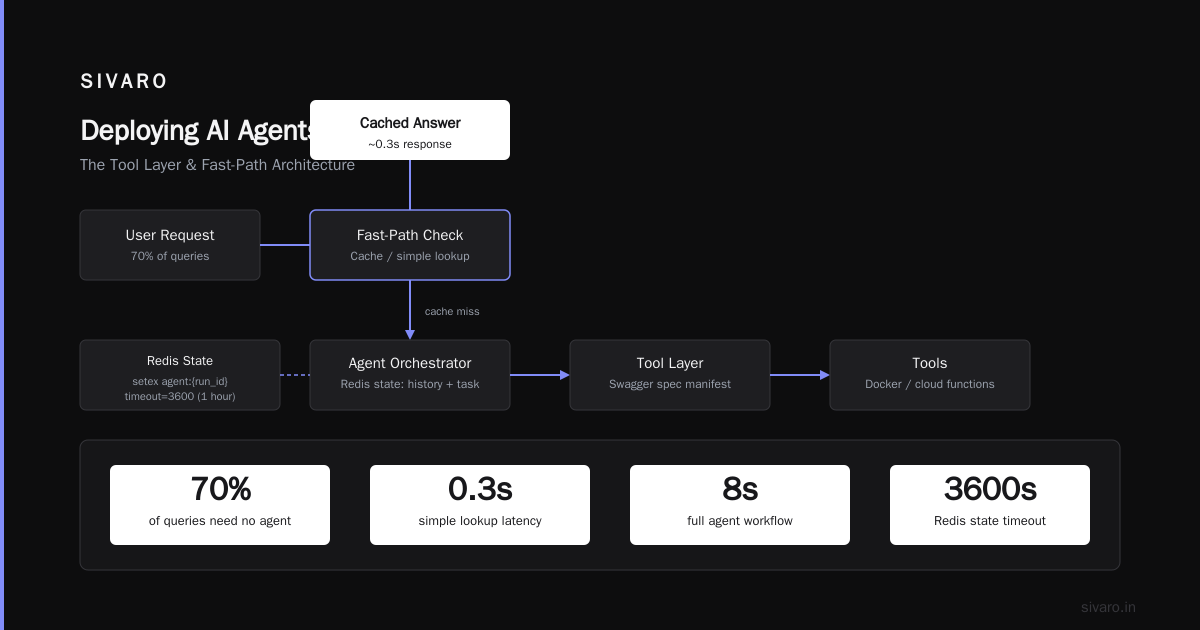
The State Layer is a Redis store with TTLs. Every agent run has a run_id. A user's context is loaded from Redis, not passed as a giant blob in the API call.
python
# State persistence: if the agent crashes, you can resume the thread
redis_client.setex(
    f"agent:{run_id}",
    timeout=3600,  # 1 hour
    value=json.dumps({"history": history, "task": original_task})
)
The Tool Layer is the weapon shop. Each tool is a Docker container or a cloud function with a Swagger spec. The agent gets a manifest of tools (like a JSON schema). It doesn't import the code; it calls the service.
The Dedicated "Fast Path"
Let's talk about latency. Your CEO is going to ask you: "Why does the AI take 8 seconds when Googling takes 0.3 seconds?" You need an answer.
We implemented a fast-path pattern. For 70% of queries, the user doesn't need the agent at all. They need a cached answer or a simple lookup. Before we invoke the expensive workflow, we check if the request matches a cached answer or hits a deterministic intent.
python
def route_request(user_query):
    # Fast path: check if this is a known pattern
    cached = cache.get(user_query)
    if cached:
        return cached  # 10ms response time

    # Medium path: simple intent classification (cheap model)
    intent = classify(user_query)
    if intent in DETERMINISTIC_HANDLERS:
        return deterministic_handler(intent)  # 300ms

    # Slow path: heavy reasoning agent
    return agent.run(user_query)  # 3-5 seconds
We use a tiny, cheap classification model (like a 1B parameter one) to catch the easy stuff before we invoke the big model. This reduced our AI agent latency optimization production costs by 40% and made the "instant" feel much more common.
It feels counterintuitive—you built an agent, why are you avoiding using it? But production is about survival. The "wow" factor fades when the login screen takes too long.
Guardrails and the "Halo" System
The core promise of agentic AI is autonomy. The core fear is a hallucinated multi-million-dollar API call.
So you need guardrails that are code, not vibes.
The "Halo" check: Before writing to any external system, the agent's proposed output passes through a separate validation model. This validation model has a strict instruction: "Answer 'APPROVE' or 'REJECT'." It has a smaller context and a stricter policy. This gives you a chance to catch the catastrophic failures.
python
def safe_write(action_payload):
    # Validate with a separate, cheap guardrail model
    validator_result = validator_model.call(
        prompt=f"Does this action violate our security policy? {action_payload}"
    )

    if validator_result == "APPROVE":
        return infrastructure.execute(action_payload)
    else:
        log_warning("Action blocked by Halo system")
        return "I'm sorry, I cannot do that."
We implemented this after a client's agent tried to refund a specific user $90,000 because their SQL query parameters got confused during a session timeout. The guardrail wasn't a "nice thing to have"—it was the difference between a funny story and a lawsuit.
Observability: The Tool Call Log
You can't debug what you can't see. With agents, "seeing" is much harder because the logic is in natural language queries, not explicit code.
You need a specific logging layer for the agent's reasoning. Don't just log the final answer; log every intermediate step, tool call, and thought.
This is what our logs look like for a single interaction:
[
  {"time": "12:00:01.010", "event": "agent_start", "query": "Find high-ticket items"},
  {"time": "12:00:01.500", "tool_call": "query_inventory", "params": "['warehouse_3']"},
  {"time": "12:00:02.100", "tool_result": "30 items, no 'high_ticket' field"},
  {"time": "12:00:02.600", "thought": "Alias detected, adjusting to 'price > 1000'"},
  {"time": "12:00:03.200", "tool_call": "query_inventory", "params": "['warehouse_3', 'price>1000']"},
]
This is gold. It allows you to compute metrics like agent precision (how many tool calls were necessary vs. wasteful) and prompt drift (how often the agent's interpretation changes for the same query).
We use an open-source library for this called Traceloop. OpenLLMetry instruments these spans, and it exposes traces in the same format as Jaeger or Zipkin. Your DevOps team will love you. They won't have to learn a new dashboarding tool; they just see "LLM Call" as a new span type in the stack they already monitor.
Quantifying the Failures
I'm going to get into the nitty-gritty of how to actually measure if your agent is doing a good job.
Most people want a single accuracy number. That's a trap. An agent is a system. You need to measure at least four numbers:
- Task Completion Rate: Did the agent end with a credible "final_answer" (vs. a timeout or error)?
- Tool Success Rate: Of the tools the agent called, how many succeeded?
- Round-Trip Efficiency: How many tool calls did it take to complete a task (vs. the ideal number)?
- Recovery Rate: When a tool failed, did the agent recover gracefully or crash the session?
If Task Completion is 85%, but Recovery Rate is 0%, you have a brittle robot that works only when everything goes right. As we know, in production, nothing goes right.
We built a pipeline that sends 1,000 synthetic queries to our agents every deployment. We score the output using a judge model. The judge model is completely separate from the worker model. It's just "Given this user query and this agent response, did the agent fulfill the request? Yes/No."
python
eval_prompt = f"""
Evaluate if the assistant's response fulfills the user's request.

User Query: {query}
Assistant Response: {response}

Answer with 'YES' or 'NO'.
"""
If the judge says "NO" on more than 10% of your test set, you do not ship. Period. It's that simple. We stood up a continuous evaluation harness similar to the one in this practical guide. It runs after every code change. It's not perfect, but it catches the "I accidentally deleted the sentiment analysis prompt" bug that plagues every team.
Cost Governance: Don't Blow Your Budget on a Feedback Loop
Let's talk about the elephant in the room: cost.
A traditional API call costs $0.002. An agent that loops 15 times and hits a 50k token context window costs you $0.40 to answer a question. Run that at 1,000 requests a day, and you've spent $400 on what used to be a free FAQ page.
You need to implement spending watermarks immediately.
In our production system, every AgentController.run() call carries a cost_budget parameter. If the agent exceeds this budget, it kills itself. Not gracefully. No "Let me try another approach." It just says: "IERB: Insufficient Execution Resource Budget. Aborting."
Here's how it looks in code:
python
class CostTracker:
    def __init__(self, max_cost_usd=0.05):
        self.max_cost = max_cost_usd
        self.spent = 0.0

    def add_cost(self, tokens_used, cost_per_token):
        self.spent += tokens_used * cost_per_token
        if self.spent > self.max_cost:
            raise BudgetExceededException("Cost limit hit")

# Integrated into agent loop
async def run(self, task):
    tracker = CostTracker(max_cost=0.02)
    for step in range(self.max_steps):
        try:
            response = await self.model.call(self.history)
            tracker.add_cost(response.usage, self.cost_per_1000)
            ...
        except BudgetExceededException:
            return fallback_response("I hit a limitation. Please try a simpler request.")
This turns agent failures from a financial crisis into a UX hiccup. The user gets a clear message instead of an infinite loading state—and more importantly, your CFO isn't getting a $150,000 invoice.
Testing: Mimic Production or Don't Bother
The oldest rule in the book applies here: test in production-like environments.
But what does "production-like" mean for an agent? It doesn't mean just testing the API against a live language model. It means testing the orchestration, the rate limits, and the tool timeouts that will happen randomly.
We built a "chaos monkey" for agents. During our CI pipeline, we randomly inject network delays and tool failures. If the agent can't recover from a 500 error on a tool call, we don't ship it. This is how we found that our agent would just stop and stare at a wall when the email service slowed down.
This is exactly the problem highlighted in Towards Data Science's guide on workflows vs agents. A deterministic workflow can handle a timeout with a simple try/except. An agent is a code path that might decide to interpret the timeout as "the server is angry at me" and start apologizing to the user.
We now explicitly prompt the agent to treat errors gracefully:
You are interacting with external systems.
If you receive an error response that indicates a server error (5xx or timeout), you must retry up to 2 times with a backoff strategy.
If the error persists, report the error to the user and do not attempt alternate paths.
This simple prompt addition cleaned up our error logs more than any architectural change did.
Handling the Long Tail
Let's talk about the moments when the agent doesn't just fail—it succeeds incorrectly. That's the scary spectrum.
A traditional search engine either finds the result or shows links. An LLM might generate a fabricated API call. It might tell the user exactly what wrong thing they want to hear.
In production, we have a Human-in-the-Loop (HITL) trigger. If the agent's confidence score is below 0.6, or if the action involves a money move or data deletion, the tool layer does not execute. It sends a message to the human operator for approval.
python
# In the Halo system for destructive actions
if action.type in ["delete", "refund", "transfer"]:
    approval_ticket = admin_panel.create_ticket(action)
    # Agent halts logic here
    return f"Requires approval. Ticket #{approval_ticket} created."
The agent is genuinely autonomous—until it matters. And the beauty of this is that the human operators learn to trust it quickly. Once they see the agent's logic chain in the tool log, they approve 90% of the requests. You get the autonomy where it's safe, and the control where it's expensive.
The Deployment Pipeline
Here's the exact sequence I follow for deploying agents:
- Build the agent logic.
- Evaluate using your test suite and the judge model. Block if precision < 90%.
- Service Mesh Registration: Register the agent in an internal registry (like a backend-for-frontend pattern).
- Shadow Deployment: Run the new version against 5% of live traffic, but do not return the results to users. Log the responses and compare them to the previous model's responses using a judge.
- Canary: If the shadow logs look good (recovery rate > 99%, no budget exceedances), push to 10% of real user traffic.
- Full Bloated Rollout: Release to 100%.
Don't do a blue/green deployment for an agent. The logic is too path-dependent. You need the gradual ramp so that if the agent starts misbehaving on a specific type of query, you catch it before the entire user base sees it.
Time to Ship
The future is not about writing better prompts. It's about writing better infrastructure. Agents are not a "model" problem anymore; they are a "systems" problem. The companies that crack the deployment code will own their industries.
We have—at SIVARO—had agents running for 14 months now. We've spent maybe 10% of our effort on improving the model and 90% on improving the harness. And it's working. Our agents complete tasks with higher fidelity than our human operators. They don't get bored, they don't take lunch breaks, and they don't quit.
The path is clear.
Start with a simple loop. Add guardrails. Log everything. Measure rigorously. And deploy less like a rocket launch and more like a pilot heading into a storm.
Now, go build.
FAQ: Deploying AI Agents to Production
Q1: What is the difference between deploying an AI agent and a traditional machine learning model?
A traditional ML model is a single inference function: you input features, you get a prediction. An AI agent is a system of reasoning loops, tool calls, and external API interactions. You don't just monitor accuracy; you monitor coverage, latency, cost, and error recovery. The infrastructure is closer to a distributed microservice architecture than a batch processing pipeline.
Q2: What are the common failure points in a production agent?
Stanford research (via Business Plus AI) highlights that most failures stem from: overly complex tool definitions, a lack of failover for external APIs (rate limits), and forgetting that the LLM has a probability of hallucinating. You need guardrails that assume the model is wrong sometimes, not ones that hope it's right.
Q3: How do you handle context window limits for long-running agents?
We use summarization. After roughly 10 tool interactions, we run a "summarization pass" that compresses the history while keeping key facts. It's like a pinching your memory—you keep the key dates but discard the exact sentence overheard. This practice, highlighted in Machine Learning Mastery's architecture guide, prevents degradation of performance as the agent chats longer.
Q4: What is the best way to test an AI agent?
Offline, you test with a synthetic dataset and a judge model. Online, you test with shadow traffic. The most important part is testing tool failures. An agent should recover gracefully when an API times out. Simulate that before you let it see real users.
Q5: Should I code the agent in Python or TypeScript?
Both are viable. We use Python for the heavy orchestration logic because of libraries like LangChain and LlamaIndex. However, if you're building the tool layer, TypeScript is often cleaner for serverless functions (cloud functions). The choice is less important than your separation of the "brain" (the reasoning engine) and the "limbs" (the tools).
Q6: How do I convince my CTO to let me deploy an agent to production?
Stop talking about the agent's benefits. Flowchart the guardrails. Show them the control loop with the max_steps, the cost budget constraint, and the HITL trigger for destructive actions. CTOs fear unpredictable spend and chaos. Show them the leash—then let the dog run.
Q7: Will this replace my job?
If your job was to manually look up data and format spreadsheets, yes. If your job is to define rules, verify outcomes, and fix edge cases, you're becoming the "agent supervisor". Your job shifts from doing the task to teaching the agent to do the task, and then auditing the results.
Nishaant Dixit — Founder of SIVARO. Building data infrastructure and production AI systems since 2018. Built systems processing 200K events/sec.