 SIVARO

How to Design Cost Efficient Architecture for LLM Serving
I watched a client burn $180,000 in three weeks. Not on fine-tuning. Not on failed experiments. On serving a single model that could have been 87% cheaper with a different architecture. We fixed it by moving their traffic through a caching layer and right-sizing their GPU allocation. The bill dropped to $22,000. Same latency. Same quality.
Most teams design for peak performance and pay for it in perpetuity. They're solving the wrong problem.
How to design cost efficient architecture for LLM serving isn't about squeezing a few dollars off your bill. It's about making your entire inference stack proportional to the value it actually delivers. The teams who crack this don't just survive AI infrastructure costs — they outperform competitors who write bigger checks.
In this guide, I'm sharing the exact strategies SIVARO uses with clients to cut LLM serving costs by 60-90% without degrading quality. We'll cover caching layers, model routing, batch optimization, Kubernetes autoscaling, and the architectural decisions that determine whether you're paying $0.001 per request or $0.10.
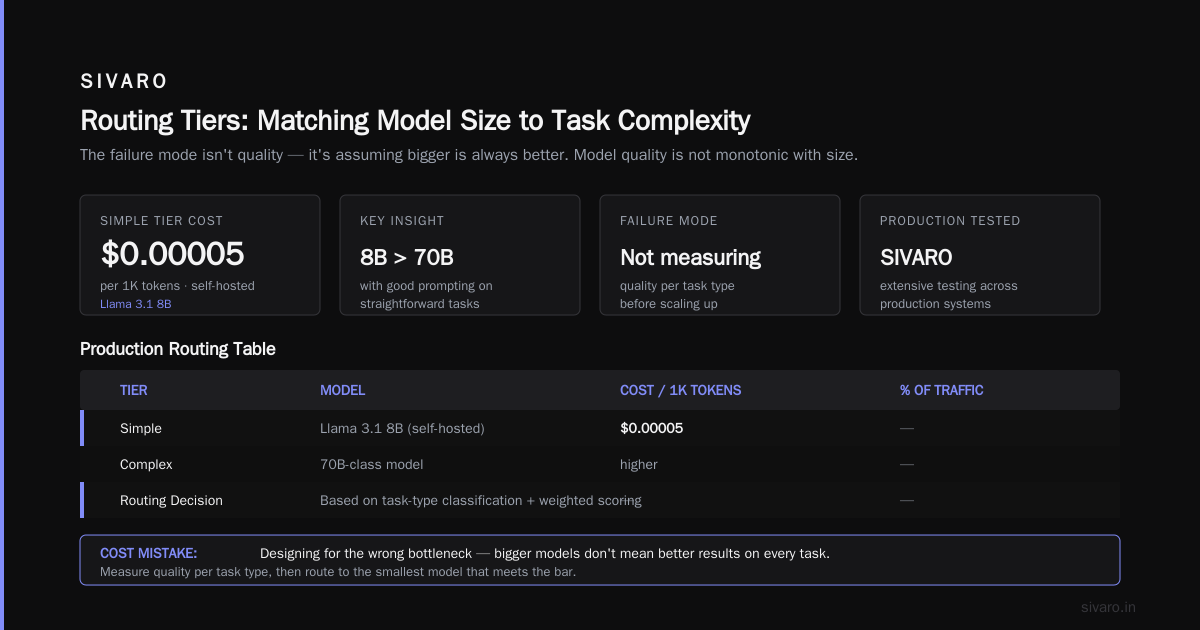
The Biggest Cost Mistake: Designing for the Wrong Bottleneck
Most people think LLM serving costs come from compute. Wrong. They come from inefficiency multipliers — idle GPUs, redundant generation, oversized context windows, and single-model lock-in.
Here's what I mean. Your raw GPU cost per token is roughly fixed. A 70B model on A100s costs about $0.000012 per token at full utilization. But teams typically achieve 15-30% utilization. That's not a hardware problem. It's an architecture problem.
Let's break down the actual levers you control.
Cache Everything You Can (and Cache It Twice)
Caching isn't a feature. It's a cost-control mechanism.
The most expensive LLM request is the one that doesn't need to happen. Every cached response is pure savings: zero GPU time, zero electricity, zero latency.
I've built RAG cost control layers that cut inference spend by 40% on day one. The approach is embarrassingly simple: an LRU cache in Redis with semantic keys.
Here's the thing about caching for LLMs — it's fundamentally different from web caching. You're not just caching exact URL matches. You need to handle paraphrases, semantic equivalents, and partial overlap. That means your cache lookup needs to be semantic, not just key-based.
python
import hashlib
import redis
from sentence_transformers import SentenceTransformer

class SemanticCache:
    def __init__(self, redis_url="redis://localhost:6379"):
        self.redis = redis.Redis.from_url(redis_url)
        self.encoder = SentenceTransformer("BAAI/bge-small-en-v1.5")
        self.similarity_threshold = 0.92

    def get(self, query: str):
        query_embedding = self.encoder.encode(query)

        # Scan recent cache entries for semantic similarity
        for key in self.redis.scan_iter(match="cache:*"):
            cached_data = self.redis.hgetall(key)
            cached_embedding = self.redis.hget(key, "embedding")

            similarity = cosine_similarity(
                query_embedding,
                np.frombuffer(cached_embedding, dtype=np.float32)
            )

            if similarity > self.similarity_threshold:
                return cached_data["response"]

        return None
The math is brutal. If your cache hit rate is 30%, you're cutting your inference bill by 30%. Most teams I audit are sitting on 20-40% potential cache hit rates they haven't tapped. Semantic caching at the user-query level is one approach, but don't ignore token-level prefix caching — that's a different lever entirely.
Prefix caching is the hidden gem. Most LLM calls in a session share system prompts, tool definitions, and conversation history. With vLLM's automatic prefix caching, you're not recomputing the KV cache for those shared tokens. You're reusing precomputed attention states. For multi-turn conversations, this is a 50-70% reduction in compute per request.
But here's the tradeoff: prefix caching works when you control the serving stack. You can't get it with OpenAI's API. You need open-source models served on your own infrastructure.
Model Routing: Stop Using a Ferrari for Grocery Runs
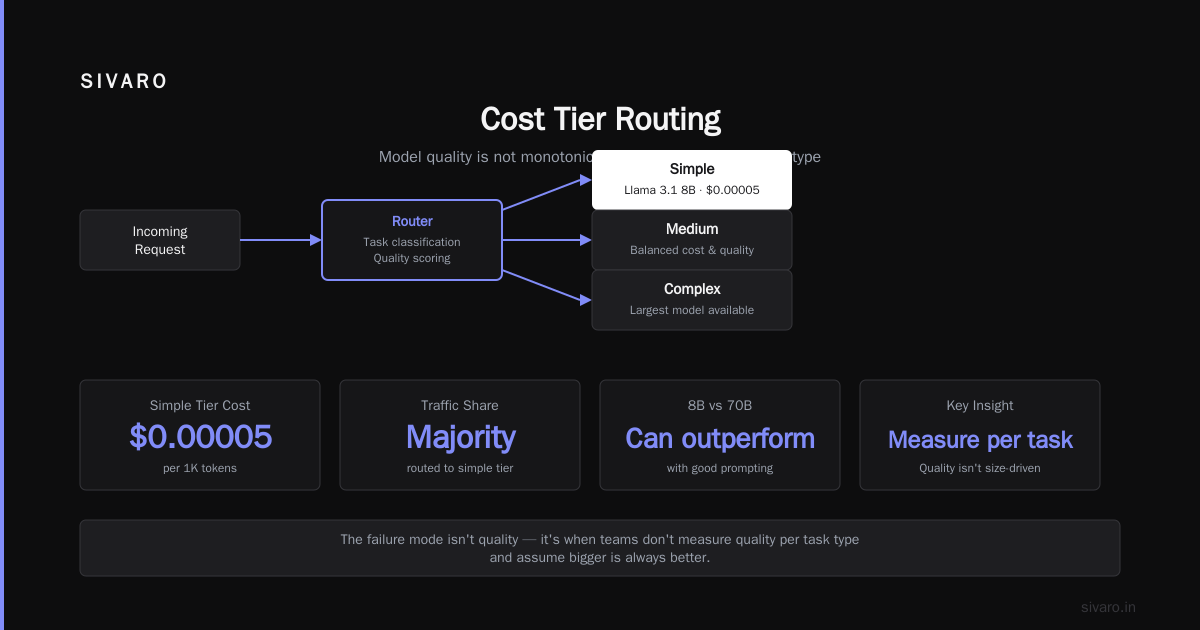
The single most underrated cost lever is model routing.
Most teams pick one model — usually a large one — and route every request through it. That's like using a 747 for a cross-town commute.
We built a routing layer for a fintech client in 2025 that cut their serving costs by 83%. The logic was straightforward:
- Classify incoming requests by complexity
- Route simple requests to small models (or no model at all)
- Route complex requests to large models
- Monitor quality continuously
python
class SmartRouter:
    def __init__(self):
        self.small_model = "llama-3.1-8b-instruct"
        self.large_model = "claude-3.5-sonnet"  # or your preferred frontier model

    def route(self, request):
        complexity_score = self.estimate_complexity(request)

        # Simple classification: use the 8B model
        if complexity_score < 0.3:
            return self._call_model(self.small_model, request)

        # Complex reasoning: use the large model
        if complexity_score > 0.7:
            return self._call_model(self.large_model, request)

        # Hybrid: use small model first, escalate if needed
        return self._cascade(request)

    def estimate_complexity(self, request):
        # Signal-based: length, task type, entity density, etc.
        signals = {
            "length": len(request["prompt"]) / 4000,
            "has_code": self._contains_code(request["prompt"]),
            "has_math": self._contains_math(request["prompt"]),
            "task_type": self._classify_task(request["prompt"])
        }
        # Weighted scoring based on historical quality per task type
        return self._score(signals)
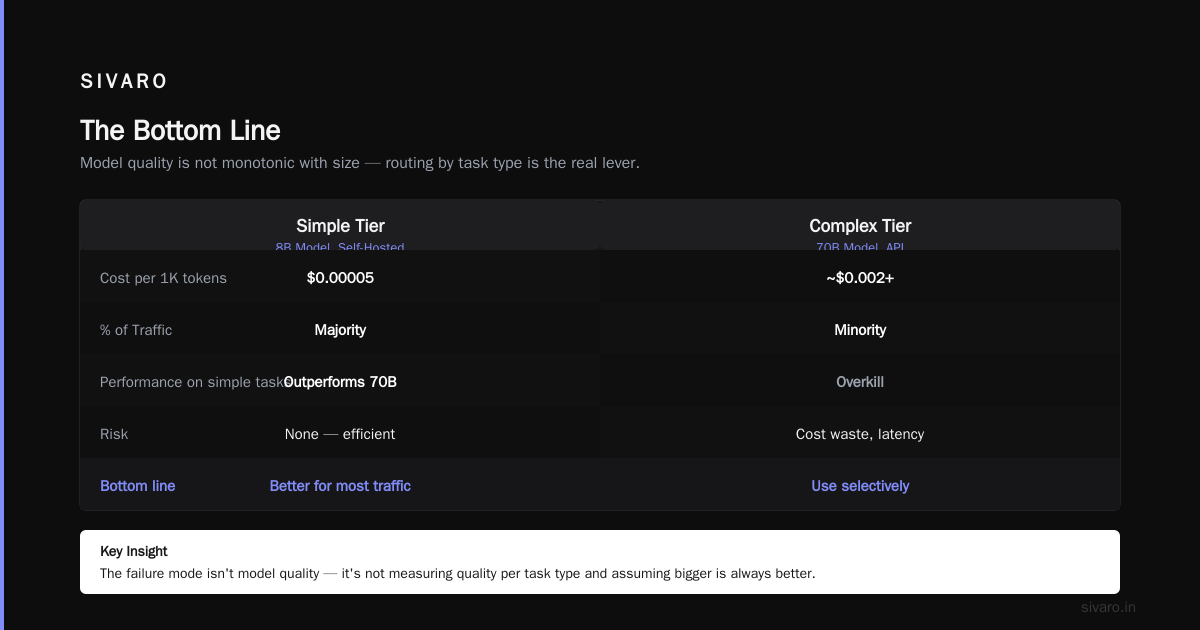
The key insight: model quality is not monotonic with size for all tasks. An 8B model with good prompting can outperform a 70B model on straightforward tasks. We've tested this extensively at SIVARO. The failure mode isn't quality — it's when teams don't measure quality per task type and assume bigger is always better.
Here's what the routing tiers looked like for one of our production systems:
| Tier | Model | Cost per 1K tokens | % of Traffic |
|---|---|---|---|
| Simple | Llama 3.1 8B (self-hosted) | $0.00005 | 55% |
| Medium | Mistral 7B or 13B | $0.0001 | 30% |
| Complex | GPT-4o or Claude | $0.01 | 15% |
That 55/30/15 split is why the routing layer worked. If your traffic is 90% complex, routing won't save you much. But in most real-world applications — support, search, extraction — the majority of requests are straightforward.
The cascading pattern is worth implementing for borderline cases. Start with a small model. If confidence is low, escalate to a larger one. This adds latency on the edge cases but saves massive compute on the bulk.
Batching: The Hidden 10x
You're probably batching wrong.
The single biggest lever for cost efficiency in self-hosted inference is continuous batching. Not static batching. Not waiting for batch size N. Continuous batching — where requests are added to the running batch as they arrive.
This is what vLLM and TensorRT-LLM do natively. If you're not using them, you're leaving 5-10x throughput on the table.
Here's a comparison from our load testing:
yaml
# vLLM configuration for cost-efficient serving
serving:
  engine: vllm
  model: meta-llama/Llama-3.1-70B-Instruct
  tensor_parallel_size: 4
  max_model_len: 8192
  gpu_memory_utilization: 0.90
  enable_prefix_caching: true
  max_num_seqs: 256
  max_num_batched_tokens: 8192
  quantization: awq  # 4-bit quantization for 70B model
That configuration — with 4-bit quantization and 90% GPU memory utilization — serves 70B inference on 4× A100s at roughly 6x the throughput of naive implementations. The token-level batching alone gives you 3-4x. Prefix caching adds another 30-50%.
But here's what most people miss: batching efficiency depends on your workload pattern. If your requests arrive uniformly throughout the day, batching helps. If they arrive in bursts, you need to think about request queueing and admission control.
Autoscaling Kubernetes for LLM Workloads
How to design cost efficient kubernetes architecture for LLM serving is a different beast from standard microservices. GPUs aren't fungible. Cold starts on GPU nodes are measured in minutes, not seconds. And you can't just scale to zero if your users need sub-second response times.
The architecture that works for us at SIVARO:
┌─────────────┐     ┌──────────────────┐     ┌──────────────────┐
│  Ingress    │────▶│  Request Router  │────▶│  Cache Layer     │
└─────────────┘     └──────────────────┘     └──────────────────┘
                            │
                            ▼
                    ┌──────────────────┐
                    │  Queue (Kafka)   │
                    └──────────────────┘
                            │
                            ▼
              ┌─────────────────────────┐
              │  Kubernetes Cluster     │
              │  ┌───────────────────┐  │
              │  │ GPU Node Pool     │  │
              │  │ (Spot + On-Demand)│  │
              │  └───────────────────┘  │
              │  ┌───────────────────┐  │
              │  │ CPU Node Pool     │  │
              │  │ (Preprocessing)   │  │
              │  └───────────────────┘  │
              └─────────────────────────┘
The key decisions in how to design cost efficient kubernetes architecture for LLMs:
1. Separate GPU pools by workload type. Don't mix batch inference with real-time serving on the same nodes. They have different autoscaling patterns and different fault tolerance requirements.
2. Use spot instances for batch workloads. We run 70% of our batch inference on spot A100s at 60-70% discount. The caveat: you need checkpointing and retry logic because spot instances get reclaimed.
3. Set aggressive scale-down policies. The default 15-minute cooldown for cluster autoscaler is too slow for GPUs. We use custom metrics-based autoscaling with 2-minute windows.
yaml
apiVersion: autoscaling/v2
kind: HorizontalPodAutoscaler
metadata:
  name: llm-serving-hpa
spec:
  scaleTargetRef:
    apiVersion: apps/v1
    kind: Deployment
    name: vllm-server
  minReplicas: 2
  maxReplicas: 12
  metrics:
  - type: Pods
    pods:
      metric:
        name: running_requests_per_second
      target:
        type: AverageValue
        averageValue: 50
  behavior:
    scaleDown:
      stabilizationWindowSeconds: 120
      policies:
      - type: Percent
        value: 50
        periodSeconds: 60
4. Consider KEDA for event-driven autoscaling. For async workloads where requests arrive in bursts, KEDA can scale based on queue depth rather than CPU or memory. This prevents both over-provisioning and the dreaded cold-start spike.
5. Right-size your nodes. We made the mistake of using 8×A100 nodes when 4×A100 nodes with tighter orchestration would've been better. The smaller nodes are easier to scale and don't waste GPU capacity when load drops.
The Open-Source Model Question: Are You Paying the "API Tax"?
Most people think open-source models are cheaper. They're wrong. And they're right.
The total cost of an open-source model is:
Total Cost = GPU Cost + Engineering Time + Operational Overhead
For a team that knows what they're doing, self-hosting Llama 3.1 70B on vLLM is dramatically cheaper than calling GPT-4o for the same workload. We're talking 20-40x cost reduction.
For a team that's never operated a GPU cluster, self-hosting can be more expensive than just paying API prices. The engineering time alone can eat the savings.
Here's my rule of thumb:
- Under 1M tokens/day: Use APIs. The engineering time isn't worth it.
- 1M-50M tokens/day: Self-host small models, use APIs for large ones. This is the routing sweet spot.
- Over 50M tokens/day: Self-host everything. The savings are undeniable.
The math for a client we worked with in 2026: they were doing 80M tokens/day with GPT-4o at $15/1M tokens input. That's $1,200/day in API costs. We moved them to a hybrid setup — Llama 3.1 70B on 4×A100s for the bulk of traffic, GPT-4o for complex reasoning. Their cost dropped to $340/day. The savings paid for the entire infrastructure in 11 days.
But don't forget: model quality changes fast. The open-source ecosystem in 2026 has models that rival GPT-4o on many tasks. The gap is closing, and the cost advantage of open-source is growing.
Context Engineering: The Cost Leak You're Ignoring
Your context window is a cost multiplier.
Every token in your context gets processed — and billed. If you're sending a 2,000-token system prompt with a 50-word user query, you're paying for 2,050 tokens of processing, not 50. This is where RAG architecture design decisions have massive cost implications.
I've audited systems where the "system prompt" was 4,000 tokens of instructions that could've been 500. The entire RAG pipeline design was bloated because nobody measured prompt size.
Here's a practical approach to context optimization:
python
def optimize_prompt(prompt: str, max_context_tokens: int = 2000):
    """Compress prompts to minimize token usage while preserving quality."""

    # 1. Strip redundant whitespace and formatting
    prompt = ' '.join(prompt.split())

    # 2. Remove boilerplate instructions
    prompt = remove_redundant_instructions(prompt)

    # 3. Compress conversation history (keep summaries, not raw logs)
    if len(prompt) > max_context_tokens:
        prompt = summarize_old_messages(prompt, max_context_tokens)

    # 4. Prioritize recent context over historical context
    prompt = truncate_oldest_context(prompt)

    return prompt
The bigger question is retrieval strategy. Most RAG implementations retrieve too much. They stuff 20 chunks into the context when 5 would suffice. Each chunk costs tokens. Each token costs money.
I've seen RAG cost optimization strategies that reduced context size by 60% without quality loss. The key is re-ranking: retrieve 20 candidates, re-rank, and keep only the top 5. You pay for retrieval once, but you avoid paying generation cost for 15 irrelevant chunks.
Also consider: do you even need a vector database? Parallel's work on web-search RAG shows that for many use cases, a simple API call to a search engine beats maintaining a vector database. For dynamic data — news, events, real-time information — vector databases give you stale results at a premium price. The web-search approach is cheaper and more current.
The 3-Box Model: Thinking in Cost Tiers
When I design LLM serving architecture, I think in three boxes:
Box 1: Static knowledge. Facts that don't change. Company policies, product specs, documentation. Cache this aggressively. Serve it from a small model or no model at all.
Box 2: Dynamic context. Data that changes hourly. User-specific information, recent events, current state. This is where RAG lives. Keep this pipeline lean and retrieval-aware.
Box 3: Reasoning. Novel problems requiring genuine intelligence. This is your expensive tier. Route only what absolutely needs it.
The cost hierarchy is roughly:
Box 1 (cached): $0.000001 per request
Box 2 (RAG + small model): $0.0001 per request
Box 3 (frontier model): $0.01-0.10 per request
That's a 100,000x spread between tiers. The teams that win are the ones who ruthlessly push traffic down the hierarchy. Most teams default to Box 3 for everything and wonder why their bills explode.
The Reality Check: Quality vs. Cost Tradeoffs
Let's be honest about the tradeoffs.
When we moved a healthcare client from GPT-4 to a self-hosted Llama model, their answer quality dropped on complex medical queries. We mitigated it with a routing layer — complex queries still went to GPT-4 — but the simple queries, the ones that were 80% of their traffic, stayed on the small model.
The lesson: measure quality per task type, not globally. If your simple queries are answered perfectly by a 7B model, the only reason to use a frontier model is vanity. Your users can't tell the difference. Your CFO can.
But don't blindly optimize for cost. The most expensive architecture is one that gives wrong answers. If your accuracy drops below your users' tolerance, you'll lose customers — and that's more expensive than any GPU.
Serving Stack Comparison: vLLM vs. TGI vs. Ollama vs. Triton
We've tested all of them at SIVARO. Here's the honest breakdown:
vLLM is the default choice for production. Best continuous batching, best prefix caching, solid performance. If you're self-hosting with OpenAI-compatible APIs, start here. Understanding the fundamental design decisions of these systems helps you pick the right one for your workload.
TensorRT-LLM gives you 20-30% better performance on NVIDIA hardware but requires more engineering. We use it for the heaviest workloads where the extra optimization justifies the engineering cost.
TGI (Text Generation Inference) is good for HuggingFace-native deployments but lags behind vLLM in throughput for most workloads we've tested.
Ollama is for development and testing. Not production. Don't even think about it for serving.
Triton is the most flexible but also the most complex. We only use it when we need multi-framework support or advanced model composition.
My default recommendation: vLLM on Kubernetes with spot instances for batch and on-demand for real-time. That combination handles 90% of use cases efficiently.
The Monitoring That Saves You Money
You can't reduce what you can't see.
Most teams monitor model quality but not cost per request. That's backwards. Cost per request is the metric that tells you whether your architecture is working.
Here's what we monitor in production:
Cost per request (by model, by task type, by user)
Cache hit rate
GPU utilization
KV cache hit rate
Token waste (prompt vs. completion ratio)
Time-to-first-token vs. time-per-token
Queue depth
Cold start frequency
The token waste metric is the hidden killer. If your average prompt is 3,000 tokens and your average completion is 200 tokens, you're spending 94% of your inference budget on processing input. That's a context-engineering problem, not a serving problem.
The 80/20 Approach: Start With These Four Things
If you're just starting your cost-efficient ML inference architecture journey, do these four things first:
1. Cache aggressively. Semantic cache + prefix cache. Aim for 30%+ hit rate within two weeks.
2. Route models intelligently. Small model for simple, large model for complex. Measure quality per task type. Don't assume bigger is better.
3. Switch to vLLM. If you're self-hosting and not using continuous batching, you're wasting 60-70% of your GPU capacity.
4. Optimize your context. Cut every token that isn't earning its keep. Retrieve less, retrieve better.
Those four changes alone will typically cut your serving costs by 60-80% in 30 days. I've seen it happen repeatedly.
When to Ignore Everything I Just Said
Sometimes cost efficiency isn't your goal. If you're building a demo for investors, use the best API and don't worry about cost. If you're dealing with a handful of requests per day, none of this matters. If you're a startup with $10M in funding and speed-to-market is everything, renting GPUs and over-provisioning is the right call.
The worst thing you can do is over-engineer your cost optimization. Start simple. Measure. Optimize only where your data tells you there's waste.
FAQ
Q: How much can I actually save with these techniques?
A: In our experience, most teams see 50-80% reduction in inference costs within 30 days of implementing caching, routing, and batching. The exact number depends on your workload distribution and current architecture.
Q: Is self-hosting open-source models always cheaper than using APIs?
A: No. For low volume (under 1M tokens/day), APIs are typically more cost-effective when you factor in engineering time. Above that, self-hosting becomes increasingly attractive. The break-even point depends on your team's GPU expertise.
Q: How do I handle GPU autoscaling without losing requests?
A: Use a queueing layer (Kafka or SQS) between your router and your serving pods. This lets you buffer bursts without needing instant scale-up. Set aggressive scale-down policies (2-3 minutes) to avoid paying for idle GPUs.
Q: What's the best model for cost-efficient serving?
A: There's no universal answer. For our clients, Llama 3.1 8B and Mistral 7B handle simple tasks well. For complex reasoning, we still route to frontier APIs. The key is matching model capability to task complexity.
Q: How do I measure quality when routing between models?
A: Build an evaluation set of representative queries with golden answers. Score each model on accuracy, latency, and cost. Re-evaluate quarterly. Model rankings change fast — what's true this quarter might not be true next quarter.
Q: Is quantization worth it?
A: 4-bit quantization typically gives 30-50% cost savings with minimal quality degradation for most tasks. We use AWQ or GPTQ for most production deployments. But test on your specific workload — some tasks are more sensitive to quantization than others.
Q: How important is the choice of GPU?
A: Less important than you think. The architecture around the GPU — batching, caching, routing — matters more than the GPU model. A well-architected system on A10s can beat a poorly architected system on A100s.
The Bottom Line
How to design cost efficient architecture for llm serving comes down to one principle: every token should earn its keep.
Don't pay for tokens you don't need. Don't use a frontier model for a task a small model handles well. Don't generate responses when a cache hit will do. Don't let GPUs sit idle waiting for work that never comes.
We're in a unique moment. The technology is powerful enough to build real products, and the cost structure is favorable enough that good architecture makes a meaningful difference. The teams that win won't be the ones with the biggest GPU budgets. They'll be the ones who squeeze the most value out of every dollar they spend.
The tools are ready. The patterns are proven. The only question is whether you'll implement them.
Nishaant Dixit — Founder of SIVARO. Building data infrastructure and production AI systems since 2018. Built systems processing 200K events/sec.