 SIVARO

How to Design Cost Efficient Architecture on AWS
A CFO told me last month that her AWS bill had grown 40% year over year while traffic grew 12%. That's the moment most teams start searching for how to design cost efficient architecture on AWS. Here's what I'd tell her.
Cost efficient architecture on AWS isn't about finding the cheapest instance. It's about matching compute, storage, and network design to your actual workload shape — and then making the boring, disciplined choices most teams skip because they're chasing features instead of unit economics.
I've run production systems at 200K events/sec. I've audited bills for Series A startups and post-IPO enterprises. The patterns that waste money are almost always the same: over-provisioned compute, ungoverned data transfer, storage tiers nobody revisits, and observability tools that cost more than the infrastructure they monitor.
This guide is a buying guide. You'll see the real trade-offs between Graviton and x86, Fargate and EC2, S3 tiers, NAT Gateway vs VPC endpoints, and the managed services that quietly drain budgets. You'll get code, specific numbers, and honest takes on where AWS pricing punishes lazy design.
The Mental Model: Unit Economics, Not Line Items
Most teams optimize the wrong thing.
They see $40K/month on EC2 and start rightsizing instances. That's fine. But it misses the bigger question: what's your cost per request, per tenant, per GB processed? Without that number, you can't tell if you're actually getting more efficient or just growing.
I saw a fintech in 2024 that cut EC2 spend 30% — and their cost per transaction went up 15%, because the reduced compute pushed work into a Lambda layer with terrible invocation patterns. They celebrated the wrong metric.
The fix: define 3–5 unit cost metrics. Cost per 1K API calls. Cost per GB ingested. Cost per active user. Cost per model inference. Track them weekly. Everything else follows.
AWS Cost Explorer and Cost Allocation Tags get you 80% of the way. Tags are non-negotiable. If your resources aren't tagged with team, environment, and product, you're flying blind.
hcl
# Terraform snippet: enforce tags via AWS provider default_tags
provider "aws" {
  default_tags {
    tags = {
      Environment = var.env
      Team        = var.team
      Product     = var.product
      ManagedBy   = "terraform"
    }
  }
}
If a resource can't be tagged properly (looking at you, some legacy services), put it in a separate account. Account-level separation is the strongest cost boundary AWS gives you.
Compute: Graviton, Spot, and Where Fargate Actually Makes Sense
Here's the contrarian take: most teams are still on x86 because of inertia, not because their workloads need it.
AWS Graviton3 and Graviton4 deliver roughly 20–40% better price-performance than equivalent x86 instances for most workloads. I moved a Kafka consumer fleet from m5 to m7g in 2023 and cut cost-per-event by 34%. Code change required: recompile. That's it, for Go and Java. Python workloads need to check native dependencies — numpy, pandas, and torch have all been stable on arm64 for years now.
Where Graviton fails: workloads with x86-only binaries (some legacy ML frameworks, certain Oracle components, old .NET Framework apps). Don't fight it. Just isolate those to x86 instances and move everything else.
Spot instances are the other lever most teams under-use. Spot can be 60–90% cheaper than on-demand. The mistake is treating spot as unreliable. It's not — it's interruptible. Those are different things.
Spot works beautifully for:
- Stateless web tiers behind a load balancer
- Batch and ETL jobs
- CI/CD runners
- Kafka consumers with checkpointing
- Ray and Spark workers
Spot is risky for:
- Stateful databases (obviously)
- Single-instance services
- Anything with long startup times
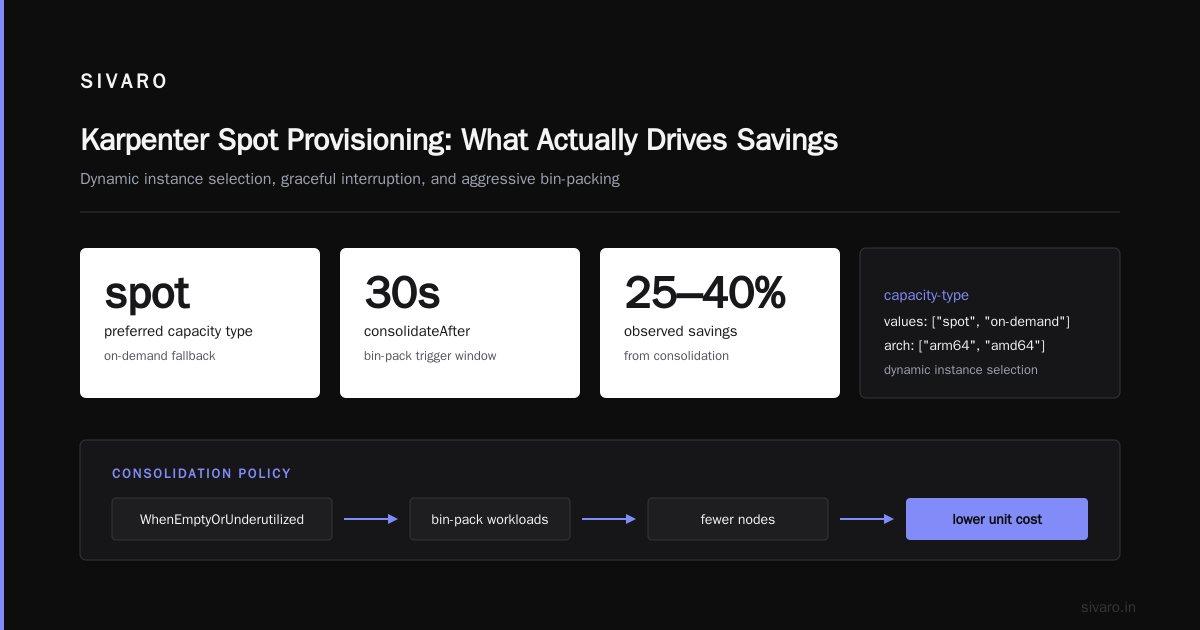
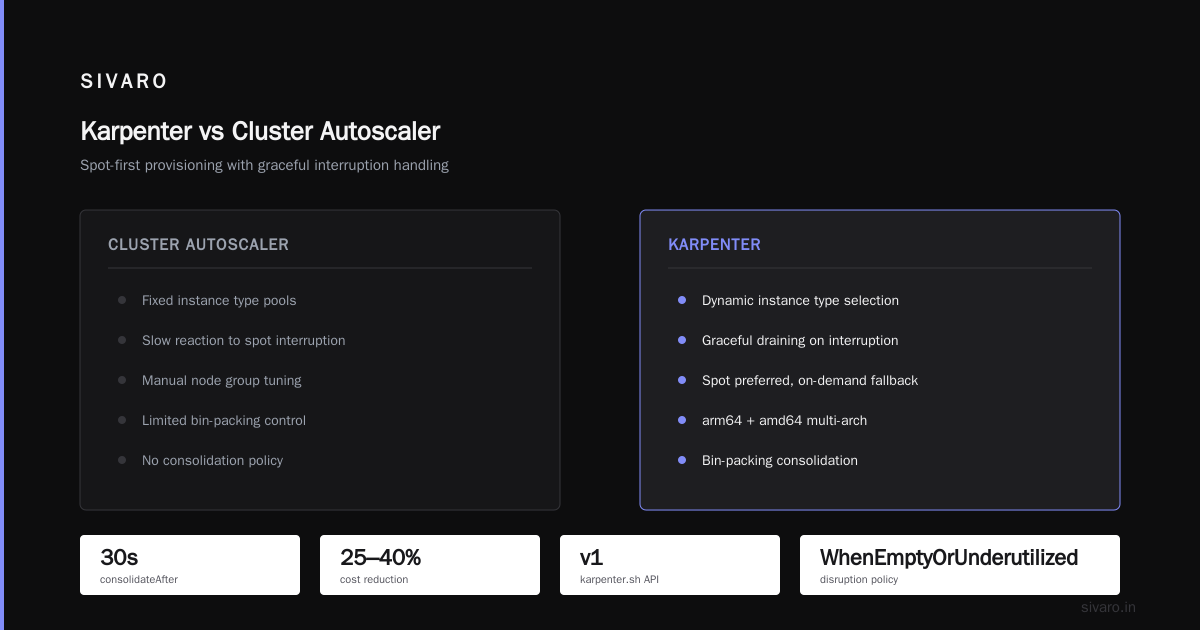
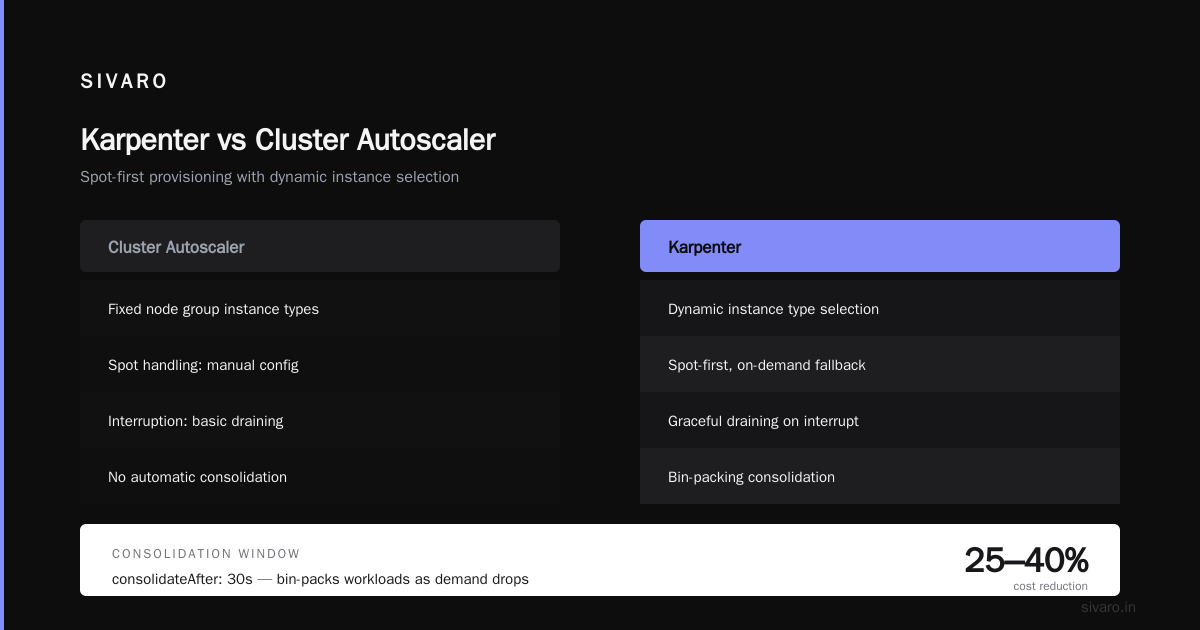
For EKS, Karpenter handles spot node provisioning better than the old Cluster Autoscaler. It picks instance types dynamically and handles interruption with graceful draining.
yaml
# Karpenter NodePool: prefer spot, fall back to on-demand
apiVersion: karpenter.sh/v1
kind: NodePool
metadata:
  name: general
spec:
  template:
    spec:
      requirements:
        - key: karpenter.sh/capacity-type
          operator: In
          values: ["spot", "on-demand"]
        - key: kubernetes.io/arch
          operator: In
          values: ["arm64", "amd64"]
  disruption:
    consolidationPolicy: WhenEmptyOrUnderutilized
    consolidateAfter: 30s
That consolidateAfter: 30s matters more than people think. Karpenter will bin-pack workloads onto fewer nodes as demand drops. I've seen 25–40% compute reduction from consolidation alone on bursty workloads.
Fargate: I'll be honest. Fargate is convenient and it's roughly 20–30% more expensive than equivalent EC2 for sustained workloads. For spiky, unpredictable, or small workloads, the ops savings win. For steady-state, EC2 with Karpenter wins on cost every time. There's no universal answer — measure.
Lambda's pricing changed in late 2024 with the added support for larger ephemeral storage and pricing on Graviton. For low-throughput event-driven work, Lambda is often the cheapest thing you can run. For high-throughput sustained work, it's the most expensive. Anything over ~5M invocations/hour with 500ms+ duration should be on containers. Do the math per workload.
Storage: The S3 Tier Question Nobody Wants to Ask
S3 is where I see the most silent waste.
Standard S3 costs about $0.023/GB/month in us-east-1. Intelligent-Tiering costs about $0.0125/GB/month for the monitoring overhead plus tiered storage. Glacier Instant Retrieval is $0.004/GB. Glacier Flexible Retrieval starts at $0.0036/GB. Deep Archive is $0.00099/GB.
The math is obvious. The behavior isn't.
Most teams leave everything in Standard because lifecycle policies feel risky. They're not. Here's a policy that handles 90% of cases:
json
{
  "Rules": [
    {
      "ID": "TieredStorage",
      "Status": "Enabled",
      "Filter": { "Prefix": "logs/" },
      "Transitions": [
        { "Days": 30, "StorageClass": "STANDARD_IA" },
        { "Days": 90, "StorageClass": "GLACIER_IR" },
        { "Days": 365, "StorageClass": "DEEP_ARCHIVE" }
      ],
      "Expiration": { "Days": 2555 }
    }
  ]
}
Intelligent-Tiering is the better call when access patterns are unpredictable. It costs ~$0.0025 per 1K objects for monitoring, which sounds expensive until you realize it moves cold objects to cheaper tiers automatically. For buckets with >1M objects and unknown access patterns, Intelligent-Tiering pays for itself.
Two things bite people on S3:
- Small object overhead. Millions of 1KB objects cost more in request charges than storage. Consider compaction or batching.
- Cross-region replication. Replication doubles storage cost and adds data transfer. If you're replicating "just in case," ask what the RTO actually is.
EBS: switch to gp3 from gp2. gp3 is 20% cheaper and lets you provision IOPS independently of size. Most teams don't need provisioned IOPS at all — baseline gp3 gives 3,000 IOPS free.
Networking: The Bill Line That Surprises Everyone
Data transfer is where CFOs get angry.
NAT Gateway alone runs about $32/month per gateway plus $0.045/GB processed. On a busy VPC, that's $5K–50K/month in data processing charges nobody budgeted for.
The fix: VPC endpoints. Gateway endpoints for S3 and DynamoDB are free. Interface endpoints for other services cost about $7.20/month per AZ plus $0.01/GB — usually 70–80% cheaper than routing through NAT.
I audited a company in early 2025 that was spending $18K/month on NAT for S3 access alone. We replaced it with a Gateway endpoint. New spend: $0. Same traffic.
hcl
resource "aws_vpc_endpoint" "s3" {
  vpc_id            = aws_vpc.main.id
  service_name      = "com.amazonaws.us-east-1.s3"
  vpc_endpoint_type = "Gateway"
  route_table_ids   = aws_route_table.private[*].id
}
The other big lever: avoid cross-AZ traffic where you can. Cross-AZ data transfer is $0.01/GB each direction. Sounds small. At 100TB/month, it's $2K. At 1PB, it's $20K.
Design chatty services to co-locate. Use topology-aware routing (EKS has topologySpreadConstraints for this). For databases, read replicas in the same AZ save real money.
CloudFront in front of S3 or ALB usually reduces origin egress because CloudFront's egress is cheaper and cache hits prevent origin traffic entirely. AWS's own pricing puts CloudFront at about $0.085/GB for the first 10TB in North America, vs $0.09/GB for direct S3 egress. That delta grows with volume.
Databases: Aurora Serverless v2 vs Provisioned, and When DynamoDB Wins
Aurora Serverless v2 looks appealing. Scaling from 0.5 to 128 ACUs. Pay for what you use. The catch: the minimum 0.5 ACU (roughly $43/month per cluster) makes it expensive for idle databases, and the scaling isn't instantaneous enough for truly spiky workloads.
Where Aurora Serverless v2 wins: unpredictable workloads, dev/test environments, or applications that scale from low to high and back. I've seen a SaaS cut RDS spend 55% by moving from provisioned (bottomed out at db.r6g.2xlarge 24/7) to Serverless v2.
Where it doesn't: steady-state production with predictable load. Provisioned Aurora with reserved instances is still cheaper for the 24/7 stuff. Two-year reserved Aurora RDS saves 40%+ over on-demand.
DynamoDB on-demand vs provisioned: same story. On-demand is 5–7x more expensive per request than well-provisioned capacity. If your workload is predictable, use provisioned with autoscaling or reserved capacity. If it's spiky, on-demand. If it's mixed, DynamoDB now supports "warm throughput" reservations, which bridge the gap.
The rule I use: if average utilization of provisioned capacity over a month is >40%, provisioned wins. Below that, on-demand.
Neptune, DocumentDB, Keyspaces — same calculus. AWS's managed database pricing is designed so that predictable workloads should commit and unpredictable workloads pay premium. Play the game accordingly.
Observability: The Silent Budget Killer
This one hurts because teams don't see it coming.
Datadog, New Relic, and Splunk bills often run 20–40% of total infrastructure spend. I've audited systems where observability cost more than the compute tier.
For cost-efficient architecture, do three things:
First, sample aggressively. You don't need every trace. 1–5% sampling on high-volume services is plenty for pattern detection. Head-based sampling from the start.
Second, enforce log retention. CloudWatch Logs charges $0.50/GB ingested and $0.03/GB/month storage. Retain hot logs 7 days in CloudWatch, ship the rest to S3 via Kinesis Firehose or an ODK pipeline. Savings: 60–80%.
Third, replace metrics agents with OpenTelemetry. OTel with the right exporter lets you pipe to a cheaper backend (Grafana Cloud, AWS Managed Prometheus, or self-hosted Mimir) without rewriting instrumentation.
CloudWatch Logs Insights is fine but slow and pricey at volume. If you're querying more than 100GB/day of logs, you want OpenSearch, ClickHouse, or similar.
Buying Guide: Which Choices to Make When
Here's the honest decision matrix. Not a feature comparison — a spend-your-money guide.
If you're under $10K/month AWS: Use managed everything. Lambda, Fargate, RDS provisioned. The ops cost of self-hosting exceeds the compute savings. Don't optimize prematurely.
If you're $10K–$100K/month: Switch to Graviton. Move stateless workloads to spot. Implement S3 lifecycle. Adopt VPC endpoints. This tier has the most headroom, often 30–45% savings in a quarter.
If you're $100K–$1M/month: Reserved Instances and Savings Plans become material. Compute Savings Plans cover Lambda, Fargate, and EC2 with a 17–27% discount for a 1-year commitment. Get engineering and finance aligned on commitment levels. Build the unit cost dashboard.
If you're >$1M/month: Hire a FinOps person or team. Negotiate an EDP (Enterprise Discount Program) with AWS. At this scale, the AWS account team will deal.
The single biggest mistake I see across all tiers: treating cost as a monthly review instead of a continuous engineering constraint. Cost is a non-functional requirement. Design for it like you design for latency.
I use the AWS Well-Architected Cost Optimization Pillar as a checklist but not a workflow. The workflow comes from weekly unit cost reviews, per-team budget alerts, and a habit of asking "what would this cost at 10x scale?" before shipping.
One more thing: AWS Compute Optimizer and Trusted Advisor are free and underused. Turn them on. They flag idle resources, over-provisioned instances, and unattached EBS volumes. First cleanup pass usually finds 10–15% savings.
FAQ
How much can I realistically cut from my AWS bill without a rewrite?
30–45% for most teams over 2–3 months using Graviton, spot, S3 lifecycle, VPC endpoints, and rightsizing. Anything deeper requires architectural change.
Is Graviton actually production-ready for everything?
For Go, Java, Python, Node, Rust — yes. For ML inference with x86-only CUDA deps — no. For legacy .NET Framework — no. Verify per workload.
Should I use Savings Plans or Reserved Instances?
Savings Plans for flexibility (covers Lambda, Fargate, EC2). RIs if you're on one specific instance family long-term and want the extra 5–10% discount. Most teams should default to Compute Savings Plans.
How do I handle unpredictable traffic without over-provisioning?
Auto Scaling with Karpenter on EKS, or Aurora Serverless v2 for databases. Add a queue (SQS) to absorb spikes so compute scales to average, not peak.
Is serverless always cheaper than containers?
No. Serverless wins under ~10M invocations/month or for spiky traffic. Above that, sustained containers on Graviton + spot are cheaper. Do the math per workload.
What's the single biggest surprise line item for teams?
Data transfer, specifically NAT Gateway processing and cross-AZ traffic. It's invisible until you look.
Do multi-account setups save money?
Indirectly, yes. Account separation gives you clean cost allocation, blast-radius isolation, and prevents surprise cross-service traffic. AWS Organizations is free.
What about containers vs. VMs for cost?
EKS on EC2 Graviton + spot beats ECS on Fargate by 40–60% at sustained scale. Fargate wins when engineering time is your constraint. Neither is universally cheaper.
Conclusion: How to Design Cost Efficient Architecture on AWS Is a Discipline, Not a Feature
There's no toggle. You don't "enable" cost efficiency. You design for it, measure it weekly, and let the data tell you where to cut.
The teams I've seen win at this share four traits: they know their unit costs, they've committed to Graviton and spot where possible, they've cleaned up networking and storage tiers, and they treat cost as an ongoing engineering problem rather than a quarterly panic.
Start with tags. Then unit costs. Then Graviton. Then spot. Then S3 lifecycle and VPC endpoints. Then Savings Plans. Each step compounds.
And ignore anyone selling you a "10x AWS savings" tool. The savings come from design choices you make, not a dashboard someone else sells you.
Nishaant Dixit — Founder of SIVARO. Building data infrastructure and production AI systems since 2018. Built systems processing 200K events/sec.