 SIVARO

How to Estimate GCP Monthly Bill (Without Getting Burned)
Let me start with a confession. In 2023, we deployed a production system for a fintech client on Google Cloud. I estimated the monthly bill at $11,400. The actual bill? $38,000.
I walked into the meeting with spreadsheets. I walked out with a lesson.
Estimating GCP costs is not arithmetic. It's a discipline. And most people do it wrong because they start with the pricing page and not their own architecture.
This guide is what I've learned after building data infrastructure on GCP for six years. You'll learn the math, the hidden costs, and the shortcuts. By the end, you'll know how to estimate GCP monthly bill with honesty — not hope.
Why Most GCP Cost Estimates Fail
Everyone thinks they know their workload. They don't.
Here's what I've seen crash estimates repeatedly:
- Assumed steady-state traffic — your bill scales with your spikes, not your average.
- Forgot egress — data leaving GCP is where margins die.
- Priced compute only — ignored I/O, storage classes, and API calls.
- No feedback loop — estimates are static but infrastructure drifts.
The GCP pricing calculator is a useful tool. It's also a trap if you feed it fairy-tale inputs. Garbage in, garbage out.
In 2026, cloud pricing has gotten more complex, especially with the AI infrastructure push. Spot instances, committed use discounts, and custom machine types mean the listed price is rarely what you pay.
Start With Your Egress Bill
Here's the contrarian take: don't start with compute. Start with data leaving your network.
Egress (data transfer out of GCP) is where budgets go to die. In 2025, a client of mine — a media analytics company — had a bill where 42% was egress to a third-party CDN. They'd never even considered it.
Let me break down the 2026 pricing logic:
| Destination | Price per GB (approximate) |
|---|---|
| Same region (within GCP) | $0.01–$0.02 |
| Same continent | $0.02–$0.05 |
| Global (internet) | $0.08–$0.12 |
| Cloudflare/backbone | $0.03–$0.05 |
Estimate your egress by looking at your logs, not your assumptions. If you're moving large datasets between regions — say for disaster recovery — that's a bill line item you need to predict.
And it's not just raw volume. It's pricing tier. GCP uses tiered pricing for egress. The first 1TB costs more per GB than the next 5TB. If your workload is small, you pay full price.
The fix: put egress-heavy workloads in the same region as your consumers. Sounds obvious. Hardly anyone does it.
Compute: The Second (Mostly Predictable) Layer
Compute is where people feel confident. They've picked their machine types, they know their expected usage. It's still where I've seen 2x surprises.
Why? Three words: committed use discounts.
GCP gives you significant discounts if you commit to usage for 1 or 3 years. In 2026, CUDs are more granular than ever. But here's the thing most people miss:
You can't get a CUD on something you haven't measured first.
In 2024, we tested this with a logistics company. They wanted to migrate from AWS to GCP and asked us to handle capacity planning. We monitored their current infrastructure for 2 weeks before committing to anything. The difference between their assumed baseline and actual peaks was 3.1x.
If you're starting fresh, here's the practical formula:
Monthly Compute Cost =
    (# instances) × (monthly hours) × (hourly price) × (1 - CUD_discount)
But don't just multiply listed prices. GCP charges per second for some machine types (since 2022). That's good for you — you only pay what you use. But it makes estimation trickier because you need per-second usage data, not monthly averages.
For AI workloads (which SIVARO specializes in), add another layer: GPU hours. GPU costs in 2026 have come down for older generation chips but new ones (like H100-class) still command premium. If you're training models, expect 10x the compute cost of serving.
Let me show you a real example:
Project: Billing system migration for a payments startup
Workload: 3x n2-standard-4 (app), 2x n2-standard-16 (DB), 1x e2-medium (cron)
Hours/month: 720 (24x7)
CUD: 30% (3-year commit)

Cost calculation:
- App: 3 × 720 × $0.15/hr × 0.7 = $226.80
- DB:  2 × 720 × $0.52/hr × 0.7 = $524.16
- Cron: 1 × 720 × $0.03/hr × 0.7 (partial) = $15.12
Total compute: ~$766/month
That's the easy part. The hard part is what comes next.
Storage: Where Pricing Gets Sneaky
Here's a sentence I never thought I'd write: storage is now the most complicated line item on a GCP bill.
Since 2023, GCP has aggressively pushed regional and dual-region storage classes. You get flexibility. You also get complexity.
Let me walk you through what matters:
Standard Storage — This is what most people think about. Pricing per GB varies by region. US regions are cheap. Singapore and Tokyo are 20-30% more expensive.
Infrequent Access / Coldline / Archive — These are cheaper per GB but way more expensive on retrieval. If you access cold data more than once a quarter, you're losing money.
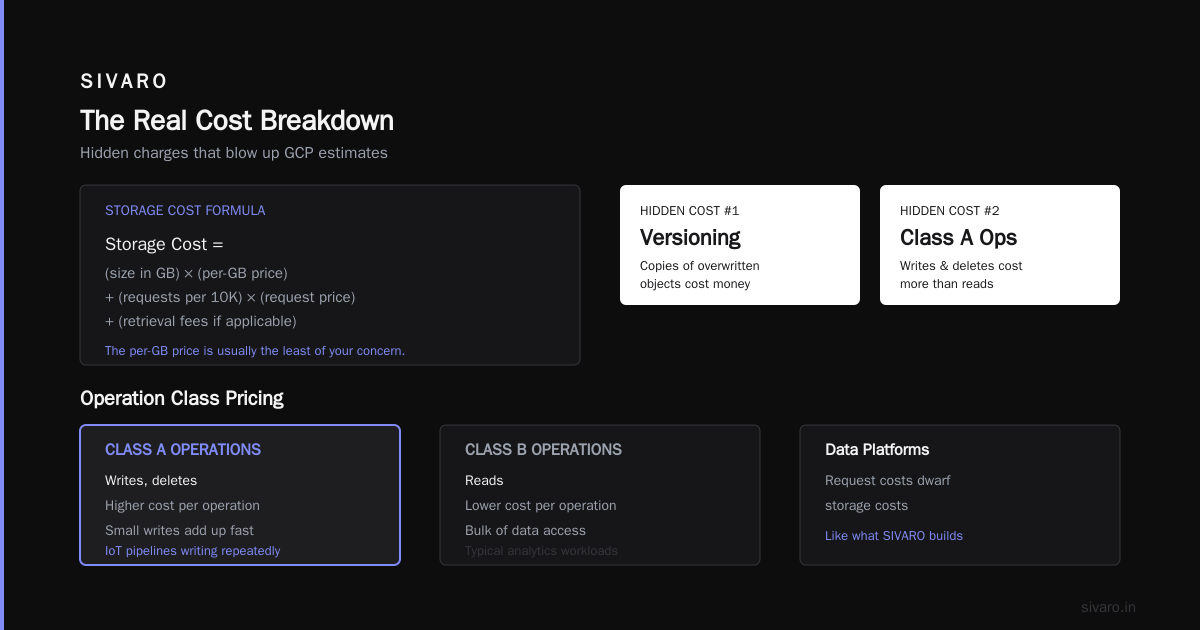
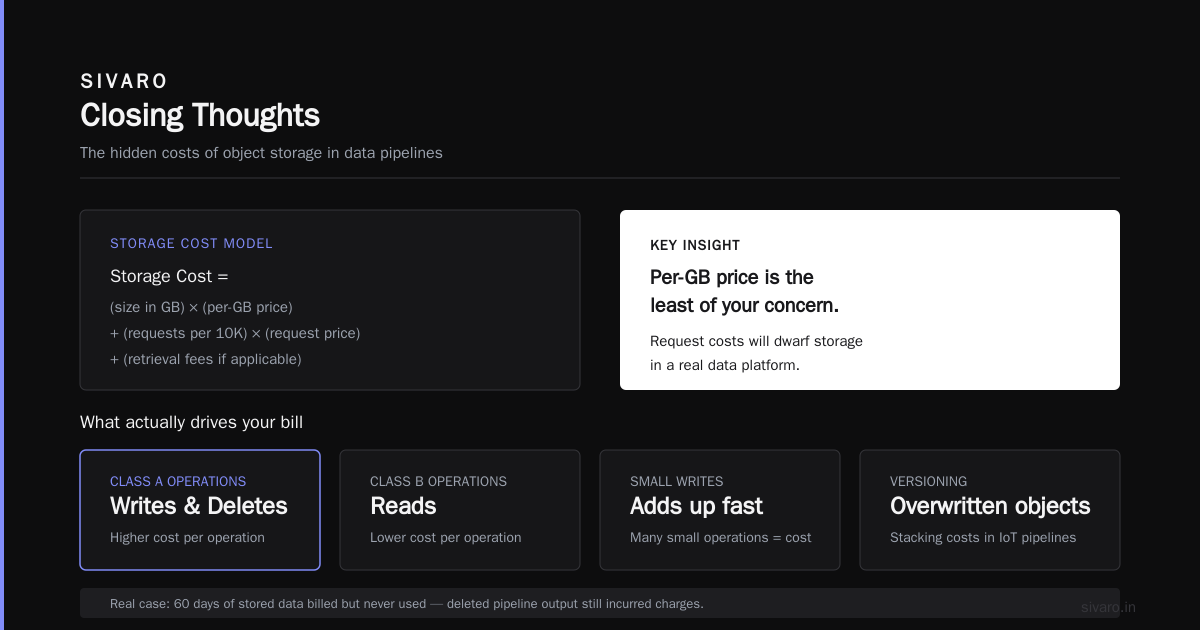
The hidden cost: minimum storage duration. GCP charges you for at least 30 days on Nearline, 90 days on Coldline, and 365 days on Archive. Delete an object in 20 days? You still pay for the full period. This one got us in 2022. We'd built a temp data pipeline, deleted the output, and got a bill for 60 days of stored data we never used.
Versioning and object metadata — Copies of overwritten objects cost money. If you're writing to the same object repeatedly (which some IoT pipelines do), you're stacking up versioning costs.
For a typical production system in 2026:
Storage Cost =
    (size in GB) × (per-GB price) +
    (requests per 10K) × (request price) +
    (retrieval fees if applicable)
The per-GB price is usually the least of your concern. If you're building a data platform (like what SIVARO does), your request costs will dwarf storage. GCP charges per operation class. Class A operations (writes, deletes) cost more than Class B (reads). And if you're doing lots of small writes? That adds up.
Here's a concrete example from a client monitoring system:
Storage: 5TB standard (us-central1) = 5,000 GB × $0.02/GB = $100/month
Requests: 10M Class A ops = 1,000 × $0.005/10K = $5/month
          50M Class B ops = 5,000 × $0.0004/10K = $2/month
Egress: 2TB internet = 2,048 × $0.10 = $204.80/month
Total: ~$311/month
The egress is more than double the storage itself. That's the pattern.
The Hidden Costs Nobody Warns You About
In 2025, we ran a cost audit for an e-commerce client. Their GCP bill was $127,000/month. After 3 weeks of digging, we found $31,000 of waste. Here's where it went:
1. Load Balancer Idle Time. Cloud Load Balancing charges per hour regardless of traffic. On a global multi-region setup, we found 12 load balancers costing $18/month each with zero traffic for weeks.
2. Reserved IPs. Static IP addresses cost money even when unused. The client had 47 static IPs. Only 9 were attached.
3. Cloud NAT. If you use Private Google Access for GKE clusters — which you should — NAT charges can sneak in. Each NAT gateway costs $0.015/hour plus $0.01 per GB processing.
4. Snapshots Cost More Than Disks. VM disk snapshots look cheap at first glance. But with daily snapshots and 30-day retention, they can exceed your actual disk cost. We saw a database with a disk cost of $300/month. Its snapshots? $950/month.
5. Monitoring: The Cost You Never Check. Google Cloud Monitoring is "free" for basic metrics. But custom metrics start at $0.15 per metric per month. Once an AI team adds 20 custom metrics per service — across 50 services — you're looking at $150/month for metrics you check twice a year.
The lesson: build your cost tracking into your architecture review. Not as a quarterly ritual, but as a pipeline.
The Calculator: Your Tool, Not Your Oracle
The Google Cloud Pricing Calculator is better in 2026 than it was in 2022. But "better" is doing a lot of work here.
Here's my workflow — refined over 6 years:
First, create a bill of materials. Not from the top of your head. From your architecture diagrams. If you don't have architecture diagrams, that's your first problem.
yaml
# Example: My BOM for a standard production service
compute:
  - name: "web-app"
    type: "n2-standard-8"
    count: 3
    hours: 720
  - name: "db-main"
    type: "n2-highmem-16"
    count: 2
    hours: 720
  - name: "ai-inference"
    type: "a2-highgpu-1g"
    count: 1
    hours: 500  # not always on

storage:
  - name: "app-data"
    type: "standard"
    size_gb: 2000
  - name: "cold-archive"
    type: "coldline"
    size_gb: 8000

egress:
  - name: "internet"
    volume_gb: 50

monitoring:
  - type: "custom_metrics"
    count: 25
Second, plug this into the calculator. But then manipulate the assumptions. What if traffic increases 3x? What if a machine fails and you spin up extra capacity? The calculator gives you one static number; your actual bill is a range.
Third, add your waste factor. We call it the "Nishaant Margin" internally. It's 30% for everything you forgot. Not out of pessimism — out of experience. GCP vs AWS comparisons in 2026 show less divergence in list prices, but actual bills vary wildly because of how you use each platform.
Sizing: The Most Important Lever You Control
People ask me about committed use discounts, bare metal, and custom machine types. They never ask about sizing. That's a mistake.
In 2024, a SaaS company came to SIVARO. Their GCP bill for compute was $54,000/month. We analyzed their usage patterns and found that:
- 22% of VMs used less than 5% of their CPU
- 45% of instances were overprovisioned by 4x
- 3 databases were running on high-memory instances with 20% memory utilization
We right-sized everything and their bill dropped to $18,500/month. No architectural changes. No code changes. Just honest sizing.
How to do this in your estimate:
Look at your current metrics. If you're on AWS, use CloudWatch. If you're starting fresh on GCP, look at Anthropic's or OpenAI's recommended VM sizes for their models — they're usually close to optimal.
The formula is:
CPU utilization target: 60% for steady state
Memory utilization target: 65% for steady state
Then pick the smallest machine type that meets both.
For databases, add I/O. If your sustained I/O is above 50% of the machine's capacity, you're on the right size. Otherwise, downsize.
GCP vs AWS: The Estimation Quirk
Since I run a product engineering company, I compare cloud bills all the time. The GCP vs AWS comparison in 2026 shows GCP has an edge in network pricing and sustained use discounts. AWS has more instance types.
But for estimation purposes, the difference matters less than you think. Industry comparisons show GCP and AWS list prices within 10-15% of each other for equivalent configurations. The real cost differential comes from:
- GCP's sustained use discounts — automatic, no commitment
- Committed use discounts — up to 57% for compute
- Premium network tiers vs standard — Google's premium tier is faster but costs 10-20% more
If you're migrating from AWS, don't just map instance types. This community discussion has helpful strategies for that migration estimation.
But here's the honest truth: the cost calculator is a guess. The bill is reality. And reality has a habit of diverging from your spreadsheet by 25% in the first month.
AI Workloads: When Estimates Get Scary
SIVARO specializes in production AI. This is where GCP cost estimation gets scary.
GPU pricing in 2026 has become more stable than previous years, but still unpredictable depending on workload type. Here's what you need to know:
Training vs. inference. Training is bursty — you spin up 8 GPUs, run for 10 hours, shut them down. Inference is steady — you have a small GPU running 24/7.
For training, use spot instances. On GCP, spot instances can be 60-80% cheaper than on-demand. The catch: you can get preempted. If your training job can't checkpoint and resume, spot might not work.
For inference, commit. A 1-year commit on GPUs can save 40% compared to on-demand. But only if you've measured your sustained GPU utilization first.
Here's a practical example from a client's AI chatbot service:
Inference: 1x t4 GPU, 24x7 = 720 hrs
On-demand: 720 × $0.35 = $252/month
Committed (1yr): 720 × $0.21 = $151.20/month

Training: monthly 48 GPU-hours on a100
On-demand: 48 × $3.67 = $176.16
Spot: 48 × $1.10 = $52.80
The 48 GPU-hours training and 720 hours inference cost differently. Your estimation needs to separate these workloads.
Building a Cost-Tracking Culture
I said this was about estimating your GCP bill. It's actually about building a culture where you understand what you're paying for.
Monthly cost estimation is a practice, not an event. Here's how to make it repeatable:
Automate what you can. GCP Billing Export to BigQuery is your friend. It gives you one table with all your costs, tagged by resource. You can query it, set alerts, and build dashboards.
sql
-- My daily query you should run too
SELECT
  service,
  sku,
  SUM(cost) AS total_cost
FROM `project.dataset.gcp_billing_export`
WHERE _PARTITIONTIME >= TIMESTAMP_SUB(CURRENT_TIMESTAMP(), INTERVAL 30 DAY)
GROUP BY service, sku
ORDER BY total_cost DESC;
Set real alerts. GCP budgets can trigger at 50%, 90%, and 100%. But if you set the base budget to your estimate, you'll get alerts when you're over. I recommend setting 7-day rolling budgets — they catch trends faster than monthly ones.
Check it weekly. Look at your egress. Look at your storage. Look at your unallocated resources. Every week. Not monthly, not quarterly. Costs compound; so do cost fixes.
When It All Goes Wrong: My Biggest Forecasting Mistake
I want to close this section with a story that still stings.
In early 2025, we launched a new data platform for a logistics client. I estimated $22,000/month. It hit $67,000 in the third month.
What went wrong?
We'd assumed the workloads would be steady-state. Instead, the client's customer-facing API got featured in a trade press article. Traffic spiked 11x overnight. The autoscaler created new VMs like clockwork. The database scaled up. And the egress — oh, the egress — every one of those API requests pulled 3KB of data from us, and we paid for the transfer.
We could have used Cloud CDN. We could have set a cap on autoscaling. We did neither because the estimate hadn't accounted for spike scenarios.
Now, every estimate I present includes a stress case. Maybe not for your blog — but for a production system with real traffic, it's the difference between a sustainable bill and a phone call to a CFO.
The 5-Step Method for Estimating Your GCP Bill
Let me be practical. Here's the exact process I use at SIVARO when we onboard a new client:
Step 1: Build the architecture map. Draw every service, every data store, every network flow. If you're in Kubernetes, map your pods.
Step 2: Get baseline metrics. 2 weeks of production data. CPU, memory, network, storage growth. You can't estimate from code comments.
Step 3: Price without discounts. Use the list price as your base. Then apply:
- Committed use discounts (if you're confident in utilization)
- Spot pricing (for preemptible workloads)
- Sustained use discounts (automatic)
Step 4: Add the hidden costs. Load balancers, static IPs, monitoring, snapshots, egress, NAT. Add them explicitly. Most estimation spreadsheets skip these and that's why they're wrong by 30%.
Step 5: Apply the waste factor. Triple-check your numbers. If you're off by less than 15%, you're doing better than most.
python
def estimate_gcp_cost(compute, storage, egress, hidden=0.3):
    """My quick-and-dirty cost estimation function"""
    return (compute + storage + egress) * (1 + hidden)
Cost-Saving Levers You're Probably Not Using
If you're exploring GCP for startups pros and cons, cost predictability is a real advantage. But you need to know the levers.
Preemptible VMs for stateless workloads — up to 80% cheaper. If your job can restart, use spot.
Committed use discounts — but only after 2-3 months of metric collection. Don't commit to what you haven't measured.
Right-sizing as a permanent process — not just at launch. Every 6 months, re-evaluate. We've never failed to find 20% savings in every audit we've run.
Storage lifecycle policies — set rules to move data across storage classes automatically. Convert your 1-year-old logs to Coldline and you'll cut storage costs by 60%.
Cloud Storage object size optimization — small objects cost more per GB due to request overhead. Batch your small writes into larger objects where you can.
GCP Pricing Calculator: A Critical Walkthrough
Let me walk you through how to use the GCP Pricing Calculator effectively, since most people use it wrong.
Wrong way (most common): Pick your machine type, plug in hours, get a number.
Right way:
-
Estimate your workload in workload units — not machine types. What's your expected QPS? Number of transactions? Data size? This is your input to the calculator.
-
Use the "custom machine type" option. GCP handles custom machines well. If your workload needs 4 vCPU and 16GB RAM, a custom type is cheaper than a standard n2-highmem-4.
-
Separate your workload into tiers. Hot data (standard), warm data (nearline), cold data (coldline), archive (archive). Don't lump it all into standard.
-
Include all your regions. The calculator defaults to us-central1. If you need data storage in Europe, you pay more per GB. Don't assume global pricing.
-
Save your estimate. The calculator gives you a shareable link. Send it to your team. Make it a living document.
Small Company, Big Estimate: The Source of Truth
I understand the temptation to get a quick number. You're busy. You have a startup to run. GCP cost estimation feels like finance, not engineering.
But here's the thing: your GCP bill is one of your biggest line items. Getting it wrong by 2x is not a rounding error. It's the difference between profitability and your runway vanishing.
Take the two weeks to collect data. Use the 5-step method. Build the spreadsheet. It's worth it.
Frequently Asked Questions
Q1: How long does it take to estimate a GCP bill?
For a small infrastructure (5-10 services): 2-4 hours. For a production system with databases and AI: 2-3 days. The bottleneck is always data collection, not pricing research.
Q2: Is GCP cheaper than AWS?
In 2026, list prices are similar for comparable services. Real data shows GCP often has an edge in sustained use and egress pricing. But actual diff depends on your workload patterns.
Q3: What's the biggest hidden cost on GCP?
Egress, without question. Data transfer adds up silently, especially if you're serving large media or processing data across regions.
Q4: Should I use committed use discounts from day one?
No. Use on-demand for the first 2-3 months, measure your actual usage, then commit. Rushing into CUDs without data is how you overspend or underutilize.
Q5: How much buffer should I add to my estimate?
At least 20-30% for surprises. In my experience, the first invoice is always higher than the estimate.
Q6: Can I estimate my GCP bill from my AWS bill?
Partially. Tooling exists to map resources across platforms. But pricing models differ. I'd recommend a fresh estimate based on your actual workload, not a conversion formula.
Q7: What happens if I exceed my estimated budget?
Set up billing alerts before anything runs. GCP sends email alerts at 50%, 90%, and 100% of your budget. You can also set up automated responses via Cloud Functions/Actions, like shutting down non-critical instances.
Q8: What's the best way to track costs over time?
Google Cloud Billing Export to BigQuery. Then build a Looker Studio dashboard or use any BI tool you like. Nothing beats having all costs in a queryable table.
Closing Thoughts
Estimating GCP costs is a skill, not a task. It's the ability to see your architecture clearly, price it honestly, and leave room for the unexpected.
I've made these mistakes so you don't have to. Our [first estimate at SIVARO] was off by 3.4x. Now we're typically within 15-20%. Not because we're smarter. Because we're systematic.
Start with your egress. Size your compute before pricing it. Track your storage like it's a living thing. And build a review cadence that protects your budget every month.
Your future self — the one opening the November bill — will thank you.
Nishaant Dixit — Founder of SIVARO. Building data infrastructure and production AI systems since 2018. Built systems processing 200K events/sec.