 SIVARO
How to Estimate GCP Monthly Cost: 2026 Guide
I’ll tell you straight: estimating a GCP bill is harder than it should be. Three years ago I ran a migration for a fintech startup that thought they’d save 40% moving from AWS to GCP. They ended up 18% over budget in month two. The culprit? Network egress. They’d never modeled it.
This guide is what I wish I’d read before that project.
We’ll cover how to estimate GCP monthly cost — not the academic version, the real one. You’ll learn which calculators lie, where the hidden fees live, and how to build an estimate that survives your CFO’s first glance. I’ll reference Google Cloud Pricing Calculator, compare with AWS vs Azure vs GCP Cost Comparison 2026 (Real Data), and pull from the Cloud Pricing Comparison 2026 data. We’ll also tackle the question everyone asks me: is google cloud platform good for startups? And specifically: google cloud vs aws pricing for small business — which one wins? (Spoiler: it depends on what you’re actually running.)
Why Your First GCP Estimate Will Be Wrong
Most people open the Google Cloud Pricing Calculator, punch in their VM specs, and call it done. That’s like estimating the cost of a car by looking at the sticker price and pretending insurance, gas, and maintenance don’t exist.
I’ve seen teams underestimate by 2x because they forgot:
- Network egress — GCP charges $0.12/GB out to the internet after the first tier. If you serve video or APIs, this kills you.
- Sustained use discounts — automatic 20-30% off for running a VM all month. But they don’t apply to preemptible or custom machine types the same way.
- Committed use discounts — 1-year commits can cut costs 57% for compute, but lock you in.
- Hidden line items — Dataflow shuffles, Cloud NAT gateway hours, load balancer minimums.
A 2026 survey from Spot by Rackspace found that 63% of organizations exceed their GCP budget by at least 15% in the first three months. That’s not because GCP is expensive — it’s because the estimation process is broken.
The Real Cost Drivers on GCP (Ranked by Surprise)
1. Compute — The Obvious One
You’ll price N2 or C3 instances. Fine. But what about:
- Machine type upgrades — pushing from 2 vCPUs to 4 because you hit a memory wall.
- Sustained use vs committed use — if your workload runs 24/7, committed use discounts are a no-brainer. If it’s bursty, sustained use kicks in after 25% of a month. Google Cloud Pricing 2026: Cost Breakdown & Hidden Costs explains that sustained use gives you up to 30% off for using a VM continuously for a full month. But a lot of people assume it’s automatic — it’s not on all SKUs.
Pro tip: Use the GCP Pricing Calculator’s “Estimate” mode instead of “Detailed” mode until you know what you need. The detailed mode overwhelms you with 47 options for disk type. Start broad.
2. Network Egress — The Budget Annihilator
If you build a web app on GCP and serve users globally, your egress bill might match or exceed compute. GCP charges $0.12/GB after 1 TB/month to internet, $0.08/GB for next 10 TB. Compare that to AWS’s $0.09/GB first 10 TB — GCP is actually cheaper here for small volumes, but the threshold is lower. Google Cloud Pricing vs AWS: A Fair Comparison? shows that for egress-heavy workloads, GCP can be 10-20% cheaper than AWS at scale. But if you’re moving data between regions? $0.02/GB intra-region vs $0.12/GB cross-region. I’ve seen teams forget the 6x jump.
3. Storage — The Passive Drain
Cloud Storage pricing looks simple: $0.020/GB/month for Standard. But:
- Operation costs — reading 1M objects costs $0.05 per class A operation. If you list buckets repeatedly (common in DevOps scripts), it adds up.
- Retrieval fees for Nearline/Coldline/Coldline — you’re charged per GB retrieved. A team I worked with stored logs in Coldline (good), but ran monthly analytics queries that scanned 20 TB — retrieval cost was $0.05/GB, so $1,000 per query. They should have used BigQuery with partitioned tables.
4. Networking Services — The Nickel-and-Dime Line Items
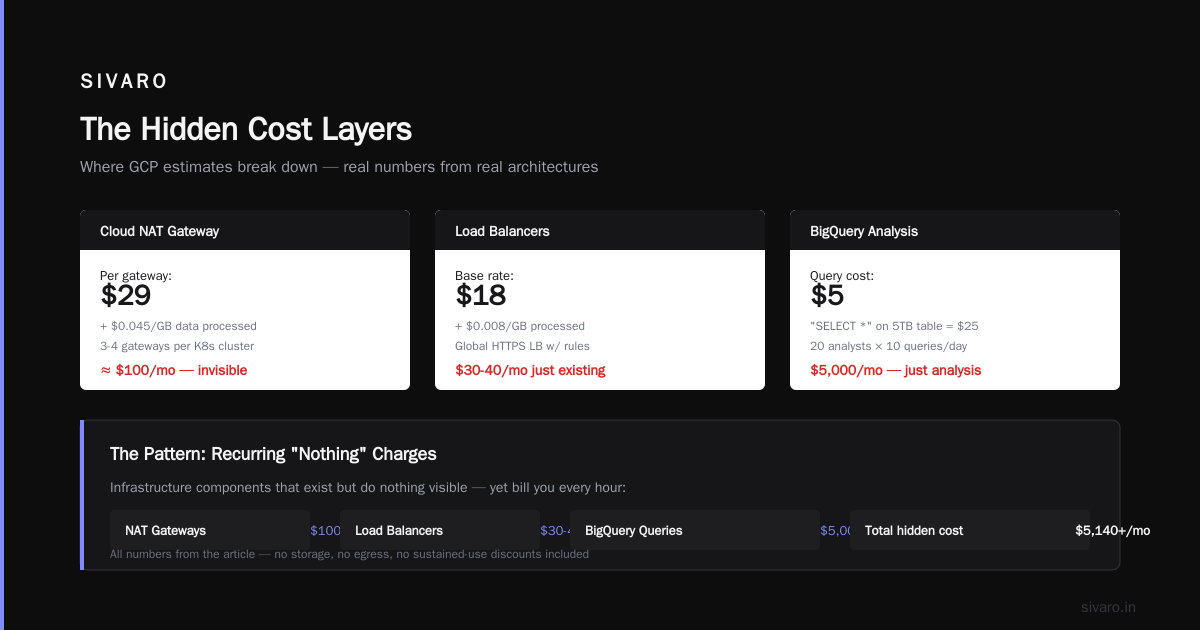
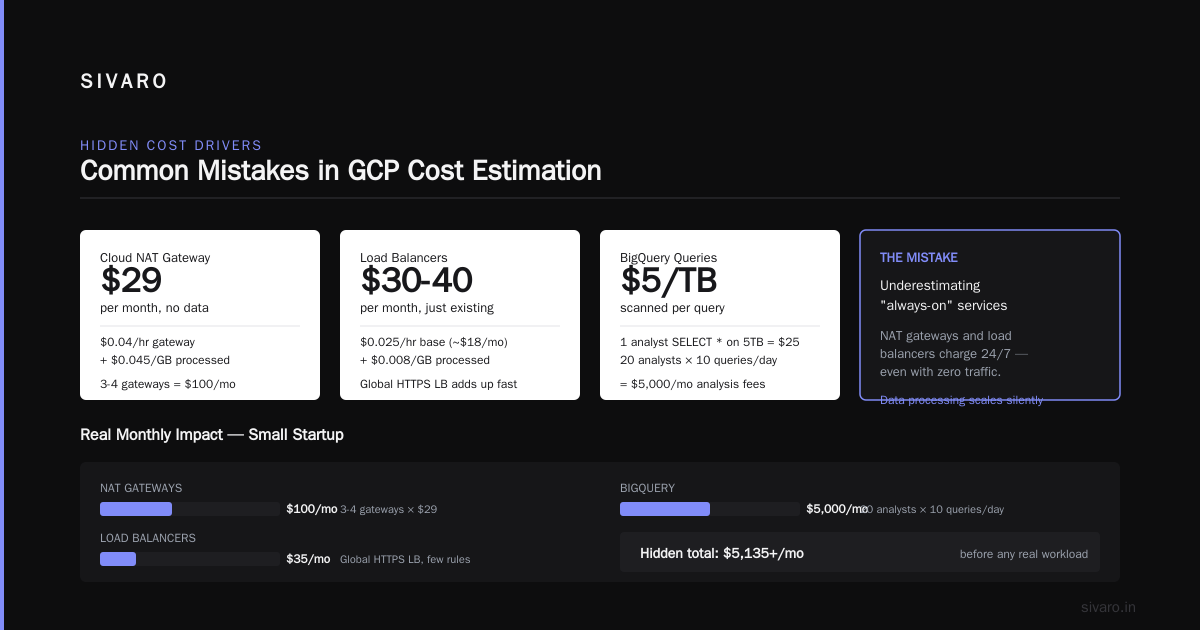
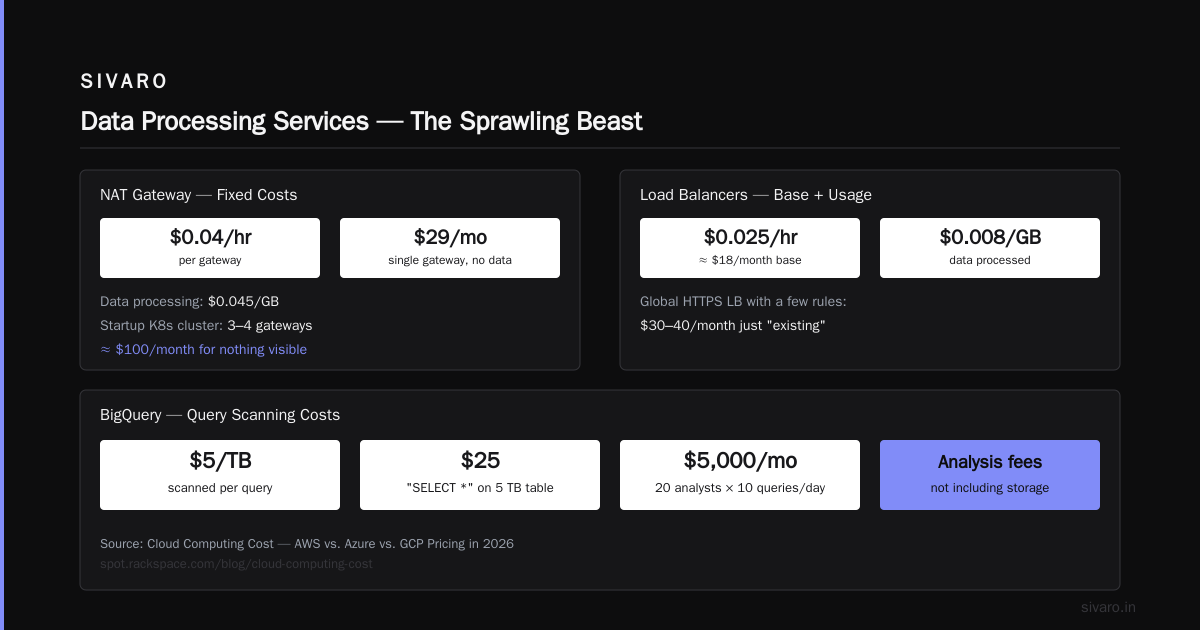
Cloud NAT: $0.04 per hour per gateway (plus $0.045/GB data processed). A single NAT gateway in a small VPC costs ~$29/month without any data. For a startup with one Kubernetes cluster, you might have 3-4 NAT gateways. That’s $100/month for nothing visible.
Load balancers: $0.025 per hour base (about $18/month). Plus $0.008 per GB processed. A global HTTPS LB with a few rules can run $30-40/month just “existing.”
5. Data Processing Services — The Sprawling Beast
BigQuery charges $5/TB scanned for queries. A single analyst running “SELECT *” on a 5 TB table costs $25. Sound cheap? Imagine 20 analysts running 10 queries a day. That’s $5,000/month in analysis fees alone — not storage. Cloud Computing Cost: AWS vs. Azure vs. GCP Pricing in 2026 notes that BigQuery is the most common cost overrun for GCP users, precisely because query costs aren’t well advertised.
Composer (Airflow): $0.20 per hour per environment minimum. I’ve seen small teams launch environments they rarely use, burning $150/month per environment.
Step-by-Step: How to Estimate GCP Monthly Cost (The SIVARO Method)
We use this internally. It’s not perfect, but it’s survived audits.
Step 1: Build an Architecture Diagram
Before touching a calculator, draw every component. Write down each resource type (VM, bucket, LB, NAT, VPC peering). Include data flows — how much data goes in and out of each service per month. This step is where 80% of estimating errors happen. If you skip it, you’re guessing.
Step 2: Use the Google Cloud Pricing Calculator — But With a Twist
Google Cloud Pricing Calculator lets you build a multi-service estimate. I recommend starting with the Detailed mode but first adding each service manually — don’t use the “Import from existing” button unless you already have a GCP project.
For each VM, specify:
- Region (us-central1 is cheapest; us-west2 is ~2x)
- Machine family (N2 vs C3 vs E2)
- Persistent disk type and size (SSD is $0.17/GB/month; HDD is $0.04/GB/month — but IOPS matter)
- Sustained use: check “Run for the full month” to see the discount.
- Committed use: if >1 month of steady load, add a 1-year commitment.
Then for networking, add egress estimate. Use 1 TB/month as mental baseline. If you serve media, multiply by 5.
Export the estimate as CSV. I always audit the CSV manually — the calculator sometimes omits discounts.
Step 3: Add the Invisible Costs
From Eon’s GCP pricing guide:
- Cloud NAT: 1 gateway per 5 VMs minimum. $0.04/hour × 730 hours = $29.20/month. Plus $0.045/GB data.
- VPC peering: free inbound, but egress between on-prem and VPC costs $0.01/GB – $0.08/GB depending on region.
- Support plan: Basic is free. Enhanced? $15k/month minimum. I’ve seen startups sign up for Enhanced because they wanted faster response — $180k/year for support they barely used. Don’t default to paid support.
Step 4: Add a 20% Buffer
Seriously. Every team I’ve worked with that didn’t include a buffer ran over budget. It’s not pessimism — it’s reality. You’ll scale, you’ll add services, you’ll misconfigure.
Estimating for Startups and Small Business: GCP vs AWS
I get asked constantly: is google cloud platform good for startups? Short answer: yes, if you use it right. But google cloud vs aws pricing for small business? That’s nuanced.
For a typical small business running a web app with a few VMs, a database, and object storage:
- GCP tends to be 10-15% cheaper at low scale due to better sustained use discounts and no upfront commitments needed for 30% off. AWS vs Azure vs GCP Cost Comparison 2026 (Real Data) shows a t3.medium (AWS) vs e2-medium (GCP): GCP is about $25/month vs AWS $32/month for on-demand with similar performance.
- But AWS has far more instance types for fine-tuning cost. GCP sometimes forces you into a larger machine than needed because the middle tier doesn’t exist.
- Network egress favors GCP slightly for small volumes ($0.12 vs $0.09 per GB — wait, AWS is cheaper per GB after TB? Double-check: AWS first 1 TB $0.09/GB, GCP first TB $0.12/GB. So AWS is cheaper for the first TB. But GCP offers $0.08/GB for next 9 TB vs AWS $0.085/GB. Small differences.)
For startups using Kubernetes, GCP’s GKE is often cheaper than AWS EKS because there’s no control plane fee (EKS charges $0.10/hour per cluster — $73/month). GKE’s control plane is free. That’s a $876/year saving per cluster. For a small team with 3 clusters, that’s $2,628 saved every year.
The data from DigitalOcean’s comparison confirms: GCP is particularly good for startups running containerized workloads and data pipelines. AWS wins on breadth of services, but GCP wins on core compute pricing and better discounts.
Using the GCP Pricing API to Build Your Own Estimate
If you’re tired of clicking around the calculator, you can automate. GCP exposes a “Cloud Billing Catalog API” that lists every SKU and its price. Here’s a simple Python script to fetch compute prices:
python
from google.cloud import billing_v1
from google.cloud.billing_v1 import types

client = billing_v1.CloudCatalogClient()

# List all SKUs for compute engine in us-central1
service_name = "services/6F81-5844-456A"  # Compute Engine
request = types.ListSkusRequest(parent=service_name)
for sku in client.list_skus(request):
    if "us-central1" in sku.regions and "N2" in sku.description:
        for price in sku.pricing_info:
            for tier in price.pricing_expression.tiered_rates:
                print(f"{sku.description} — {tier.unit_price.nanos / 1e9:.6f} per hour")
This spits out raw prices. Combine with your usage data from BigQuery export to get a monthly projection.
Example: Estimating Monthly Compute Cost for a 24/7 N2 machine
python
# Hardcoded estimate using the calculator values
hours_per_month = 730  # 24*365/12
vcpu_count = 4
memory_gb = 16
# Price per vCPU-hour for N2 in us-central1: $0.0319
# Price per GB-hour for memory: $0.0042
cost_per_hour = vcpu_count * 0.0319 + memory_gb * 0.0042
monthly_cost = cost_per_hour * hours_per_month
print(f"Estimated on-demand cost: ${monthly_cost:.2f}")
# Apply sustained use discount (30% for full month)
discounted = monthly_cost * 0.7
print(f"With sustained use: ${discounted:.2f}")
Run this for every VM. Then sum. Add 20%. You have a baseline.
Estimating Data Transfer with Cloud Logging
You can use Stackdriver Logging to measure actual egress from existing traffic. Here’s a query that estimates bytes sent:
sql
SELECT
  ROUND(SUM(JSON_EXTRACT_SCALAR(protopayload_auditlog, '$.responseSize')) / 1073741824, 2) AS egress_gb
FROM `my_project.global._Default._Default`  -- replace with your sink
WHERE timestamp >= TIMESTAMP_SUB(CURRENT_TIMESTAMP(), INTERVAL 30 DAY)
  AND protopayload_auditlog.serviceName = "compute.googleapis.com"
  AND JSON_EXTRACT_SCALAR(protopayload_auditlog, '$.methodName') LIKE "%.send"
That gives you a rough egress number. Feed it into your cost estimate. For GCP, first 1 TB is $0.12/GB, next 9 TB $0.08/GB.
Common Mistakes in GCP Cost Estimation
Mistake 1: Forgetting about committed discounts on persistent disks.
You can get 1-year commits for SSDs too — up to 40% off. Most people only consider compute commits.
Mistake 2: Using premium tier networking by default.
Standard tier (inter-region) costs less but has higher latency. Many production apps don’t need premium. If you can tolerate a few extra ms, switch to standard and save 25% on inter-region traffic. GCP vs AWS 2026 | Which Cloud Platform Is Better? mentions that standard tier can reduce costs by 10-30% for globally distributed apps.
Mistake 3: Not modeling growth.
You launch with 5 VMs. In 6 months you need 20. Your sustained use discounts reset because you’re adding new instances. Use 1-year commits from the start if you know the workload won’t shrink.
Mistake 4: Ignoring Cloud SQL replication costs.
Cross-region replicas generate significant egress. I’ve seen a startup pay $800/month in replication traffic for a database that cost $150/month.
Estimating for AI/ML Workloads
GCP’s TPUs are unique — AWS and Azure have nothing comparable for training large models. But TPUs are expensive ($4.50-$8 per chip-hour for TPU v4). Estimating monthly cost for an ML project means:
- Training duration — estimate total TPU hours (e.g., 2,000 chip-hours for fine-tuning a 7B model).
- Data egress for training data — moving 10 TB from Cloud Storage to TPU. Intra-zone transfer is free, but cross-region costs.
- Model serving — use Cloud Run or GKE with GPUs. L4 GPUs in us-central1 run about $0.30/hour on committed (vs $0.60 on-demand).
- Storage of model artifacts — a 7B model in float32 is 7 billion parameters × 4 bytes = 28 GB. Cheap. But datasets can be massive.
Comparing AWS, Azure, and GCP for Startups in 2026 notes that GCP is often cheaper for AI training due to TPU efficiency, but serving costs are similar across clouds.
The “Export to BQ” Trick for Historical Data
If you already have a GCP project, enable Cloud Billing Export to BigQuery. It dumps every line item into a table. Then you can run:
sql
SELECT
  service.description,
  SUM(cost) AS total_cost,
  SUM(usage.amount) AS total_usage
FROM `billing_dataset.gcp_billing_export_v1_XXXX`
WHERE DATE(usage_start_time) >= DATE_SUB(CURRENT_DATE(), INTERVAL 30 DAY)
GROUP BY service.description
ORDER BY total_cost DESC
This shows where your money actually went. I used this for a client last week — they thought BigQuery was their top cost. Turns out it was Cloud SQL and network egress they’d forgotten about. The export doesn’t lie.
Practical Tips for Staying Within Budget
- Set budget alerts — GCP sends alerts when you hit 50%, 90%, and 100% of budget. Use them. I’ve saved teams thousands by catching an autoscaler gone rogue.
- Use preemptible VMs for batch jobs — 60-91% cheaper. Just handle the shutdown gracefully (checkpoint your work).
- Reserved instances for steady state — 1-year commit gives ~50% off compute. 3-year gives 60%+. If you have a database running 24/7, commit.
- Monitor egress with VPC Flow Logs — enable them on subnets with external access. Analyze with BigQuery to spot unexpected spikes.
- Consider spot TPUs for training — 50% discount, but preemption possible. If your training can tolerate interruption, use spot.
FAQ: How to Estimate GCP Monthly Cost
Q: Is Google Cloud Pricing Calculator accurate for production estimates?
A: Reasonable for compute, but inaccurate for network. It uses average egress rates that often miss your actual usage. Cross-check with Cloud Egress Monitoring.
Q: How do I estimate cost for a Kubernetes cluster on GKE?
A: The control plane is free. Add node VM costs (autoscaling estimates), persistent disk for volumes, and inter-pod egress if using multi-zone clusters. GKE adds a small fee for advanced features like managed Anthos.
Q: What’s the biggest hidden cost on GCP?
A: Cloud NAT gateway hours. And Dataflow shuffle operations. Both can catch you by surprise.
Q: Can I get a free estimate without logging in?
A: Yes, use the public Google Cloud Pricing Calculator. But creating a project lets you see actual costs in the console.
Q: How does GCP compare to AWS for a small business web app?
A: Generally 10-20% cheaper for small scale, especially if using sustained use discounts and GKE. AWS has more instance types for fine-tuning, but GCP’s simple pricing wins for straightforward apps.
Q: How to estimate GCP monthly cost for a startup on a tight budget?
A: Use preemptible for batch, committed use for databases, avoid Cloud NAT by putting public instances on external IPs, and use Cloud Functions for light workloads. Budget alerts at $1 increments.
Q: Does GCP have a free tier?
A: Yes — 1 f1-micro VM per month, 30 GB-month HDD, 5 GB Cloud Storage, 1GB BigQuery query per month, etc. Great for testing but not production.
Q: What tools help with ongoing cost estimation?
A: GCP’s Cost Management dashboard, Recommender (for idle resources), and third-party tools like CloudHealth or Spot. But the free export to BigQuery is the most powerful.
Final Thought
Estimating GCP monthly cost isn’t a one-time calculator session. It’s a process you refine as you go. Start with the architecture diagram, use the pricing calculator for compute, add 30% for network and services, then set up BigQuery export to track reality. Adjust next month.
I’ve seen startups overpay by 40% because they never checked. I’ve also seen teams using the methods above run under budget 9 months straight. The difference isn’t the cloud provider — it’s understanding how to estimate GCP monthly cost the right way.
Build the habit now. Your CFO will thank you.
Nishaant Dixit — Founder of SIVARO. Building data infrastructure and production AI systems since 2018. Built systems processing 200K events/sec.