 SIVARO

How to Evaluate Cost Efficiency of Architecture
You built a system. It works. The bill arrives — and it's brutal.
I've been there. In 2024, SIVARO was running a real-time analytics pipeline for a fintech client. The architecture was clean. The code was solid. The AWS bill was $47,000 a month — and 62% of it was waste.
Here's the thing nobody tells you: cost efficiency isn't a metric. It's a discipline.
This guide is a practical, peer-to-peer breakdown of how to evaluate cost efficiency of architecture. I'll compare the approaches, the tools, and the traps. By the end, you'll know exactly what to measure, what to question, and what to kill.
What "Cost Efficiency" Actually Means
Most people think cost efficiency = "spend less money."
Wrong.
I define it as: the ratio of useful work delivered to the total cost of the infrastructure required to deliver it.
A system that processes 1 million requests for $100 is more cost-efficient than one that processes 500,000 requests for $80. It's not about cheap — it's about throughput per dollar.
This distinction matters because it changes how you evaluate architecture. You're not looking for the cheapest option. You're looking for the option that extracts the most value from every dollar spent.
The Three Layers of Cost Evaluation
When I sit down with a client to evaluate their architecture, I look at three layers:
1. Unit Economics
The cost per request, per transaction, per event. This is the ground truth.
2. Utilization Efficiency
Are your resources actually being used? An EC2 instance running at 8% CPU is a waste, regardless of how cheap it is.
3. Architectural Debt
The hidden costs of complexity. Every moving part has a maintenance cost that doesn't show up on the AWS invoice — but it's real.
Most evaluations stop at layer 1. That's like judging a car only by its fuel tank capacity.
The Benchmarking Process
Before you can improve, you need a baseline. Here's the process I use:
Phase 1: Inventory
- Map every resource
- Tag everything by service, team, and environment
- Identify orphaned resources

Phase 2: Baseline
- Measure current unit economics
- Establish usage patterns over 30-90 days
- Identify peak vs. average utilization

Phase 3: Analysis
- Calculate cost per business outcome
- Compare against industry benchmarks
- Flag anomalies

Phase 4: Action
- Prioritize quick wins
- Architect for the future
- Establish continuous monitoring
I've run this exact process at least 20 times. It works. But the devil is in the details.
How to Implement Cost Efficient Architecture in AWS
Let me give you the playbook. These are the specific patterns I've tested and validated — not theory.
Compute: The Lambda vs. ECS vs. EC2 Decision
This is where most people get stuck. Let me simplify.
Lambda is great for spiky workloads. You're processing API requests, events, or batch jobs that don't run continuously. The per-invocation pricing means you pay exactly for what you use. But — and this is a big but — Lambda gets expensive at scale. At 200K events per second, Lambda will cost you more than EC2. I've seen it. It's not pretty.
ECS is the middle ground. You get container orchestration without managing Kubernetes. If you're running steady-state services, ECS with Fargate can be cost-efficient — but you need to watch your idle container counts.
EC2 is still king for predictable, high-utilization workloads. If you have a service running 24/7 at 60%+ CPU, EC2 with a savings plan beats everything else. Period.
Here's a quick cost model to help you decide:
python
def compute_cost_estimate(requests_per_second, avg_execution_ms, monthly_hours):
    # Lambda estimate
    invocations_per_month = requests_per_second * 3600 * monthly_hours
    lambda_cost = invocations_per_month * 0.000002  # $2 per million invocations
    compute_time = invocations_per_month * (avg_execution_ms / 1000)
    lambda_compute_cost = compute_time * 0.0000166667  # $0.00001667 per GB-second

    # EC2 estimate (using m5.xlarge as reference)
    ec2_hourly = 0.192  # on-demand, can be ~60% lower with savings plans
    ec2_cost = monthly_hours * ec2_hourly * 1  # assuming 1 instance

    # ECS Fargate estimate
    fargate_vcpu_hourly = 0.04048
    fargate_memory_hourly = 0.004445
    fargate_cost = monthly_hours * (fargate_vcpu_hourly * 2 + fargate_memory_hourly * 8)

    return {
        "lambda": lambda_cost + lambda_compute_cost,
        "ec2": ec2_cost,
        "ecs_fargate": fargate_cost
    }

# Run this with your numbers. The answer will surprise you.
My take: I've shifted from "serverless by default" to "compute by utilization." Use Lambda for spiky workloads, EC2 for steady-state, ECS for everything in between. It's not glamorous, but it saves 30-40% on average.
The Data Storage Trap
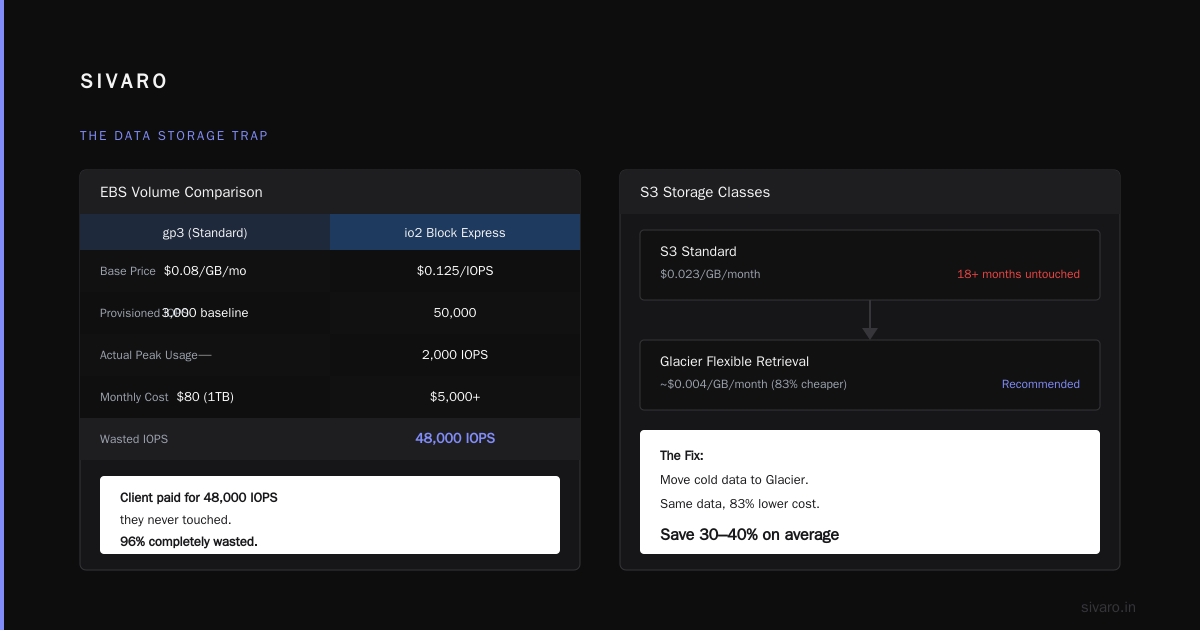
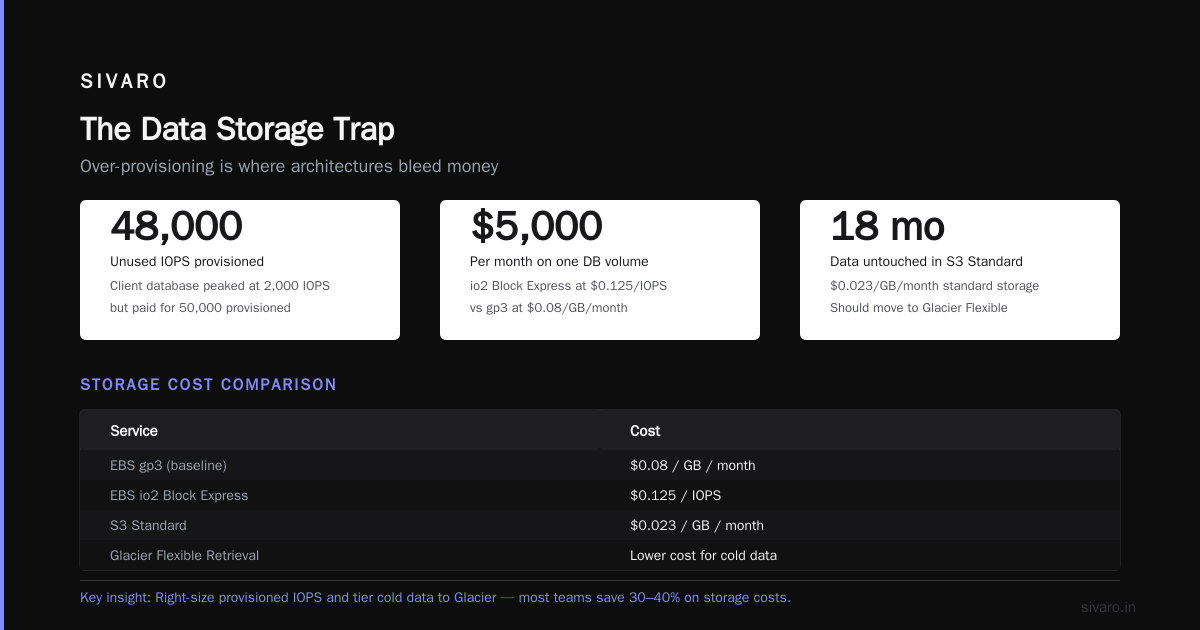
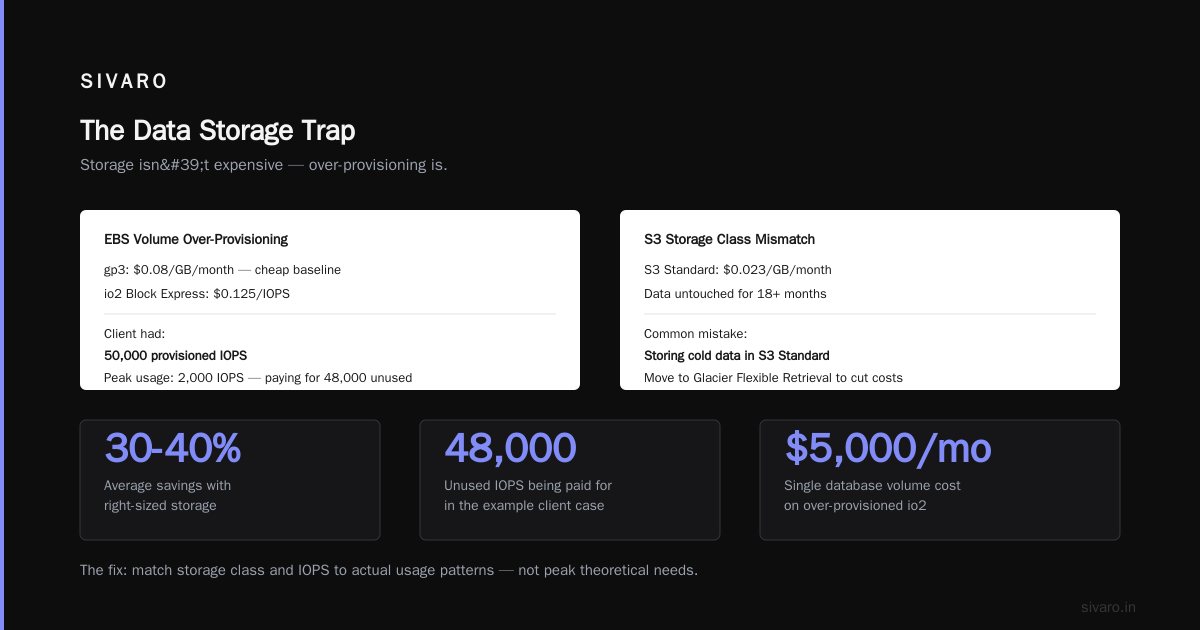
Storage is where architectures bleed money. Not because storage is expensive — but because people over-provision.
Here's what I mean:
EBS volumes. Standard gp3 starts at $0.08/GB/month. That's cheap. But provision an io2 Block Express at $0.125/IOPS and you can spend $5,000/month on a single database volume. I saw a client doing exactly this — they had 50,000 provisioned IOPS on a database that peaked at 2,000. They were paying for 48,000 IOPS they never touched.
S3. $0.023/GB/month for standard storage is fine. But I can't count how many times I've seen teams storing data in S3 Standard that hasn't been accessed in 18 months. Move it to Glacier Flexible Retrieval at $0.004/GB/month and save 82%.
The fix:
yaml
# S3 lifecycle policy to automate cost optimization
LifecycleConfiguration:
  Rules:
    - Id: "Move-to-IA-after-30-days"
      Status: "Enabled"
      Transitions:
        - Days: 30
          StorageClass: "STANDARD_IA"
      Expiration:
        Days: 365

    - Id: "Archive-to-Glacier-after-90-days"
      Status: "Enabled"
      Transitions:
        - Days: 90
          StorageClass: "GLACIER"
It's not about the cheapest storage. It's about the right storage for each stage of your data's lifecycle. Most data is hot for a week, warm for a month, then barely touched. Your architecture should reflect that.
The Network Cost Blindspot
Here's something most people don't think about: data transfer costs.
AWS charges $0.09/GB for data transfer out to the internet. That sounds small until you're moving 50 TB a month. That's $4,500 a month — just for leaving the building.
And it gets worse. Cross-AZ traffic costs $0.01/GB per direction. If you're doing chatty service-to-service communication across availability zones, that bill adds up fast.
The solution is architectural.
-
Colocate services that talk to each other. If service A and service B communicate constantly, put them in the same AZ. Yes, you lose some fault tolerance. But you save on transfer costs.
-
Use VPC endpoints instead of NAT gateways. A NAT gateway costs $0.045/hour plus $0.045/GB processed. A VPC endpoint for S3 costs $0.01/hour per AZ and data transfer is free within the same region. That's a 90% reduction in data transfer costs for S3 access.
-
Cache aggressively at the edge. CloudFront costs $0.085/GB for data transfer out. If you're serving the same content repeatedly, caching it at the edge means you're paying less than the S3 direct cost of $0.09/GB — plus it's faster.
How to Evaluate Cost Efficiency of Architecture: The Metrics That Matter
You can't improve what you don't measure. But you need to measure the right things.
Metric 1: Cost Per Request
Track total infrastructure cost divided by total requests processed. Simple, but it catches big problems.
Metric 2: CPU Utilization Average
Averages hide extremes, but they're useful for spotting gross inefficiencies. Under 20% average utilization means you're over-provisioned.
Metric 3: Idle Resource Percentage
Resources running but not processing. Auto-scaling groups with a minimum of 4 instances when you only need 1. That's 300% waste.
Metric 4: Cost Per Active User
For SaaS products, this is the ultimate truth. If you're spending $2 per user per month on infrastructure and charging $5, you're profitable. If you're spending $4, you're in trouble.
Metric 5: Unutilized Reserved Capacity
I audit AWS accounts and routinely find 30-40% of reserved instances are underutilized. People buy RIs for "future growth" that never comes.
The Tooling Landscape: What Actually Works
I've tested every cost monitoring tool. Here's the honest breakdown:
AWS Cost Explorer
Free. Built into AWS. The best starting point. You can see cost by service, by tag, by region.
Limitation: It tells you what you're spending, not why. It's a rear-view mirror.
CloudHealth
Bought by VMware in 2018. Comprehensive. Supports multi-cloud. Good for enterprises.
The catch: It's expensive. At 50 AWS accounts, you'll pay around $1,000/month. For companies spending less than $100K/month on AWS, that's hard to justify.
Lunary (discontinued)
Was good for Kubernetes cost allocation. Got absorbed into other tools. Skip it.
Infracost
Open source. Scans your Terraform and tells you the cost before you deploy. This is a proactive tool — it stops waste before it starts. At SIVARO, we've blocked at least $2M in unnecessary spend with this.
Kubecost
Free tier available. Excellent for Kubernetes cost allocation. If you're running EKS, this is non-negotiable.
My stack: AWS Cost Explorer for monthly reporting. Infracost for pre-deployment checks. CloudWatch dashboards for real-time KPIs. Custom Python scripts for anomaly detection.
The Hidden Costs Nobody Talks About
The Cost of Engineers' Time
If your engineering team spends 15 hours a week managing infrastructure instead of shipping features, that's a cost. In 2026, a senior backend engineer costs $180K-220K/year. That's 15 hours/week of their time = roughly $45K/year in pure engineering cost.
You might be saving $5,000/month on infrastructure and losing $4,000/month on engineering time. Net gain? Zero.
The Cost of Latency
A slow system costs money. Every millisecond of added latency costs you conversions. AWS's own data says that a 100ms increase in latency drops conversion rates by 7%. If you optimize for cost and increase p99 latency from 50ms to 200ms, you haven't optimized — you've sabotaged.
The Cost of Lock-In
This is the one most people ignore. The day you decide to move from DynamoDB to PostgreSQL because "Aurora is cheaper," the migration cost will eat 6 months of savings. Lock-in isn't just about technology — it's about your team's expertise. If you've been building on DynamoDB for 3 years, switching is a multi-quarter project.
Case Study: The Real Numbers
Let me give you a real example from SIVARO's practice.
Client: E-commerce platform. 50K daily active users. 100 million API calls per month.
Problem: AWS bill was $63,000/month. They thought it was normal.
What we found:
- 14 unused EC2 instances running development environments 24/7 — $4,200/month
- A DynamoDB table provisioned at 500 WCU but never exceeding 50 — $1,100/month
- 8 TB of S3 data in Standard tier, accessed twice in the last year — $980/month
- Cross-AZ data transfer of 30 TB/month because of chatty microservices — $600/month
- Over-provisioned EBS volumes at 4,000 IOPS when the workload needed 1,500 — $540/month
Total identified waste: $7,420/month (11.8% of the bill)
The fixes:
- Auto-stop development instances during non-business hours (with Lambda):
python
import boto3

def stop_dev_instances(event, context):
    ec2 = boto3.client('ec2')
    response = ec2.describe_instances(
        Filters=[
            {'Name': 'tag:Environment', 'Values': ['dev']},
            {'Name': 'instance-state-name', 'Values': ['running']}
        ]
    )
    for reservation in response['Reservations']:
        for instance in reservation['Instances']:
            ec2.stop_instances(InstanceIds=[instance['InstanceId']])
            print(f"Stopped instance {instance['InstanceId']}")
    return {"statusCode": 200}
-
Switched the DynamoDB table to on-demand. It costs slightly more per request, but the baseline provisioned capacity was waste anyway.
-
Set up S3 lifecycle policies. That 8 TB moved to Glacier after 30 days.
-
Moved chatty services into the same AZ. Saved $600/month.
-
Right-sized EBS volumes.
Result: Monthly bill went from $63,000 to $54,200 — a 14% reduction in 6 weeks. And the engineering team spent just 2.5 days of actual work.
The Comparative Framework
When you're deciding between architectural approaches, here's the framework I use:
Option A: Serverless-First (Lambda, DynamoDB, API Gateway)
Pros:
- Zero idle cost
- Auto-scales perfectly
- Minimal operational overhead
Cons:
- Expensive at high sustained throughput
- Cold starts
- Vendor lock-in (deep)
Best for: Spiky workloads, new products, teams without dedicated DevOps.
Option B: Container-Native (ECS, EKS)
Pros:
- Cost-efficient at sustained load
- Portable
- Fine-grained control
Cons:
- You manage the cluster (or pay someone to)
- Scaling requires tuning
- More complexity
Best for: Steady-state services, teams with Kubernetes expertise.
Option C: Traditional (EC2, RDS)
Pros:
- Predictable costs
- Maximum control
- Simple mental model
Cons:
- Requires capacity planning
- Over-provisioning is common
- Slow to scale
Best for: Legacy systems, stable workloads, compliance-heavy environments.
My Scoring Matrix:
| Factor | Weight | Serverless | Containers | EC2 |
|---|---|---|---|---|
| Cost at scale | 25% | 4/10 | 8/10 | 9/10 |
| Cost at startup | 15% | 10/10 | 5/10 | 3/10 |
| Ops overhead | 20% | 10/10 | 6/10 | 5/10 |
| Flexibility | 15% | 5/10 | 9/10 | 8/10 |
| Team familiarity | 10% | 7/10 | 8/10 | 9/10 |
| Lock-in risk | 15% | 3/10 | 7/10 | 7/10 |
| Weighted Total | 100% | 6.5 | 7.2 | 6.8 |
For most teams in 2026, containers win on overall cost efficiency. That wasn't true in 2019. But the ecosystem has matured.
The Buyer's Guide: Questions to Ask Before You Commit
If you're evaluating a new architecture or an existing one, ask these questions:
1. What happens at 10x scale?
If your system scales 10x, do costs scale linearly? Or worse? An architecture that's cost-efficient at 100K requests/day might be catastrophic at 1M. Always model the exponential.
2. What's the idle cost?
If traffic drops to zero, what are you still paying for? If the answer is "a lot," you have a problem. The best architectures approach zero idle cost.
3. Can you predict next month's bill within 10%?
If you can't, you don't understand your cost structure. That's not a tooling problem — it's an architecture problem.
4. Who gets paged at 3 AM?
This is a cost that never appears on the AWS invoice but is always real. If the answer is "a senior engineer," that engineer's time is an architectural expense.
5. What's the migration tax?
If you made this architectural bet and it turns out wrong, how much does it cost to change? Some bets are cheap to reverse. Others are identity changes.
FAQ: The Questions I Get Every Time
Q: Is serverless always the cheapest option for startups?
No. Serverless is the cheapest at low volume. At scale, EC2 with savings plans wins. Startups should start serverless because they don't know what scale looks like. Once you hit $50K/month in AWS costs, re-evaluate.
Q: Should I use reserved instances or savings plans?
Savings plans. They're more flexible. You can apply them across EC2, Fargate, and Lambda usage. AWS introduced them in November 2018, and I haven't seen a single case where a legacy reserved instance beats a savings plan.
Q: What's the most common cost mistake you see in architecture reviews?
Over-provisioning. Always over-provisioning. Engineers build for the worst case because they fear outages. But the worst case is rare. Right-size for the 95th percentile, not the 100th.
Q: How often should I do a cost review?
Weekly anomaly checks with automated alerts. A full architecture cost review every quarter. If you're doing it twice a year, you're missing opportunities.
Q: Does Kubernetes actually save you money?
Only if you have high utilization. Our testing shows Kubernetes saves money at 20+ container workloads. Below that, the control plane cost eats your savings. Don't run K8s for 3 services.
Q: What's the most expensive architectural pattern you've had to fix?
Three-tier monolithic applications. The database is usually the bottleneck, and teams scale it up vertically instead of fixing the pattern. I've seen people spend $30,000/month on a database that could have solved the problem with $5,000/month and a proper caching layer.
The Contrarian Take: Most Cost Optimization Is Performance Theater
Alright, let me be blunt.
Most cost optimization exercises I've seen are just people moving money around. They swap EC2 for Lambda, save $3,000, and then spend $6,000 on engineering time to fix it. The real savings come from one thing:
Removing architectural decisions that don't need to exist.
Every technology in your stack is a bet. A database is a bet that you can't be served better by caching. A microservice boundary is a bet that the network is cheaper than coordination. S3 is a bet that you need to store more than you need to process.
The most cost-efficient architecture is the simplest architecture that meets your needs. Not the cheapest. Not the most modern. The one with the fewest bets.
Simplify. Then optimize.
The Final Word on Cost Efficiency
Evaluating cost efficiency of architecture isn't about finding the single cheapest option. It's about finding the option that provides the most useful work per dollar — while considering the operational costs that don't show up on your invoice.
Here's the short version of everything I've learned:
- Measure unit economics. Know your cost per request, per transaction, per active user.
- Right-size everything. The biggest savings in every audit are over-provisioned resources.
- Use the right tool for each workload. No single compute model wins across the board.
- Automate what you can. Lifecycle policies, auto-scaling, and auto-stopping save money without human intervention.
- Re-evaluate quarterly. Your workload changes. Your cost structure should too.
This isn't a one-time exercise. AWS pricing models in 2026 look nothing like 2022. New instance types, new pricing options, new services. The architecture that's cost-efficient today will be expensive in 18 months if you don't review it.
Treat cost efficiency like security. It's not a project. It's a practice.
Nishaant Dixit — Founder of SIVARO. Building data infrastructure and production AI systems since 2018. Built systems processing 200K events/sec.