 SIVARO
How to Explain Docker Architecture in an Interview
Two years ago I sat through a senior platform engineer round at a payments company. The candidate could walk through Kubernetes' entire control plane from memory. Then I asked one question: "Walk me through what happens when you type docker run nginx." He froze. Then he said, "Docker is like a VM, but lighter." I stopped the interview there.
That gap is exactly what this guide closes. How to explain docker architecture in an interview isn't about memorizing diagrams. It's about showing how the pieces actually move. Docker's architecture is a stack of five players: the CLI client, the daemon, containerd, runc, and the shim. Most people know the first two. Almost nobody can explain the last three properly.
By the end of this, you'll be able to walk any interviewer through the full flow — from keypress to running process — and handle the follow-ups they'll throw at you about volumes, image sizes, and networking. We'll cover what interviewers actually grade you on, and I'll share the exact scripts that have worked for my team at SIVARO.
How to Explain Docker Architecture in an Interview: The Three-Second Mental Model
Start with the stack, because that's the whole trick. Every interview question about Docker architecture is a question about layers — whether the interviewer knows it or not.
Draw this in the air with your hand if you're on a whiteboard:
+------------------+
|  Docker CLI       |
|  (your terminal)  |
+------------------+
        |
        | REST / HTTP over Unix socket
        v
+------------------+
|  docker daemon    |
|  (dockerd)        |
+------------------+
        |
        | gRPC
        v
+------------------+
|  containerd       |  <-- the real container manager
+------------------+
        |
        | runc (OCI runtime)
        v
+------------------+
|  container process |
+------------------+
The mental model that separates senior answers from junior ones: the daemon is not the container runner. It's a manager, a scheduler, an orchestrator of housekeeping tasks. But it delegates the actual "run this process" work down to containerd, which delegates to runc. containerd vs. Docker explains the split: in 2017, Docker extracted containerd and donated it to the CNCF precisely so it could be a standard, reusable runtime.
When you say "Docker" to an interviewer, you're really talking about Docker Engine — which is the client plus the daemon. But the architecture underneath is a clean OCI-compliant runtime stack. Say that sentence out loud now. It'll carry you far.
The Daemon Is Not the Hero
Most tutorials draw Docker as a single box. That's a lie that costs people jobs.
The daemon (dockerd) is a long-running process that:
- Receives HTTP requests from the CLI via a socket at
/var/run/docker.sock - Manages images — pulling, pushing, tagging
- Manages networks and volumes
- Tracks containers and their states
But it doesn't start processes. It delegates.
Here's the key insight: the daemon is stateful, which is why Docker Desktop and Docker Engine historically had issues with restarts — if the daemon died, your containers kept running (thanks to the shim), but Docker couldn't talk to them until it restarted. I've seen production outages caused by this exact behavior.
In an interview, I want to hear you say: "The daemon is the controller, not the executor. It's the part that makes Docker feel like Docker — the CLI sugar, the image API, the network management — but it steps back at the moment of truth and hands off to the runtime."
That moment of truth is where the next layer takes over.
What Actually Happens When You Run docker run
Walk through this step by step. It takes 45 seconds, and it earns more credit than any definition you can regurgitate.
-
CLI to daemon. You type
docker run -d nginx. The CLI parses the flags, then sends an HTTP POST to the daemon's REST endpoint over the Unix socket. No network involved — local socket only. -
Daemon checks the image. If
nginx:latestisn't present locally, the daemon pulls it from Docker Hub. It uses the registry's manifest to fetch layers in parallel. GeeksforGeeks' intro covers this comfortably, but the interview gold is in the next steps. -
Daemon talks to containerd. Via gRPC. At this point the daemon's job is done — it just says "here's the image, here's the config, run it."
-
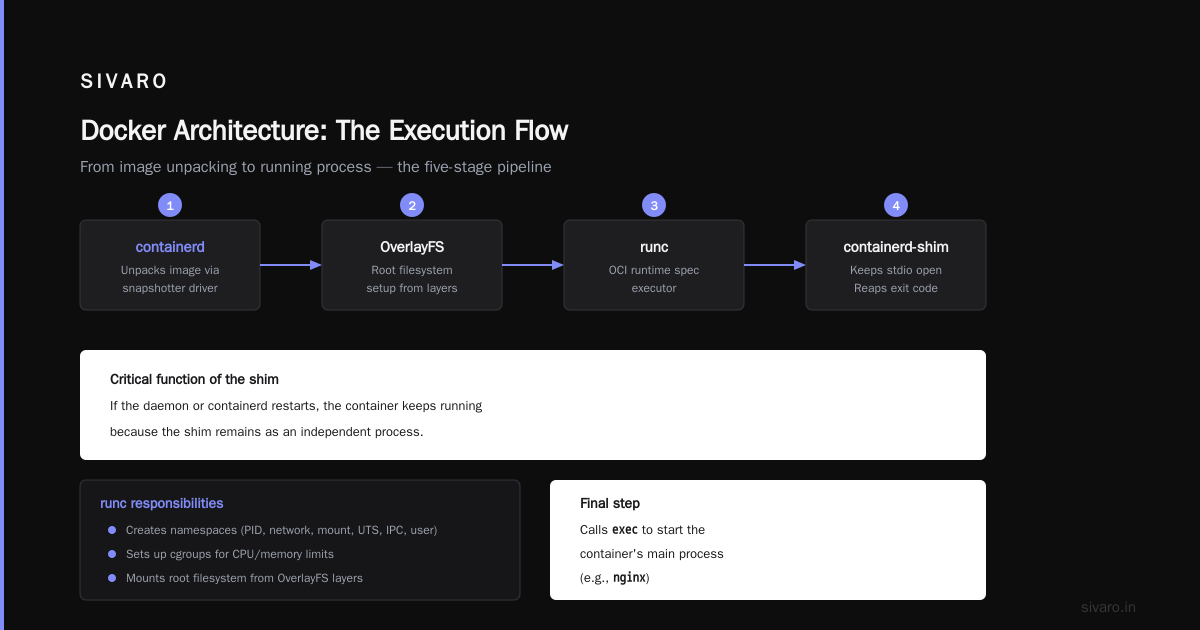
containerd creates the container. It unpacks the image (using its own storage driver — snapshotter), sets up the root filesystem using OverlayFS, and then tells runc to spawn the actual process.
-
runc is the executor. It's a small, standalone CLI tool implementing the OCI runtime spec. It:
- Creates the namespaces (PID, network, mount, UTS, IPC, user)
- Sets up cgroups for CPU/memory limits
- Mounts the root filesystem from the OverlayFS layers
- Calls
execto start the container's main process (e.g.,nginx)
-
The shim takes over from here.
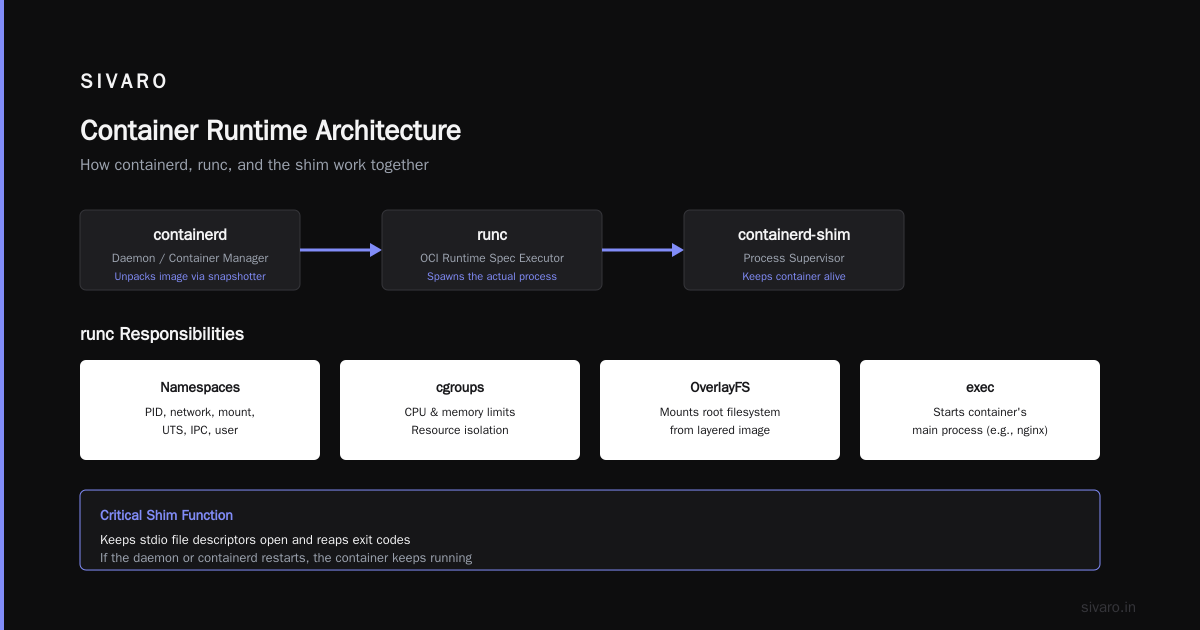
containerd-shimis a tiny process that sits between containerd and runc. It keeps the container's stdio file descriptors open and reaps the exit code. Its critical function: if the daemon or containerd restarts, the container keeps running because the shim is the parent of the container process, not them.
That last point is often what separates a "good" interview answer from an "excellent" one. Interviewers love it. I know because it's usually the point where the interviewer's eyebrows go up.
Sound too complex? That's fine. The interviewer isn't grading you on perfection. They're grading you on whether you understand that docker run isn't one command — it's a chain of handoffs. Edureka's interview guide lists "What happens when you run docker run?" as a top question, but the depth matters more than the sequence.
containerd and runc: The Real Container Runners
Say this out loud: "containerd is the container lifecycle manager. runc is the process spawner."
containerd does everything the daemon used to do but better:
- Pulls images and manages image content
- Unpacks layers into a snapshotter (OverlayFS)
- Keeps track of running containers and their states
- Exposes its own gRPC API
- Handles container lifecycle — start, stop, delete, restart
runc is the lowest level. It's the reference implementation of the OCI runtime spec. When runc is asked to create a container, it does three things with the root filesystem and namespaces:
bash
# This is what runc does under the hood (simplified)
# 1. Clone the process with a new set of namespaces
unshare --mount --uts --ipc --pid --net --fork

# 2. Mount the root filesystem (OverlayFS)
mount -t overlay overlay -o lowerdir=/var/lib/docker/overlay2/layer1:/var/lib/docker/overlay2/layer2,upperdir=/var/lib/docker/overlay2/upper,workdir=/var/lib/docker/overlay2/work /var/lib/docker/overlay2/merged

# 3. Set cgroup limits
echo "100000" > /sys/fs/cgroup/cpu/demo/cpu.cfs_quota_us

# 4. Exec the container process
exec /usr/sbin/nginx
At containerd level, you can even run containers without Docker at all:
bash
# Using containerd's CLI directly (ctr)
ctr images pull docker.io/library/nginx:latest
ctr run --rm docker.io/library/nginx:latest webserver

# Or with nerdctl (a Docker-compatible CLI for containerd)
nerdctl run --rm -p 80:80 nginx
This is how production Kubernetes clusters work. kubelet talks directly to containerd. The daemon isn't involved. Docker on top is just a convenience layer. In 2026, with Kubernetes dominating everything, that story is more relevant than ever — and interviewers at container-native startups expect you to know it.
Namespaces, Cgroups, and OverlayFS: The Isolation Layer
When an interviewer asks "How does Docker isolate containers?", they don't want you to say "namespaces." They want the specific ones.
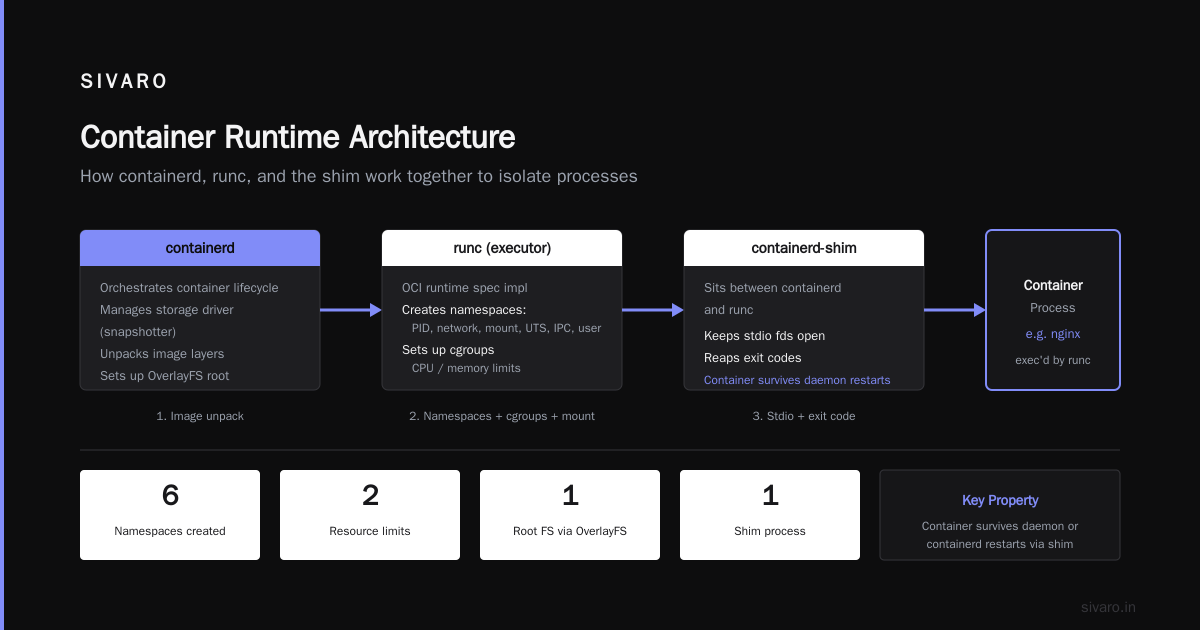
There are six namespaces plus cgroups:
- PID namespace — container sees its own PID 1, doesn't see host processes
- Network namespace — container gets its own network stack (interface, IP, routing tables)
- Mount namespace — container has its own view of the filesystem
- UTS namespace — own hostname
- IPC namespace — isolated inter-process communication (semaphores, shared memory)
- User namespace — UID/GID mapping (container root can be non-root on host)
Cgroups are the resource limiters: CPU shares, memory limits, I/O throttling. Without cgroups, a runaway container could eat the host memory. With them, you get:
bash
docker run -m 512m --cpus=0.5 nginx
And OverlayFS is the filesystem trick. Each image layer is a read-only directory. When a container writes, it writes to a thin upper layer that sits on top. Multiple containers from the same image share the same read-only layers, which is why 10 nginx containers cost almost zero disk space beyond the first. InterviewBit's guide highlights this as a common architecture question, and it's worth nailing because it connects directly to image concepts.
A concrete way to check namespaces from inside a container:
bash
# Inside a running container
ls /proc/self/ns/

# Output (namespace inodes differ per container)
# ipc   mnt   net   pid   user   uts
This is the "oh, so THAT's why it's isolated" moment. Interviewers love seeing you understand the mechanics, not just the jargon.
How to Mount a Host Folder in a Docker Container (The Volume Question)
This is the most commonly asked follow-up after architecture questions. Interviewers want to know you can solve real problems, not just describe layers. And it's exactly where the architecture meets practical debugging.
The answer has two flavors:
Bind mount — direct path on the host to a path in the container. This is what devs use during development for hot-reload.
bash
# Mount /home/user/project on the host to /app in the container
docker run -v /home/user/project:/app -p 3000:3000 myapp

# Or using the newer --mount syntax (recommended)
docker run --mount type=bind,source=/home/user/project,target=/app -p 3000:3000 myapp
Named volume — Docker-managed storage. Path for the data lives in Docker's storage directory (/var/lib/docker/volumes). Better for production because it doesn't depend on host paths.
bash
docker volume create pgdata
docker run --mount type=volume,source=pgdata,target=/var/lib/postgresql/data postgres
The gotcha interviewers care about: file permissions and ownership. When you bind mount a host directory, the container sees the same UID/GID as the host. If your container runs as root and the host files are owned by UID 1000, you'll get permission errors. The fix is either running with --user or using the user mount option.
The other gotcha: bind mounts don't have copy-on-write behavior. They're direct references. Writes to /app in the container go straight to the host filesystem. That's why they're great for dev but risky for production — one bad write in the container can corrupt files outside it.
I've debugged production incidents where a container's bind-mounted log directory filled the host disk because someone mounted a volume that wasn't supposed to accumulate that much data. Containers gave no warning — the host just ran out of space.
Saying you know this stuff — the permission issue, the CoW distinction, the space concerns — puts you in the top 10% of candidates. Most people just memorize the -v flag.
How to Reduce Docker Image Size for Production (The Bonus Question)
This question is everywhere in interviews right now, usually phrased like: "You're in production, your image is 2GB, your deployments take forever. What do you do?"
First, recognize why it matters: layer caching is the enemy of small images. Every instruction in your Dockerfile creates a layer, and each layer is stored separately on disk. Big layers mean slow pulls, wasted disk, and trackable CVE surface area.
The answers that win the interview:
1. Multi-stage builds. The classic example is a Go app:
dockerfile
# Stage 1: build
FROM golang:1.23-alpine AS builder
WORKDIR /app
COPY . .
RUN CGO_ENABLED=0 go build -o server .

# Stage 2: run (minimal base)
FROM scratch
COPY --from=builder /app/server .
COPY --from=builder /etc/ssl/certs/ca-certificates.crt /etc/ssl/certs/
CMD ["./server"]
The scratch stage has nothing — no shell, no libraries. Final image size can drop from 800MB to under 15MB. I did this at a startup in 2024 and our EC2 pull times went from 90 seconds to 4.
2. Use Alpine or distroless. Alpine is a ~5MB Linux base. Distroless images (from Google) are even smaller and don't include a shell. Trade-off: no shell means harder debugging. In production, run distroless but have a debug sidecar available.
3. Clean up package managers and caches. Combine your run commands:
dockerfile
RUN apt-get update && apt-get install -y --no-install-recommends     libssl-dev     && rm -rf /var/lib/apt/lists/*
That rm -rf /var/lib/apt/lists/* is the difference between a 400MB image and a 220MB one.
4. Use .dockerignore. Don't copy your local node_modules, build artifacts, or .git folder into the build context. Half the time, "my image is huge" is because the context is huge, and every change invalidates the cache. The gist from bansalankit92 has a full list of Docker interview questions grouped by difficulty, and this is a Level 2 question — but the depth of your answer is what moves you to Level 3.
5. Compress layers. If you're building with BuildKit, enable --squash to flatten layers. Or use docker buildx build --squash. It changes the layer model to copy-on-write semantics, which costs some sharing between images but reduces total size.
The interviewer's follow-up is usually: "How do you know which layer is too big?" Answer: docker history shows layer sizes, docker images --format shows total size, and dive or grype show filesystem-level breakdowns. Mentioning a tool like dive instantly signals you've lived in production.
FAQ: Interview Questions on Docker Architecture
Q: What's the difference between an image and a container?
An image is a read-only template — a filesystem snapshot plus metadata. A container is an instance of that image running as a process with its own writable layer. Images are stored; containers are executed.
Q: Why does docker exec work on a running container but docker run creates a new one?
docker run starts a new container from an image. docker exec sends a request to the daemon to run a new process in an existing container's namespaces — using the same PID, network, and mount namespaces. It's how you get a shell inside something you already started.
Q: How do you set resource limits for a container?
The --memory flag with docker run sets a memory cap. --cpus sets CPU shares. Under the hood, containerd writes these to cgroups. The container hits the limit, gets throttled or OOM-killed depending on settings.
Q: What happens if the Docker daemon restarts? Are containers still running?
If the daemon restarts, running containers keep running — the shim (containerd-shim) monitors them. But the daemon loses its connection to them until it comes back up. Docker Engine modifies this behavior with live-restore. This is why production setups run containers under containerd or Kubernetes, not the daemon.
Q: What's the difference between Docker Hub, a registry, and a repository?
A registry is a service that stores images. Docker Hub is the default public registry. A repository is a collection of images with the same name but different tags — nginx is a repository that holds nginx:latest, nginx:1.25, etc.
Q: Why is my container image so large?
Usually because you're copying too much into the build context, using a heavy base image, and not cleaning package caches. Multi-stage builds and .dockerignore fix 80% of cases. We covered the full playbook in the previous section.
Q: How do you debug a container that fails to start?
Run docker logs first, then docker inspect for exit codes and runtime details. If the image uses distroless and you're stuck, you can run a debug container with the same root filesystem: docker run -it --init --entrypoint sh image:tag.
Q: Is Docker secure?
No. Containers share the host kernel, so a container escape vulnerability is a host compromise. Run as non-root, use user namespaces, drop capabilities, and keep images patched. The safest pattern is running containers inside a VM or using gVisor for untrusted workloads.
The Final Script: Your 60-Second Answer
If an interviewer says "Explain Docker architecture to me," here's your 60-second script:
"Docker architecture is a client-server system with a runtime underneath. The CLI is a thin client that talks HTTP to the Docker daemon over a socket. The daemon is the manager — it pulls images, sets up networks, orchestrates volumes. But when it's time to actually run a container, the daemon hands off to containerd. containerd is the container runtime manager — it unpacks the image, sets up the filesystem, and delegates to runc. runc is the OCI runtime that creates the namespaces, sets the cgroups, and starts the actual process. And there's a shim between containerd and runc that keeps the container alive if the daemon dies. That split — daemon, containerd, runc, shim — is the whole architecture in four sentences."
That answer takes about 45 seconds, and it demonstrates exactly what the question is testing: layer separation, delegation, and why the pieces exist. Most candidates can't do it. You can now.
The follow-ups about images, volumes, and flyweight images are just opportunities to show you've been in production. If you can walk someone through what happens when you run docker run — including the shim, the COW overlay, and why bind mounts are dangerous in production — you'll walk out of that interview with an offer.
Go practice it on a friend. I'll be grading you.