 SIVARO
how to explain docker architecture in simple terms
Look, I've spent eight years building data infrastructure. When I explain Docker to a new engineer at SIVARO, I don't start with kernel namespaces. I start with a shipping port.
The whole thing clicks when you realize Docker isn't a box. It's a system of cranes, containers, and dock workers.
Here's the problem: most articles treat Docker architecture like a biology textbook. Layers, daemons, runtimes, registries. It sounds like it should be complicated, so it gets explained in a complicated way.
It isn't.
Let me show you how to explain docker architecture in simple terms—the way I've taught it to every engineer who's joined SIVARO since 2019.
The Core Insight: You're Packaging a Process
When I explain Docker to clients, I tell them to stop thinking about virtual machines.
A VM takes a whole computer and splits it into fake computers. That's why a VM hypervisor like VMware or KVM needs to emulate hardware. You're running a full OS—kernel, system daemons, everything—inside a sandbox. It works, but each VM chews through gigabytes of RAM just for the OS overhead. I've seen teams at fintech startups burn 70% of their infrastructure budget on that overhead alone. The docker vs virtual machines performance comparison isn't even close—containers start in milliseconds and use a fraction of the memory.
Docker does the opposite. It takes the minimum needed to run one process and wraps it in a portable package. That's it. No hardware emulation, no full OS.
https://www.geeksforgeeks.org/devops/introduction-to-docker/ calls it "the containerization technology that packages an application with all of its dependencies." Accurate, but dry. The interesting bit is how it works.
Docker leverages Linux kernel features directly. The kernel's namespaces isolate what the process can see. The cgroups control how much CPU, memory, and I/O it can use. Combined, these give you a process that thinks it has the whole machine to itself. It doesn't. It's just a process on your host, fenced off.
The Architecture: A Clean Division of Labor
Let me walk you through how to explain docker architecture in simple terms by breaking it into components. Think of it like a restaurant kitchen.
The Docker Client: The Waiter
You're the customer. The Docker CLI is the waiter. You tell the waiter what you want, and the waiter brings it to the kitchen.
$ docker build -t myapp:latest .
$ docker run -d -p 8080:80 myapp
$ docker push myapp:latest
Every docker command you type goes to the client, which formats it into an API call and sends it to the daemon. The client doesn't do the work. It just relays your order.
The Docker Daemon: The Chef
The daemon is where the work happens. Run docker ps and the daemon queries the state of your containers, images, and networks. Build an image, and the daemon assembles it layer by layer. Start a container, and the daemon tells the container runtime to spin it up.
One thing I've learned at SIVARO: the daemon is powerful, but it's also the single point of failure. It holds all the state. If your daemon crashes, you don't lose your containers (they keep running), but you lose the ability to manage them. That's an architecture decision that's caused real pain in production. Docker knows this. That's a big part of why they've been pushing containerd as a separate layer—it isolates the runtime management so the daemon's failure surface shrinks.
The Container Runtime: The Sous-Chef
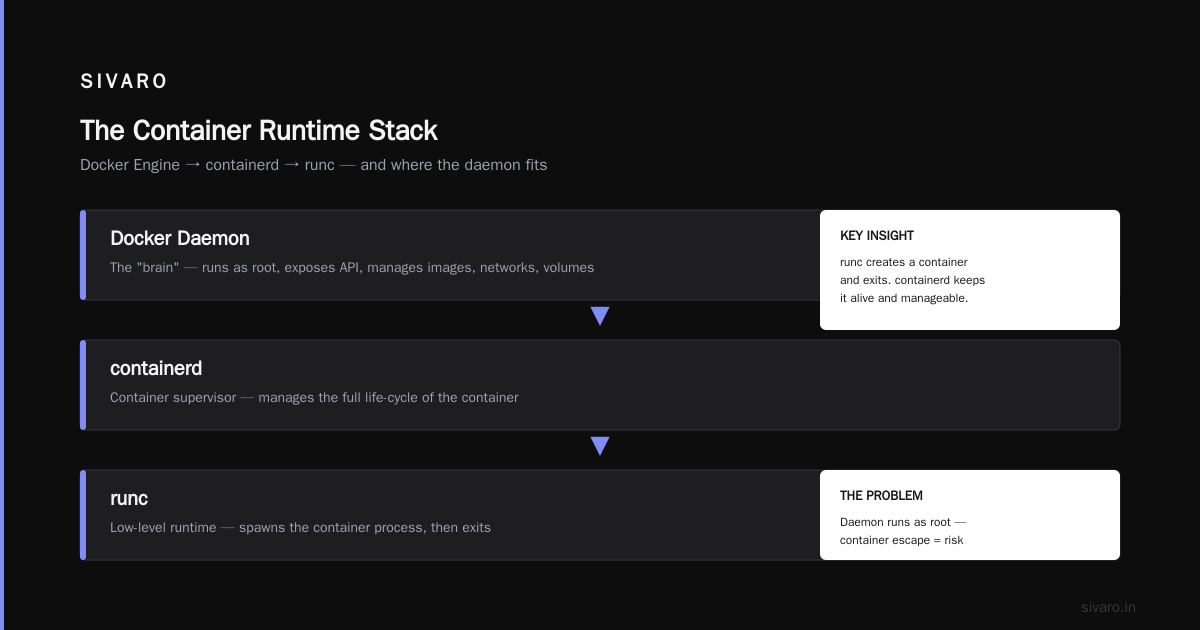
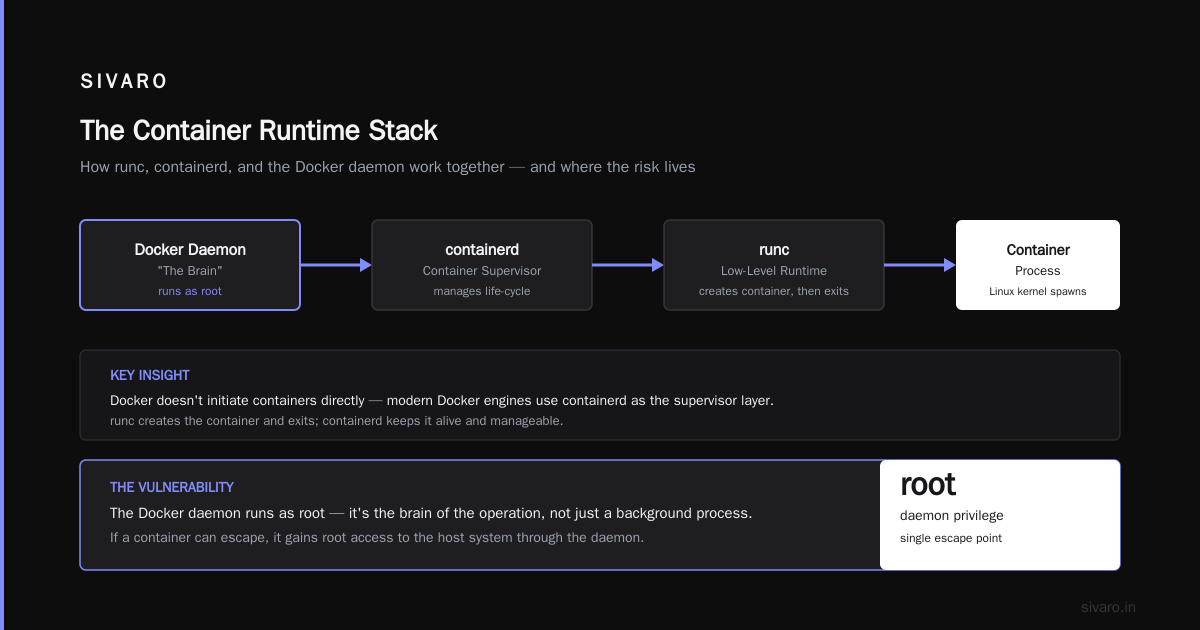
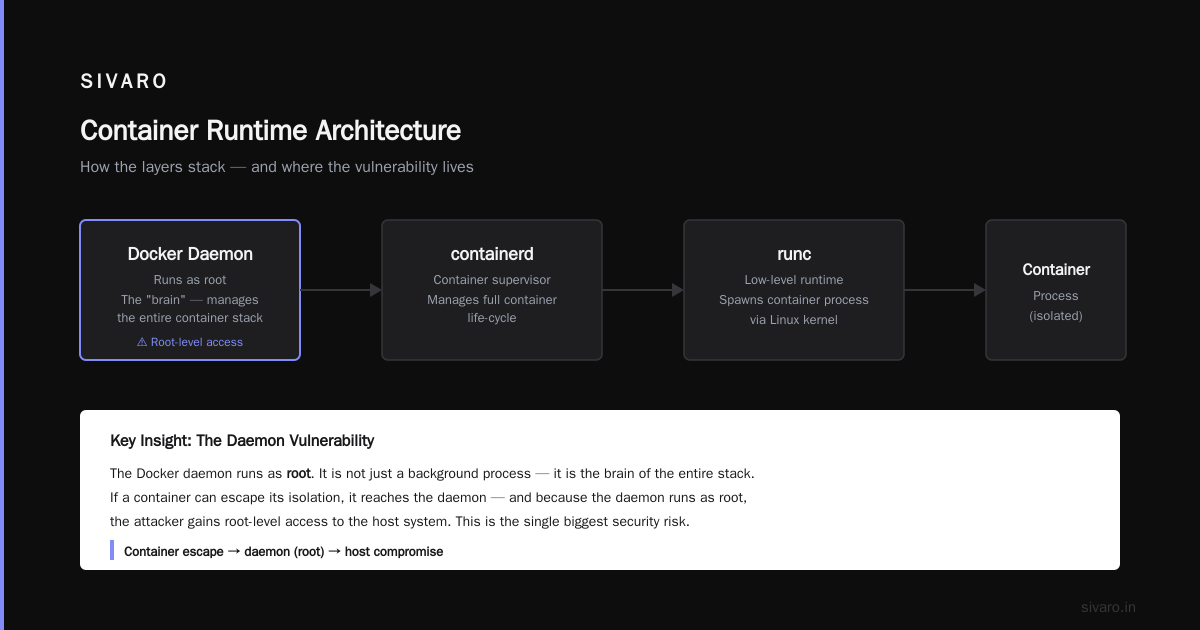
Here's where Docker's architecture gets subtle. The Docker daemon doesn't actually run containers. It delegates to a lower-level runtime.
Runc does the heavy lifting—it talks to the Linux kernel and spawns the container process. But runc creates a container and then exits. To keep that container alive and manageable, you need a layer between the daemon and runc. That's containerd, and it acts as the container supervisor, managing the life-cycle of the container.
I remember when this confused me. I thought Docker the company made the whole stack. But modern Docker engines use containerd; they don't initiate containers directly. The runtimes files contain the "low-level" layer of tools like runc, while containerd handles the details.
The Problem With the Daemon
Most people think the Docker daemon is just the "background process." It's not. It's the brain. And that creates a vulnerability.
The Docker daemon runs as root. That means if a container can escape its isolation and reach the daemon, you have a root-level hole. The industry spent years shitting on this. It's fair. The Docker daemon's attack surface has been the weak point more than once, and the Docker interview questions you'll see on the job circuit will absolutely probe this.
But here's a contrarian take: you don't need to run the Docker daemon in production.
I suggest running containers on bare metal or VMs using a lightweight runtime like containerd directly, or leveraging Kubernetes with containerd as the runtime from the start. At SIVARO, we moved most of our production workloads to containerd in 2024. The Docker CLI is fine for development, but for production, the daemon's overhead and privilege model aren't worth it. Containerd is the better runtime, no question. Docker's own blog post on containerd vs. Docker makes the distinction crystal clear.
Images Are a Stack of Layers
This is the mental model that made Docker go viral. Images are not single giant files. They're a stack of read-only layers. Each layer is a set of filesystem changes that corresponds to a build instruction.
Let's look at a typical Dockerfile:
dockerfile
FROM node:20-alpine
WORKDIR /app
COPY package*.json ./
RUN npm install
COPY . .
CMD ["node", "index.js"]
That's four layers: the base OS, the working directory setup, the node install, and the app copy. Each instruction creates a layer.
Why does this matter? Caching. If you rebuild the image, Docker checks each layer's fingerprint against the cache. If package.json didn't change, Docker reuses the npm install layer instead of re-running it. We've cut build times for some services at SIVARO by 80% just by structuring Dockerfiles so the most volatile files are copied last.
The Union Filesystem
But how do these layers become a single filesystem when you run the container?
The union filesystem (overlay2 is the default in Docker now) stacks those read-only layers and adds a thin read-write layer on top. When your container writes a file, it goes to that top layer. The bottom layers stay clean, read-only, and shareable between all containers using the same image. This is why spinning up five containers from one image takes barely any additional disk space for the base.
Volumes: Persisting Data With Files Without Jailing Yourself
Here's the catch: containers are ephemeral, but your data isn't. When a container dies, any data in the write layer disappears. So for anything that matters, we use volumes.
A volume is a directory on the host filesystem, mapped into the container. The container sees it as its own path. The host stores it wherever you tell Docker to. Data persists beyond the container's lifetime.
bash
$ docker run -v /data/mysql:/var/lib/mysql mysql:8
The problem is that volumes have a visibility issue. You can't check volume contents without manually inspecting them through an ephemeral container. Over time, orphaned volumes accumulate. I've seen production servers with 40 GB of dangling volumes after 18 months. Build a system to enforce cleanup from day one.
Networks: Containers Are Social
The last major piece is Docker's network architecture.
By default, Docker creates a bridge network. Each container gets its own virtual IP on that bridge. They can talk to each other using container names as DNS. This is what lets you run a web app and database in containers and have them find each other without knowing host IPs.
yaml
version: '3.8'
services:
  app:
    build: .
    networks:
      - backend
  db:
    image: postgres:16
    networks:
      - backend

networks:
  backend:
    driver: bridge
That's a Docker Compose file. Compose isn't a different architecture—it's a config format that tells the daemon how to orchestrate multiple containers.
Docker Desktop Alternatives for Linux in 2026
One of the most common questions I get from teams: what are the docker desktop alternatives for linux 2026? Let me be blunt. Docker Desktop is fine on Mac and Windows. On Linux, it's often unnecessary. The whole point of the Linux kernel is that you already have native support for namespaces and cgroups—you can run containers directly with the engine.
On Linux, skip Docker Desktop entirely. Use the Docker Engine CLI. Or, if you're already in the Kubernetes world, run containerd as your CRI and use nerdctl for local development. It's the same image format, same container isolation, no daemon overhead. I made the switch in early 2025 and haven't looked back. The only reason to keep Docker Desktop on Linux is if you need its GUI dashboard, and I'll judge you slightly for that.
So How Is Docker Different From a VM?
Let me give you a table, because people love a table.
| Aspect | Docker Container | Virtual Machine |
|---|---|---|
| Kernel | Shares the host kernel | Runs its own kernel |
| OS | Minimal—just the app and its deps | Full OS with system daemons |
| Boot time | Milliseconds | Minutes |
| RAM usage | Megabytes | Gigabytes |
| Isolation | Namespaces and cgroups (shared kernel) | Full hardware virtualization |
| Security boundary | Weaker—kernel is shared | Stronger—insulated from the host |
The tradeoff is real. Containers are fundamentally less secure than VMs. If the host kernel has a vulnerability, a malicious container could exploit it. That's why in multi-tenant environments—think a cloud provider hosting arbitrary customer code—VMs and hard security boundaries matter. At SIVARO, we'll use VMs for the absolute untrusted workloads and containers for everything else. Docker's portability and speed win most of the time.
The Real World Flows
None of this is just theory. We use containers for everything at SIVARO—local development, CI/CD pipelines, and production services. Our core data pipeline processes roughly 200,000 events per second. We don't run virtual machines for those workloads. Containers handle the throughput, volumes handle the persistence, and we use Kubernetes to orchestrate more complex multi-service setups in production.
The architecture isn't just about "how the daemon works." It's about understanding how packaging into layers impacts your build performance, how network isolation helps you keep services decoupled, and how volumes preserve state across ephemeral container life-cycles.
Frequently Asked Questions
What's the difference between Docker and containerd?
Docker is the complete platform—client, daemon, build tools, networking. Containerd is the container runtime that Docker uses under the hood. You can only manage containers with containerd, but it doesn't build images. Docker does that. If you just need to run containers in production, containerd is enough. If you need to build images, Docker has you covered.
Does Docker use more or less memory than a VM?
Significantly less. A VM runs a full OS with its own kernel, so a typical Linux VM idles around 300–500 MB. A container shares the host kernel and only runs the application process, so it might use 10–50 MB. The exact number depends on the workload, but the performance comparison is so one-sided that you should only use VMs for strong isolation needs, not for the metric-heavy apps that can run in containers.
Why do containers start so fast?
Because there's no boot process. The kernel is already running. Running a container is just a call to the kernel to create a namespace and spawn a process. VMs have to boot their own kernel, run systemd, and start services. There's no competition.
Can I use Docker for production?
Yes, but you need to be careful. The Docker daemon is a powerful, privileged process. In production, you'd usually want to use containerd directly or a Kubernetes cluster that uses containerd as the runtime. The Docker CLI is strictly for development and build workflows.
Do containers replace VMs?
No. They serve different purposes. Containers give you lightweight, fast, portable environments. VMs give you strong isolation and the ability to run arbitrary code from untrusted sources. Most modern architectures use both.
How do I keep my Docker containers secure?
Not through a single command. Use non-root users inside containers, avoid mounting the Docker socket into containers, keep images up to date, and scan them for vulnerabilities. Most importantly, don't run the Docker daemon in your production cluster if you can avoid it. That's the biggest vulnerability.
**Why do I keep getting "Was stored in one layer, but is not in the layer below"?
Ignore that specific error message. It's a warning from Docker's overlay filesystem when a file is deleted from one layer but still exists in a lower layer. It means the file still exists in the image, but you wanted it deleted from the top layer. The solution is to always copy and delete files in the same Dockerfile instruction so you don't leave stale layers.
What's the easiest way to explain Docker to a non-technical colleague?
A metaphor. You can't just say, "It's like a shipping container" because that only covers the portability aspect. The full analogy is: each process you want to ship gets its own small crate with everything it needs—its library, its binaries, its config. Then you use a crane (Docker) to stack those crates on any ship (any OS). The crane doesn't care what's in the crate—it just stacks them and keeps them isolated. That's Docker in a paragraph.
Leadership Perspective: Containers Don't Solve Every Problem
Containers are a tool, not a silver bullet. They can help you scale faster, deploy more often, and build more reliable systems. But they don't fix bad code. They don't fix bad design. They don't fix organizational silos.
I've watched teams at a mid-sized tech company adopt Docker thinking it would solve their deployment problems. What they'd really need was better CI/CD pipelines, more automated testing, and a clearer definition of service boundaries. Docker just made their messy code deployable more often, which made the mess faster.
Understanding the architecture matters because the architecture is constraints. And if you understand the constraints—the layers, the daemon, the runtime, the network—you can make good decisions. You'll know when to use volumes, when to use a bridge network, when to keep the Docker daemon out of production.
That's the real payoff. Not just running containers. Running them the right way.
Nishaant Dixit — Founder of SIVARO. Building data infrastructure and production AI systems since 2018. Built systems processing 200K events/sec.