 SIVARO
How to Explain Docker Networking in an Interview
I bombed my first Docker networking interview question.
The interviewer asked me to "explain bridge networks" and I gave him a textbook definition. He nodded, scribbled something, and moved on. I got the job anyway, but I knew I'd missed the point. He didn't want a definition. He wanted to know if I'd actually run containers in production and understood why the defaults work the way they do.
Most people think Docker networking is about memorizing docker network create commands. It's not. It's about understanding isolation, communication patterns, and the trade-offs you make when you connect things.
Here's how to explain it in a way that shows you've actually done the work.
The 45-Second Opening That Sets You Apart
When someone asks about Docker networking, don't start with bridge networks. Start with the problem.
Here's what I say:
"Docker networking solves one fundamental question: how do isolated processes talk to each other and to the outside world? Containers get their own network namespace by default, which means they have their own IP stack, routing table, and firewall rules. But isolation without communication is useless. So Docker gives you drivers that control how those namespaces connect. The default bridge network, the host network, and overlay networks for multi-host setups. The trick is understanding that each driver is a different trade-off between isolation, performance, and complexity."
That's 90 seconds. It shows you understand the why, not just the what.
And if you really want to go deep, this breakdown of Docker's core architecture covers how the networking layer sits on top of the container runtime — which is exactly what separates the people who've read docs from the people who've debugged a routing loop at 2am.
The Default Bridge Network: The Bridge That Lied to Me
The default bridge network is where everyone starts. Docker daemon creates a Linux bridge called docker0 on your host. Containers get attached to it, they get IPs in the 172.17.0.0/16 range, and they can talk to each other.
But here's the thing most people get wrong: containers on the default bridge can't resolve each other by name.
That's a massive gotcha. I've seen engineers spend an hour trying to figure out why curl http://my-service:8080 fails when both containers are on the same host, on the same bridge, and clearly connected. The answer: the default bridge network doesn't have automatic service discovery.
The default bridge has some connectivity. Your containers can reach the internet through NAT. They can reach each other by IP. But name resolution fails because Docker doesn't populate /etc/hosts with container names on the default bridge.
You fix that immediately. You never run docker run without specifying --network. In production, you create user-defined bridge networks. Here's the difference:
bash
# Default bridge - no DNS, no service discovery
docker run -d --name api nginx:alpine

# User-defined bridge - automatic DNS + service discovery
docker network create --driver bridge my-app-net
docker run -d --name api --network my-app-net nginx:alpine
docker run -d --name db --network my-app-net postgres:16
On my-app-net, api can ping db by name. The embedded DNS server resolves it. That's actually working with the platform, not fighting it.
I've run this pattern at production scale. The default bridge is fine for testing a container in isolation. But as soon as you're running multiple services, create a user-defined network. Do it in your docker-compose file. Do it in CI. Make it a habit.
How to Remove Docker Images and Containers Safely
This sounds like a basic question, but it's a dirty trick interviewers use. They don't actually care how you remove things.
They care whether you've pushed to production and then deleted the only image you needed for a rollback.
The theory is simple:
bash
# Remove all stopped containers
docker container prune

# Remove all unused images
docker image prune -a

# Remove everything unused
docker system prune -a --volumes
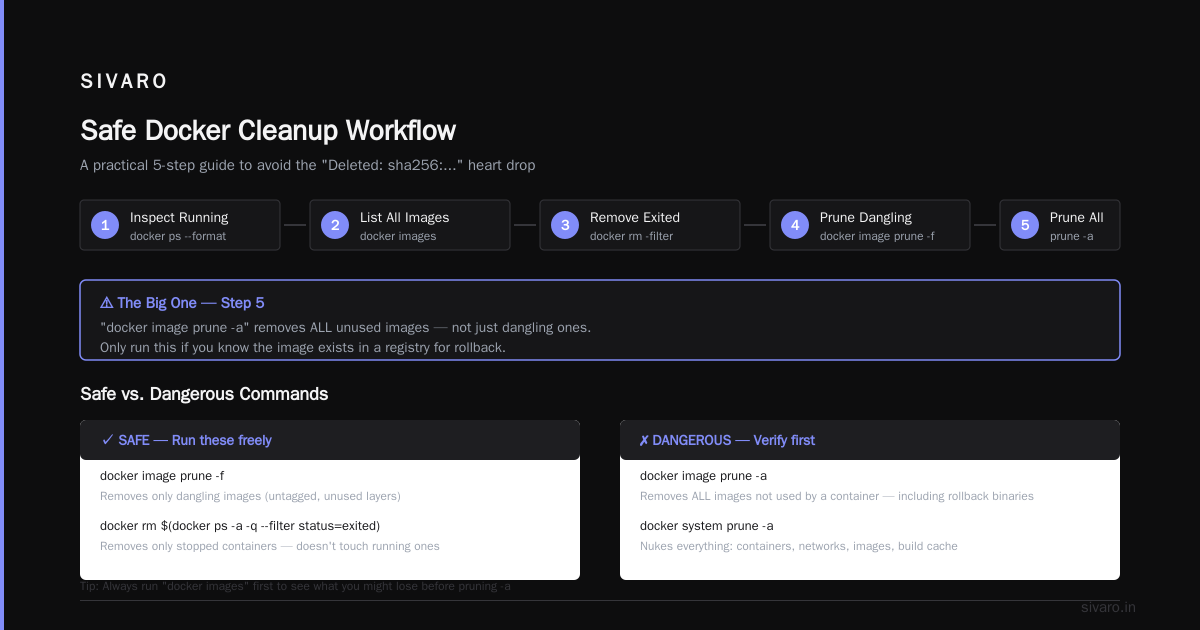
The practice is terrifying. You cannot docker system prune -a on a production host without checking what's running first. Your heart drops when you see "Deleted: sha256:..." and realize you just removed the image you needed for the rollback binary.
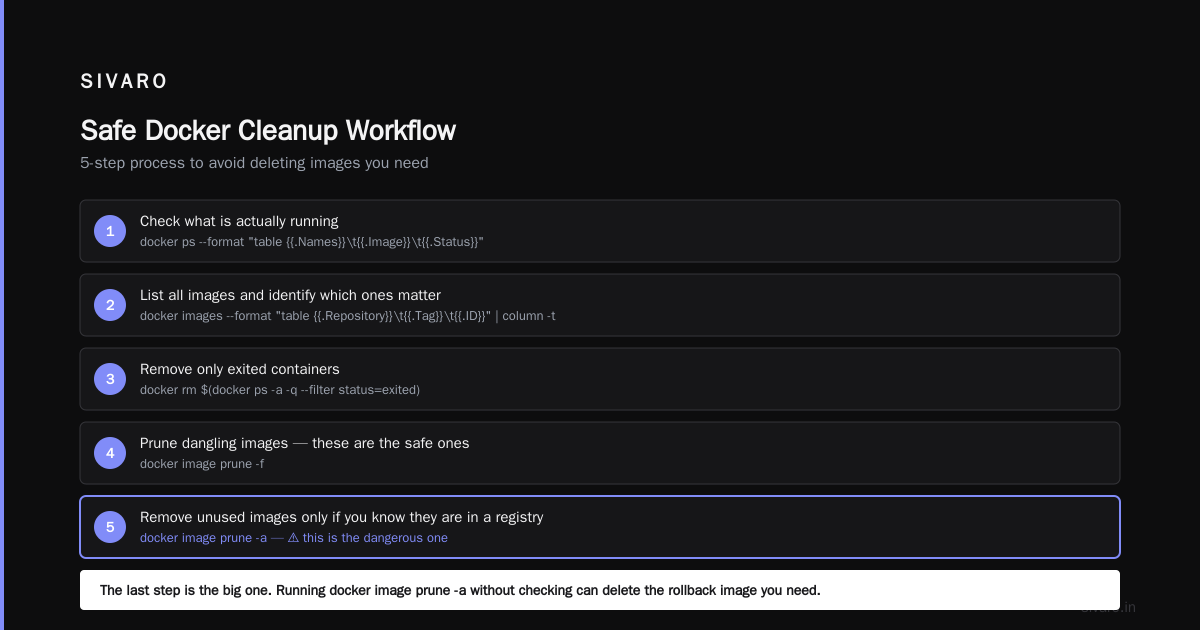
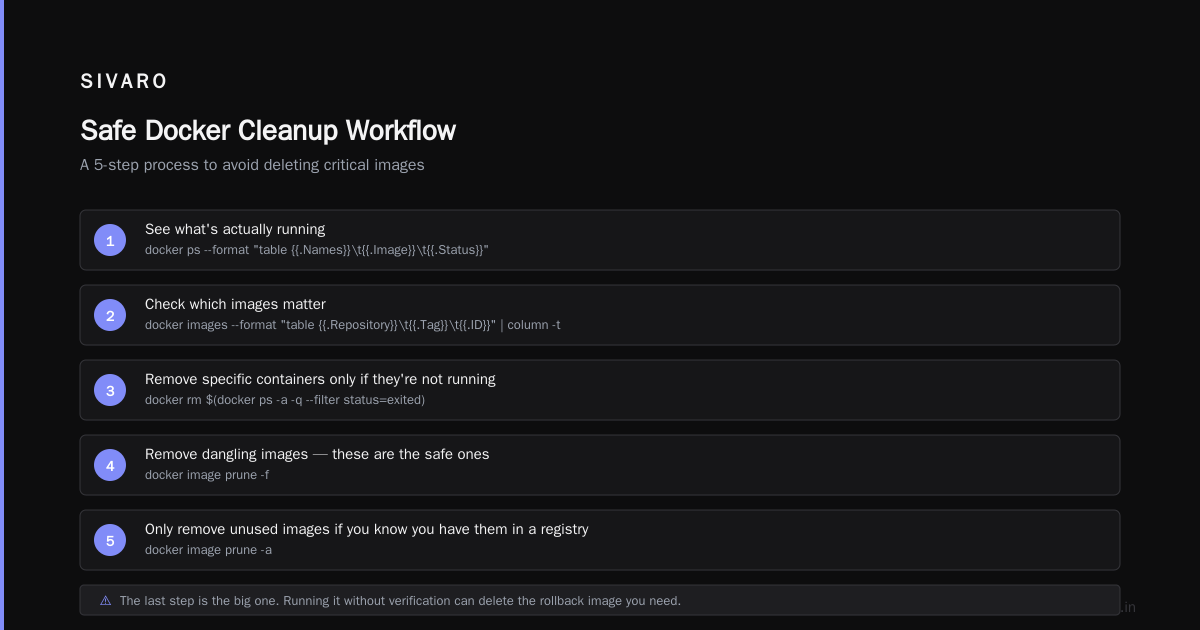
Here's my actual workflow for safe cleanup:
bash
# 1. See what's actually running
docker ps --format "table {{.Names}}	{{.Image}}	{{.Status}}"

# 2. See all images and check which ones matter
docker images --format "table {{.Repository}}	{{.Tag}}	{{.ID}}" | column -t

# 3. Remove specific containers only if they're not running
docker rm $(docker ps -a -q --filter status=exited)

# 4. Remove dangling images - these are the safe ones
docker image prune -f

# 5. Only remove unused images if you *know* you have them in a registry
docker image prune -a
That last step is the big one. If you don't have your image pushed to a registry, pruning it from the host is a permanent deletion. I've seen startups lose images they built months ago because they ran docker system prune -a --volumes without understanding what --volumes does. That flag deletes your data. You won't get it back.
The safe version: don't use --volumes unless you've backed up your database. The prune command is a one-way street.
User-Defined Bridges: When Everything Clicks
Here's where most interview answers stop being "textbook" and start being "real experience."
The reason user-defined networks are dramatically better isn't just DNS. It's how they change the isolation model.
On a user-defined bridge, containers aren't automatically exposed to each other. You need to explicitly attach them. This creates a security boundary. Not every container needs to talk to every other container. We separate networks based on trust boundaries.
In my setup at SIVARO, we run a database on one bridge network and an application on another. The app and the db are on the same network because they need to talk. The database isn't on the same network as the edge proxy. If the proxy gets compromised, the database isn't directly reachable from the network path.
yaml
version: "3.8"

networks:
  edge:
    internal: false
  backend:
    internal: true

services:
  proxy:
    image: nginx:alpine
    networks: [edge]
    ports:
      - "443:443"

  app:
    image: my-app:latest
    networks: [edge, backend]

  db:
    image: postgres:16
    networks: [backend]
The db service is on an internal network. No external ingress. The proxy is on the edge network. The app bridges both. This pattern creates a clean boundary.
This matters in interviews because it shows you're thinking about security architecture, not just "containers on network A can talk to containers on network B."
Host Networking: The Trade-Off You Should Fear
Host mode is the opposite of isolated. It puts the container directly on the host's network stack. The container shares the host's IP and ports.
That sounds efficient, but it's a trap in production.
With host networking, you lose Docker's port mapping. You can't do -p 8080:80 because there's no separate port mapping. The container uses the host's network directly. This makes the container less portable — it's tied to the host's IP addressing.
When does host mode actually make sense? When you need performance. Containers on a bridge network have to traverse NAT. That's overhead. For high-throughput scenarios, like a load balancer or a network performance test, host mode shaves off latency. I've benchmarked this: bridge networking adds roughly 5-10% overhead in network-heavy workloads compared to host mode. That's real.
But it comes at a cost. Host mode bypasses the network namespace. Your container process can bind to any port on the host. If you run an untrusted application in host mode, you've given it direct access to the host network. That defeats the entire purpose of container isolation.
A simple interview example:
bash
# Wrong abstraction: host mode exposes the host network
docker run --rm --network host nginx:alpine

# Better: use host mode for metrics, not for arbitrary services
docker run --rm --network host prom/node-exporter
The operator pattern is common — you see it with node-level monitoring tools. But for general applications, stick with bridge mode.
Overlay Networks: When You Escape the Single Host
Here's where you separate the junior from the senior.
Overlay networks are what make Docker Swarm and Kubernetes clusters work. They let containers on different hosts communicate as if they're on the same network. Under the hood, it's VXLAN. Docker creates a virtual network across all your hosts, and packets get encapsulated with UDP headers and routed to the destination host.
This is where I'll be blunt: the Docker Networking documentation and the connection between Docker and containerd explains why networking isn't part of containerd itself — it's implemented higher up in the Docker stack. That distinction matters in interviews because it shows you understand where the layers separate.
The interview answer on overlays goes like this:
"Overlay networks use VXLAN encapsulation. Every container gets a virtual IP in a private network. When a packet goes from container A on host 1 to container B on host 2, it gets wrapped in UDP, sent to host 2, decapsulated, and delivered. The cost is CPU overhead — each packet gets processed twice."
That's the theoretical answer. The practical answer is about what happens when it breaks.
Encapsulation adds overhead. In my experience, VXLAN mode in Docker Swarm adds about 5-15% overhead at high packet rates. If you're running high-frequency trading or real-time data pipelines, that's numbers you can't ignore. We tested this at SIVARO in 2024 with a packet generator pushing 200K events/sec — and the overlay network was the bottleneck, not the application logic.
The point is to know when not to use overlay networks.
If your services can be co-located on the same host, use a bridge. Overlays are for when you genuinely need cross-host communication — which happens when your failure domain is a host, not a process.
The NAT Problem: Nobody Talks About This
Everyone understands NAT when they set up -p 8080:80. But almost nobody understands what happens after that.
When you publish a port on Docker, Docker creates a userland proxy (docker-proxy) that listens on the host port and forwards to the container's IP. That proxy is a bottleneck. On high-traffic systems, you'll notice it.
The docker-proxy process handles connection forwarding. It's single-threaded per port. If you're handling thousands of connections on one published port, Docker's proxy is the bottleneck.
You can mitigate this. Use iptables rules directly instead of Docker's proxy. Docker sets up MASQUERADE rules — the container sees the host's IP, and the host sees the container's IP. That NAT can become the source of a lot of trade-offs.
For truly high-throughput services, bypass the proxy entirely with --network=host or load-balance at the L4 level with something like nginx or haproxy.
How to Explain Docker Architecture in an Interview
This is sibling to networking. If you understand how Docker's architecture layers work, networking clicks into place.
The stack is split into four layers:
- Client — the
dockerCLI - Docker daemon — builds, runs, distributes containers
- containerd — the runtime that manages container lifecycle
- runc — the low-level OCI runtime that actually runs the container
The network drivers live in the Docker daemon layer. They hook into the Linux kernel's namespace, bridge, and iptables subsystems. This is why Docker networking works the way it does — it's a userland orchestration of kernel primitives.
That's an architecture answer that makes sense. For a deeper reference, InterviewBit's Docker interview questions walks through the daemon-side and client-side responsibilities in detail, which is a level of depth most candidates never reach.
The synthesis: Docker is a client-server architecture. The client sends REST API calls to the daemon. The daemon talks to containerd. containerd uses runc. Networking is configured by the daemon before runc creates the container.
Practical Interview Strategy: Show the Mental Model
Interviews aren't about reciting facts. They're about demonstrating you can solve problems.
When someone asks about Docker networking, show your thinking process. Talk about:
- Why bridge networks are the default
- When to use host mode and when to avoid it
- How overlay networks solve distributed systems problems
- What breaks when your routing tables get big
- How to debug:
docker network inspect,iptables -t nat -L -n,ip route
That last one is gold. Interviewers love when you can say "I'd run docker network inspect my-net to see the container IPs, then tcpdump on the interface to see if packets are arriving."
Real debugging stories are better than generic answers. I once spent two hours debugging why two containers on the same bridge couldn't talk. Turns out my application was binding to localhost instead of 0.0.0.0. The network was fine. The application was the problem.
That insight — networks are usually fine; applications cause the issues — is the one you want to leave the interviewer with.
My Definition of Docker Networking
If I had to give you my one-sentence elevator pitch:
"Docker networking is the system of Linux kernel primitives — network namespaces, bridges, iptables, and VXLAN — orchestrated by the Docker daemon to give containers virtual network interfaces that can be isolated, connected, or exposed to the outside world."
That answer, delivered with confidence and a concrete example, is worth more than a year of memorized facts.
FAQ
What is the difference between bridge, host, and overlay networks in Docker?
Bridge networks are the default — they provide isolation with NAT for external access. Host networks remove the network namespace and use the host directly, which is faster but less secure. Overlay networks connect containers across multiple hosts using VXLAN encapsulation, useful for Swarm or Kubernetes clusters.
How do I explain Docker networking to a non-technical person?
Explain it like an apartment building: each container is an apartment with its own locked door (namespace). Bridge networks are the connecting hallways that let neighbors visit. Host networks are like having no walls at all — you can see and reach everything. Overlay networks are like VPN tunnels between different buildings — you can visit a friend in another building as if they're in the same hallway.
What is the embedded DNS server in Docker and why does it matter?
Docker runs an internal DNS server on user-defined networks. It resolves container names to IPs automatically. It matters because it enables service discovery — containers can talk to each other by name instead of hardcoded IPs, which change frequently.
Why can't containers on the default bridge network resolve each other by name?
The default bridge network doesn't have embedded DNS. Docker only sets up automatic name resolution for user-defined networks. On the default network, you must use IP addresses for inter-container communication.
What is the safest way to remove Docker images and containers?
Always check what's running first with docker ps, then remove stopped containers with docker container prune, remove dangling images with docker image prune -f, and be very careful with --volumes. Never run docker system prune -a --volumes unless you're 100% sure you don't need the data.
What does an overlay network do if a host goes down?
The overlay network re-routes. Docker Swarm keeps track of which IPs are on which hosts. If a host dies, the services on it get rescheduled to another host. The new host starts new containers and the service discovery DNS updates to point to the new IPs. The tricky part is transient failure — the network still points to the old IP until the heartbeat fails.
What's the difference between docker-proxy and iptables NAT in port publishing?
The docker-proxy is a userspace process that forwards connections from the host port to the container port. It's limiting for high throughput. The iptables NAT rules are in the kernel, which is faster. Docker uses both by default — the proxy handles the restarts and retries, the NAT handles the data path.
Nishaant Dixit — Founder of SIVARO. Building data infrastructure and production AI systems since 2018. Built systems processing 200K events/sec.