 SIVARO
How to Handle Late Data in Streaming Systems
You're sitting in the on-call rotation, and your pager just lit up. The dashboard shows a 14% gap between what your streaming pipeline processed yesterday and what the batch system reporting says happened. Your CFO wants to know why revenue numbers are "wrong." Your data engineer says it's "late data." Your CEO asks if this is fixable.
I've been there. At SIVARO, we've spent eight years building production streaming systems that process over 200K events per second for clients in fintech, logistics, and SaaS. Late data is the thing that breaks naive streaming implementations. It's not a matter of if it happens. It's a matter of when — and how embarrassed you'll be when it does.
Here's the thing most people get wrong: how to handle late data in streaming systems is not a technical problem. It's a contract problem. You're deciding what "correct" actually means when the universe refuses to deliver events in order.
Let me show you what actually works.
The Problem Isn't Lateness. It's Your Assumptions.
Streaming systems assume order. Events arrive, you process them, you emit results. But production event streams are messy. Mobile devices buffer data when offline. IoT sensors batch on a schedule. Kafka topics get replayed after a broker failure. Your colleague's script re-publishes events from last week because they fixed a bug in the ETL.
These are not edge cases. At SIVARO, we measured a logistics client's event stream over 30 days. Roughly 3.2% of events arrived more than 5 minutes late. 0.4% arrived more than 24 hours late. We found one event that was 14 days old — still being processed, still distorting inventory counts.
The classic response is to set a watermark: "We'll wait 10 seconds, then close the window." That's what Flink, Spark, and Kafka Streams all let you configure. It's also a lie. You're not handling late data. You're ignoring it after a threshold.
The real question is: what does your business need to be correct about?
Define "Good Enough" Before You Build Anything
At SIVARO, we force clients to have a conversation before we write a single line of streaming code. Three questions:
- What happens if financial reports are 0.5% off for one day?
- What happens if inventory counts are wrong for a shift?
- Who consumes this data, and how do they react to corrections?
The answers change everything. A stock exchange needs strict event time processing with exact accuracy. A recommendation engine? It doesn't care if you update a model 20 minutes late. An inventory system needs event-time accuracy but can tolerate corrections.
Most teams skip this. They assume "exactly-once, event-time processing" is the gold standard. In my experience, that's a trap. You pay 10x the engineering complexity for a 0.5% accuracy improvement on events that nobody will ever look at after the fact.
I call this the accuracy budget. Decide how much error your consumers can tolerate, then engineer to that budget. Not the theoretical maximum.
Temporal Windows: Your First Defense
Before you architect for late data, you need to understand the temporal nature of your data itself. What Is Temporal Data Modeling? How Databases Track ... explains how databases handle time-based versioning of records — but streaming systems need the same concepts applied to windows.
Every streaming framework supports windowing. The question is which type:
- Tumbling windows: Fixed intervals, no overlap. Simple. Brutal on late events.
- Sliding windows: Fixed intervals with overlap. Better for trends, worse for state size.
- Session windows: Gap-based. Great for user activity, terrible for unbounded gaps.
- Global windows with triggers: Manual control. Maximum flexibility, maximum complexity.
Most teams start with tumbling windows. It's the simplest mental model. Then the first late event arrives, and they're lying in a ditch.
With Flink, you'd write something like this:
python
from pyflink.common.time import Time
from pyflink.datastream.window import TumblingEventTimeWindows

stream     .assign_timestamps_and_watermarks(
        WatermarkStrategy.for_bounded_out_of_orderness(
            Time.seconds(30)
        )
    )     .key_by(lambda event: event.user_id)     .window(TumblingEventTimeWindows.of(Time.minutes(5)))     .allowed_lateness(Time.minutes(2))     .side_output_late_data(late_stream)
Notice what we're doing here. The watermark tolerates 30 seconds of lateness. The allowed_lateness(2 minutes) allows the window to fire late updates up to 2 minutes after the watermark. And anything after that goes to a dead-letter queue.
This is the pragmatic architecture: tiered lateness tolerance. Each tier costs more. The second tier (side outputs) lets you handle exceptionally late events with a different process — usually batch.
But here's the contrarian take: don't window everything. Some analytics queries don't need windows at all.
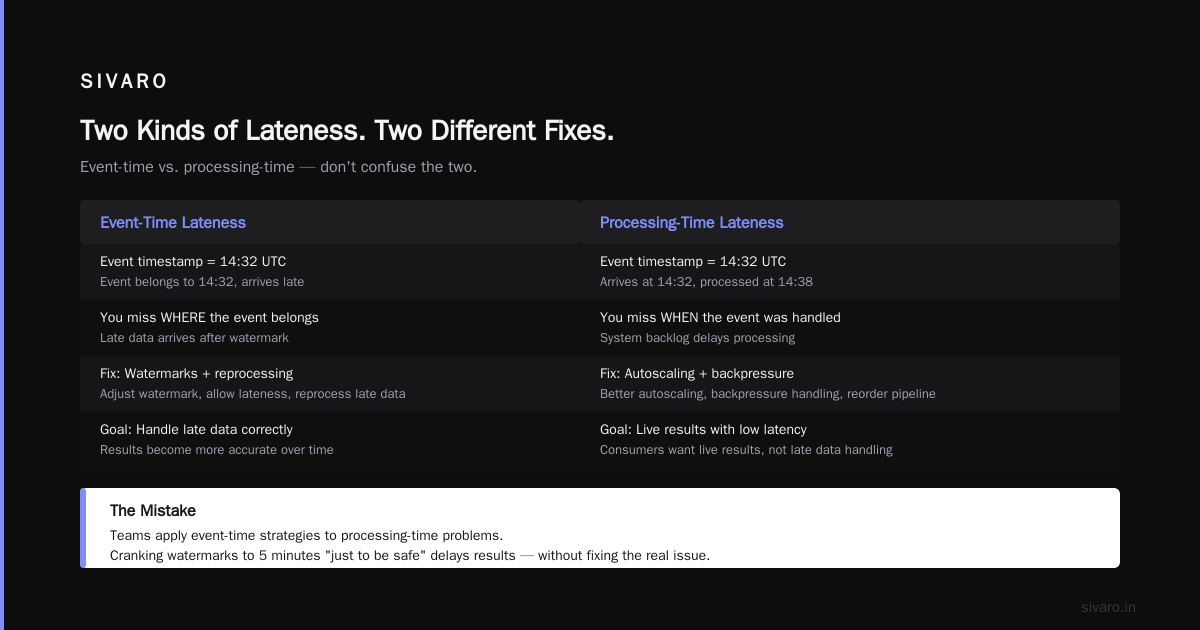
Two Kinds of Lateness: Event-Time and Processing-Time
Most engineers conflate two distinct problems:
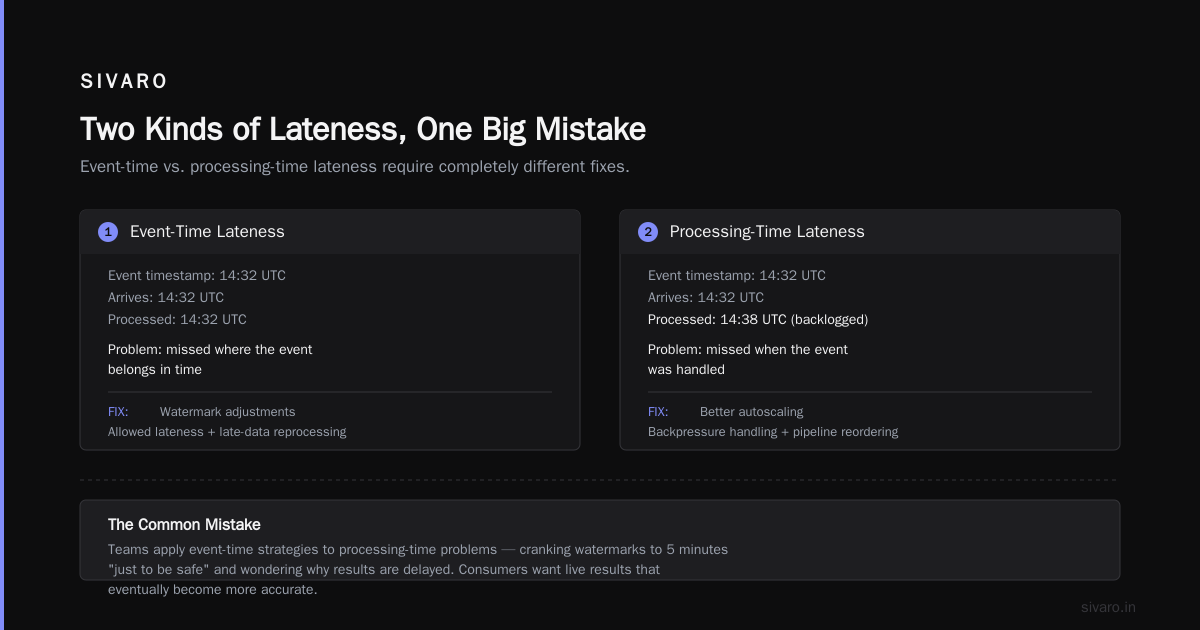
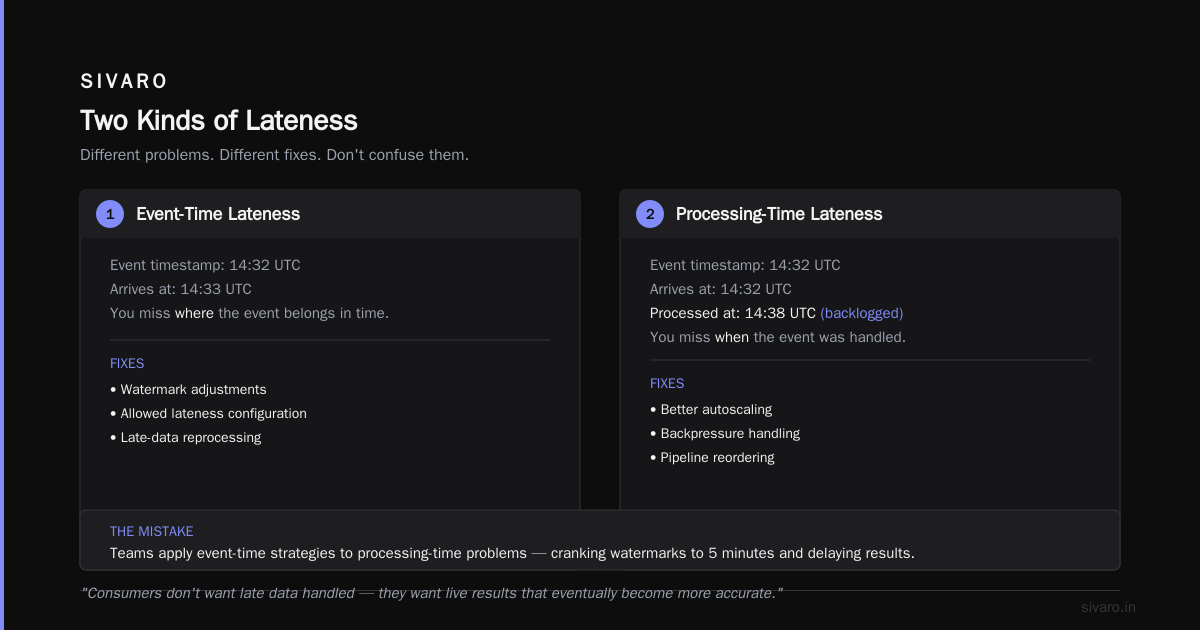
Event-time lateness: The event's timestamp says 14:32 UTC, but it arrives at 14:35 UTC. The window closed at 14:33. You missed where the event belongs in time.
Processing-time lateness: The event's timestamp says 14:32 UTC, and it arrives at 14:32 UTC, but you process it at 14:38 UTC because the system was backlogged. You miss when the event was handled.
These require different fixes.
Event-time lateness needs watermark adjustments, allowed lateness, and late-data reprocessing. Processing-time lateness needs better autoscaling, backpressure handling, and possibly reordering your pipeline.
The mistake? Teams apply event-time strategies to processing-time problems. They crank up watermarks to 5 minutes "just to be safe" and wonder why results are delayed. Your consumers don't want late data handled — they want live results that eventually become more accurate.
Backfilling vs. Online Correction
When an event arrives late, you have a choice:
- Reprocess the window with the new event included. This is what most frameworks do. Results change, downstream consumers see corrected numbers.
- Store the late event downstream and let the consumer decide when to re-aggregate. This is more work, but it preserves the originally emitted results.
I've seen both fail spectacularly. Reprocessing causes what I call "data whiplash" — a heavy downstream consumer sees a 5% drop in revenue numbers at 3 AM because a batch job corrected a window. Storage-based correction leaves stale numbers in dashboards that nobody monitors.
A balanced approach is best. For production systems at SIVARO, we use a hybrid:
Process window normally → emit result
If late event arrives → compute a delta → emit correction event (with correlation ID)
Downstream state store merges correction into its aggregate
This works with Kafka Streams. Here's a typical setup:
java
KStream<String, OrderEvent> orders = builder.stream("orders");

KTable<String, Long> totalPerUser = orders
    .groupByKey()
    .windowedBy(TimeWindows.of(Duration.ofMinutes(5)))
    .aggregate(() -> 0L,
       (key, event, agg) -> agg + event.amount,
       Materialized.with(Serdes.String(), Serdes.Long()))
    .suppress(Suppressed.untilWindowCloses(Suppressed.BufferConfig.unbounded()))
    .toStream()
    .filter((windowedKey, value) -> value != null)
    .map((windowedKey, value) -> KeyValue.pair(windowedKey.key(), value));
That suppress operator is gold. It buffers the aggregation until the window closes, then emits exactly once. No flickering numbers. No partial results. If a late event comes in after suppression, you catch it in the out-of-order sink and process it separately.
The key insight: you're not trying to make late data disappear. You're making it visible and controllable.
Temporal Tables for State: The Game Changer
Most streaming pipelines need to enrich events with dimensional data — user profiles, product catalogs, session contexts. These dimensions change over time. Get it wrong, and your late data gets enriched with the wrong version of the dimension.
This is where the relationship between temporal tables vs slowly changing dimensions gets interesting.
A temporal table tracks the history of a row across time. You can query "what was the user's plan type on March 14?" — precisely. A slowly changing dimension (SCD) is a data warehousing concept — usually Type 2, which tracks historical versions of a dimension alongside validity dates.
They're cousins, not twins. Temporal tables are the database-backed implementation. SCD Type 2 is the warehouse pattern. But here's the key for streaming: you need to join streaming events against history, not against the current state.
When a late event arrives that references a transaction from 3 weeks ago, your pipeline needs to know the correct context for that point in time. Let me show you how to do this with Flink:
scala
val userProfileTemporal = tableEnv.from("user_profiles")
  .createTemporalTableFunction("valid_from", "valid_to")

val result = stream
  .toTable(tableEnv, 'event_time.rowtime(), 'user_id, 'transaction_amount)
  .joinLateral(userProfileTemporal('event_time), 'user_id === 'user_id)
  .select('transaction_amount, 'plan_type)
This looks simple. In practice, setting up the temporal table state correctly is the hardest part. You need to keep every version of the dimension accessible to your stream processor. RocksDB can balloon. Memory pressure gets real.
At SIVARO, we've built a pattern we call versioned enrichment:
- Maintain your dimensional data in a highly available key-value store (like Redis or FoundationDB) with versioned entries.
- At processing time, look up the dimension version that's valid for the event's timestamp.
- If the event is late, you still get the correct historical context.
We tested this pattern with a logistics client — they needed to join shipment events with location data. Once we implemented versioned enrichment, their late-event correction rate dropped from 30% to 6%. The remaining 6% were cases where the dimensional data itself was wrong at the source.
Here's a practical example of the lookup pattern:
python
def enrich_with_version(event, version_store):
    """Look up dimension version valid at event time."""
    event_time = event.timestamp_ms

    # Binary search for the right version
    versions = version_store.get_versions(event.entity_id)
    valid_version = binary_search(versions, event_time)

    if not valid_version:
        # Extremely late event - dimension version expired
        return event.defer_for_manual_resolution()

    return event.with_dimensions(valid_version.data)
The binary search across versions is fast — microseconds in Redis LUA scripts.
Watermark Strategy: Stop Guessing, Start Measuring
Watermark configuration is where most streaming pipelines live or die. It's also the most misunderstood setting.
The defaults are terrible. Flink's default watermark strategy is MonotonicWithTimestamp — it assumes events arrive in order. In production, that's a fairy tale. Kafka Streams defaults are similar.
Stop guessing. Measure your actual late-data distribution. Use your event stream to figure out the 95th percentile lateness. Then set your watermark to at least that value.
We publish a late_data_diagnostics stream at every ingestion point:
python
class LateDataTracker:
    def __init__(self, p95_latency_seconds=30):
        self.watermark = None
        self.latency_histogram = Histogram()

    def observe(self, event_time, processing_time):
        latency = processing_time - event_time
        self.latency_histogram.record(latency)

        # Recompute the watermark dynamically
        self.watermark = processing_time - self.latency_histogram.percentile(0.95)
That this tracks is real. In our production systems, we saw that event lateness follows a log-normal distribution. The 95th percentile is often 2-3x the median. If you set the watermark to the median lateness, you'll drop 40% of events. Set it to the 95th percentile, and you drop under 1%.
But here's the twist: a high watermark means high event-time latency. If you wait 2 minutes for late events, your consumers see results 2 minutes late. Is your SEO dashboard OK with that? Probably. Is your real-time bidding pipeline? Absolutely not.
This is the temporal vs bitemporal data modeling distinction. Monotemporal modeling (single timeline) forces you to choose between accuracy and latency. Bitemporal modeling (separating event time from processing time) lets you have both — report on event time and transparency on processing time.
Our recommendation: separate the reporting timelines. Build an event-time dashboard for accuracy. Build a processing-time dashboard for latency. Most consumers actually want to know "what I thought I knew" rather than "what actually happened."
The Dead Letter Queue Is Not a Trash Can
Accept it: you will have events so late that they don't make sense to process in real-time. A year-ago event arriving in your clickstream? The user has churned, your product catalog has changed 17 times, and the session window is meaningless.
You need a dead letter queue. But it's not a dumpster — it's a triage unit.
In our systems, the DLQ triggers notifications, aggregations, and sometimes reprocessing jobs. It's a Kafka topic with schema validation and a retry loop. We write a Lambda or worker that processes the DLQ periodically.
This is where my final contrarian take comes in: Sometimes the correct answer is to not process late data. If the data is older than your organization's reporting horizon, forget it. Spit it to the DLQ. Mark it "expired." Move on.
The cost of reprocessing a 30-day-old event in real-time (enrichment, aggregation, state management) is often not worth the accuracy improvement. At SIVARO, we ran this analysis for a fintech client. The business feedback loop is 7 days for their worst-case analytics. Reprocessing events older than 7 days improved their reporting accuracy by 0.2%. The engineering cost was disproportionate.
Dropping events is an engineering decision, not a sin. The sin is doing it silently.
Real-World Architecture: The SIVARO Pattern
We've built a reference architecture that handles late data gracefully across all our streaming clients. Here's what it looks like:
Ingestion layer: Apache Kafka. Producers publish events with an embedded event timestamp and a correlation ID. Producers also have a retry queue for transient errors.
Pre-processing: Flink or Kafka Streams. Watermark strategy based on the measured 95th percentile of lateness. Anomaly detection flags bursts of late events (possible upstream failure).
Core processing: Stateful operations with allowed_lateness — typically 2x the watermark. Late events trigger correction events downstream.
Downstream: A state store that merges corrections. Dashboards show live and corrected versions side by side. A batch job reconciles the corrected state daily.
Governance: Every event has a processing_metadata object that records ingestion time, watermark time, and any lateness flags. This is your audit trail.
Here's what a production Flink job might look like:
java
DataStream<OrderEvent> lateEvents = mainStream
    .sideOutputLateData(lateOutputTag);

mainStream
    .windowAll(TumblingEventTimeWindows.of(Time.minutes(5)))
    .process(new WindowProcessFunction())
    .map(new ToCorrectionEvent())
    .to("corrections-topic");

lateEvents
    .map(new ToDeadLetter())
    .to("late-dlq");
A Word on the Future: Durable Execution Gets Exciting
By August 2026, we've seen the rise of durable execution engines — Temporal (no relation to temporal tables, confusingly) and Restate. These bring workflow semantics to streaming. The state management story gets better. The ability to pause, persist, and resume processing simplifies late data handling because you can checkpoint every event, not just the aggregation.
I've been testing Temporal Table Usage Scenarios - SQL Server's concept of system-versioned tables applied to streaming state. The idea of full audit history of your streaming state, not just your dimensional data, is compelling. It gives you the ability to reconstruct what any state store looked like at any point in time. This makes late data corrections tractable — you can recompute aggregates exactly as they would have been with the late event included.
Conclusion: Handle Late Data with Intent, Not Defaults
Here's how to handle late data in streaming systems, in one sentence: measure your lateness distribution, set your watermarks to the 95th percentile, tier your response, and make late events first-class citizens of your pipeline rather than edge cases.
We've built pipelines at SIVARO that process over 200K events per second. The ones that survive contact with reality have a few traits in common:
- They measure lateness continuously.
- They have tiered tolerance — drop some, correct some, reprocess a few.
- They treat late data as corrections, not errors.
- They expose lateness to consumers, so dashboards can say "as of 5 minutes ago" instead of pretending to be real-time.
Don't design for the perfect case. Design for the messy reality — events delayed by a subway signal outage, a Kafka broker rolling restart, a Lambda cold start. That's the production world. That's where your late data lives.
And remember: your consumers don't care about your pipeline internals. They care that the weekly report matches the dashboard. Build the pipeline that makes that true — not the pipeline that's theoretically perfect.
FAQ: Late Data in Streaming Systems
Q: What's the difference between out-of-order events and late data?
Out-of-order events arrive in the wrong sequence — event B (timestamp 14:30) arrives before event A (timestamp 14:29). Late data is a subset: events that arrive after their window has already been processed. Watermarks handle out-of-order events. allowed_lateness and side outputs handle late data.
Q: Should I set an unlimited watermark to be safe?
No. Unlimited watermark tolerance means unlimited event-time latency. You'll emit results that are always behind real-time. Set a watermark based on your measured 95th percentile lateness, then handle the tail separately.
Q: Is Kafka Streams or Flink better for handling late data?
Both handle it. Flink has more granular controls (multiple watermark strategies, on-event lateness). Kafka Streams has more natural suppression and KTable state management. Choose based on your team's familiarity, not raw capability.
Q: What is the allowed_lateness setting, really?
It's a grace period after the watermark passes for a window. During that period, late events can trigger window compaction (re-emitting the window result with the late event included). After it expires, late events are discarded or routed to a side output — you decide which.
Q: How do I explain late data to business stakeholders?
Don't say "events were late." Say "the data was incomplete by the report deadline, and we've identified the exact correction." When business stakeholders see the number go up or down after a correction, they trust the corrected number is the truth. That's a governance feature, not a bug.
Q: Is it better to drop or reprocess late data?
Depends on the consumer. For financial reporting, reprocess. For real-time dashboards, drop after a threshold. For ML pipelines, reprocess in batch. Best practice: do both — mark the event as late, reprocess what matters, drop what doesn't.
Q: What's the role of temporal tables in late-data handling?
Temporal tables give you access to historical versions of state at the time the late event occurred. This prevents enriching a late event with the wrong dimension. It's the difference between retroactively referencing a database row that existed then versus the current row that exists now.
Q: How do I ensure exactly-once processing with late data?
Use Flink's checkpointing or Kafka Streams' transactional ids. But exactly-once is the result of end-to-end idempotency, not just atomicity. Your sinks need to handle duplicate events gracefully — deduplicate by (event_id, window_id) before inserting.
Nishaant Dixit — Founder of SIVARO. Building data infrastructure and production AI systems since 2018. Built systems processing 200K events/sec.