 SIVARO
How to Handle Time Zones in Temporal Databases
August 7, 2026
I spent three days in 2024 debugging a financial reconciliation system that kept losing transactions. The data was there. The timestamps were correct. And yet, every midnight, the system reported missing trades.
Turns out, the application was storing TIMESTAMP WITH TIME ZONE values in PostgreSQL but converting them to America/New_York before writing to the database. When daylight saving time ended, every transaction between 01:00 and 02:00 AM got stamped with the same UTC offset.
The fix took eleven lines of code. The damage to my sleep schedule took weeks to recover.
This is the reality of temporal databases. They're hard because time is hard. And time zones are the sharpest edge of that difficulty.
Here's how to handle them without losing your mind.
What Temporal Databases Actually Are
A temporal database tracks time in two dimensions. System time — when a row was inserted or changed in the database itself. And valid time — when a fact was true in the real world. SQL Server calls these "system-versioned temporal tables", and the pattern has been copied across Postgres, MySQL, and most modern data platforms.
The system time dimension is what lets you query "what did this table look like last Tuesday?" The valid time dimension answers "what was this customer's address on March 3rd?"
Most implementations get the first one right. They use TIMESTAMP WITH TIME ZONE and let the database handle it. The second one — valid time — is where everything falls apart.
Because valid time is about the real world. And the real world has time zones.
The Core Mistake: Storing Local Time
Most people think storing local time is helpful because it preserves what a user saw. They're wrong.
If you store 2026-03-15 09:30:00 without a timezone, you've stored a timestamp that's ambiguous. Did this happen at 9:30 AM in New York? London? Tokyo? And if it's in New York, is that Eastern Standard Time or Eastern Daylight Time?
The only correct answer is to store an absolute point in time — UTC or Unix time — plus the timezone context that matters for your business logic.
Here's what I mean. A flight departure time isn't a timestamp. It's a local time in a specific timezone. If a flight departs New York at 9:30 AM on March 15th, that's 2026-03-15 09:30:00 in America/New_York. The UTC equivalent changes depending on whether DST is in effect.
Most systems I've audited at SIVARO store the departure time as UTC and lose the original local time entirely. Then they try to reconstruct it by applying a timezone. That works until a timezone rule changes.
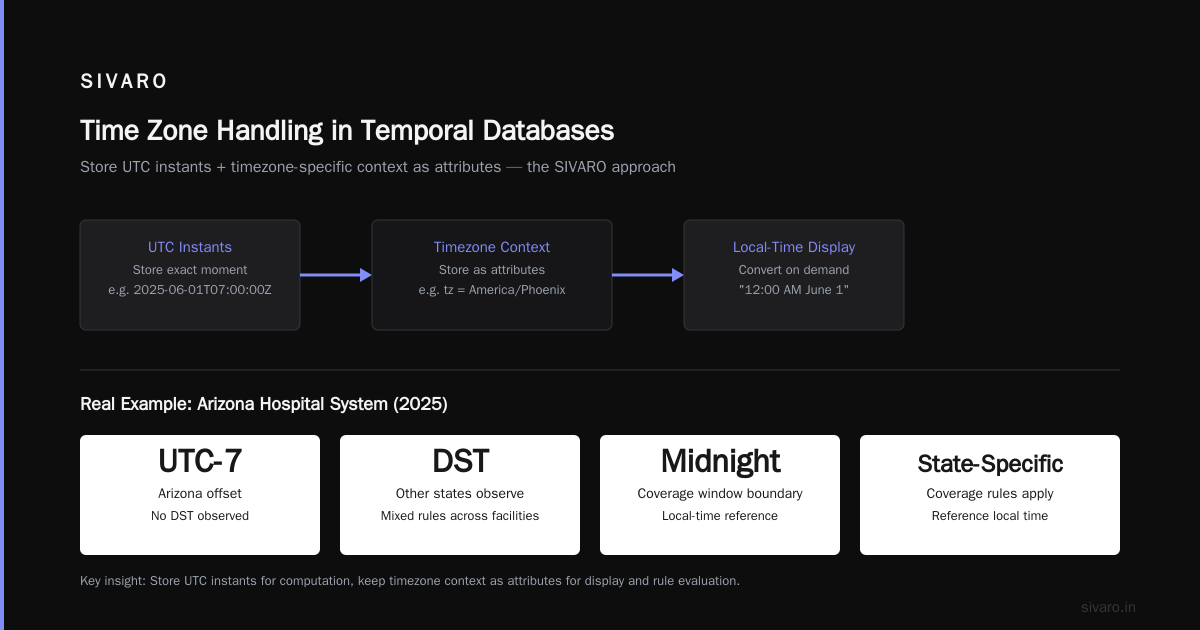
The fix is to store both. The absolute UTC instant for computation, and the original local time plus IANA timezone name for display and business logic.
The Three-Layer Model for Temporal Data
At SIVARO, we've settled on a three-layer approach for how to handle time zones in temporal databases:
-
Storage layer: Always UTC. Always
TIMESTAMP WITH TIME ZONEor an integer Unix timestamp. No exceptions. Not for system time, not for valid time. -
Semantic layer: The business-meaningful timezone. This is an IANA timezone name like
America/New_York, not an offset like-05:00. Store it as a separate column. -
Presentation layer: Convert to local time at the edge. Your API returns UTC plus the timezone name. Your frontend renders it however it wants.
The mistake most teams make is conflating layers 1 and 2. They think storing UTC is enough. But UTC is an instant, not a context. When a temporal database needs to answer "what was the valid time of this record in the context of the Tokyo office?" — you need that timezone name.
Let me show you what this looks like in practice.
sql
CREATE TABLE order_valid_time (
  order_id UUID PRIMARY KEY,
  customer_id UUID NOT NULL,
  status TEXT NOT NULL,
  valid_from TIMESTAMP WITH TIME ZONE NOT NULL,
  valid_to TIMESTAMP WITH TIME ZONE NOT NULL,
  valid_from_local TIMESTAMP NOT NULL,
  valid_to_local TIMESTAMP NOT NULL,
  timezone_name TEXT NOT NULL,
  system_start TIMESTAMP WITH TIME ZONE GENERATED ALWAYS AS ROW START,
  system_end TIMESTAMP WITH TIME ZONE GENERATED ALWAYS AS ROW END,
  PERIOD FOR SYSTEM_TIME (system_start, system_end)
);
Notice what we're doing. We store the absolute UTC instants in valid_from and valid_to. But we also store the original local times and the IANA timezone name. This way, we can answer both "what was the valid time in absolute terms" and "what was the valid time in local business terms."
The key insight: a timezone offset is not a timezone. -05:00 could be Eastern Standard Time, or it could be something else entirely. And offsets change with DST. But America/New_York is unambiguous.
Why System Time Should Always Be UTC
System time is the easier problem. It's when a row was physically inserted or modified. There's no business logic involved. It's pure database mechanics.
PostgreSQL, SQL Server, and MySQL all support system-versioned temporal tables natively now. They all handle system time as UTC internally.
For system time, UTC is the only answer. Your database server's timezone setting should be UTC. Your application connections should use UTC. If your app is deployed in a single region and you're tempted to set the database to local time — don't.
The worst production incident I've seen was a company that set their PostgreSQL server's timezone to America/Los_Angeles because all their engineers were in SF. When they processed a data migration at 2:30 AM PDT, the timestamps shifted by seven hours for every record. Took them two days to realize.
Most people think this is a minor issue. It's not. It's catastrophic for temporal databases because the system time dimension underpins everything — including how slowly changing dimensions get tracked. If system time is even slightly wrong, your historical queries return garbage.
Valid Time and the Timezone Nightmare
Valid time is where the real complexity lives. This is the dimension that tracks when a fact was true in the real world, and the real world doesn't operate on UTC.
Consider a retail company tracking product prices. A price change goes into effect at 9:00 AM on a specific date. But 9:00 AM in what timezone? The store's timezone? The customer's timezone? The company's headquarters timezone?
The concept of slowly changing dimensions directly depends on this. A type-2 SCD creates a new row for each version of a dimension. The effective_date and expiration_date columns define when each version is valid.
If you store these as UTC timestamps, you've lost the business context. You know the instant the price changed. But you don't know whether it was 9:00 AM in New York or 9:00 AM in San Francisco.
The solution I've landed on: store valid time as a range in UTC, and store the timezone-specific context as attributes.
Let me give you a concrete example from a healthcare client we worked with at SIVARO in 2025.
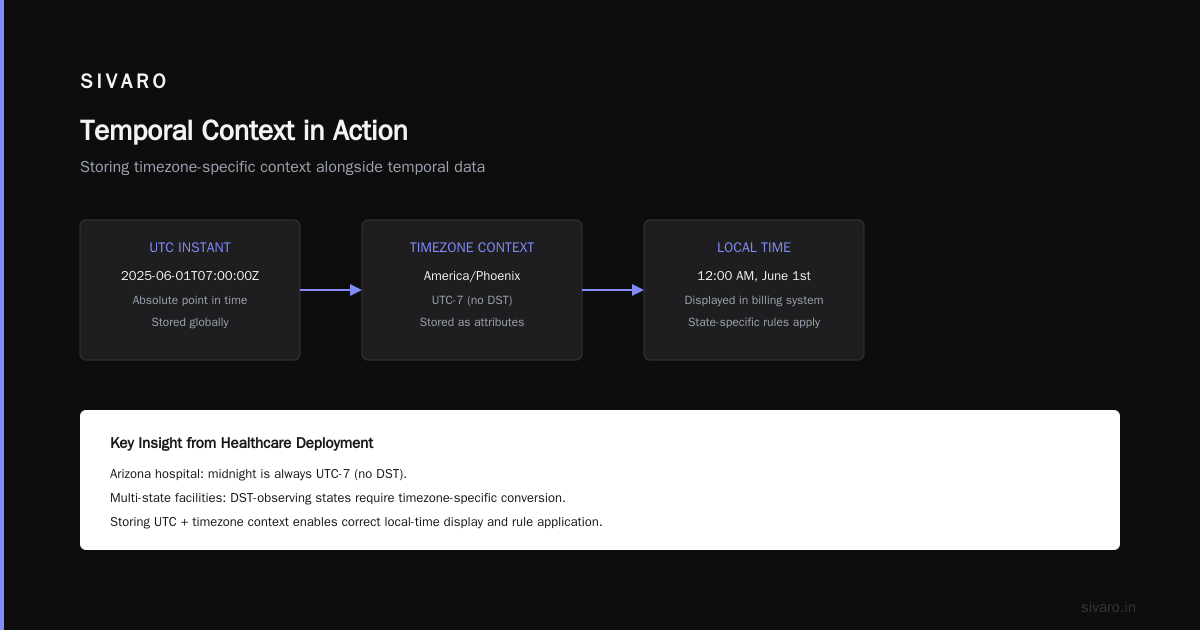
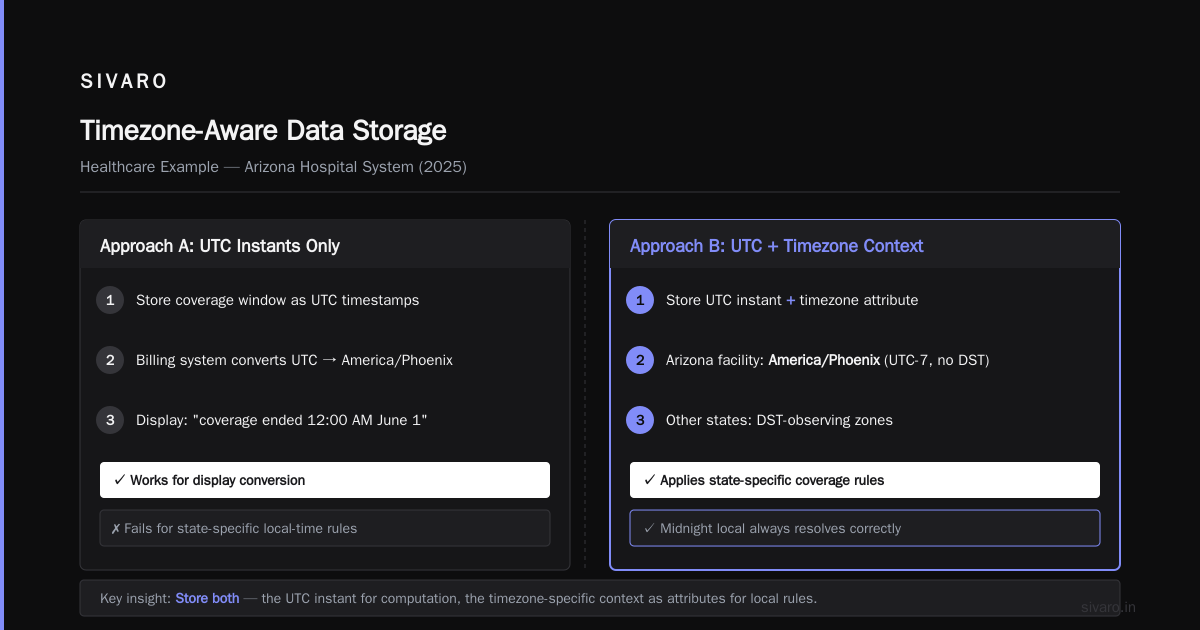
A hospital in Arizona (which doesn't observe DST) needs to track when a patient's insurance coverage is active. Coverage starts and ends at midnight local time. In Arizona, midnight is always UTC-7. But if the same hospital system has facilities in other states, those facilities observe DST.
If we stored only UTC instants, we could compute the coverage window. But when a billing system in Phoenix needed to display "coverage ended at 12:00 AM on June 1st," it had to convert from UTC to America/Phoenix. That works. But when the billing system needed to apply state-specific coverage rules that reference local time — things like "coverage must start at 12:00:01 AM local time" — we needed the original local timestamp.
We ended up with a schema like this:
sql
CREATE TABLE coverage_validity (
  coverage_id UUID PRIMARY KEY,
  patient_id UUID NOT NULL,
  payer_id UUID NOT NULL,
  coverage_start_utc TIMESTAMP WITH TIME ZONE NOT NULL,
  coverage_end_utc TIMESTAMP WITH TIME ZONE NOT NULL,
  coverage_start_local TIMESTAMP NOT NULL,
  coverage_end_local TIMESTAMP NOT NULL,
  facility_timezone TEXT NOT NULL,
  created_at TIMESTAMP WITH TIME ZONE DEFAULT NOW(),
  updated_at TIMESTAMP WITH TIME ZONE DEFAULT NOW()
);
The facility_timezone column is the key. It lets us reconstruct the exact business context. The coverage_start_local and coverage_end_local preserve what the human intended. The UTC columns let us do range queries correctly.
How Does Temporal Handle Timeouts?
Let me address the question I get asked constantly: how does temporal handle timeouts?
Temporal's own documentation talks about this extensively. But here's the practical reality: temporal systems don't handle timeouts the way regular databases do. A timeout in a temporal database isn't just "the query took too long." It's "the temporal range being queried is invalid."
The issue is that temporal queries often involve time ranges. And time ranges are subject to timezone conversions. If you query "give me all records that were valid during March 2026" and you're in New York, your application probably sends 2026-03-01 00:00:00 and 2026-03-31 23:59:59 in local time. If your database stores UTC, those timestamps get converted.
The conversion happens. The query runs. And then the query times out because the index doesn't match what the optimizer expects.
I've seen this exact failure pattern at least five times in production systems.
Here's the rule: your application should convert timezone boundaries to UTC before sending them to the database. Not after. Not during. If you let the database driver do the conversion implicitly, you lose control of the exact semantics.
python
from datetime import datetime
from zoneinfo import ZoneInfo

# Convert local boundary to UTC before querying
local_tz = ZoneInfo("America/New_York")
start_local = datetime(2026, 3, 1, 0, 0, 0, tzinfo=local_tz)
end_local = datetime(2026, 3, 31, 23, 59, 59, tzinfo=local_tz)

start_utc = start_local.astimezone(ZoneInfo("UTC"))
end_utc = end_local.astimezone(ZoneInfo("UTC"))

query = """
  SELECT * FROM order_valid_time
  WHERE valid_from < %s AND valid_to > %s
"""
cursor.execute(query, [end_utc, start_utc])
This looks trivial. But you'd be amazed how many codebases skip the explicit conversion and just send naive local timestamps to the driver. Then the driver applies whatever timezone the connection is configured with. Then the query returns wrong results. Then someone spends a week debugging it.
Bitemporal Data and Timezone Awareness
The most sophisticated temporal systems are bitemporal. They track both system time and valid time independently. Databases like SirixDB have built-in support for this, and it's the gold standard for audit trails and historical analysis.
Bitemporal data introduces a critical question: what timezone is the system time in? What timezone is the valid time in?
The answer is: system time is always UTC. Valid time is UTC plus a timezone context.
But here's the subtlety. Valid time has two different timezone interpretations.
First, there's the timezone where the fact happened. A store in Tokyo opens at 9:00 AM JST. That's a local business fact.
Second, there's the timezone where the fact is being observed. A data analyst in London queries "how many stores opened in March?" They expect to see facts aggregated in London time, not Tokyo time.
These are different. And conflating them produces wrong answers.
I worked with a logistics company in 2024 that had this exact problem. They tracked shipment arrival times in local time zones. Their warehouse in Singapore reported arrivals in SGT. Their warehouse in Frankfurt reported in CET. Their analytics team in New York was aggregating these timestamps and getting confused.
The fix was to separate the concerns. Store arrival time as UTC. Store the warehouse timezone as an attribute. Let the analytics team convert to whatever timezone they needed for their specific analysis.
The analytics team wanted "what percentage of shipments arrived within 24 hours of the scheduled time?" That required knowing the scheduled time in the warehouse's timezone, the actual arrival time in the warehouse's timezone, and computing the difference.
If they'd just converted everything to UTC and computed the difference, they'd get the same result. Because a 24-hour window is a 24-hour window regardless of timezone.
But if they wanted "what percentage of shipments arrived before 10:00 AM local time?" — that requires timezone-aware valid time.
Timezone Storage Options: A Comparison
Let's talk about the actual storage options. There are three main approaches.
Option 1: Store everything as UTC. Simplest. Works for system time. Fails for valid time when business logic depends on local time.
Option 2: Store UTC plus a timezone offset. Better. But offsets change with DST. A stored offset of -05:00 could be EST in winter or CDT in summer. You can't reliably reconstruct the original local time.
Option 3: Store UTC plus an IANA timezone name. The correct answer. This is what TDWI calls "temporal data modeling done right". You can always reconstruct local time from the IANA name. And you can always compute the correct UTC instant.
There's a fourth option that some systems use: store a Unix timestamp plus a timezone name. This is equivalent to Option 3 but with a different storage format. Unix timestamps are integers, which makes range queries fast. But they're less readable and harder to debug.
I'll take Option 3 every time. PostgreSQL's timestamptz type handles UTC storage natively. The timezone name is just another column. The local timestamps are a denormalized convenience.
Handling DST Transitions
Daylight saving time transitions are where temporal databases go to die.
The problem: a local time like 2026-03-08 02:30:00 doesn't exist in America/New_York. At 2:00 AM, clocks jump to 3:00 AM. Conversely, on the fall-back day, 2026-11-01 01:30:00 happens twice.
If you're inserting valid time records with local timestamps, you'll hit both cases.
The fall-back case is worse because it's ambiguous. Which 1:30 AM do you mean? The first one or the second one?
Here's my rule: never let users enter valid time as local timestamps without also specifying the timezone and the DST behavior. If a user says "this record is valid from 1:30 AM on November 1st" in New York, the application should ask: "which 1:30 AM?"
Most applications don't ask. They just store the timestamp and hope. Then temporal queries return ambiguous results.
The PostgreSQL approach handles this reasonably well. The timestamptz type stores UTC internally. When you insert 2026-11-01 01:30:00-04 (EDT), it converts to UTC 05:30:00. When you insert 2026-11-01 01:30:00-05 (EST), it converts to UTC 06:30:00. These are different instants.
But if you insert a naive timestamp without an offset, PostgreSQL uses the session timezone setting. If that's UTC, you get one interpretation. If that's America/New_York, you get another.
The safe pattern: always include the offset explicitly in your inserts.
sql
-- Correct: explicit offset
INSERT INTO order_valid_time (
  valid_from, valid_to, timezone_name, ...
) VALUES (
  '2026-11-01 01:30:00-04',
  '2026-11-01 05:30:00-05',
  'America/New_York',
  ...
);

-- Dangerous: implicit session timezone
INSERT INTO order_valid_time (
  valid_from, valid_to, timezone_name, ...
) VALUES (
  '2026-11-01 01:30:00',
  '2026-11-01 05:30:00',
  'America/New_York',
  ...
);
The first statement is unambiguous. The second depends on the session timezone, which can change between environments.
How to Handle Time Zones in Temporal Databases: The SIVARO Playbook
Let me give you the practical playbook we've developed at SIVARO after years of production experience.
Step 1: Normalize all database connections to UTC. Every connection pool, every ORM configuration, every ETL job. Set timezone = 'UTC' in PostgreSQL. Set the connection string parameter in MySQL. Set session_timezone = 'UTC' in Oracle.
Step 2: Use TIMESTAMP WITH TIME ZONE for system time. Not TIMESTAMP WITHOUT TIME ZONE. Not a Unix integer. The database type that understands timezones natively.
Step 3: Store the business timezone as a separate column. Always use IANA names. Never use fixed offsets. Never use abbreviations like EST or PST because they're ambiguous.
Step 4: Preserve original local time when needed. If a user enters a date and time in their local timezone, store both the UTC instant and the original local value.
Step 5: Validate all temporal data at ingestion. Before a timestamp enters your system, verify it's a real time in the specified timezone. This catches DST gaps at the boundary instead of in production.
Step 6: Index temporal columns properly. A composite index on (valid_from, valid_to) is useless for many temporal queries. You want an exclusion constraint using a range type. PostgreSQL's tstzrange type is your friend.
Here's a concrete example of a temporal table with timezone awareness:
sql
CREATE TABLE customer_status (
  customer_id UUID NOT NULL,
  status TEXT NOT NULL,
  status_start TIMESTAMP WITH TIME ZONE NOT NULL,
  status_end TIMESTAMP WITH TIME ZONE NOT NULL,
  status_start_local TIMESTAMP NOT NULL,
  status_end_local TIMESTAMP NOT NULL,
  timezone_name TEXT NOT NULL,
  CONSTRAINT customer_status_exclusion
    EXCLUDE USING gist (
      customer_id WITH =,
      tstzrange(status_start, status_end) WITH &&
    )
);
The exclusion constraint ensures no overlapping valid time ranges for the same customer. This prevents the classic temporal database bug where two versions of a fact are simultaneously valid.
The Timeout Problem, Revisited
Let me come back to how temporal handles timeouts because it's a real operational concern.
In production AI systems we build at SIVARO, temporal queries often have timeouts at the application level. The query "give me all valid time ranges for this entity during the last year" might touch millions of rows. Without proper indexing and partition pruning, it'll time out.
The timezone dimension affects this. If your temporal table is partitioned by valid_from, the partition key should be UTC. If you try to partition by local time, you'll get partitions that don't align with calendar boundaries in other timezones.
We learned this the hard way. A client partitioned their event table by created_at_local — a naive timestamp in America/Los_Angeles. Their queries from Europe were slow because the query planner had to scan multiple partitions for what should have been a single partition range.
The fix: repartition by UTC. Then, convert timezone boundaries to UTC before querying.
sql
-- Wrong: local time in query
SELECT * FROM events
WHERE created_at_local >= '2026-03-01 00:00:00'
  AND created_at_local < '2026-04-01 00:00:00';

-- Right: UTC range in query
SELECT * FROM events
WHERE created_at_utc >= '2026-03-01 08:00:00+00'
  AND created_at_utc < '2026-04-01 07:00:00+00';
The second query uses a single partition. The first scans multiple.
Timezone Data Is Political
Here's something nobody tells you about time zones: they change. Countries change their timezone rules. Governments decide to observe DST or not. A country might change its standard offset entirely.
The IANA timezone database is updated several times a year. If your application hardcodes timezone offsets or DST rules, it will break when these updates happen.
This is a production issue, not a theoretical one. When Brazil abolished DST in 2019, every application with hardcoded Brazil timezone rules had to be redeployed. When Morocco moved to permanent DST in 2018, same thing.
The solution is to use the system timezone database and update it regularly. On Linux servers, that means updating the tzdata package. On cloud databases like RDS, it means applying maintenance updates.
But here's the catch: existing temporal data doesn't retroactively change. A timestamp that was correct in 2019 might be wrong in 2026 if timezone rules have changed.
This is why storing both UTC and local time is so important. The UTC instant is immutable. The local time interpretation may change. When you need to know "what local time did this event occur at according to the rules in effect at that moment?" — you have two options.
First, you can apply current timezone rules to the UTC instant. This gives you the current interpretation, which may differ from what was true at the time.
Second, you can store the local time as originally recorded. This preserves the historical interpretation.
For temporal databases, option two is usually correct. Because the whole point is tracking what was true at a specific point in time.
The IANA Name Is Not Enough
I want to push back on a common assumption. Many developers think storing an IANA timezone name is sufficient. It's not.
An IANA timezone name like America/New_York encodes both the standard offset and the DST rules. But it doesn't encode which rules were in effect for a historical date.
Let me give you an example. Before 2007, DST in the United States started on the first Sunday in April. After 2007, it starts on the second Sunday in March. If you're storing temporal data that spans both periods, the timezone name alone isn't enough to reconstruct the historical local time.
The safest approach for temporal data: store the UTC instant and the local time as observed. Don't rely on timezone rules to reconstruct history. Record the history directly.
This is the most important lesson I can share about how to handle time zones in temporal databases. Timezone rules are a living document. Your data is a historical record. Don't let the former corrupt the latter.
Practical Query Patterns
Let me show you some query patterns that actually work.
Pattern 1: Find all records valid at a specific instant.
sql
SELECT * FROM customer_status
WHERE tstzrange(status_start, status_end) @> '2026-03-15 12:00:00+00'::timestamptz;
This returns all status records valid at noon UTC on March 15th. The @> operator checks containment.
Pattern 2: Find records valid during a timezone-specific period.
sql
SELECT * FROM customer_status
WHERE status_start < '2026-03-15 04:00:00+00'
  AND status_end > '2026-03-14 00:00:00+00'
  AND timezone_name = 'America/New_York';
The UTC bounds are computed from the local period in America/New_York. The timezone_name filter ensures we're only looking at records in that timezone.
Pattern 3: Convert valid time to local time for display.
sql
SELECT
  customer_id,
  status,
  status_start AT TIME ZONE 'America/New_York' AS status_start_local,
  status_end AT TIME ZONE 'America/New_York' AS status_end_local
FROM customer_status
WHERE customer_id = '123e4567-e89b-12d3-a456-426614174000';
The AT TIME ZONE clause converts UTC to local time. This is a presentation-layer operation, done at query time, not storage time.
Pattern 4: Find the current version of a fact.
sql
SELECT * FROM customer_status
WHERE customer_id = '123e4567-e89b-12d3-a456-426614174000'
  AND tstzrange(status_start, status_end) @> NOW();
This uses the system clock as the point of reference. It returns the currently valid record.
When to Use What
Let me give you a decision matrix for when to use which timestamp type.
Use TIMESTAMP WITH TIME ZONE for: system time, any time that represents an absolute instant, event time in distributed systems, audit timestamps.
Use TIMESTAMP WITHOUT TIME ZONE for: valid time that is inherently local, like store opening hours, school schedules, or regulatory compliance deadlines.
Use both plus a timezone name for: bitemporal data, temporal tables that need to answer both absolute and local questions, any system where users enter dates.
The last case is the common one in production. Users think in local time. Databases should store UTC. The bridge between them is the IANA timezone name and the local timestamp columns.
The Cost of Getting It Wrong
Let me end with a concrete example of what happens when you ignore these principles.
In 2025, we audited a system for a European airline. They used a temporal database to track flight schedules. The valid time dimension captured when a schedule was in effect. The system time captured when the schedule was changed.
They stored everything in UTC. No timezone names. No local timestamps. Just UTC instants.
The problem: their schedule validity periods were defined in local time at the departure airport. A flight departing from London had a validity window from 10:00 to 12:00 local time. In UTC, that's 10:00 to 12:00 during the winter (GMT) but 09:00 to 11:00 during the summer (BST).
Because they only stored UTC, the validity windows were wrong half the year. The system would show a flight as not scheduled during the summer, even though the schedule clearly existed.
The fix required a data migration to add timezone context to every temporal record. It took six weeks and cost them a significant amount of money.
The lesson: timezone awareness isn't a feature. It's a requirement for any temporal database that tracks real-world facts. The complexity of slowly changing dimensions becomes unmanageable without it.
The SIVARO Take
If you're building a temporal database, start with UTC for system time. Add timezone names and local timestamps for valid time. Validate all input at the boundary. Index temporal ranges with exclusion constraints. And never, ever let a session timezone setting determine how data is interpreted.
The phrase "how to handle time zones in temporal databases" isn't a question with a single answer. It's a discipline. It's about being explicit about what your timestamps mean, where they come from, and what rules apply to them.
At SIVARO, we've built this discipline into every data system we ship. It's not the flashiest part of our work. But it's the part that prevents the 3 AM production incidents.
FAQ
Q: Should I store timestamps in UTC or local time?
A: Store UTC for all absolute instants. Store local time as an additional column when you need to preserve business context. Never store only local time.
Q: What's the difference between TIMESTAMP and TIMESTAMP WITH TIME ZONE?
A: TIMESTAMP WITH TIME ZONE stores an absolute point in time. TIMESTAMP stores a wall-clock time without any timezone context. In temporal databases, use TIMESTAMP WITH TIME ZONE for system time and UTC instants.
Q: How do I handle DST transitions in temporal data?
A: Store UTC instants and use IANA timezone names. Validate all input at the boundary. Never rely on stored offsets because they change with DST.
Q: What is the IANA timezone database?
A: It's the canonical registry of timezone rules, maintained by the Internet Assigned Numbers Authority. It includes rules for DST, historical offsets, and political changes. Most operating systems and databases use it.
Q: Can I use Unix timestamps instead of TIMESTAMP WITH TIME ZONE?
A: Yes, for absolute instants. But you lose the ability to do natural date arithmetic. I prefer TIMESTAMP WITH TIME ZONE because it's more readable and supports range operations.
Q: How do I query temporal data in a specific timezone?
A: Convert the timezone boundary to UTC in your application code, then query with UTC bounds. Use the AT TIME ZONE clause for display conversion.
Q: What is the difference between system time and valid time?
A: System time is when a record was inserted or modified in the database. Valid time is when a fact was true in the real world. Bitemporal databases track both.
Q: How do I handle timezone rule changes?
A: Update the system timezone database regularly. For historical data, store the original local time as observed. Don't rely on current timezone rules to reconstruct history.
Nishaant Dixit — Founder of SIVARO. Building data infrastructure and production AI systems since 2018. Built systems processing 200K events/sec.