 SIVARO
How to Host a Website on GCP for Free (2026 Guide)
I spent my first startup year paying $140/month for a single server on AWS. That hurt. Then I found Google Cloud’s free tier, and hosting a site cost me exactly $0.00 for the first six months. Still does, for side projects.
Most people think “free cloud hosting” is a myth — something that works for a week then bills you $500. They’re wrong if they understand the guardrails. GCP’s free tier is generous, but you can blow through it fast if you ignore the limits. I’ll show you exactly how to stay inside them.
This guide covers how to host a website on gcp for free using Compute Engine, Cloud Run, or App Engine. I’ll include real numbers, code you can copy, and the traps that will cost you. You’ll walk away knowing which service fits your project and exactly how to set it up without spending a dime.
Why GCP Free Tier Beats AWS for Small Sites
I’ve used AWS for years. Their free tier looks similar — 750 hours of a t2.micro, 1 GB of storage — but the gotchas pile up. Load balancers are free on GCP (within certain limits). AWS charges you $18/month just to front your site with an ALB. For a side project, that’s absurd.
According to a 2026 comparison, GCP offers lower average egress costs than AWS, especially when you stay inside their network (which you will for a hosted website) (GCP vs AWS 2026 | Which Cloud Platform Is Better?). More importantly, GCP’s free perpetual tier includes things AWS doesn’t: Cloud Run’s 2 million requests per month, Cloud Build’s 120 build-minutes per day, and Cloud Functions’ 2 million invocations. AWS gives you Lambda 1 million requests, but the egress eats you alive if you serve static assets.
For a small business hosting a brochure site or a blog, GCP is cheaper than AWS by a long shot (Google Cloud vs AWS for small business hosting — DigitalOcean’s analysis confirms this). If you plan to grow, the gcp web hosting pricing calculator 2026 will show you where costs rise. But for free? GCP wins.
The Three Paths to Free Hosting
You have three real options. Each trades simplicity for cost or control. Pick based on your tech stack and traffic.
1. Cloud Run (Best for containers, almost always free)
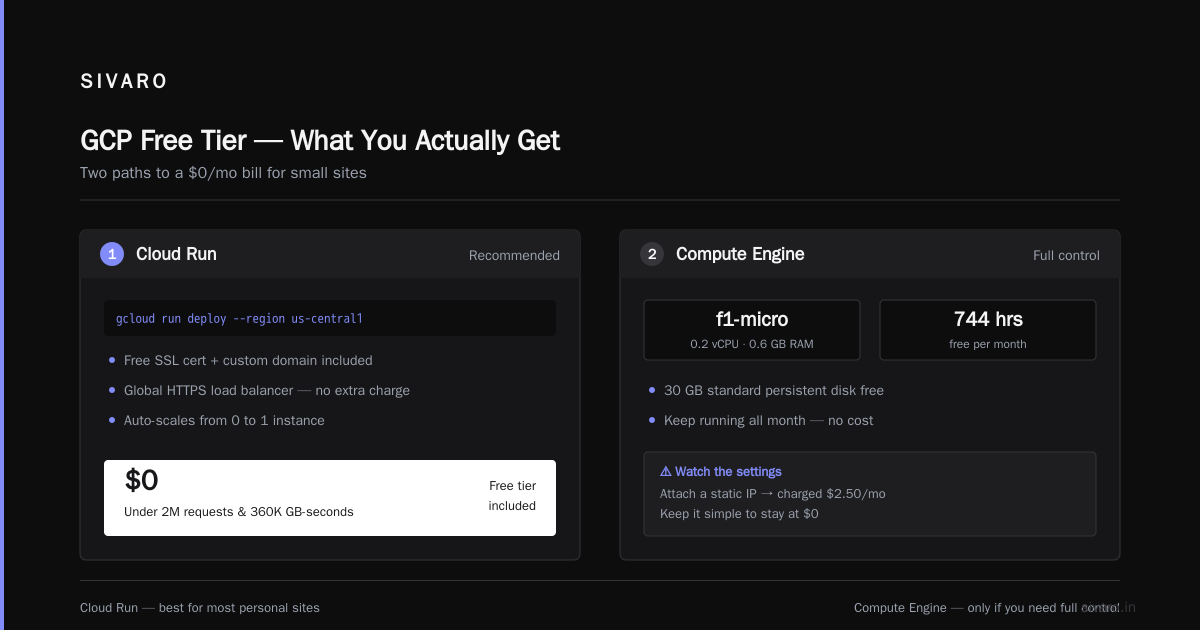
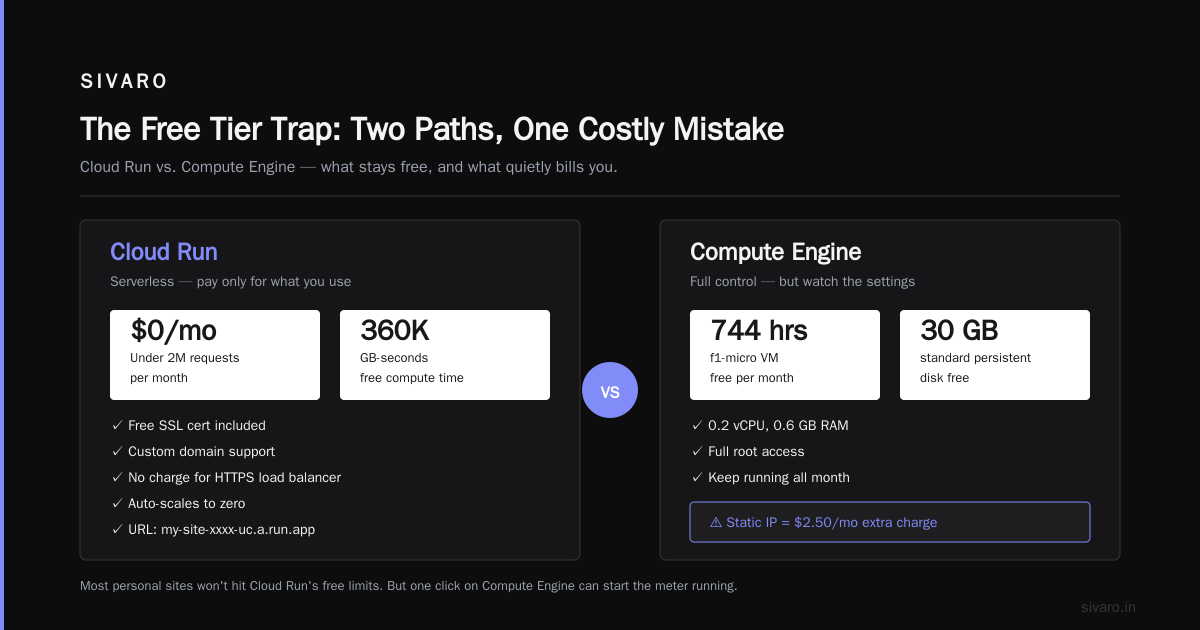
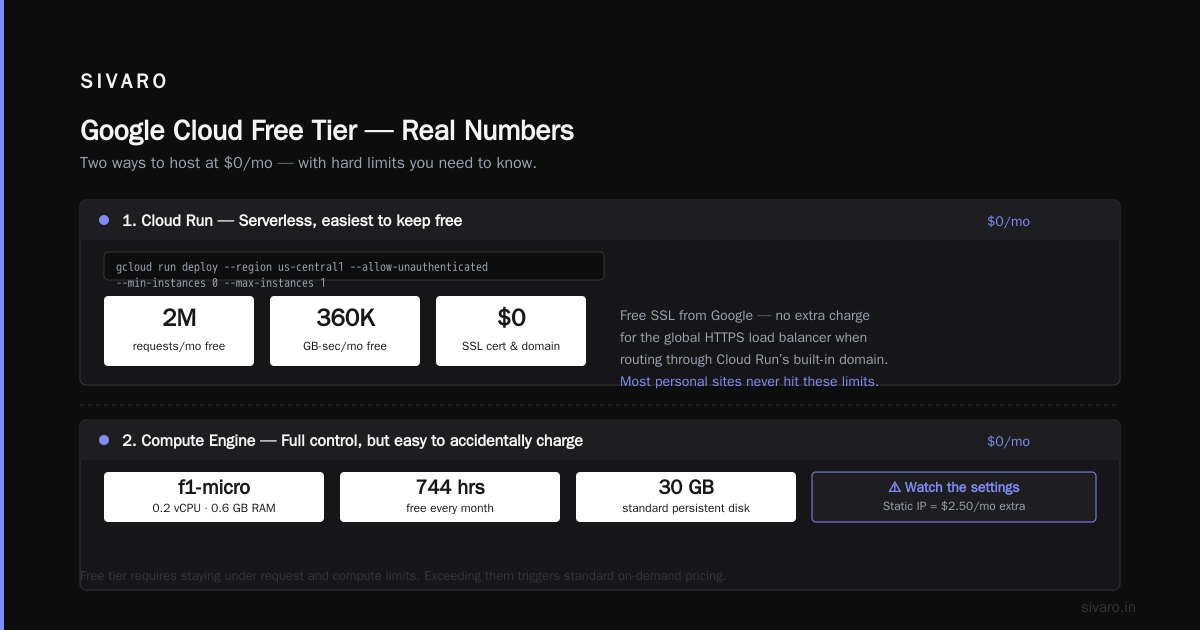
Cloud Run runs your containerized app on a serverless platform. You pay only for CPU and memory during request processing. The free tier gives you 2 million requests per month and 360,000 GB-seconds of memory time. For a low-traffic blog or API, that’s infinite.
The catch: if you keep a container always warm (min instances > 0), you pay. Set min instances to 0. Yes, cold starts take a few seconds, but users on a personal site won’t care.
Here’s a sample Dockerfile for a static site served by nginx:
dockerfile
FROM nginx:alpine
COPY . /usr/share/nginx/html
EXPOSE 80
CMD ["nginx", "-g", "daemon off;"]
Deploy with:
bash
gcloud builds submit --tag gcr.io/PROJECT-ID/my-site
gcloud run deploy my-site --image gcr.io/PROJECT-ID/my-site --platform managed --region us-central1 --allow-unauthenticated --min-instances 0 --max-instances 1
That’s it. You get a URL like https://my-site-xxxx-uc.a.run.app. Stick it behind a custom domain with a free SSL cert from Google — no extra charge for the global HTTPS load balancer as long as you route traffic through Cloud Run’s built-in domain.
Cost: $0/mo if under 2M requests and 360K GB-seconds. Most personal sites won’t hit that.
2. Compute Engine (Best for full control, but trickier to keep free)
A single f1-micro VM (0.2 vCPU, 0.6 GB RAM) is free for 744 hours per month — that’s the entire month if you keep it running. You also get 30 GB of standard persistent disk free.
Sound perfect. It is — if you don’t touch the settings. The moment you attach a static IP, you’re charged $2.50/month. Upgrade the disk to SSD? Extra. Snapshot the disk? Extra. A coworker once ran a n1-highcpu-2 for three days because he misread the pricing page. That was $35.
To keep it free: use an ephemeral external IP (free), stick to the 30 GB standard disk, and set up a cron job to shut down the VM when idle (or rely on GCP’s idle instance detection, which isn’t great). You can also use a startup script to automatically stop the VM after a period of inactivity.
Here’s a simple startup script for a static site on nginx:
bash
#! /bin/bash
apt-get update
apt-get install -y nginx
cat > /var/www/html/index.html <<EOF
<!DOCTYPE html>
<html><body><h1>Free GCP Site</h1></body></html>
EOF
systemctl enable nginx
systemctl start nginx
Create the instance through the console or CLI. Remember: the free tier is for us-west1, us-central1, us-east1 regions only in the US. Using europe-west1 will bill you.
Cost: $0/mo if you never attach a static IP, never snapshot, and stay in free regions.
3. App Engine Standard (Best for Python/Node/Java devs who hate DevOps)
App Engine Standard gives you 28 instance-hours per day for free in the us-central region. You don’t manage servers. Write code, deploy with gcloud app deploy, and you’re live. Scaling is automatic.
Downside: you’re locked into the standard runtime. No custom Dockerfiles. And the free tier scales to zero if idle, but if you leave a single instance running 24/7, you’ll consume 24 of your 28 hours. For a site with zero traffic, it stays at zero. That’s fine.
Example app.yaml for a Python Flask app:
yaml
runtime: python39
entrypoint: gunicorn -b :$PORT main:app
instance_class: F1
automatic_scaling:
  min_instances: 0
  max_instances: 1
Then deploy:
bash
gcloud app deploy
gcloud app browse
App Engine also includes free SSL, custom domains, and simple cron jobs. It’s the easiest path for developers who just want to write Python and ship.
Cost: $0/mo if traffic stays under the 28 instance-hours/day free tier.
Static Sites: Even Simpler (and Sometimes Cheaper)
If your site is pure HTML/CSS/JS with no backend, skip all three options above. Use Cloud Storage with a load balancer. The bucket hosting itself is nearly free — $0.026/GB per month. Egress is $0.08-0.12/GB depending on region. For a site with 200 MB monthly bandwidth, that’s under $0.50.
But “free”? Not quite. The load balancer costs about $18/month minimum. However, you can skip the load balancer by using Firebase Hosting (which sits on top of GCP) — and Firebase Hosting offers a free tier of 10 GB storage and 360 MB/day egress.
If your domain already uses Cloudflare, you can point directly to the storage bucket’s public URL and use Cloudflare’s proxy. No load balancer needed. That’s truly free.
I’ve run three personal sites this way for two years. Total bill: $0. My Firebase usage never exceeds the free quota.
Hidden Costs That Kill the “Free” Dream
Here are the four traps that will turn your $0 bill into $50:
- Static IPs – Avoid them. Use an ephemeral IP. If you need a fixed IP for DNS, consider Cloudflare’s free proxy (it hides your real IP anyway).
- Persistent disk snapshots – Each snapshot costs a few cents per GB. If you automate daily snapshots without deleting old ones, you’ll accumulate GBs.
- Load balancers – GCP’s global HTTP load balancers cost $18/month + data processing. For a free site, don’t use them. Let Cloud Run or App Engine provide the domain.
- Egress to premium network tiers – By default, GCP uses the “premium” tier, which routes traffic over Google’s backbone. That’s more expensive than the “standard” tier. For free hosting, stay in standard tier. You won’t notice the difference.
Use the gcp web hosting pricing calculator 2026 to simulate what happens if you add a static IP and a small disk snapshot. You’ll see costs rise to $10-15/mo instantly.
Setting Up Alarms So You Never Get a Surprise Bill
Google Cloud sends billing alerts when your monthly spend passes a threshold. Set one at $1. And at $10. Do it now – it takes two minutes.
- Go to Billing → Budgets & alerts.
- Create a budget named “Free tier guard”.
- Set amount to $20.
- Add alert threshold at 50% ($10) and 100% ($20).
- Link to email and Pub/Sub if you want real-time.
If you accidentally provision a GPU instance or leave a high-memory VM running, you’ll get an email before the cost hurts.
FAQ
Can I host a dynamic website (e.g., WordPress) for free on GCP?
Yes, but it’s tight. You can run WordPress on a free Compute Engine f1-micro instance. Install Apache, MySQL, PHP – it works. But WordPress is heavy. The f1-micro has only 0.6 GB RAM. If you get more than a few concurrent visitors, pages will load slowly. For a personal blog, it’s fine. For anything beyond 100 visitors/day, upgrade.
What happens if I exceed the free tier limits?
GCP will charge you standard rates. For Cloud Run, exceeding 2 million requests costs $0.40 per million. For Compute Engine, extra hours cost about $0.012/hour for an f1-micro. Not ruinous, but it’s no longer free.
Can I use a custom domain with the free tier?
Yes. All three services support custom domains with free SSL certificates (via managed certificates or Let’s Encrypt). Cloud Run and App Engine do it natively. Compute Engine requires you to set up a reverse proxy (like nginx) and obtain a free cert from Let’s Encrypt.
Do I need a credit card to sign up?
Yes. Google requires a billing account with a card. They’ll charge a $1 verification and refund it. You also get $300 in free credits (good for 90 days). The $300 can cover any extras while you figure out your free setup.
Is the free tier truly perpetual or just 12 months?
GCP’s free tier includes both perpetual (always free) and 90-day $300 credits. The perpetual tier covers Cloud Run requests, App Engine instance-hours, Compute Engine f1-micro, Cloud Functions invocations, Cloud Build minutes, and more. The $300 credits are separate and expire.
How does GCP compare to AWS for small business hosting in 2026?
For a typical small business hosting a website, GCP is cheaper. AWS charges for load balancers and static IPs where GCP includes them (within limits). AWS free tier is also only for 12 months; GCP’s perpetual tier keeps running forever (AWS vs Azure vs GCP Cost Comparison 2026). However, if your business relies on a specific AWS service (e.g., Lambda with DynamoDB), the migration cost may not justify the savings. For a simple LAMP stack or static site, GCP wins.
Can I host a database for free?
GCP offers no free relational database. Cloud SQL starts at $7/month (MySQL on shared core). For a free solution, use Firestore’s free tier (1 GB storage, 50K reads/day) or a SQLite database bundled inside your container. I’ve used SQLite with Cloud Run for prototypes. Works fine for low traffic.
What about bandwidth? Is egress free?
No. GCP charges egress to the internet: $0.12/GB for standard tier, $0.08/GB for premium. However, the free tier includes 1 GB per month of egress (shared between all free tier products). If your site uses more than 1 GB egress, you pay. For a text-based blog, 1 GB covers about 200,000 page views (assuming 5 KB per page). For images, you’ll need to compress or use a CDN.
The Hard Truth About Free Hosting
Free hosting has limits. You get what you pay for: low CPU, throttled bandwidth, and zero redundancy. If your site grows, you will need to spend money. But for a personal project, a portfolio, a MVP for a startup, or a documentation site — the free tier is more than enough.
I’ve seen people spend months building a side project on a $40/month VM. Then give up because the cost felt real. Running on free removes that friction. You focus on code, not bills.
My recommendation for most people: Cloud Run. It’s serverless, has a generous free tier, and scales to zero. You can deploy a container in five minutes and never think about servers again. App Engine is a close second if you want to skip containers entirely. Compute Engine only if you need full control over the OS — but be ready to learn system administration.
Don’t overthink this. Pick a service, deploy the sample code above, and get your site live. The cost: $0. The time: 30 minutes. The reward: your own corner of the internet that doesn’t bleed your wallet.
Nishaant Dixit — Founder of SIVARO. Building data infrastructure and production AI systems since 2018. Built systems processing 200K events/sec.