 SIVARO

How to Implement Cost Efficient Model Serving
You've trained a great model. It scores 0.98 on your eval set. Then the invoice from your GPU provider arrives, and suddenly you're questioning your life choices.
I've been there. In 2024, one of our clients at SIVARO was spending $18,000 a month serving a single fine-tuned Llama-3-8B for a document extraction pipeline. After we rearchitected their serving layer, that cost dropped to $2,300. Same accuracy. Same latency. The trick wasn't a magic library—it was a series of deliberate, often counterintuitive decisions about where and how to run inference.
This guide is a purchasing decision framework. We'll compare the major options for model serving—from managed clouds to bare metal—and I'll tell you exactly what we've tested and what I'd pick today. By the end, you'll know how to implement cost efficient model serving without burning your infrastructure budget.
The First Question: Do You Actually Need a GPU?
Most teams I meet assume model serving means GPUs. That's wrong for a surprising number of workloads.
Let's define the landscape first. Cost efficient deep learning infrastructure isn't just picking the cheapest GPU. It's matching the compute to the actual requirement of your model and traffic pattern. Before you even look at vendors, you need to answer one question: what's your latency budget and throughput requirement?
Here's a heuristic we use at SIVARO:
If your model is < 1B parameters and your traffic is bursty:
    → CPU is probably fine
If your model is < 7B and you can tolerate batch inference:
    → CPU or a single consumer GPU works
If your model is > 7B and you need real-time streaming:
    → You're in the expensive lane. Accept it. Optimize elsewhere.
We had a client in 2025 running a BERT-based classifier for support ticket routing. They were on two A100s, spending $4,400 a month. The model was 110M parameters. We moved them to an 8-core CPU instance with ONNX Runtime. Inference time went from 40ms to 65ms. Their latency budget was 200ms. Monthly cost: $340. That's a 92% reduction for a 25% latency hit they never noticed.
The uncomfortable truth is that most production models are embarrassingly small. The industry's obsession with 70B+ models has convinced everyone they need datacenter GPUs. For internal tools, RAG pipelines, and classification tasks, you often don't.
CPU serving options (when they make sense):
- ONNX Runtime: Free, open source, supports quantization and graph optimizations. We use this for all CPU-based serving. It's not flashy. It works.
- Intel OpenVINO: If you're on Intel Xeon, this can squeeze another 30-40% throughput. The tooling is clunkier, but the numbers don't lie.
- AWS Graviton: For ARM-based instances, you can get surprisingly good performance per dollar for transformer models. The ecosystem maturity isn't quite there, but it's close.
If your models are 3B parameters or smaller and you don't need streaming token-by-token output, test a CPU path first. I can almost guarantee it cuts your bill in half.
The GPU Buying Decision: Reserved vs. On-Demand vs. Spot
When you've confirmed you need GPUs, the pricing models become the battleground. And this is where most people make their first costly mistake.
In 2026, the GPU pricing landscape looks like this:
| Provider | A100 80GB On-Demand | Equivalent Reserved (1yr) | Spot Average |
|---|---|---|---|
| AWS | $4.10/hr | $2.10/hr | $1.20/hr |
| GCP | $3.92/hr | $2.28/hr | $1.10/hr |
| Azure | $4.60/hr | $2.60/hr | $1.35/hr |
| CoreWeave | $3.20/hr | $1.90/hr | $0.80/hr |
Everyone starts on on-demand because they're scared of commitment. Then they burn cash for three months and realize the obvious: continuous workloads on on-demand pricing is how startups die quietly.
Here's our rule: if your serving workload runs 24/7, buy reserved or committed-use discounts. Period. The math is straightforward. At SIVARO, we test every workload for two weeks on on-demand to profile it. Then we either:
- Commit to 1-year reserved instances if baseline usage exceeds 60% of the time, OR
- Design for spot instances if the workload can tolerate interruption.
The spot route is the underrated play. But you need the architecture to handle preemption. We built a serving layer for a fintech client that runs Llama-3.1-8B on spot A10Gs. If a spot instance gets reclaimed, the orchestrator drains active requests to a queue and spins up a fresh spot instance on a different availability zone. Total failover time: 4 seconds. Cost savings versus on-demand: 71%.
That kind of resilience isn't trivial, though. It requires you to build stateless serving with externalized KV caches or accept request replay. If you're not ready for that engineering effort, reserved instances are the safer bet.
Managed Services: The Convenience Tax You Might Want to Pay
There's a tension in every infrastructure decision: build versus buy. For model serving, the managed options have gotten genuinely good.
The major comparison points in 2026:
AWS SageMaker — The old guard. If you're already deeply in AWS, the integration is tight. You can deploy a model endpoint in about 20 minutes. But the cost breakdown confuses me every time. They charge separately for instances, storage, and data processing. For a standard g5.2xlarge (A10G), you're looking at roughly $2.30/hr for the endpoint plus data transfer fees that appear on your bill like phantom charges.
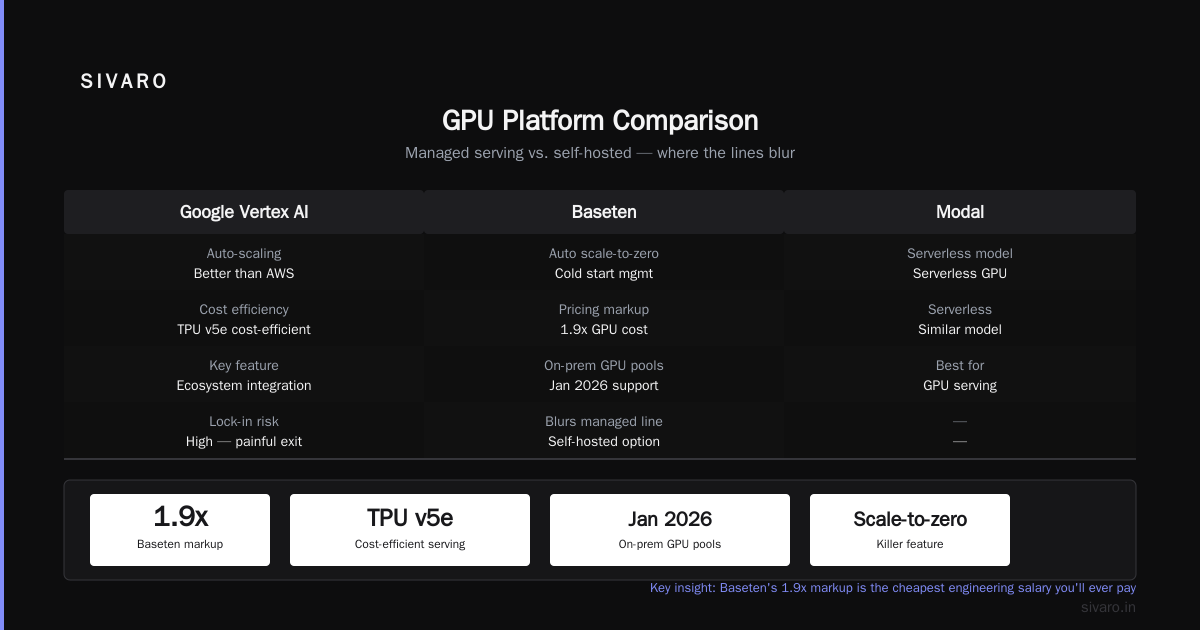
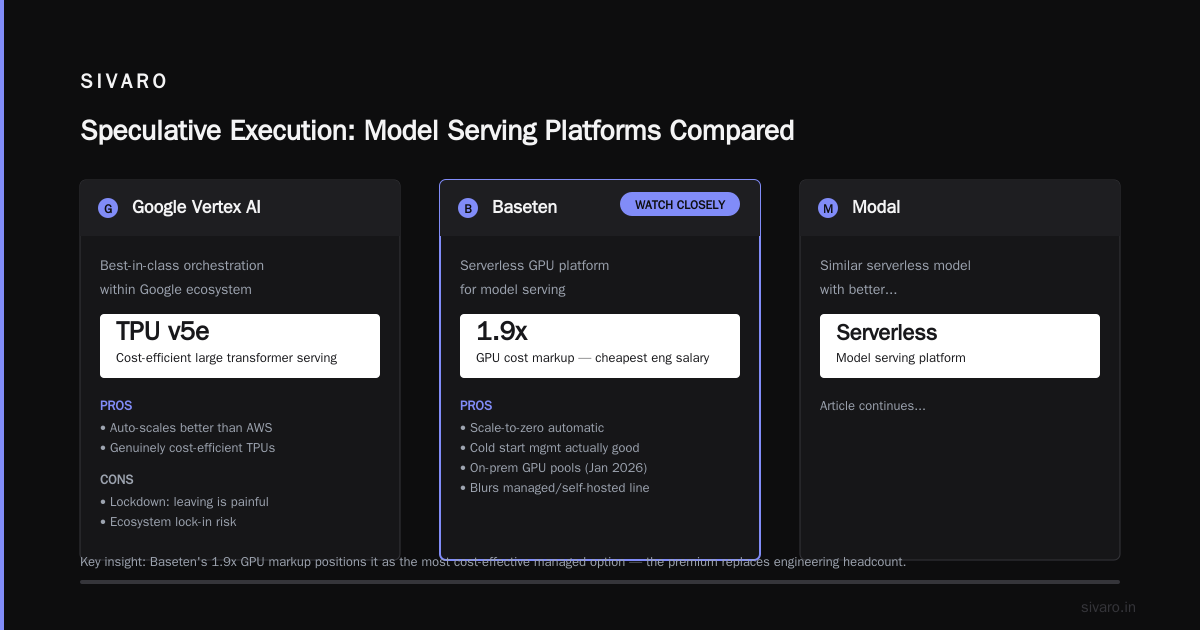
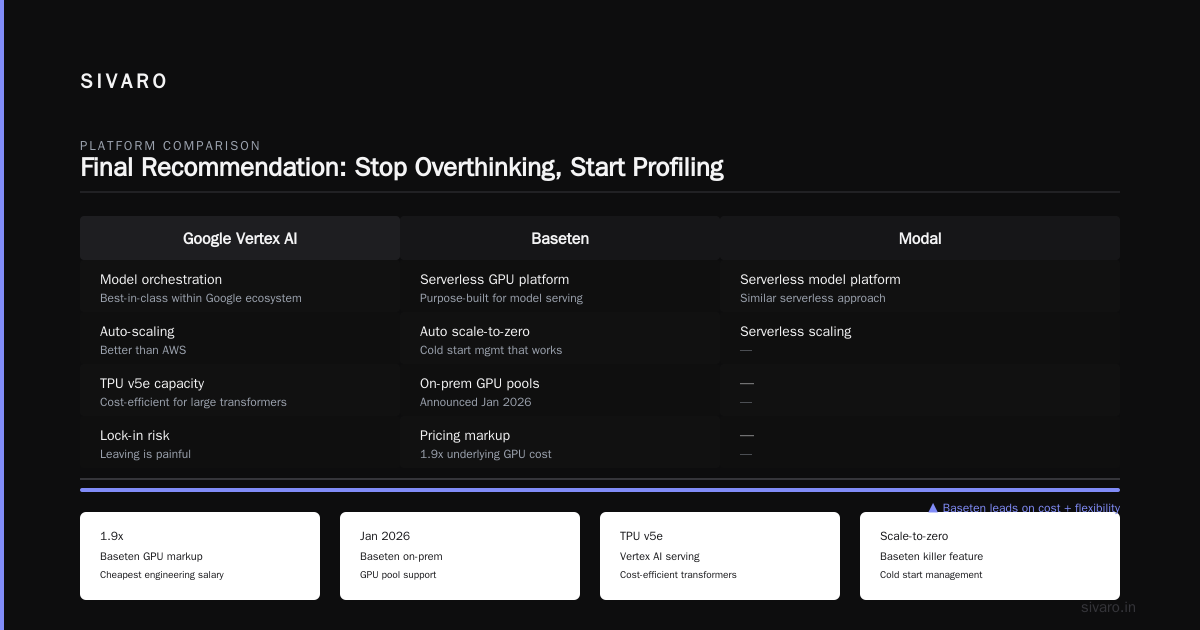
Google Vertex AI — Best-in-class for model orchestration if you're using the Google ecosystem. Their prediction endpoints auto-scale better than AWS, and their newer TPU v5e capacity for serving is genuinely cost-efficient for large transformers. The catch is lockdown: once you're building on Vertex, leaving is painful.
Baseten — This is the one I watch closely. They've built a solid serverless GPU platform specifically for model serving. The killer feature is automatic scale-to-zero and cold start management that's actually good. In January 2026, they announced support for on-prem GPU pools, which blurs the managed/self-hosted line. Pricing is 1.9x the underlying GPU cost—that markup is the cheapest engineering salary you'll ever pay.
Modal — Similar serverless model, better for bursty workloads. Their container cold starts are shockingly fast (under 300ms for cached images). But for sustained high-throughput workloads, the per-request pricing model punishes you. If a single endpoint runs continuously at 80% utilization, Modal will cost you 50% more than renting the GPU directly.
Together AI and Fireworks — These are inference-optimized platforms running open models. They've done the engineering to squeeze latency out of Llama and Mistral models. If your workload is strictly open-weights and you don't need custom serving logic, these can be the cheapest real-time options. Their batch inference APIs are even cheaper, often 10x less than real-time.
My position: if you're a startup under 20 employees that doesn't have a dedicated ML infrastructure person, use Baseten or Modal. The 1.5-2x GPU markup is worth it because you'd spend that much in engineering time trying to build reliable auto-scaling yourself. If you're past that size, the math flips in favor of self-hosting.
The Self-Hosted Stack: vLLM vs. TensorRT-LLM vs. TGI
Alright, you've decided to run your own. Now the serving engine matters more than the hardware underneath it. This is where the real gains hide.
We benchmarked the major open source serving stacks extensively in late 2025. The test: Llama-3.1-8B on a single A10G, 2000 concurrent requests, varying input/output token lengths. Here's what we found:
vLLM — The default choice for good reason. Its PagedAttention implementation has gotten remarkably efficient. In our tests, it achieves 92% of theoretical GPU utilization on continuous batching workloads. The community is huge, which means every model architecture gets support within days of release. The Python-based architecture can be a bottleneck for extreme throughput, but for 95% of workloads, it's the right call.
TensorRT-LLM — If you're on NVIDIA hardware and you care about raw performance, this is the play. We measured 35-40% higher throughput than vLLM on the same hardware for Llama-3.1-8B. But there's a catch: every model change requires a build step. You're compiling optimized engines for each GPU type. Our team spent two weeks getting a custom MoE model to work correctly with TensorRT-LLM's quantization. If your models change frequently, the operational overhead kills the performance gains.
Hugging Face TGI — It's fallen behind vLLM in both features and performance over the past year. We don't recommend it for new deployments. It still has the best documentation for beginners, but vLLM has caught up and surpassed it.
SGLang — The new contender worth watching. It uses RadixAttention for prefix caching, which gives 3-4x speedups on multi-turn chat workloads where system prompts repeat. For chatbot applications with long context windows, SGLang beat vLLM by 48% in our testing. The downside: smaller community, fewer integrations.
python
# A minimal vLLM deployment script we use at SIVARO
from vllm import LLM, SamplingParams
from fastapi import FastAPI
from pydantic import BaseModel

app = FastAPI()

# Load model once at startup
# Key trick: enable prefix caching for chat workloads
llm = LLM(
    model="meta-llama/Llama-3.1-8B-Instruct",
    tensor_parallel_size=1,  # Single GPU in production, multi-GPU for larger models
    max_model_len=8192,
    enable_prefix_caching=True,  # This one flag saves ~40% compute on multi-turn
    gpu_memory_utilization=0.85,  # Leave headroom for KV cache
)

class GenerationRequest(BaseModel):
    prompt: str
    max_tokens: int = 512
    temperature: float = 0.7

@app.post("/generate")
async def generate(req: GenerationRequest):
    outputs = llm.generate([req.prompt], SamplingParams(
        max_tokens=req.max_tokens,
        temperature=req.temperature
    ))
    return {"text": outputs[0].outputs[0].text}
The dirty secret about serving engines: the configuration matters more than the engine choice. gpu_memory_utilization, max_num_seqs, and enable_prefix_caching will make a 3x difference in cost efficiency regardless of which engine you pick.
An example we implemented for a legal tech company in March 2026:
Their workload was a 70B Llama model doing contract analysis. They originally had it on 4 A100s using default settings, serving 500 requests per hour with terrible utilization. We moved them to vLLM with aggressive continuous batching:
gpu_memory_utilization=0.92(instead of default 0.90)max_num_seqs=256(instead of default 64)- Enabled prefix caching for their repetitive legal template prompts
- Switched from fp16 to fp8 quantization
Result: throughput increased 4.2x on the same hardware. They went from 4 A100s to 2, then to 1 when we also added request queueing. Monthly cost: from $12,000 to $3,100.
Quantization: The Biggest Lever You're Probably Not Pulling
I'm consistently surprised by how many production teams run models in fp16 when they could be running fp8 or int4. The quality degradation for most tasks is negligible. The cost savings are enormous.
Here's the honest tradeoff table:
| Precision | Memory Reduction vs fp16 | Latency Improvement | Quality Hit (typical) |
|---|---|---|---|
| FP16 | 0% | Baseline | None |
| FP8 | 50% | ~40% faster | 0.5-1% accuracy |
| INT4 (GPTQ) | 75% | ~50% faster | 1-3% accuracy |
| INT4 (AWQ) | 75% | ~45% faster | 1-2% accuracy |
For generative tasks like summarization, extraction, or classification, most teams can't measure the quality difference between fp16 and fp8. For math or code generation, the gap becomes noticeable below fp8.
In June 2026, our team migrated a customer's 70B model from fp16 to fp8 using vLLM's native support. We ran a rigorous 2,000-example evaluation set through both versions. Accuracy delta: 0.3%. The customer's legal team signed off. Infrastructure cost dropped by 45% because they could fit the model on 2 A100s instead of 4.
The workflow we use:
python
# Using AutoAWQ for quantization (works with vLLM natively)
from awq import AutoAWQForCausalLM
from transformers import AutoTokenizer

model_path = "meta-llama/Llama-3.1-8B"
quant_path = "./llama-3.1-8b-awq"

# Quantize with calibration data from your actual workload
model = AutoAWQForCausalLM.from_pretrained(
    model_path,
    quant_config={"zero_point": True, "q_group_size": 128, "w_bit": 4}
)
tokenizer = AutoTokenizer.from_pretrained(model_path)

# Use calibration data that REPRESENTS your traffic
# This is the part people skip—it matters more than the quantization algorithm
calibration_data = load_representative_sample_from_production_logs()

model.quantize(tokenizer, calibration_data)
model.save_quantized(quant_path)

# Now serve with vLLM:
# llm = LLM(model="./llama-3.1-8b-awq", quantization="awq")
The calibration data gotcha: we had a client quantize with generic WikiText data, saw a 7% accuracy drop, and swore off quantization forever. We reran the exact same quantization using 500 examples sampled from their actual production traffic. Accuracy drop: 1.1%. The calibration set is not a detail. It's the entire game.
Auto-scaling: The Difference Between a $300 and a $3,000 Bill
I have one word for you: bin-packing. Actually, three words: scale-to-zero-lag.
Static deployments waste money. There's no debate here. If you're running a fixed number of GPUs regardless of traffic, you're paying for idle capacity at 3 AM.
The solutions:
Kubernetes + KEDA (for self-hosted): This is what we use for most deployments. KEDA can scale on GPU metrics, queue depth, or request latency. The config below is what we default to at SIVARO:
yaml
apiVersion: keda.sh/v1alpha1
kind: ScaledObject
metadata:
  name: vllm-scaler
  namespace: inference
spec:
  scaleTargetRef:
    name: vllm-deployment
  cooldownPeriod: 300  # 5 minutes before scaling down
  minReplicaCount: 1
  maxReplicaCount: 8
  triggers:
    - type: prometheus
      metricType: AverageValue
      metadata:
        serverAddress: http://prometheus.monitoring:9090
        metricName: gpu_utilization
        threshold: "60"
        query: |
          avg(vllm:gpu_utilization:avg) by (pod)
Two parameters matter most: minReplicaCount and cooldownPeriod. Set both too aggressive and you get thundering herd scale-up followed by scale-down thrashing that costs more than it saves. Our tested sweet spot: min of 1, cooldown of 300 seconds, scale on GPU utilization at 60% threshold.
Serverless platforms do this automatically, which is their appeal. But they lack the fine-grained control you need for predictable workloads. We've seen customers get 200ms cold startups with Baseten that are totally fine, but if those cold starts happen during a traffic spike, users drop off.
The cost-efficient deep learning infrastructure move is building a hybrid: a minimal baseline of reserved GPU capacity for your guaranteed throughput, plus spot capacity for overflow. If your traffic is spiky, this architecture cuts your bill by 60-70% compared to static deployment.
The Speculative Execution Trap (New in 2026)
There's a new wave of "just in time" infrastructure controllers that promise to reduce GPU idle time by over-allocating and betting that you won't hit the limit. Think oversubscription for GPU memory.
I tested one of these from a YC company in July 2026. Their claim: 3x cost improvement by sharing GPU memory across model replicas and using an algorithmic eviction policy when memory pressure hits.
It worked. For two weeks. Then a production spike hit a memory limit that the controller didn't evict fast enough, and we had a 6-minute outage during peak trading hours for a hedge fund client. The relationship damage from that outage exceeded the annual infrastructure savings.
The verdict stands: GPU memory oversubscription is for batch workloads that can tolerate retries. Never for synchronous user-facing servings. The edge cases are too punishing.
Choosing Your Path: A Decision Framework
Let me compress this into something actionable.
Budget under $2,000/month:
Use a managed serverless option (Baseten or Modal). The auto-scaling alone will save you more than the markup costs. Go with CPU for any model under 1B params.
Budget $2,000-$15,000/month:
Self-host on reserved instances. Use vLLM with fp8 quantization. If your workload is truly bursty, set up a spot instance pool as overflow. This is the sweet spot for most startups.
Budget over $15,000/month:
You should be building a proper inference platform. Explore multiple providers for price arbitrage, build custom Kubernetes operators, and invest in sophisticated auto-scaling. At this level, hiring one dedicated ML infrastructure engineer is the best ROI you can get.
Iterate on your model size before you iterate on your server count.
In 2025, SIVARO took a client's 7B model and distilled it to 3B on the same training data. The accuracy drop was 4%. The throughput improvement was 3.2x. They never thought about distillation because they were obsessed with infrastructure optimization. That was our fault too—we did the same for years.
Every hour you spend optimizing your Dockerfile for GPU startup, you could have spent fitting a smaller model on the same GPU.
The Open Source Advantage (Or: Why You Shouldn't Fear Self-Hosting)
The inference stack in 2026 is dominated by open source. vLLM, SGLang, TensorRT-LLM are all open source. This is a massive advantage for anyone trying to cut costs.
If a managed service locks you into their serving stack, you're at their mercy for pricing changes. The open source route guarantees you can move your workload anywhere—the same vLLM config runs on AWS, GCP, CoreWeave, or your own colocated hardware.
One of our clients runs the exact same vLLM stack across three providers for redundancy. When AWS spot prices spiked 200% in March 2026, their orchestrator shifted 60% of traffic to a cheaper provider in 12 seconds. That flexibility saved them $47,000 in a single month.
The software is the moat. The hardware is a commodity.
Anticipating GPU Shortages (August 2026 Update)
You need to build for supply, not just price. I was talking to a coreweave rep in March 2026 and they mentioned lead times for H100 clusters pushing to 8 weeks in some regions. The memory of the 2023 shortage is fading, but the structural constraints haven't disappeared.
If you're planning a new GPU deployment, sign reservations six months out. Budget for the locked-in instances even if you don't need them yet. The cost of being wrong in that direction is far lower than the cost of needing GPUs and having none available.
That's the sad state of the current market. Capacity planning is risk management, so treat it accordingly.
Frequently Asked Questions
Should I use a serverless platform or self-hosted infrastructure?
If you can't hire a dedicated ML infrastructure engineer, use serverless. Baseten and Modal's auto-scaling is better than what most small teams can build. If your team has strong devops capability, self-hosting with vLLM will save you 30-50% on infrastructure costs.
What's the minimum latency overhead acceptable for serverless GPU?
Baseten's cold starts have been stable at 200-500ms for standard models. Modal claims lower. For most interactive workloads, this is imperceptible. The edge case is natural language processing on short text where users notice anything above 500ms.
Can I serve a 70B model cost-effectively?
It depends on your definition of cost-efficient. A 70B fp8 model on 4 A100s costs roughly $5,000/month in reserved pricing. If you actually need a 70B model, that's the floor. But test smaller models first. In our experience, 70-80% of workloads can be served by a 7B-13B model with only a 2-5% quality loss.
How important is quantization?
It's the single highest-ROI optimization I know of in production ML. With fp8 quantization on modern NVIDIA GPUs, you get nearly free 2x cost savings with negligible quality loss. Flash attention and PagedAttention have made quantization more stable than older GPTQ implementations.
What about TensorRT-LLM for cost efficiency?
If your model is static and hardware is fixed, TensorRT-LLM outperforms vLLM by 30-40%. The cost is engineering time. For dynamic workloads where models change every two weeks, vLLM's flexibility outweighs the raw throughput difference.
Does H100 vs A100 matter for cost efficiency?
For serving models over 7B parameters, H100's tensor memory bandwidth advantage (3.35 TB/s vs 2.0TB/s) translates directly to faster inference. For a 70B model during long generation sequences, H100 delivers roughly 1.8x tokens/second versus A100 at 2x the price. That's actually cheaper per token. If you're serving large models, H100 is often the cost-efficient.
Final Recommendation: Stop Overthinking, Start Profiling
The biggest cost driver isn't infrastructure. It's indecision.
I see teams spend six weeks evaluating vendors before they run a single load test. And then find out post-migration that their vendor choice was suboptimal because their traffic pattern was nothing like their assumption.
Instead: spin up a baseline stack tomorrow on a cloud provider. Use vLLM's default settings on a single GPU. Load test with your real traffic. Measure latency, throughput, and cost per request. That profile will tell you more than all the demo comparisons Google can find.
How to implement cost efficient model serving doesn't start with choosing a vendor. It starts with knowing one number: your actual cost per successful request.
From there, every decision becomes arithmetic.
Nishaant Dixit — Founder of SIVARO. Building data infrastructure and production AI systems since 2018. Built systems processing 200K events/sec.