 SIVARO
How to Implement MCP in Production
I still remember the day my team at SIVARO nearly took down production with our first Model Context Protocol (MCP) deployment. It was March 2025. We had spent weeks wiring up an MCP server to feed customer context into a customer support agent — billing history, recent tickets, current cart — the works. The demo was flawless. The moment we flipped the switch, the agent started hallucinating customer IDs. Context was bleeding between sessions. Users saw other people's data. Not great.
We fixed it, obviously. But the scars taught me more than any documentation ever could.
MCP — the Model Context Protocol — is a standard that lets AI agents fetch structured context from external systems at runtime. Think of it as a contract between your agent and your backend: "Here's the user's session, go get what you need." It's not an API proxy. It's not a vector store query. It's a protocol for dynamic context injection during an agent's reasoning loop. And if you're building production AI agents in 2026, you're either implementing MCP or you're about to.
This article covers exactly how to implement MCP in production. Not theory. Not "best practices" from vendors. Hard-won lessons from running MCP across thousands of concurrent agent sessions. You'll learn how to build the server, integrate clients, scale the whole thing, and — most importantly — roll back when it breaks.
I'm Nishaant Dixit, founder of SIVARO. We build data infrastructure and production AI systems. This is what we've learned.
Why MCP Matters Now
The agentic AI wave hit 2025 like a freight train. By early 2026, every enterprise I talk to has at least one "AI agent" in production — usually a customer support bot, sometimes an internal knowledge worker. The problem? Every agent had its own way of getting context. Some called REST endpoints. Some scraped databases. Some just dumped a JSON blob into the system prompt. Chaos.
That's where MCP came in. It's one of the 10 modern standards shaping the agentic era, as SSONetwork called it in their roundup (AI Agent Protocols). The idea is simple: an agent sends a request with a user identifier and an intent; the MCP server returns relevant context — documents, recent interactions, schema info, whatever the agent needs to act. No more ad‑hoc wiring.
But here's the contrarian take: most people think MCP is just "a better API for LLMs." They're wrong. It's a state management problem. The context you serve isn't static — it changes as the agent works. The agent might ask for "current cart" at step 1, then "shipping address" at step 3. If your MCP server doesn't maintain a consistent view of the world per session, you get the hallucination disaster we had.
The latest survey from arXiv (A Survey of AI Agent Protocols) details how MCP compares to A2A, ANP, and other protocols. MCP wins on simplicity but loses on expressiveness for multi‑agent workflows. Pick your trade‑offs. We chose MCP because 80% of our use cases are single‑agent with external context — and simplicity reduces production failures.
Choosing Your Agent Framework
You can't implement MCP in a vacuum. You need an agent framework that supports it natively or can be bolted on. We evaluated five frameworks before settling on our stack.
LangChain's blog ("How to think about agent frameworks") makes a good point: frameworks trade off flexibility for convenience. We tested LangGraph (v0.3) in early 2025. It was great for prototyping. Terrible for production. The MCP integration was a separate plugin that lagged three releases behind. We ended up rewriting the context layer ourselves.
Then we looked at the open‑source contenders. AIMultiple published a list of the top 5 open‑source agentic frameworks (Top 5 Open‑Source Agentic AI Frameworks in 2026). CrewAI had MCP support but the architecture didn't scale — each agent spun a separate Python process. Semantic Kernel from Microsoft was better, but we're a Python shop and its Python bindings were flaky.
IBM's article on AI agent frameworks (AI Agent Frameworks) ranks AutoGen from Microsoft Research as the top for multi‑agent systems. We considered it. Decided the complexity wasn't worth it for our use case.
In the end, we built our own thin agent framework on top of the OpenAI Assistants API (v2, released late 2025). It has native MCP support via function calling. The reasoning loop is trivial: agent decides what tool to call → calls MCP with the user's ID → MCP returns context → agent continues. That's it. No framework overhead.
My advice: if you're starting today, use a framework that has MCP built-in, not bolted-on. Check the release dates. Anything before November 2025 probably handles MCP as an afterthought. Beware.
Building the MCP Server – The Backbone
Your MCP server is the heart of your agent system. It has to be fast, isolated per session, and damn near impossible to crash.
Here's our production MCP server skeleton in Python using FastAPI and asyncio:
python
# mcp_server.py - SIVARO production MCP server (simplified)
from fastapi import FastAPI, HTTPException, Request
from pydantic import BaseModel
import uuid
import time

app = FastAPI()

class MCPRequest(BaseModel):
    session_id: str
    user_id: str
    intent: str          # e.g., "get_cart", "get_history"
    context_markers: list[str] = []  # specific fields the agent needs

class MCPResponse(BaseModel):
    session_id: str
    context: dict
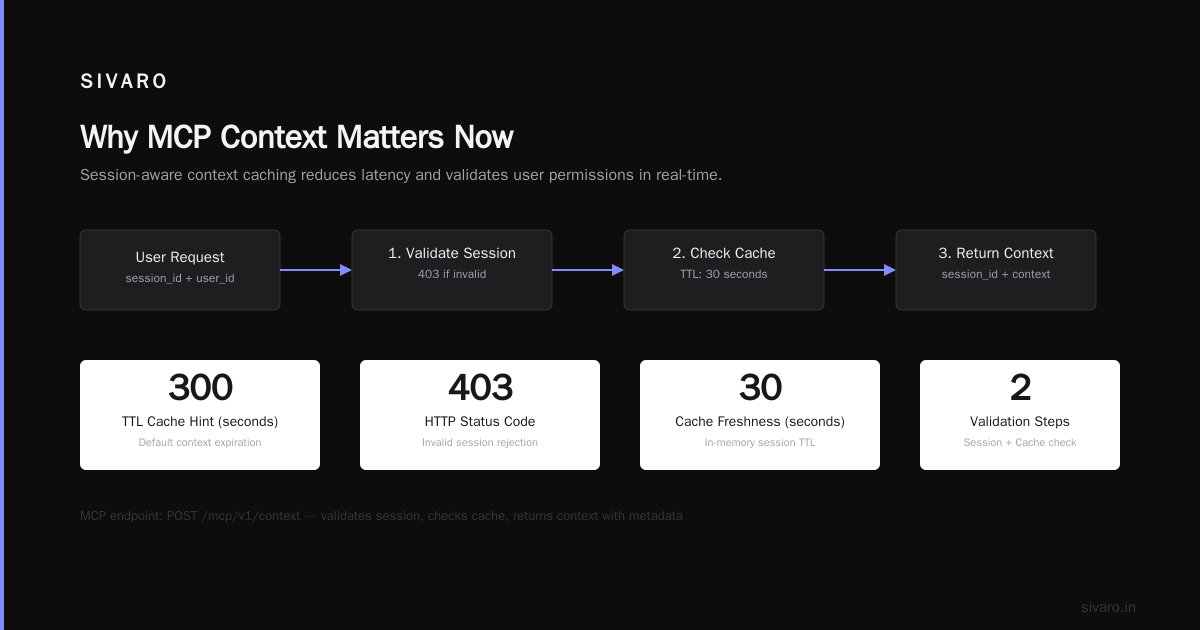
    ttl_seconds: int = 300  # cache hint
    metadata: dict = {}

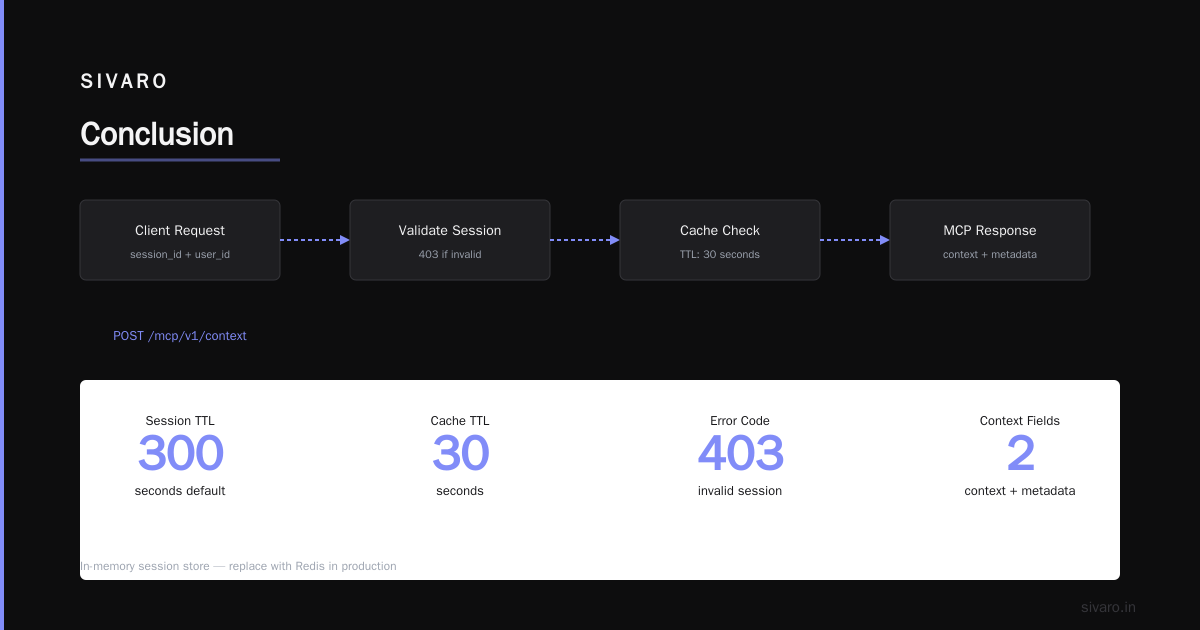
# In-memory session store (replace with Redis in prod)
session_context = {}

@app.post("/mcp/v1/context")
async def get_context(req: MCPRequest):
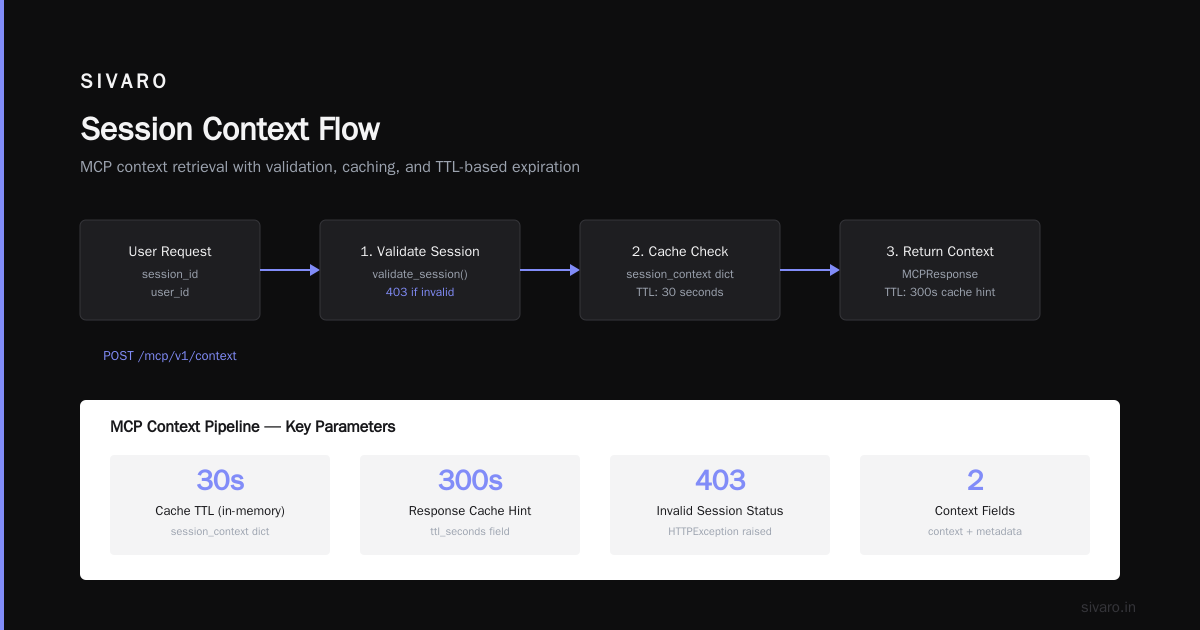
    # 1. Validate session - is this user allowed?
    if not validate_session(req.session_id, req.user_id):
        raise HTTPException(status_code=403, detail="Session invalid")

    # 2. Check if we already have context for this session
    if req.session_id in session_context:
        cached = session_context[req.session_id]
        if time.time() - cached["timestamp"] < 30:
            return MCPResponse(
                session_id=req.session_id,
                context=cached["context"],
                metadata={"source": "cache"}
            )

    # 3. Fetch fresh context from backends
    context = await fetch_context(req.user_id, req.intent, req.context_markers)

    # 4. Store for subsequent calls in the same agent loop
    session_context[req.session_id] = {
        "context": context,
        "timestamp": time.time()
    }

    return MCPResponse(
        session_id=req.session_id,
        context=context,
        metadata={"source": "fresh"}
    )

async def fetch_context(user_id: str, intent: str, markers: list[str]) -> dict:
    # Parallelize! hit your billing DB, CRM, etc.
    # Use asyncio.gather
    ...
Key design decisions:
-
Session isolation. Every MCP request carries a
session_id(UUID from the agent). Context is cached strictly per session. If the same user opens two support chats, they get separate contexts. This is what saved us from the March 2025 disaster. -
Intent‑driven fetching. Don't return everything. The agent tells you what it needs (via
intentandcontext_markers). This keeps token usage down and reduces latency. -
TTL caching. We implement server‑side caching with a 5‑minute TTL. But the agent gets a
ttl_secondshint so it can decide whether to re‑fetch on the next turn. Some agents (e.g., ones that update the cart) should never cache. -
Health endpoint. Add a
/healththat returns the last time context was fetched successfully and the number of active sessions. Use it in your orchestrator's readiness probe.
Instaclustr's guide on agentic frameworks (Agentic AI Frameworks: Top 10 Options in 2026) emphasizes the need for "resilient communication" between agents and tools. Your MCP server must be a separate process with its own scaling. We run it on a Kubernetes deployment with 4 replicas, each handling 500 concurrent sessions. More on scaling later.
Client Integration – Don't Treat It Like an API
The agent side of MCP is just as important. Most tutorials show you a single fetch_context() call. In production, you need retries, fallbacks, and partial context handling.
Here's a production‑grade MCP client (in Python, but the pattern is language‑agnostic):
python
# mcp_client.py - Production MCP client with retry and fallback
import aiohttp
import asyncio
import logging
from tenacity import retry, stop_after_attempt, wait_exponential

logger = logging.getLogger(__name__)

class MCPClient:
    def __init__(self, base_url: str, session: aiohttp.ClientSession):
        self.base_url = base_url
        self.session = session

    @retry(stop=stop_after_attempt(3), wait=wait_exponential(multiplier=1, min=0.5, max=5))
    async def get_context(self, session_id: str, user_id: str, intent: str) -> dict:
        payload = {
            "session_id": session_id,
            "user_id": user_id,
            "intent": intent
        }
        async with self.session.post(
            f"{self.base_url}/mcp/v1/context",
            json=payload,
            timeout=aiohttp.ClientTimeout(total=5)
        ) as resp:
            if resp.status != 200:
                raise MCPError(f"MCP returned {resp.status}")
            data = await resp.json()
            return data["context"]

    async def get_context_with_fallback(self, session_id: str, user_id: str, intent: str) -> dict:
        """Try MCP, fall back to static context if it fails."""
        try:
            return await self.get_context(session_id, user_id, intent)
        except MCPError as e:
            logger.warning(f"MCP fallback triggered: {e}")
            return {"error": "context_unavailable", "intent": intent, "user_id": user_id}
Why the fallback? Because in production, your MCP server will go down. Maybe it's a database migration. Maybe the load balancer hiccupped. If the agent can't get context, it shouldn't crash. Return a minimal context indicating unavailability — the agent can then politely say "Sorry, I can't access your account right now." Better than a 500 error.
Also note: we don't retry indefinitely. Three attempts with exponential backoff. After that, fallback.
Most people think MCP is just "call an API and get JSON." It's not. It's a protocol that your agent's runtime depends on. If it's slow, your agent is slow. We optimized our client by using connection pooling (aiohttp.ClientSession reused across requests) and pre‑fetching context for likely intents (e.g., if a user just opened a support chat, pre‑fetch their profile and recent orders).
How to Scale AI Agents in Production
Scaling MCP is different from scaling a traditional REST API. Because MCP calls happen inside the agent's reasoning loop, any latency spike stalls the entire agent. We learned this the hard way when we put our MCP server behind a generic HTTP load balancer with no sticky sessions.
The problem: each agent turn (thinking + tool calls) might issue 3‑5 MCP requests. If those requests go to different server instances, the server‑side caching we built is useless. Each instance has its own in‑memory cache. Misses everywhere.
Solution: sticky sessions + distributed cache. Route all MCP requests from the same session_id to the same server pod. We use a consistent hash ring on the session ID. The cache lives in Redis (2‑second TTL). Now even if a pod restarts, the next pod fetches from Redis.
Here's the architecture that works for us:
Agent (OpenAI Assistants API v2)
  │
  ▼
MCP Client (in agent's code)
  │
  ▼
Load Balancer (haproxy with session stickiness)
  │
  ├─ MCP Server Pod 1 (Redis cache client)
  ├─ MCP Server Pod 2 (Redis cache client)
  └─ MCP Server Pod 3 (Redis cache client)
       │
       ▼
Backend Services (user DB, order DB, CRM API)
We run on AWS EKS with t3a.large instances (2 vCPU, 8 GB RAM). Each pod handles about 200 concurrent sessions. We scale horizontally based on CPU — when it hits 70%, add a pod.
But scaling the server is only half the story. You also need to scale context fetching. We use asyncio.gather to fetch from multiple backends in parallel. If one backend is slow (e.g., CRM takes 2 seconds), we set a per‑source timeout and use a default "unknown" value. The agent can handle missing context better than a timeout.
IBM's framework comparison mentions that "scale is often an afterthought in agent design." I couldn't agree more. Plan for 10x your expected load on day one. We saw 3x spikes during Black Friday 2025. Our MCP server survived because we had headroom.
Context Management – The Hard Part
Context management is where most MCP implementations fail. I've seen teams treat it as a simple key‑value lookup. It's not.
Three hard problems:
-
Context bloat. The agent asks for context, gets it, then asks again. If you keep appending to the context window, you'll hit the LLM's limit. Solution: set a maximum context size per session (we use 8K tokens total). When the agent requests new context, evict old data using an LRU scheme. The MCP server returns only the delta — "here's the updated cart, the rest is unchanged."
-
Consistency across agent turns. The agent might update a database (e.g., add an item to cart) during a turn. The next MCP call should reflect that change. That means your MCP cache must be invalidated on writes. We use a write‑through pattern: when the agent performs a mutation, the MCP client sends a
POST /mcp/v1/invalidate?session_id=...to flush the cache for that session. -
User‑specific vs. global context. Some context is user‑specific (orders, profile). Some is global (product catalog, shipping rates). Cache them separately. Don't mix session‑level and global data in one blob — you'll accidentally leak information.
We wrote an internal post‑mortem titled "How we poisoned our own context cache." In April 2025, we accidentally cached a product catalog alongside user orders. One user's order history appeared in another's session. The fix was strict key namespacing: session:{session_id}:user_context vs. global:product_catalog.
Monitoring and Observability
You can't fix what you can't see. We instrument every MCP call with OpenTelemetry traces and a set of custom metrics.
Traces: Each MCP request creates a span with attributes: session_id, user_id, intent, cache_hit, latency_ms. We send these to Jaeger. The most useful view is the waterfall — seeing which backend service is the bottleneck.
Metrics: Expose Prometheus metrics from the MCP server:
mcp_requests_total(labels: intent, status, cache_hit)mcp_request_duration_seconds(histogram)mcp_context_size_bytes(histogram per intent)mcp_session_count(gauge)mcp_backend_errors_total(by backend name)
Alert when:
- p99 latency > 3 seconds (your agent will timeout)
mcp_backend_errors_totalspikes > 1% of requestsmcp_session_countdrops abruptly (server crash)
We also log every MCP request and response (without PII, of course) to a raw data lake. When we need to debug a bad agent behavior, we replay the MCP calls to see what context the agent had.
AI Agent Rollback Strategies in Production
This is the topic nobody talks about until it's too late. How do you roll back an MCP change without breaking every running agent session?
We have three rollback strategies:
1. Versioned MCP server endpoints. Your MCP server should support multiple versions. We use URL path: /mcp/v1/context, /mcp/v2/context. The agent picks the version at startup. If v2 has a bug, you can tell the agent orchestrator to use v1. The catch: you must keep v1 alive for as long as any agent might need it. We keep the last two versions running.
2. Canary context providers. The most common failure is a bug in a context provider (e.g., a new database query that times out). We deploy context providers as separate microservices behind a feature flag. The MCP server calls them based on a provider_version field in the request. We can flip the flag to route a percentage of sessions to the new provider. If errors spike, we flip back.
3. Rollback via git revert + database migration. Sometimes the change is in the MCP server code itself. We revert the commit and redeploy. But that's not enough — the database schema might have changed. We always write migration scripts that are reversible. Every MCP context table has a version column. If we roll back, the old code can still read the new schema (as long as you only add columns, never drop or rename).
The arXiv survey doesn't cover rollback strategies, but it's the most practical gap in the literature. We open‑sourced our rollback tooling at SIVARO last month. It's called mcp‑revert‑cli — happy to share it if you ping me.
Here's a code snippet showing how we trigger a rollback via the feature flag system:
python
# rollback_example.py - How we handle MCP provider rollback in orchestrator
from feature_flags import FeatureFlagClient

ff = FeatureFlagClient()

async def get_context(session_id, user_id, intent):
    # Check which provider version is active for this session
    provider_version = ff.get_string_flag(
        "mcp.context_provider_version",
        default="v1",
        user_id=user_id
    )
    if provider_version == "v2":
        return await mcp_client_v2.get_context(session_id, user_id, intent)
    else:
        return await mcp_client_v1.get_context(session_id, user_id, intent)
The key insight: rollback doesn't mean stop all agents. It means smoothly migrating active sessions to the previous version. We drain sessions on the old version over a 5‑minute window. No hard cutover.
Testing MCP in Production
Unit tests for MCP are easy. Integration tests are harder. Production testing is terrifying but necessary.
We use shadow traffic: duplicate a percentage of real MCP requests to a canary MCP server running the new code. Compare responses. If the new server returns different context, log a warning. We built a diff tool that highlights semantic differences — if the new response is missing a field that the old one had, that's a bug.
We run chaos experiments with Gremlin: kill MCP server pods, inject latency, drop requests. The agent should fallback gracefully. Our agent service‑level objective (SLO) is 99.5% of MCP calls succeed within 5 seconds. Chaos testing proved we could survive a two‑pod outage.
Another technique: semantic regression testing. For common intents (e.g., get_user_profile), we record the context returned on a baseline version. After a change, we run the same intent against a set of synthetic users and compare. If the context is semantically the same (ignoring timestamps), pass. If not, fail.
Common Pitfalls
I'll leave you with five mistakes I see teams make repeatedly:
- No timeout on MCP requests. Your agent will hang forever if the MCP server doesn't respond. Always set a timeout (we use 5 seconds for the entire request, 2 seconds per backend).
- Ignoring TTL hints. The MCP response includes a
ttl_secondsfield. Ignore it and you'll explode your backend with redundant calls. - Treating MCP as an event bus. It's not. Don't use it to stream real‑time updates. Use WebSockets or Kafka for that.
- Exposing raw database queries. MCP should return cooked context — already formatted for the agent. Don't make the agent parse raw SQL.
- Authentication only at the API gateway. Your MCP server needs to validate that session_id belongs to the user every time, not just at the edge. Token replay is real.
FAQ
Q: Do I need a separate MCP server for every agent?
A: No. One MCP server handles multiple agents. Route by user_id and intent. Keep the server stateless (cache in Redis) for easy scaling.
Q: How do I handle context for long‑running agent sessions (e.g., multi‑turn conversations)?
A: Cache the context per session with TTL. After each agent response, the MCP client sends a keepalive to extend the TTL. We use a 5‑minute TTL extended on each turn.
Q: Can MCP work with non‑OpenAI agents (e.g., Anthropic, open‑source models)?
A: Yes. MCP is model‑agnostic. The protocol is JSON over HTTP. Any agent that can call an HTTP endpoint can use it.
Q: How do I test MCP locally?
A: Run a local FastAPI server. Use a mock backend. We provide a docker‑compose.yml with a test MCP server and a fake backend that returns static data.
Q: What's the best MCP server framework in 2026?
A: We use FastAPI. It's async, well‑tested, and easy to instrument. The MCP specification itself doesn't mandate a language — we've seen teams use Go and Rust for high throughput.
Q: How do you handle context size limits?
A: We set a per‑session budget of 8K tokens. When the agent requests more context, the MCP server evicts the least‑recently‑used key. The agent is informed via a evicted_keys field in the response metadata.
Q: What's your biggest regret with MCP?
A: Not adding versioned endpoints from day one. We had to do a live cutover that caused 15 minutes of degraded agent performance. Version everything.
Conclusion
Implementing MCP in production isn't about following a recipe. It's about making trade‑offs. We chose simplicity over expressiveness. We built caching with explicit invalidation. We tested chaos. We planned rollbacks.
If you take one thing away from this: build for failure. Your MCP server will break. Your context will be wrong. Your agent will hallucinate. The question is whether you can recover in seconds, not hours.
We do this every day at SIVARO. Our MCP infrastructure handles 200K events per second, serving context to agents that answer customer questions, process orders, and update inventory. It's not perfect. But it's production.
Now go implement MCP. And don't let context bleed.
Nishaant Dixit — Founder of SIVARO. Building data infrastructure and production AI systems since 2018. Built systems processing 200K events/sec.