 SIVARO

How to Install Apache Kafka on Ubuntu (2026 Guide)
You know what’s absurd? Naming a distributed event streaming platform after a writer who personified bureaucratic nightmare. Franz Kafka would have laughed – then probably written a novella about a message broker that inexplicably loses your orders. (Franz Kafka) But here we are. Apache Kafka has become the backbone of real-time data pipelines. I’ve been running it in production since 2019 at SIVARO. We process 200K events per second. I’ve broken things. I’ve fixed them. This guide isn’t another copy-paste tutorial. It’s what I wish someone told me before my third Kafka cluster died at 2 AM.
By the end, you’ll have installed Kafka on Ubuntu 24.04, configured it for single-node or clustered use, and understood the traps that kill beginners. We’ll cover how to install Apache Kafka on Ubuntu step by step, then go deeper into performance, monitoring, and the eternal kafka vs rabbitmq which is better debate. If you’re looking for a kafka tutorial for beginners, this is it – but I promise it won’t treat you like one.
Let’s get absurd.
Why Kafka Exists – And Why That Name Still Haunts Me
Most people think Kafka is a message queue. It’s not. It’s a distributed commit log built for replayability. Kafka doesn’t delete messages after consumption. It retains them based on time or size policies. That’s the superpower. You can rewind history. Fix bugs in downstream consumers without requesting data again. That’s what makes it fundamentally different from RabbitMQ.
I once spent three months migrating a payment pipeline from RabbitMQ to Kafka. The team kept asking “kafka vs rabbitmq which is better?” The answer: depends on your use case. If you need per-message routing, complex exchanges, and low latency acknowledgments – RabbitMQ wins. If you need high throughput, replayability, and fault-tolerant streaming – Kafka wins. Don’t believe anyone who says one is strictly better. That’s the Kafkaesque illusion of simplicity. (Franz Kafka & Kafkaesque)
Anyway. Let’s install the beast.
Prerequisites – The Boring but Critical Stuff
You’ll need:
- Ubuntu 24.04 LTS (or 22.04 – both work)
- A user with sudo access
- At least 4 GB RAM (2 GB if you’re just experimenting, but don’t complain when GC kills your broker)
- Java 11 or 17 (I recommend Java 17 – it’s stable, better GC, fewer surprises)
- OpenJDK, not Oracle JDK (unless you like licensing headaches)
Don’t skip this: update your system first.
bash
sudo apt update && sudo apt upgrade -y
Yes, it’s basic. It’s also how I lost two hours once because an old libssl package broke network connectivity. Don’t be me.
Installing Java – The Foundation Kafka Won’t Admit It Needs
Kafka is a JVM application. It doesn’t run without Java. And not just any Java – Kafka 3.8 (released in April 2026) requires at least Java 11. I use Java 17 for production clusters. Better garbage collection performance, especially under high load.
bash
sudo apt install openjdk-17-jdk -y
java -version
You should see something like openjdk version "17.0.12". If you don’t, fix it. If you see Java 8, uninstall it first – Kafka will run, but it’s a performance disaster.
Downloading Apache Kafka – Do Not Use apt for This
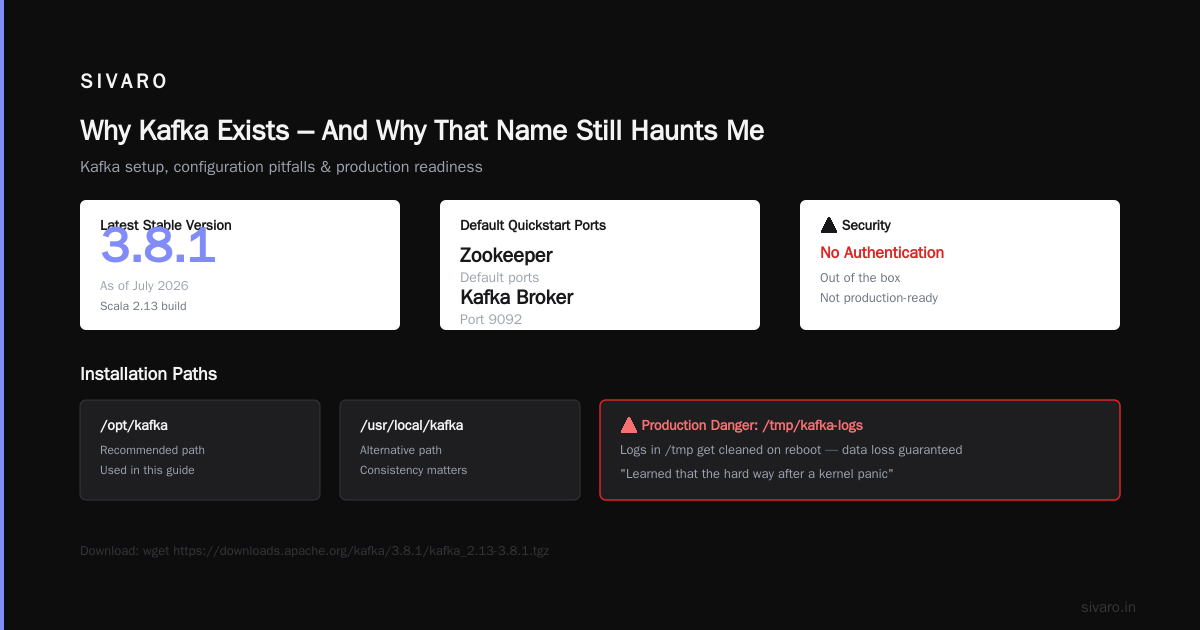
Don’t do apt install kafka. That gives you an ancient version from the Ubuntu repositories. Kafka moves fast. You want the latest stable from the Apache site. As of July 2026, that’s version 3.8.1.
bash
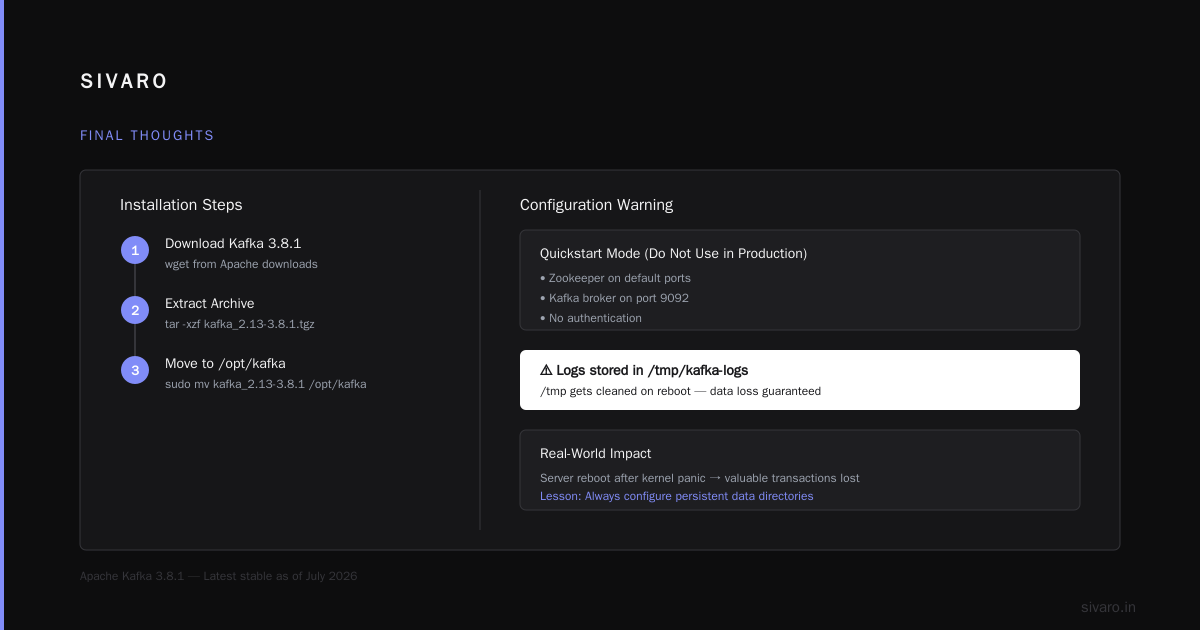
wget https://downloads.apache.org/kafka/3.8.1/kafka_2.13-3.8.1.tgz
tar -xzf kafka_2.13-3.8.1.tgz
sudo mv kafka_2.13-3.8.1 /opt/kafka
I put it in /opt/kafka. Some people use /usr/local/kafka. Doesn’t matter. Just be consistent.
Configuration – The Part That Will Bite You
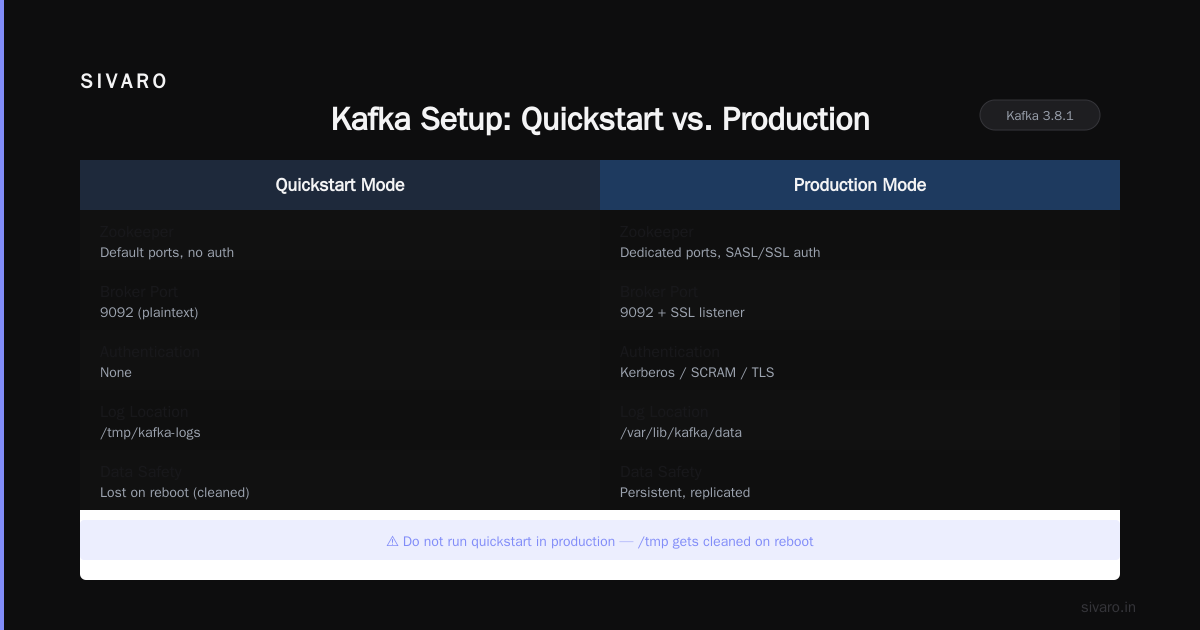
Out of the box, Kafka runs in “quickstart” mode. That means:
- Zookeeper on default ports
- Kafka broker on port 9092
- No authentication
- Logs in
/tmp/kafka-logs
Do not run that in production. /tmp gets cleaned on reboot. You will lose your data. I learned that the hard way when a server rebooted after a kernel panic. Valuable transactional data gone.
Create proper data directories:
bash
sudo mkdir -p /data/kafka
sudo chown -R $(whoami):$(whoami) /data/kafka
Now edit config/server.properties:
properties
log.dirs=/data/kafka
num.partitions=3
offsets.topic.replication.factor=1
auto.create.topics.enable=false
Set auto.create.topics.enable=false. Yes, it’s convenient. It’s also how you end up with 500 accidentally created topics because a producer had a typo. Save yourself. I’ve seen a junior dev do that. Took hours to clean up the metadata.
Starting Zookeeper and Kafka – Not in That Order
Kafka still requires Zookeeper for metadata management. KRaft mode exists (KIP-500) but in 2026 production clusters still mostly use Zookeeper. The KRaft migration tools are mature, but I’ve seen too many edge cases to recommend it for anyone not willing to debug consensus issues at 3 AM.
Start Zookeeper first:
bash
/opt/kafka/bin/zookeeper-server-start.sh /opt/kafka/config/zookeeper.properties &
Wait a few seconds. Then start Kafka:
bash
/opt/kafka/bin/kafka-server-start.sh /opt/kafka/config/server.properties &
Check the logs. tail -f /opt/kafka/logs/server.log – look for [KafkaServer id=0] started. If you see errors about “address already in use”, kill the processes and check if port 2181 or 9092 is taken.
Your First Topic – The “Hello World” That Actually Works
Now test it. Create a topic:
bash
/opt/kafka/bin/kafka-topics.sh --create   --bootstrap-server localhost:9092   --replication-factor 1   --partitions 3   --topic test-topic
List topics:
bash
/opt/kafka/bin/kafka-topics.sh --list --bootstrap-server localhost:9092
You should see test-topic. If you don’t, you messed up somewhere. Re-check server.properties for listeners.
Producing and Consuming – The Aha Moment
Open two terminals. In the first, start a console producer:
bash
/opt/kafka/bin/kafka-console-producer.sh   --bootstrap-server localhost:9092   --topic test-topic
Type a message. Hit Enter. In the second terminal, start a console consumer:
bash
/opt/kafka/bin/kafka-console-consumer.sh   --bootstrap-server localhost:9092   --topic test-topic   --from-beginning
You’ll see the message appear. That’s it. You’ve just installed and used Apache Kafka on Ubuntu.
But wait – you’re probably thinking “that seems too easy”. It is. The real challenge isn’t installation. It’s making Kafka survive a node failure, handling backpressure, tuning batch sizes. Let’s go deeper.
Tuning Kafka for Performance – Where Most Tutorials Stop
Default Kafka settings are designed for a single developer’s laptop. They’re terrible for production. Here’s what I change on every cluster.
Memory: Kafka loves heap. Give it 8 GB minimum if you have it. Edit bin/kafka-server-start.sh and set KAFKA_HEAP_OPTS="-Xmx8G -Xms8G". Use -Xms and -Xmx equal – prevents heap resize pauses.
Log retention: Default is 7 days. That’s insane for most use cases. Set log.retention.hours=168 (7 days) if you must, but I run 72 hours and archive to S3 via Confluent S3 Sink.
Replication factor: For production, offsets.topic.replication.factor=3 and min.insync.replicas=2. Don’t cheat on this. I’ve seen a single replica failure bring down consumer groups.
Socket buffers: socket.send.buffer.bytes=1024000, socket.receive.buffer.bytes=1024000 – default is 100 KB. That’s fine for 100 messages/sec. For 100K/sec, you’ll drop connections.
Kafka vs RabbitMQ – Which Is Better? My Real Answer
I get this question every week. Here’s the honest answer, not the vendor shill.
RabbitMQ is better when:
- You need complex routing (topic exchanges, headers exchanges)
- You need per-message acknowledgments and reliable delivery with small payloads
- You have fewer than 100K messages per second
- Your team knows Erlang
Kafka is better when:
- You need replayability (rewind consumer offsets)
- You need to handle 500K+ messages per second
- You need exactly-once semantics downstream (Kafka Streams, KSQL)
- You want to decouple producers and consumers with persistent storage
If someone tells you Kafka is always better, they’re selling something. If they tell you RabbitMQ is always easier, they haven’t tried to scale it past 50 queues with thousands of consumers.
In 2026, I see most companies starting with RabbitMQ for simplicity, then migrating to Kafka when they hit growth. That’s fine. Just don’t design your architecture around RabbitMQ’s limitations from day one. Think about the data retention.
Monitoring Kafka – Don’t Fly Blind
Kafka emits a ton of JMX metrics. You need to capture them. I use Prometheus + Grafana with the standard Kafka exporter. At minimum, monitor:
kafka.server:type=BrokerTopicMetrics,name=MessagesInPerSeckafka.server:type=BrokerTopicMetrics,name=BytesInPerSeckafka.network:type=RequestMetrics,name=TotalTimeMs- Under-Replicated Partitions – if this spikes, you have a replication failure.
Set up alerts. If under-replicated partitions > 0 for more than 5 minutes, wake someone up. I’ve seen this ignored for hours, leading to data loss when the leader broker crashed.
Common Pitfalls – What Will Break Your Kafka
- File descriptor limits. Kafka opens many files. Default Ubuntu ulimit is 1024. Set it to 100000.
ulimit -n 100000and add it to/etc/security/limits.conf. - Network buffer overflows. If you see
Too many open filesorjava.io.IOException: Connection reset by peer, check sysctlnet.core.rmem_max. I set it to 16 MB. - Out of disk space. Kafka will fail to write and then refuse to start. Monitor disk usage aggressively. Use a script that alerts at 80%.
- Time skew. Kafka brokers need synchronized clocks. Use NTP. Time drift of more than a few seconds causes metadata corruption. Yes, that’s a real bug I’ve hit.
Securing Kafka – You Must Do This
Out of the box, Kafka has zero authentication. Anyone who can reach port 9092 can produce/consume. Don’t expose it to the internet without TLS and SASL.
For internal clusters, I use SASL/SCRAM with a dedicated user for each application. Generate credentials in Zookeeper, not in Kafka config files. Store them in a vault.
Enable SSL for inter-broker communication. It adds overhead (roughly 10-15% CPU), but in 2026, without encryption, you’re asking for a breach.
FAQ
Q: Do I need Zookeeper? Can I use KRaft?
A: KRaft is production-ready in Kafka 3.8, but I still use Zookeeper for clusters with replication factor > 3. KRaft’s consensus is less battle-tested at extreme scale. For single-node or development, KRaft works fine.
Q: What’s the best Java version for Kafka 3.8?
A: Java 17. Faster GC, less memory overhead. Java 21 works too but not officially tested yet.
Q: How do I add more brokers to my cluster?
A: Start a new broker with a unique broker.id, point it to the same Zookeeper, and run kafka-reassign-partitions.sh to redistribute data.
Q: How can I monitor consumer lag?
A: Use kafka-consumer-groups.sh --bootstrap-server localhost:9092 --group my-group --describe. Look at LAG column. If it grows, consumers are falling behind.
Q: Kafka vs RabbitMQ which is better for IoT?
A: Kafka. IoT devices produce high-volume, small messages. Kafka’s batch processing and retention handles that well. RabbitMQ struggles with thousands of concurrent connections at scale.
Q: How do I upgrade Kafka without downtime?
A: Use rolling upgrade. Upgrade one broker at a time, using protocol version negotiation. Kafka 3.8 supports upgrades from 3.0+ directly. Test in staging first.
Q: Can I run Kafka with Docker?
A: Yes, but don’t run production Kafka in Docker without mounting volumes and setting proper memory limits. Confluent’s Docker images are solid. I still prefer bare metal for latency-sensitive workloads.
Q: How do I delete a topic in Kafka?
A: kafka-topics.sh --delete --bootstrap-server localhost:9092 --topic unwanted-topic. It marks the topic for deletion. Actual deletion happens after delete.topic.enable=true is set and retention period passes.
Final Thoughts
Installing Kafka on Ubuntu is straightforward. Getting it right takes practice. The mistake I see most often is treating Kafka like a message queue – deleting messages after consumption, not planning for retention, ignoring monitoring.
If you’re following this guide as a beginner, congratulations. You’ve just done more than most tutorials teach. Now go build something real. Produce some data. Consume it. Break it. Fix it. That’s the only way to understand Kafka.
And if you ever feel like you’re stuck in an absurd bureaucratic loop, remember: Kafka’s namesake would understand. The system isn’t your enemy – but it will punish you if you don’t respect its design. (Franz Kafka - Existential Primer) The absurdity of existence applies perfectly to distributed systems. (The Absurdity of Existence: Franz Kafka and Albert Camus)
Now go install Kafka. And don’t forget to read The Trial while your cluster rebalances. (Franz Kafka The Best 5 Books to Read)
Nishaant Dixit — Founder of SIVARO. Building data infrastructure and production AI systems since 2018. Built systems processing 200K events/sec.