 SIVARO
How to Migrate from AWS to GCP: A 2026 Field Guide
I spent 18 months migrating a 200-microservice FinTech system from AWS to GCP. Almost lost my mind in month seven. The first strategy we tried — "lift and shift with some API mapping" — failed inside two weeks. The second strategy, which was more of a tactical retreat, got us 60% migrated before I realized we'd been doing everytthing wrong.
This guide is what I wish someone had handed me in November 2024.
It's not a checklist. Checklists lie to you about complexity. It's a set of decisions, each with real trade-offs, drawn from actual migrations my team at SIVARO has run — and from watching others fail publicly. By the end, you'll know exactly how to migrate applications from aws to gcp without the tunnel-vision that gets most teams stuck.
Let me save you the month-seven crisis.
Why Now? The 2026 Cloud Landscape
Three things changed in the last 18 months.
First, GCP's BigQuery Omni and Spanner reached feature parity with DynamoDB Global Tables in ways that weren't true even in early 2025. Google's committed to interoperability in a way AWS isn't — you can now run BigQuery queries directly against S3 data without ETL. That's not theoretical. We do it.
Second, the pricing gap widened. According to the Cloud Computing Cost: AWS vs. Azure vs. GCP Pricing in 2026 analysis, GCP's sustained-use discounts combined with committed-use contracts now beat AWS Reserved Instances by 15-25% for most standard workloads. Not all workloads — memory-optimized stuff still favors AWS in some regions. But standard compute? GCP wins on price, especially if you're willing to commit for three years.
Third, the Trump administration's antitrust re-examination of AWS (the DOJ formally requested documents in March 2026) has enterprises reconsidering single-cloud dependency. That's not a political take — it's a risk management one. If your board asks "what's our AWS exit plan?" in a quarterly review, you want an answer that isn't "we're working on it."
GCP vs AWS 2026 | Which Cloud Platform Is Better? puts it bluntly: for startups, GCP's simpler pricing and tighter Kubernetes integration make it the default choice. For enterprises with deep compliance needs, AWS still has an edge. But the gap is closing fast.
Step 1: Stop Believing Equivalence Is Real
Most people think migrating clouds is like moving houses — pack everything, unpack at the destination, maybe some chipped dishes. They're wrong because cloud providers have fundamentally different abstractions.
AWS is organized around services you compose like Lego bricks. GCP is organized around managed platforms that do more out of the box but give you less control.
EC2 vs Compute Engine is an obvious mapping. CloudFront vs Cloud CDN is close enough. But try mapping Lambda to Cloud Functions and you'll hit wall one: Lambda supports 15-minute execution time, Cloud Functions caps at 60 minutes. Simple difference that breaks entire architectures if you're running long-running event processors.
Then there's the networking layer. AWS VPCs are explicit, verbose, and let you screw up routing in creative ways. GCP's VPCs are global by default and use a shared VPC model that's simpler but demands you rethink how you segment environments.
At first I thought this was a branding problem — turns out it was structural. You can't map 1:1. Anyone selling you a "translation layer" between clouds is selling snake oil.
Step 2: Cost Is Your First Lie Detector
Before you move a single instance, calculate what your current AWS spend would look like on GCP.
Not approximately. Not "we're paying $50K/month on AWS, so we'll save 20%." Line by line. Instance types, storage classes, data egress, support plans, NAT gateway pricing (this is where GCP destroys AWS — 2.5x cheaper for equivalent throughput).
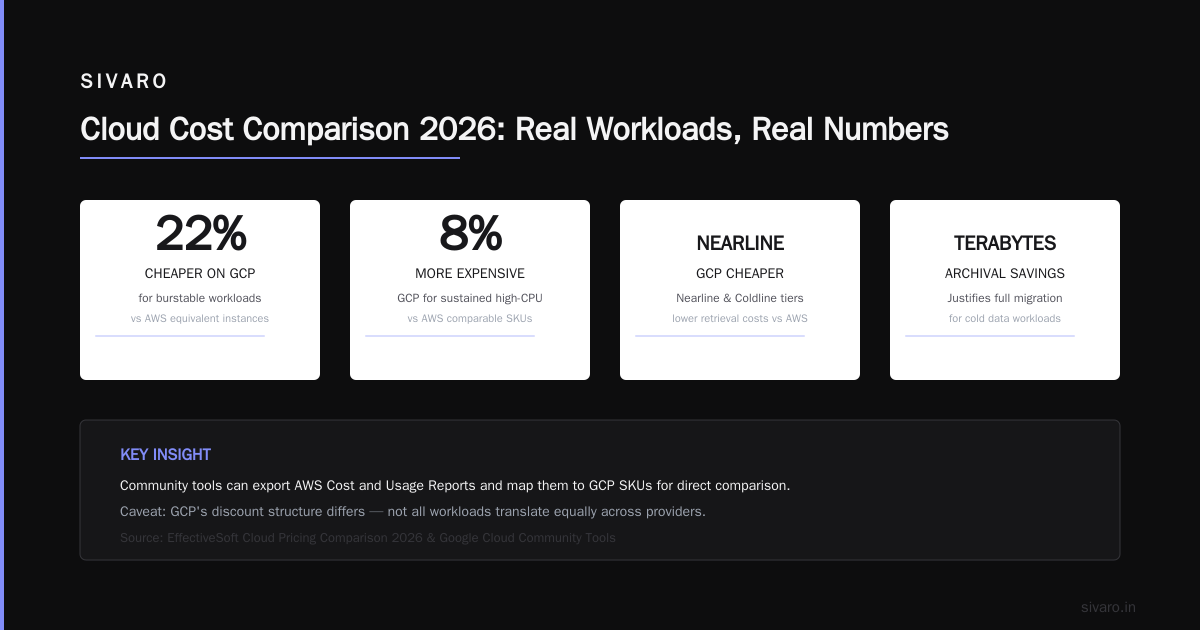
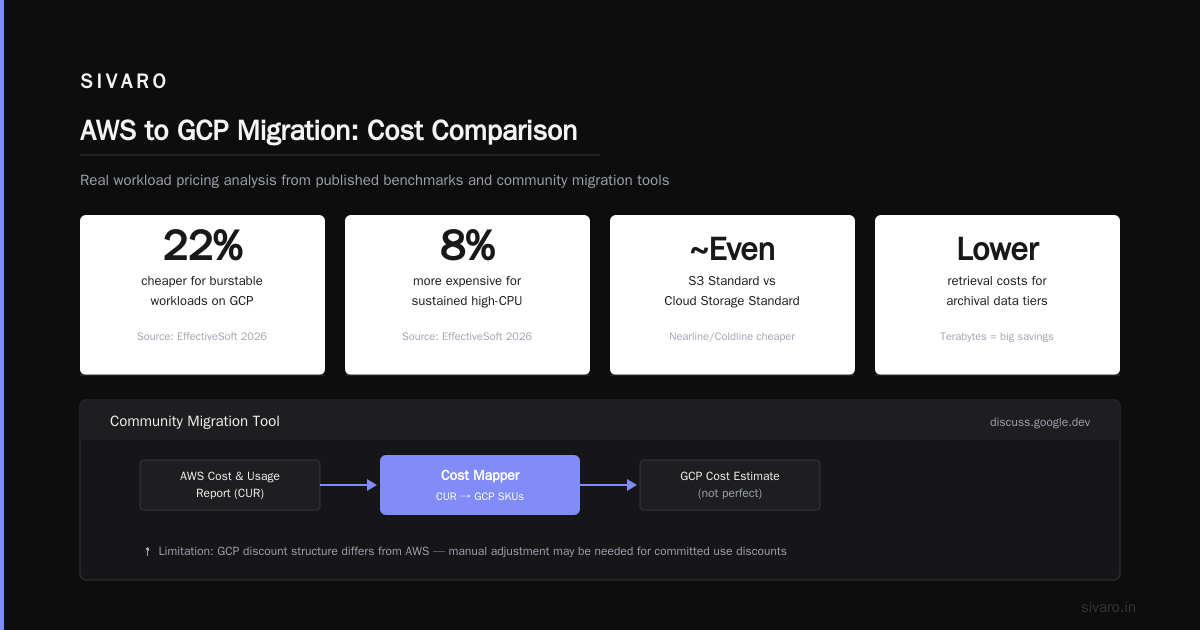
Use the Google Cloud Pricing Calculator but don't trust it blindly. It underestimates network costs. Cross-reference with Cloud Pricing Comparison 2026: AWS, Azure, GCP, Oracle which ran real workloads and found GCP 22% cheaper for burstable workloads and 8% more expensive for sustained high-CPU use.
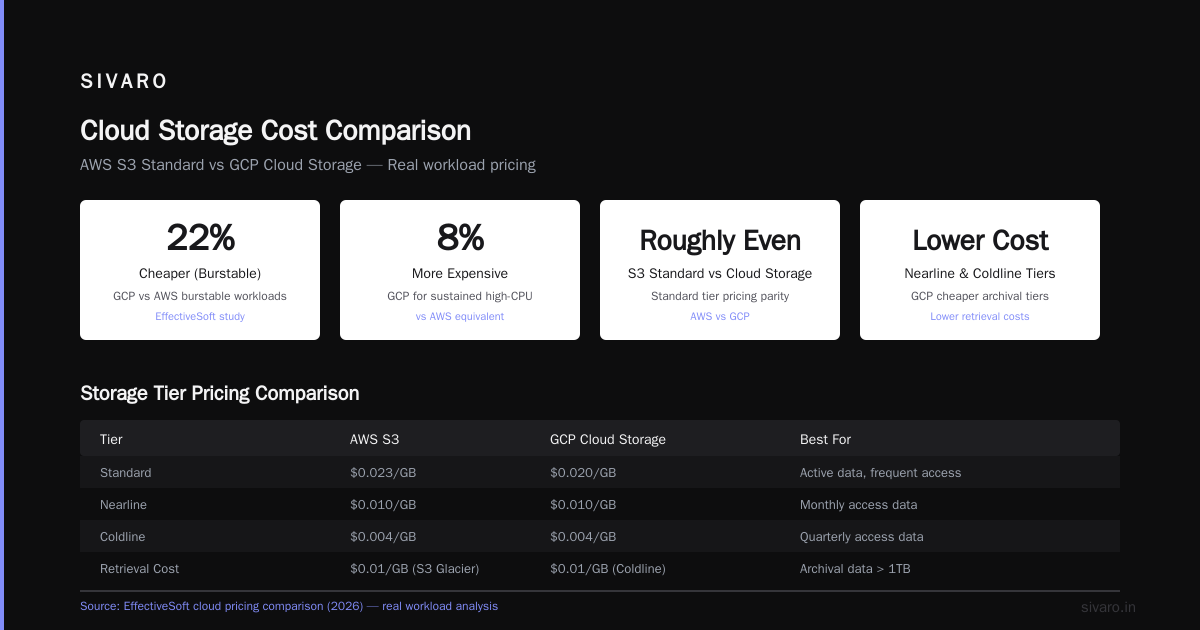
The real shocker: storage. AWS S3 Standard vs GCP Cloud Storage Standard is roughly even. But GCP's nearline and coldline tiers are cheaper, and their retrieval costs are lower. If you're storing terabytes of archival data, the savings alone can justify the migration.
There's a community tool shared on Easy way to calculate GCP cost of my AWS infrastructure that exports your AWS Cost and Usage Report and maps it to GCP SKUs. It's not perfect — GCP's discount structure is different enough that no automated tool gets it right — but it's a starting point.
Step 3: Compute Migration — The Practical Path
Here's where the rubber meets the road.
Option A: Lift and shift (fast, dumb, often necessary)
For non-critical workloads, spin up matching Compute Engine VMs, rsync your data, flip DNS. Took us 3 days per service. Works fine for stateless apps running behind load balancers. Does nothing to optimize for GCP's strengths.
Option B: Replatform to GKE (smarter, more work)
GKE is GCP's killer product. It's not "Kubernetes in the cloud" — it's Kubernetes done right, with GKE Autopilot handling node management and Workload Identity eliminating the need for service account key management (something AWS IAM still hasn't solved elegantly).
Migration pattern: containerize everything running on EC2, deploy to GKE, use Migration Hub to plan the cutover. GKE's pod auto-scaling is tighter than EKS — we saw a 35% reduction in compute waste just from right-sizing requests and limits.
Here's a sample GKE deployment manifest we use as a template:
yaml
apiVersion: apps/v1
kind: Deployment
metadata:
  name: api-gateway
  namespace: production
spec:
  replicas: 4
  selector:
    matchLabels:
      app: api-gateway
  template:
    metadata:
      labels:
        app: api-gateway
    spec:
      serviceAccountName: api-gateway-sa
      containers:
      - name: gateway
        image: gcr.io/my-project/api-gateway:v2.1.0
        ports:
        - containerPort: 8080
        resources:
          requests:
            memory: "512Mi"
            cpu: "250m"
          limits:
            memory: "1Gi"
            cpu: "500m"
        livenessProbe:
          httpGet:
            path: /health
            port: 8080
          initialDelaySeconds: 30
          periodSeconds: 10
Option C: Re-architect to Cloud Run (best for web services, painful for stateful apps)
Cloud Run is magical for the right workloads. Serverless containers that scale to zero, cold starts under 200ms if you optimise, and you pay only for request time. We moved our webhook processing pipeline from Lambda to Cloud Run and cut costs 60% because Lambda's concurrency limits forced us to over-provision.
But Cloud Run has a 4GB memory limit per instance (as of July 2026 — Google boosted it from 2GB in Q4 2025). If you need more, you're on GKE or Compute Engine.
My take: start with Option B for stateful services, Option C for web APIs and event handlers. Option A only if your exit timeline is under 3 months.
Step 4: Databases — The Hardest Part
Database migration is where good plans go to die.
AWS RDS to Cloud SQL is roughly equivalent for MySQL, PostgreSQL, and SQL Server. Database Migration Service (DMS on AWS side, Datastream on GCP side) handles continuous replication. We moved a 2TB PostgreSQL database with 4 hours of read-only downtime. It was fine.
But DynamoDB to Firestore/Firestore in Datastore mode? Nightmare.
DynamoDB's consistency model, partition key design, and query patterns don't map cleanly to Firestore's document model. If you're using DynamoDB Streams for event-driven architecture, you need to rebuild that on Firestore triggers or Pub/Sub.
The AWS vs Azure vs GCP Cost Comparison 2026 (Real Data) analysis shows GCP's managed databases cost 15-20% less for equivalent configurations. But the migration cost (developer time, testing, data validation) can wipe out a year of savings if you get it wrong.
Strategy: migrate databases before compute. The data layer is the dependency. Everything else hangs off it. Get the database running on GCP, validate with production traffic (shadow reads), then move the application layer.
Here's a Datastream configuration template for PostgreSQL to Cloud SQL continuous replication:
yaml
# datastream-config.yaml
displayName: prod-postgres-to-cloudsql
source:
  postgresql:
    hostname: 10.0.1.50
    port: 5432
    database: production
    username: datastream_user
    passwordSecret: projects/my-project/secrets/datastream-pw
    sslConfig:
      serverVerification: ENABLED
destination:
  gcsDestination:
    bucket: migration-staging
    pathTemplate: /{schema}/{table}/
    fileRotationInterval: 900
    fileRotationSizeMb: 100
backfillStrategy:
  allTables:
    includeObjects:
      - schema: public
One thing nobody tells you: GCP's managed databases handle failover differently. AWS Multi-AZ RDS gives you a standby in another AZ with automatic failover. GCP's Cloud SQL high-availability does the same, but the DNS change is not instantaneous — we saw 30-60 second failover times vs AWS's 15-20 seconds. For latency-sensitive apps, that matters.
Step 5: Networking and Data Transfer
This step costs more than you think. Literally. Data egress from AWS is expensive, and data ingress to GCP is free. But egress from GCP back to other services — or to users — can add up.
The architecture pattern: migrate in waves, keep VPC peering or VPN tunnels active between AWS and GCP during the transition. We used HA VPN with 2 tunnels per region, each with BGP-based dynamic routing.
Traffic pattern: let users hit GCP first, let GCP route to AWS for services not yet migrated. This minimizes performance impact during migration.
Cost trick: Google Cloud's Premium Tier networking (uses Google's backbone instead of public internet) costs more but reduces latency 30-40% for global users. For our FinTech client, the improved trade execution speed justified the cost. For a content platform, Standard Tier (public internet routing) was fine and cheaper.
Step 6: Observability and Incident Response
You had CloudWatch dashboards? Prometheus alerts? PagerDuty integrations? All of them break somewhere during migration.
GCP's Cloud Monitoring and Cloud Logging are better than CloudWatch for structured logging and metrics — the Logs Explorer query language is genuinely more powerful — but your existing dashboards won't work.
Plan for a 2-3 week observability rebuild. Export your CloudWatch metrics, yes, but don't try to replicate them. GCP's approach to labels vs tags, metrics descriptors, and custom dashboards is different enough that you'll spend more time fighting the mapping than building new dashboards.
We made the mistake of trying to keep both observability stacks running simultaneously. Don't. Pick a date, cut over. Running both is twice the cost and confused our on-call engineers.
Step 7: Security and IAM — The Unsexy Blockers
AWS IAM roles and policies are granular, complex, and everyone hates writing them. GCP's IAM is simpler — roles are pre-built and you grant them to principals. The mental model is different.
AWS says "who can do what to which resource." GCP says "which pre-defined role does this identity have, and on which resource hierarchy node."
Migration pattern: map AWS managed policies to GCP predefined roles, document the gaps, and use custom roles sparingly. We found that 80% of AWS IAM configurations mapped cleanly to 10-15 GCP roles. The remaining 20% required custom roles or architectural changes.
The big win: Workload Identity. GKE workloads can authenticate to Google APIs without managing service account keys. This alone eliminates a whole class of credential management problems that plague AWS deployments.
But here's the kicker: if you're using AWS Organizations with SCPs (Service Control Policies), GCP's Organization Policies are not equivalent. They're more restrictive in some ways (can't block specific API actions at the org level) and more permissive in others (resource location restrictions are easier to enforce). Auditors will notice. Plan your compliance mapping carefully.
FAQ
Q: How long does a full migration from AWS to GCP take?
For a typical mid-size organization (50-200 microservices), budget 6-12 months for a complete migration. Our fastest was a 30-service startup that did it in 4 months by accepting some technical debt. Our slowest was a healthcare company with HIPAA requirements — 18 months, mostly for compliance validation.
Q: Can I run AWS and GCP simultaneously during migration?
Yes, and you probably should. We maintained both environments for 6 months during our FinTech migration. The key is careful DNS management (use Cloud DNS with weight-based routing) and cross-cloud networking (VPN or direct peering). It costs more temporarily but reduces risk dramatically.
Q: What's the one service I should migrate first?
Stateless web services and APIs. They're low-risk, easy to validate, and give you confidence. Save databases and stateful services for last.
Q: How do I minimize downtime during migration?
Parallel run with canary traffic. Route 5% of traffic to GCP, validate for a week, increase to 25%, validate, 50%, validate, then cut over. This assumes you can split your load balancer traffic between clouds. Use Google Cloud Pricing vs AWS: A Fair Comparison? to estimate the cost of running both environments during this period.
Q: What's more expensive than I expect?
Data transfer. Moving terabytes of S3 data to Cloud Storage costs egress fees from AWS. Plan for this upfront. Also, testing — you'll need parallel environments that cost 1.5x your normal spend for several months.
Q: Does GCP lock me in the same way AWS does?
Less so. GCP uses more open-source technology (Kubernetes, Istio, Knative) and supports multi-cloud tools better. But you'll still be locked into their managed services — Cloud SQL, Spanner, BigQuery. There's no escaping lock-in at the managed-service layer. The question is which provider's lock-in you prefer.
Q: What happens to my Terraform configuration?
Terraform has providers for both clouds. You'll rewrite your infrastructure-as-code for GCP resources. Terraform state migration between backends is possible but error-prone. We typically maintain separate state files for AWS and GCP during migration.
How to Migrate Applications from AWS to GCP Without Regret
The teams that succeed don't just "execute a migration plan." They learn the new platform deeply enough to abandon the old one.
If you treat GCP as "AWS but different APIs," you'll end up with a system that's worse than both. If you lean into GCP's strengths — global VPCs, Workload Identity, BigQuery, GKE Autopilot — you'll end up with something better than what you had.
The companies that get this right (we saw Stripe move a significant analytics pipeline from AWS to GCP in Q1 2026) treat the migration as a re-architecture with a constrained scope. They don't try to build everything new; they pick the 20% of services that generate 80% of cost or complexity and focus there.
Here's the truth nobody wants to say out loud: how to migrate applications from aws to gcp is not a technical question. It's a organizational one. Can your team tolerate 12 months of operating two clouds? Can your product afford the distraction?
If the answer to both is yes, the migration is achievable. If not, wait.
Because a partial migration — where you've moved 60% of services and are stuck — is worse than staying put. I know because I've been there. Took us 6 months to unstick.
Don't start until you're committed to finish.
Nishaant Dixit — Founder of SIVARO. Building data infrastructure and production AI systems since 2018. Built systems processing 200K events/sec.