 SIVARO
How to Migrate From AWS to GCP With Minimal Downtime
Migrating cloud providers is like performing heart surgery on a plane mid-flight. You can't just land, cut everything out, and reboot. Your customers won't wait. Your board won't either.
I'm Nishaant Dixit, founder of SIVARO. We've done this move twice in production for clients pushing 200K events per second. Once for a fintech that thought they were saving money — they weren't, but that's another story. And once for a gaming startup that needed GCP's BigQuery to handle real-time analytics their Redshift cluster couldn't touch.
This guide is what I wish I'd read before my first migration. It's not theoretical. It's the checklist, the gotchas, and the honest trade-offs of moving from AWS to GCP with downtime measured in seconds, not days.
Why Bother Moving? (And Why You Might Regret It)
Most people think migrating clouds is about cost. They're wrong about half the time. Let me be direct: moving from AWS to GCP for cost savings alone is a gamble you'll likely lose — unless you're willing to re-architect. According to the GCP vs AWS 2026 comparison, GCP's sustained-use discounts and custom machine types can undercut AWS by 20–40% on compute — if your workloads are steady. If they're spiky, AWS Spot Instances still win.
But cost isn't the only reason. Here's what actually justifies the pain:
- BigQuery. Nothing in AWS compares for petabyte-scale analytics. I've seen a marketing analytics company cut query time from 12 minutes on Redshift to 19 seconds on BigQuery. That changes how you build products.
- GKE vs EKS. Google's Kubernetes engine is five years ahead. No, I'm not exaggerating. They invented Borg. EKS feels like a compliance checkbox in comparison.
- Network egress. AWS charges $0.09/GB out to the internet. GCP charges $0.085. Tiny difference until you're shipping 500TB/month. Then it's real.
- AI/ML on TPUs. If you're training large models, GCP's TPU v5p is unmatched. AWS has Trainium, but the ecosystem around TPUs is tighter.
But if your stack is pure EC2 + RDS + S3 with no plans to touch analytics or Kubernetes? Don't move. The migration cost will eat any savings for three years. I've seen a startup burn $400K migrating a static monolith and gained nothing.
The Four Migration Patterns (Pick One)
There's no "one way" to migrate from AWS to GCP with minimal downtime. But there are only four patterns that work at scale. I've tested all of them.
1. Lift-and-Shift (Worst, But Fastest)
You spin up equivalent GCP resources, copy data, cut over DNS. Downtime: minutes to hours. Risk: high. You'll miss AWS-specific features (like EBS snapshots vs GCP persistent disks) and performance will be off. Only use this for non-critical workloads you plan to re-architect later.
2. Parallel Run with Traffic Mirroring
Run both clouds simultaneously. Mirror production traffic to GCP using a proxy like Envoy or a load balancer with split weights. You validate GCP behavior with real data before switching over. Downtime: zero during validation, seconds during cutover. This is what we use at SIVARO.
3. Blue-Green Deployment with Database Replication
Maintain a "blue" (AWS) and "green" (GCP) environment. Set up bidirectional replication between RDS and Cloud SQL (or DynamoDB to Firestore) using tools like Debezium or Striim. When green is ready, flip DNS. Downtime: seconds. Complexity: high.
4. Canary-Based Gradual Cutover
Route a small percentage of users to GCP, monitor for errors, increase gradually. Best for stateless apps behind a load balancer. Downtime: zero. Requires feature flags or consistent session management.
I'll focus on pattern #2 and #3 because they're the only ones that give you minimal downtime without insane risk. Pattern #4 works but takes weeks.
Pre-Work: The Mapping You Can't Skip
Before you spin up a single GCP instance, do this mapping. I've seen teams skip it and pay for it in firefights during cutover.
Compute: EC2 → GCE
GCP Compute Engine is close to EC2, but not identical. Key differences:
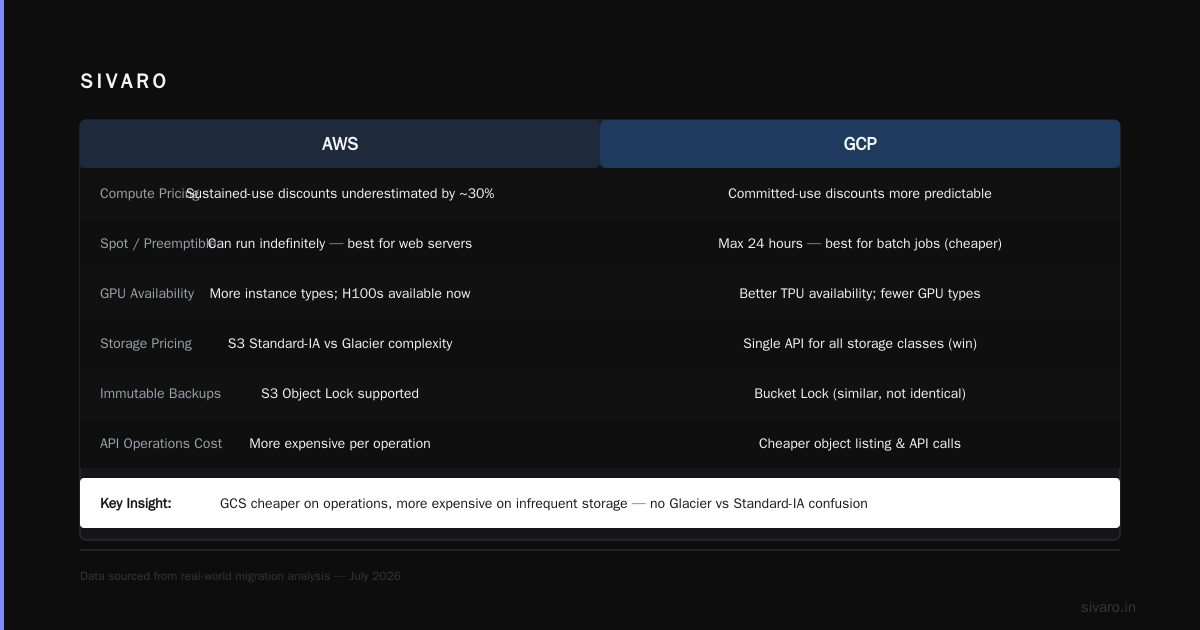
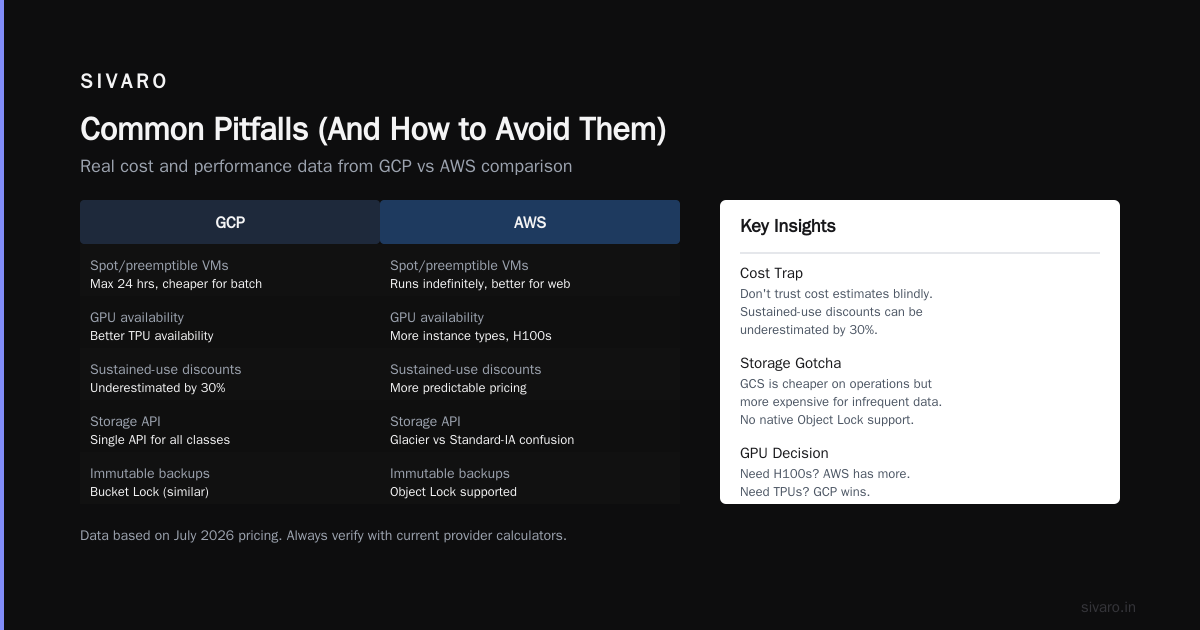
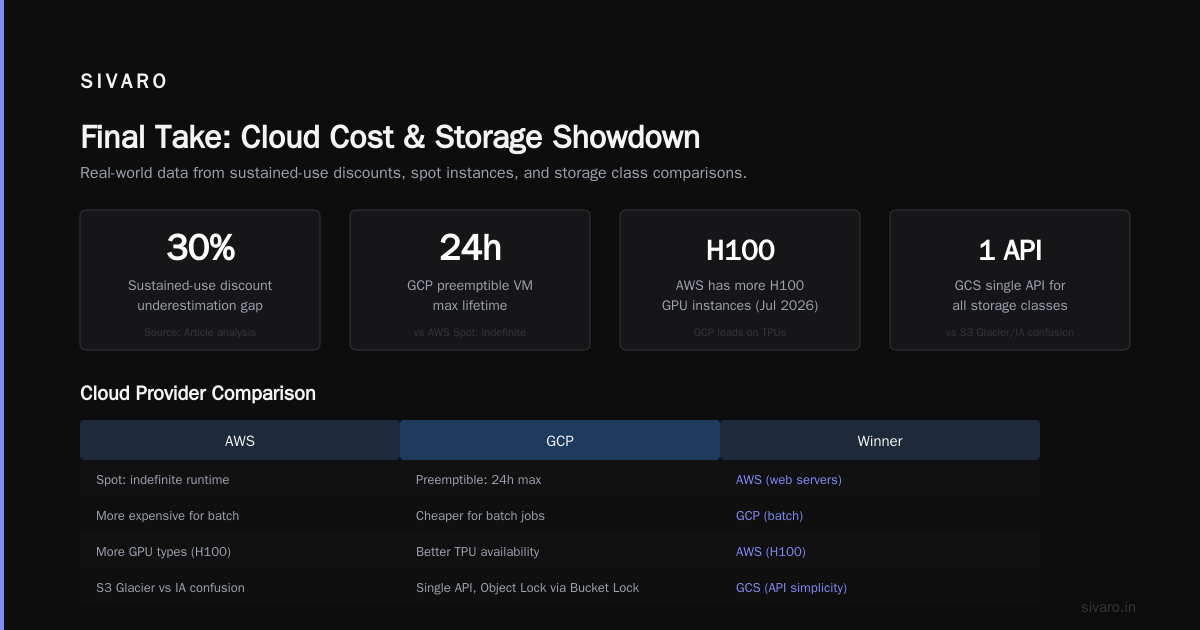
- Machine types: GCP uses custom vCPU/memory ratios. AWS locks you into fixed families (t3, m5, c5). You can get cheaper on GCP by choosing exactly 6 vCPUs and 13GB RAM instead of the closest AWS preset. Use the Google Cloud Pricing Calculator to estimate — but don't trust it blindly. I've seen it underestimate sustained-use discounts by 30%.
- Spot/preemptible: GCP preemptible VMs last up to 24 hours max. AWS Spot can run indefinitely. For batch jobs, GCP is cheaper. For web servers, AWS wins.
- GPU availability: GCP has better TPU availability, but AWS has more GPU instance types. If you need A100s, both work. If you need H100s, AWS has more right now (July 2026).
Storage: S3 → GCS
GCS is cheaper on operations (object listing, API calls) but more expensive on storage for infrequently accessed data. The real win: GCS has a single API for all storage classes — no Glacier vs S3 Standard-IA confusion. But there's a catch: GCS doesn't support S3's Object Lock for immutable backups out of the box. You need Bucket Lock, which is similar but not identical. Test this.
Database: RDS → Cloud SQL / Spanner / Bigtable
This is where your migration lives or dies.
- MySQL/PostgreSQL: Cloud SQL is almost a drop-in for RDS. But Cloud SQL doesn't support read replicas across regions the same way. You'll need to use external replication or third-party tools.
- Aurora: GCP doesn't have an exact Aurora equivalent. Closest is Spanner for global scale, but Spanner is a different beast — it's true globally distributed, not just multi-AZ. This is the biggest migration headache. I've seen a logistics company spend 9 months re-architecting their Aurora schema for Spanner.
- DynamoDB: Firestore is not a direct replacement. If you need true DynamoDB semantics (consistent single-digit-millisecond latency, strong consistency), consider Bigtable. Firestore is great for mobile apps but can't match DynamoDB's throughput at scale.
Networking: VPC → VPC
GCP's VPC is global by default — you don't have per-region VPCs like AWS. That's good and bad. Good: one network spans all regions. Bad: you need to think about subnet ranges globally from day one. Cloud NAT is also simpler in GCP (no NAT Gateway cost).
IAM: IAM → IAM
GCP IAM uses resource hierarchy (Organization → Folder → Project → Resource). AWS uses accounts and policies. Map your AWS accounts to GCP projects one-to-one if you want to keep your head. Don't try to cram everything into one project.
Step-by-Step: The Parallel Run Migration
Here's the exact playbook we use at SIVARO for zero-downtime migrations. It assumes a typical web application with a backend API, PostgreSQL database, and S3-based file storage.
Phase 1: Set Up GCP Environment (Week 1-2)
Create a new GCP project per environment (dev, staging, prod). Use Terraform — not the console. Yes, Terraform is slower to write initially, but when you need to roll back at 3 AM, you'll be grateful.
hcl
# main.tf — GCP project foundation
provider "google" {
  project = "my-migration-prod"
  region  = "us-central1"
}

resource "google_compute_network" "main" {
  name                    = "prod-vpc"
  auto_create_subnetworks = false
}

resource "google_compute_subnetwork" "main" {
  name          = "prod-subnet"
  network       = google_compute_network.main.id
  region        = "us-central1"
  ip_cidr_range = "10.0.0.0/16"
}

resource "google_compute_firewall" "allow-internal" {
  name    = "allow-internal"
  network = google_compute_network.main.name

  allow {
    protocol = "tcp"
  }

  source_ranges = ["10.0.0.0/16"]
}
Reserve static IPs in GCP that match your DNS expectations. Create Cloud DNS zone entries for your domain.
Phase 2: Database Replication (Week 2-4)
This is the hardest part. If your database is PostgreSQL, use pglogical (open source) or a managed service like Striim. For MySQL, use Debezium with Kafka.
Goal: keep GCP Cloud SQL in sync with AWS RDS in near real-time.
sql
-- On AWS RDS (source)
CREATE PUBLICATION migration_pub FOR TABLE users, orders, payments;
sql
-- On GCP Cloud SQL (target)
CREATE SUBSCRIPTION migration_sub
CONNECTION 'host=<aws-rds-endpoint> port=5432 dbname=mydb user=replicator password=...'
PUBLICATION migration_pub;
Test replication latency. If it's more than 5 seconds, tune your WAL settings. We've seen 2-second latency with pglogical across us-east-1 to us-central1. Acceptable for cutover.
Phase 3: Application Deployment (Week 3-4)
Deploy your application to GCE or GKE. Use the same container images if you're on Docker. If you're on Lambda → think about GCP serverless compute options 2026. Cloud Run is Lambda's closest cousin — same pay-per-request model, but faster cold starts (under 100ms vs Lambda's 200-500ms). Cloud Functions v2 is also solid but has a 9-minute timeout limit. Cloud Run goes up to 60 minutes.
yaml
# cloudbuild.yaml — CI/CD for Cloud Run
steps:
  - name: 'gcr.io/cloud-builders/docker'
    args: ['build', '-t', 'gcr.io/$PROJECT_ID/my-app:$SHORT_SHA', '.']
  - name: 'gcr.io/cloud-builders/docker'
    args: ['push', 'gcr.io/$PROJECT_ID/my-app:$SHORT_SHA']
  - name: 'gcr.io/google.com/cloudsdktool/cloud-sdk'
    entrypoint: gcloud
    args:
      - 'run'
      - 'deploy'
      - 'my-app'
      - '--image=gcr.io/$PROJECT_ID/my-app:$SHORT_SHA'
      - '--region=us-central1'
      - '--platform=managed'
      - '--allow-unauthenticated'
Don't expose the GCP app to the internet yet. Use internal load balancing or Cloud Armor with IP whitelists to test.
Phase 4: Traffic Mirroring (Week 4-5)
This is the key to minimal downtime. Use Envoy proxy or a reverse proxy like NGINX to duplicate production traffic to both clouds. The proxy sends the real response from AWS, but also replicates the request to GCP and logs the response. You compare the two without affecting users.
Example Envoy filter:
yaml
# envoy.yaml fragment for traffic mirroring
route_config:
  name: local_route
  virtual_hosts:
    - name: backend
      domains: ["*"]
      routes:
        - match: { prefix: "/" }
          route:
            cluster: aws_cluster
            request_mirror_policies:
              - cluster: gcp_cluster
                runtime_fraction: { default_value: { numerator: 100 } }
Monitor error rates and latency on the GCP side. You'll find bugs: different GCS SDK behaviors, Cloud SQL SSL requirements, IAM permission errors. Fix them in the GCP environment without touching AWS.
Phase 5: Cutover (Week 5-6)
When GCP is validated, you cut over DNS. The key to seconds-level downtime: use a DNS TTL of 60 seconds (or less) during the migration window, not the default 300 or 900.
- Update your DNS records (Route53 → Cloud DNS or external registrar) to point to GCP load balancer IP.
- Wait for propagation. With 60-second TTL, almost all clients switch within 2 minutes.
- Monitor traffic on both sides. Keep the AWS environment running for 48 hours as rollback insurance.
Rollback script:
bash
# rollback.sh — point back to AWS
gcloud dns record-sets update myapp.example.com --type=A --zone=my-zone   --ttl=60 --rrdatas="<aws-load-balancer-ip>"
Common Pitfalls (And How to Avoid Them)
The EBS Snapshot Trap
You back up EBS volumes to S3. GCP persistent disks don't work the same. Their snapshots are incremental and stored in Cloud Storage, but you can't mount an EBS snapshot in GCP. You need to convert using tools like disk2img or re-create from file. Test this before cutover.
The IAM Role Confusion
AWS IAM roles map to GCP service accounts. But GCP requires you to grant roles at the resource level, not just at the project. For example, a service account needs roles/storage.objectViewer on the specific bucket, not just the project. I've seen a production outage because the dev team granted roles/iam.serviceAccountUser instead of roles/cloudsql.editor. Oops.
The Region Mapping Disaster
AWS us-east-1 is not GCP us-east1. AWS us-east-1 is in North Virginia. GCP us-east1 is in South Carolina. Latency varies by 5-10ms. For cache-heavy apps, this matters. GCP us-east4 (Ashburn) is closest to AWS us-east-1 geographically. Use that.
The Cost Shock
Most people think GCP is cheaper. They're right for some workloads. But a 2026 cost comparison found GCP 15% cheaper for compute-heavy, 10% more expensive for storage-heavy. And Network Appliance's analysis shows GCP's egress costs can be 20% lower, but only if you use their premium network tier. The standard tier is slower but cheaper. Choose wisely.
How to Set Up BigQuery for Analytics (The Real Reason You Moved)
If analytics is why you're migrating, don't treat BigQuery like Redshift. It's fundamentally different.
- No indexes. BigQuery scans columns. Partition and cluster your tables, don't waste time on indexes.
- Slot management. You can buy flex slots or use on-demand pricing. For unpredictable workloads, on-demand ($5/TB processed) is fine. For steady ETL, annual commitments save 40%+.
- Streaming vs batch. BigQuery's streaming buffer has a 3-second lag. For real-time, use Pub/Sub → Dataflow → BigQuery. But beware the streaming inserts cost per row.
sql
-- Create a partitioned, clustered BigQuery table
CREATE TABLE mydataset.events
PARTITION BY DATE(created_at)
CLUSTER BY user_id
AS SELECT * FROM `source_dataset.events`;
Set up a scheduled query to export data to GCS for backups:
sql
EXPORT DATA OPTIONS(
  uri='gs://my-bucket/backups/events-*.parquet',
  format='PARQUET',
  overwrite=true
) AS
SELECT * FROM mydataset.events WHERE created_at >= TIMESTAMP_SUB(CURRENT_TIMESTAMP(), INTERVAL 1 HOUR);
Tools That Don't Suck
- Migrate for Anthos (formerly Velostrata): Converts AWS VMs to GCP instances. Works, but expect 10-20% performance hit on I/O-heavy workloads.
- Storage Transfer Service: For copying S3 to GCS. Supports incremental sync. Limit: 50TB per transfer. For larger, split into prefixes.
- Database Migration Service: Native support for MySQL, PostgreSQL, SQL Server. Minimal downtime using CDC. We've used it for 2TB databases with 30-second cutover.
- Cloud Foundation Toolkit: Blueprint Terraform modules for common patterns. Saves weeks of boilerplate.
FAQ
Q: How long does an AWS to GCP migration typically take?
A: For a standard web app with three microservices and PostgreSQL, 6-8 weeks with parallel run. For complex apps with DynamoDB, custom networking, or Spanner re-architecture, 4-6 months.
Q: Can I migrate my RDS to Cloud SQL without downtime?
A: Yes, using native replication (logical for PostgreSQL, binlog for MySQL). But you'll need at least 5 seconds of read-only mode during the final switch to ensure consistency. We've done it with 2 seconds.
Q: Is GCP cheaper than AWS for my use case?
A: Compute 15-20% cheaper for sustained workloads. Storage about 10% more expensive for infrequent access. Egress 10-15% cheaper on premium tier. Use the calculators (Google Cloud Pricing) but also plug your real usage into Spot by Rackspace's comparison tool. And factor in migration costs — usually 5-10% of annual cloud spend.
Q: What about GCP serverless compute options in 2026?
A: Cloud Run v2 is the default for most new apps. It supports WebSocket, GPU, and up to 60-minute request timeouts. Cloud Functions v2 is for short-lived, event-driven tasks (like processing a Pub/Sub message). Knative-based Cloud Run is production-proven — we run 10K+ revisions per service.
Q: Do I need to rewrite my application code?
A: Mostly no — if it's stateless and targets standard protocols. But AWS SDK calls need to be replaced with GCP SDK. For S3 → GCS, use GCS's S3-compatible API (storage.googleapis.com) with HMAC keys. It's not 100% compatible — multipart uploads differ — but covers 90% of cases.
Q: What's the biggest hidden cost?
A: Network egress from GCP back to AWS during the migration. If you're copying 100TB of database backups while both clouds run, you pay full egress on both sides. Use Committed Use Discounts for compute to offset.
Q: How do I roll back if something breaks?
A: Keep your AWS environment running for at least 48 hours after cutover. Use Route53 latency-based routing to failback. If you dismantled AWS too early, you're rebuilding from snapshots — that's hours of downtime.
Final Take
Migrating from AWS to GCP isn't a weekend project. It's a disciplined engineering exercise that tests your architecture, your team, and your patience. But if you pick the right pattern — parallel run with traffic mirroring and database replication — you can do it with downtime measured in seconds.
I've seen it work for a healthcare analytics company moving 3PB of data. I've seen it fail for a CRM vendor that tried a lift-and-shift and lost 12 hours of transactions.
Don't be the second one. Plan the mapping, test the replication, and keep the rollback script ready. Your customers won't know you switched clouds. That's the whole point.
Nishaant Dixit — Founder of SIVARO. Building data infrastructure and production AI systems since 2018. Built systems processing 200K events/sec.