 SIVARO
How to Migrate from Docker to Kubernetes
I spent three weeks moving a fraud detection pipeline from Docker Swarm to Kubernetes in early 2026. It failed. Not because Kubernetes is hard — because I treated it like a bigger Docker. Different habits, different mental model, different failure modes.
Nobody in that org knew how to migrate from docker to kubernetes properly. I sure didn't. The good news? You don't need a six-month cloud consulting engagement to do this right. You need to understand what's actually changing under the hood.
Stop Thinking in Containers
Here's the thing nobody says in the migration guides: Kubernetes isn't a container orchestrator. It's a reconciliation engine. The container part is incidental.
What is Docker? describes Docker as a platform for building, running, and managing containers. That's accurate but incomplete. Docker gives you docker run, and you're done. Run the container, expose a port, move on with your life.
Kubernetes gives you a desired state. You declare "I want three replicas of this service, with this image, this CPU limit, this probe path." Then the control plane spends its entire existence trying to make reality match that declaration.
That shift — from imperatives to declarations — is the entire ballgame.
If you can't wrap your head around that, every step of this migration will feel like fighting the platform. Once you get it, things click into place. I've watched engineers go from frustrated to fluent in about two weeks.
Docker Architecture, Explained Briefly
Before any migration, you should understand what you're moving. If someone asked me how to explain docker architecture in an interview (and I've been asked this dozens of times when hiring at SIVARO), I'd say:
- Docker uses a client-server architecture with three components.
- The client (
dockerCLI) talks to the daemon (dockerd). - The daemon handles images, containers, networks, and volumes.
- Images are layered filesystems built from Dockerfiles.
- Containers are isolated processes with their own filesystem, network namespace, and PID namespace.
Here's what matters for migration: Docker's daemon is a monolithic process. It does everything — API, image management, container lifecycle, networking, storage. containerd vs. Docker explains how Docker actually wraps containerd under the hood. containerd handles the actual container runtime. Docker adds the DX layer on top.
Kubernetes also uses containerd (or CRI-O) as the runtime. So the container itself? Same. The networking, the scheduling, the storage, the rolling updates — completely different world.
Most teams already have well-structured Dockerfiles and running containers. That work carries over. The migration is about everything around the container, not the container itself.
Before You Touch a Manifest
You need an audit. I'm serious. We skipped this at that fraud pipeline gig and paid for it with downtime.
Answer these questions first:
- How many services do you run? List them all.
- Which ones are stateful? Databases, caches, anything writing to disk.
- How do your services discover each other? Docker DNS? Hardcoded IPs? Docker Compose service names?
- Where do your secrets live? Environment variables? Files? Vault?
- What Linux skills does your team actually have? Because Kubernetes is a Linux distribution for distributed systems. If no one on your team knows how to use
kubectl execto debug a container, you have a training problem before you have a migration problem.
This audit is your migration spec. Every service you find gets a row in a spreadsheet. When my team did this for a payments platform in mid-2026, we found 17 services nobody had documented. They were running in production under a forgotten swarm stack. That's the kind of thing you need to know before you start.
Interview-Ready Docker Questions That Also Help You Migrate
I want to pause here. I've been tracking Docker interview questions since 2023 because they're literally a free checklist of what you need to know for migration. Top Docker Interview Questions and Answers (2025) and Top 50 Docker Interview Questions and Answers in 2025 cover things like image layering, networking modes, and volume persistence.
Those questions map directly to migration decisions:
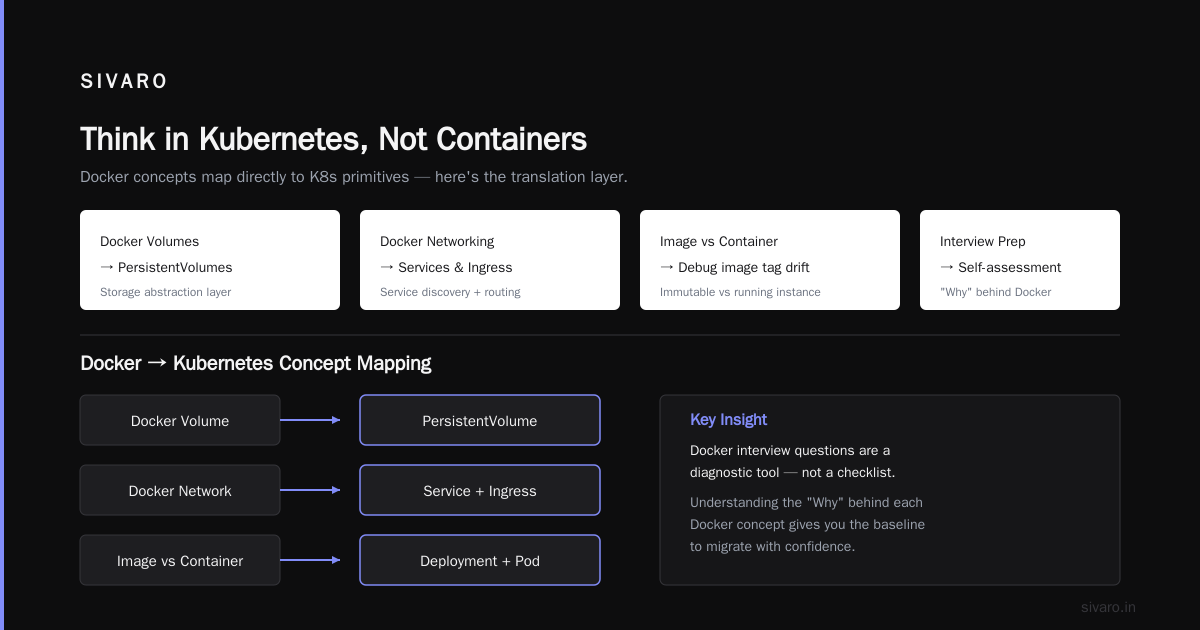
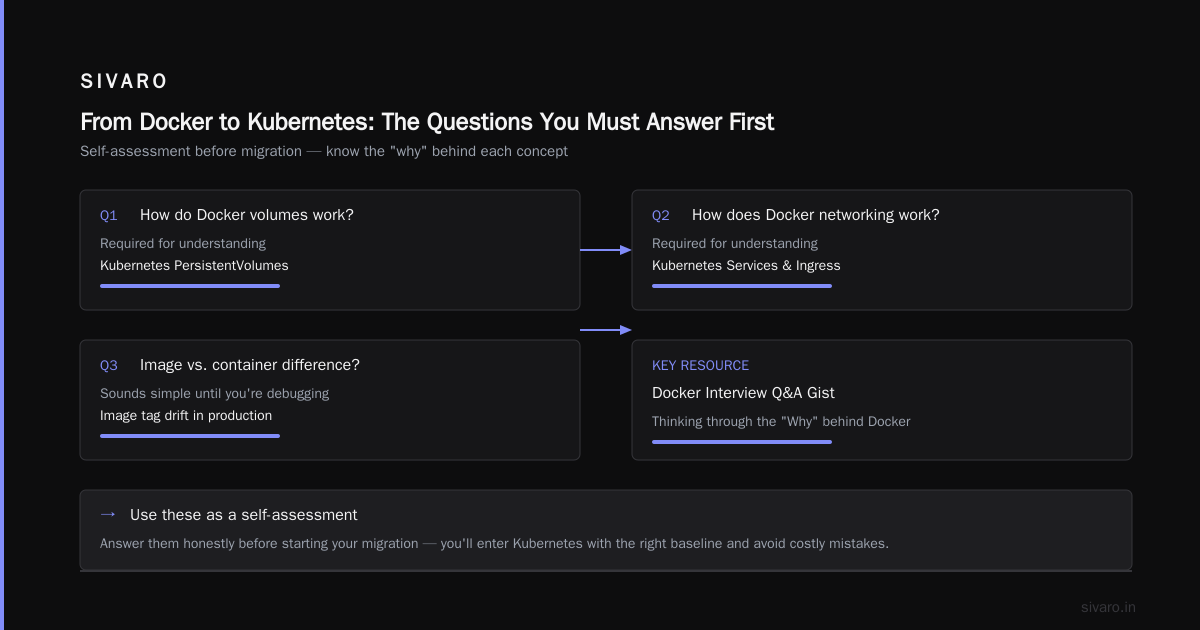
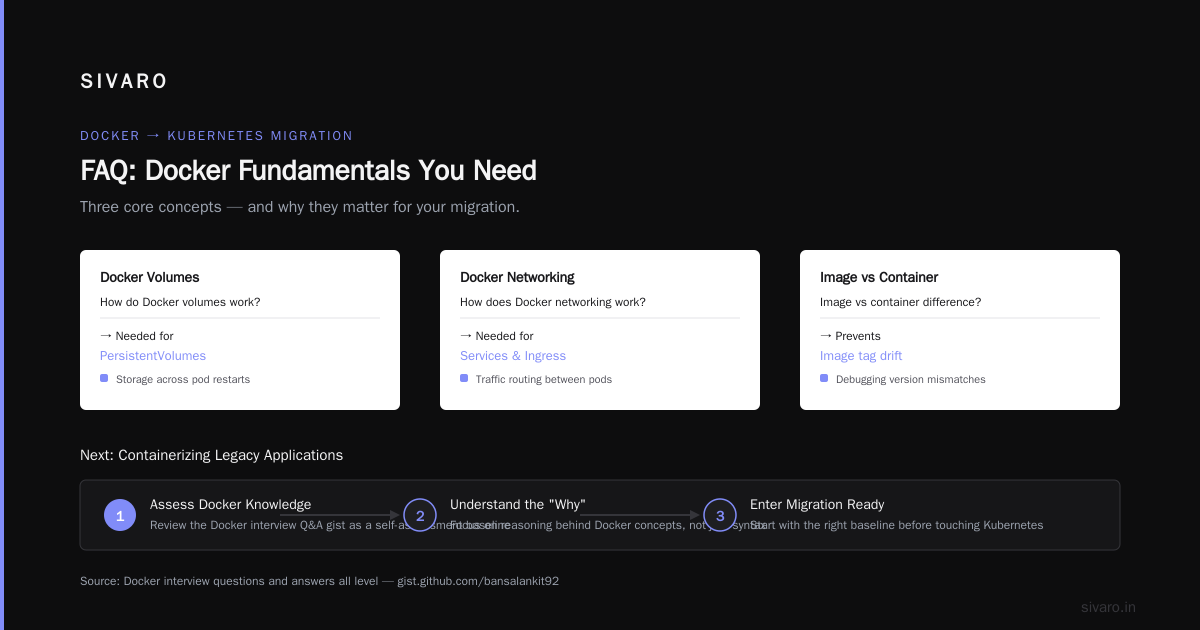
- "How do Docker volumes work?" → You need to understand this for PersistentVolumes.
- "How does Docker networking work?" → Kubernetes Services and Ingress will confuse you otherwise.
- "What's the difference between an image and a container?" → This sounds stupid simple until you're debugging an image tag drift.
The Docker interview questions and answers all level gist is particularly good at thinking through the "Why" behind Docker. Read those, treat them as a self-assesment, and you'll enter the migration with the right baseline.
How to Containerize a Legacy Application with Docker
If you're migrating from Docker to Kubernetes, you probably already have containers. But if you've got a legacy monolith in production that's never seen a Dockerfile, the migration to K8s is a two-step process.
Step one: containerize it with Docker. Step two: orchestrate it with Kubernetes.
I'm going to say something probably annoying: don't containerize the monster all at once. We had a legacy insurance claims system at SIVARO— 15 years old, Java 8, tightly coupled to a MySQL instance running on the same host. Containerizing that whole thing was unreasonable. The database stayed on the VM. The app, with its config externalized and its file system writes redirected, went into a container.
Here's the process:
- Extract config into environment variables.
- Move file writes to a mounted volume or object storage.
- Add health checks to the app.
- Write a Dockerfile with enough Linux knowledge to keep the image lean.
- Run it locally. Then on a server. Then in a cluster.
If you have legacy apps holding you back, the containerization step is the hard part. Kubernetes will do what you tell it to. The legacy app needs to be told to behave.
From Docker Compose to Kubernetes Manifests
First decision: Helm or raw manifests?
For most teams, Helm. Raw manifests for everything means you're going to have hundreds of YAML files. Helm charts at least give you templating, release management, and rollbacks.
Here's what the translation looks like.
Typical docker-compose.yml:
services: api: image: your-registry/api:1.2.3 ports: - "8080:8080" environment: - DB_HOST=db depends_on: - db db: image: postgres:16 volumes: - db-data:/var/lib/postgresql/data restart: always
The same service in Kubernetes:
`apiVersion: apps/v1
kind: Deployment
metadata:
name: api
spec:
replicas: 3
selector:
matchLabels:
app: api
template:
metadata:
labels:
app: api
spec:
containers:
- name: api
image: your-registry/api:1.2.3
ports:
- containerPort: 8080
env:
- name: DB_HOST
value: "postgres-service"
readinessProbe:
httpGet:
path: /health
port: 8080
apiVersion: v1
kind: Service
metadata:
name: api-service
spec:
selector:
app: api
ports:
- port: 8080
targetPort: 8080`
Notice something? There's no depends_on in Kubernetes. Kubernetes doesn't understand dependencies. It will happily start your API before Postgres is ready. That's what init containers, readiness probes, and startup probes are for.
That's one of the biggest mental shifts. Docker Compose gives you a deterministic start order. Kubernetes gives you a chaotic convergence.
You need health checks. You need retries. You need your application to handle dependencies being temporarily down.
Your app should handle the database being briefly unreachable at startup. If it doesn't, you're going to have problems.
The State Problem
Volumes in Docker Compose are simple — a path on the host. Kubernetes PersistentVolumes are a different beast entirely.
Local volumes won't work in a multi-node cluster unless you're living dangerously. If a pod dies and gets rescheduled to a different node, its local volume data is gone.
For stateful workloads, use managed disk solutions:
- AWS EBS or EFS with EKS
- GCE Persistent Disks with GKE
- Azure Disks or Files with AKS
- Or a CSI driver like Rook/Ceph if you're on-prem
CloudBlockStorageCSI was the answer for most production clusters I set up.
The bigger question is whether you need StatefulSets or whether Deployments with persistent volumes are enough. If you need stable network identities and persistent storage for each replica — databases, message queues, distributed caches — you probably need StatefulSets. If your stateless services just need shared storage, standard Deployments with a shared PV work fine and are far less painful to operate.
Networking Is Not What You Think It Is
This is where most migrations die.
In Docker, you have docker network create. Containers on the same user-defined bridge network can resolve each other by service name. Port mapping is done via -p 8080:80.
Kubernetes networking is... not that.
Pods get their own IPs, but those IPs are ephemeral. Pods die and get recreated all the time. That's the workload. The IP will change.
This is why we use Services in Kubernetes. A Service is a stable entry point with a DNS name. When pods change, the Service tracks them.
There's also Ingress. In Docker, you run nginx and reverse proxy traffic. In Kubernetes, Ingress controllers handle that job — but they're an ecosystem component, not core. You need to install one yourself (or use a managed one).
And network policies. Docker has them, but nobody uses them. Kubernetes network policies are enforced by the CNI plugin, not by Kubernetes itself. You need to understand which CNI you have (Calico, Cilium, Weave), because that determines your network policy capabilities.
Config and Secrets: Some Assembly Required
Docker Compose handles config and secrets with environment variables and bind-mounted files. Kubernetes gives you ConfigMaps and Secrets, but they're not magic.
Whats've done good work here: ConfigMaps are great for non-sensitive config. Secrets are encoded as base64, which is not encryption. Anyone with access to the API can decode them.
For production secrets — database passwords, API keys, certificates — use something like:
- External Secrets Operator with AWS Secrets Manager or Vault
- sealed-secrets
- SOPS with a KMS backend
Don't put plaintext secrets in your cluster. The base64 encoding will not save you. Use an external secrets solution. If I had to pick one practice to prioritize in a migration, it's this: build the secret handling properly from day one, or you'll be doing default credentials cleanup at 2 AM.
Migrating Your Deployment Workflow
You've probably got CI/CD scripts that do docker build && docker push && docker run. That last step changes.
With Kubernetes, you push an image, then you have to get Kubernetes to pick it up. Options:
kubectl set image deployment/api api=your-registry/api:1.2.4helm upgrade api ./helm/api --set api.image.tag=1.2.4(withimagePullPolicy: Always)- GitOps with Argo CD (and watch it apply the new image from your registry webhook)
We use Argo CD at SIVARO for most clients now. The principle of declarative GitOps beats imperative kubectl apply for anything teams will operate for more than six months.
For the middle path, make sure your rollout looks like this:
deployment: api: strategy: rollingUpdate: maxSurge: 1 maxUnavailable: 0 type: RollingUpdate
This ensures zero-downtime deployments. The highest availability you can get with a single replica (though why you'd run one replica in production is beyond me).
Choose a Migration Strategy
Three strategies, in order of increasing risk:
Strategy 1: Side-by-Side
Run Kubernetes alongside your Docker hosts. For a few weeks, both are live. Send new traffic to the K8s cluster, keep old services running in Docker. Cut over when you're confident. This is the most boring, safest approach.
Strategy 2: Incremental
Move individual services to K8s as you migrate them. This requires the services to communicate across environments at the network level (e.g., your K8s API reaching the still-Dockerized database). It's a good way to manage risk, but the interconnection traffic is what gets complicated.
Strategy 3: Big Bang
Shut down Docker. Deploy everything to K8s in one weekend. This is what we tried at SIVARO with that fraud pipeline and it's how we learned the hardest lessons (storage, probes, networking). It can work, but it's high risk.
Most teams should pick Strategy 1 or 2. Starting with the easiest stateless parts of your stack, you maintain the overlap until you're confident.
The Questions Nobody Asks Before Migrating
These won't come up in Docker interview docs, but I've seen all three sink a migration effort:
"What if this isn't a good idea?"
Kubernetes is not for every team. It's absolutely right for scale — if you need auto-scaling, zero-downtime deploys, or team autonomy across microservices. If you're running three containers on one VM with a small team, Kubernetes is overhead you don't need. Running a Kubernetes cluster is a job. Managed services (EKS, GKE, AKS) make it easier, but they still cost real money and real attention.
"Who handles day 2 operations?"
Deploying to Kubernetes is day 1. Monitoring, backup, upgrades, networking issues — that's day 2. Have a team and a plan before you move.
"Is Docker still relevant?"
Yes, absolutely. Kubernetes doesn't replace Docker. It replaces Docker Swarm, Compose, and the orchestration side of things. You'll still use Docker. It's how you build images. containerd vs. Docker is a useful read to understand where the line is between your build tools and your runtime.
The Common Cost Mistake
This deserves its own section, because I've seen so many teams underestimate it.
Docker on a single VM is cheap. Kubernetes on managed infrastructure is not.
An EKS cluster with node groups, ALB ingress controller, and the associated operational overhead runs anywhere from $200 to $2,000 per month before any node costs. The control plane alone is about $0.10/hour on AWS. If you run 10 nodes at around $50-100/month each, you're looking at $500-1,200/month per cluster, plus storage, plus egress.
If you're coming from a single $40/month VM running all your containers, that's a shock. Build that cost into your decision before you start.
The Final Checklist
When you sit down to do this, have a checklist:
- Audit everything — services, state, networking, secrets, team skills
- Containerize all legacy apps before touching the cluster
- Map docker-compose to K8s manifests, service by service
- Design storage — kind of PV/StorageClass, CSI driver, backup strategy
- Design networking — VPC/CIDR planning, CNI choice, Ingress controller, service discovery
- Design config/secret management — External Secrets Operator or the like
- Set up health checks on every service, before you move them
- Migrate incrementally, keeping an escape hatch for rollback
- **Test everything ** in a staging cluster first — can't stress this enough
- Document the operational plan — who's on call, what the runbooks say
That's the whole game. The overwhelming majority of the work is in planning, not in the mechanics of the migration.
FAQ
Is Docker still used with Kubernetes?
Yes. Docker builds the images Kubernetes runs. The runtime is containerd under the hood in both cases, but Docker remains the standard tool for building and testing containers locally.
How long does a migration take?
A simple stack with two or three stateless services can move in days. We helped a logistics company migrate their API layer in a week. A complex stateful system with databases, data pipelines, and legacy monoliths can take 3-6 months.
Can Docker and Kubernetes run side by side?
Absolutely, and that's actually the safest way. Keep your Docker workloads running while you gradually bring up Kubernetes workloads, then cut traffic over as you gain confidence.
Do I need to rewrite my Dockerfiles?
No. Your Dockerfiles carry over directly. Kubernetes doesn't care how the image was built, just what's in it.
What happens to docker-compose?
You translate it into Kubernetes manifests or Helm charts. The structure maps roughly: services → Deployments + Services, volumes → PersistentVolumeClaims, networks → Service and Ingress definitions.
Do I need Helm?
You don't need it for tiny one-off workloads. For anything you're going to operate over time, Helm gives you templating, release management, and rollbacks. I'd strongly recommend it for anything beyond a single Deployment.
What about local development?
They're two different worlds. Docker is great for local dev — run a few containers with Compose, and you're set. Kubernetes on your laptop (via Minikube, kind, or k3s) works but it's heavier and slower. Most teams keep Docker for local dev and use Kubernetes for staging/production. The gap between them causes friction, but tools like Skaffold and Tilt make this smoother.
Migration from Docker to Kubernetes is a mindset shift. You're moving from "here's a container" to "here's a desired state." Once your team gets that, the rest is configuration. Get the planning right, respect the operational cost, and you'll be fine.
Nishaant Dixit — Founder of SIVARO. Building data infrastructure and production AI systems since 2018. Built systems processing 200K events/sec.