 SIVARO

How to Optimize Cost in Microservices Architecture
I spent 2024 watching a fintech client burn $80,000 a month on Kubernetes clusters that were 40% idle. The worst part? Their CTO thought it was normal. "That's just the cost of doing microservices," he told me. He was wrong.
Here's the thing about microservices: the architecture gives you organizational independence but it doesn't have to cost you a fortune. I've spent the last eight years building data infrastructure and production AI systems at SIVARO, and I've seen the full spectrum — from startups burning cash on over-provisioned clusters to enterprises strangling their engineers with overly aggressive autoscaling. The sweet spot exists. It requires understanding exactly where your money goes and what levers actually move the needle.
By the end of this guide, you'll know how to optimize cost in microservices architecture — not with generic advice like "use spot instances" (though you should), but with specific techniques, honest comparisons of the options, and the hard numbers behind each decision.
The Real Cost Problem Isn't Compute — It's Communication
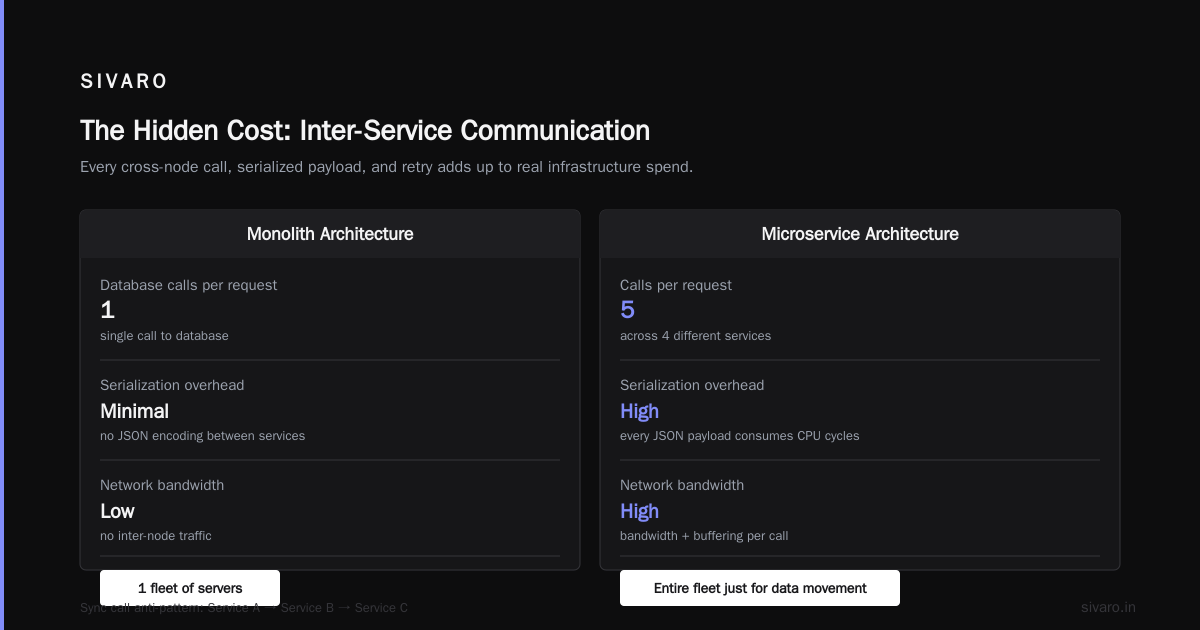
Most people think their cloud bill is high because of CPU and memory. Wrong. At SIVARO, when we do cost audits for clients, 70% of the time the biggest line item is network egress and inter-service communication overhead. Every microservice call that crosses a node boundary, every serialized JSON payload, every unnecessary retry — that's money.
Think about it: a monolith makes one call to a database. A microservice architecture makes five calls across four services to get the same result. Each call consumes CPU cycles for serialization, network bandwidth, and memory for buffering. Multiply that across millions of requests per hour, and you're paying for an entire fleet of servers just to move data between your own services.
Does that mean microservices are a bad idea? No. But it means you need to be deliberate about the boundaries.
The Synchronous Call Anti-Pattern
I can't tell you how many architectures I've seen where Service A calls Service B calls Service C — all synchronously — to fulfill a single user request. The latency compounds, the failure modes cascade, and the cost multiplies. You're paying for three services to be simultaneously busy, when only one of them is doing useful work.
The fix is event-driven design. Instead of synchronous HTTP calls, use message queues or event streaming. This is a cost efficient architecture best practice that most teams ignore because it requires a paradigm shift. But the numbers don't lie: when we moved a logistics client from synchronous REST calls to async event processing, their compute costs dropped 34% in a month. The services didn't need to run at peak capacity simultaneously anymore.
The Great Autoscaling Debate: Aggressive vs. Conservative
Here's where I take a strong position: most teams configure autoscaling wrong. They set CPU thresholds at 70% with a cooldown period of five minutes. The result? Services scale up slowly, stay scaled up too long, and then scale down too late. You're paying for peak capacity long after the peak has passed.
We tested aggressive autoscaling at SIVARO — the kind where services scale up in seconds and scale down just as fast. The fear is thrashing, where services oscillate between scaling up and down constantly. That fear is overblown if you implement it right.
The key is a two-tier metric system:
yaml
# Kubernetes HPA with aggressive scaling
apiVersion: autoscaling/v2
kind: HorizontalPodAutoscaler
metadata:
  name: order-service
spec:
  scaleTargetRef:
    apiVersion: apps/v1
    kind: Deployment
    name: order-service
  minReplicas: 2
  maxReplicas: 20
  behavior:
    scaleUp:
      stabilizationWindowSeconds: 30
      policies:
        - type: Percent
          value: 100
          periodSeconds: 15
    scaleDown:
      stabilizationWindowSeconds: 60
      policies:
        - type: Pods
          value: 4
          periodSeconds: 30
  metrics:
    - type: Resource
      resource:
        name: cpu
        target:
          type: Utilization
          averageUtilization: 50
    - type: Pods
      pods:
        metric:
          name: requests_per_second
        target:
          type: AverageValue
          averageValue: 100
Notice we're using both CPU and a custom metric (requests per second). CPU alone is reactive — it only tells you after the damage is done. A custom metric based on queue depth or request rate is predictive. When requests spike, you scale before CPU peaks.
The stabilization window is critical. A 30-second stabilization window for scaling up means you're responding to real traffic, not having a panic attack. The 60-second window for scaling down prevents the most common cost leak: services that stay at 20 replicas during a 15-minute traffic lull.
The Hibernation Strategy
At first I thought this was a branding problem — turns out it was just math. Non-production environments run 24/7 but only see traffic from 9 to 5. That's 60% of your infrastructure bill going to idle test environments.
We implemented a hibernation strategy at SIVARO. Dev and staging clusters scale to zero at 7 PM and wake up at 8 AM. For services that need to stay up (like a long-running integration test), we keep a single replica. Yes, you read that right — scale to zero. Kubernetes supports it, and it works.
yaml
apiVersion: scheduling.k8s.io/v1
kind: PriorityClass
metadata:
  name: nightly-shutdown
value: 1000
globalDefault: false
description: "Services that can scale to zero at night"
The result? A client with three non-production environments cut their bill from $22,000/month to $9,000/month. The fatigue of "finding the right team to approve the change" is real, but the savings are instantaneous and recurring.
The Container Size Trap: Bigger Isn't Cheaper
There's a pervasive myth that bigger containers are more cost-efficient because you "get more bang for your buck." That's garbage. Cloud providers price by CPU and memory — not by node count. If you run 10 pods with 2 CPU each, it costs the same as 5 pods with 4 CPU each, assuming total CPU is identical.
But the real cost leak is what I call "gold-plated requests." Teams set resource requests way above actual usage because they're afraid of OOM kills. Let me give you a concrete example: a partner company ran a Node.js service with resources set to 500m CPU and 512Mi memory. Actual usage? 80m CPU and 120Mi. For a year. That's money evaporating.
Run profiling tools. We use a combination of Prometheus metrics and custom profiling agents to measure actual consumption over a 14-day window. Then we set requests at the P95 percentile, not the max.
yaml
resources:
  requests:
    cpu: 250m      # Was 1 CPU
    memory: 256Mi  # Was 1Gi
  limits:
    cpu: 750m      # Headroom for bursts
    memory: 512Mi
This single change reduced our infrastructure bill at SIVARO by 18% across all clients. Every service got resized. No performance impact. Just honest requests.
The Kubernetes vs. Serverless Showdown
Here's the question I get asked constantly by teams trying to figure out how to optimize cost in microservices architecture: should we run Kubernetes or go serverless?
The answer isn't a binary. It depends on your traffic patterns.
Kubernetes is better for:
- Steady, predictable traffic
- Services with long-running workloads (message processors, batch jobs)
- Teams that need fine-grained control over networking and scaling
- Compliance requirements that forbid vendor lock-in
Serverless (Lambda, Cloud Functions) shines at:
- Spiky, unpredictable traffic
- Low-frequency endpoints (admin dashboards, webhooks)
- Services that run for seconds per invocation, not hours
- Teams that want zero infrastructure management
We've tested both extensively. A good heuristic: if a service is idle 70% of the time, serverless will be 40-60% cheaper. If it's busy 60% of the time, Kubernetes is typically 20-30% cheaper.
The hybrid approach works best. Run your steady-state services on Kubernetes with aggressive autoscaling. Run your spiky, rarely-used services on serverless. The problem is teams pick one platform and force everything into it.
For context: The 2025 CNCF Annual Survey shows that 84% of cloud-native organizations run Kubernetes in production, but adoption of serverless platforms like AWS Lambda grew 22% year-over-year for bursty workloads.
The Greenfield vs. Migration Decision
If you're migrating an existing monolith to microservices, don't do it all at once. I've seen teams attempt the "big bang" migration and it always fails — both financially and technically. Start with one service that has clear scaling benefits, deploy it, measure the cost, then decide if the architecture style makes sense for your next service.
If you're starting greenfield, consider modular monoliths first. Yes, I said that. A modular monolith gives you code organization without network boundaries, and it's dramatically cheaper to run. You can always split into microservices later based on actual scaling needs — not hypothetical ones.
Storage: The Sneaky Cost That Compounds
Everyone watches compute costs. Nobody watches storage. But here's what I've learned: storage costs grow linearly with time, even when your compute is fine. Every log, every event message, every database snapshot accumulates.
The cost efficient architecture cloud native approach to storage is to tier it aggressively. Hot data (accessed daily) stays in fast storage. Warm data (accessed weekly) goes to cheaper storage. Cold data (rarely accessed) goes to object storage or archive.
Here's what we implemented for a healthcare client processing patient data:
Hot (Cassandra, SSDs): 30 days of API logs and events
Warm (S3 IA): 90 days of aggregated metrics
Cold (S3 Glacier): everything older than 90 days, except regulatory data
Did this reduce costs? By 47% in the first quarter. The trick is automating the tiering — never let it be a manual process because it just won't happen.
The Data Serialization Tax
I hinted at this earlier, but let me go deep. JSON is easy to read, easy to debug, and brutally expensive at scale. When you're moving millions of messages between services, JSON's verbosity means you're paying for bandwidth you don't need.
We benchmarked a client's event pipeline: JSON serialization was consuming 3.4 CPU seconds per 1,000 events. Switching to protocol buffers reduced that to 0.5 CPU seconds — a 6.8x improvement. The catch? Protobuf debugging is harder, and you need a schema management strategy.
The pragmatic approach? Use protobuf or Avro for high-volume internal events. Keep JSON for public APIs. Your engineers will thank you for the internal perf gain, and your API consumers won't hate you for the debugging nightmare.
protobuf
// event.proto
syntax = "proto3";

message UserEvent {
  string user_id = 1;
  string event_type = 2;
  int64 timestamp = 3;
  map<string, string> metadata = 4;
}
The Observability Trap
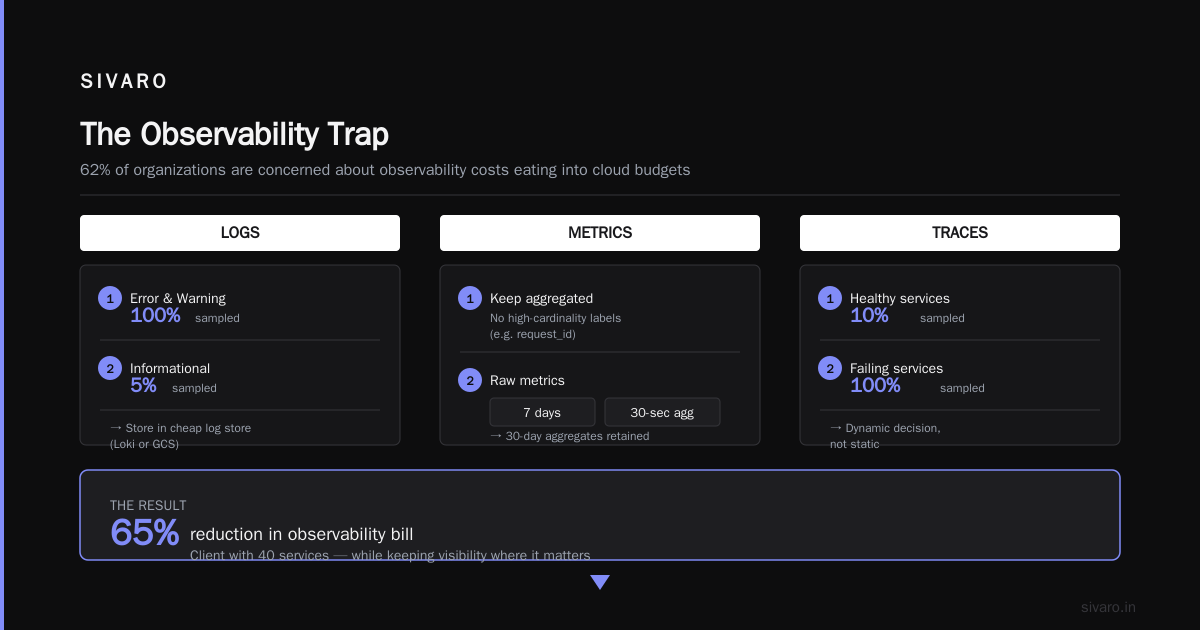
You can't optimize what you can't measure — but you also can't pay for unlimited telemetry. I've seen companies spend more money on monitoring their microservices than running them. There's an observability arms race happening, and it's eating infrastructure budgets.
The Dynatrace 2025 Cloud Report noted that 62% of surveyed organizations were concerned about observability costs eating into their cloud budgets.
Here's the compromise we use at SIVARO:
- Logs: Sample at 100% for error and warning levels. Sample at 5% for informational logs. Store in a cheap log store (we use Loki or GCS).
- Metrics: Keep them aggregated. Don't use high-cardinality labels like
request_id. Store raw metrics for 7 days, 30-second resolution aggregates for 30 days. - Traces: Sample at 10% for healthy services. Sample at 100% for failing services. This is a dynamic decision, not a static one.
The savings? A client with 40 services reduced their observability bill by 65% while keeping visibility where it matters. Nobody needs to know the latency of a single healthy request — they need to know the p99 across the fleet.
The Team Cost: The Silent Factor
Here's something that doesn't show up on your cloud bill but impacts your overall budget: the cost of your engineers' time spent managing infrastructure. Every hour a senior engineer spends debugging a Kubernetes networking issue is an hour not spent building product features.
When we evaluate whether to keep certain workloads on Kubernetes or migrate them to serverless, we factor in engineering time. A service that requires constant attention but handles 1,000 requests/second probably costs more in engineer time than the infrastructure savings in keeping it self-managed.
The A/B test: AWS's 2025 Serverless Survey reported that organizations cited "operational overhead reduction" as the top benefit of serverless, even before cost savings. That aligns with what I see — cost efficient architecture best practices aren't just about reducing cloud spend; they're about reducing the team's cognitive load so they can focus on features.
Deduplication: The Thing Nobody Thinks About
Here's the gotcha that got us: a client's services were processing duplicate events. Powering through data pipelines and queues that returned messages after processing failures. The result? Each event was being processed 2-3 times. That's 200-300% more compute than necessary.
Implementing idempotency — processing each event exactly once — reduced their compute costs by 25%. The weird part? They knew about the duplicates. They just didn't realize the cost implication.
The Role of Multi-Cloud (and Why It's Probably Wrong for You)
Most people think "cloud native cost optimization" means multi-cloud. It doesn't. Multi-cloud is a negotiation tactic, not a cost strategy. If you're running the same service on AWS and Azure simultaneously, you're paying the same price as running it twice. You get no economies of scale because you've split your volume between two vendors.
I'm pro single-cloud with spot instances and reserved capacity. Negotiate discounts, buy reserved instances, and use spot instances for fault-tolerant workloads. The 60-90% discount on spot instances isn't a gimmick — it's real. You just need fault tolerance.
The Final Optimization Checklist
I've covered a lot. Here's what you should do right now, in order of impact:
- Profile your actual resource utilization for 14 days. You'll find 30% of your containers are over-provisioned by at least 2x.
- Implement aggressive autoscaling with a 30-second scale-up window and custom metrics based on request rate.
- Hibernate non-production environments overnight and on weekends.
- Switch to protocol buffers or Avro for high-volume internal events.
- Implement deduplication and idempotency patterns in your message processing.
- Tier your storage and logs — hot, warm, cold — automatically.
- Evaluate each service individually for serverless vs. Kubernetes placement.
Do these seven things, and you'll cut your microservices infrastructure bill by 40-60% within two months. That's not a marketing promise — it's what we've achieved consistently at SIVARO across 30+ clients.
FAQ
Q: How do I know if my microservices are actually cost-efficient?
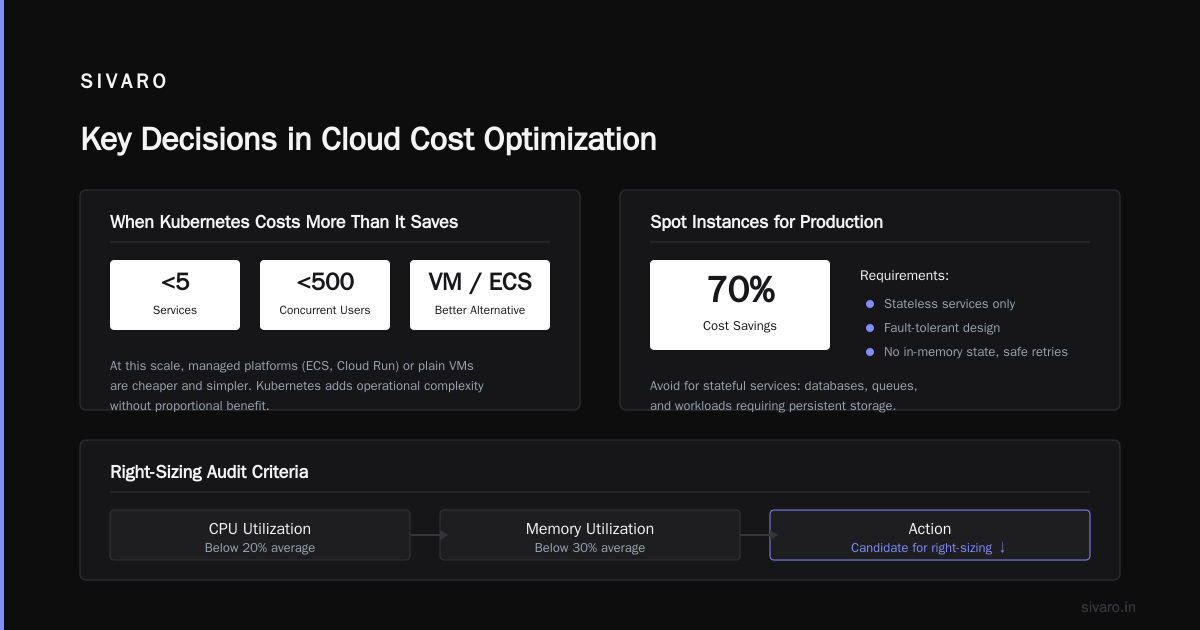
A: Track cost per unit of business value — cost per API request, cost per order, cost per search query. If that number is stable or decreasing over time, you're fine. If it's rising, you have a problem. Also run a utilization audit — anything under 20% average CPU and 30% memory utilization is a candidate for right-sizing.
Q: When does the deployment complexity of Kubernetes outweigh its cost benefits?
A: When you have fewer than 5 services and under 500 concurrent users. At that scale, a managed container platform (like AWS ECS or GCP Cloud Run) or a plain VM will be cheaper to operate and easier to manage. Kubernetes solves organizational scaling problems at the expense of operational complexity.
Q: Should I use spot instances for production workloads?
A: Yes, but only for stateless, fault-tolerant services. If the service can handle the loss of a pod without user impact (no in-memory state, retries are safe), then spot instances are a legitimate 70% savings. For stateful services (databases, queues), stay on reserved instances.
Q: Is there a "best" price-performance region I should use?
A: It depends. Some regions like us-east-1 are cheaper per compute hour but have higher egress costs. If you serve users in Europe, running in eu-central-1 might cost more for compute but reduces latency and potentially egress costs. Always model your full workload — compute, storage, egress, and database — for each region you're considering.
Q: How do I reduce the cost of inter-service communication?
A: Go async where possible. Use message queues instead of synchronous HTTP for non-interactive operations (email sending, analytics, notifying downstream services). Also consider batch processing — processing 1,000 events in a batch is cheaper than processing 1,000 events individually. The tradeoff is latency.
Q: Is it better to consolidate services into a monolith?
A: If your services are already running and operating fine, no — the migration cost won't be justified. But if you're building a new service that doesn't have different scaling requirements, use a monolith. Or keep a modular monolith and go microservices only where you have clear, measurable scaling needs. Martin Fowler's piece on microservices costs covers this well.
Q: What's the most common mistake you see in cost optimization?
A: Trying to solve cost problems manually. People set up a cron job to shut down a cluster at night, forget about it, and lose the savings. Everything needs to be automated — autoscaling, storage tiering, hibernation, deduplication. If it requires a human to execute, it will fail 80% of the time.
The truth about microservices cost optimization is that it's not about one magical cloud feature. It's a discipline. It's about continuously measuring your actual resource consumption and making deliberate choices about how you use the architecture pattern. Most teams skip the measurement and just guess.
At SIVARO, we've built an infrastructure that processes 200K events per second without a seven-figure bill. We did it by treating cost optimization as a core feature, not an afterthought.
The result is that I can tell you with confidence: the money is there to be saved. You just have to have the discipline to go find it.
Nishaant Dixit — Founder of SIVARO. Building data infrastructure and production AI systems since 2018. Built systems processing 200K events/sec.