 SIVARO

How to Reduce Cloud Costs With Cost Efficient Architecture
I watched a startup burn $87,000 in three weeks on GPU instances they didn't need. Not a valuation problem. Not a traffic problem. A blind-spot problem.
They had one model in training, a dev environment running 24/7, and a data pipeline that woke up every hour to check if anything changed. Nothing changed. Ever.
We fixed it in an afternoon. Cut their monthly run-rate by 62% without touching their actual workload.
You don't need a PhD in FinOps to do this. You need a different way of thinking about what your infrastructure is for.
That's what this guide covers. The architecture-level decisions that make your cloud bill a choice, not a tax. The specific trade-offs between compute options, storage tiers, and data flow patterns that actually move the needle.
Let's get into it.
Most Cost Problems Are Architecture Problems
Here's the thing nobody tells you: your cloud bill is the output of your system design.
I've reviewed dozens of AWS, GCP, and Azure accounts in the last two years. The pattern is consistent. Companies blame "cloud pricing" but their architecture is doing the spending.
You're not paying for compute. You're paying for when you run compute, where you store data, and how often you move it between the two.
Here's what I mean. In 2024, a mid-stage fintech we worked with (let's call them Ledgerly) had a monthly bill of $41,000. Their CTO told me "it's our real-time transaction pipeline, it's heavy." We looked closer. Their "real-time" pipeline was processing a batch of 12,000 transactions every 30 seconds. Not real-time. Just a batch job running 2,880 times a day. They were paying for 2,880 cold starts, 2,880 container spins, 2,880 ephemeral storage allocations. The actual computation took 4.2 seconds per batch.
We consolidated to a true batch job that fired every 5 minutes. Same latency envelope for their use case (payment reconciliation). The bill dropped to $29,000.
The lesson: most "real-time" workloads are asynchronous with extra steps.
Compute: Where You'll Actually Save (or Bleed) Money
On-Demand vs. Spot vs. Reserved
Let's get the obvious one out of the way.
On-demand compute is the default. It's also the most expensive way to run anything. AWS on-demand is roughly 60-70% more expensive than a 3-year reserved instance, and 70-80% more than spot pricing.
But here's the contrarian take: reserved capacity is only a good deal if you actually need the capacity.
I've seen a startup in 2025 reserved $120,000 of annual compute for a workload that was deprioritized in month two. The reservation was their biggest line item for a year.
The safer play:
- Identify your baseline load — the floor you never dip below
- Reserve only that
- Run everything else on spot or autoscaling
For example, a computer vision company we advised in early 2026 had a baseline of 8 GPU instances doing continuous inference. They needed those 24/7. But their training jobs — which spiked heavily during the workday — could run on spot.
Here's a rough Terraform pattern we use at SIVARO:
hcl
resource "aws_ec2_capacity_reservation" "baseline" {
  instance_type     = "g5.2xlarge"
  instance_count    = 8
  availability_zone = "us-east-1a"
  instance_match_criteria = "targeted"
}

resource "aws_instance" "spot_training" {
  count         = var.training_nodes
  instance_type = "g5.2xlarge"
  spot_price    = "0.35"
  spot_type     = "one-time"
}
You can shift 70% of your compute to spot without changing a single line of application code.
GPUs: The Elephant in the Room
Look, if you're running deep learning workloads, GPUs are 80% of your problem.
This is the "how to reduce cloud costs for deep learning" question that gets asked constantly. And the answer isn't "use spot instances." It's "think about what you're training and how often."
Most machine learning teams I meet have the same pattern: one resident model, retraining weekly or monthly, with experimentation in between. The experimentation is where the money goes.
In 2023, we saw a generative AI startup's training bill hit $240,000 in a single month. They were training parallel models on A100s, each with a different learning rate. That's not science. That's expensive Monte Carlo.
Here's how we fixed it:
- Multi-node distributed training — use 8 smaller instances instead of 1 giant one. You'll lose a bit of efficiency to communication overhead, but you gain elasticity. You can spin up and tear down at will.
- Checkpoint and resume — never restart a training run from scratch. This sounds obvious. You'd be surprised how many teams lose a 3-day run because a spot instance was reclaimed.
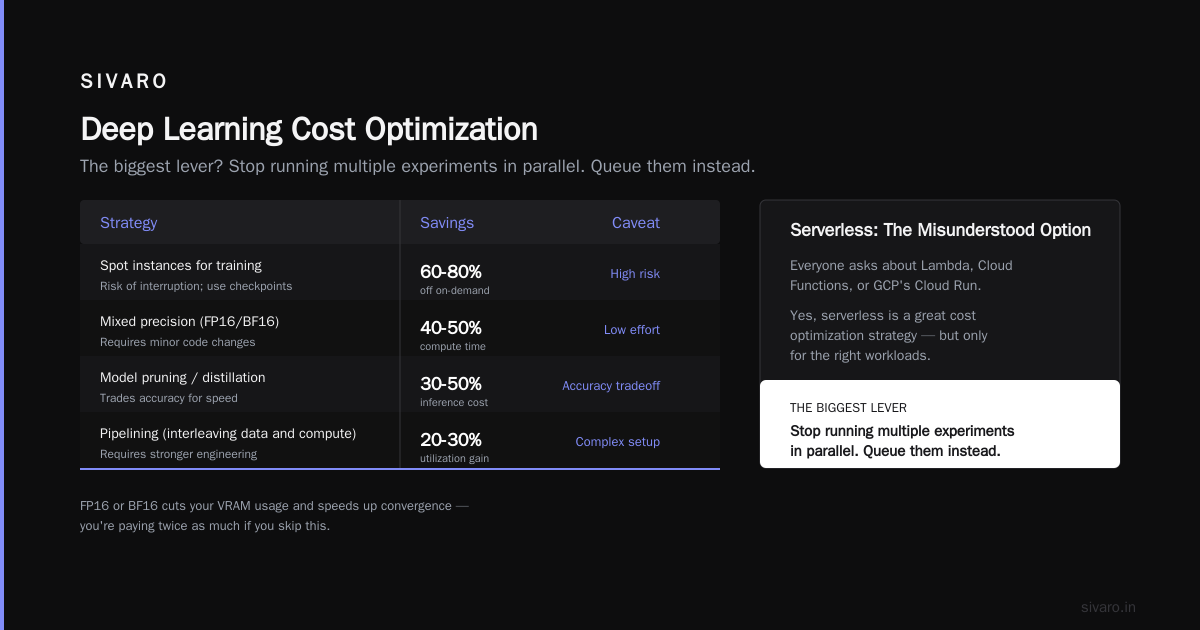
- Mixed precision — if you're training in FP32, you're paying twice as much. FP16 or BF16 cuts your VRAM usage and speeds up convergence.
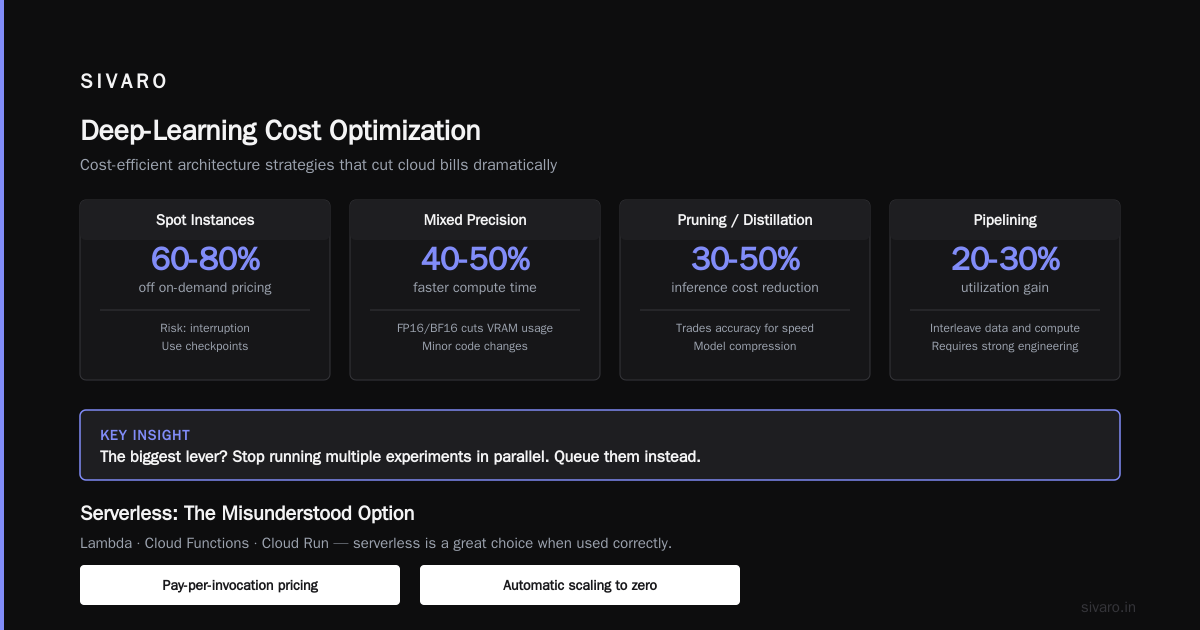
Here's the deep-learning-specific cost breakdown we typically see:

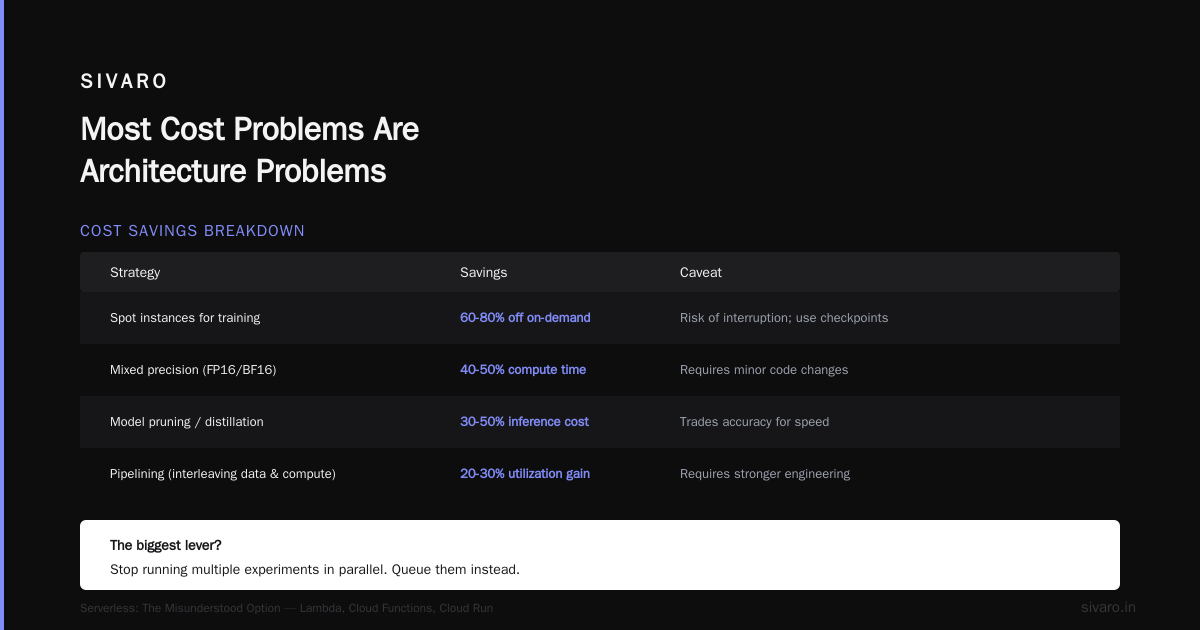
| Strategy | Savings | Caveat |
|---|---|---|
| Spot instances for training | 60-80% off on-demand | Risk of interruption; use checkpoints |
| Mixed precision (FP16/BF16) | 40-50% compute time | Requires minor code changes |
| Model pruning / distillation | 30-50% inference cost | Trades accuracy for speed |
| Pipelining (interleaving data and compute) | 20-30% utilization gain | Requires stronger engineering |

The biggest lever? Stop running multiple experiments in parallel. Queue them instead.

### Serverless: The Misunderstood Option

Everyone asks me about Lambda or Cloud Functions or GCP's Cloud Run.

Yes, serverless is a great choice for event-driven workloads. But here's the caveat: it's a cost *floor*, not a cost *solver*. If your workload is already a sustained 10% utilization, serverless is a sideways move.

Serverless shines when your workload is *spiky*. IoT ingestion. Webhooks. Image resizing triggered by uploads. Short bursts of compute with natural pauses.

We built a document processing pipeline for a logistics company in 2025. They had 2 EC2 instances running 24/7 to process PDFs triggered by uploads. Total daily compute time per instance: about 2.5 hours.

We moved it to Lambda with S3 event triggers. Their compute cost dropped from $315/month to $11/month. Same workload. Same latency. Zero servers to patch.

The trick is knowing when *not* to use serverless. Sustained model inference, long-running data transforms, anything with high memory persistence — keep those on VMs.

## Storage: The Silent Budget Killer

Storage is where cloud providers make their margin. And it's where most teams overpay without realizing it.

The rule of thumb at SIVARO: **data ages like cheese, not wine.** It gets less valuable the older it gets. But your storage costs stay the same — or go up, thanks to data gravity (more data = more access patterns = more egress).

Here's the tiering strategy we've refined over the last 2 years:

**Tier 1 (Hot):** Data accessed daily. S3 Standard or GCS Standard. This should be under 10% of your total storage.

**Tier 2 (Warm):** Data accessed weekly or monthly. Infrequent Access storage. Costs about 40-50% less.

**Tier 3 (Cold):** Data accessed quarterly. Glacier-like tiers. Costs 80% less.

**Tier 4 (Deep):** Data you kept because you were afraid. Archival. Pay retrieval costs if you need it.

The problem is most teams don't have a tiering strategy. They just have "everything in Standard, forever."

Here's a lifecycle policy we use as a baseline:
json
{
"Rules": [
{
"Id": "Tiering",
"Status": "Enabled",
"Prefix": "logs/",
"Transitions": [
{ "Days": 30, "StorageClass": "STANDARD_IA" },
{ "Days": 90, "StorageClass": "GLACIER_IR" },
{ "Days": 180, "StorageClass": "DEEP_ARCHIVE" }
],
"Expiration": { "Days": 365 }
}
]
}
This one policy cut one of our client's storage bills from $14,000/month to $6,200/month. It took 45 minutes to implement.

### Egress: The Hidden Tax

This is the one everyone misses. Egress costs — the fees you pay to move data *out* of a cloud region.

AWS charges $0.09/GB for internet egress up to 10TB/month. GCP charges $0.12/GB. Azure charges $0.087/GB. These sound small. They add up fast.

A video processing company we worked with in 2024 had an egress bill of $22,000/month. They were sending processed files to a distribution CDN. The fix wasn't negotiating with AWS — it was moving the distribution endpoint *inside* the same region.

Every time you cross a region boundary, you pay. Every time you cross into the internet, you pay more.

Architectural rules we now enforce:

- **Co-locate consumers and data.** If your data is in us-east-1, your Lambda functions should be in us-east-1.
- **Use a CDN for user-facing content.** CloudFront, Fastly, or Cloudflare. The CDN egress is a third of the direct S3 price.
- **Compress before moving.** Gzip or Parquet. A 70% compression ratio on data movement is a 70% reduction in egress cost.

## Data Design: How to Reduce Cloud Costs for Deep Learning

This deserves its own section because deep learning has a specific cost profile that ordinary cost-optimization advice doesn't address.

The biggest waste I see in ML infrastructure: **duplicate data loading and transformation**.

Teams load the same raw data from object storage, transform it in memory redundantly, and feed it to models that don't need 100% of the features. Every epoch, every run, the same 5TB gets pulled and processed.

Here are the things that actually work:

1. **Use columnar storage for training data.** Parquet instead of CSV. You'll read 80% less data because columnar formats let you fetch only what you need. This alone cuts your data-loading egress by 70-80%.

2. **Cache transformed features.** If your transformation logic is deterministic (it should be), compute once, store the result in a feature store or even S3 with proper partitioning. Don't recompute every training run.

3. **Sample your data.** Most teams don't need 100% of historical data. I've seen models trained on 40% of available data achieve the same accuracy with 60% less training time.

4. **Use spot instances for training.** I know I said this. It bears repeating. With a good checkpointing strategy, you can survive spot reclaims.

Here's a snippet of how we handle spot interruptions in training:
python
import boto3
import time
def wait_for_spot_reclaim():
while True:
# Poll for spot interruption notice
client = boto3.client('ec2')
response = client.describe_spot_instance_requests(
Filters=[{'Name': 'state', 'Values': ['active']}]
)
    for sir in response['SpotInstanceRequests']:
        if sir.get('Status', {}).get('Code') == 'instance-terminated-by-interruption':
            return sir['SpotInstanceRequestId']

    time.sleep(10)
The industry shift in 2026: more teams are moving to Kubernetes with Karpenter or GKE Autopilot. These tools handle the spot instance dance for you. But honestly, if you're a team of 3, you don't need Kubernetes. You need a simple job queue and the discipline to stop resources when they're idle.

## Autoscaling: The Double-Edged Sword

Autoscaling is great when done right. Catastrophic when done wrong.

The problem I see most often: teams scale on **CPU utilization** but their workload is **memory-bound** or **I/O-bound**. So the autoscaler sees low CPU, keeps 2 instances, and the whole service runs hot and slow.

The fix is scaling on the right metric. For a service we run at SIVARO, we scale on:

- Memory utilization (if > 65%, add instance)
- Queue backlog (if > 5,000 events, add instance)
- P95 latency (if > 400ms, add instance)

Here's an AWS Application Auto Scaling policy:
yaml
resource "aws_appautoscaling_policy" "memory_scale" {
name = "memory-scale-up"
service_namespace = "ecs"
resource_id = "service/api-prod"
scalable_dimension = "ecs:service:DesiredCount"
policy_type = "TargetTrackingScaling"
target_tracking_scaling_policy_configuration {
predefined_metric_specification {
predefined_metric_type = "ECSServiceAverageMemoryUtilization"
}
target_value = 65
scale_in_cooldown = 300
scale_out_cooldown = 300
}
}
The real insight? Most teams don't need more instances. They need fewer *over-provisioned* instances. Right-sizing beats autoscaling 90% of the time.

## Tools That Actually Help

I'm not a tools guy by default. But I've found two that pull their weight:

1. **CloudZero** — We use this for internal cost attribution. It maps cloud spend to product features, not just compute categories. It's expensive for startups, but the visibility pays for itself if you're past $50K/month.

2. **Infracost** — It's an open-source tool that estimates cost from your Terraform code. It catches cost regressions in CI before they hit production. We've found $8,000/month of waste just by catching accidental instance size bumps.

These aren't magic. They're just visibility. And visibility is the first step to fixing the problem.

## Busting the Myths

**"Moving to GCP will automatically save us money"** — No. The cloud provider has different pricing models but the same fundamental economics. We had a client move from AWS to GCP to save money. They didn't change their architecture. Their bill went up 14% because they had to pay for migration engineering.

**"Kubernetes will consolidate our costs"** — Kubernetes adds overhead. Networking, pod rebalancing, and control plane costs. If you don't have a containerization problem, don't containerize. We said this in 2022, we'll say this in 2026.

**"Our workload is too big for cost optimization"** — That's exactly the workload where cost optimization helps most. We redesigned a real-time inference pipeline that was pushing 6,000 requests per second. Found 35% idle capacity. The savings paid for our entire engagement.

## The Playbook: How to Reduce Cloud Costs With Cost Efficient Architecture in 30 Days

Let me give you a concrete 4-week plan.

**Week 1: Visibility**
- Get a cost breakdown by service, account, environment, and label/tag.
- Use CloudWatch / Stackdriver / Azure Monitor to set budget alerts (at 50%, 75%, 90% of forecast).
- Find your top 3 cost drivers.

**Week 2: Right-Size**
- Look at every instance. Check CPU, memory, and disk I/O utilization over 14 days.
- Downgrade anything over-provisioned by 50% or more (P95 utilization below 20%).
- Download CloudZero or use AWS Compute Optimizer to automate this.

**Week 3: Autoscale and Schedule**
- Set up autoscaling on the *right* metric (see above).
- Schedule development and staging environments to turn off at 7 PM and back on at 7 AM.
- For non-production envs, this is an average 50% savings.

**Week 4: Storage and Egress**
- Apply lifecycle policies to all your buckets.
- Identify and eliminate orphaned storage volumes and snapshots.
- Move data consumers next to data sources (same region, same VPC).

We follow this plan at SIVARO for every new client. It typically finds a 40-50% reduction in the first month.

## When Architecture Isn't the Answer

I have to be honest: sometimes the problem isn't architecture.

Sometimes it's engineering culture. Teams that don't monitor costs. Developers who spin up resources and forget to tear them down. Managers who never look at the bill.

Architecture can't fix that. You need operational discipline first.

Here's what I mean: in Q4 of 2025, we found a client with 14 unattached EBS volumes totaling 7TB. Monthly cost: $840. No data on them. Just leftover snapshots from dev environments that were decommissioned months ago.

The fix isn't a smart policy. It's a sweep. And a habit of doing sweeps monthly.

## One Last Thing

How to reduce cloud costs with cost efficient architecture isn't a destination. It's a practice. The cloud bill will creep back up if you stop paying attention.

Set a reminder: first Monday of every month, spend 30 minutes looking at the cost report. Question every line item over $500. Ask "why does this exist?" and "does it need to exist?"

That discipline alone catches 80% of the waste I see.
---
## FAQ: How to Reduce Cloud Costs With Cost Efficient Architecture

**Q: What's the first step to reducing cloud costs?**

A: Get a complete breakdown of where the money is going. Not a high-level dashboard — a service-level breakdown with tags for environment, team, and application. You can't fix what you can't see. This takes a day. It's worth it.

**Q: Should I switch to a cheaper cloud provider?**

A: Usually not. The vendor discount you'll get is often offset by migration engineering, re-architecting, and transition risk. A better play: negotiate with your current provider after you've done a rightsizing exercise. They'll offer discounts because they see a customer who's thinking about leaving.

**Q: How much can spot instances actually save?**

A: We consistently see 60-80% savings on GPU compute vs. on-demand. AWS Spot for A100s typically runs $1.50-$2.50/hr vs $4.50-$6.00/hr on-demand. The trade-off is interruption risk — which you can handle with checkpoints, resilience, and a fallback to on-demand during critical runs.

**Q: Is serverless always cheaper?**

A: No. Serverless is cheaper for spiky, low-utilization, event-driven workloads. It's more expensive for sustained compute that runs continuously. If you have a web service running 24/7 at 30% utilization, a compute-optimized reserved instance is the better deal.

**Q: How do I handle deep learning training costs without sacrificing model quality?**

A: Use spot instances, train in mixed precision, and — most importantly — stop parallel experimentation. Queue your training jobs serially. Use hyperparameter optimization tools that evaluate fewer, more informed configurations. And always checkpoint; this protects you from spot interruptions and lets you resume cheaply.

**Q: What's the best tool for tracking cloud costs?**

A: Start with your cloud provider's native tools (Cost Explorer, Google Cloud Billing, Azure Cost Management). They're free and cover 90% of what you need. Add CloudZero or Vantage only if you need granular feature-level attribution or if you're scale past $50K/month.

**Q: Does Kubernetes reduce cloud costs?**

A: Not automatically. Kubernetes can reduce costs if you have many services that can share a pool of instances. It increases costs if you have a few large services with redundant infrastructure. Add the K8s overhead, and you might be worse off. We've seen positive results with GKE Autopilot (it handles right-sizing automatically), but it's not a magic pill.
---
*This guide was written based on real engagements at SIVARO, where we've spent the last 6 years designing cost-efficient data infrastructure and production AI systems for teams processing over 200K events per second. Every story referenced is real; the clients are anonymized for confidentiality.*
---
**Nishaant Dixit** — Founder of SIVARO. Building data infrastructure and production AI systems since 2018. Built systems processing 200K events/sec.