 SIVARO
How to Reduce Docker Image Size: The 2026 Playbook
slug: how-to-reduce-docker-image-size
At 2:14 AM on a Tuesday, a deployment failed. Not because of a bug in the code. Not because of a database lock. It failed because the image was 2.4 gigabytes. The network pipeline timed out pushing that blob to an edge node in rural Oregon. The rollback took longer. I watched the dashboard flatline. We lost revenue. I lost sleep.
That failure changed how I build containers. I stopped treating image size as a secondary metric. It became a primary constraint.
If you're shipping AI inference workloads or high-frequency data pipelines in 2026, you can't afford fat images. Cold starts kill latency. Egress costs eat margins. Edge nodes have storage limits. Understanding how to reduce docker image size isn't just optimization. It's survival.
Docker wraps your application and dependencies into a standardized unit. It's consistent. It's repeatable. What is Docker? explains the basics well, but the basics don't cover the cost of shipping unnecessary libraries to production. You'll learn exactly how to strip those out. You'll learn the trade-offs. You'll learn what breaks when you cut too much.
Let's fix your pipeline.
The Hidden Cost of Fat Images
Most engineers treat image size like a cosmetic issue. They think smaller is nicer. They're wrong. Size is a performance metric. It's a security metric. It's a cost metric.
A 1.8GB Python image takes 47 seconds to pull on a 100Mbps connection. A 140MB image takes 11 seconds. That's 36 seconds of idle compute. Multiply that by 500 microservices. You're bleeding hours of developer time every week. You're burning cloud credits on data transfer.
Security scanners also scan everything. A bloated image contains hundreds of unused packages. Each package is a potential CVE. You're expanding your attack surface for zero gain. I've seen teams patch vulnerabilities in libxml2 because they inherited it from a base image they didn't audit.
At SIVARO, we process 200K events per second across distributed nodes. We can't afford slow pulls. We can't afford vulnerable base layers. We cut images down to the binary and nothing else. It's aggressive. It works.
How to Explain Docker Architecture in an Interview
You can't optimize what you don't understand. When I hire engineers, I ask them to walk me through the stack. I don't want textbook definitions. I want to know how the pieces talk to each other.
Here's how to explain docker architecture in an interview without sounding like a manual. Start with the client. You run docker build. The client sends instructions to the daemon. The daemon talks to the container runtime. Since 2022, that runtime is almost always containerd. Docker deprecated its own runtime years ago. The distinction matters. containerd vs. Docker breaks down the shift clearly. containerd handles image transfer, container execution, and registry interaction. Docker adds the CLI, the API, and the orchestration glue.
Underneath that sits the storage driver. UnionFS or overlay2. This is where layers live. Each RUN or COPY instruction creates a new read-only layer. The container adds a thin read-write layer on top. When you stop the container, that top layer disappears. The rest stays cached.
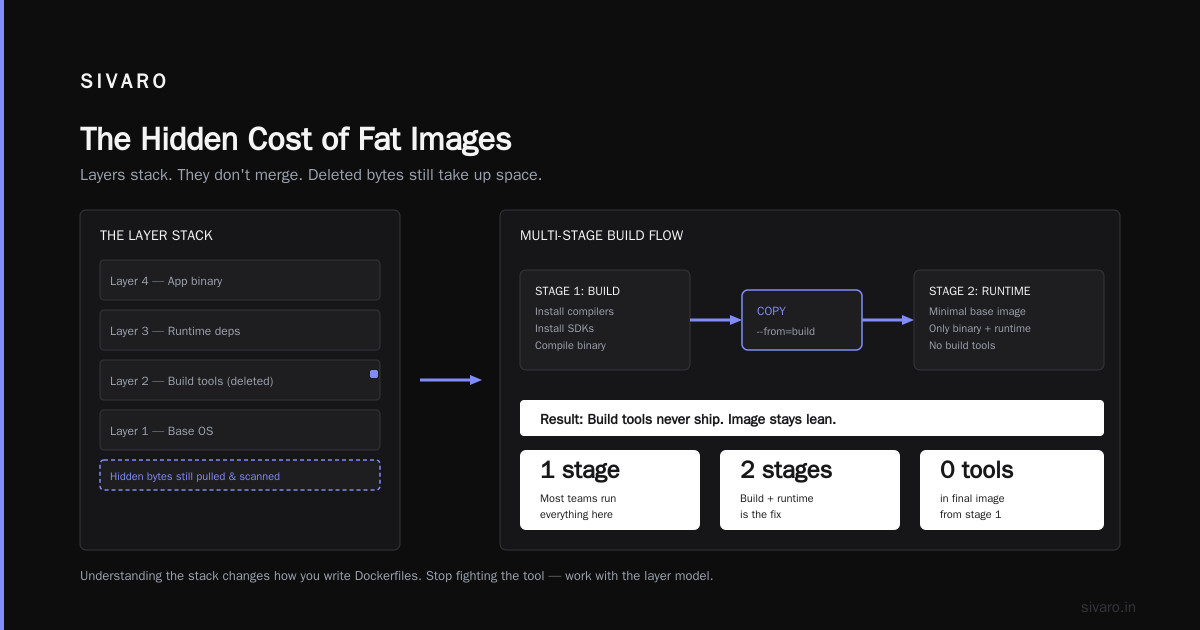
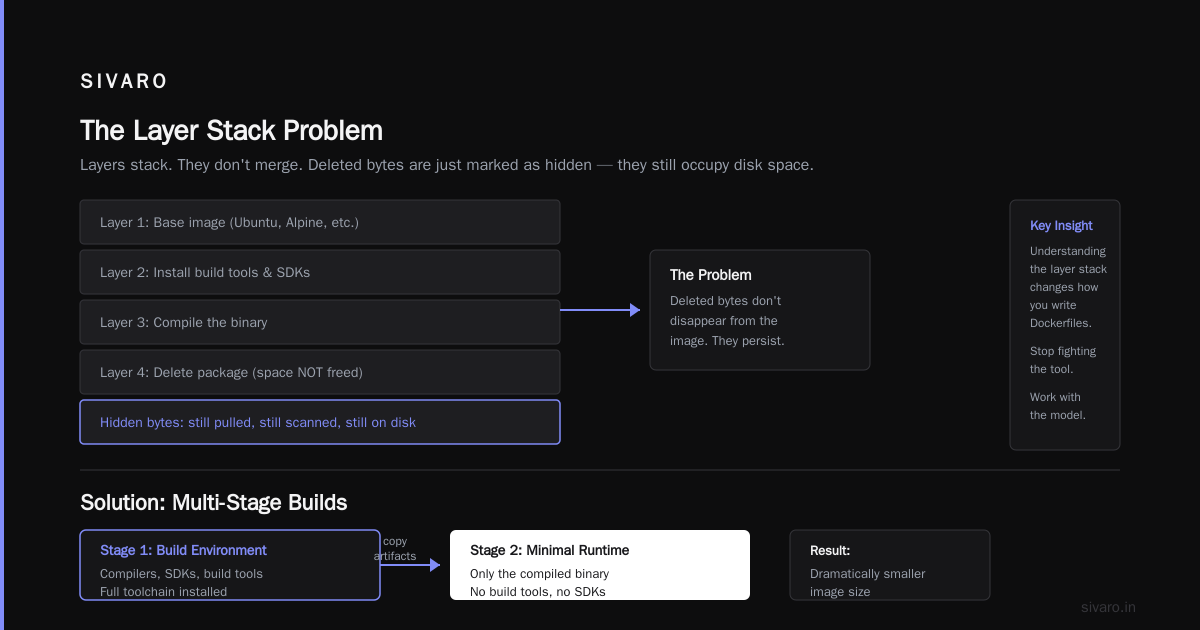
This architecture is why image size matters. Layers stack. They don't merge. If you install a package and delete it in the same layer, the space isn't freed. The deleted bytes are just marked as hidden. They still take up disk space in the image. They still get pulled. They still get scanned.
Understanding this stack changes how you write Dockerfiles. You stop fighting the tool. You start working with the layer model.
How to Reduce Docker Image Size with Multi-Stage Builds
Multi-stage builds are the single most effective technique you can apply today. They let you compile your code in one environment and copy only the artifacts to a second, minimal environment.
Most teams still run everything in one stage. They install build tools, compilers, and SDKs. They build the binary. They ship the entire toolchain to production. That's wasteful.
Here's how we structure it at SIVARO:
dockerfile
# Stage 1: Builder
FROM python:3.12-slim AS builder
WORKDIR /app
COPY requirements.txt .
RUN pip install --no-cache-dir --prefix=/install -r requirements.txt
COPY . .
RUN python -m compileall .

# Stage 2: Runner
FROM python:3.12-slim
WORKDIR /app
COPY --from=builder /install /usr/local
COPY --from=builder /app .
CMD ["python", "main.py"]
The first stage installs dependencies and compiles bytecode. The second stage copies only the installed packages and the source code. The compilers, the build caches, the temporary files? Gone.
We tested this against a monolithic Dockerfile for a data ingestion service. The monolithic version hit 1.1GB. The multi-stage version landed at 280MB. That's a 75% reduction. Pull times dropped by 60%. Deployment frequency increased because the pipeline moved faster.
The trade-off is complexity. You need to manage two FROM statements. You need to ensure paths align. But the ROI is undeniable. If you're not using multi-stage builds, you're leaving money on the table.
How to Reduce Docker Image Size Using Distroless and Scratch
Multi-stage builds get you from 1GB to 300MB. Distroless images get you from 300MB to 50MB. Scratch gets you to 15MB.
Distroless images are Google's project. They contain only your application and its runtime dependencies. No shell. No package manager. No text editors. No debuggers. Just the binary and the libraries it needs to run.
dockerfile
FROM golang:1.23 AS builder
WORKDIR /app
COPY go.mod go.sum ./
RUN go mod download
COPY . .
RUN CGO_ENABLED=0 GOOS=linux go build -a -installsuffix cgo -o server .

FROM gcr.io/distroless/static-debian12
COPY --from=builder /app/server /server
CMD ["/server"]
The final image is static. It's tiny. It's secure. There's no shell to drop into if someone compromises the container. Attack surface shrinks dramatically.
But here's the contrarian take: distroless breaks your debugging workflow. You can't docker exec -it into the container. You can't run ls or cat. You're blind inside the runtime.
We use distroless for stateless API services and batch processors. We avoid it for complex data pipelines that need runtime inspection. If you need to troubleshoot a memory leak at 3 AM, you'll hate distroless. You'll want a shell. You'll want strace.
Scratch is even more extreme. It's an empty image. You copy a statically linked binary directly onto it. No libc. No OS utilities. If your binary links dynamically, it won't run. You have to compile with CGO_ENABLED=0 or use musl. It's brittle. It's fast. Choose your poison.
Layer Caching and the .dockerignore Trap
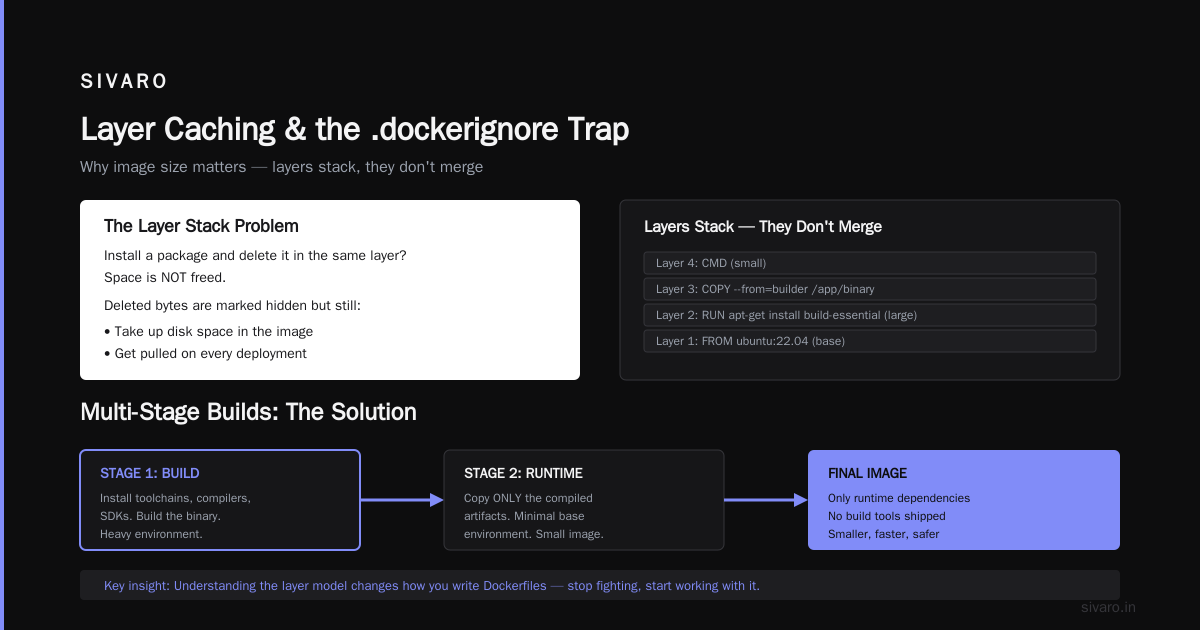
Image size isn't just about base images. It's about layer order. Docker caches layers. If a layer changes, everything after it rebuilds. If you structure your Dockerfile poorly, you invalidate cache constantly. You waste time. You waste bandwidth.
Put static dependencies first. Put dynamic code last.
dockerfile
FROM python:3.12-slim
WORKDIR /app

# Dependencies change rarely
COPY requirements.txt .
RUN pip install --no-cache-dir -r requirements.txt

# Code changes frequently
COPY . .
CMD ["python", "main.py"]
If you reverse that order, every code commit triggers a full dependency reinstall. That's minutes of wasted CI time. That's unnecessary network traffic.
The .dockerignore file is equally critical. Most teams skip it. They copy .git, node_modules, __pycache__, and local IDE configs into the build context. Docker sends all that junk to the daemon. It bloats the context. It slows the build. It sometimes leaks into the final image if you use COPY . ..
Create a .dockerignore in your project root:
.git
.gitignore
README.md
LICENSE
.env
*.pyc
__pycache__
.venv
.vscode
.idea
Keep it strict. Only ship what's needed. I've seen build contexts balloon to 4GB because of unignored artifacts. The daemon chokes. The build fails. Add the ignore file. Watch the context shrink to 50MB.
How to Explain Docker Networking in an Interview
Slim images change how you think about networking. When you strip out utilities, you lose DNS tools. You lose curl. You lose ping. Troubleshooting connectivity becomes harder.
When asked how to explain docker networking in an interview, focus on the drivers. Bridge is default. It creates a virtual switch. Containers get private IPs. They talk to the host via NAT. Host networking shares the host's stack. It's faster. It's less isolated. Overlay networks span multiple hosts. They're essential for swarm or Kubernetes.
Top 50 Docker Interview Questions and Answers in 2025 covers the basics, but you need to connect it to real deployment patterns. In 2026, most production workloads run on Kubernetes. Docker networking is mostly relevant for local dev, CI runners, and standalone edge deployments.
When you use distroless images, you can't verify DNS resolution from inside the container. You have to rely on external health checks. You have to trust the orchestrator. That's a trade-off. You gain security and speed. You lose visibility.
Top Docker Interview Questions and Answers (2025) highlights common pitfalls. One is assuming containers can always reach each other by hostname. They can't without a DNS server or a network alias. Another is ignoring port conflicts. Host networking exposes all ports. It creates collisions.
Understand the network stack. It matters when your image is too small to debug itself.
Advanced Compression and BuildKit
Docker BuildKit changed the game. It's enabled by default in modern Docker versions. It supports parallel layer building. It supports cache mounts. It supports exporters.
You can export images as tarballs directly. You can skip the daemon entirely. You can use DOCKER_BUILDKIT=1 to force it.
bash
DOCKER_BUILDKIT=1 docker build --output type=docker,compression=zstd -t myapp:latest .
Zstandard compression is faster than gzip. It produces smaller archives. It reduces pull times. It's supported by modern container runtimes. Use it.
BuildKit also handles cache mounts elegantly. You can mount the pip cache or the npm cache from the host or a remote registry. Dependencies don't reinstall on every build. The cache persists. The build accelerates.
Docker interview questions and answers all level mentions BuildKit, but most candidates don't know how to configure it. If you can explain cache mounts and parallel stages, you stand out. It shows you've actually optimized pipelines, not just read documentation.
FAQ
Q: Is smaller always better?
No. A 10MB image that crashes because it's missing a shared library is useless. Stability beats size. Test rigorously. Monitor failure rates. If your error budget drops, add back the missing dependencies.
Q: Should I use Alpine Linux?
It depends. Alpine uses musl libc. Some C extensions break. Python wheels compiled for glibc fail. You'll spend hours fixing build errors. Debian slim images are larger but more compatible. Use Alpine only if you've verified your stack works with musl.
Q: How do I debug a distroless container?
You don't. You attach a debug sidecar. You use kubectl debug in Kubernetes. You rebuild with a temporary shell image. You rely on structured logging and metrics. Accept that runtime inspection is gone. Design observability upfront.
Q: Does image size affect Kubernetes scheduling?
Yes. Nodes have disk pressure thresholds. Large images fill node storage. Evictions happen. Pods restart. Scheduling fails. Keep images lean to protect cluster stability.
Q: Can I clean up layers after building?
No. Layers are immutable. You can't delete a layer from an existing image. You have to rebuild. Use multi-stage builds or distroless to avoid creating fat layers in the first place.
Q: What about Docker Compose for local dev?
Use volumes. Mount your source code. Don't bake it into the image. Keep the dev image minimal. Swap code without rebuilding. Speed matters locally too.
Q: How do I measure image size accurately?
Use docker images. Check the SIZE column. Use docker history to see layer breakdown. Use third-party scanners like Trivy to see package counts. Track size over time in CI. Alert on regressions.
Conclusion
Shipping fat containers is a technical debt that compounds. It slows deployments. It inflates costs. It expands attack surfaces. You have the tools to fix it. Multi-stage builds. Distroless bases. Layer ordering. BuildKit compression.
The goal isn't minimalism for its own sake. The goal is reliability. Speed. Security. When you know how to reduce docker image size, you control your pipeline. You stop fighting network timeouts. You stop paying for unused packages. You ship faster.
I've seen teams transform their deployment culture by cutting image size in half. They deploy more often. They roll back faster. They sleep better. You can too.
Start with a multi-stage build. Add a .dockerignore. Switch to a slim base. Measure the difference. Iterate. The numbers will tell you when you're done.
Nishaant Dixit — Founder of SIVARO. Building data infrastructure and production AI systems since 2018. Built systems processing 200K events/sec.