 SIVARO
How to Reduce GCP Cloud Costs: A SIVARO Founder's Playbook
Last year, a Series B startup came to me with an $80k/month GCP bill. They had no idea where the money was going. No budgets, no alerts, no rightsizing reviews — just a credit card on autopilot. Three months later, we cut it to $48k. No feature changes. No migration. Just ruthless cost discipline.
I've been building data infrastructure on GCP since 2018. SIVARO runs production AI systems that process over 200,000 events per second. Cloud costs aren't abstract for me — they're a survival metric.
This guide is what I wish someone had handed me back then. You'll learn exactly how to reduce GCP cloud costs systematically, which discounts actually work, where the hidden drains are, and when the free tier is — or isn't — worth your time.
Let's start with the thing nobody tells you: GCP isn't cheap by default. It's cheap by design — if you use the design. Most people don't.
The GCP Pricing Model Isn't What You Think
Here's the dirty secret: cloud providers make money on complexity. Google's pricing is simpler than AWS or Azure — compute, storage, network, and services are billed separately and transparently. But "simpler" isn't the same as "cheap."
Check the numbers from the Google Cloud Pricing 2026 cost breakdown: the average GCP user overprovisions by 30-40%. That's not a Google problem — that's a "you didn't set up rightsizing" problem.
Compare that to AWS vs Azure vs GCP cost comparison data: GCP's on-demand compute is often 10-15% cheaper than equivalent AWS instances on paper. But after discounts, the gap narrows. The real difference? How easy GCP makes it to apply those discounts.
Most people think the solution is "switch providers." They're wrong. The solution is understanding GCP's pricing levers and pulling them in the right order.
Compute: The Biggest Drain, Easiest Fix
Compute is where 60-70% of your GCP bill lives. Fix it first.
Rightsize Instances
I've seen teams run n2-standard-32 VMs with CPU utilization below 10%. That's $1,200/month per VM, wasted. Use GCP's rightsizing recommendations — they're surprisingly good.
Run this regularly:
bash
gcloud compute instances list --format="table(name, zone, machineType, status, scheduling.onHostMaintenance)"
Then check utilization via Cloud Monitoring. Anything averaging under 30% CPU for a week? Downsize. Under 10%? Question if it should exist at all.
Committed Use Discounts (CUDs)
GCP offers 1-year or 3-year committed use discounts for compute resources. The savings? Up to 57% for 3-year commitments on most machine types. This is the single biggest lever most teams ignore.
The trick: don't commit for your entire fleet. Start with predictable baseline loads — your always-on production servers. If your total compute fluctuates more than 20%, commit to only 60-70% of peak. The rest goes on-demand or preemptible.
Google's own pricing calculator lets you compare committed vs on-demand. Run scenarios before signing anything.
Preemptible and Spot VMs
For batch jobs, ML training, CI/CD, and stateless workers — use preemptible VMs. They can be shut down with 30 seconds notice, but they cost 60-80% less than on-demand.
We run our entire Spark processing pipeline on preemptible VMs. Yes, tasks get killed occasionally. We designed the pipeline to checkpoint every 5 minutes. Total cost for 100 nodes running 12 hours/day: about $4,000/month instead of $18,000.
Important: GCP's spot VMs (same as preemptible but with longer termination notice) are now available for newer generations like C3 and H3. Use those.
Avoid f1-micro and g1-small for Production
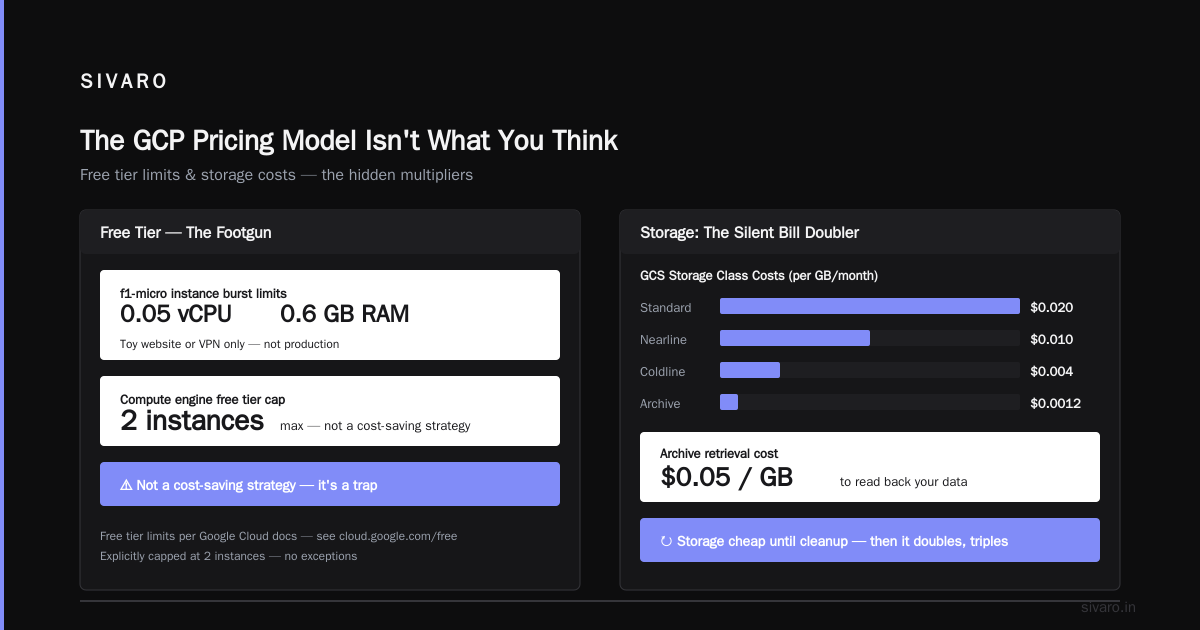
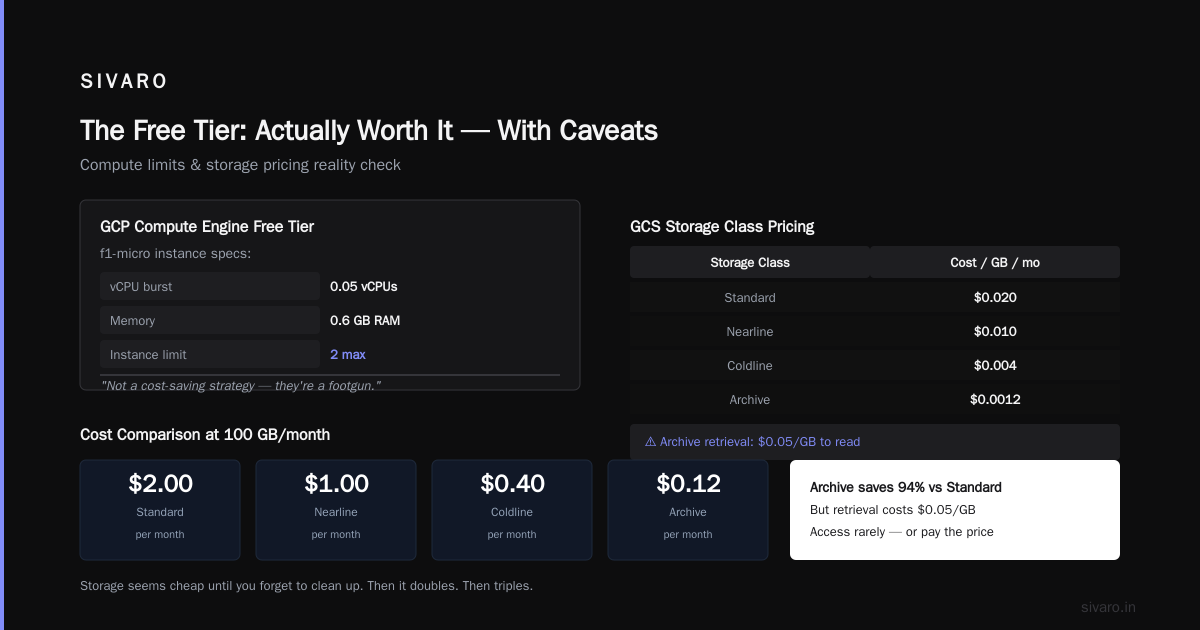
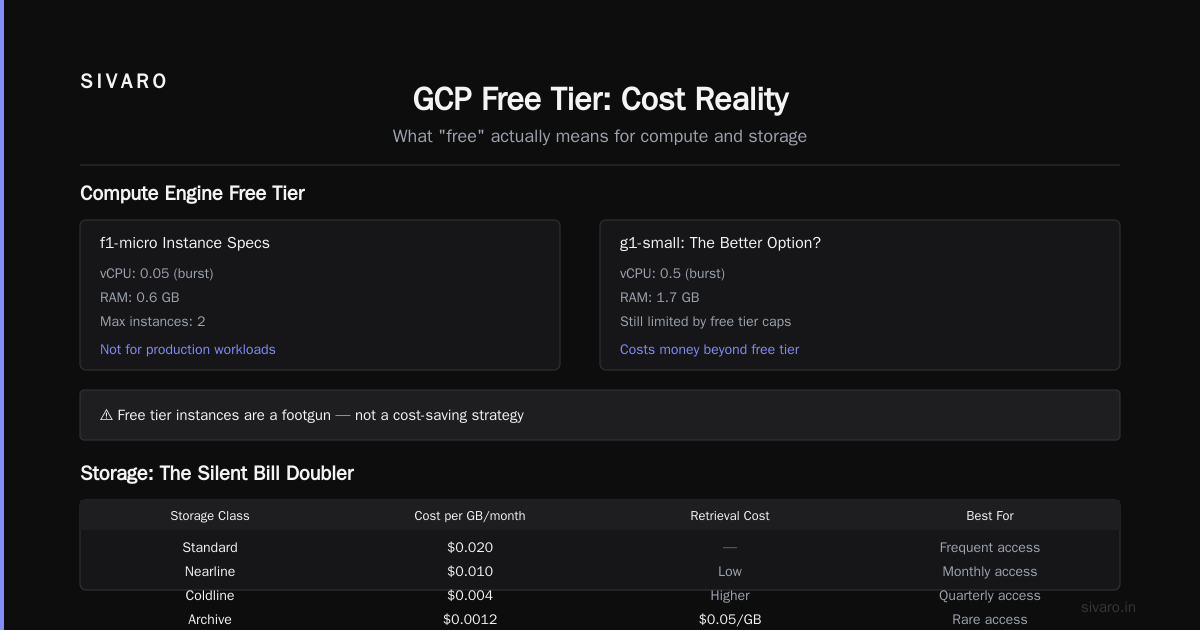
The GCP free tier includes f1-micro instances — but they burst only 0.05 vCPUs and 0.6 GB RAM. That's fine for a toy website or a VPN. For anything resembling production? Forget it. The GCP free tier compute engine limits explicitly cap you at 2 such instances. They're not a cost-saving strategy — they're a footgun.
Storage: The Silent Bill Doubler
Storage seems cheap until you forget to clean up. Then it doubles. Then triples.
Object Storage: Use Nearline and Coldline
Standard storage in GCS costs $0.020/GB/month. Nearline is $0.010, Coldline is $0.004, Archive is $0.0012. But retrieval costs vary — Archive charges $0.05/GB to read.
For data you access less than once a quarter, that's 93% savings. We moved 20 TB of historical logs to Archive. Saved $380/month. Retrieval happens maybe once a year. Worth it.
Persistent Disks: Unattached Disks Are Thieves
Every disk that's not attached to a running VM still costs you. I've seen teams with 50 unattached SSDs eating $1,000/month.
Find them with:
bash
gcloud compute disks list --format="table(name, sizeGb, status, users)" --filter="users:null"
Delete or snapshot and delete any disk you're not using within 30 days.
Snapshots and Images
Snapshots are incremental — first one is full, subsequent ones only store changes. But if you keep weekly snapshots for two years, you're paying for 104 snapshots. Use lifecycle policies to keep only the last 7 daily, last 4 weekly, last 12 monthly. That cut our snapshot costs by 80%.
Network: The Hidden Tax Everyone Forgets
Egress is where GCP (and every cloud) makes margin. Ingress is free. Data moving between zones or regions costs money.
Keep Traffic Inside a Region
If your frontend is in us-east1 and your database is in us-west1, every query pays network egress. Move them to the same region. We consolidated four regional deployments into two regions. Saved $3,200/month in data transfer fees.
Use VPC Peering Instead of Public IPs
Every public IP costs $0.004/hour. That's $2.88/month per IP — not huge. But 50 public IPs? That's $144/month for nothing. Use Cloud NAT for outbound traffic from private instances. Use internal load balancers. Avoid public IPs unless absolutely necessary.
Cloud CDN and Edge Caching
If you serve static content, GCP's Cloud CDN caches it at Google's edge locations. You pay for the CDN, but you save on egress from your origin. For us, adding CDN to a leaf node monitoring dashboard dropped egress from 2 TB/month to 200 GB/month. That's roughly $180 saved per month.
Databases: Don't Overspend on Managed Services
GCP's managed databases (Cloud SQL, Spanner, Bigtable) are convenient. They're also expensive.
Cloud SQL: Use Shared Cores
For Cloud SQL, you can choose shared-core machine types like db-f1-micro and db-g1-small. They're severely limited (0.5 vCPU), but for low-traffic dev environments, they cost $10-$20/month instead of $50+. Production? Use committed use discounts on dedicated cores.
BigQuery: Partition and Cluster
BigQuery charges by the data scanned. A query scanning 1 TB costs $5. Partition your tables by date. Cluster by frequently filtered columns. This can reduce scanned data by 70-90%.
Example: A SELECT * on a 10 TB partitioned table with a WHERE date = '2026-08-01' scans maybe 20 GB instead of 10 TB. That's the difference between $50 and $0.10 per query.
Spanner: Turn Down Nodes
Spanner scales horizontally. But if you provision 5 nodes and only need 2, you're paying for 3 idle nodes. Use the recommender to spot overprovisioned Spanner instances. We found a client with 10 nodes at 15% utilization. Dropped to 3 nodes. Monthly bill went from $12,000 to $3,600.
The Free Tier: Actually Worth It — With Caveats
"Is Google Cloud free tier worth it?" — this gets asked constantly. My answer: yes, but only for learning, prototyping, and very low-traffic personal projects.
The free tier includes:
- 1
f1-microinstance per month (but only inus-west1, us-central1, us-east1— not all regions) - 30 GB-month of standard persistent disk
- 5 GB of Cloud Storage
- 1 GB of network egress per month (topped up with 200 GB from Cloud CDN)
- BigQuery 1 TB of query data per month
- Cloud Functions 2 million invocations per month
For a blog with 500 visitors/month? Fine. For a SaaS app with 10,000 users? You'll hit limits fast.
The GCP free tier compute engine limits are strict: you get one f1-micro in select regions, and exceeding that kills the free tier. Also, the free tier doesn't cover premium networking or high-availability features.
So is it worth it? If you're bootstrapping a side project, yes. If you're a startup with revenue, the free tier is a distraction. Focus on committed use discounts and preemptibles instead.
Automate Cost Control
You can't reduce costs manually every month. It's too easy to forget. Automate it.
Set Budgets and Alerts
Google Cloud's Budgets API lets you set thresholds and trigger Pub/Sub notifications. We set a 50%, 75%, 90%, and 100% alert on every project's budget. When the 100% alert fires, we auto-pause non-critical workloads using Cloud Functions.
Here's a script to list budgets:
bash
gcloud billing budgets list --billing-account=BILLING_ACCOUNT_ID --format="table(budgetFilter.displayName,amount.specifiedAmount.units, thresholdRules)"
Use Recommender and Active Assist
GCP's recommender system gives you specific, actionable recommendations: "This VM is idle — stop it." "This disk has 30% low usage — resize." "This CUD is underutilized — increase coverage." Listen to it. We automated the application of low-risk recommendations (like resizing unattached disks) via a weekly cron job.
Clean Up Unused Resources
Run a weekly inventory. Use the recommender's idle instance report. We built a simple script that lists all VMs stopped for over 7 days and sends a Slack notification. 90% of the time, they can be deleted.
Example:
bash
gcloud compute instances list --filter="status:TERMINATED AND creationTimestamp < $(date -d '-7 days' +%Y-%m-%dT%H:%M:%SZ)" --format="table(name,zone,creationTimestamp)"
Case Study: How SIVARO Cut Costs by 40%
We run a data pipeline that ingests, transforms, and serves real-time analytics. Architecture: Pub/Sub -> Dataflow -> BigQuery -> Cloud Run APIs. All on GCP.
In 2025, our monthly bill was $52,000. By February 2026, it was $31,000. Changes:
- Moved batch Dataflow pipelines to preemptible workers. Saved $8,000/month.
- Switched from Cloud SQL to a self-hosted PostgreSQL on GCE with committed use discounts. Saved $4,500/month.
- Implemented BigQuery clustering and partitioned tables. Reduced query costs by 60% ($2,200/month).
- Consolidated three regions to two. Saved $2,100/month in network egress.
- Deleted 200 TB of unused snapshots. Saved $600/month.
- Used committed use discounts on compute for the frontend servers. Saved $3,400/month.
Total: $21,000/month reduction. No performance degradation. No developer productivity loss.
The key was not a single silver bullet — it was a dozen small fixes applied systematically.
Hidden Costs You Need to Watch
Google's pricing documentation is transparent. But some costs sneak up on you:
- Dataflow Shuffling: Shuffle operations can cost $0.005/GB. If your pipeline shuffles 1 TB per job, that's $5 per job. Run 1,000 jobs? $5,000/month. Optimize your pipeline to minimize shuffling or use the
batchmode. - Cloud NAT Gateway: $0.045/hour per gateway, plus $0.045/GB for data processed. For high-volume NAT traffic, that adds up fast. Use private Google access and VPC peering instead.
- VPC Service Controls: $0.003/hour per perimeter — sounds trivial. For 100 perimeters? $216/month.
- Key Management Service (KMS): $0.06 per key version per month. If you create 1,000 key versions per month (e.g., for CI/CD), that's $60/month. Not huge, but unnecessary.
Use the cloud pricing calculator to model these before deploying.
FAQ
Is Google Cloud free tier worth it for a startup?
It depends. For learning and prototypes, absolutely. For a revenue-generating SaaS, even with 100 users, the free tier limits (1 f1-micro, 5 GB storage, 1 GB egress) will bottleneck you. Use it to validate an idea, then upgrade. The GCP vs AWS 2026 comparison shows GCP's free tier is generous for small-scale, but AWS's free tier offers more variety (1 year of certain services). Choose based on what you're building.
What are GCP free tier compute engine limits?
You get one f1-micro VM per billing account per month in specific regions (us-west1, us-central1, us-east1). Exceeding that or using a different region charges standard rates. Also, you get 30 GB-month of persistent disk for that VM, and 1 GB of egress. Full details on GCP Free Tier page.
How do I reduce GCP cloud costs without refactoring code?
Start with rightsizing, committed use discounts, and storage lifecycle policies. Those require zero code changes. Then look at network topology (keep things in the same region). That's a configuration change, not code. You can often cut 20-30% without touching a single line.
Should I migrate to another cloud to save money?
Rarely. The cloud pricing comparison data shows that differences between AWS, Azure, and GCP are 5-15% on equivalent services after discounts. Migration costs (engineering time, downtime risk, data transfer) usually exceed savings for 3+ years. Optimize what you have first. Only consider migration if you need a specific service (e.g., GCP's BigQuery vs AWS Redshift) or if your existing provider is failing you on support.
How do I estimate GCP costs before migrating from AWS?
Use the Google Cloud Pricing Calculator or the discuss tool shared by the community to map your AWS usage to GCP equivalents. Be honest: include egress, support tiers, and committed use discounts. Most people underestimate by 20%.
What are the biggest GCP cost mistakes teams make?
Overprovisioning VMs (30% utilization is common), not using committed use discounts, ignoring egress costs between regions, and forgetting to delete unattached disks or old snapshots. Also, running expensive databases (Spanner, Bigtable) for workloads that would work fine on Cloud SQL or even self-managed Postgres.
How do I set up budgets and alerts effectively?
Create per-project budgets with 50%, 75%, 90%, and 100% thresholds. Use Pub/Sub to trigger Cloud Functions that auto-pause non-critical resources at 100%. Also set up a monthly cost review with the billing export to BigQuery. We run a weekly script that flags any resource with cost growth >10% week-over-week.
Nishaant Dixit — Founder of SIVARO. Building data infrastructure and production AI systems since 2018. Built systems processing 200K events/sec.