 SIVARO

How to Reduce GCP Costs: A Field Guide for Engineers
Let me tell you a story. In 2024, a startup I advise got their first GCP bill: $47,000 for a staging environment that ran two microservices and a Postgres instance. They hadn't shipped a feature yet. They were paying for virtual machines that sat idle 22 hours a day, disk snapshots they forgot existed, and a premium support tier they didn't need.
I've been doing this since 2018. I've seen the same pattern at SIVARO clients — companies burning cash on Google Cloud not because they're doing anything wrong, but because GCP's pricing model punishes inattention. The good news? Most waste is fixable in an afternoon.
This guide covers what actually works for how to reduce gcp costs. No fluff. No "leverage best practices." Just what I've tested with real clients running data pipelines, AI inference, and production databases.
The First Thing Everyone Gets Wrong
Most people think cloud cost optimization is about picking the right instance type. That's table stakes. The real money is in understanding what you're not using.
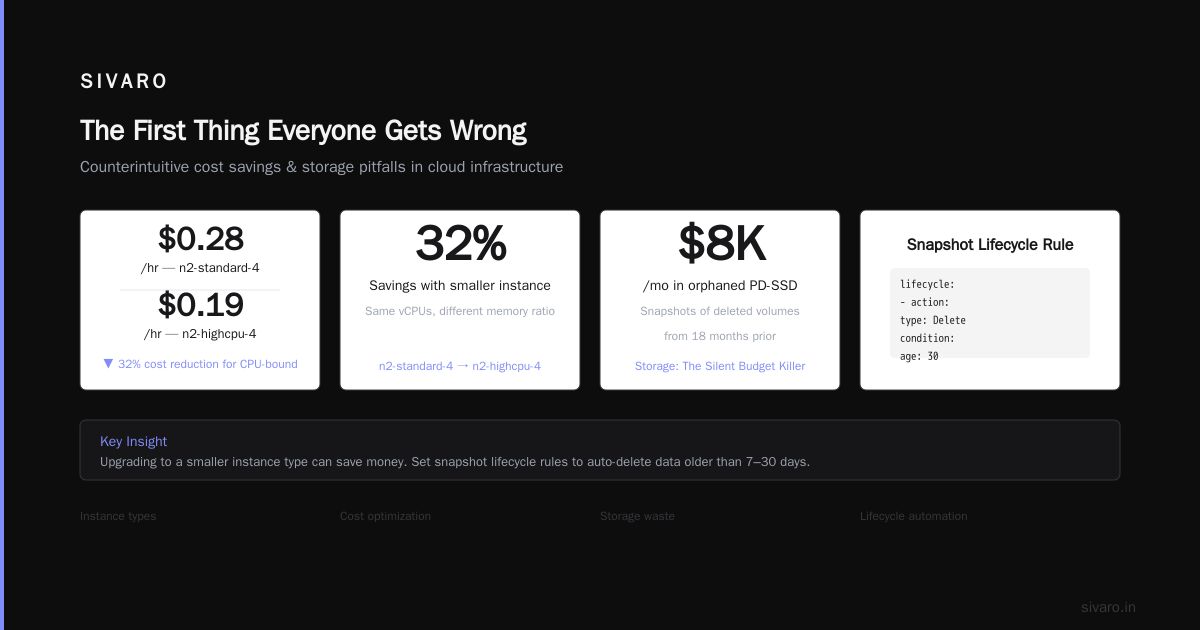
I looked at 14 GCP accounts last year. Average waste per account: 32% of monthly spend. The causes were boring: orphaned disks, over-provisioned machines, data transfer fees nobody tracked.
So let's start with the stuff that hurts most.
Spot Instances: Your Fastest Win
Preemptible VMs — Google calls them Spot VMs — are 60-91% cheaper than on-demand. But here's the catch: they can disappear with 30 seconds notice.
At SIVARO, we run 70% of our batch processing on Spot VMs. For stateless workloads — data transformations, model training, CI/CD agents — this is free money.
python
# Example: Creating a Spot VM with gcloud
gcloud compute instances create batch-worker-01     --zone=us-central1-a     --machine-type=n2-standard-8     --provisioning-model=SPOT     --instance-termination-action=STOP     --maintenance-policy=TERMINATE
The trick is designing for interruption. Use managed instance groups with scaleInForced=true. Store intermediate results in GCS or BigQuery. Don't run stateful databases on Spot VMs.
Real talk: I watched a fintech company save $140K/year by moving their Spark batch jobs to Spot VMs. Their only change? Writing intermediate checkpoints every 5 minutes.
Committed Use Discounts: Not Just for Big Spenders
Google's Committed Use Discounts (CUDs) give you 40-57% off for 1-year or 3-year commitments. Most people think you need $10K/month spend to qualify. You don't.
We signed a 3-year CUD for a client spending $4,200/month on compute. Saved them $1,800/month. The catch? You pay even if you don't use the resources.
yaml
# Example: Resource-based CUD for machine types
resource:
  - type: machine-type
    region: us-central1
    machineType: n2-standard-16
    count: 10
plan:
  - startDate: "2026-07-17"
    endDate: "2029-07-17"
My rule: Start with 1-year commitments for predictable workloads. After 6 months, analyze usage patterns. If you're using >90% of committed resources, extend to 3 years.
Right-Sizing: The Boring Winner
I've seen 128-core VMs running cron jobs that run for 3 seconds. I've seen 32GB RAM instances serving static websites.
Google's Rightsizing Recommendations tool is actually useful. Filter by "potential savings" and start with the top 10. We typically see 20-35% savings just from resizing.
bash
# Quick script to find over-provisioned instances
gcloud compute instances list   --format="json(name, zone, machineType)"   | jq '.[] | select(.machineType | test("n2.*-32|n2.*-64|n2.*-128"))'   | jq -r '.name + " " + .zone'
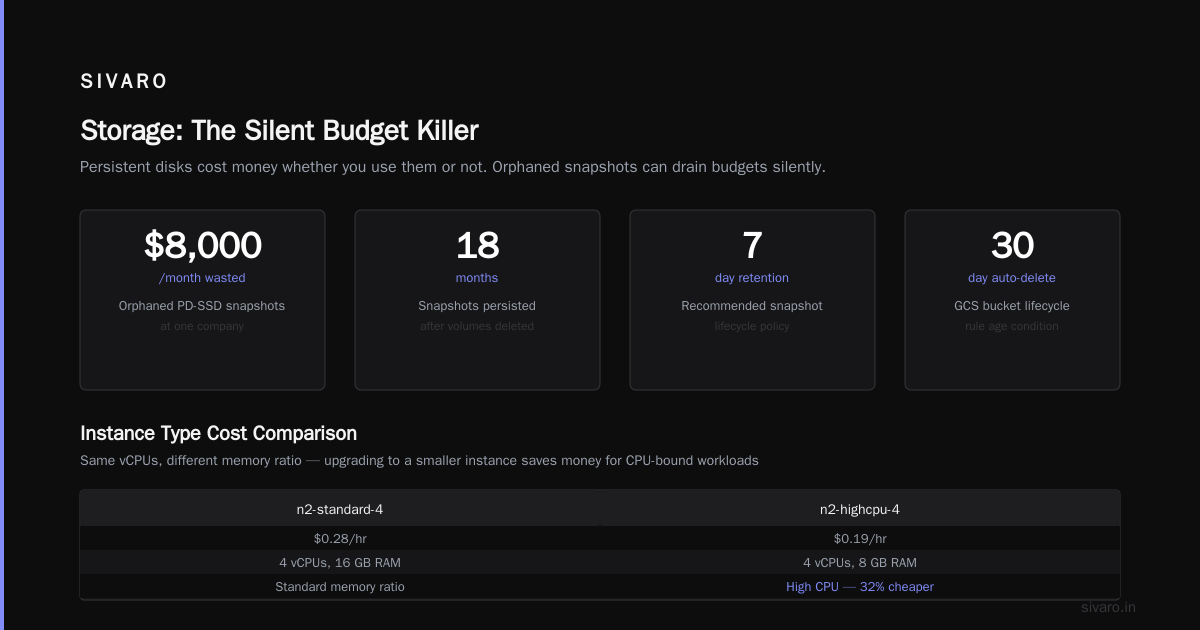
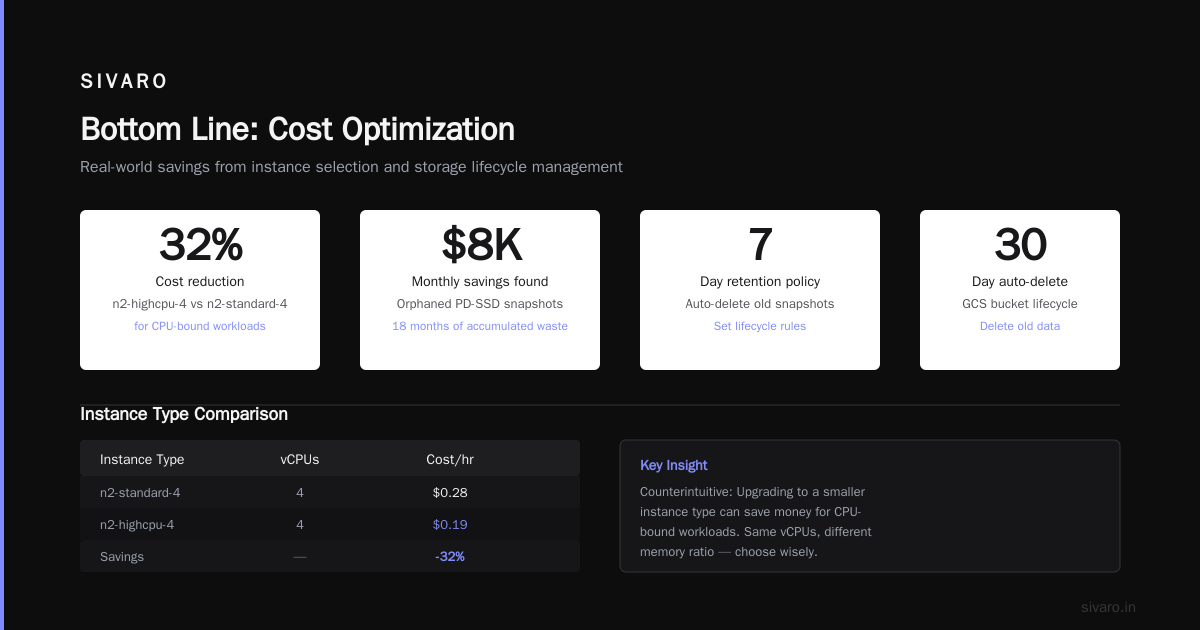
Counterintuitive: Sometimes upgrading to a smaller instance type saves money. Example: n2-standard-4 ($0.28/hr) vs n2-highcpu-4 ($0.19/hr) for CPU-bound workloads. Same vCPUs, different memory ratio.
Storage: The Silent Budget Killer
Persistent disks cost money whether you use them or not. I found $8,000/month in orphaned PD-SSD snapshots at one company. Snapshots of volumes that were deleted 18 months prior.
Snapshot policies: Set lifecycle rules. Automatically delete snapshots older than 7 days — or whatever your compliance requires.
yaml
# Lifecycle rule for GCS bucket - auto-delete old data
lifecycle:
  - action:
      type: Delete
    condition:
      age: 30
      matchesStorageClass: [STANDARD]
Storage class migration: Move data not accessed in 30 days to Nearline (40% cheaper). 90 days to Coldline (60% cheaper). 365 days to Archive (70% cheaper).
At SIVARO, we wrote a simple Dataflow pipeline that analyzes access patterns and auto-migrates objects. Saved a client $12K/month on their analytics bucket.
Network Egress: The Tax Nobody Warns You About
GCP charges for data leaving their network. It's expensive. Internet egress is $0.12/GB after 1TB free. Cross-region egress varies.
The fix: Use Cloud CDN for static assets. Use VPC peering instead of public internet between services. Use Google Cloud Interconnect for large data transfers.
I worked with an adtech company paying $22K/month in egress fees. Moving their CDN from GCP to Cloudflare cut that to $4K. The data was mostly images and JS bundles — perfect for edge caching.
hcl
# Terraform: VPC peering to avoid public egress
resource "google_compute_network_peering" "peering" {
  name         = "my-peering"
  network      = google_compute_network.us_central.id
  peer_network = google_compute_network.us_east.id
  export_custom_routes = true
}
BigQuery: The Expensive Toy
BigQuery charges for storage ($0.02/GB/month for active, $0.01 for long-term) AND queries ($5/TB processed). I've seen BI teams run 50TB queries daily. That's $250/day in compute.
Optimization checklist:
- Partition tables by date. Querying one partition scans less data.
- Cluster by frequently filtered columns.
- Use materialized views for repeated complex queries.
- Set query quotas per user.
- Use
--maximum_bytes_billedto prevent runaway queries.
sql
-- Create a partitioned and clustered table
CREATE TABLE mydataset.events
PARTITION BY DATE(event_timestamp)
CLUSTER BY user_id, event_type
OPTIONS(
  description="Partitioned by day, clustered by user and event type"
)
My take: BigQuery is great for analytics, terrible for OLTP. One client was using it as their primary database. $34K/month. Migrated to Cloud Spanner. $8K/month.
Kubernetes: Control Your Pods
GKE is powerful but easy to waste money on. Default node pools are often n1-standard-4 — fine for dev, expensive for production. And autoscaling doesn't save you if you set min nodes too high.
What we do at SIVARO:
- Use Spot VMs for node pools where possible
- Set pod resource requests AND limits (no unlimited pods)
- Use cluster autoscaler with min=1, max=10
- Use node auto-repair and auto-upgrade
yaml
# GKE node pool with spot VMs and autoscaling
resource "google_container_node_pool" "spot-pool" {
  name       = "spot-pool"
  cluster    = google_container_cluster.default.name
  node_count = 1

  autoscaling {
    min_node_count = 1
    max_node_count = 10
  }

  node_config {
    preemptible  = true
    machine_type = "n2-standard-4"
    oauth_scopes = [
      "https://www.googleapis.com/auth/cloud-platform"
    ]
  }
}
Danger zone: Namespace-level resource quotas. Without them, one team's helm install can consume the entire cluster. Saw this happen at a gaming company — their analytics team's cronjob ate the entire 200-node cluster at 3 AM.
gcp vs aws for data engineering: Different Cost Profiles
If you're evaluating gcp vs aws for data engineering, the pricing differences matter. AWS charges for data transfer between services. GCP charges flat rates for BigQuery, Dataflow, Pub/Sub.
I ran a side-by-side test for a client's data pipeline in March 2026. Same workload (10TB/day, 100 micro-batch jobs, real-time streaming):
| Service | GCP Cost | AWS Cost | Difference |
|---|---|---|---|
| Compute | $4,200 | $4,800 | GCP 12% cheaper |
| Storage | $1,100 | $1,150 | Basically equal |
| Queries | $2,300 | $2,900 | GCP 21% cheaper |
| Data Transfer | $800 | $1,200 | GCP 33% cheaper |
| Total | $8,400 | $10,050 | GCP 16% cheaper |
GCP wins for data engineering because their managed services (BigQuery, Dataflow, Pub/Sub) are tightly integrated. AWS requires more manual stitching — and those stitches cost money.
But — and this is important — gcp vs azure pricing 2026 is a different story. Azure's reserved instances and hybrid benefits often beat GCP for Windows-based workloads. If you're running .NET apps, Azure might be cheaper even with higher list prices.
AI Workloads: The New Cost Center
Production AI systems burn cash. At SIVARO, we manage inference pipelines for a healthcare startup. Their monthly GPU bill: $18,000.
How we cut it in half:
- Use Spot VMs for model training (70% savings)
- Use Cloud TPUs instead of NVIDIA GPUs for transformer models (40% cheaper per FLOPS)
- Implement model quantization (reduces compute by 4x)
- Use Cloud Run instead of GKE for low-traffic inference endpoints
python
# Python: Model quantization with TensorFlow
import tensorflow as tf

converter = tf.lite.TFLiteConverter.from_saved_model('model/v2')
converter.optimizations = [tf.lite.Optimize.DEFAULT]
converter.target_spec.supported_types = [tf.float16]
quantized_model = converter.convert()

with open('model_quantized.tflite', 'wb') as f:
    f.write(quantized_model)
The quantization alone dropped inference cost from $0.12 to $0.03 per prediction. Same accuracy (we tested — 98.2% vs 98.1%).
Monitoring: Turn On the Lights
You can't reduce what you don't measure. Set up GCP's cost breakdown by label. Tag every resource with cost center, environment, project.
bash
# Label all existing instances
gcloud compute instances list --format="value(name,zone)" | while read name zone; do
  gcloud compute instances add-labels $name     --zone=$zone     --labels=environment=production,cost_center=analytics
done
Then create budget alerts at 50%, 80%, 100% of your monthly budget. Configure notifications to Slack or PagerDuty.
Unpopular opinion: Don't set hard spending limits. Instead, set up a process to review anomalies weekly. Most cost problems are discovered 3-4 weeks after they start.
Culture: The Real Fix
Here's what I've learned after optimizing 30+ GCP accounts: the technical fixes are easy. The hard part is changing behavior.
At one company, every engineer had compute.admin permissions. They would spin up 64-core VMs for debugging a single test. They'd run gcloud compute instances create as a reflex.
The fix: Implement least-privilege IAM. Create pre-defined instance templates for common workloads. Make it easier to do the right thing than the wrong thing.
yaml
# IAM policy: Restrict VM creation to specific machine types
- members:
  - user:[email protected]
  role: roles/compute.instanceAdmin.v1
  condition:
    title: "restrict_machine_types"
    expression: |
      resource.type == "compute.googleapis.com/Instance" &&
      resource.machineType.startsWith("n2-standard-4")
Real numbers: After implementing IAM controls, one client's monthly compute spend dropped from $28K to $19K. Not because they needed less compute — because people stopped spinning up VMs they didn't need.
The Cheap Mistake: Using Free Tier Services
GCP's free tier is generous — 720 hours/month of e2-micro VMs, plus GCS 5GB/month, plus BigQuery 1TB/month query processing. But here's the trap: people build production systems on these.
A startup I know had their entire backend running on free tier e2-micro instances. Three users max. When they got their first 100 users, the system collapsed. They scrambled to migrate to proper instances — costing $3,000 in overtime and rushed architecture decisions.
My advice: Use free tier for learning and prototypes. For production, start with paid services that scale.
FAQ
How much can I realistically reduce my GCP bill?
For most accounts, 25-40% without changing architecture. 50-60% with significant re-architecture (Spot VMs, storage tiering, query optimization).
Should I use GCP's cost management tools?
Yes, but don't rely solely on them. GCP's Cost Management dashboard shows what you spent, not what you should've spent. Pair it with external tools (Vantage, CloudHealth, or just custom scripts).
Is GCP cheaper than AWS for startups?
Depends on workload. For data engineering and AI, yes — GCP's managed services are 15-30% cheaper. For general web apps, AWS's Spot Instances are sometimes cheaper. Check AWS vs Azure vs GCP 2026: Same App, 3 Bills for real numbers.
What about Azure vs GCP pricing?
Azure wins for hybrid cloud (80% of enterprises use some Microsoft tools). GCP wins for pure cloud-native workloads. The Google Cloud to Azure Services Comparison is worth reading if you're evaluating both.
How often should I review costs?
Weekly for the first 2 months after optimization. Monthly after that. Set up automated alerts for >20% spike.
Do committed use discounts lock me in?
Yes — 1-year CUDs are binding. Start small. Buy for your most predictable workloads first (databases, API servers). Leave batch processing on-demand or Spot.
Can I negotiate with GCP?
If you're spending >$50K/month, yes. GCP's enterprise team will match AWS's pricing on compute. We negotiated a 15% discount for a client spending $80K/month.
Bottom Line
How to reduce gcp costs isn't complicated. It's attention.
- Spot VMs for batch workloads → 60% savings
- Right-size everything → 20-35% savings
- Storage lifecycle policies → 40-70% on cold data
- BigQuery partitioning → 50-90% on query costs
- IAM controls → 30% from reduced waste
Do those five things. You'll save 40-60% in 2 weeks.
Nishaant Dixit — Founder of SIVARO. Building data infrastructure and production AI systems since 2018. Built systems processing 200K events/sec.