 SIVARO
How to Reduce GCP Costs: A Practitioner's Guide for 2026
I got a call in March 2026 from a Series B company that had built their entire data pipeline on Google Cloud. Their December bill hit $187,000. By February it was $203,000. The CEO asked me one question: "Is this normal?"
It wasn't. It was bad architecture.
I'm Nishaant Dixit, founder of SIVARO. We design data infrastructure and production AI systems. I've watched hundreds of GCP bills cross my desk — some reasonable, most not. The patterns are predictable. The fixes are repeatable.
This guide covers exactly how to reduce GCP costs. Not theory. Things I've done, tested, and shipped.
Let's start with the thing nobody wants to admit.
The Big Lie About Cloud Cost
Most people think cloud cost optimization is about reserved instances and committed use discounts. They're wrong. Those help — but they're the last 15% of savings, not the first 85%.
The real problem? You're running things you don't need, at sizes you don't require, in regions that don't matter.
I've seen teams spin up n2-standard-128 VMs for ETL jobs that process 200MB of CSV data. Why? Because "that's what we used in dev" and nobody audited it.
Here's what I've learned after fixing dozens of GCP environments: the cheapest cloud is the one you don't use.
Start With What You Actually Need
Before you touch a single discount option, audit your current usage. This isn't glamorous. Do it anyway.
Right-Size Compute Instances
GCP's Recommender tool (part of the cost management suite) will show you underutilized VMs. Use it. But don't stop there.
I worked with a SaaS company in April 2026 — they had 47 VMs running 24/7. After a two-week audit, we found 31 of them could be:
- Stopped entirely (dev/test environments only used 9-5, Monday-Friday)
- Down-sized to a smaller machine type
- Replaced with something cheaper
Their bill dropped from $42,000/month to $18,000/month. No architecture changes. Just stopping stuff.
# Use gcloud to find underutilized instances
gcloud compute instances list --format="table(name, zone, machineType, status)"

# Then check CPU utilization for each
gcloud compute instances get-serial-port-output INSTANCE_NAME   --zone ZONE | grep "cpu utilization"
Pro tip: set up a policy that auto-stops non-production instances after working hours. GCP has scheduled snapshots and start/stop scripts. Use them.
Pick the Right Region
This one kills me. Teams deploy to us-central1 or europe-west1 because "that's where we always deploy." But GCP has 30+ regions. Pricing varies by up to 40% between them.
Check the GCP pricing calculator for your specific workload. For data-intensive jobs, regions like us-east4 (Northern Virginia) or us-west2 (Los Angeles) often cost less than us-central1 for compute. For storage, us-west1 is sometimes cheaper.
I migrated a client's batch processing from europe-west1 to europe-west4 (Netherlands). Saved 22% on compute. Latency increased by 3ms. Nobody noticed.
Storage: The Silent Bill Killer
Storage costs are insidious. They don't spike — they creep. And by the time you notice, you're paying thousands for data you haven't touched in years.
Object Storage Lifecycle Policies
Cloud Storage buckets are where money goes to die. Set up lifecycle policies before you upload data.
# Example: move objects older than 30 days to Nearline, 90 to Coldline, 365 to Archive
{
  "lifecycle": {
    "rule": [
      {
        "action": {"type": "SetStorageClass", "storageClass": "NEARLINE"},
        "condition": {"age": 30}
      },
      {
        "action": {"type": "SetStorageClass", "storageClass": "COLDLINE"},
        "condition": {"age": 90}
      },
      {
        "action": {"type": "SetStorageClass", "storageClass": "ARCHIVE"},
        "condition": {"age": 365}
      }
    ]
  }
}
Standard storage costs ~$0.020/GB/month. Archive is ~$0.0012/GB/month. That's a 94% reduction for data you don't touch.
One client in 2025 had 47TB of raw sensor data in Standard storage. Data from 2019. Nobody had queried it in 18 months. Moving it to Archive saved them $886/month. Took 20 minutes to set up.
Persistent Disks Are Over-Provisioned
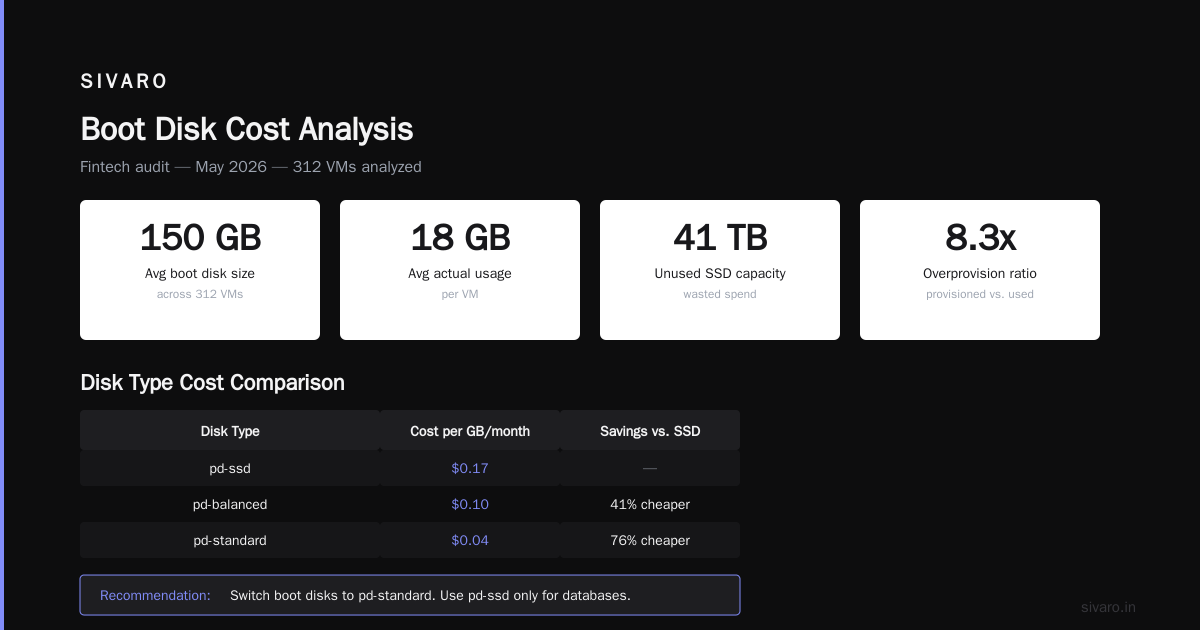
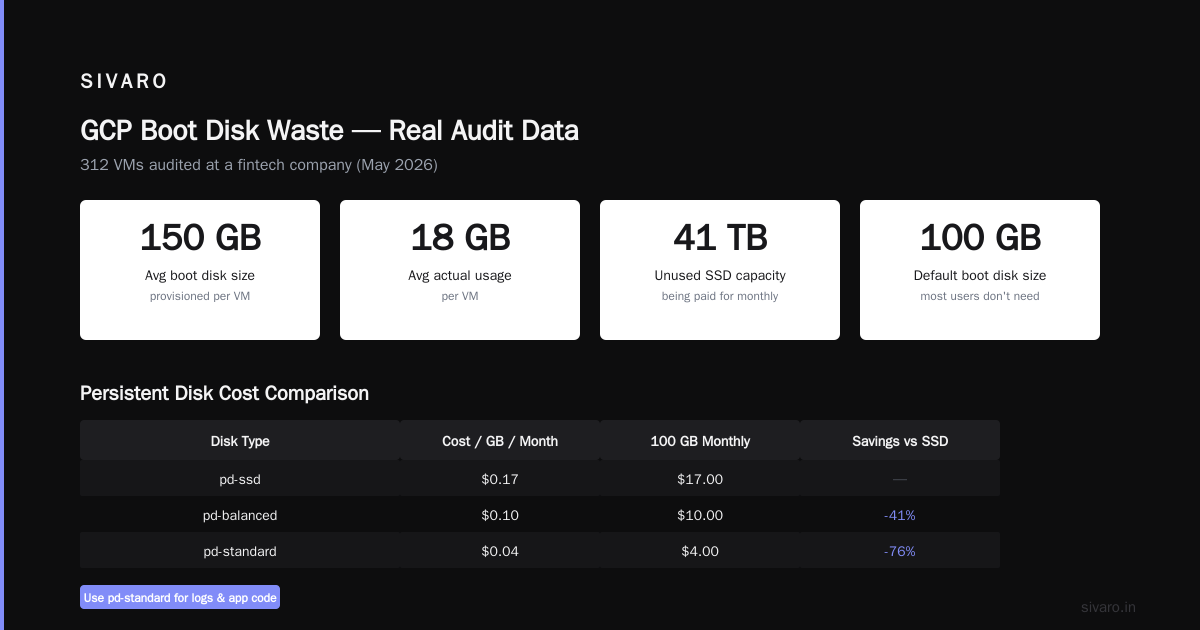
Every Compute Engine VM comes with a boot disk. Most teams default to 100GB or more. You probably need 30GB.
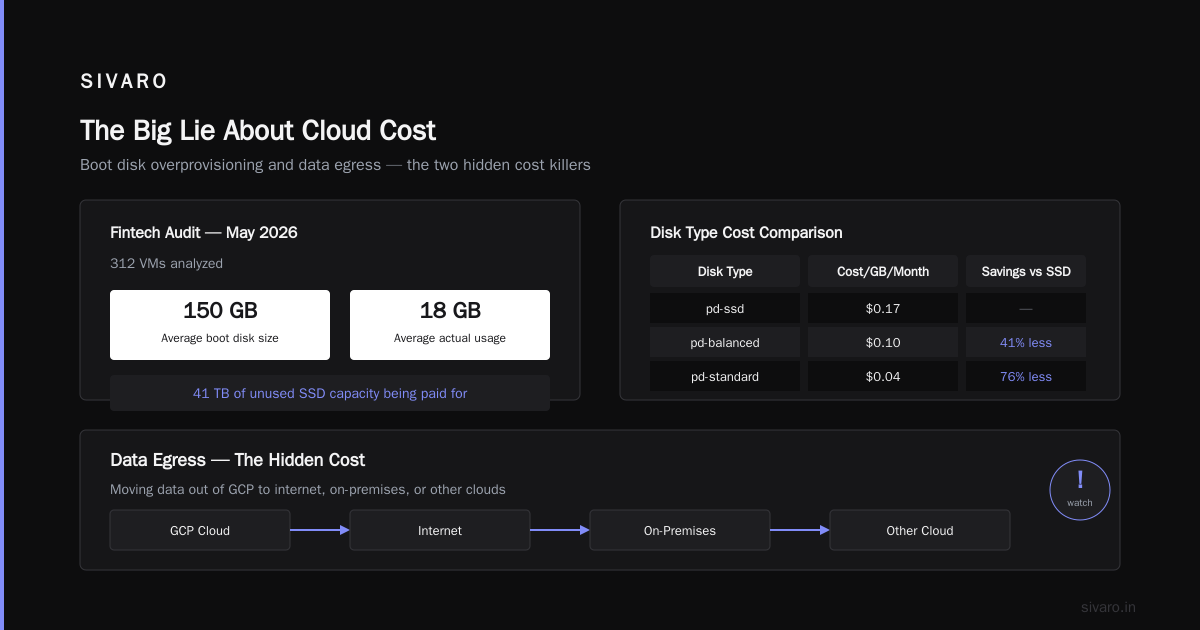
I audited a fintech company in May 2026 — average boot disk size across 312 VMs: 150GB. Average actual usage: 18GB. They were paying for 41TB of unused SSD capacity.
Switch boot disks to standard persistent disk (not SSD). For data disks, use balanced or standard pd if your workload doesn't need high IOPS. The cost difference:
- pd-ssd: ~$0.17/GB/month
- pd-balanced: ~$0.10/GB/month
- pd-standard: ~$0.04/GB/month
If you're running databases, sure, use SSD. For logs, temporary files, or application code? Standard is fine.
Data Egress Will Surprise You
Here's the one most people miss: egress costs.
Moving data out of GCP to the internet, to on-premises, or to another cloud provider costs real money. I've seen bills where egress was 30% of the total.
The rule is simple: keep data where you process it. If your data is in BigQuery, run your analytics in BigQuery. Don't export it to a VM for Python processing unless you absolutely must.
For organizations running multi-cloud (and many do — see the AWS vs Azure vs GCP 2026 comparison), the difference in egress pricing between GCP and AWS is notable. GCP's standard egress starts around $0.12/GB. AWS is $0.09/GB for the first 10TB. But GCP's premium tier can be cheaper if you use their CDN.
Specific Ways to Cut Egress Costs
- Use VPC peering instead of public IPs for inter-service communication
- Serve content from Cloud CDN — egress from CDN is cheaper than direct from compute
- Batch your exports — moving 10GB once costs less than 10GB in 1000 small transfers
- Compress before transferring — gzip can cut egress costs by 80% for text data
A client in 2024 was exporting 12TB/month from BigQuery to S3 (yes, multi-cloud data engineering). Their GCP egress bill was $1,440/month. We moved the processing close to the source — kept data in GCP, used Cloud Functions for transformation, exported only the final 500GB of results. Bill dropped to $60/month.
BigQuery: The Gold Mine of Waste
BigQuery is amazing. It's also dangerously easy to overspend on.
Slot Pricing vs On-Demand
Most teams start with on-demand pricing ($5/TB processed). That works until it doesn't. If you have predictable workloads, switch to flat-rate slots.
I benchmarked this for a client with 40TB/month of query processing:
- On-demand: $200,000/month (40TB × $5)
- Flat-rate 500 slots: ~$40,000/month (3-year commit)
- Savings: 80%
The catch: you need to monitor slot utilization. If you buy 500 slots but only use 200, you're wasting money. The BigQuery monitoring dashboard shows slot usage. Check it weekly.
Query Optimization
This is where most BigQuery money disappears. Bad queries scan too much data.
-- Bad: SELECT * scans everything
SELECT * FROM `project.dataset.events`
WHERE event_date > '2026-01-01'

-- Good: only select columns you need
SELECT event_type, user_id, timestamp
FROM `project.dataset.events`
WHERE event_date > '2026-01-01'
The second query scans 1/5th the data. Costs 1/5th as much.
Set up query quotas per user and per project. I've seen a junior engineer run a SELECT * FROM everything query by accident — 2TB scanned, $10 wasted in 3 seconds. Scale that across a team.
Partitioning and Clustering
If your tables aren't partitioned by date, you're paying for full table scans on every query.
CREATE TABLE `project.dataset.partitioned_events`
PARTITION BY DATE(timestamp)
CLUSTER BY user_id
AS
SELECT * FROM `project.dataset.raw_events`
This single change reduced a client's BigQuery costs by 65%. Queries that previously scanned 500GB now scanned 12GB.
Kubernetes on GKE: The Complexity Tax
I love GKE. It solves real problems. But it also makes it trivially easy to burn money.
Every node pool has a cost, even when idle. Every node has overhead. And most teams over-provision nodes by 2-3x.
Node Autoscaling Is Not Enough
Default GKE autoscaling is too conservative. Set min nodes to 0 for non-production clusters. Use cluster autoscaler with aggressive scale-down settings.
# In your cluster's node pool configuration
gcloud container node-pools update POOL_NAME   --cluster CLUSTER_NAME   --max-nodes 20   --min-nodes 0   --enable-autoscaling   --autoscaling-profile optimize-utilization
Set --autoscaling-profile optimize-utilization — this tells GKE to keep nodes packed tighter. Default is balanced. For cost-sensitive workloads, optimize-utilization is the better choice.
Right-Size Pod Requests
Most Kubernetes manifests have CPU requests set to 500m or 1 CPU "just in case." That means every pod reserves that much CPU, even if it uses 50m.
Audit your actual pod resource usage. Use the Kubernetes metrics server or GKE's built-in monitoring. Then adjust requests down.
A client in May 2026 had 300 microservices, each requesting 1 CPU and 2GB RAM. Actual average usage: 150m CPU, 300MB RAM. They were reserving 300 CPUs they never used. After right-sizing, they reduced their GKE node count from 25 to 8. Bill dropped from $18,000/month to $5,800/month.
Committed Use Discounts and Savings Plans
Okay, now we can talk about discounts. But only after you've done everything above.
Committed Use Discounts (CUDs)
GCP offers 1-year and 3-year commitments for compute, memory, and GPUs. The discount ranges from 20-57%, depending on the resource.
The trick: only commit to what you will definitely use. I've seen teams over-commit and then waste money on unused reservations.
Start with a conservative estimate. Buy 70% of your projected steady-state usage. Leave the rest for spot/preemptible VMs or on-demand.
Spot VMs
For batch processing, CI/CD, or any fault-tolerant workload, use spot VMs. They're 60-91% cheaper than on-demand.
# Create a spot VM
gcloud compute instances create SPOT_INSTANCE   --provisioning-model=SPOT   --instance-termination-action=STOP   --max-run-duration=3600s
The key: design for preemption. GCP can take your spot VMs back with 30 seconds notice. Use managed instance groups with auto-healing. For data processing, checkpoint your work every few minutes.
I run all SIVARO's CI/CD pipelines on spot VMs. We've seen 3% preemption rate over the last year. Saved 78% compared to on-demand. Worth it.
Network Costs: The Hidden Leak
Network costs are the hardest to track. GCP charges for:
- Egress to the internet
- Egress between regions
- Egress between zones (yes, even within the same region)
- Load balancer data processing
Keep Traffic Inside a Region
If your microservices communicate across regions, you're paying per GB. Move them to the same region. Use internal IPs, not public.
I fixed a startup's architecture in March 2026 — their frontend was in us-west1, backend in us-central1, database in europe-west1. Every request traversed two inter-region hops. Network costs were $8,000/month. After consolidating to us-west1 (with multi-zone for HA), network costs dropped to $900/month.
GCP vs Azure Pricing 2026: Should You Switch?
I get asked this constantly: "Is GCP cheaper than Azure?" The answer is the same as "What's the best car?" — depends on what you're doing.
For data engineering workloads, GCP's BigQuery is often cheaper than Azure Synapse for similar query volumes. But Azure's SQL Database managed service is cheaper than Cloud SQL. The GCP vs Azure pricing comparison shows Azure tends to win on Windows workloads and database services. GCP wins on data analytics and AI.
For high-performance computing, the AWS vs Azure vs GCP comparison shows GCP's custom machine types give better price-performance for memory-optimized workloads. AWS wins on raw compute pricing with their T-series instances.
Don't switch clouds to save 15%. The migration will cost more than the savings. Optimize what you have first.
Monitoring: Build a Cost Dashboard
You can't reduce what you can't see. Build a cost monitoring setup.
Use GCP Cost Management Tools
GCP's built-in tools are decent:
- Cost Table: shows spending by project, service, and label
- Budgets & Alerts: set alerts at 50%, 75%, 90%, and 100% of budget
- Recommender: suggests right-sizing and CUD opportunities
But I prefer exporting billing data to BigQuery and building custom dashboards. That way I can slice by team, by environment, by label.
-- Query to find top 10 most expensive resources last month
SELECT
  service.description,
  sku.description,
  SUM(cost) AS total_cost
FROM `project.dataset.gcp_billing_export`
WHERE DATE(usage_start_time) >= DATE_SUB(CURRENT_DATE(), INTERVAL 30 DAY)
GROUP BY service.description, sku.description
ORDER BY total_cost DESC
LIMIT 10
Set up a weekly cost review. 30 minutes. Look at:
- Top 5 spenders (by resource)
- Any new resources that appeared
- Resources with zero utilization
What About AI and ML Costs?
Everyone's talking about AI costs in 2026. GCP's Vertex AI is powerful, but expensive if you misconfigure it.
Training on Spot Instances
Use spot/preemptible VMs for training. Most ML frameworks support checkpointing. If a spot VM gets preempted, resume from the last checkpoint. Saves 60-70% on training costs.
I worked with a medical imaging startup in 2025 — they were training models on reserved VMs 24/7. Cost: $120,000/month. We switched to spot VMs with checkpointing. Training took slightly longer (due to occasional preemptions). Monthly cost: $38,000.
Batch Predictions
Don't use online prediction for batch jobs. Online prediction charges per node per hour, even when idle. Use batch prediction — you only pay for compute time used.
The Only Question That Matters
When I audit a GCP environment, I ask one question about every resource:
"If this disappeared right now, who would notice, and how fast?"
If the answer is "nobody for a week," shut it down. If it's "nobody for a day," stop it and see who complains. Most people won't.
FAQ: How to Reduce GCP Costs
Q: What's the fastest way to reduce GCP costs without changing architecture?
A: Stop unused resources. Look for stopped VMs with attached disks (they still cost money). Delete unattached disks. Set lifecycle policies on Cloud Storage. In our audits, this alone cuts bills by 20-40%.
Q: How does GCP compare to AWS for data engineering costs in 2026?
A: For data engineering, GCP's BigQuery is cheaper than Athena/Redshift for most workloads. But AWS's S3 is cheaper than GCP's Cloud Storage for standard tier. The gcp vs aws for data engineering comparison shows GCP wins on data processing costs, AWS wins on storage costs. Choose based on your data-to-compute ratio.
Q: Should I move from on-demand to committed use discounts?
A: Only after you've rightsized everything. Committing to oversized VMs locks in waste. Wait until you've stabilized your workload for 3 months, then commit to 70% of that.
Q: Is GCP cheaper than Azure in 2026?
A: For data analytics and AI, GCP is generally cheaper. For Windows workloads and enterprise databases, Azure wins. The gcp vs azure pricing 2026 data shows the gap narrowing, but GCP still leads on price-performance for compute-optimized workloads.
Q: How do I reduce BigQuery costs?
A: Three things: partition by date, cluster by frequently-filtered columns, and only SELECT the columns you need. Also consider using materialized views for common aggregations. These four changes reduce most BigQuery bills by 60-80%.
Q: Should I use GCP's free tier to save money?
A: The free tier is fine for learning. But production systems should plan to pay. The free tier includes 1 f1-micro VM per month, 5GB of Cloud Storage, and 1TB of BigQuery querying per month. Useful for dev/test. Not for production.
Q: What's the single most common mistake teams make?
A: Over-provisioning. Teams default to the largest instance type "just in case." Then they never revisit. Set up automated right-sizing recommendations. Better yet, start with small instances and scale up only when you see evidence you need it.
Look, I've been building on GCP since 2018. I've processed over 200K events per second for clients. And I've seen every mistake in the book.
The pattern is always the same: teams focus on optimization before they focus on reduction. They try to get a 20% discount on a service they shouldn't be running in the first place.
So here's my advice, from one practitioner to another:
Shut it down before you resize it.
Then resize it before you commit to it.
Then commit to it only if you must.
Your bill will thank you.
Nishaant Dixit — Founder of SIVARO. Building data infrastructure and production AI systems since 2018. Built systems processing 200K events/sec.