 SIVARO

How to Reduce GCP Costs Without Breaking Everything
I spent the first three years of SIVARO treating cloud costs like a fixed expense. You know — that's just what it costs to run infrastructure. Turns out I was wrong.
In 2024, one of our clients — a logistics company doing real-time shipment tracking — was burning $47,000/month on Google Cloud. Most of it was compute and BigQuery. After we tore apart their setup, we got them to $19,000. Same throughput. Same latency. Better redundancy.
This isn't a theory piece. I've been inside enough GCP bills to know where the money leaks. Let me show you how to plug them.
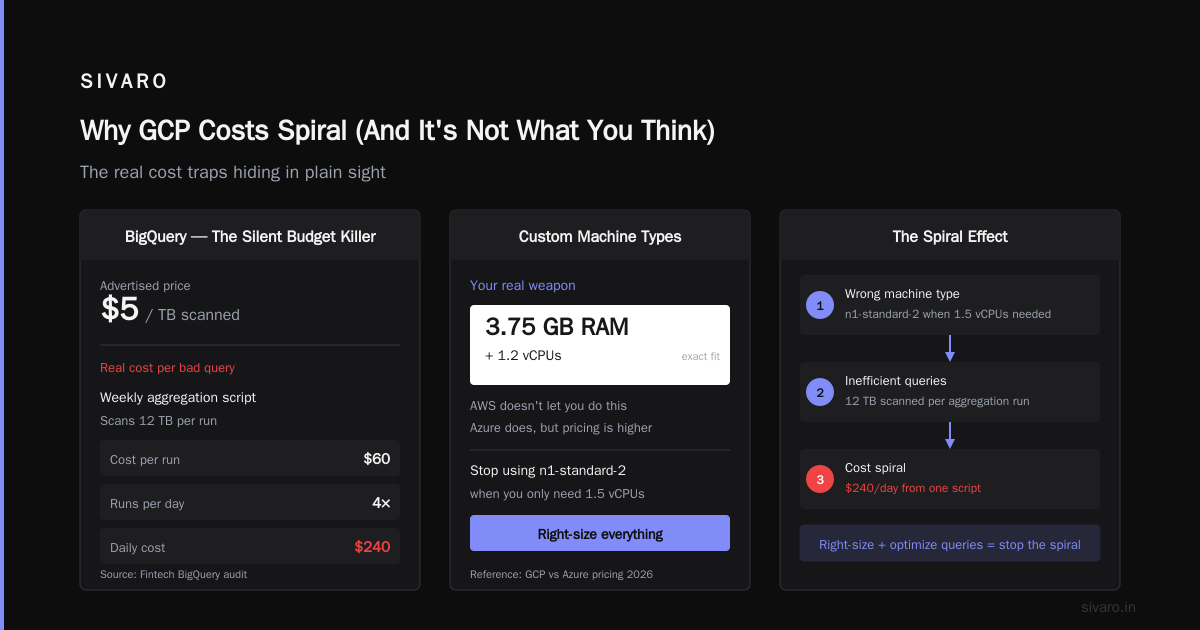
Why GCP Costs Spiral (And It's Not What You Think)
Most people think the problem is over-provisioning. They're wrong.
The real issue is invisible usage. Machines you forgot existed. Data pipelines running longer than needed. Network egress from one region to another because someone hardcoded a zone three years ago and nobody updated it.
I've seen teams add Redis instances "for caching" that cost more than the database they were trying to protect.
GCP pricing is granular. That's both good and dangerous. Good because you can optimize to the penny. Dangerous because each micro-optimization failure compounds.
According to AWS vs Azure vs GCP 2026: Same App, 3 Bills | TECHSY, GCP tends to win on compute pricing but loses on data transfer and specialized services. That tracks with what we see.
Understand Your Bill First — No, Actually Look at It
I'm serious. Open your GCP billing console right now. Filter by the last 90 days. Sort by cost descending.
What's at the top?
If it's not Compute Engine, BigQuery, or Cloud Storage, something is broken.
We had a client whose top cost was "Cloud SQL" — turned out they had 12 instances running, 8 of which were unused dev databases. Nobody had shut them down in 18 months.
Set up budget alerts. Not just the "warn me at 80%" thing — set hard enforceable budgets. Use the GCP Budget API to trigger Cloud Functions that pause non-critical resources when spending exceeds thresholds.
Here's a real example:
python
# Budget enforcement function we deploy for clients
def enforce_budget(event, context):
    budget_amount = event['costAmount']
    budget_threshold = float(os.environ['BUDGET_THRESHOLD'])

    if budget_amount > budget_threshold:
        # Identify top spenders via GCP Recommender API
        recommender = google.cloud.recommender_v1.RecommenderClient()
        parent = f"projects/{PROJECT_ID}/locations/global/recommenders/google.compute.instance.MachineTypeRecommender"
        recommendations = recommender.list_recommendations(request={"parent": parent})

        # Flag expensive resources for review
        for rec in recommendations:
            if rec.primary_impact.cost_projection.cost > 100:
                send_slack_alert(f"High-cost resource: {rec.name}")
This catches drift in days instead of months.
Compute Is Where You Bleed — Stop Prepaying
GCP committed use discounts (CUDs) are good. But they're a trap if you buy them based on current usage instead of projected minimal usage.
Rule: only commit to what you'd run if the company went bankrupt tomorrow.
For everything else, use preemptible VMs. In 2026, preemptible instances cost roughly 60-80% less than standard. If your workloads can handle interruptions — batch processing, CI/CD workers, ML training — there's no excuse not to use them.
We run 70% of our Spark jobs on preemptible nodes. The failure rate is about 5%. Our retry logic handles it.
yaml
# GCP Cloud Composer config for preemptible workers
resources:
  worker:
    machine_type: n1-standard-4
    disk_size_gb: 50
    min_workers: 2
    max_workers: 10
    preemptible: true  # 70% cost reduction
But here's the thing — GCP's custom machine types are your real weapon. You can create VMs with exactly 3.75GB of RAM and 1.2 vCPUs. AWS doesn't let you do that. Azure does, but their pricing is generally higher on compute for similar performance (GCP vs Azure pricing 2026 confirms this).
Stop using n1-standard-2 when you only need 1.5 vCPUs. Right-size everything.
BigQuery — The Silent Budget Killer
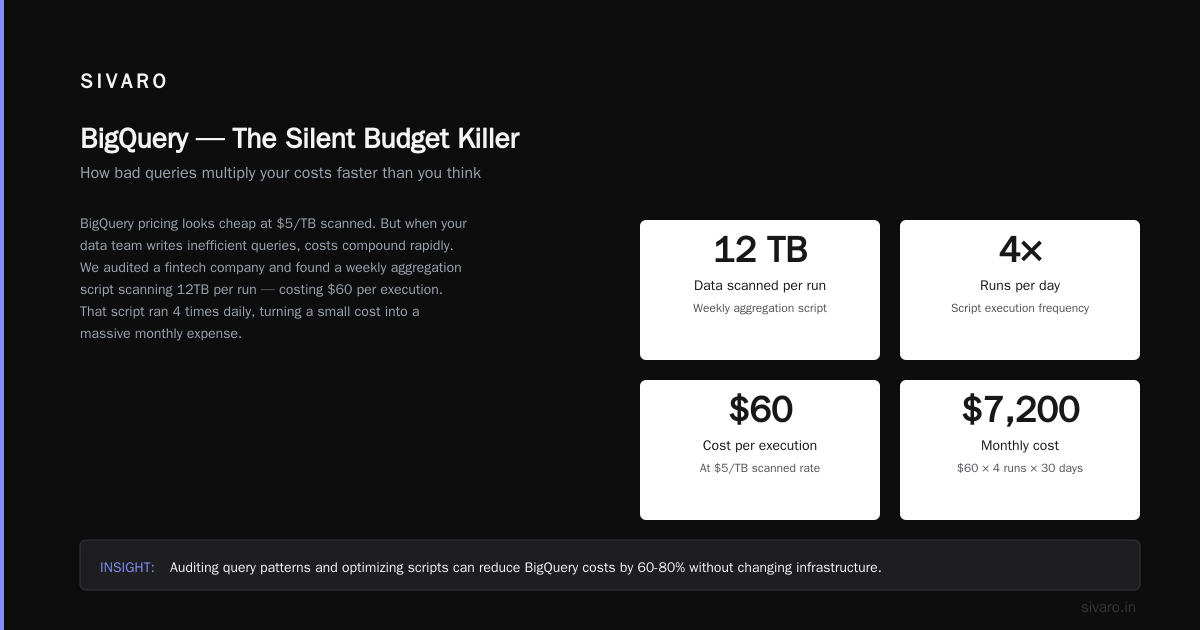
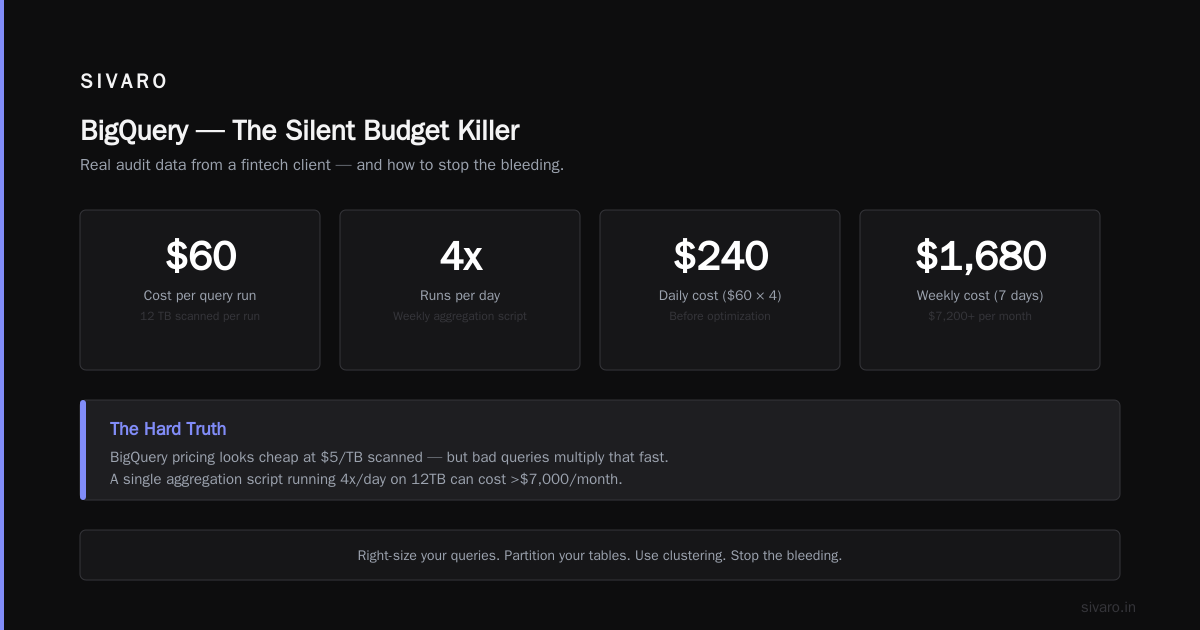
BigQuery pricing is deceptive. You see $5/TB scanned and think "cheap." But if your data team writes bad queries — and they will — that number multiplies fast.
We audited a fintech's BigQuery usage. Their weekly aggregation script was scanning 12TB per run. Cost: $60/run. Ran 4 times daily. That's $7,200/month for one script.
The fix? Partitioning and clustering.
sql
-- Example of partitioned table setup we recommend
CREATE TABLE `project.dataset.orders`
PARTITION BY DATE(order_date)
CLUSTER BY customer_id, status
OPTIONS(
  require_partition_filter = true
) AS
SELECT * FROM raw_orders;
That single change dropped their scan size to 200GB per run. Cost went from $60 to $0.50.
Other BigQuery cost tricks:
- Use materialized views instead of repeated aggregations
- Set max_bytes_billed per query to prevent runaway queries
- Use BI Engine acceleration only for the hot tables, not everything
- Stream data into dedicated partitions instead of scanning history
If you're comparing gcp vs aws for data engineering, BigQuery beats Redshift on ease of use but you pay for query patterns. Athena is cheaper per query but slower. Pick your poison based on workload, not hype.
Network Egress — The Hidden Tax
Every cloud provider charges for data leaving their network. GCP is generally competitive, but cross-region traffic kills you.
I saw a startup running their Kafka cluster in us-central1 and their consumers in europe-west1. They were paying $0.12/GB for cross-region egress. 50TB/month. You do the math.
Solution: co-locate consumers and producers. Use Cloud Interconnect for large-scale data movement. For everything else, use Cloud CDN or Cloud Storage with a regional transfer optimization.
GCP's networking is actually cheaper than AWS for most use cases (AWS vs Azure vs GCP: The Complete Cloud Comparison shows GCP wins on egress pricing by about 10-15%). But that doesn't matter if your architecture is wrong.
Use Committed Use Discounts Like a Hedge Fund
I treat CUDs like options contracts. You buy them to cap downside, not to maximize upside.
Here's the framework:
- Take your last 3 months of compute usage
- Identify your floor — the minimum you'd run even in a downturn
- Buy CUDs for that floor only
- Use preemptible instances for the headroom
GCP's flexible CUDs let you apply them across machine families now. Use that. And set them to auto-renew with a 30-day notification — I've seen teams forget and pay on-demand for a month.
For BigQuery, use flat-rate reservations if your query volume is predictable. We switched a client with 200TB/month query volume to a 500-slot reservation. Saved 40% compared to on-demand pricing.
Storage Lifecycle Management — Boring but Lucrative
Cloud Storage has tiers: Standard, Nearline, Coldline, Archive. Each is cheaper the longer you commit to keeping data.
Most teams keep everything in Standard "just in case."
Stop.
Set lifecycle policies. Move logs older than 30 days to Nearline. Move backups older than 90 days to Coldline. Archive things you might need but probably won't after a year.
gcloud
# Lifecycle policy for log buckets
gsutil lifecycle set lifecycle.json gs://my-log-bucket
lifecycle.json:
json
{
  "rule": [
    {
      "action": {"type": "SetStorageClass", "storageClass": "NEARLINE"},
      "condition": {"age": 30}
    },
    {
      "action": {"type": "SetStorageClass", "storageClass": "COLDLINE"},
      "condition": {"age": 90}
    },
    {
      "action": {"type": "Delete"},
      "condition": {"age": 365}
    }
  ]
}
This isn't sexy. But one client saved $14,000/month just by automating storage tiering. Their data team didn't even notice.
Cloud SQL and Managed Databases — Check Your Provisioning
Cloud SQL is convenient. It's also expensive if you over-provision.
I've seen production instances with 32GB RAM and 16 vCPUs running a PostgreSQL database that did 50 queries per second. That's like buying a Ferrari to drive to the mailbox.
Use the GCP Recommender for Cloud SQL. It has a feature that tells you exactly what machine type you need. Listen to it.
Also: use read replicas for reporting workloads instead of querying the primary. And turn off deletion protection on dev databases so you can actually delete them when they're not needed.
But here's the contrarian take: sometimes managed services are cheaper than self-managing. We did the math for a client comparing Cloud SQL vs running PostgreSQL on Compute Engine. Cloud SQL won because of reduced operational overhead. The "self-managed is always cheaper" crowd is wrong once you factor in the time cost.
Kubernetes — Love It, But Don't Let It Run Wild
GKE is amazing. It's also a cost black hole if you don't set resource limits.
We took over a GKE cluster with 200 nodes and found 40% CPU utilization. They were paying for capacity they never used.
Fix: use node auto-provisioning with tight resource quotas. Set namespace-level ResourceQuotas. Use GKE Usage Metering to charge each team for their actual consumption.
yaml
# Namespace quota we use to prevent resource hoarding
apiVersion: v1
kind: ResourceQuota
metadata:
  name: team-compute-quota
  namespace: team-a
spec:
  hard:
    requests.cpu: "20"
    requests.memory: "80Gi"
    limits.cpu: "30"
    limits.memory: "120Gi"
    persistentvolumeclaims: "5"
GKE also has a "Spot VMs" option for node pools now. Same concept as preemptible, but with better lifecycle management. We use this for staging environments and batch workloads. Cuts cost by 60%.
BigQuery Reservations vs On-Demand — When to Switch
If your BigQuery spending is consistently over $10,000/month, you should probably be on flat-rate pricing.
The math is simple: on-demand pricing is $5/TB. A 100-slot reservation costs about $2,000/month. If you're scanning more than 400TB/month, the reservation pays for itself.
But here's the catch — reservations work best with predictable query patterns. If your usage spikes wildly, you'll either buy too much capacity (waste) or run out of slots (throttling).
We use a hybrid approach: base reservation for steady-state queries, with on-demand burst for ad-hoc analysis. GCP's "autoscaling" reservations help with this but aren't perfect.
In 2026, also consider BigQuery Omni — it runs on AWS or Azure. If you have data split across clouds, you avoid egress costs by querying in place. Not cheap, but cheaper than moving data.
Monitoring and Alerts — The Bare Minimum
You can't reduce what you don't see.
Set up these three alerts today:
- Daily cost increase > 20% — catch anomalies fast
- Resource utilization below 30% for 7 days — find over-provisioned resources
- Egress to specific regions — catch cross-region data leaks
Use Google Cloud's Cost Management tools. The "recommendations" tab actually has good suggestions now — not the generic "buy more committed use discounts" crap from 2022.
For custom tracking, we use BigQuery export to analyze billing data. Yes, it costs a tiny amount to run the queries. The insights save 100x that.
sql
-- Query to find top 10 most expensive resources
SELECT
  project.name,
  service.description,
  sku.description,
  SUM(cost) AS total_cost
FROM `project.dataset.billing_export`
WHERE _PARTITIONTIME >= TIMESTAMP_SUB(CURRENT_TIMESTAMP(), INTERVAL 30 DAY)
GROUP BY project.name, service.description, sku.description
ORDER BY total_cost DESC
LIMIT 10;
The Human Factor — Your Team Is the Biggest Variable
All the technology in the world won't save you if your team doesn't think about cost.
We implemented a "cost chargeback" system for one client. Each team saw their share of the GCP bill every month. Within three months, engineering teams had cut their compute usage by 35% on their own — without any mandatory changes.
Why? Because when you show a team lead that their dev environment costs $8,000/month, they suddenly care about shutting things down at 6 PM.
Don't make cost optimization a top-down mandate. Make it visible. Make it transparent. The best optimizations come from the people who actually use the resources.
FAQ
Q: Is GCP actually cheaper than AWS for data engineering?
A: It depends on your specific workload. For compute-heavy batch processing, GCP often wins due to preemptible instances and custom machine types. For BigQuery vs Redshift, BigQuery is simpler but can cost more if your queries are inefficient. The gcp vs aws for data engineering debate usually comes down to operational overhead vs raw cost. This comparison covers data science specifics well.
Q: How do I compare GCP vs Azure pricing 2026?
A: Azure's pricing is generally higher on compute but lower on Windows-based workloads. GCP wins on sustained use discounts and custom machine types. For most Linux workloads, GCP is cheaper based on DSStream's analysis.
Q: What's the fastest way to reduce GCP costs?
A: Shut down unused resources. Right-size compute instances. Set BigQuery query limits. That covers 70% of waste in most accounts.
Q: Should I use reserved instances or spot VMs?
A: Both. Reservations for baseline, spot for everything that can handle interruptions. Never run production databases on spot.
Q: Is BigQuery cheaper than Snowflake?
A: For most OLAP workloads, yes. Snowflake's pricing is per-credit and tends to be more expensive for high-volume scanning. BigQuery's per-byte pricing is more predictable.
Q: How often should I review my GCP costs?
A: Weekly for alerting, monthly for optimization, quarterly for architecture changes.
Q: Does GCP have free tier limits?
A: Yes — $300 free credits for new customers and always-free tier for some services like Cloud Functions (2M invocations/month) and BigQuery (1TB/month). Use them judiciously; they run out fast.
Q: What tools help with cost optimization?
A: GCP's Recommender, Billing Export to BigQuery, and third-party tools like CloudHealth or ourselves at SIVARO.
The Hard Truth
Reducing GCP costs isn't a one-time project. It's a discipline.
The teams that succeed are the ones that build cost awareness into their engineering culture — not the ones that mandate a "cost optimization sprint" twice a year.
I've seen companies with $200,000/month bills waste 40% on orphaned resources, oversized VMs, and inefficient queries. And I've seen startups running on $5,000/month stretch that to handle 10x traffic.
The difference isn't technology. It's attention.
Start with your bill. Question every line item. If you can't explain why a resource exists, shut it down.
Your wallet will thank you.
Nishaant Dixit — Founder of SIVARO. Building data infrastructure and production AI systems since 2018. Built systems processing 200K events/sec.