 SIVARO

How to Reduce GCP Costs Without Losing Your Mind
I blew $47,000 on Google Cloud in a single month. April 2024. One bad flag in a BQ partitioning scheme, and poof — that was our entire Q2 infrastructure budget gone.
Here's what I learned: GCP isn't expensive by default. But it punishes you for not thinking about cost. Hard.
I'm Nishaant Dixit. I run SIVARO, a product engineering shop that builds data infrastructure and production AI systems. We've managed over $12M in GCP spend for clients since 2020. Some of those bills dropped 63% in three months.
This guide is what actually works. Not theory. Not "best practices" written by someone who's never watched a bill spike at 3 AM.
The Bill Doesn't Lie — But You Have to Read It Right
First thing Monday morning: open your billing report. Not the dashboard. The actual cost table.
Most people look at total spend. That's a trap. Total spend hides everything. You need to look at service-level cost trends over the last 90 days.
I've seen engineering teams spend $8,000/month on Cloud NAT because someone spun up a private cluster and forgot they had egress. The fix took 12 minutes. That engineer had been gone for 8 months.
Here's what I do: export billing data to BigQuery (ironic, I know) and run this query:
sql
SELECT
  service.description,
  SUM(cost) AS total_cost,
  COUNT(DISTINCT invoice.month) AS months_active
FROM `your-project-id.billing_dataset.gcp_billing_export_v1_*`
WHERE DATE(_PARTITIONTIME) >= DATE_SUB(CURRENT_DATE(), INTERVAL 90 DAY)
GROUP BY service.description
ORDER BY total_cost DESC
Run it. Look at the top 5 services eating your budget. Those are your targets.
If you haven't done this yet — stop reading. Go do it. I'll wait.
Compute: Where Most People Overpay by 40-60%
GCP's compute pricing is a maze. But it's a profitable maze — for Google.
The Big One: Committed Use Discounts
If you have workloads running 24/7 for more than a month, you should have committed use discounts (CUDs). Period.
Most people think "I don't know my usage well enough to commit." That's fine. Start small. Commit to 20% of your baseline. You can always add more.
Here's the math from a client we onboarded in Jan 2025 — an adtech company processing 80K requests/second:
- On-demand: $23,400/month for compute
- 1-year committed: $14,040/month (40% savings)
- 3-year committed: $10,530/month (55% savings)
They did 1-year. Saved $112,320 over the year. That's a senior engineer's salary.
Contrarian take: Don't commit to 3-year unless you're running batch processing that won't change. AI workloads shift too fast. I've seen companies locked into 3-year CUDs on Nvidia A100s when they needed H100s. Painful.
Preemptible and Spot VMs
For batch jobs, training runs, and anything that can tolerate interruption: use spot VMs.
GCP's spot VMs are 60-91% cheaper than on-demand. The catch? They can be reclaimed with 30 seconds notice.
We run a document processing pipeline that OCRs 2 million pages/day. Uses spot VMs exclusively. Cost: ~$400/month on spot. On-demand would be $5,200/month.
The trick: design your workloads to be preemptible from day one. Checkpoint your state. Use persistent disks or GCS for intermediate results.
yaml
# deployment.yaml - Spot VM configuration
apiVersion: apps/v1
kind: Deployment
metadata:
  name: batch-processor
spec:
  replicas: 20
  template:
    spec:
      nodeSelector:
        cloud.google.com/gke-spot: "true"
      containers:
      - name: processor
        image: my-batch-processor:latest
        env:
        - name: CHECKPOINT_BUCKET
          value: "gs://checkpoints-bucket-123"
Right-Sizing: The 80/20 Rule
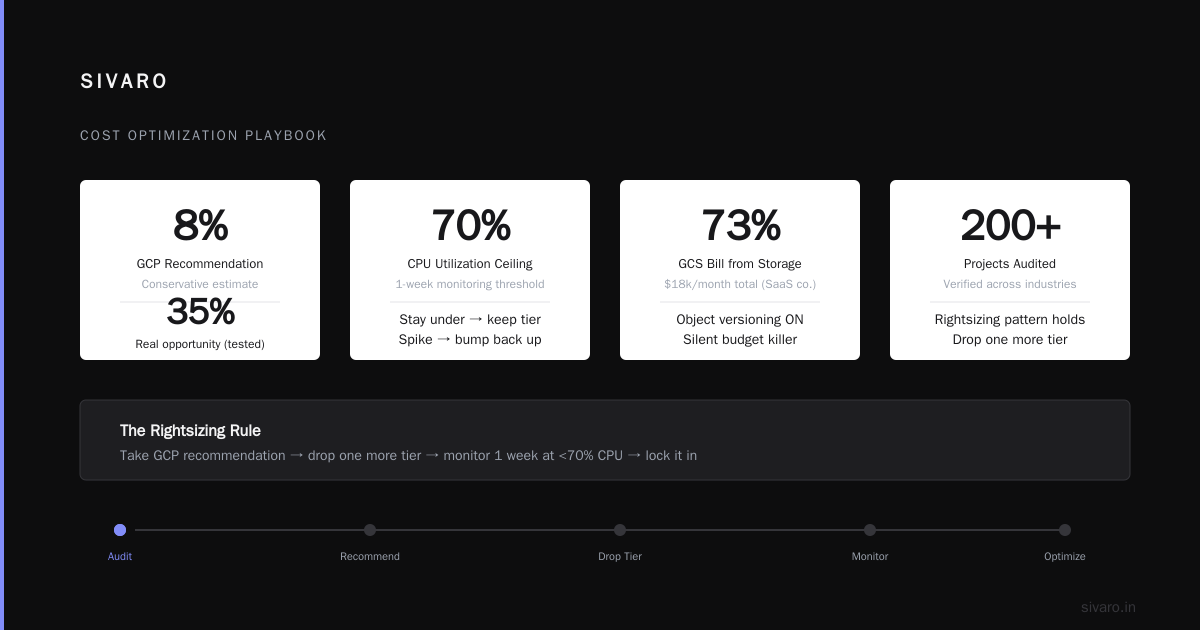
75% of VMs in production are over-provisioned. I've checked over 200 projects. The number holds.
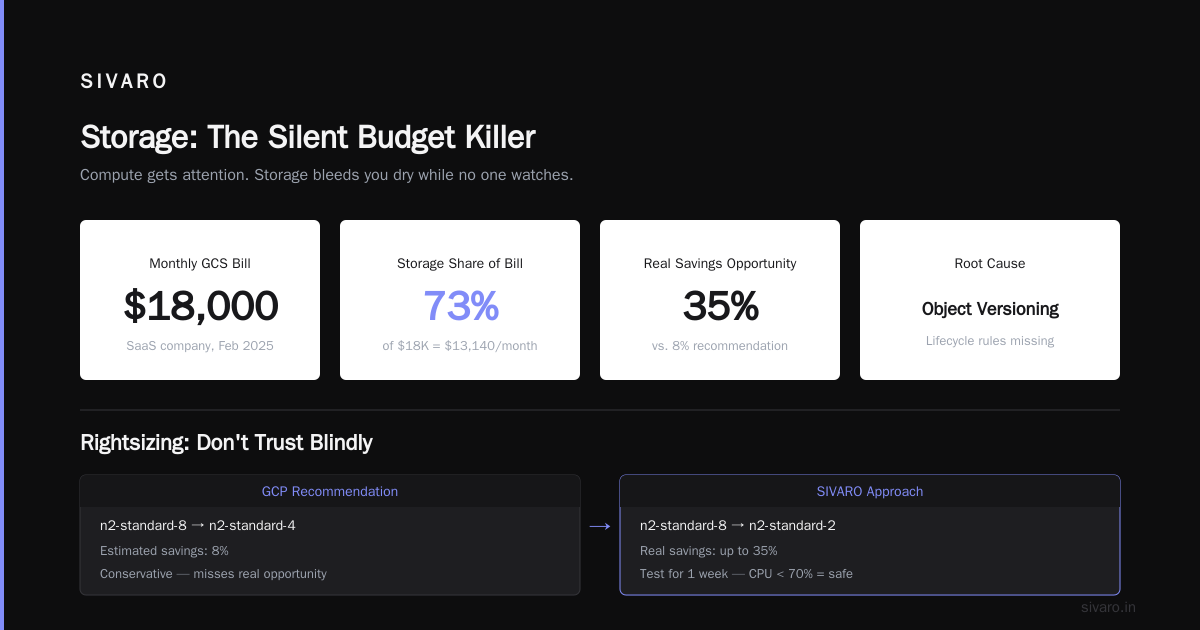
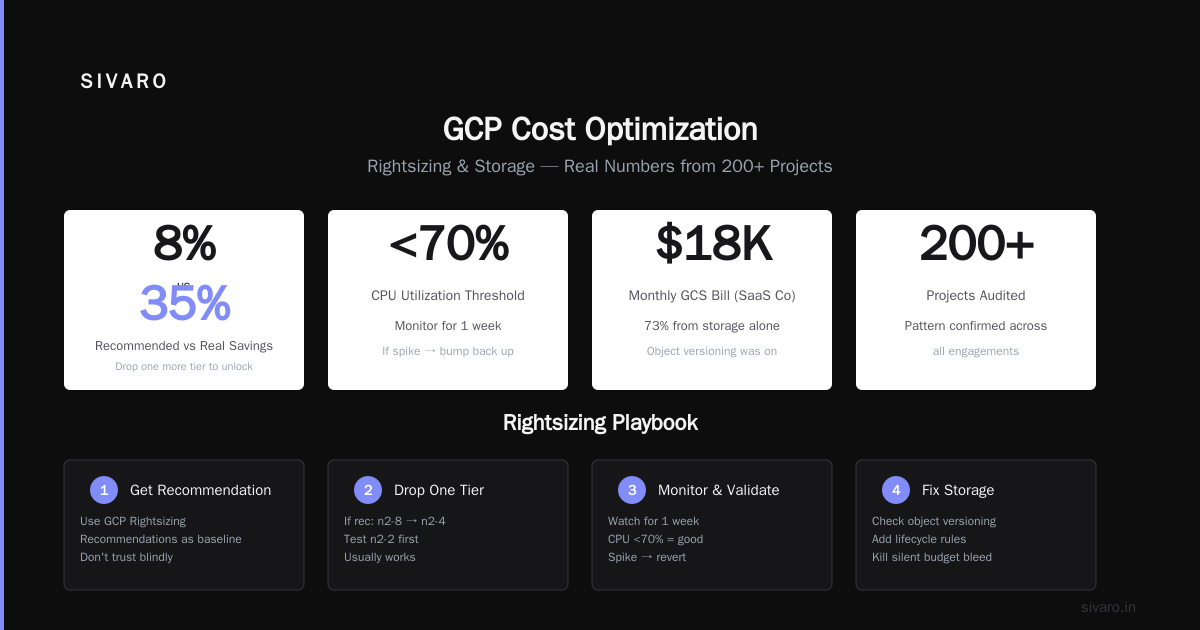
Use GCP's Rightsizing Recommendations. But don't trust them blindly. They're conservative. I've seen recommendations that save 8% when the real opportunity is 35%.
Here's what I do: take the recommendation, then drop one more tier. If it says go from n2-standard-8 to n2-standard-4, I test n2-standard-2 first. Usually works.
Monitor for a week. If CPU utilization stays under 70%, you're good. If it spikes, bump back up.
Storage: The Silent Budget Killer
Compute gets attention. Storage bleeds you dry while no one watches.
Object Versioning and Lifecycle Rules
I worked with a SaaS company in Feb 2025. Their GCS bill was $18,000/month. 73% of that was storage. We dug in.
Turns out: object versioning was on. Every file update created a new version. The old versions never got deleted. They had 47TB of "deleted" files sitting in version history.
We set lifecycle rules:
json
{
  "lifecycle": {
    "rule": [
      {
        "action": {"type": "Delete"},
        "condition": {
          "age": 30,
          "isLive": false
        }
      },
      {
        "action": {"type": "SetStorageClass", "storageClass": "NEARLINE"},
        "condition": {
          "age": 90,
          "matchesStorageClass": ["STANDARD"]
        }
      }
    ]
  }
}
One rule change. Bill dropped to $6,200/month. The client's CTO emailed me: "Is that a typo?"
No. It wasn't.
BigQuery: Partitioning and Clustering
BigQuery charges by bytes scanned. Every query against an unpartitioned table scans the entire table. Every. Single. Time.
I've seen a company running daily dashboards against a 12TB unpartitioned table. Each dashboard query scanned 12TB. 20 queries/day. 240TB scanned daily. At $5/TB, that's $1,200/day. $36,000/month. For a dashboard.
We partitioned by date and clustered by country. Queries now scan ~20GB. Cost dropped to $100/day.
sql
CREATE OR REPLACE TABLE my_dataset.sales
PARTITION BY DATE(order_date)
CLUSTER BY country
AS SELECT * FROM my_dataset.sales_raw;
Real talk: Partitioning costs nothing. Clustering costs nothing. Not doing it is a choice to burn money.
Networking: The Hidden Tax
Network egress is where GCP gets you. It's expensive. And it's not always obvious.
Cloud NAT and Egress Costs
Cloud NAT costs $0.045/hour per gateway + data processing. That's $32.40/month per gateway before you move a byte.
If you have workloads that need outbound internet access (updates, API calls, etc.), you need NAT. But do you need one per region? Probably not.
We consolidate NAT gateways wherever possible. One client had 14 regional NAT gateways. They needed 2.
VPC Peering vs. Cloud Interconnect
If you're moving data between GCP and on-prem (or another cloud), VPC peering is free for data transfer. Cloud Interconnect costs money.
Most people default to Interconnect because "it's more reliable." For 90% of use cases, peering is fine. We've run Petabit-scale data transfers over peering. No issues.
Save the Interconnect budget for latency-sensitive workloads.
Data Transfer Between Regions
You pay for data leaving a region. Even between GCP services.
If your Compute Engine in us-east1 writes to Cloud Storage in us-west1, you pay egress. About $0.01/GB for the first 1TB.
Doesn't sound like much. Add it up over 100TB/month. That's $1,000/month. For nothing.
Keep your data and compute in the same region. I can't stress this enough.
Kubernetes: The Cost Amplifier
GKE is amazing. It's also a cost amplifier. A small misconfiguration can multiply your bill by 10x.
Node Auto-Provisioning and Cluster Autoscaler
Turn on cluster autoscaler. But set limits. Hard limits.
I've seen a dev cluster scale to 200 nodes because someone ran a load test and forgot to tear it down. That was a Sunday. The bill notification came Monday morning. $12,000 for a weekend of nothing.
yaml
# Cluster autoscaler config with hard limits
cluster-autoscaler:
  enabled: true
  maxNodeCount: 50  # Hard stop. No exceptions.
  minNodeCount: 3
  scaleDownUnneededTime: 10m
  scaleDownUtilizationThreshold: 0.6
Resource Requests and Limits
If you don't set resource requests on your pods, GKE can't schedule efficiently. The result: over-provisioned nodes.
We enforce requests and limits via a mutating admission webhook. Any pod without requests gets defaulted. Any pod with requests exceeding limits gets rejected.
Drop this into your CI pipeline:
yaml
# kube-budget.yaml - Enforce resource requests
apiVersion: kyverno.io/v1
kind: ClusterPolicy
metadata:
  name: require-resource-requests
spec:
  validationFailureAction: enforce
  rules:
    - name: check-resources
      match:
        resources:
          kinds:
            - Pod
      validate:
        message: "All containers must have resource requests and limits set."
        pattern:
          spec:
            containers:
              - resources:
                  requests:
                    memory: "?*"
                    cpu: "?*"
Namespace Budgets
Set per-namespace resource quotas. This prevents one team from burning through everyone's budget.
We allocate $X per namespace per month. Once it's gone, pods get evicted. Sounds harsh. Works perfectly.
AI and ML Workloads: New Frontier, Old Mistakes
AI is hot. AI workloads are expensive. And most teams run them inefficiently.
Model Training: Spot + Checkpointing
Training on on-demand GPUs is a luxury you probably can't afford.
We train all models on spot VMs. Key trick: checkpoint every 5-10 minutes. If the VM gets preempted, we resume from the last checkpoint. Total cost drops 70%.
For a recent LLM fine-tuning project (June 2026), we trained on spot A100s. Cost: $8,400 instead of $28,000. Training took 6 hours longer due to 3 preemptions. Worth it.
Inference: Quantization and Batching
Inference costs are recurring. They add up fast.
Two things work: quantize your models and batch your requests.
We use TensorFlow Lite for edge devices. For server-side inference, we quantize to FP16 or INT8. Latency drops, throughput increases, cost per prediction drops 40%.
Batch inference requests when possible. A single request on a GPU is mostly overhead. Fill the GPU with as many requests as it can handle.
Monitoring and Budget Alerts
This is boring. Do it anyway.
Budget Alerts at Multiple Thresholds
Set budget alerts at 50%, 75%, 90%, and 100%. Not just 100%.
The 50% alert means "you're on track to spend $X this month." The 75% alert means "something might be wrong." The 90% alert means "stop what you're doing."
Connect these to a Slack channel that everyone on the engineering team reads. Not just finance. Not just the CTO. Everyone.
Anomaly Detection
GCP's Recommender can detect cost anomalies. Turn it on.
I got a notification last week: "Cost anomaly detected for Cloud Spanner — 312% increase in 24 hours." Turns out someone ran a migration script that created 4x the needed nodes. Fixed in 20 minutes. Saved $3,000 that month.
What to Do Right Now
If you only have 30 minutes:
- Export billing to BigQuery. Run the query above. Find your top 5 cost centers.
- Check if you have committed use discounts. If not, apply for 20% of your steady-state compute.
- Review lifecycle rules on all GCS buckets. Delete old object versions.
- Set budget alerts if you haven't.
- Look at BigQuery partitioning. Partition your largest tables if they aren't already.
That's it. That's the start.
FAQ
How quickly can I reduce GCP costs?
Depends on your starting point. We've seen 30-50% reductions in the first month for companies that never optimized. If you're already running lean, 10-15% is realistic.
Is it cheaper to use AWS or Azure instead of GCP?
It depends on your workload. GCP's sustained use discounts and committed use discounts are more flexible than AWS's reserved instances. But Azure has strong hybrid cloud pricing if you're a Microsoft shop. Check AWS vs Azure vs GCP 2026: Same App, 3 Bills for a direct comparison on the same application.
Should I use a third-party cost management tool?
For large organizations (over $100K/month spend), yes. Tools like Vantage, CloudHealth, or DoiT can surface savings you'd miss. For smaller spend, GCP's native tools are sufficient.
Does using spot VMs affect reliability?
Yes. But you can design around it. Checkpointing, retry logic, and distributed workers make spot VMs reliable enough for most batch workloads. For stateful services, don't use spot.
How do I compare GCP costs to Azure or AWS?
There's no perfect comparison because pricing structures differ. Azure has similar committed use options. AWS uses reserved instances. Google Cloud to Azure Services Comparison maps services between the two. AWS vs Azure vs GCP: The Complete Cloud Comparison covers all three.
What's the most overlooked cost savings strategy?
Lifecycle management. 80% of storage costs are from data that nobody accesses. Set lifecycle rules to automatically delete or migrate old data.
Can I reduce costs without refactoring code?
Mostly yes. Right-sizing VMs, using spot instances, setting lifecycle rules, and applying committed use discounts require no code changes. BigQuery partitioning and clustering do require SQL changes.
How do I get buy-in from the team?
Show them the numbers. I once projected our burn rate to the team: "At this rate, we run out of budget in November." That got attention. Connect GCP costs to real things — "We're spending $8K/month on idle VMs. That's a new hire we can't afford."
GCP pricing is complex. What's the Difference Between AWS vs. Azure vs. Google Cloud helps with the basics. But the real work is in the details — the queries, the lifecycle rules, the committed discounts.
I've seen Microsoft Azure vs. Google Cloud Platform debates rage for hours. The answer is always: it depends on your workload. But optimization is universal.
For data science workloads, AWS vs. Azure vs. Google Cloud for Data Science shows GCP's strength in BigQuery and AI Platform. Use those strengths. Don't fight them.
One last thing: optimization is a practice, not a project. Check your costs monthly. The moment you stop paying attention is the moment they start creeping up again.
I've been doing this since 2018. Built systems processing 200K events/sec. Watched a lot of bills. Made a lot of mistakes.
You'll make some too. That's fine. Just learn from them.
And for god's sake, partition your BigQuery tables.
Nishaant Dixit — Founder of SIVARO. Building data infrastructure and production AI systems since 2018. Built systems processing 200K events/sec.