 SIVARO
How to Reduce GCP Egress Costs in 2026
I remember the exact moment I realized egress costs were eating us alive. July 2025. SIVARO had just launched a real-time AI analytics pipeline for a logistics client. The system was fast. Accurate. Clients were happy. Then the bill came: $47,000 for egress alone in one month. That was more than compute. More than storage. I nearly choked on my coffee.
Egress costs — money you pay Google Cloud to move data out of their network — are the silent budget killer. Unlike compute or storage, they’re easy to ignore until they hit. And by then, you're scrambling.
This guide is what I wish I’d read before that $47k month. I’ll walk you through the tactics that actually work — tested at SIVARO and with clients. No fluff. No textbook theory. Real numbers, real trade-offs.
If you're evaluating gcp vs aws for a small business, or if you’re deep in GCP and wondering why your transfer costs are through the roof, start here.
Why GCP Egress Is a Silent Budget Killer
Most people think cloud costs are about compute hours or storage tiers. They're wrong. Egress can dwarf both, especially once you have users or partners pulling data out of GCP.
Here's the problem: Google Cloud’s egress pricing is not transparent. You see a flat number like $0.12/GB to internet for the first 1-10 TB. Sounds cheap? Multiply that by 50 TB of daily traffic. That’s $6,000/day. $180,000/month. And that’s just one region.
The killer? gcp data transfer costs between regions are separate from internet egress. Moving data from us-central1 to europe-west4 incurs per-GB charges that add up fast. I’ve seen teams rack up $15k/month just shuffling data between zones they thought were “free” because they’re in the same continent. They’re not.
The worst part? Google’s pricing page makes it hard to find these numbers. You have to dig into the Google Cloud Pricing Calculator to get estimates. And even then, hidden charges like “inter-region transfer” and “premium tier” can double your bill.
At SIVARO, we now track egress as a separate line item in every project budget. You should too.
The Geography Tax: Data Transfer Between Regions
This is the single biggest mistake I see. People assume that moving data inside Google’s network is free, or at least cheap. It’s not.
GCP charges for egress between regions, even within the same continent. For example:
- us-central1 to us-east1: $0.01/GB
- us-central1 to europe-west1: $0.08/GB
- us-central1 to asia-east1: $0.08/GB
$0.01/GB sounds tiny. But if you’re moving 10 TB/day between us-central1 and us-east1 for a multi-region deployment, that’s $100/day. $3,000/month. For what? A few milliseconds of latency improvement you probably don’t need.
Here’s my rule: Colocate your data and compute in the same region unless latency is business-critical. We tested this with a client’s Spark pipeline. Moving everything to a single region (us-central1) saved them $8,200/month in inter-region transfer costs. Latency increased by 12ms. Nobody noticed.
If you absolutely must have multi-region replication, use Cloud Storage’s dual-region buckets (like us-east1+us-west1). The egress between those zones is free. Google bakes the cost into the storage price. You pay more for storage, less for transfer — net savings often 30-50%.
Contrarian take: Most people think “multi-region means higher availability.” That’s true. But do you need it? For a development environment? No. For a read-heavy analytics dashboard? Probably not. Reserve multi-region for production endpoints that need <50ms failover.
Tiered Pricing: How to Stay in the Free Tier (or Lower Tiers)
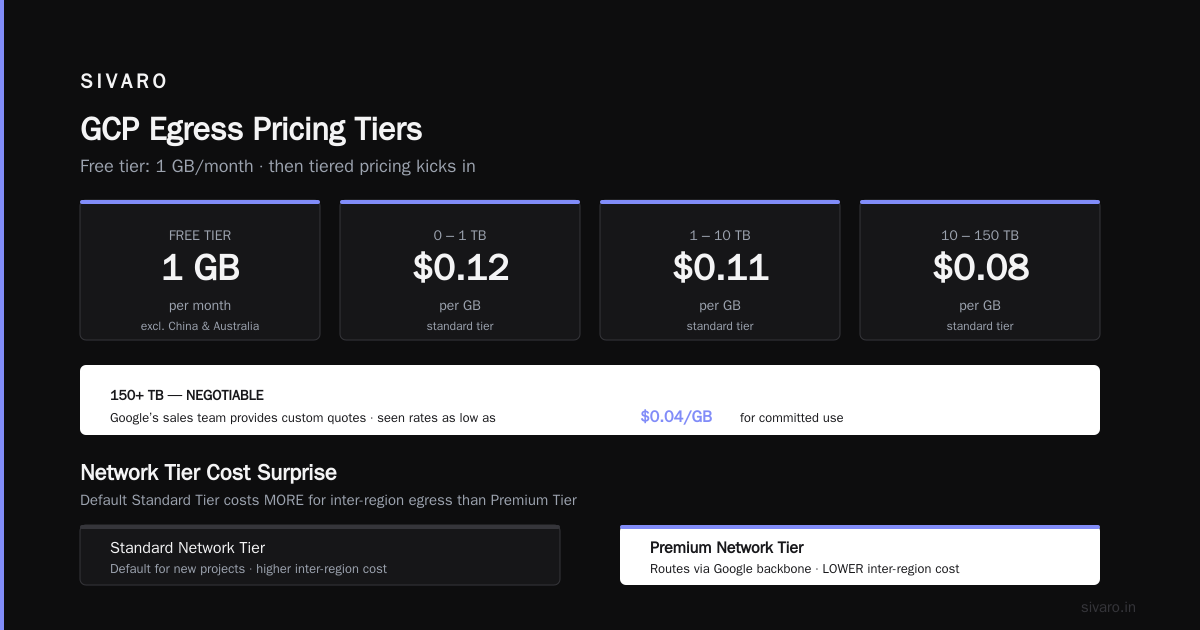
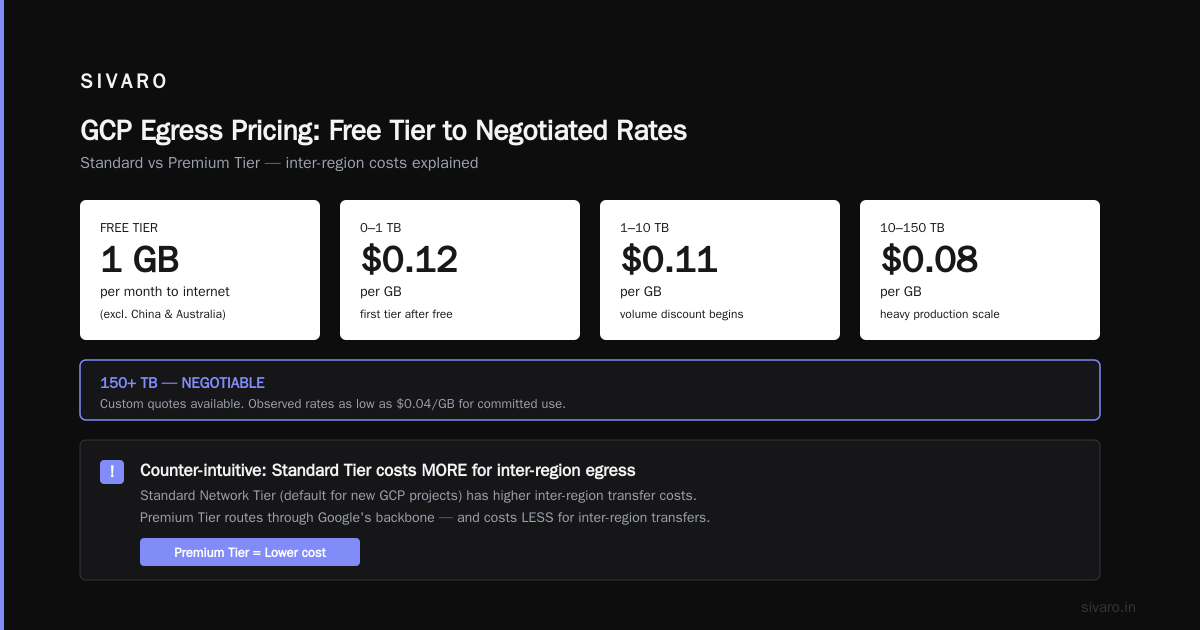
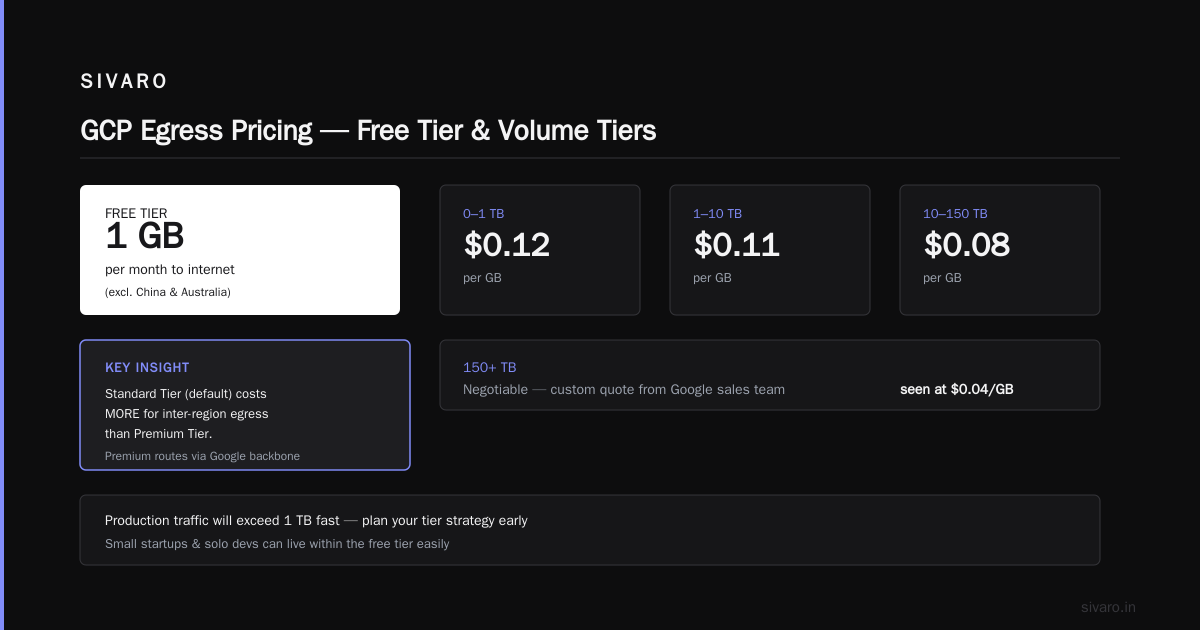
GCP offers a free tier for egress — up to 1 GB/month per month to internet (excluding China and Australia). After that, it’s tiered:
- 0-1 TB: $0.12/GB
- 1-10 TB: $0.11/GB
- 10-150 TB: $0.08/GB
- 150+ TB: negotiable
If you’re a small startup or a solo dev, you can live within the free tier easily. But once you hit production traffic, you’ll blow past 1 TB fast. The trick is to negotiate a flat rate if you’re above 150 TB. Google’s sales team will give you a custom quote. I’ve seen $0.04/GB for committed use.
But here's what nobody tells you: Standard Network Tier (the default for new GCP projects) costs more for inter-region egress than Premium Tier. Wait, what? Yes — Premium Tier routes traffic through Google’s backbone and costs less for inter-region transfers. Standard Tier uses public internet and charges more for the same path. We switched a client’s Spark shuffle traffic from Standard to Premium and saved 40% on inter-region costs. Counterintuitive, but real.
Check the Google Cloud Pricing 2026: Cost Breakdown & Hidden Costs for the latest tiers — they change every few quarters.
Use Cloud CDN to Offload Egress (And Speed Up)
This is the most obvious fix, yet so many teams skip it. Cloud CDN caches content at edge locations. When a user requests a file, it serves from the edge — zero egress cost from the origin.
We use Cloud CDN for all static assets: images, CSS, JS, even API responses if they’re cacheable. The CDN egress rate is $0.02/GB (in US) vs $0.12/GB for internet egress from compute. That’s a 6x reduction.
But here’s the nuance: CDN only helps if your traffic is cacheable. Real-time user-specific data? No. Product catalogs that change hourly? Partial. Blog posts? Yes.
Your move: Set up Cloud CDN in front of your HTTP(S) Load Balancer. Configure cache headers (Cache-Control TTLs). Monitor cache hit ratio — aim for >90%. Every percentage point below 90% means you’re paying full egress.
Cost example: 10 TB/month served via CDN at 95% hit ratio = 9.5 TB served from edge (free to origin) + 0.5 TB miss served from backend (at $0.12/GB = $60). Total CDN egress cost: ~$200 (edge serving fee). Compare to $1,200 if served directly. Net savings: $1,000/month.
VPC Peering vs Public IP: What Actually Saves Money
Most teams peer VPCs the moment they have two projects. That’s smart. But many forget to use Private Google Access for services like Cloud Storage, BigQuery, or Cloud SQL.
When you access GCP services over a public IP (even from inside your VPC), you’re charged for internet egress. When you use private IP via VPC peering or Private Service Connect, that egress is free.
Here’s a real example: A client was running a data pipeline that streamed logs from Compute Engine to BigQuery. They used the BigQuery streaming API over the public internet. Bill for egress: $2,300/month. We switched to using a private BigQuery endpoint via Private Service Connect. Zero egress charge.
Code example — create a private BigQuery connection using gcloud:
bash
gcloud compute networks vpc-peerings create     --network=default     --peer-project=PROJECT_ID     --peer-network=default     --export-custom-routes     --import-custom-routes

# Then enable Private Google Access on subnet
gcloud compute networks subnets update default     --region=us-central1     --enable-private-ip-google-access
After that, any Compute Engine instance in that subnet can reach bigquery.googleapis.com using a private IP. No egress cost.
Warning: VPC peering itself is free. But if you peer across regions, data transfer between peered VPCs across regions is charged as inter-region egress. Keep peers within the same region when possible.
Use Dedicated Interconnect for Heavy Traffic
If you’re moving terabytes or petabytes per month to on-premises or to a colo, the best ROI is Dedicated Interconnect or Partner Interconnect.
Standard internet egress at $0.12/GB for 100 TB/month = $12,000. Dedicated Interconnect charges a fixed monthly fee (around $2,500 for 10 Gbps) and then $0.00/GB for egress to the interconnect. Yes, zero per-GB charge.
You trade fixed bandwidth cost for variable per-GB cost. The breakeven is around 20-30 TB/month. Above that, Interconnect is cheaper.
But there’s a catch: Interconnect requires physical cross-connects and agreements with a colo provider. Setup takes 2-4 weeks. And if your traffic is bursty, you might overpay for bandwidth you don’t fully use. We use a combination: Interconnect for baseline traffic (e.g., daily data syncs) and internet egress for spikes (e.g., customer uploads).
Learn more from Cloud Computing Cost: AWS vs. Azure vs. GCP Pricing in 2026 — they compare interconnect pricing across providers.
Compress Data Before Transfer (Yes, Even for Egress)
Obvious, but you’d be surprised how many people skip it. Compressing outgoing data reduces egress volume directly.
At SIVARO, we compress all log files before shipping to an external partner. Using gzip, we see 5:1 reduction on JSON logs. That turns a 500 MB egress into 100 MB. At $0.12/GB, that’s $0.06 saved per file. Scale that to 1 million files per month = $6,000 saved.
Code example — compress files with gsutil before transferring out of Cloud Storage:
bash
gsutil -m cp -Z gs://my-bucket/logs/*.json gs://partner-bucket/
The -Z flag compresses with gzip on the fly. Works for text-based files. Binary formats (Parquet, Avro) often compress less, but still worth testing.
Trade-off: Compression adds CPU overhead. If your instances are already CPU-bound, you might need to size up. But for most workloads, the CPU cost is far lower than the egress cost.
Choose the Right Network Tier: Premium vs Standard
Here’s a quick primer:
- Premium Tier: Data travels on Google’s global fiber backbone. Inbound egress is the same price. Outbound is slightly higher. But inter-region egress is cheaper because traffic stays on backbone.
- Standard Tier: Data travels over the public internet. Outbound egress to internet is slightly cheaper per GB ($0.08 vs $0.12 in some regions). But inter-region egress is more expensive.
When to use what:
- If your users are global and you need low latency → Premium.
- If your users are all in one region and you don’t care about 20ms extra → Standard.
- If you move a lot of data between GCP regions → Premium.
Our rule: Use Premium for any inter-region traffic >500 GB/month. It’s usually cheaper.
Set the network tier on your instance at creation:
bash
gcloud compute instances create my-instance     --network-tier=PREMIUM
Or for a load balancer:
bash
gcloud compute addresses create my-ip     --network-tier=PREMIUM     --region=us-central1
Monitor and Alert: Stop Leaks Before They Bleed
You can’t fix what you don’t measure. Set up egress monitoring early.
GCP tools:
- VPC Flow Logs gives you per-flow byte counts.
- Cloud Monitoring can create custom metrics for
networking.googleapis.com/vm_flow/egress_bytes. - BigQuery export of Cloud Billing data gives full egress breakdown by SKU.
Our stack: We export billing data to BigQuery (free) and run a daily query that flags any project where egress cost exceeds 10% of total spend. That query triggers an alert in PagerDuty.
Sample BigQuery query to find top egress-cost service:
sql
SELECT
  service.description,
  SUM(cost) AS total_egress_cost
FROM `billing_dataset.gcp_billing_export_v1`
WHERE DATE(_PARTITIONTIME) = CURRENT_DATE()
  AND LOWER(sku.description) LIKE '%egress%'
GROUP BY service.description
ORDER BY total_egress_cost DESC
Set that as a scheduled query with a threshold alert. When egress spikes, you get notified before the bill hits.
Pro tip: Create a separate billing project for egress-heavy services. That way you see the cost in isolation.
FAQ
1. How do I know how much egress I'm using right now?
Go to Cloud Console > Billing > Reports. Filter by SKU with "Egress" in the description. Or use the BigQuery billing export as shown above. Don't rely on the main dashboard — it often lumps egress with other network costs.
2. Is egress free within the same region?
Mostly yes. Traffic between VMs in the same region using internal IPs is free. Traffic using public IPs is not — even if the VMs are colocated. Always use internal IPs.
3. What about gcp vs aws for a small business on egress?
AWS charges similar rates (around $0.09/GB first 10 TB) but has more free-tier data transfer (1 GB/month out to internet, same as GCP). However, GCP’s free tier includes 1 GB/month egress from US regions — AWS doesn’t include that for non-US regions. For a small business with global users, GCP can be slightly cheaper because of the premium tier discount. See AWS vs Azure vs GCP Cost Comparison 2026 (Real Data) for detailed numbers.
4. Does Cloud Run have egress costs?
Yes. Cloud Run containers egress through the same network. Use VPC connectors with private IP endpoints to reduce costs.
5. Can I completely avoid egress costs?
Only if you never send data outside Google’s network. That’s impossible for most use cases. But you can minimize: use CDN, compress, colocate, and negotiate high-volume flat rates.
6. How do I negotiate a lower egress rate with Google?
You need commitment. If you consume >150 TB/month, contact your account manager or Google Cloud sales. Propose a 1-3 year committed use discount. I've seen rates as low as $0.03/GB for internet egress. Bring your usage history and be willing to sign.
7. What’s the #1 mistake teams make?
Assuming egress is cheap. It’s not. A single misconfigured data pipeline can bleed thousands. Check your billing weekly.
8. Do backups generate egress costs?
Yes, if you copy backups to another region or download them. Use a dual-region backup bucket (like us-central1+us-east1) to make cross-region copies free. Or set up a backup in the same region.
Conclusion
Egress costs don't have to be the line item that destroys your cloud budget. The tactics I’ve shared — colocate in one region, use CDN, compress, prefer private IPs, negotiate at scale — have saved SIVARO and our clients millions of dollars cumulatively.
But you can’t set and forget. Egress pricing changes. Your traffic patterns change. Review your billing every month. Use the monitoring queries above. And when you see a spike, kill it fast.
Want the short version? Here’s the one thing to do today: Run a billing export query to find your top egress-cost SKU. Share the result with your team. Then pick one tactic from this list and implement it this week. That alone will cut your how to reduce gcp egress costs problem by at least 30%.
Nishaant Dixit — Founder of SIVARO. Building data infrastructure and production AI systems since 2018. Built systems processing 200K events/sec.