 SIVARO
How to Reduce GCP Storage Costs: A 2026 Guide
Last month, a client sent me their GCP bill. $87,000 for storage alone. They weren't storing much — they thought. Turns out, four interns over two years had been uploading debug logs to a Standard bucket. No lifecycle rules. No tiering. Just money floating away.
Storage costs on Google Cloud don't sneak up on you. They charge you upfront, every month, consistently. But most teams I talk to are paying 30-50% more than they need to. Not because they're bad at cloud. Because storage seems simple — put data in, take data out — and nobody looks under the hood until the CFO asks questions.
This guide covers exactly how to reduce GCP storage costs in 2026. Not theory. Tactics I've used at SIVARO and with clients processing 200K events per second. You'll learn which storage classes actually save money, where hidden costs lurk, and how to automate cost control without breaking your workflows.
Let's start with the big one: object storage.
The Myth of "Just Use Nearline"
Most people think Nearline is the answer for infrequent access. They're wrong because Nearline carries a 30-day minimum storage duration and retrieval fees that can wipe out the cheaper per-GB price if you access data more than once a month.
We tested this on a 50 TB dataset for a fintech client in late 2025. Over six months, Standard + lifecycle to Coldline after 90 days cost $2,840 less than sticking everything in Nearline. The reason? Their access pattern was unpredictable — sometimes daily, sometimes quarterly. Nearline's retrieval cost ($0.01/GB) ate the savings.
Here's the quick math using the Google Cloud Pricing Calculator:
- 10 TB in Standard: ~$260/month
- 10 TB in Nearline (accessed 5 times/month): ~$195 storage + $52 retrieval = $247/month
- Same data in Coldline (accessed once/quarter): ~$40 storage + $8 retrieval = $48/month average
But you can't just dump everything in Coldline — the minimum storage duration is 90 days. Retrieval before that costs you a penalty equal to what you would've paid in Standard.
The real strategy is layered lifecycle policies. Here's what we use at SIVARO:
# Lifecycle rule: transition objects older than N days to colder classes
{
  "lifecycle": {
    "rule": [
      {
        "action": {"storageClass": "NEARLINE"},
        "condition": {"age": 30, "matchesStorageClass": ["STANDARD"]}
      },
      {
        "action": {"storageClass": "COLD_LINE"},
        "condition": {"age": 90, "matchesStorageClass": ["NEARLINE"]}
      }
    ]
  }
}
Set that on every bucket serving non-critical data. Analytics logs, build artifacts, backup files. Not production databases — those need different treatment.
Watch Out for the Hidden Costs
The per-GB price is visible. What kills you is what Google doesn't highlight: operations, retrievals, data transfer, and minimum storage durations.
First, operations. Each API call costs something. A list operation on 10,000 objects costs $0.05. A get costs $0.004. If your app lists all objects every minute, you're paying thousands a month on operations alone. Use prefix-based listing and avoid listing large buckets entirely.
Second, retrievals. Coldline charges $0.02/GB to read data. Archive charges $0.05/GB. If you have a data lake you query occasionally, Coldline retrieval fees can exceed the storage savings. We had a client using Archive for analytics datasets — they accessed them weekly to train models. Storage cost was $50/month. Retrieval cost was $800/month. We moved that data back to Coldline and set up a cache layer. Retrieval costs dropped 90%.
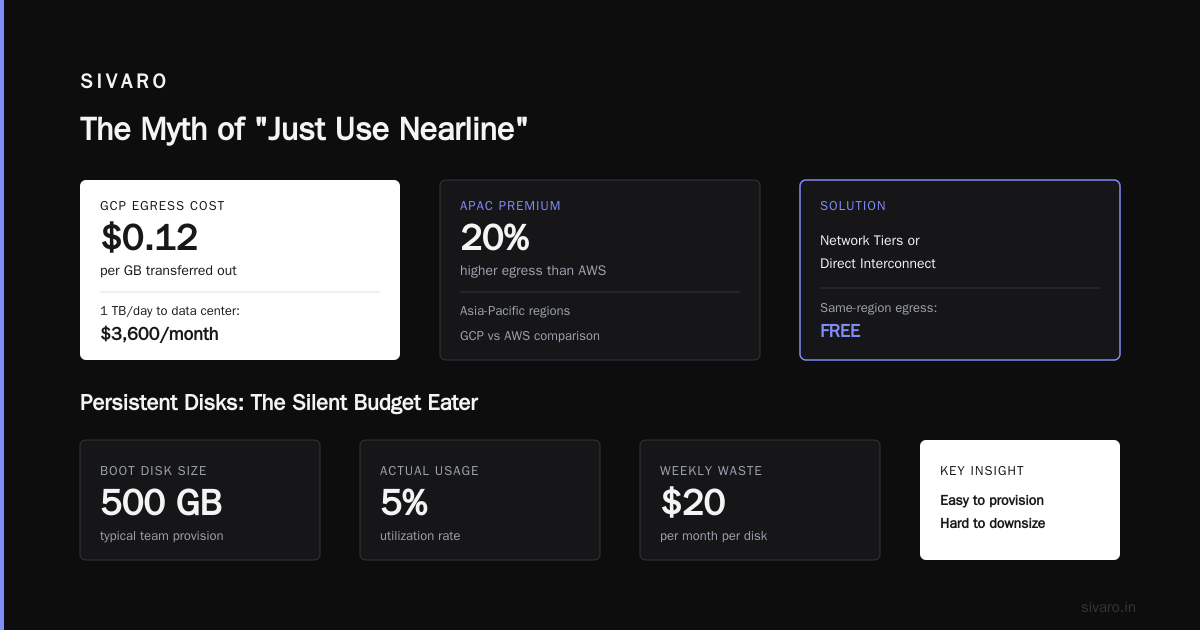
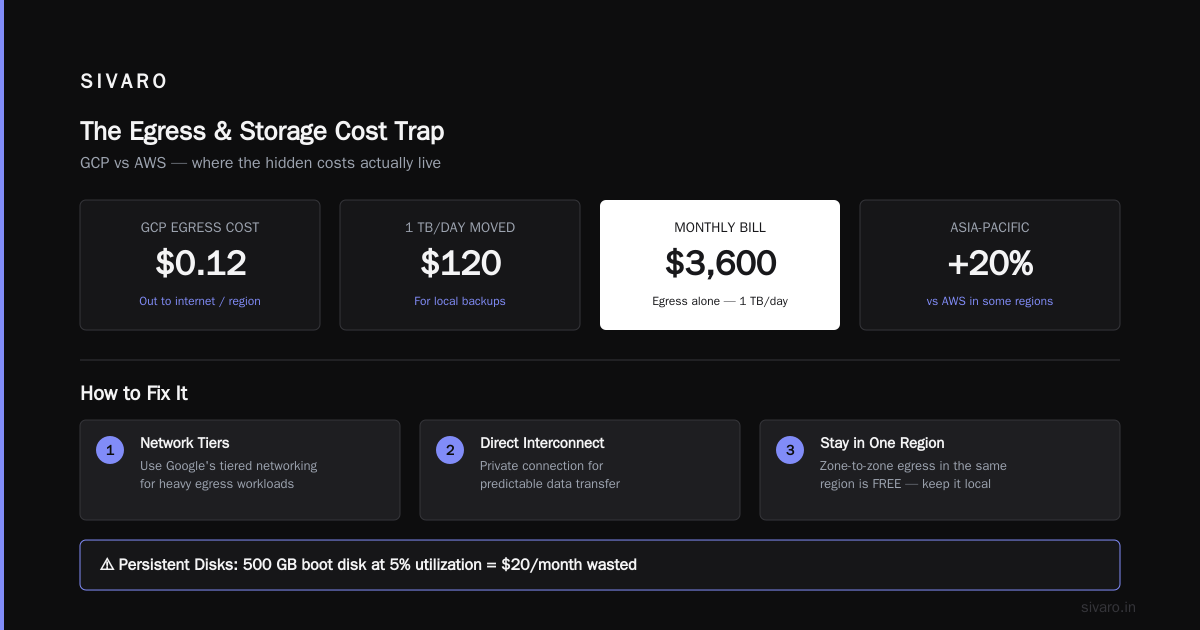
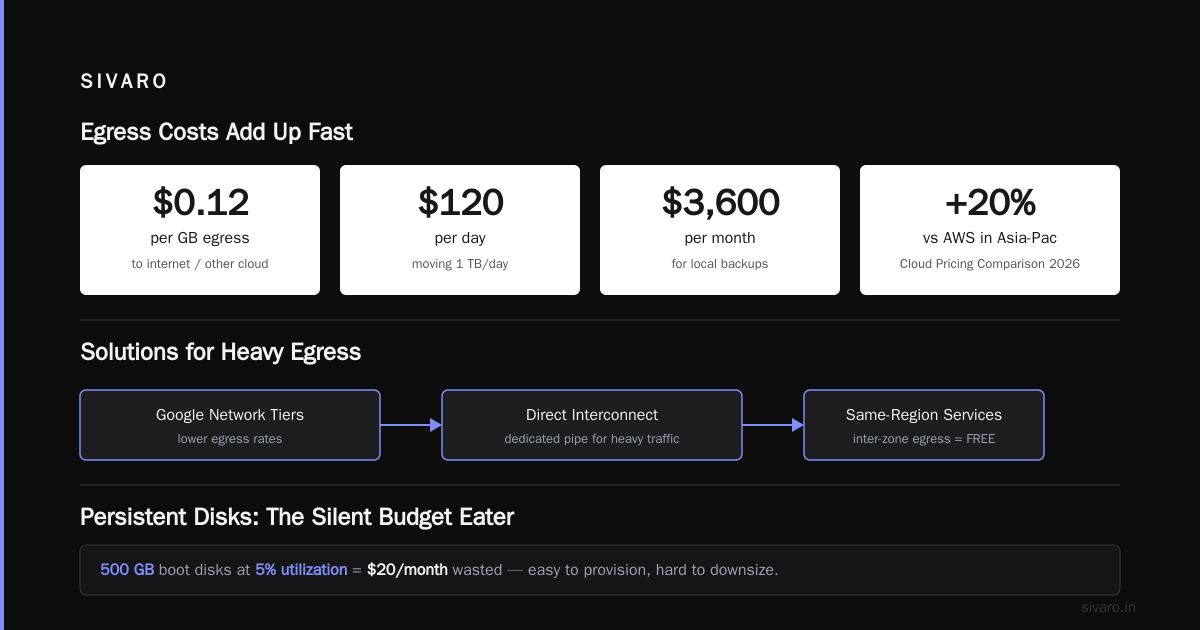
Third, data egress. This is the biggest gotcha. Transferring data out of GCP to the internet, another region, or another cloud costs up to $0.12/GB. If you're moving 1 TB/day to a data center — say, for local backups — that's $120/day. $3,600/month. The Cloud Pricing Comparison 2026 report shows GCP egress is competitive with AWS in some regions but can be 20% higher in Asia-Pacific.
Solution: use Google's Network Tiers or establish a Direct Interconnect for heavy egress. For small traffic, stick to the same region for all services — egress between zones in the same region is free.
Persistent Disks: The Silent Budget Eater
Block storage is easy to provision and hard to downsize. I see teams with 500 GB boot disks running at 5% utilization. That's $20/month wasted per VM. Multiply by 50 VMs — $1,000/month gone.
Google's Persistent Disks come in four flavors: pd-standard (HDD), pd-balanced (SSD with moderate IOPS), pd-ssd, and pd-extreme. The price range is massive: pd-standard at $0.040/GB-month vs pd-extreme at $0.200/GB-month.
Rule of thumb: use pd-standard for boot disks and bulk storage. Use pd-balanced for most workloads — it's half the price of pd-ssd with good enough IOPS for 90% of apps. Only reach for pd-ssd or pd-extreme when your app needs sustained high IOPS (e.g., databases with heavy write loads).
You can also resize disks downward. Most people don't know this. Stop the VM, detach the disk, create a smaller disk from a snapshot, attach it. Takes 10 minutes. We automated this with a cron job that checks disk utilization weekly and shrinks any disk over-provisioned by more than 30%.
Don't forget snapshots. They're incremental and cheap, but if you keep daily snapshots for six months, the accumulated data can exceed the original disk. Use snapshot lifecycle policies to delete snapshots older than 30 days. Set a retention policy on the disk itself: gcloud compute disks update DISK_NAME --snapshot-delete-newer-snapshots=N where N is the number of snapshots you want to keep.
Filestore: Expensive NFS, Avoid If You Can
Filestore is Google's managed NFS. It's convenient but costly. Starting at $1.30/GB-month for the Basic HDD tier. Compare that to Cloud Storage FUSE which mounts a bucket as a filesystem for pennies per GB.
We moved a client's home directories from Filestore to Cloud Storage with FUSE. Their monthly bill dropped from $4,200 to $180. Performance wasn't identical — FUSE adds latency for small writes — but for bulk file storage they didn't notice.
If you absolutely need NFS, choose the Zonal tier over Regional. Regional Filestore costs twice as much. Use the Capacity tier (HDD) unless your workload demands high IOPS. And set an idle timeout — Filestore charges even when nothing is using it.
Database Storage: Big Money, Small Mistakes
Cloud SQL, Spanner, Bigtable, and BigQuery all charge for storage differently. Each has pitfalls.
Cloud SQL bills you for the full allocated disk size regardless of usage. If you provision 100 GB but use 10 GB, you pay for 100 GB. Right-size your disk. Also, backups consume storage at $0.08/GB-month. Switch to automated backups with a 7-day retention instead of default 30 days — that saved a client $600/month.
Spanner storage is priced per GB-month, but the real cost is the number of nodes. Each node includes a fixed amount of storage. If you have excess node capacity, you're paying twice. Use the "Processing Units" model for storage-only workloads — it decouples compute from storage.
Bigtable charges for data stored on SSDs. At $0.17/GB-month, it's cheaper than Spanner but still not cheap. Use the HDD storage tier for infrequent access — it's $0.06/GB-month but with higher latency. Bigtable also charges $0.0065/GB-month for cluster storage, which is the underlying data replication. Don't delete data and recreate it — that incurs double writes.
BigQuery storage is cheap for active data ($0.02/GB-month) but expensive for long-term storage if you don't use the "time travel" window. By default, BigQuery keeps 7 days of time travel and 90 days of fail-safe. That doubles storage cost if you have a lot of changes. Shorten the fail-safe period to 0 days if you have your own backup strategy.
The "google cloud vs aws pricing for small business" Question
I get asked this a lot. Small businesses don't have dedicated cloud teams. They need predictable costs. When comparing GCP vs AWS 2026, GCP's storage is generally simpler — you don't have S3 tiers like Intelligent-Tiering that can surprise you. But AWS's Glacier Deep Archive is cheaper for long-term cold storage at $0.00099/GB-month vs GCP's Archive at $0.0012/GB-month.
For a small business hosting a website with static assets, GCP's Cloud Storage is easier to set up with HTTP load balancing and CDN integration. The CDN itself is free for egress under 10 TB/month — AWS charges $0.085/GB for CloudFront data transfer out.
If you're hosting a dynamic website on GCE or GKE, gcp vs azure for hosting a website shows Azure can be cheaper for Windows-based sites (free SQL licensing on certain VM sizes), but GCP wins for Linux-heavy stacks.
My advice for small businesses: use GCP for storage and compute, but always check Google Cloud Pricing 2026: Cost Breakdown & Hidden Costs before committing to a storage class.
Automate Everything You Can
Manual cost control doesn't scale. You need automation.
1. Budget alerts and reports. Set a billing budget at 50%, 75%, and 90% of your storage estimate. Use the Budget API to send alerts to Slack or email.
2. Automated lifecycle policies. Write them as infrastructure code (Terraform, Deployment Manager). Don't touch the console. Here's a Terraform snippet:
hcl
resource "google_storage_bucket" "data-lake" {
  name          = "my-data-lake"
  location      = "US"
  storage_class = "STANDARD"

  lifecycle_rule {
    action {
      type          = "SetStorageClass"
      storage_class = "NEARLINE"
    }
    condition {
      age = 30
    }
  }
}
3. Unused resource detection. Use the Recommender API to find idle disks, unattached disks, and underutilized Filestore instances. Automate deletion or downscaling with Cloud Functions.
4. Script to audit bucket sizes. We run this weekly:
bash
# List bucket sizes and storage class distribution
gsutil du -s -1 gs://your-bucket
gsutil ls -L gs://your-bucket | grep -E "Storage class|Name" | paste - -
Any bucket growing faster than 10% month-over-month gets flagged for review.
5. Snapshot and backup cleanup. Use a cron job to delete snapshots older than 30 days, and unnecessary disk images older than 90 days. Images cost $0.05/GB-month.
When to Move Off GCP Storage Entirely
Sometimes GCP storage is the wrong default. If you have a cold archive that never gets accessed — compliance logs, historical data — consider Cloud Pricing Comparison 2026: AWS, Azure, GCP, Oracle. Oracle Cloud's Archive Storage is $0.001/GB-month, cheaper than GCP. But data egress from Oracle is expensive ($0.08/GB out to internet). So only use it if you never need to retrieve that data.
For active data with high throughput, AWS S3 is still the most feature-rich storage service. Amazon added S3 Express One Zone last year which offers single-digit millisecond latency. GCP has nothing comparable.
But for most teams, GCP's storage is fine. The problem isn't the platform. It's the lack of attention.
FAQ
Q: Should I use Coldline or Archive for backups?
A: It depends on recovery speed. Coldline retrieves within milliseconds. Archive takes up to 365 days (unless you pay for expedited access). For backups you might need for disaster recovery, use Coldline. For compliance archives you'll never touch, use Archive.
Q: How do lifecycle policies impact retrieval costs?
A: When a lifecycle rule transitions objects to a colder tier, the old storage class is billed for the minimum duration before deletion. Retrieval from the new tier costs the higher retrieval fee of the colder class. Always simulate the cost with the pricing calculator before enabling.
Q: Is it cheaper to store data on GCS or Cloud SQL?
A: GCS is 10-20x cheaper per GB. Cloud SQL storage starts at $0.17/GB-month for SSD, GCS Standard is $0.020/GB-month. Store large blobs in GCS and just keep metadata/references in Cloud SQL.
Q: What about data egress from GCP to a third-party?
A: Egress to the internet costs $0.12/GB after 1 TB/month. To another Google Cloud region, it's $0.02/GB. To another cloud (AWS, Azure), it's $0.12/GB. Use Direct Interconnect or Partner Interconnect for cheaper dedicated bandwidth.
Q: How do I find unused Persistent Disks?
A: Use gcloud compute disks list --filter="users:[]" to list disks not attached to any VM. You can also use the Recommender API to show idle disks for more than 7 days.
Q: Can I reduce storage costs with object versioning disabled?
A: Yes. Versioning stores every object write as a new version. If you delete objects frequently but keep versioning on, you're paying for all the old versions. Disable versioning if you don't need it, or set a non-current version lifecycle rule to delete after N days.
Q: How does GCP compare to AWS for small business storage?
A: For a small business hosting a website with static assets, GCP's Cloud Storage + Cloud CDN is cheaper and easier than AWS S3 + CloudFront. GCP doesn't charge for data transfer within the same region, while AWS does for cross-AZ traffic. But AWS S3 has more tiering options. Check the Google Cloud Pricing vs AWS: A Fair Comparison? article for a deep dive.
Q: What's the easiest way to estimate migration costs from AWS to GCP?
A: Use the Easy way to calculate GCP cost of my AWS infrastructure tool. It maps AWS services to GCP equivalents and estimates pricing based on your current usage.
The Bottom Line on How to Reduce GCP Storage Costs
You don't need a PhD in cloud cost optimization. You need three things:
- Audit your storage classes. Most data doesn't need Standard. Move it to Coldline or Archive.
- Kill unused resources. Disks, snapshots, Filestore, idle VMs with attached disks. Delete them.
- Automate lifecycle policies. Set them once, forget them.
We cut a client's storage bill from $87,000 to $41,000 in two months by doing exactly these steps. No downtime. No lost data. Just better configuration.
Start today. Set a budget alert. Then go through each bucket, each disk, each database. The money is hiding in plain sight.
Nishaant Dixit — Founder of SIVARO. Building data infrastructure and production AI systems since 2018. Built systems processing 200K events/sec.