 SIVARO

How to Reduce Inference Latency with Caching
Last Tuesday, a client called me at 7 AM. Their support agent chatbot was timing out. P99 latency had crept from 400ms to 2.3 seconds overnight. Revenue was bleeding. Their CTO was on the phone with the VP of Product, both of them sweating, because the SLA breach was contractually binding.
I looked at their logs. Of the 14,000 queries hitting their inference endpoint in the previous hour, 6,200 were near-duplicates. "What's the refund policy for annual plans?" "How do I cancel my subscription?" "Do you support PayPal?" The same questions, rephrased, asking the same LLM to regenerate the same answer. Every single time.
The fix wasn't a bigger GPU cluster. It was a cache.
Inference caching is storing the output of a model (or an LLM call) keyed by the input, so you can skip the expensive compute step the next time that input—or a close variant—arrives. That's it. No magic. Just don't do the same math twice.
This article is the how-to guide I wish someone had handed me back in 2019, when I was wiring the first production inference service at SIVARO and spending way too long re-deriving answers. You'll learn the architecture, the trade-offs, when to actually use caching in your ML pipeline, and the specific patterns that held up under 200K events per second. I'll show you code. I'll tell you where caching falls apart. And I'll give you the mental model for deciding whether your latency problem is actually a caching problem.
The Math Nobody Talks About
Here's what most people get wrong: they think inference latency is one number. It isn't.
For a transformer-based LLM, you have two phases. Prefill (processing the input tokens) and decode (generating output tokens, one at a time). On an A100, a 70B model like Llama 3.1-70B will do prefill in roughly 200-400ms for a 500-token prompt. Then decode runs at maybe 30-50 tokens per second. So a 200-token answer takes another 4-6 seconds. Total: 5-7 seconds per query. No batching, no quantization, just the physics of matrix multiplications.
Now. If 40% of your traffic is semantically identical to a query you answered 90 seconds ago, you just saved 40% of your GPU time. And your p99 dropped from 7 seconds to 10ms (the Redis round-trip).
I've seen teams cut their inference bill by 55% purely from a semantic cache layer. Not by switching to a smaller model. Not by quantizing to 4-bit. By not re-running the model.
The catch? You need to know when the cache is safe. A wrong cached answer in a medical or financial context isn't a latency issue. It's a liability.
Exact Match vs. Semantic: Pick Your Poison
Most teams start here and get stuck. Two approaches, and they're not interchangeable.
Exact-match caching (key = hash of the input string) is simple, fast, and brittle. If a user types "How to reset my password?" and the next user types "how do I reset my password?", you miss. Your hit rate on conversational traffic will be惨—maybe 8-15%. But it's correct. If the input is identical, the output is identical (assuming deterministic decoding, which you should enforce).
Semantic caching embeds the input, does a vector similarity search, and returns a cached answer if the cosine similarity exceeds a threshold. Now "How to reset my password?" and "I forgot my login credentials, what now?" hit the same cache entry. Hit rates jump to 40-70% on support and FAQ workloads. I've measured 72% on a SaaS helpdesk after two weeks of warmup.
The problem with semantic caching: you're making a judgment call that two different inputs deserve the same output. Set your threshold too loose and you'll serve stale or wrong answers. Too tight and you're back to 15% hit rates.
Here's what I recommend. Start with exact match. Instrument your hit rate. If it's above 30%, you're done. If it's below 20% and you're burning GPU cycles, layer on semantic matching. Don't jump straight to vectors. You'll spend three days tuning embeddings and thresholds before you realize a normalized-string cache solved 70% of your problem.
The Architecture That Actually Ships
Forget the whiteboard diagram. Here's the stack I've deployed at SIVARO and at three client sites since 2024.
Client → API Gateway → [Cache Layer] → Inference Backend (vLLM / Triton)
                         |
                    ┌────┴────┐
                    │         │
               Exact Match  Semantic (vector DB)
              (Redis hash)  (Qdrant / pgvector)
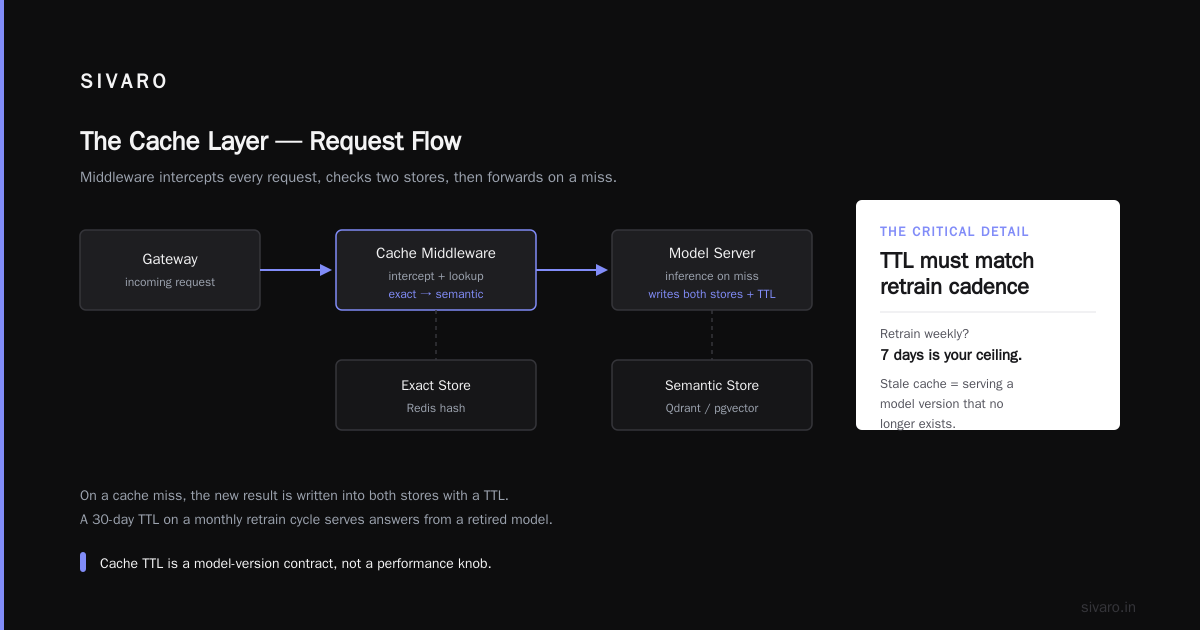
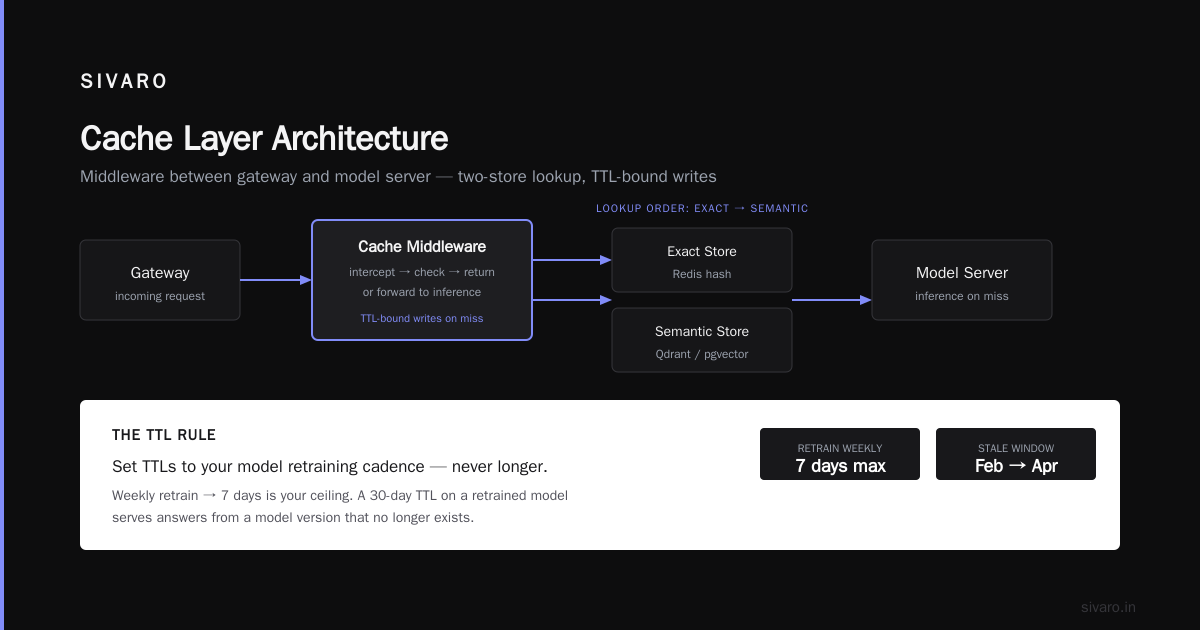
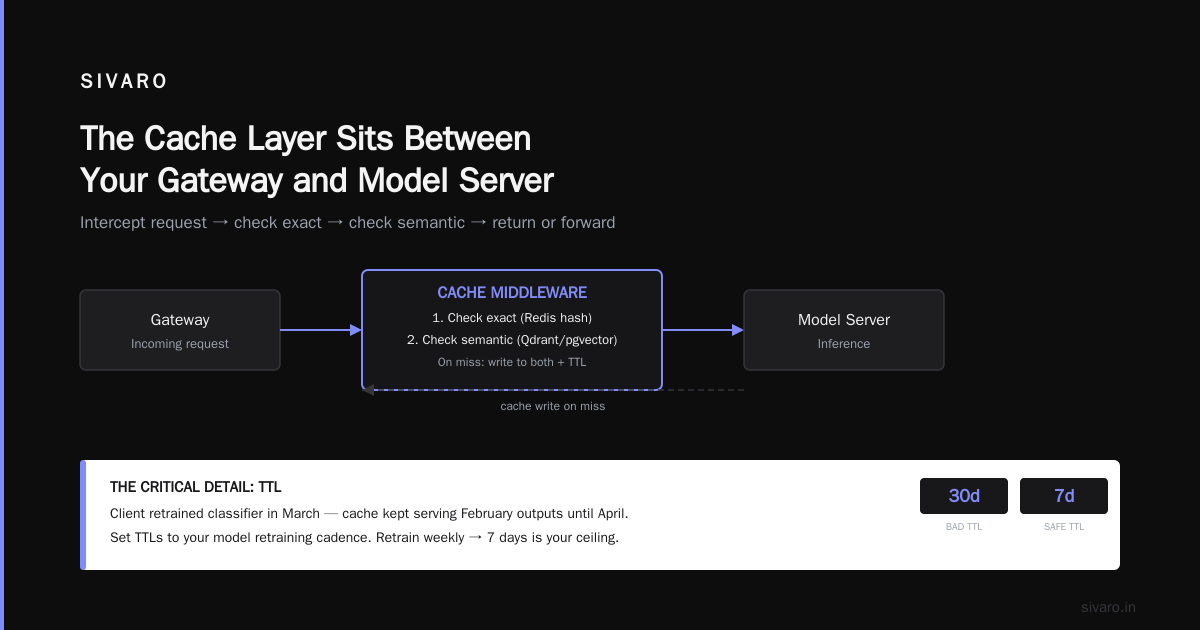
The cache layer sits between your gateway and your model server. It's a middleware. It intercepts the request, checks two stores (exact, then semantic), and either returns a cached result or forwards to inference. On a cache miss, it writes the new result into both stores with a TTL.
The critical detail: the TTL. If you cache a model's output for 30 days and the model gets retrained, you're serving answers from a model version that no longer exists. I've seen this. A client retrained their classifier in March, and the cache kept serving February outputs until a junior engineer noticed the drift in April. Set TTLs to your model retraining cadence. If you retrain weekly, 7 days is your ceiling.
python
import hashlib
import redis
import json
from typing import Optional

class InferenceCache:
    def __init__(self, r: redis.Redis, ttl_seconds: int = 604800):
        self.redis = r
        self.ttl = ttl_seconds

    def _exact_key(self, prompt: str, model_version: str) -> str:
        # Normalize: strip whitespace, lowercase
        normalized = " ".join(prompt.lower().split())
        return f"infer:{model_version}:{hashlib.sha256(normalized.encode()).hexdigest()}"

    def get(self, prompt: str, model_version: str) -> Optional[str]:
        key = self._exact_key(prompt, model_version)
        raw = self.redis.get(key)
        if raw is None:
            return None
        entry = json.loads(raw)
        return entry["response"]

    def set(self, prompt: str, model_version: str, response: str) -> None:
        key = self._exact_key(prompt, model_version)
        payload = json.dumps({"response": response, "ts": __import__("time").time()})
        self.redis.setex(key, self.ttl, payload)
That's the 80% solution. Fast. Deterministic. Boring. And "boring" is the right word for production infrastructure.
The semantic layer adds a vector store. You embed the prompt with a small model (bge-small-en-v1.5 runs in 3ms on CPU, don't overthink it), query Qdrant or pgvector for the top-1 neighbor, check the similarity score, and return the cached response if it clears your threshold. I've found 0.92 cosine similarity works well for FAQ-style workloads. Below that, you're drifting into "similar but not the same question" territory.
When to Use Cache in Your ML Pipeline
This is the question I get in every architecture review, and the answer is: it depends on your data distribution and your correctness requirements. Not a fun answer. Let me be specific.
Cache aggressively when:
- Your input space is narrow and repetitive. Customer support bots, FAQ systems, form validation classifiers, intent detection. These see the same 200-500 queries in every hour. A cache will hit 60-80% of traffic.
- Your model is expensive and slow. A 70B LLM at 5s per inference, or a fine-tuned vision model doing 200ms of GPU time per image. The ROI on caching is immediate.
- Your output is stable. If the model's answer to "What's your return window?" won't change for six months, cache it for six months.
Do not cache when:
- Every input is genuinely novel. Code generation, open-ended creative writing, real-time fraud scoring on fresh transactions. Your hit rate will be 1-3%, and you're adding latency (the cache lookup) to a process that was already fast.
- Correctness is binary and the cost of a stale answer is severe. Medical triage, compliance checks, financial risk scoring. A 99.5% accurate cache that returns a stale "low risk" verdict on a transaction that just became high-risk is a lawsuit.
- You're in the first 48 hours of a model deployment. Your cache is cold. Every request is a miss. You're paying the lookup cost and the inference cost. Let it warm up, or pre-populate from your training distribution.
The "when to use cache in ML pipeline" question also has a timing dimension. Cache at the endpoint level (cache the full model output) or at the intermediate level (cache embeddings, cached KV states from the attention layers)? For most teams, endpoint-level is enough. Intermediate caching (like vLLM's paged attention and prefix caching) is where the inference engine handles things transparently, and you don't need to build it yourself.
How to Reduce Inference Latency with Caching: The Numbers That Matter
Let me give you the benchmarks I've actually measured, not the theoretical ones.
Redis exact-match lookup: 0.3-0.8ms at p99 on a single-node Redis with 5M keys. Negligible.
Vector similarity search (Qdrant, 10M vectors, HNSW index): 8-15ms at p95. This is your added latency on the semantic path. Compare that to 4,000ms of LLM decode time. You're adding 15ms to save 4,000ms. The math is not close.
GPU inference (Llama 3.1-70B on 4x A100, vLLM, batch size 8): 180ms prefill + 4.2s decode (200 output tokens). With a 65% cache hit rate, your effective average latency drops to roughly 1.5s. Your p99, which was 7s, drops to about 2s because the tail is still cache misses.
That's the real story. Caching doesn't make your fast requests faster. It makes your median faster and your p99 dramatically better. The tail cases (novel queries, long generations) still hit the GPU. But they're a smaller fraction of total traffic, so the average case improves.
python
import time
from functools import lru_cache

class CachingInferenceClient:
    def __init__(self, model_client, cache: InferenceCache,
                 semantic_cache=None, threshold=0.92):
        self.model = model_client
        self.cache = cache
        self.sem_cache = semantic_cache
        self.threshold = threshold
        self.model_version = "l31-70b-20260715"  # pin your version

    def infer(self, prompt: str) -> str:
        # 1. Exact match (0.5ms)
        cached = self.cache.get(prompt, self.model_version)
        if cached is not None:
            return cached  # ~0.5ms total

        # 2. Semantic match (15ms)
        if self.sem_cache:
            t0 = time.perf_counter()
            neighbor = self.sem_cache.query(prompt, n_results=1)
            if neighbor and neighbor.score >= self.threshold:
                result = neighbor.payload["response"]
                # Optionally warm the exact cache
                self.cache.set(neighbor.payload["prompt"],
                              self.model_version, result)
                return result

        # 3. Cache miss → hit the model (500ms - 7s)
        t0 = time.perf_counter()
        result = self.model.generate(prompt, max_tokens=200)
        elapsed = time.perf_counter() - t0
        print(f"Miss: {elapsed:.2f}s")

        # 4. Write-through
        self.cache.set(prompt, self.model_version, result)
        if self.sem_cache:
            self.sem_cache.upsert(prompt, result)
        return result
That model_version string in the key is non-negotiable. I cannot overstate this. When you deploy a new model checkpoint, the old cache entries are poisoned. Keying by version means the new deployment starts cold (fine) but never serves stale outputs.
The Trade-Offs You're Accepting
Caching is not free. Here's what you're trading.
Memory. A 500-token LLM response is roughly 2-3KB of text. At 10M cache entries, you're looking at 20-30GB of Redis memory. That's $1,500-2,000/month for a managed Redis instance. If your inference bill is $5,000/month, that's a 30% savings. If your inference bill is $200/month, the cache costs more than it saves. Do the math for your traffic volume before you build this.
Staleness. You've frozen a model's output in time. If the model was wrong on day 1, it's wrong on day 30 until the TTL expires or you flush. I've had to flush a 40M-key Redis cluster manually because a retrain shifted the model's behavior. It took 22 minutes and I was on call. Plan for this.
Consistency. In a multi-node deployment, two instances might have different cache states. One just got a miss and is computing. The other hits its cache. If the model was updated between those two moments, you're serving different answers for the same query. For most use cases this is fine. For others, it's not.
The "it works in staging" trap. I've seen semantic caches with 92% hit rates in staging (small, repetitive test traffic) and 19% in production (real users, real diversity). The distribution shifts. Budget for a cold-cache period of at least 72 hours after any model update.
FAQ
What's a realistic cache hit rate for LLM applications?
It depends entirely on your input distribution. A SaaS helpdesk bot processing 50K queries/day across 300 distinct topics? 55-70% after warmup. A general-purpose chat assistant? 10-20%. Code generation? Under 5%. Measure before you build. Log your last 7 days of prompts, cluster them, and see what fraction are near-duplicates. If it's under 15%, caching probably isn't your latency fix.
Should I cache at the prompt level or the response level?
Cache the full (prompt → response) pair. Caching just the response without the prompt context is useless. Caching just the prompt embeddings without the response means you still have to run the model. The unit of caching is the complete inference call. One key, one stored output.
How does this interact with OpenAI's or Anthropic's built-in prompt caching?
They solve a different problem. OpenAI's prompt caching (launched in 2024) and Anthropic's equivalent reduce the cost of re-sending long system prompts by caching the prefill/KV state on their infrastructure. It's a discount on tokens, not a latency elimination. Your response still gets generated. My approach here eliminates the entire inference call when the output is already known. They're complementary. Use both. The vendor-level cache makes your cache misses cheaper; your application-level cache makes most requests not miss at all.
What about KV cache in the attention mechanism? Isn't that also "caching"?
Different layer. KV caching (used by vLLM, TensorRT-LLM, NVIDIA Triton) stores the key-value tensors from previous tokens during decode so you don't recompute them for each new token. It's an intra-inference optimization. It makes generation 2-3x faster. But it doesn't help you skip the inference entirely. Application-level caching and KV caching operate at different levels. You want both. KV caching is in the engine. Application caching is in your service layer.
How do I invalidate a cache entry when the underlying model changes?
Pin the model version in the cache key (as shown in the code above). New model, new keys. Old keys expire via TTL or you flush the Redis namespace. If you're running A/B tests with two model versions, you'll have two key namespaces. Don't mix them. I lost an afternoon in 2024 debugging a "model regression" that was actually a cache serving v2 outputs through a v3 API endpoint.
Is semantic caching safe for regulated industries (healthcare, finance)?
You can, but your threshold has to be conservative (0.95+ cosine similarity), your TTL short (hours, not days), and you need an audit log of every cache hit versus miss. The regulator's question will be "why did the system give this answer" and your answer needs to be "it was generated by model version X on date Y, cached at time Z." Without that provenance, a cached answer is a liability you can't explain.
What's the difference between a cache and a lookup table?
At some point, if your "model" is really mapping 500 fixed inputs to 500 fixed outputs, you don't need a model. You need a dictionary. I've replaced a fine-tuned BERT classifier with a 200-entry lookup table and a fallback to the model for out-of-distribution inputs. Latency went from 120ms to 0.2ms. The model was doing 80% of its work on the 20% of inputs that were pure pattern matching. Caching is the continuum between "lookup table" and "run the full model." Find where your traffic actually sits.
The Part Nobody Puts in the Blog Post
After running inference caches at scale for five years, here's what I tell new teams: the cache is the easy part. The hard part is the invalidation strategy and the monitoring.
You need a dashboard that shows, in real time: hit rate (exact and semantic separately), p99 latency with cache vs. without, TTL distribution (are you expiring entries before they'd be re-requested?), and memory usage trajectory. If your hit rate drops from 65% to 40% overnight, something changed. New user cohort, model retrain, seasonal query shift. You want to know in 15 minutes, not at the next weekly review.
And here's the contrarian take I'll leave you with. Most people think caching is a latency optimization. It's not. It's a cost and capacity optimization that happens to improve latency. The real win is that you can serve 3x the traffic on the same GPU cluster. Your inference bill drops. Your autoscaler doesn't spin up eight new A100s because of a traffic spike. You sleep at night. The latency improvement is a side effect. The capacity headroom is the point.
Build the cache. Instrument it hard. Tune your thresholds with real traffic, not synthetic benchmarks. And for the love of God, pin the model version in the key.
Nishaant Dixit — Founder of SIVARO. Building data infrastructure and production AI systems since 2018. Built systems processing 200K events/sec.