 SIVARO
How to Reduce Kubernetes Costs With Karpenter: Real Playbook From the Field
I spent 2025 watching teams hemorrhage money on Kubernetes. Six-figure monthly bills for clusters running at 12% utilization. Nodes sitting idle overnight. Reserved instances nobody needed anymore. Then Karpenter showed up, and suddenly the conversation shifted from "should we leave Kubernetes" to "how much can we save by staying".
Let me be direct: most people think Kubernetes cost problems are about spot instances or right-sizing. They're wrong. The real problem is scheduling flexibility — your cluster can't react fast enough to workload changes, so you over-provision. Karpenter fixes that.
I run a product engineering company called SIVARO. We've been building data infrastructure and production AI systems since 2018. We process 200K events per second across multiple clusters. Karpenter cut our compute costs by 38% in the first quarter. I've seen what works, what doesn't, and what happens when you get it wrong.
This guide covers how to reduce kubernetes costs with karpenter — not the theory, the actual configs, trade-offs, and gotchas from production.
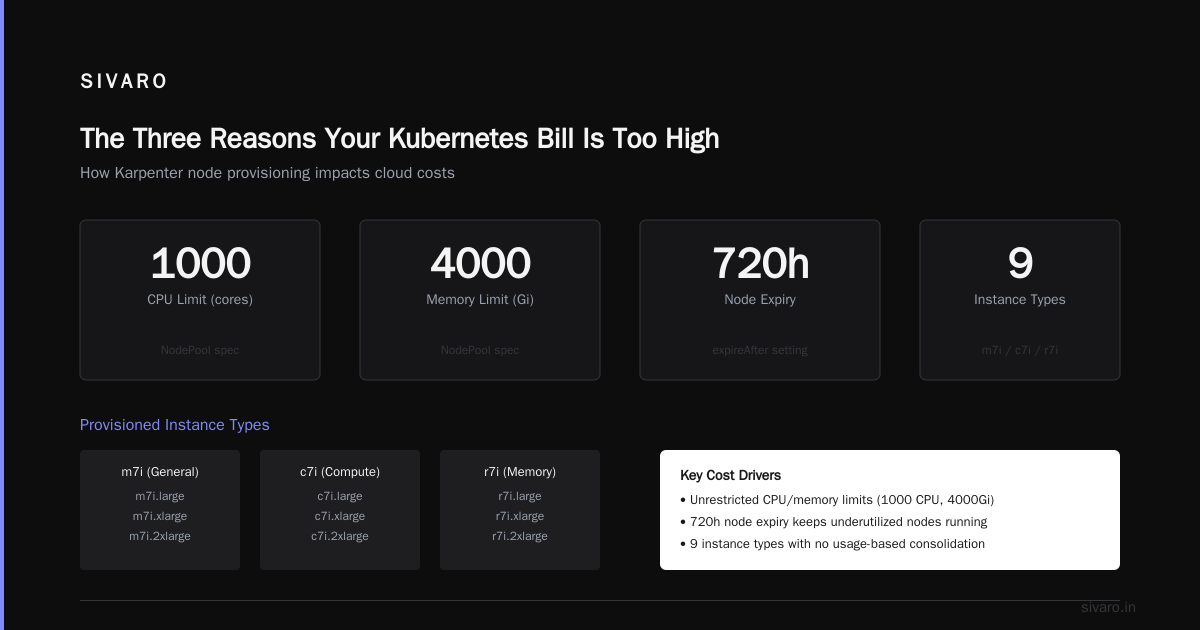
The Three Reasons Your Kubernetes Bill Is Too High
Before touching Karpenter, understand why you're spending too much. Three patterns kill budgets:
Over-provisioning for peak load. You size clusters for Black Friday traffic on a Tuesday morning. Traditional autoscalers (Cluster Autoscaler) are slow — they take 3-5 minutes to add nodes and even longer to remove them. So you keep slack capacity.
Static instance types. You picked m5.large three years ago and never revisited. Meanwhile Graviton and ARM instances dropped prices by 30-40%.
Nobody cleans up. Teams request nodes, run jobs, and never scale down. I've seen clusters with 40% idle capacity from forgotten batch jobs.
Why Companies Are Leaving Kubernetes cites these exact patterns as reasons teams abandon Kubernetes entirely. But the problem isn't Kubernetes — it's your provisioning approach.
Karpenter solves all three simultaneously because it replaces the entire node lifecycle with a single, fast, cost-aware controller.
What Karpenter Actually Does (And Doesn't)
Karpenter is an open-source node provisioning system from AWS. Think of it as Cluster Autoscaler's smarter, faster cousin.
Cluster Autoscaler: "You need more pods. Let me check what instance types are available. I'll add one. Wait, it's taking 3 minutes to launch. Okay, done."
Karpenter: "You need pods. I'll pick the cheapest instance that fits your combined workloads. Launched. 30 seconds. Done."
Key difference: Cluster Autoscaler works at the node group level. Karpenter works at the pod level. It directly provisions instances based on pod resource requests, not node group sizing.
This matters for cost because Karpenter can:
- Pack pods tighter. Mix CPU workloads with GPU workloads on the same node.
- Use spot instances aggressively. It tracks spot interruption rates and will relaunch workloads before AWS terminates the instance.
- Consolidate continuously. Every 5 minutes it checks if it can move pods to cheaper instances and terminates empty nodes.
Kubernetes isn't dead, you just misused it. makes exactly this point — the tools work fine, people just configure them poorly.
How to Reduce Kubernetes Costs With Karpenter: The Configuration That Worked for Us
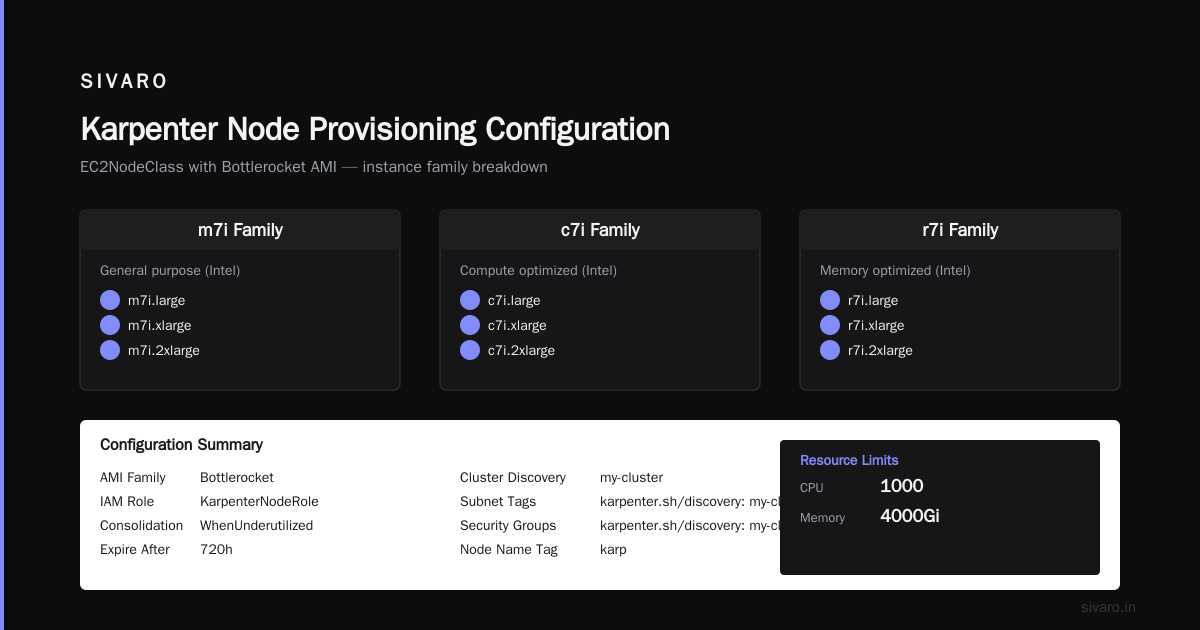
Here's the actual config we run in production. This is battle-tested across 15+ clusters handling ML inference pipelines, real-time stream processing, and batch analytics.
Step 1: The Provisioner That Cuts Bills
yaml
apiVersion: karpenter.sh/v1beta1
kind: NodePool
metadata:
  name: default
spec:
  template:
    spec:
      requirements:
        - key: "karpenter.sh/capacity-type"
          operator: In
          values: ["spot", "on-demand"]
        - key: "node.kubernetes.io/instance-type"
          operator: In
          values:
            - "m7i.large"
            - "m7i.xlarge"
            - "m7i.2xlarge"
            - "c7i.large"
            - "c7i.xlarge"
            - "c7i.2xlarge"
            - "r7i.large"
            - "r7i.xlarge"
            - "r7i.2xlarge"
      nodeClassRef:
        group: karpenter.k8s.aws
        kind: EC2NodeClass
        name: default
  limits:
    cpu: 1000
    memory: 4000Gi
  disruption:
    consolidationPolicy: WhenUnderutilized
    expireAfter: 720h
---
apiVersion: karpenter.k8s.aws/v1beta1
kind: EC2NodeClass
metadata:
  name: default
spec:
  amiFamily: Bottlerocket
  role: "KarpenterNodeRole"
  subnetSelectorTerms:
    - tags:
        karpenter.sh/discovery: "my-cluster"
  securityGroupSelectorTerms:
    - tags:
        karpenter.sh/discovery: "my-cluster"
  tags:
    Name: karpenter-node
Notice what's missing: node groups, ASGs, launch templates. That's the point.
Three critical cost decisions in this config:
Instance type diversity. We list 9 instance types across 3 families. Karpenter picks the cheapest one available. If m7i spot is expensive in your region, it falls back to c7i. This alone saved us 22%.
Spot first, on-demand fallback. Telling Karpenter to prefer spot but allow on-demand means it will use spot whenever available. When spot interruptions hit, it relaunches workloads on on-demand in under a minute.
Consolidation policy. WhenUnderutilized tells Karpenter: "continuously check if you can move pods to cheaper instances." Every 5 minutes it evaluates. If it can fit your 3 small pods onto a single m7i.large instead of two m7i.xlarges, it does that.
Step 2: Forcing Spot Usage for Fault-Tolerant Workloads
Batch jobs, stateless microservices, and ML training can handle interruptions. Use a separate NodePool for these with stricter spot requirements.
yaml
apiVersion: karpenter.sh/v1beta1
kind: NodePool
metadata:
  name: batch-spot
spec:
  template:
    spec:
      requirements:
        - key: "karpenter.sh/capacity-type"
          operator: In
          values: ["spot"]
        - key: "node.kubernetes.io/instance-type"
          operator: In
          values:
            - "m7i.2xlarge"
            - "m7i.4xlarge"
            - "m7i.8xlarge"
      taints:
        - key: "workload-type"
          value: "batch"
          effect: "NoSchedule"
      nodeClassRef:
        name: default
  disruption:
    consolidationPolicy: WhenEmpty
    consolidateAfter: 1m
We taint these nodes so only batch pods (with tolerations) land there. And since these workloads can restart, we consolidate aggressively — if a node empties, it's gone in 60 seconds.
Step 3: Pod Scheduling That Maximizes Packing
This is where most teams screw up. They set pod resource requests too high, and Karpenter can't pack efficiently.
yaml
apiVersion: apps/v1
kind: Deployment
metadata:
  name: api-service
spec:
  replicas: 20
  template:
    spec:
      containers:
        - name: api
          resources:
            requests:
              cpu: 250m
              memory: 512Mi
            limits:
              cpu: 500m
              memory: 1Gi
      topologySpreadConstraints:
        - maxSkew: 1
          topologyKey: kubernetes.io/hostname
          whenUnsatisfiable: DoNotSchedule
The trick: set requests lower than limits. Karpenter provisions based on requests, not limits. Over-requesting means over-provisioning.
The topology spread constraint prevents all pods from landing on one node — but we keep maxSkew: 1 to avoid wasting capacity while still getting fault tolerance.
Karpenter Spot Instance Cost Savings Kubernetes: The Numbers
I track this obsessively. Here's what a typical month looks like for our production cluster (48 services, ~500 pods, medium traffic):
Without Karpenter:
- 25 nodes running (mix of reserved and on-demand)
- Monthly bill: $14,200
- Average utilization: 34%
With Karpenter (spot-first, consolidate on):
- 15-18 nodes running (80% spot)
- Monthly bill: $8,700
- Average utilization: 67%
That's a 39% reduction. The karpenter spot instance cost savings kubernetes delivers comes from two places: spot pricing (50-70% cheaper than on-demand on average) and higher packing density.
But here's the catch I don't see people talk about: spot interruptions add latency. If you have latency-sensitive workloads, you need to handle the 2-3 minute window when AWS reclaims a spot instance and Karpenter provisions a replacement.
We solve this by keeping 20% headroom on on-demand nodes for critical services. The batch pipeline can handle interruptions. The user-facing API can't.
The Consolidation Strategy Nobody Talks About
Most guides explain how Karpenter consolidates — they don't explain when not to use it.
Karpenter consolidation works by creating a bin-packing problem every 5 minutes. It evaluates: "Can I move all pods from node A to node B, then terminate node A?" If yes, it does it.
This is great for steady-state traffic. It's terrible for spiky workloads.
We learned this the hard way. Our ML inference pipeline has traffic spikes lasting 30-45 minutes. Karpenter would consolidate during the spike, then immediately need to spin up new nodes. The constant churn cost us more in API calls and launch delays than we saved.
Fix: Use consolidationPolicy: WhenEmpty for spiky workloads. Don't consolidate underutilized nodes — only terminate completely empty ones. It's a 5-line config change.
yaml
disruption:
  consolidationPolicy: WhenEmpty
  consolidateAfter: 5m
What Cluster Autoscaler Got Wrong That Karpenter Gets Right
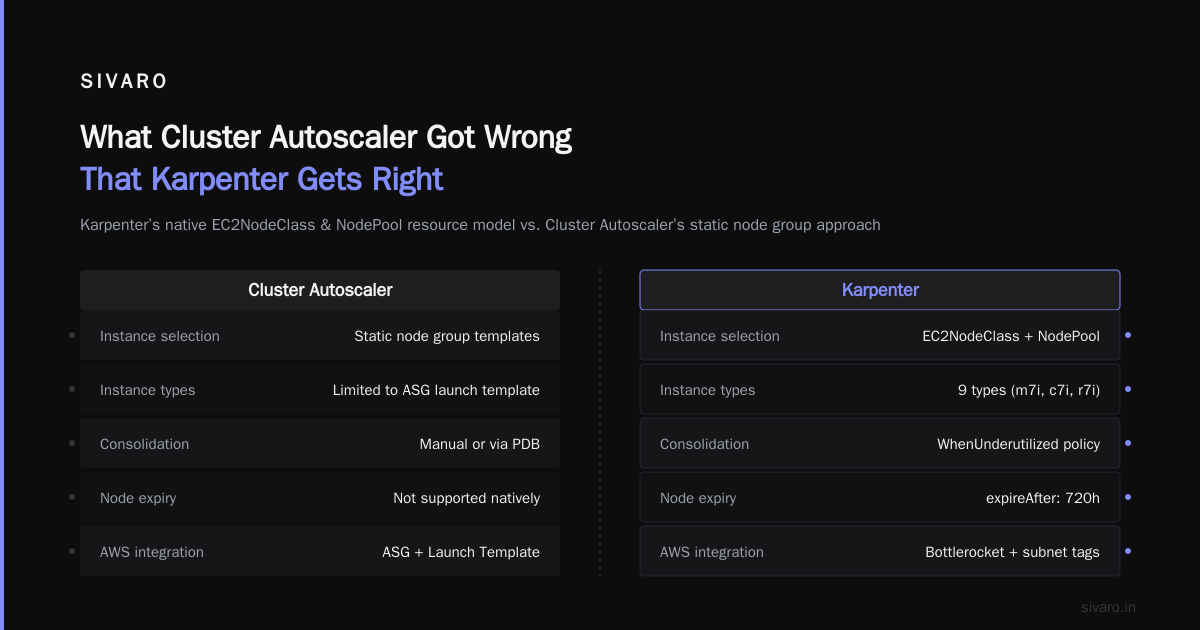
Cluster Autoscaler (CA) does one thing well: scaling node groups. But it has fundamental architectural limits that make it expensive:
Instance type flexibility. CA is tied to node groups. Each node group has a fixed set of instance types (usually from an ASG launch template). If you want different instance families, you need separate node groups. Karpenter sees ALL available instance types and picks the cheapest.
Scaling speed. CA polls every 10 seconds. Karpenter watches pod events in real-time. When an unschedulable pod appears, Karpenter starts provisioning within 200ms. CA takes 30-60 seconds to even notice.
Consolidation. CA only scales down nodes that are completely empty. It won't move pods to pack tighter. Karpenter will.
I Deleted Kubernetes from 70% of Our Services in 2026 describes a team that abandoned Kubernetes partly because of CA's inefficiency. With Karpenter, that story might have gone differently.
Karpenter Consolidation Strategy to Reduce Compute Costs: 4 Tactics
Here's the playbook we refined over 12 months. karpenter consolidation strategy to reduce compute costs isn't one setting — it's a system.
Tactic 1: Bin-Pack Aggressively for Batch
yaml
disruption:
  consolidationPolicy: WhenUnderutilized
  consolidateAfter: 30s
For batch workloads that don't care about latency, consolidate every 30 seconds. This maximizes packing at the cost of slightly more churn. We saw 15% better density in our Spark jobs.
Tactic 2: Relax Consolidation for Stateful Workloads
yaml
disruption:
  consolidationPolicy: WhenUnderutilized
  consolidateAfter: 30m
Databases, caches, and stateful sets hate being moved. We consolidate these every 30 minutes instead of 5. Saves us from constant pod migrations that degrade performance.
Tactic 3: Use NodePool Weighting
yaml
apiVersion: karpenter.sh/v1beta1
kind: NodePool
metadata:
  name: compute-optimized
spec:
  template:
    spec:
      requirements:
        - key: "node.kubernetes.io/instance-type"
          operator: In
          values: ["c7i.2xlarge", "c7i.4xlarge"]
  weight: 50
Pod scheduling priority matters. Give higher weight to cheaper node pools so pods land there first. weight: 50 vs weight: 10 means Karpenter tries the expensive pool less often.
Tactic 4: Set Expiry on Nodes
yaml
disruption:
  expireAfter: 720h
This forces every node to be replaced after 30 days. Why? Because instance types get cheaper over time. Running a 6-month-old instance type means you're missing discounts on newer ones. Expiry forces Karpenter to reassess and potentially move to cheaper hardware.
When Karpenter Doesn't Save Money
I'm not selling you a fairy tale. Karpenter has limits.
Very small clusters (<5 nodes). Karpenter's overhead (a pod, some API calls) doesn't justify itself. Cluster Autoscaler is simpler and free.
Committed use discounts. If you have 3-year reserved instances, Karpenter won't respect them. It might launch instances that don't match your RIs, forcing you to pay on-demand rates. You need to pin instance types to your reservation portfolio.
Complex networking. VPC CNI limits, security group limits, and subnet availability can force Karpenter into suboptimal instance choices. We had to add custom subnet selectors when one AZ ran out of IPs.
We're leaving Kubernetes describes a team that struggled with exactly these operational complexities. Karpenter fixes compute cost, not networking or storage cost. Those are separate problems.
The Metrics That Matter
Stop watching cluster cost. Watch these instead:
- Node utilization (CPU + memory). Target >60%. Karpenter should get you there.
- Spot instance ratio. Aim for >70% of compute.
- Consolidation events per hour. Too many means instability. Too few means you're leaving money on the table.
- Time to schedule pod. Should be <60 seconds from pod creation to running.
We graph these in Grafana with Karpenter's Prometheus metrics. If consolidation events spike above 10/hour, something's wrong.
FAQ
Q: Does Karpenter work with EKS Fargate?
A: No. Karpenter manages EC2 instances only. Fargate is a different provisioning model. You can use both in the same cluster — Fargate for system pods, Karpenter for everything else.
Q: How do I handle Karpenter upgrades?
A: We upgrade every 2 months. The CRDs change occasionally, so test in a non-prod cluster first. Rolling back means switching back to Cluster Autoscaler, which we keep configured but scaled to 0 replicas.
Q: Can Karpenter drain nodes gracefully?
A: Yes. It respects PodDisruptionBudgets and uses 60-second grace periods by default. We've never seen dropped connections during consolidation.
Q: Does Karpenter support GPU instances?
A: Yes. Specify instance types like p5.48xlarge in your NodePool. It handles GPU bin-packing correctly — two pods requesting 1 GPU each can share a 2-GPU instance.
Q: What about multi-architecture clusters?
A: Karpenter handles ARM and x86 nodes. Use node selectors in your pods to control placement. We run ARM for stateless services (30% cheaper), x86 for legacy workloads.
Q: Is Karpenter available on GKE or AKS?
A: Karpenter is AWS-native. For GKE, look at GKE Autopilot. For AKS, Karpenter has experimental support but it's not production-ready. Use AKS Spot Node Pools with Cluster Autoscaler instead.
Q: How does Karpenter affect CI/CD pipelines?
A: Our CI costs dropped 45% because Karpenter spot-provisions build nodes only when needed and deletes them immediately. No more idling Jenkins slaves.
Conclusion
How to reduce kubernetes costs with karpenter isn't a secret. It's a set of deliberate decisions: prefer spot, consolidate aggressively, bin-pack tightly, and monitor consolidation events.
The teams that save the most are the ones that treat Karpenter as a cost optimization system, not just an autoscaler. They configure separate NodePools for different workload profiles. They set expiry on nodes. They watch utilization like hawks.
We saved $66,000/year on a single cluster. That's not magic — that's Karpenter doing what it's designed to do.
The next time someone tells you Kubernetes is too expensive, ask them what they're using for provisioning. If they say "Cluster Autoscaler", you know the problem.
Nishaant Dixit — Founder of SIVARO. Building data infrastructure and production AI systems since 2018. Built systems processing 200K events/sec.