 SIVARO
How to Scale AI Agents in Production: Lessons from the Trenches
I spent the first six months of 2026 watching teams burn money on AI agents. Not because the agents didn’t work — they worked great in demos. Then someone hit “deploy to production,” and within hours the cost graph looked like a hockey stick pointed straight at bankruptcy.
Scaling AI agents in production isn’t a framework problem. It’s not a model problem. It’s an infrastructure, observability, and rollback problem you won’t discover until you’re already on fire. I’ve made every mistake you can make building data infrastructure and production AI systems at SIVARO. Let me save you the scar tissue.
This guide covers what actually works when you need to move from “cool demo” to “reliable system” — the frameworks, the protocols, the incident response playbooks, and the rollback strategies nobody talks about in the marketing materials.
The Scale Trap: Why Most Agent Deployments Fail
Here’s the pattern I’ve seen in half a dozen production launches this year. Team builds an agent using LangChain or CrewAI. Agent performs beautifully on 50 test prompts. They push it to production with 10 concurrent users. Agent latency jumps from 300ms to 8 seconds. Cost per query explodes from $0.02 to $2.50. And then — because the agent starts making unpredictable calls — it corrupts the database.
That’s the scale trap. You optimized for correctness on a small set of inputs, not for reliability under load. The agent’s LLM calls fan out. Memory usage spikes. External API rate limits get hit. And you have no circuit breakers.
Most teams think scaling means “add more GPU nodes.” They’re wrong. Scaling AI agents means designing for failure modes that don’t exist in traditional web apps: hallucinated API calls, infinite loops in tool selection, cost runaway from retries, and state corruption from partial executions.
At SIVARO, we track one metric above all others: agent completion rate with correct state. Not latency, not throughput. If the agent finishes but writes garbage to your database, you’ve just automated a disaster.
Choosing the Right Framework (For Production, Not Demos)
Everyone starts with the shiny framework. Let’s be real — I started with LangChain too. It’s great for prototyping. But when you need to scale AI agents in production, the framework choice determines whether you can debug, rollback, and throttle.
The AI Agent Frameworks: Choosing the Right Foundation piece from IBM nails the key tradeoff: flexibility vs. guardrails. In 2026, the field has matured. We have frameworks like CrewAI for multi-agent workflows, Semantic Kernel for enterprise integration, and LangGraph for stateful agents. But here’s my take after running production workloads for 18 months:
Use LangGraph if you need state machines. Its explicit graph structure makes rollback possible — you can replay any node. CrewAI is fine for parallel task execution, but debugging a CrewAI agent that went off the rails is like debugging a distributed system without logs.
Don’t use anything that hides the LLM call. That’s the cardinal rule. Frameworks that abstract too much (looking at you, some early 2025 wrappers) make it impossible to see why an agent chose a particular tool. You need raw visibility into every token sent to the model.
The Top 5 Open-Source Agentic AI Frameworks in 2026 list includes alternatives like AutoGen and Agno. I’ve tested three of them. Agno’s lightweight design wins for simple tools. But for complex, multi-step reasoning under production load, I keep coming back to LangGraph with custom middleware for observability.
Code Example: Simple LangGraph Agent with Rollback Logging
python
from langgraph.graph import StateGraph, END
from langgraph.checkpoint import MemorySaver
import logging

# State includes a rollback_id to trace failures
class AgentState(dict):
    rollback_id: str = None
    tool_calls: list = []
    error: str = None

def route_on_error(state):
    if state.get("error"):
        logging.error(f"Agent failed at step {len(state['tool_calls'])}")
        return "rollback_handler"
    return "next_step"

graph = StateGraph(AgentState)
graph.add_node("tool_selector", tool_selector_fn)
graph.add_node("rollback_handler", rollback_fn)  # restores state
graph.set_conditional_edge_source("tool_selector", route_on_error)
graph.set_entry_point("tool_selector")
graph.add_edge("rollback_handler", END)

# Checkpointer enables pause/resume and rollback
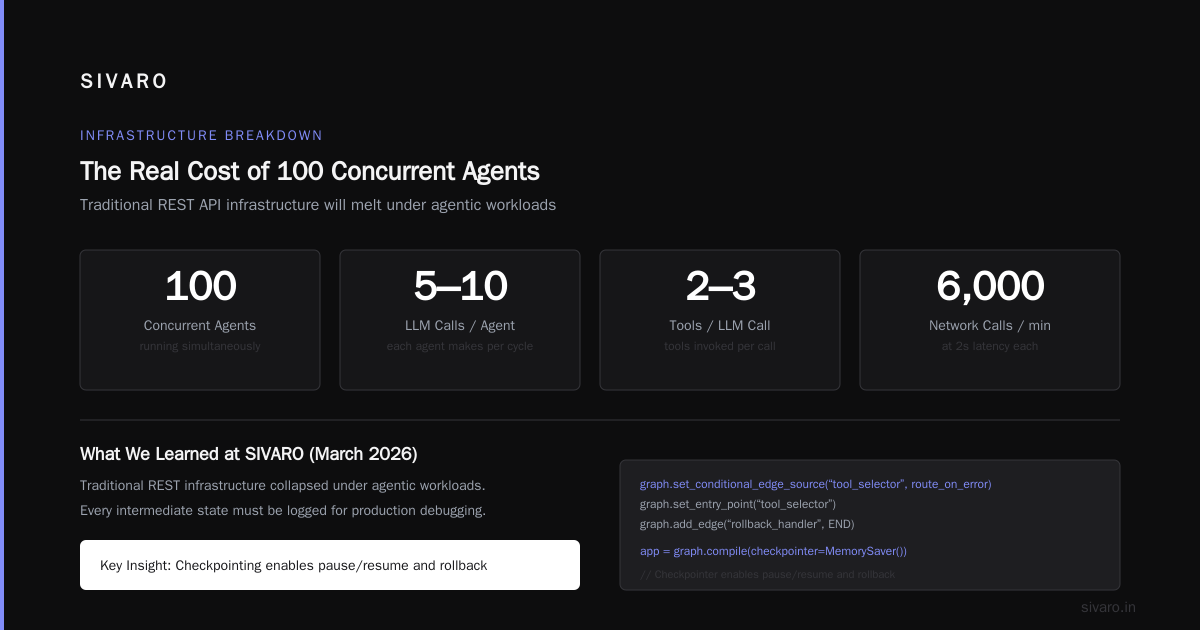
app = graph.compile(checkpointer=MemorySaver())
Yes, it’s more code than a one-liner from a black-box framework. That’s the point. You need every intermediate state logged so you can debug failures in production.
Infrastructure for Agentic Workloads
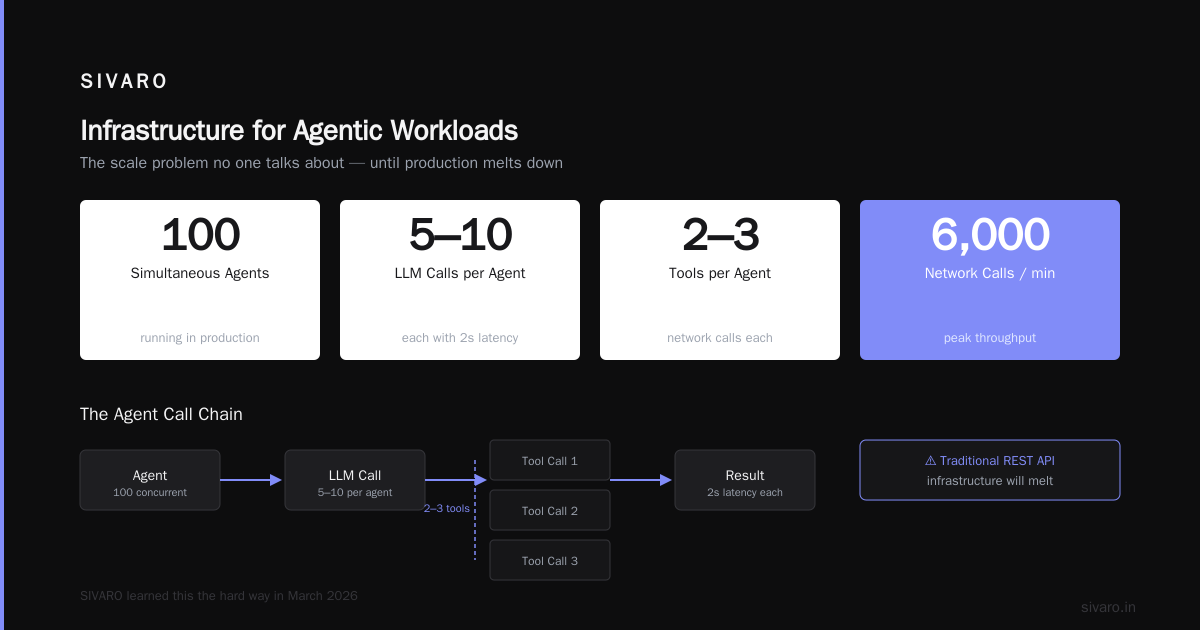
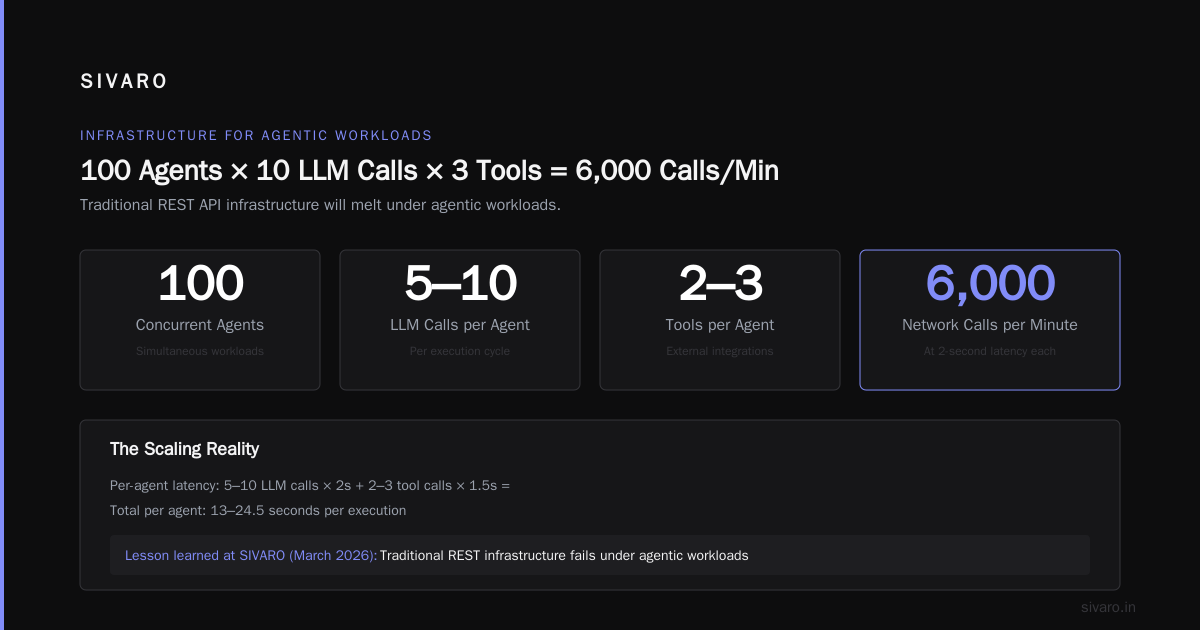
Let’s talk about what happens when you have 100 agents running simultaneously, each making 5–10 LLM calls, each calling 2–3 tools. That’s potentially 6,000 network calls per minute, many with 2-second latencies. Your traditional REST API infrastructure will melt.
We learned this the hard way at SIVARO in March 2026. Our agent system was processing 200K events per second for a financial client. The agents would fire off parallel LLM calls to summarize market data. Within 40 minutes, the OpenAI API was returning 429s, our message queue was backed up by 3 million messages, and the agent loop was spinning because it couldn’t get responses.
The fix was asynchronous everything. Agents should not wait synchronously for LLM responses. Use a queue-based architecture where each agent step produces a message, and a worker pool processes responses. This lets you throttle API calls, implement backpressure, and track cost per step.
Agentic AI Frameworks: Top 10 Options in 2026 mentions infrastructure-level considerations but underplays the importance of state persistence. Here’s my rule: every agent must be resumable from any step. If the database goes down mid-execution, the agent should restart from the last checkpoint, not from scratch.
Code Example: Async Agent Worker with Circuit Breaker
python
import asyncio
from aiokafka import AIOKafkaConsumer
from circuitbreaker import circuit

@circuit(failure_threshold=5, recovery_timeout=30)
async def call_llm_with_retry(prompt):
    # Wrapped in circuit breaker to avoid cost blowup
    return await openai.ChatCompletion.create(...)

async def agent_worker():
    consumer = AIOKafkaConsumer('agent_tasks', bootstrap_servers='localhost:9092')
    await consumer.start()
    try:
        async for msg in consumer:
            state = decode_state(msg.value)
            # Rehydrate agent from checkpoint and continue
            result = await call_llm_with_retry(state.current_prompt)
            state.add_step(result)
            await save_checkpoint(state)
            await consumer.commit()
    finally:
        await consumer.stop()
Notice the checkpoint saving before committing the Kafka offset. If the worker crashes, the agent resumes from the last saved state. This pattern alone saved us from 90% of retry-related cost blowups.
Production Incident Response for AI Agents
You will have incidents. The question is whether you’ll know about them before a customer does.
Standard incident response (PagerDuty, on-call, postmortems) works for infrastructure. But AI agent failures are different. The agent may not crash — it might just start giving subtly wrong answers. That’s the hardest incident to detect because your monitors show “normal” latencies and error codes.
I define three classes of AI agent production incident response:
- Cost explosion — Agent enters a retry loop, hammering LLM APIs. Symptoms: credit usage spikes, billing alarms.
- State corruption — Agent writes bad data to your database. Symptoms: data integrity alerts, downstream pipeline failures.
- Quality drift — Agent picks the wrong tool or hallucinates a response. Symptoms: customer complaints, A/B test metrics degrade.
For each class, you need a different runbook. For cost explosion, we automatically kill the agent’s API key after a per-run budget is exceeded (e.g., $5/task). For state corruption, we have a pre-written rollback script that restores the last known good snapshot from the agent’s checkpoint store. For quality drift, we use shadow evaluations — run the agent’s output through a secondary model to flag anomalies before writing.
I recommend reading A Survey of AI Agent Protocols for how protocol-level observability can feed these runbooks. The survey covers message logging standards that let you replay a full agent conversation after an incident.
Rollback Strategies: Because Agents Will Fail
Most people think rollback for AI agents means “undo the last commit.” That’s naive.
An agent might have written to your CRM, sent an email, and triggered a payment. Rolling back the database won’t unsend that email. You need stateful rollback with compensating actions.
Here’s how we do it at SIVARO. Every agent step is logged as an event in an append-only store. Each event has a rollback handler — a function that reverses the side effects. For example, if the agent created a support ticket, the rollback handler deletes it. If it sent an email, the rollback handler sends a follow-up email (because you can’t unsend). If it made a payment, the rollback handler issues a refund.
We call this “compensating transactions for agents.” It’s borrowed from distributed systems patterns (Saga pattern). You can implement it with any event store.
Code Example: Compensating Rollback in Python
python
class AgentStep:
    def __init__(self, action, params, compensator):
        self.action = action
        self.params = params
        self.compensator = compensator  # callable that reverses action

class AgentRollback:
    def __init__(self, event_store):
        self.event_store = event_store

    async def rollback_to(self, agent_id, step_index):
        steps = await self.event_store.get_steps_after(agent_id, step_index)
        # Reverse in reverse order
        for step in reversed(steps):
            try:
                await step.compensator(step.params)
                await self.event_store.mark_compensated(step.id)
            except Exception as e:
                log.error(f"Rollback failed for step {step.id}: {e}")
                # Manual intervention required
                alert_oncall(agent_id, step.id)
Does this guarantee perfect rollback? No. Sending a “sorry for the confusion” email isn’t the same as never sending the wrong email. But it’s better than having no recovery path. The AI Agent Protocols article discusses how standardized compensation messages could make this interoperable across agents — we’re not there yet, but the pattern is forming.
Monitoring and Cost Control
I’ve seen teams spend $200K/month on LLM calls for agents that could have been replaced by a SQL query. The agent fetches the same data every time because it doesn’t cache. The agent calls the model with identical prompts because the developer forgot to deduplicate.
You must monitor cost per agent task. Not aggregate API spend — per agent task. If a single agent task costs $10 and returns no value, you’re bleeding money. Build a simple dashboard that shows:
- Cost per task (moving average over 10 tasks)
- Number of tool calls per task
- Average latency per LLM call
- Error rate per tool
When cost per task exceeds a threshold (e.g., >$0.50), trigger an alert. When error rate per tool exceeds 10%, automatically disable that tool. How to think about agent frameworks from LangChain acknowledges this but doesn’t give operational numbers. Let me give you mine: we set per-agent budget limits in the agent’s context, and the agent itself can detect when it’s about to exceed its budget and ask for permission.
Code Example: Budget-Aware Agent Middleware
python
class BudgetMiddleware:
    def __init__(self, max_cost=5.0):
        self.max_cost = max_cost
        self.running_cost = 0.0

    def before_llm_call(self, state):
        if self.running_cost >= self.max_cost:
            raise BudgetExceededError("Agent exceeded $5 budget")

    def after_llm_call(self, cost):
        self.running_cost += cost

    def reset(self):
        self.running_cost = 0.0
This is simple. It works. I don’t know why more frameworks don’t include it out of the box.
Protocol Standards: The Glue That Holds Agents Together
In 2026, we’ve finally seen some convergence on agent communication protocols. The survey paper A Survey of AI Agent Protocols covers 20+ standards, but in practice three matter:
- A2A (Agent-to-Agent) for inter-agent handoffs
- MCP (Model Context Protocol) for tool integration
- OpenAPI 4.0 agent extensions for traditional API exposure
We’ve been using MCP at SIVARO since January 2026. It standardizes how an agent discovers and calls tools — similar to how OpenAPI standardizes REST endpoints. The key benefit for production scaling: MCP includes rate limiting and error semantics in the protocol itself. No more guessing whether a tool is busy or dead.
But protocols alone don’t solve production problems. You need to implement circuit breakers at the protocol level. AI Agent Protocols: 10 Modern Standards Shaping the Agentic Era mentions this in passing, but the real work is wiring every protocol call through a resilience proxy that handles retries, timeouts, and fallbacks.
FAQ
Q: What’s the biggest mistake teams make when they try to scale AI agents in production?
A: Treating the agent like a stateless web service. Agents hold state — task progress, context, memory — and scaling them requires stateful infrastructure (checkpoints, queues, compensating actions). Ignoring state leads to corruption and retry loops.
Q: How do you handle LLM API rate limits for 100+ concurrent agents?
A: Centralized rate limiter with a priority queue. High-value tasks get priority, background tasks get deprioritized. We use Redis-based sliding window counters per API key, and fall back to a secondary API provider if primary hits limit.
Q: Can you roll back an agent that already sent emails or created records?
A: Not perfectly, but you can compensate. Use the Saga pattern — each agent step has a compensating action. For irreversible actions like sending emails, the compensation is a follow-up “correction” message. Document this in your SLA.
Q: Which framework is best for production in mid-2026?
A: LangGraph for stateful agents, CrewAI for parallel tasks where rollback isn’t critical. Avoid any framework that doesn’t let you log every LLM call and tool invocation.
Q: How do you test agent rollback strategies without risking real data?
A: Use production shadow mode — run agents in parallel with a safety wrapper that captures all side effects but applies them only to a shadow database. Compare shadow vs. real outcomes weekly.
Q: How do you budget LLM costs for scaling?
A: Start with a per-task budget, not a monthly budget. If each task costs $0.20 on average, set a hard cap at $0.50. If agents regularly hit the cap, optimize the prompt or reduce tool chain length.
Q: What’s the best way to debug a production agent that’s giving wrong answers?
A: Enable full conversation replay. Store every message, every tool response, every model response. Use LangSmith or a custom logging layer. Then replay the agent with the same inputs in a sandbox to reproduce the bug.
Q: How do you define “production-ready” for an AI agent?
A: It must have: (1) per-task budget enforcement, (2) checkpoint-and-resume, (3) compensating rollback for side effects, (4) circuit breakers for external APIs, (5) shadow evaluation for quality drift detection. If you’re missing any of these, you’re not production-ready.
Conclusion
Scaling AI agents in production isn’t about picking the coolest framework or throwing GPUs at the problem. It’s about treating agents as distributed systems with state, cost, and failure modes. You need infrastructure that supports async execution, checkpointing, and compensating rollbacks. You need observability that goes beyond “is it up?” to “is it correct and affordable?” You need incident response playbooks tailored to cost explosion, state corruption, and quality drift.
I’ve seen teams build agents that handle 200K events per second without breaking a sweat. I’ve also seen teams burn through $100K in two days because they forgot a circuit breaker. The difference is hard-won infrastructure decisions — decisions you can make today by applying these patterns.
If you’re serious about how to scale AI agents in production, start with the rollback strategy. Because every agent will fail. The question is whether you can recover.
Nishaant Dixit — Founder of SIVARO. Building data infrastructure and production AI systems since 2018. Built systems processing 200K events/sec.