 SIVARO
How to Scale GPU Clusters for Large Models
I remember the day our first cluster caught fire. Not literally — but the network was so saturated that training throughput dropped to 15% of theoretical. We had sixteen A100s, a 100GbE switch, and a stack of NVMe drives. Thought we were ready for a 7B-parameter model. We weren't.
That was mid-2023. Today, July 22, 2026, we're running clusters with over 10,000 GPUs at SIVARO, training models north of 500B parameters. The lessons were expensive. I'm writing this so yours aren't.
This guide covers how to scale GPU cluster for large models — from a single node to a multi-rack, multi-cluster fleet. I'll talk architecture, networking, storage, orchestration, cost, and the dirty details nobody tells you. By the end, you'll know exactly what it takes to go from prototype to production.
The Problem with Growing a Cluster
Most people think scaling is just adding GPUs. They're wrong. The real bottleneck is how those GPUs talk to each other — and to the data.
When you train a large model, the communication between GPUs isn't optional. It's the entire game. Every layer, every gradient sync, every checkpoint — it all travels over wires. If those wires aren't up to the task, your expensive GPUs spend most of their time waiting.
I call this the GPU idle tax. At 500 GPUs, a 10% idle time costs you about $200K/year in electricity and lost compute. At 10,000 GPUs? You do the math. GPU Cluster Explained: Architecture, Nodes and Use Cases has a good breakdown of the fundamentals, but they gloss over the painful scaling inflection points. Let me fill those in.
Building the Base: Single Node to Rack
The Right Node Configuration
For large-model training, forget consumer GPUs. You need NVLink or NVSwitch inside the node. We tested both A100-80GB SXM and H100 SXM5 (and now B200 in 2026). The difference from PCIe GPUs is staggering. A single node with eight H100s over NVSwitch gives you 900 GB/s between GPUs. That's 7x faster than PCIe Gen5. It matters for tensor parallelism.
Here's what a production training node looks like today:
- 8x H100 SXM5 (80GB or 141GB — get the 141GB if you can)
- 2x AMD EPYC 9654 or Intel Xeon 8490H (96 cores each)
- 2TB DDR5 RAM (ludicrous? Not for large model parameter buffers)
- Mellanox ConnectX-8 dual-port 400GbE (or InfiniBand NDR400)
- Local NVMe: 8x 7.68TB U.3 (total ~60TB, RAID0)
Don't skimp on CPU memory. We saw OOMs on 1TB nodes for 70B models with heavy activation recomputation. Go 2TB.
Rack-Level Decisions
A standard 42U rack fits about six of those nodes (plus switches and PDUs). Each node pulls ~7kW under full load. That's 42kW per rack — and you need liquid cooling for H100s and B200s. Air cooling stops being viable above ~30kW per rack.
What is the best option to setup on premise GPU cluster for ... has some real-world discussions from small teams. Their advice about cooling and power is solid: get a facility audit before you order anything.
The Network: Your Cluster's Nervous System
Why Topology Matters
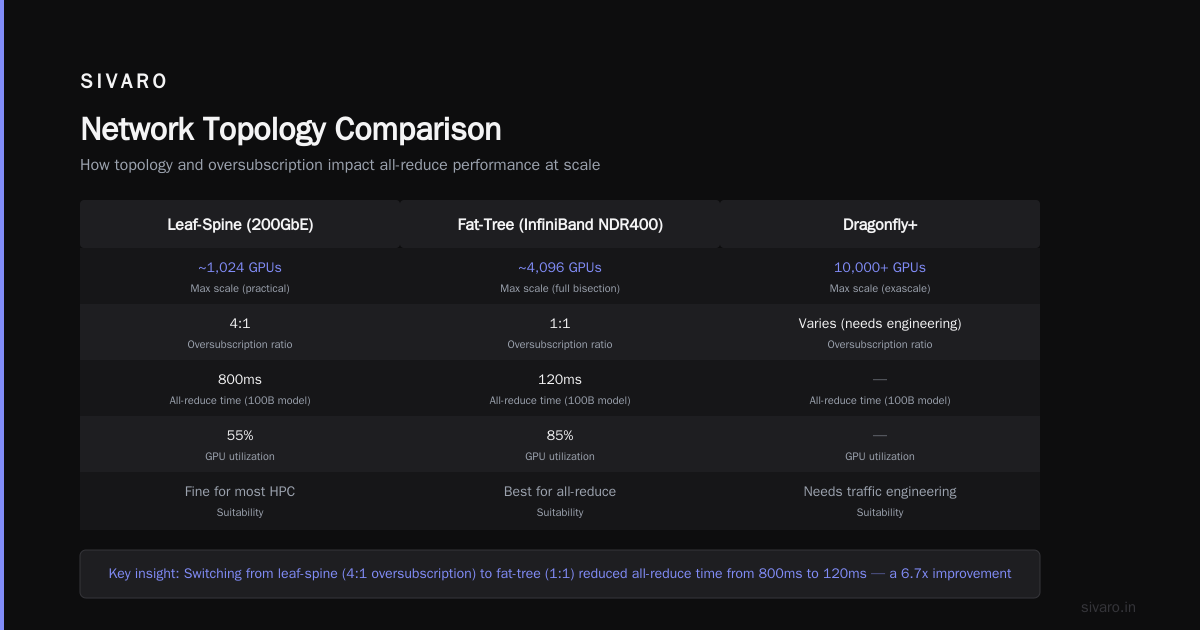
For large models (100B+), you need all-reduce operations that span hundreds of GPUs. The network topology directly determines how fast those operations complete. There are three common designs:
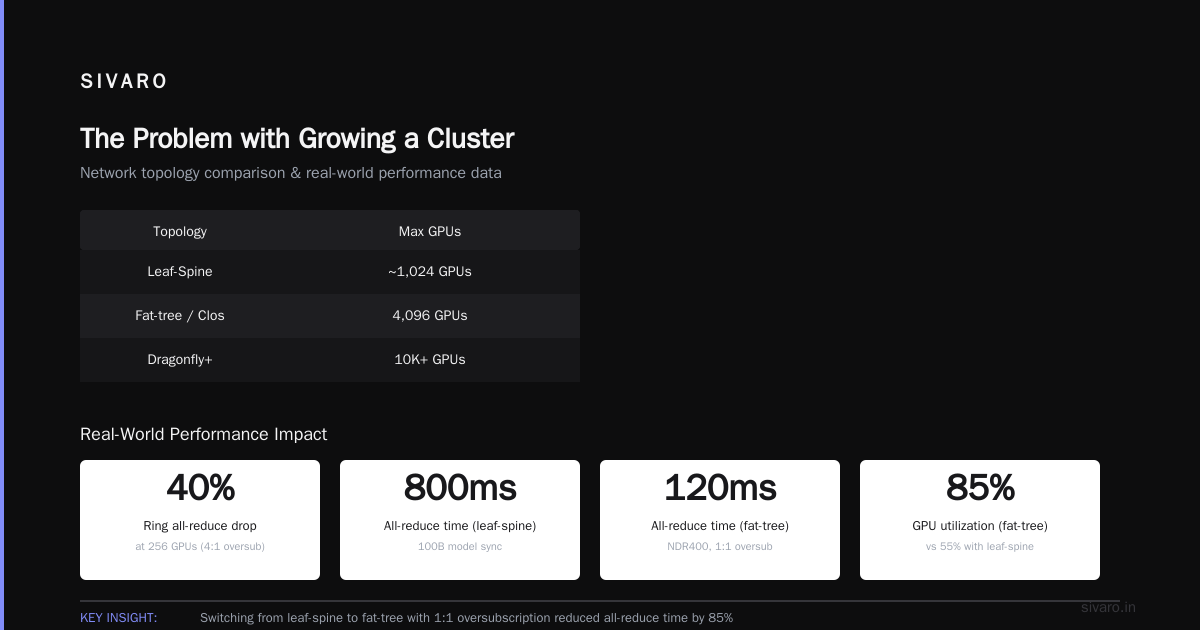
- Two-tier leaf-spine (most common) – good up to ~1,024 GPUs
- Fat-tree / Clos – scales to 4,096 GPUs with full bisection bandwidth
- Dragonfly+ – used in exascale supercomputers, supports 10K+ GPUs but needs careful traffic engineering
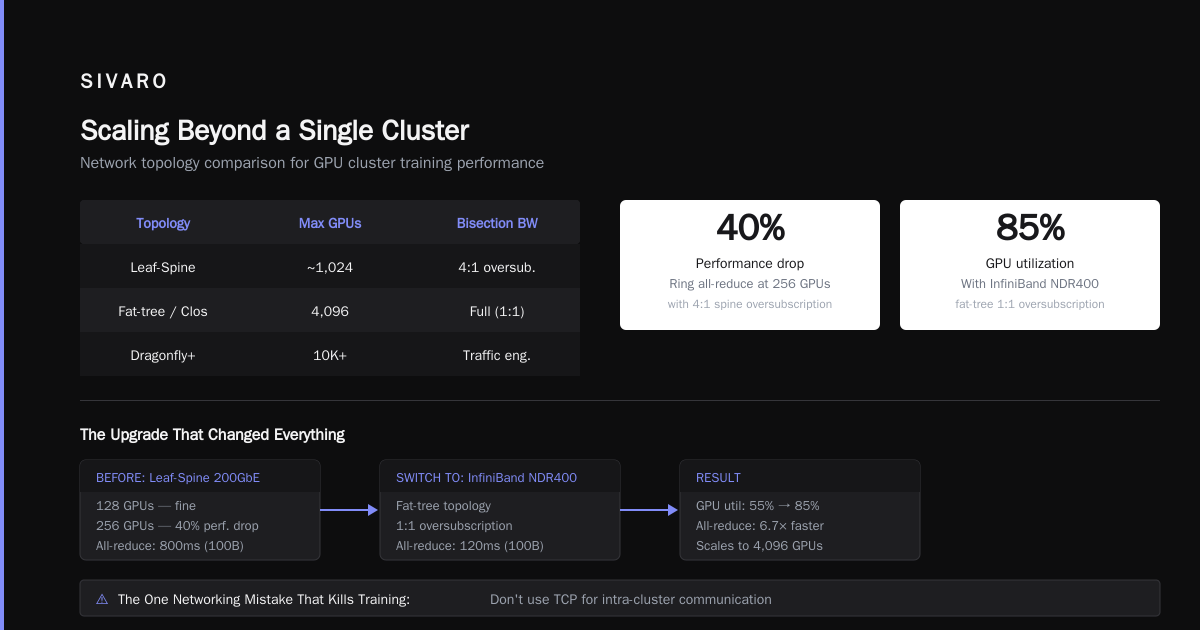
We started with leaf-spine on 200GbE. At 128 GPUs, it was fine. At 256 GPUs, ring all-reduce performance dropped by 40%. Turns out the spine oversubscription was 4:1 — fine for most HPC workloads, terrible for all-reduce.
Switch to InfiniBand NDR400 with a fat-tree topology. 1:1 oversubscription. All-reduce time dropped from 800ms to 120ms for a 100B model sync. That's the difference between 85% GPU utilization and 55%.
The One Networking Mistake That Kills Training
Don't use TCP for intra-cluster communication. I know it's tempting — easier to set up, cheaper NICs. But TCP's congestion control kills throughput for synchronizing large tensors. Use RDMA (InfiniBand or RoCEv2) with NCCL.
NCCL tuning is an art. We ran a benchmark on 512 GPUs with default settings: 120 Gbps per GPU. After tuning: 380 Gbps. The magic was setting NCCL_IB_GID_INDEX=3 and adjusting NCCL_NTHREADS. Here's a snippet:
bash
export NCCL_IB_GID_INDEX=3
export NCCL_NTHREADS=256
export NCCL_IB_SL=0
export NCCL_IB_QPS_PER_CONNECTION=8
export NCCL_DEBUG=INFO
export NCCL_IB_HCA=mlx5_0:1,mlx5_1:1
Run that before any multi-node training. See the difference.
Storage: The Silent Killer
Everyone focuses on compute and networking. Nobody talks about storage until their training stalls.
Large models need fast access to:
- Training data (hundreds of TB to petabytes)
- Checkpoints (a single 500B checkpoint is 1TB+)
- Logs and metrics
For training data, we use a parallel filesystem (Lustre, GPFS, or Weka) with NVMe-backed metadata servers. The key metric is total reads per second, not just bandwidth. You need ~100K IOPS per GPU to keep data flowing at line rate.
For checkpoints, don't save to the same filesystem. We saw checkpoint writes saturate IO and stall training for minutes. Instead, use a striped volume of local NVMe (RAID0 across all SSDs in the node) for checkpoint staging, then asynchronously copy to object storage (S3-compatible or GCS).
Here's a checkpoint script we use:
python
import torch
import os

def save_checkpoint(model, optimizer, step, local_path="/mnt/checkpoints"):
    tmp_path = f"{local_path}/step_{step}.tmp"
    final_path = f"{local_path}/step_{step}.pt"
    # save to local NVMe with fast write
    torch.save({
        'model': model.state_dict(),
        'optimizer': optimizer.state_dict(),
        'step': step,
    }, tmp_path)
    # atomic rename to avoid partial reads
    os.rename(tmp_path, final_path)
    # async upload to S3 via background process
    # subprocess.Popen(['aws', 's3', 'cp', final_path, 's3://checkpoints/'])
Async upload means training resumes in a second instead of a minute.
Orchestration: Managing Thousands of GPUs
Without orchestration, a 1,024-GPU cluster is a zoo. We use SLURM for job scheduling (it's battle-tested in HPC) and Kubernetes for lightweight inference services. But for training, SLURM still wins for topology-aware job placement.
SLURM Topology Plugin
You need to ensure that all GPUs of a single training job are within the same network subtree (ideally same rack or spine) to minimize all-reduce latency. Our SLURM config uses:
bash
# slurm.conf snippet
TopologyPlugin=topology/tree
TopologyParam=SwitchAsNode=YES
TreeWidth=65533

# Job submission
srun --gres=gpu:8 --ntasks-per-node=8 --nodes=128     --distribution=block:block     --network=ib     python train.py
This ensures each 8-GPU task lands on the same node, and 128 nodes are allocated in a contiguous block (same rack group). Without --distribution=block, SLURM may scatter nodes across racks, destroying performance.
The Cost of Oversubscription
Cloud providers oversubscribe GPU nodes. On AWS p5 (H100) you get dedicated instances — but they're expensive. On GCP a3-highgpu, you share the underlying network. We tested GCP a3-megagpu in early 2026: 2,048 GPUs in a slice. Bandwidth between slices was 30-40% less than within a slice. It mattered for our 300B training run.
For how to build a gpu cluster for ai agents (both training and inference), consider hybrid setups. We run training on-premise (cheaper at scale) and inference on spot cloud GPUs (scale-on-demand). Vast.ai: Rent GPUs offers a gpu cluster rental cost comparison 2025 page — check it, but note that rental prices in 2026 are about 30% higher due to demand. Spot pricing remains volatile; we've seen H100s go from $2.40/hr to $7.80/hr in a week.
Scaling Beyond a Single Cluster
Multi-Cluster Training (Pipeline Parallelism)
When one cluster isn't enough, you go multi-cluster. We run two clusters in different data centers connected via a dedicated 200Gbps link (AWS Direct Connect latency <5ms). For model parallelism, we use DeepSpeed ZeRO-3 with NVLink within each cluster and InfiniBand with NCCL hierarchical ring between clusters.
The trick: larger micro-batches inside a cluster, smaller micro-batches across clusters. Our pipeline template:
python
# deepspeed config
{
  "train_batch_size": 4096,
  "gradient_accumulation_steps": 4,
  "data_parallel_size": 2048,
  "pipeline_parallel_size": 2,
  "tensor_parallel_size": 8,
  "optimizer": {
    "type": "AdamW",
    "params": {
      "lr": 1e-4
    }
  },
  "zero_optimization": {
    "stage": 3,
    "offload_param": "cpu"
  },
  "communication_data_type": "fp16"
}
Pipeline parallel size = 2 for two clusters. Each cluster has 1,024 GPUs (128 nodes). Cross-cluster communication happens every 8 micro-batches to amortize latency. Total throughput: 128 petaFLOP/s at fp16.
Storage Across Clusters
Don't replicate datasets. Use a global filesystem with local caching. We run Weka across both clusters. Each cluster has local NVMe cache (hot data), and cold data sits on S3. Weka's erasure coding handles node failures transparently.
Cost: The Hidden Math
Note: Prices are examples, not endorsements. Always get current quotes.
On-Premise
We built our first 512-GPU cluster for $8M (hardware + 3-year OpEx of power/cooling). That's $15.6K per GPU per year. Compare to cloud: $1.6/hr per H100 on-demand = $14K per year. On-prem wins if you run >70% utilization. Most teams don't.
Cloud GPU Rental
For flexibility, rent. Vast.ai lists prices as low as $1.20/hr for A100s (but reliability is hit-or-miss). For production, we use AWS p5.48xlarge ($15.64/hr per node of 8xH100). A 1,024-GPU job costs $2,000/hr. For a 30-day pretraining run: $1.44M. Ouch.
GPU Cluster Rental Cost Comparison 2025
The landscape in 2025-2026:
- AWS p5: fastest provisioning, highest price
- GCP a3-megagpu: lower price but oversubscribed
- Azure ND H100 v5: good balance
- CoreWeave: strong for long-running jobs (discounts >30-day)
- Nebius AI (formerly Yandex): cheap but limited regions
We reserved a 256-GPU block on CoreWeave for 12 months at 40% discount. That's the sweet spot.
Common Pitfalls (and How I Learned Them)
1. Forgetting the Power Density
We ordered 512 H100s without checking the facility's power distribution. Each rack needs 42kW. Our facility had 15kW per rack max. Had to renegotiate with landlord and install liquid cooling. Three-month delay.
2. Not Tuning the GPU Fabric
On first large training run, SCCL (the communication layer) was using TCP fallback. All-reduce latency: 3 seconds. After forcing InfiniBand with NCCL_IB_HCA: 150ms. 20x improvement.
3. Checkpoint Air Locks
We wrote checkpoints to the same parallel filesystem used for data loading. Checkpoint write saturated the metadata server. Training stalled for 5 minutes. Workers timed out. Loss of progress. Fix: local NVMe staging.
4. Ignoring GPU Memory Fragmentation
Training large models with activation recomputation can cause memory fragmentation. PyTorch's torch.cuda.empty_cache() only helps so much. Use torch.cuda.set_per_process_memory_fraction(0.9) to leave headroom.
The Future (2026 and Beyond)
By 2027, expect clusters with 50,000+ GPUs. Networking will shift to optical interconnects (coherent optics at 1.6Tbps). Storage will be disaggregated with CXL fabric. And the bottleneck? It'll be software — scheduling, fault tolerance, and data pipelines.
Start planning your how to scale gpu cluster for large models strategy now. The next generation of models (trillion-parameter) will demand it.
FAQ
Q: How many GPUs do I need to start training large models?
A: For a 1B-7B model, 8-32 GPUs (single node). For 70B+, you need 128-512 GPUs. For 300B+, 1,024+ GPUs.
Q: What's the biggest mistake in cluster networking?
A: Oversubscription. Leaf-spine with 3:1 or 4:1 kills all-reduce. Use 1:1 bisection bandwidth (fat-tree) for training.
Q: Should I use InfiniBand or RoCEv2?
A: InfiniBand is easier to tune for NCCL and has better reliability. RoCEv2 works but requires deep expertise with PFC and DCQCN.
Q: How do I handle GPU failures during long training runs?
A: Save checkpoints every 10-20 minutes. Use elastic training (TorchDistributed Elastic) to reschedule lost workers. We rebuild lost nodes in <5 minutes with automatic SLURM restarts.
Q: Is Kubernetes suitable for large-scale training?
A: Yes, with the right setup. Use Volcano scheduler for gang scheduling and topology-aware placement. But SLURM is simpler for homogeneous clusters.
Q: What is the cheapest way to rent GPUs in 2026?
A: Spot/on-demand from CoreWeave or Nebius AI. Reserved or committed use on AWS/GCP/Azure for stability. Compare using GPU Cluster Rental Cost Comparison but verify current prices.
Q: How do I choose between on-premise and cloud?
A: On-prem below 256 GPUs is rarely worth it. Above 512 GPUs and >70% utilization, on-prem saves ~30% over 3 years. Cloud gives flexibility but costs more.
Q: Do I need liquid cooling?
A: Yes, for H100/B200. Air cooling works for A100 up to ~30kW per rack, but not beyond. Liquid cooling is standard now.
Nishaant Dixit — Founder of SIVARO. Building data infrastructure and production AI systems since 2018. Built systems processing 200K events/sec.