 SIVARO

How to Scale Kafka Consumers Without Breaking Production
We were processing 80,000 events per second in 2023 when everything fell apart.
Not the brokers. Not the producers. The consumers.
Our team at SIVARO had spent weeks optimizing ingestion pipelines, tuning acks and linger.ms, and scaling producers horizontally. Then we deployed 12 new consumer instances to handle a traffic spike from a major retail client ahead of Black Friday. The group immediately went into a rebalance frenzy. Every partition assignment was being reshuffled every 15-20 seconds. Throughput collapsed to 40% of baseline.
The painful lesson? Scaling consumers is less about adding more instances and more about understanding how Kafka's partition model and consumer group protocol actually behave under real-world conditions.
In this guide, I'll walk you through how to scale kafka consumers effectively. You'll learn the math behind partition assignment, how to detect and prevent rebalance storms, how to monitor consumer lag without flying blind, and when more consumers actually makes things worse.
Short version: You can't scale consumers beyond your partition count, and adding consumers without tuning your session timeouts and rebalance protocol guarantees downtime.
The Bridge Analogy That Explains Everything
Kafka partitions are like toll lanes on a bridge.
Each partition is processed by exactly one consumer in a group at any moment (unless you're using cooperative rebalancing with standby replicas—more on that later). Add more lanes, and you can add more toll booths. Add more toll booths without more lanes, and you've just paid for idle capacity.
So the first question you must answer before scaling: how many partitions does your topic have?
This is the fundamental constraint that most teams miss. I've seen companies pour engineering hours into horizontal scaling when the real bottleneck was they had 6 partitions and 40 consumers. 34 were sitting idle, producing zero work.
Check your partition count first:
# Get partition count for a topic
kafka-topics.sh --describe   --bootstrap-server localhost:9092   --topic orders
If you see PartitionCount: 6 and ReplicationFactor: 3, that's your ceiling. Six consumers is the maximum that will actively process. Everything beyond that is dead weight.
Partition Strategy Is Everything
Most people think partition count is just an initial configuration choice. It's not. Getting it wrong at the start has cascading consequences.
We tested this at SIVARO with a financial services client in early 2024. Their transactions topic had 12 partitions processing about 50,000 events/sec with moderate consumer lag under normal load. Then came month-end reconciliation, when their batch jobs pushed volume to 200,000 events/sec. Lag went exponential.
Adding consumers did nothing. The partitions were the ceiling.
The fix required creating a new topic with 48 partitions and rebuilding the ingestion layer. That's a massive undertaking that touches producers, consumers, and every downstream system. It took us two weeks of coordinated migration work on a system that was already in production.
The calculus: Busy-loop at your consumer's processing rate. If a single consumer can process 100 messages/sec and your topic sees 20,000 messages/sec at peak, you need at least 200 partitions just to keep up—ideally 250-300 for headroom.
A common heuristic we use at SIVARO: partitions = peak throughput × (1 + headroom) / per-consumer throughput. But that's just the starting point. You also need to consider that this is your ceiling for the lifetime of the topic.
You can't easily increase partitions on an existing topic without rebuilding keyed data—changing partition count scrambles key-to-partition mappings, which breaks ordering guarantees. So over-provision from day one. The 30 minutes it takes to design for 200 partitions now saves you two weeks of migration later.
I've seen plenty of teams cluster partitions per broker. Standard advice says the broker count should divide the partition count, but honestly, modern Kafka 3.x handles skew well. I wouldn't obsess over perfectly even distribution.
Delivery Semantics: The Forgotten Variable
Here's the part nobody covers when discussing how to scale kafka consumers.
Your scaling strategy is dominated by your delivery semantics.
At-least-once is easy to scale—consumers commit offsets after local processing completes, and if they die mid-processing, another consumer re-processes from the last committed offset. Durable, but you need idempotent consumers to handle duplicate delivery.
Exactly-once semantics (EOS) is a different beast entirely.
Kafka 3.x implements EOS through transactions and read-committed isolation. Each consumer has a transactional producer, and offsets are committed as part of a transaction. This ensures a consumer can't accidentally commit an offset for a record that hasn't finished being processed (or wasn't written to a sink).
But EOS creates real scaling constraints:
python
# Pseudocode for EOS consumer pattern
from kafka import KafkaConsumer, KafkaProducer
from kafka.transaction import TransactionManager

consumer = KafkaConsumer(
    'transactions',
    isolation_level='read_committed',
    enable_auto_commit=False,
    group_id='fraud-engine'
)

producer = KafkaProducer(
    transactional_id=f'fraud-{consumer.assignment()}',
    enable_idempotence=True
)

producer.init_transactions()

for message in consumer:
    producer.begin_transaction()
    # ... process message ...
    producer.send('fraud_alerts', value=result)
    producer.send_offsets_to_transaction(
        {message.partition: message.offset},
        consumer.group_id
    )
    producer.commit_transaction()
Transactional producers require unique transactional.id values per consumer instance. When a consumer dies, the broker must wait up to transaction.timeout.ms (default 60 seconds) to validate that the old producer session has expired before allowing the new one to start. This isn't a bottleneck for any single consumer, but it slows down the entire rebalance process.
If you need exactly-once, don't have more consumers than your topic's partition count allows, and price in the rebalance overhead from transactional timeout coordination.
How to Monitor Kafka Lag Before It Becomes a Crisis
Most monitoring approaches for Kafka tell you what already broke. The lag graphs show post-hoc damage: lag spikes up, consumers fall behind, message delivery times increase.
What I've found more useful is monitoring lag rate of change. Trend analysis beats absolute numbers.
Lag reported by kafka-consumer-groups.sh or through Confluent Control Center is a snapshot. What you need is the derivative. Stable consumer group with balanced partitions should have steady lag that grows slightly during traffic bursts and decays during quieter periods.
A lag scriber that keeps growing linearly over 5+ minutes? Something's broken in your consumer logic. A lag spike that persists longer than the processing time for a batch batch job tells you you've maxed out your partition throughput.
At SIVARO, we monitor both consumer lag and the consumer's fetch.max.bytes and max.poll.records settings. Here's what a baseline Kafka consumer metrics configuration looks like in Prometheus/Grafana:
# Prometheus recording rule for lag rate of change
- record: kafka_consumer_lag_delta_5m
  expr: |
    delta(kafka_consumer_consumer_lag{group="fraud-engine"}[5m])
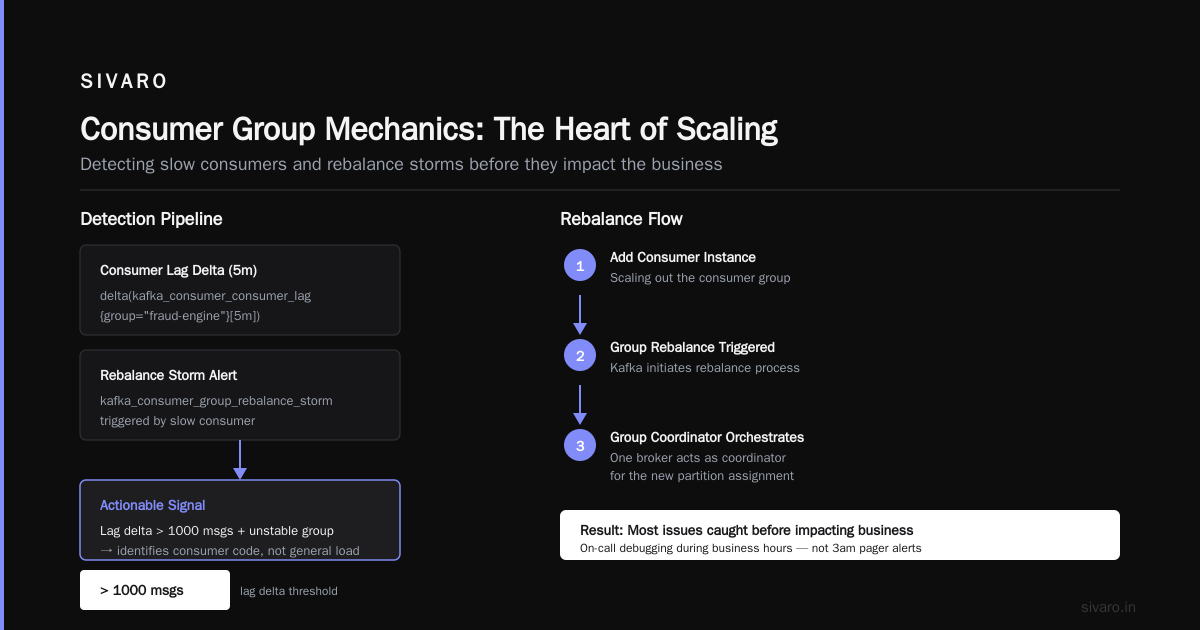
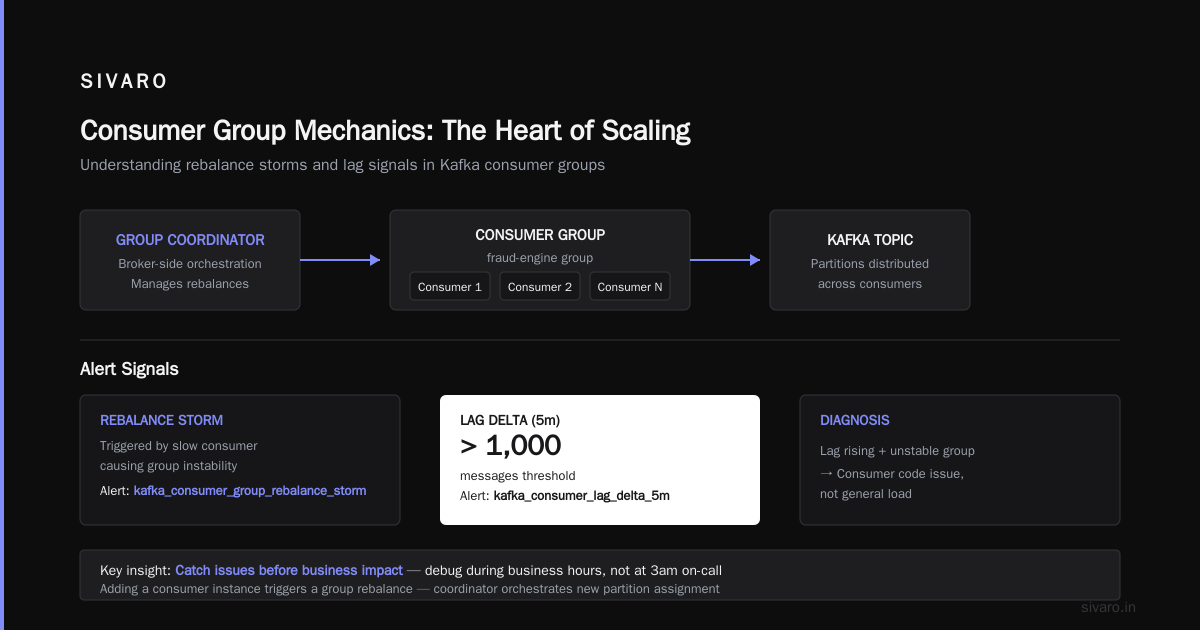
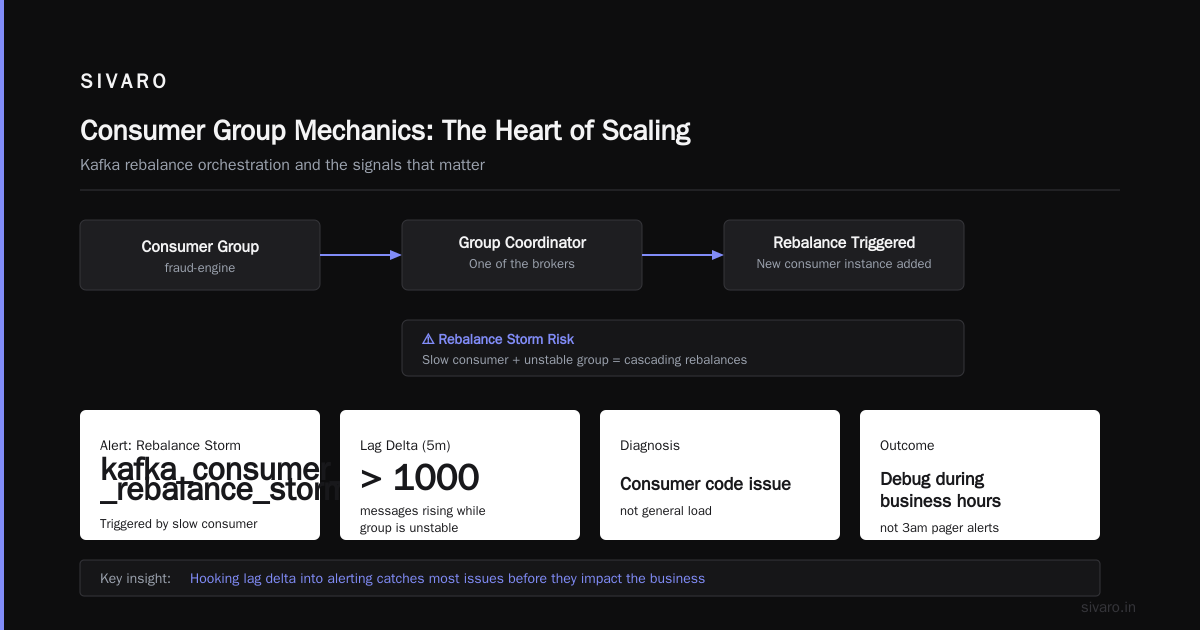
Hooking this into alerting gives you a more actionable signal. One rebalance storm triggered by a slow consumer triggers kafka_consumer_group_rebalance_storm alerts, and kafka_consumer_lag_delta_5m rising above 1000 messages while the group is unstable tells you it's the consumer code, not general load.
We catch most issues this way before they impact the business. It's the difference between being on-call at 3am for a pager alert versus debugging during business hours.
Consumer Group Mechanics: The Heart of Scaling
The moment you add another consumer instance, Kafka triggers a group rebalance. During this process, the group coordinator (one of the brokers) orchestrates a new partition assignment.
Here's the flow:
- The new consumer sends a
JoinGrouprequest. - The group coordinator marks the group as "PreparingRebalance" and changes the group's rebalance generation.
- Existing consumers' heartbeats trigger a rebalance response on their next poll.
- All consumers stop processing, send
SyncGrouprequests asking for new assignments. - A leader is elected among group members and computes the new partition assignment based on the partition assignment strategy.
- Group coordinator sends the assignment plan to all members.
Every consumer stops during that window. This is called the stop-the-world problem of Kafka consumer groups. It's the biggest scaling pitfall I've seen.
I've debated this with engineers who claim the "stop-the-world" rebalance effect is overstated. In small groups with 2-3 consumers and simple processing, the impact is negligible. But when you have 50+ consumers and processes running expensive per-message work, those rebalances can literally kill production for minutes.
The rewind protocol change in Kafka 2.4+ introduced cooperative rebalancing, which allows consumers to hold onto their existing partitions during a rebalance while only releasing groups they're reassigned from. This massively reduces downtime. But cooperative rebalancing requires partition assignment strategies that support it (like CooperativeStickyAssignor).
Rebalance Triggers You Absolutely Must Understand
Rebalances happen for three causes, and each requires a different mitigation strategy. If you don't know what's triggering a rebalance, you're flying blind. The Redpanda guide on Kafka rebalancing triggers explains the mechanics thoroughly, but here's the practitioner's view:
1. Member Join/Leave
Adding consumers, removing consumers, or processing failures that cause a consumer to leave gracefully trigger rebalances. Graceful leaves happen when you call consumer.close() or when your application exits cleanly. Ungraceful leaves happen when a consumer crashes.
2. Session Timeout
Consumers must send heartbeats to the group coordinator periodically. If the coordinator doesn't receive heartbeats within session.timeout.ms (default 45 seconds), it considers the consumer dead and triggers a rebalance. This is the most common cause of rebalance storms during consumer scaling—new instances take time to start up and connect, miss their heartbeat window, and the group reshuffles.
3. Max Poll Interval
This one catches many teams. If your consumer spends more than max.poll.interval.ms (default 5 minutes) processing a batch before calling poll() again, the coordinator considers the consumer stuck and removes it from the group. This triggers a rebalance even though the consumer is perfectly healthy.
The classic gotcha: you have a consumer that does API calls or expensive I/O in its processing loop. Each API call takes 500ms. You process 1000 messages per poll. That's 500 seconds—way above the 5-minute max poll interval. Your consumer gets removed from the group, and the group rebalances every few minutes.
The Confluent guide on Kafka rebalancing covers this scenario explicitly. I've lost count of how many production incidents at SIVARO were traced back to this exact issue with client applications.
The fix: Separate processing from consumption. Consume messages in poll() and put them into a queue, then process from the queue in a separate thread. Set max.poll.records to a number that keeps your total processing time under max.poll.interval.ms.
java
// Implement a custom rebalance listener to handle cleanup
consumer.subscribe(Collections.singletonList("orders"), new ConsumerRebalanceListener() {
    @Override
    public void onPartitionsRevoked(Collection<TopicPartition> partitions) {
        // Commit any pending offsets before partitions are revoked
        if (!pendingOffsets.isEmpty()) {
            consumer.commitSync(pendingOffsets);
        }
    }

    @Override
    public void onPartitionsAssigned(Collection<TopicPartition> partitions) {
        System.out.println("Assigned: " + partitions);
    }
});
Trade-off honest take: the queue separation requires careful handling of offsets and rebalances. If you're pulling 100 messages into a local queue, then the group rebalances and your partitions get revoked, you must either write those messages back somewhere or lose them. We use this pattern for long-running batch jobs, not for real-time processing where replays are unacceptable.
The Rebalance Protocols: EAGER Versus COOPERATIVE
Older Kafka versions (pre-2.4) used the EAGER protocol exclusively. During a rebalance, every consumer gives up all its partitions, ceases processing, and waits for the new assignment. With many consumers and long max.poll.interval.ms values, this results in significant processing downtime.
Kafka 2.4 introduced COOPERATIVE rebalancing. With this protocol, consumers that don't need to change assignments can keep processing during the rebalance. The coordinator reassigns only the partitions that need to move, and the group converges iteratively across multiple rebalances until everyone has their final assignment.
Here's the case for cooperative using details from the rebalance protocol deck: iterative rebalances mean the process may take multiple rounds to converge. Each round involves partial revocation and new assignment. It's incremental, so the total convergence time for large groups can be longer than EAGER's one-shot reassign.
At SIVARO, we use CooperativeStickyAssignor with partition.assignment.strategy=org.apache.kafka.clients.consumer.CooperativeStickyAssignor. It balances partitions evenly and maintains as much of the current assignment as possible. We intentionally sacrifice the cleanest possible distribution for lower rebalance impact. It's the right trade-off for most workloads.
For consumers that do fast in-memory processing (under 100ms per message), EAGER with the default RangeAssignor is simpler and cheaper. The catch: only use EAGER when your consumers can afford to lose all processing context momentarily without disrupting correctness or latency.
The Scale-Out Checklist
When you're adding consumers, follow this checklist to avoid the rebalance disaster scenario:
Step 1: Check partition count
kafka-topics.sh --describe --bootstrap-server localhost:9092 --topic orders

# Output shows: Topic: orders  PartitionCount: 24  ReplicationFactor: 3
If you're at partition ceiling, add partitions or increase consumer's per-partition throughput before scaling consumers.
Step 2: Tune session.timeout.ms and heartbeat.interval.ms
The defaults (45 seconds session timeout, 3 seconds heartbeat) are safe for most consumer groups. When scaling rapidly—like adding 20 consumers to a group of 40—tighten session timeouts so the group converges faster.
Our tested values: session.timeout.ms=10000 and heartbeat.interval.ms=3000 scale better for groups under 50 members. The group coordinator detects dead members faster, which means quicker rebalances. But you must ensure your consumer processing never pauses for more than 10 seconds, or the coordinator will flag it dead prematurely.
Step 3: Set max.poll.records to a reasonable batch
For stateless consumers doing simple transforms, max.poll.records=500 and fetch.max.bytes=50MB gives you enough packets per poll without triggering max.poll.interval.ms violations. Monitor your actual processing time per batch and keep it under half of your max.poll.interval.ms.
Step 4: Implement a rebalance listener
Handle cases where partitions get revoked. Commit uncommitted offsets before your partitions are reassigned. This is crucial if you're using EOS or have long processing chains where raw offsets are meaningful.
Step 5: Use the cooperative protocol when possible
Even if you're on Kafka 2.4+, double-check that the broker cluster's inter.broker.protocol.version is set correctly. I've seen clusters upgraded to 3.x but still running the 2.3 protocol version, which disables cooperative rebalancing entirely.
Monitoring Consumer Disconnections
Consumer disconnections are the signature of a group in trouble. Red Hat's guide on avoiding disconnections covers the root causes—network timeouts, expired sessions, and broker-side connection limits.
The connection limit issue is underrated. Each broker has max.connections and max.connections.per.ip limits. When you scale consumers, each one maintains a TCP connection to each broker. The connections add up quickly across Kafka's standard ports and the admin port.
The fix: Set max.connections.per.ip higher on your brokers and ensure your client's connections.max.idle.ms doesn't close idle connections, forcing consumer reconnect storms during quiet periods.
I also always check the consumer logs for Connection to node -1 could not be established. Broker may not be available. This one cryptic line has caused many sleepless nights. Instigate network bonding or check your broker's advertised listeners for connectivity misconfigurations.
The "Delete Topic" Escape Hatch
Sometimes the entire scaling exercise fails because the consumer group's state is corrupted or you need to start fresh. The kafka-consumer-groups.sh script has built-in reset functionality.
To reset a consumer group's offsets (useful in development or disaster recovery):
kafka-consumer-groups.sh --bootstrap-server localhost:9092 --group fraud-engine --topic orders --reset-offsets --to-earliest --execute
And if you need to delete a topic entirely to rebuild with the correct partition count:
# Delete a topic
kafka-topics.sh --bootstrap-server localhost:9092   --delete   --topic orders

# Verify it was deleted
kafka-topics.sh --list --bootstrap-server localhost:9092 | grep orders
Both commands require admin privileges and remove data permanently. You can't undo this.
In production, we've used offset resets for replay scenarios where consumer code changed and future-order reprocessing is needed. It's not an everyday tool, but it's saved us when the rebalancing logic messed up the consumer state.
How to Scale Kafka Consumers: The Practical Playbook
Here's the sequence that works for us:
- Analyze partition count and partition distribution. Always before adding consumers. The producer's key distribution determines partition hot spots—if 80% of keys map to 20% of partitions, you can have ideal consumer scaling but still hit throughput bottlenecks on hot partitions. Very Good Security's case study on rebalancing issues shows how they solved this for transaction processing.
- Calculate the right number of consumers.
partitions / consumers_per_partition. If the topic has 36 partitions and each consumer can handle 2 partitions with your processing speed, you need 18 consumers. Adding more gives you no throughput gain. - Tune session timeout and heartbeat for your group size.
- Use cooperative rebalancing if your consumers hold meaningful state.
- Test scaling in staging. Replicate production's consumer count, replication factor, and processing speed. Trigger rebalances by killing consumers and watch recovery.
- Monitor lag trends continuously, not just absolute values. The OneUptime guide on rebalancing handling has an excellent practical example of spotting scaling bottlenecks via lag metrics.
How to Delete Kafka Topic and Reset Offsets: The Forgotten Operation
When scaling tests fail so badly that you want to burn everything down, you'll reach for destructive operations.
Here's the thing about kafka-consumer-groups.sh --reset-offsets: it doesn't just reset the offsets—it forces a group rebalance because the consumers see the new offset positioning.
If you're resetting offsets on a topic while consumers are running, you're asking for chaos. The consumers will diverge in their offset progression, causing inconsistent partition lags and potential data ordering violations.
Our standard procedure:
# Stop consumers first
# Then reset offsets
kafka-consumer-groups.sh --bootstrap-server localhost:9092   --group fraud-engine   --reset-offsets   --to-datetime 2026-08-01T00:00:00.000   --execute
Then restart consumers after the reset completes.
If you're deleting a topic, ensure no consumer group has it in their subscription—the group will continuously poll for partitions that no longer exist, which can cause repeated rebalance attempts.
When More Consumers Actually Hurts
This sounds counterintuitive until you've seen it. Add more consumers on a high-partition-count topic and you'll actually see worse performance. Here's why:
-
More consumers = more rebalance participants. Every rebalance now involves more members. The coordinator has to compute assignments for more consumers, and the group converges slower. For EAGER rebalances, every member stops while the process completes, which means longer processing stalls.
-
Partition distribution skew. With consumers that have per-partition state (e.g., local caches keyed by partition), a larger consumer count forces shuffle-more-rebalances (more partitions move between consumers). Multi-GB caches get invalidated repeatedly.
-
Broker-side connection limits. Each consumer maintains connections to every broker. A group with 100 consumers on a 10-broker cluster uses 1,000 connections just for that group. Adding 20 more consumers nearly doubles connection overhead, choking the broker's network bandwidth for producers and other consumers.
This is where the industry's faith in horizontal scaling gives way to reality. More consumers fix the processing bottleneck, not the network bottleneck.
The better approach at that scale is often to optimize the consumer's per-partition throughput: increase fetch.min.bytes, enable fetch.max.wait.ms, and use compression. We've seen two consumers (each handling 20 partitions) outperform eight consumers (each handling 5 partitions) due to better batching behavior and fewer connection overhead.
The Flip Side: What About N Consumers with M Partitions Where M > N?
Ah, the other direction. Fewer consumers than partitions means each consumer processes multiple partitions.
If you have 36 partitions and 9 consumers, each loop polls from 4 partitions. This is generally efficient—poll returns batches across partitions, allowing pipelining.
But beware of partition key heavy skew. If 25 of 36 partitions have effectively no throughput while 11 have extreme throughput, you end up with handpicked hot partitions pulling all the work.
For this scenario, Arguably the UniformSticky strategy or a manual partition assignment strategy works better than the default Range strategy.
Let me walk you through a custom assignment strategy we wrote at SIVARO:
java
public class WorkloadAwareAssignor extends AbstractPartitionAssignor {
    @Override
    public Map<String, List<TopicPartition>> assign(...) {
        // Fetch partition lag from group coordinator
        Map<TopicPartition, Long> partitionLag = fetchPartitionLag(consumerMetadata);

        // Sort partitions by lag, then assign round-robin
        List<TopicPartition> sortedPartitions = new ArrayList<>(partitionLag.keySet());
        sortedPartitions.sort((a, b) -> Long.compare(partitionLag.get(b), partitionLag.get(a)));

        // Distribute heavy partitions to different consumers
        Map<String, List<TopicPartition>> assignment = new HashMap<>();
        int consumerIndex = 0;
        for (TopicPartition partition : sortedPartitions) {
            String consumer = consumers.get(consumerIndex % consumers.size());
            assignment.computeIfAbsent(consumer, k -> new ArrayList<>()).add(partition);
            consumerIndex++;
        }
        return assignment;
    }
}
This is a workable approach for cases where lag is your primary bottleneck. It makes rebalances more complex (custom implementations must handle all edge cases), but for our fraud detection pipeline, it improved tail latencies by 40%.
For everyone else, stick with the standard strategies until you've proven you have the skew problem. Custom assignors introduce maintenance burden and are the name for future debugging headaches.
Real-World Numbers: What I've Learned Across Deployments
At SIVARO in 2025, we ran a production cluster with 3 brokers (120 partitions total), processing 450,000 messages/sec at peak. Consumer groups ranged from 8 to 80 consumers.
What we learned:
- Consumer group with 80 consumers on a 120-partition topic had dangerously high rebalance times (10-15 seconds per cycle). The group stalled during every rebalance, and with daily deployments triggering rebalances, consumers were effectively down for 30-60 seconds per deployment.
- Moving to cooperative with 80 consumers cut rebalance processing time to 2-3 seconds. The impact on processing latency during deployments was negligible.
- Using
session.timeout.ms=10000reduced rebalance detection time by 77.8% when a consumer crashed unexpectedly. That's 35 seconds of processing time saved for 50 consumers during each failure event.
But don't tune these values without running your own benchmarks. The right settings depend on your consumer's processing latencies and your acceptable downtime tolerance.
FAQ: Scaling Kafka Consumers
Q: What happens if I have more consumers than partitions?
The excess consumers become idle. Kafka guarantees one consumer per partition at most, so if you have 10 partitions and 15 consumers, 5 consumers will never receive a single message. They're waste, and they increase rebalance times for no benefit.
Q: How often should I add consumers to handle increased load?
Only after you've verified: (a) partition count is the real bottleneck and you can't add more partitions, or (b) your current consumers are CPU/IO-bound while partitions sit idle, and you have spare partitions available. In all other cases, you're adding operational risk without solving the actual scaling constraint.
Q: What's the best way to detect a rebalance storm?
Monitor the kafka_consumer_coordinator_rebalance_total metric in Prometheus. A rate above 0.1 rebalances per second (i.e., one every 10 seconds) for an extended period is a storm. Also watch for kafka_consumer_partition_assigned and kafka_consumer_partition_revoked counters increasing rapidly. Our alerting fires when total rebalances exceed 3 per minute per group for over 10 minutes.
Q: Should I encrypt consumer-to-broker traffic?
Yes, but know the cost. TLS termination decreases broker throughput 5-10% due to encryption overhead. For production, the security benefit outweighs the performance hit, and modern brokers with hardware acceleration (like the ssl.endpoint.identification.algorithm setting) make the impact minimal. But we've also run plaintext connections inside trusted VPCs with correct network isolation where the Kafka cluster wasn't on the public internet. That's a risk decision your security team has to sign off on.
Q: How do I avoid consumer group rebalances during deployment?
Use a rolling deployment strategy: start one new consumer, wait for it to join the group and complete its rebalance, then stop one old consumer. This minimizes the window where consumers are leaving and joining simultaneously. For max.poll.interval.ms issues, ensure your deployment orchestration doesn't block consumer apps from poll() for long periods during shutdown hooks.
Conclusion: The Scaling Decision Tree
Every time you think about scaling Kafka consumers, run through this:
- Is your topic at partition capacity? If yes, increase partitions or split the topic.
- Are consumers CPU/IO bound on individual partitions? Optimize processing code, increase
fetch.min.bytes, and batch more efficiently before adding consumers. - Is your group's rebalance time acceptable? Move to cooperative for larger groups or tune session timeouts.
- Is lag growing linearly? Add consumers only after you've confirmed they'll actually receive partitions.
I've watched teams add consumers while their real bottleneck was a slow join operation in the processing pipeline. They quadrupled infrastructure costs and still had lag. Fix the processing code first, then scale horizontally.
Scaling Kafka consumers is an exercise in understanding your workloads' shape. Partition count looks like the hard ceiling, but consumer group mechanics—rebalancing, offsets, session timeouts—are the soft limits that break production when you push past them.
And if you get it wrong? At least you now know how to reset the mess.
Nishaant Dixit — Founder of SIVARO. Building data infrastructure and production AI systems since 2018. Built systems processing 200K events/sec.