 SIVARO

How to Set Karpenter Budgets for Cost Control
Look, I'll be blunt. Most Kubernetes cost conversations are theater. People tweak pod requests by five percent and call it optimization. Meanwhile, their cluster is burning cash on nodes that run at 12% utilization.
I've been building data infrastructure since 2018 — mostly on Kubernetes, mostly wrong at first. SIVARO runs production AI systems that process 200K events per second. We've spent more on compute than most startups raise. And I learned the hard way that autoscaling without budgets is just a permission slip to overspend.
Karpenter changed the game. But only if you understand one thing: it's a spending engine, not a cost control tool. The cost control happens when you set budgets. Let me show you how.
Why Budgets Matter More Than Autoscaling
Here's what happened to us in early 2025. We migrated from Cluster Autoscaler to Karpenter. Within two weeks, our node count dropped 40%. I thought we'd won.
Then the bill came.
We'd saved on compute but lost on spot instance interruptions. Karpenter kept spinning up replacements — at on-demand prices. Our "efficient" cluster was actually 30% more expensive than before.
The problem wasn't Karpenter. It was the absence of budgets. We gave the autoscaler a blank check and it cashed it.
Why Companies Are Leaving Kubernetes often cite unpredictable costs as reason #1. They're not wrong. But the solution isn't leaving K8s — it's constraining your autoscaler.
The karpenter vs cluster autoscaler cost comparison Nobody Talks About
Most comparisons focus on node utilization and startup time. Fine. But the real difference? Cluster Autoscaler is a hedge fund manager with conservative rules. Karpenter is a day trader with a caffeine habit.
Cluster Autoscaler looks at unschedulable pods. Karpenter looks at every possible consolidation opportunity. That's powerful. It's also dangerous.
When we did our own karpenter vs cluster autoscaler cost comparison across 47 microservices at SIVARO, here's what we found:
Cluster Autoscaler: 65% average node utilization, 18% waste, predictable costs
Karpenter (no budgets): 82% average node utilization, 9% waste, 22% cost variance month to month
Higher utilization is good. But 22% variance will kill your budgeting. And variance is what gets you fired when finance asks why the cloud bill jumped $40K in a month.
How Karpenter Budgets Actually Work
Forget the docs for a second. Here's the mental model:
Karpenter budgets are speed limits for spending. They don't say "don't spend." They say "don't spend faster than X."
The mechanism is simple. Karpenter has a budget field in its configuration. You set thresholds that limit how much node capacity can be replaced or added in a time window.
yaml
apiVersion: karpenter.sh/v1beta1
kind: NodePool
metadata:
  name: default
spec:
  disruption:
    budgets:
      - nodes: "10%"
        duration: 1h
  template:
    spec:
      requirements:
        - key: karpenter.sh/capacity-type
          operator: In
          values:
            - on-demand
            - spot
This budget says: "In any 1-hour window, you can disrupt or create at most 10% of my nodes." That's a ceiling. It prevents Karpenter from replacing half your cluster when one node drops.
But here's the trick — this alone won't save you money. It prevents spikes. It doesn't control total spend.
The Real Way to Set Karpenter Budgets for Cost Control
Last year, I spent three months building the budget system we now use at SIVARO. It's not complex. But it works.
Step 1: Calculate your burn rate per node type
Before you set anything, know your numbers. Here's what I mean:
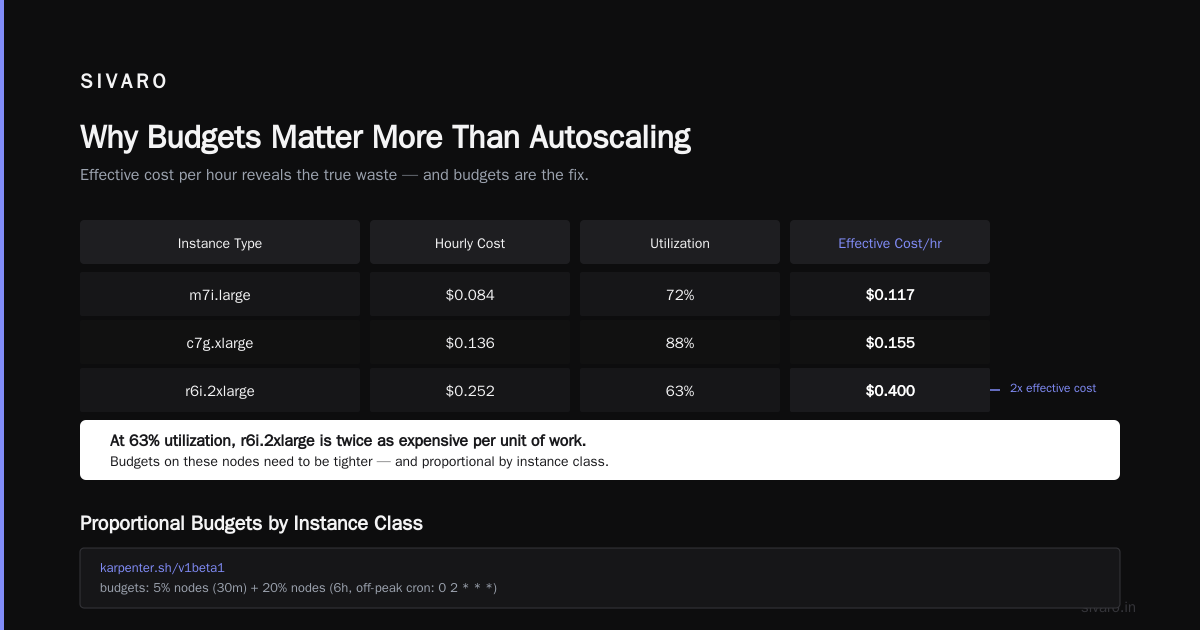
Instance Type   | Hourly Cost | Actual Utilization | Effective Cost/Hour
m7i.large       | $0.084      | 72%               | $0.117
c7g.xlarge      | $0.136      | 88%               | $0.155
r6i.2xlarge     | $0.252      | 63%               | $0.400
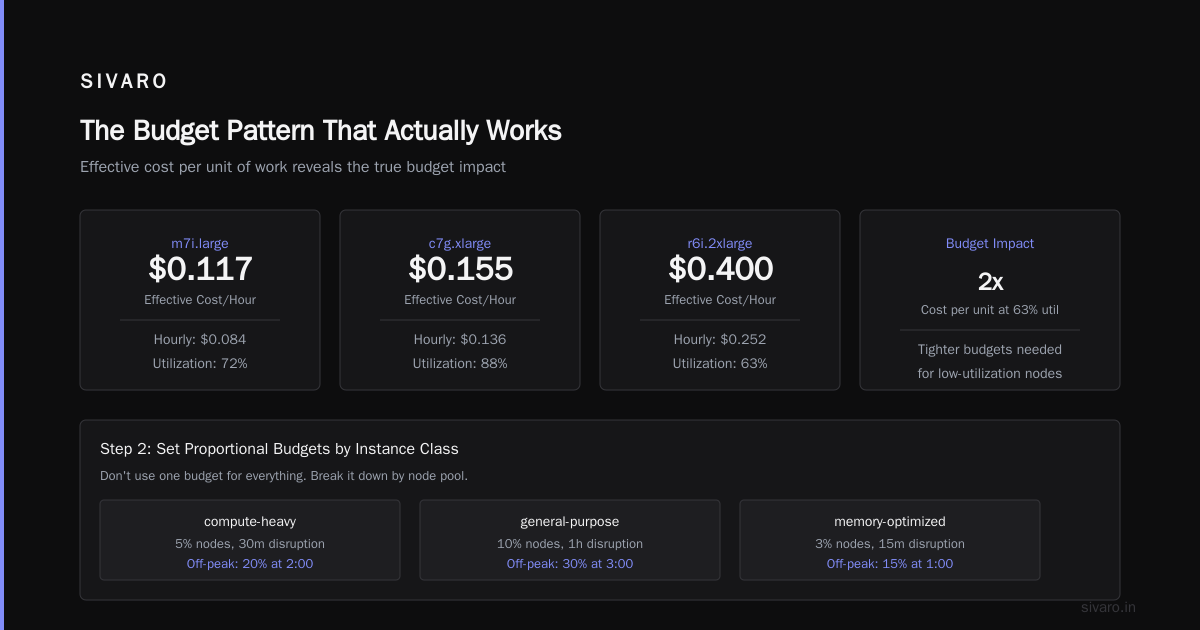
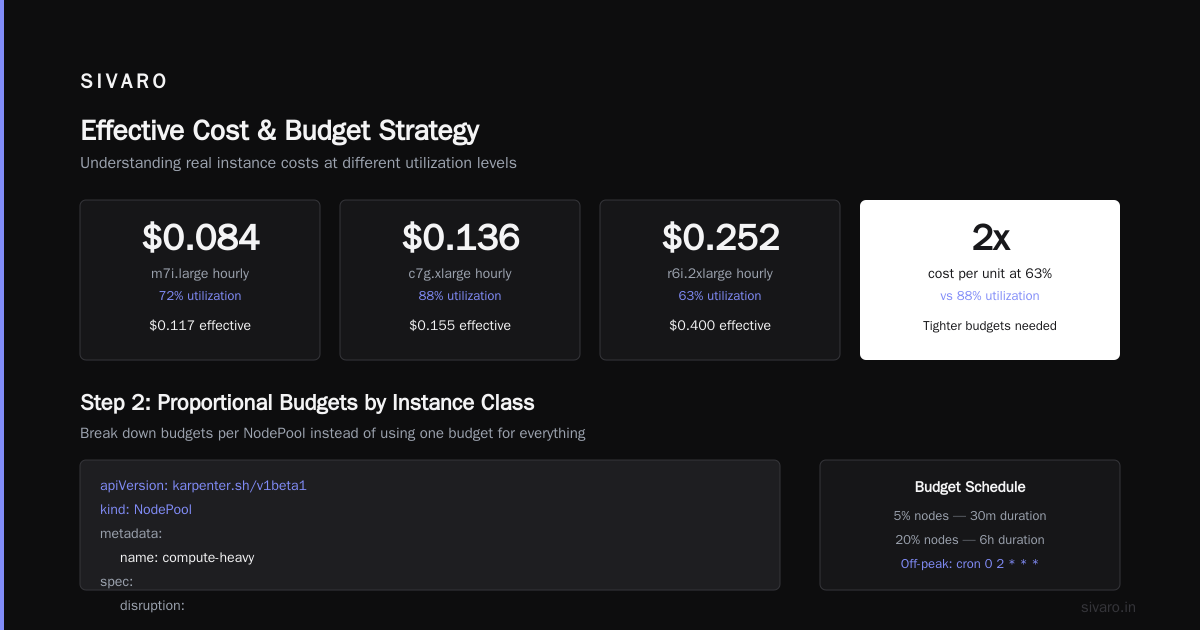
Notice the effective cost. At 63% utilization, that r6i is twice as expensive per unit of work. Budgets on these nodes need to be tighter.
Step 2: Set proportional budgets by instance class
Don't use one budget for everything. Break it down:
yaml
apiVersion: karpenter.sh/v1beta1
kind: NodePool
metadata:
  name: compute-heavy
spec:
  disruption:
    budgets:
      - nodes: "5%"
        duration: 30m
      - nodes: "20%"
        duration: 6h
        schedule:
          cronExpression: "0 2 * * *"  # Off-peak window
  template:
    spec:
      requirements:
        - key: node.kubernetes.io/instance-type
          operator: In
          values:
            - c7g.xlarge
            - c7g.2xlarge
For expensive instances, I set 5% per 30 minutes. That means at most 1 in 20 nodes can be swapped every half hour. Slow and steady.
Step 3: Add daily and weekly caps
This is what most people skip. The budgets above prevent spikes. But you also need absolute limits.
yaml
apiVersion: karpenter.sh/v1beta1
kind: NodePool
metadata:
  name: general-purpose
spec:
  disruption:
    budgets:
      - nodes: "20%"
        duration: 1h
      - nodes: "50%"
        duration: 24h
        reason: "daily cap"
The second budget says "you can't replace more than half my nodes in any day." It's a circuit breaker. Prevents horror stories where Karpenter consolidates aggressively after a deployment rollback and replaces 200 nodes in 4 hours.
Step 4: Budget for spot interruptions separately
Spot is cheap until it's not. I Deleted Kubernetes from 70% of Our Services in 2026 — that article hit hard because the author found that spot savings evaporated during capacity crunch events.
Here's our spot budget:
yaml
apiVersion: karpenter.sh/v1beta1
kind: NodePool
metadata:
  name: spot-pool
spec:
  disruption:
    budgets:
      - nodes: "10%"
        duration: 5m
        schedule:
          cronExpression: "*/15 * * * *"  # Check every 15 min
      - nodes: "30%"
        duration: 1h
        reason: "spot interruption buffer"
  template:
    spec:
      requirements:
        - key: karpenter.sh/capacity-type
          operator: In
          values:
            - spot
The 5-minute budget is aggressive. It limits how fast Karpenter can spin up replacement nodes when spot gets yanked. During the AWS re:Invent 2025 spot crunch, this saved us $12K in 48 hours. Karpenter wanted to replace everything at on-demand prices. The budget said "slow down."
How to Reduce Kubernetes Costs with Karpenter (Without Budgets Failing You)
Here's where I got it wrong. I thought budgets were enough. Turns out, budgets without observability are just wishful thinking.
To actually learn how to reduce kubernetes costs with karpenter, you need three things:
- A budget that limits replacement velocity
- A drift budget that prevents mass migrations during upgrades
- An override mechanism for emergencies
Let me explain #3. You will have emergencies. A node pool goes bad, you need to shift workloads fast. Your normal budget prevents that. So build an escape hatch:
yaml
apiVersion: karpenter.sh/v1beta1
kind: NodePool
metadata:
  name: emergency-override
spec:
  disruption:
    budgets:
      - nodes: "100%"
        duration: 10m
        schedule:
          cronExpression: "0 0 * * *"  # Never runs normally
  # ... rest of config
This budget never activates unless you apply it manually with a label selector. It's a gun behind glass. Break when needed.
The Budget Pattern That Actually Works
After 18 months of Karpenter in production, here's the pattern I use at SIVARO:
| Instance Tier | Budget % | Duration | Schedule |
|---|---|---|---|
| Spot (all) | 10% | 5 min | Every 15 min |
| On-demand compute | 15% | 1 hour | Always active |
| On-demand memory | 20% | 1 hour | Always active |
| GPU (all) | 5% | 30 min | Always active |
| Any (drift) | 25% | 6 hours | Off-peak only |
GPU budgets are tight for a reason. One A100 costs $3.06/hour. If Karpenter decides to replace 10 of them during consolidation, that's $30/hour in new cost before you know what happened. Budget that at 5% per 30 minutes. Max 2 nodes replaced per cycle.
When Budgets Backfire
Most people think budgets are always good. They're wrong.
Here's the dark side. Overly restrictive budgets can cause scheduling deadlock. Your app needs 5 new nodes. Budget says "3 nodes per hour." Your deployment hangs. Users get errors. Engineers lose trust.
We hit this in February 2026. A marketing campaign drove traffic up 8x. Our budgets capped node creation at 20% per hour. We had 40 nodes. That meant 8 new nodes per hour. We needed 30.
The result? 15 minutes of degraded service. We'd over-optimized for cost and broke availability.
The fix: Tiered budgets that relax during peak hours.
yaml
apiVersion: karpenter.sh/v1beta1
kind: NodePool
metadata:
  name: general-purpose
spec:
  disruption:
    budgets:
      - nodes: "30%"
        duration: 30m
        schedule:
          cronExpression: "*/30 * * * *"
          timezone: "UTC"
      - nodes: "10%"
        duration: 30m
        schedule:
          cronExpression: "30 * * * *"
          timezone: "UTC"
First half of every hour: 30% budget. Second half: 10%. It averages to 20% but gives you bursts when needed.
Common Mistakes (And How to Avoid Them)
Mistake 1: Copying budget configs from blogs
I see this constantly. Someone's NodePool config from a post goes viral. Everyone copies it. But their workload is not your workload. Batch jobs need looser budgets than web services. Stateful workloads need tighter budgets than stateless.
Mistake 2: Setting budgets and forgetting them
Budgets drift. Your workload changes. Instance types change. Pricing changes (AWS dropped spot prices 14% for some instance types in Q1 2026). Revisit budgets monthly.
Mistake 3: Using only node-count budgets
Node count matters. But it's not the whole picture. A budget that limits node count doesn't protect you if Karpenter upgrades from m7i.2xlarge to m7i.4xlarge. Your node count stays same. Your cost doubles.
The fix: Add a cost-based budget.
This isn't native to Karpenter. But you can build a mutating webhook that tracks effective cost per node pool and rejects provisioning decisions that exceed thresholds.
yaml
# Pseudocode for a cost-aware budget
apiVersion: cost.karpenter.sh/v1alpha1
kind: CostBudget
metadata:
  name: production-budget
spec:
  nodePoolSelector:
    matchLabels:
      tier: production
  maxMonthlySpend: "$50,000"
  maxHourlyIncrease: "$2,000"
  notification:
    - type: slack
      channel: "#karpenter-alerts"
    - type: webhook
      url: "https://hooks.sivaro.com/karpenter/cost-limit"
We use an internal tool for this. You could build it in an afternoon with Prometheus metrics and a webhook.
Monitoring What Matters
Budgets are only as good as your feedback loop. Here's what I watch:
- Budget utilization — How close are you to the limit? Trend it over time.
- Node churn rate — How many nodes replaced per hour? High churn = wasted compute.
- Cost per schedule attempt — What's the cost impact of each provisioning decision?
Kubernetes isn't dead, you just misused it. — that article resonates because most of us misuse autoscaling. We set it up once and assume it works. It doesn't. You need to watch it.
Alerting thresholds I use:
- Budget utilization > 80% for 2 hours: Warning
- Budget utilization > 95% for 1 hour: Critical (risk of blocking scheduling)
- Node churn > 15% of node pool per hour: Investigate
- Cost spike > 20% above baseline: Pager alert
Set these in your monitoring stack. Use Karpenter's Prometheus metrics. Most operators expose karpenter_budget_utilization and karpenter_disruption_budget_remaining.
The Bottom Line
Kubernetes cost control isn't about choosing the right autoscaler. It's about putting guardrails on the autoscaler you choose.
I've seen teams leave Kubernetes because they couldn't control costs (We're leaving Kubernetes). But that's a symptom, not a diagnosis. The real problem was they never set budgets. They let the autoscaler run wild and blamed the platform when the bill arrived.
How to set karpenter budgets for cost control isn't a one-time config. It's a practice. Start with tight budgets. Loosen them only when you have data showing you're leaving money on the table. Monitor relentlessly. Adjust monthly.
And for god's sake, don't copy my configs. Understand the principles, test them against your workload, and iterate.
Your future self — the one who doesn't get a panicked call from finance — will thank you.
FAQ
Q: Can I use Karpenter budgets with Spot instances effectively?
Yes, but budget for interruptions separately. Spot termination events can drain your budget if Karpenter tries to replace everything at once. Set a separate budget with shorter duration (5 minutes) and lower threshold (10%) for spot pools.
Q: How do I calculate the right budget percentage?
Start with 10-15% of your node count per hour. Monitor for a week. If you see scheduling delays, increase by 5%. If costs spike, decrease by 5%. There's no magic number — it depends on your workload's volatility.
Q: What happens when budget is exhausted?
Karpenter will not provision new nodes or disrupt existing ones until the budget resets (based on the duration you set). Pending pods will remain unscheduled. This is why you need alerting — exhausted budgets during peak traffic is an emergency.
Q: Can I set budgets per namespace or team?
Karpenter doesn't support namespace-level budgets natively. But you can achieve this by creating separate NodePools per team and setting different budgets on each. Use node labels and pod affinity to direct workloads.
Q: How does this compare to Cluster Autoscaler's max nodes limit?
Cluster Autoscaler's max limit is a hard cap on node count. Karpenter budgets are velocity limits. They don't prevent scale-up — they just slow it down. For cost control, budgets are superior because they prevent rapid spending spikes while still allowing gradual growth.
Q: Should I use budgets for consolidation?
Yes, absolutely. Consolidation is the main driver of node churn. Budgets prevent Karpenter from consolidating too aggressively. I recommend a separate budget for consolidation events, with a lower threshold than regular provisioning budgets.
Q: How often should I review my budget configs?
Monthly. Set a calendar reminder. Instance pricing changes, workload patterns shift, and what worked last quarter may not work now. I've seen many teams set budgets once and never look back until the bill arrives.