 SIVARO
How to Set Up a GPU Cluster: A No-BS Guide from a Practitioner
I’ll never forget the day we realized our shiny new 8-node cluster was actually slower than a single workstation. We’d spent $180k on hardware, three weeks cabling, and then watched our training job take 30% longer than on a lone RTX 4090.
That was 2023. By 2024 I’d built and scrapped four different clusters. By 2025 I’d done the math on GPU-renting versus buying. And by this morning, July 23, 2026, I’ve watched the GPU shortage cycle roll over three times. The hype is louder than ever. But the fundamentals haven’t changed.
A GPU cluster is just a group of computers with GPUs connected by a fast network, working together on one problem. Sounds simple. It’s not. This guide covers exactly how to set up a GPU cluster — the hardware, the networking, the software, and the traps. I’ll tell you what worked for us at SIVARO, what didn’t, and why most advice you read is wrong.
Why You’re Probably Overthinking This
Most people start by asking, “Which GPU should I buy?” That’s the wrong first question. The right one is: “What workload am I actually running?”
Train a single large model? You need tight GPUs with fast interconnects — NVLink, NVSwitch, ideally all in one box. Run many small experiments? You can use cheaper GPUs with slower networking. Serve inference? You care more about memory bandwidth and latency than inter-node speed.
At SIVARO we run production AI systems processing 200K events per second across a mix of training, fine-tuning, and real-time inference. We’ve used H100s, A100s, even old V100s for less demanding tasks. The cluster design looks different for each.
So step zero: define your bottleneck. If you don’t know, start with one node and profile. Then scale. Building a cluster blind is like buying a truck without knowing if you’re hauling gravel or groceries.
The Hardware Trap: What Actually Matters
Nodes and GPUs
You’ll see two camps: dense nodes (8× GPU like DGX) or sparse nodes (2–4× GPU). Dense nodes reduce networking complexity because the GPUs talk over NVLink inside the chassis. Sparse nodes let you grow incrementally and use cheaper networking.
What we chose: 4× A100 nodes with NVLink bridges. Sweet spot between density and cost for our workloads. If you’re starting today (2026), look at H200 or B200 based systems. Blackwell is real, but I’d wait until the ecosystem matures — we’ve seen driver issues with early B200 clusters.
CPU and RAM
Don’t skimp here. Each GPU needs enough PCIe lanes and memory bandwidth. We use AMD EPYC because they give 128 lanes per socket. Intel Xeon works too, but AMD wins on PCIe density per dollar.
RAM: at least 1GB per 1GB of GPU memory. If you have 80GB H100s, give each GPU at least 80GB system RAM. For data loading and preprocessing, more is better.
Storage
This is where most small clusters die. You need parallel filesystem access. A single 10TB SSD won’t cut it when all 32 GPUs try to read the same dataset.
We use a separate storage node with 4× NVMe in RAID0 and 100GbE networking. Also: GPU Cluster Explained has a solid breakdown of storage architectures. Key rule: your storage bandwidth should match your GPU read throughput. For a 4-node cluster with 32 H100s, aim for 20+ GB/s sequential reads.
GPU Cluster Networking Requirements: Where Most People Screw Up
I can’t count how many people ask me, “Can I just use 10GbE?” No. Please, no.
The Math
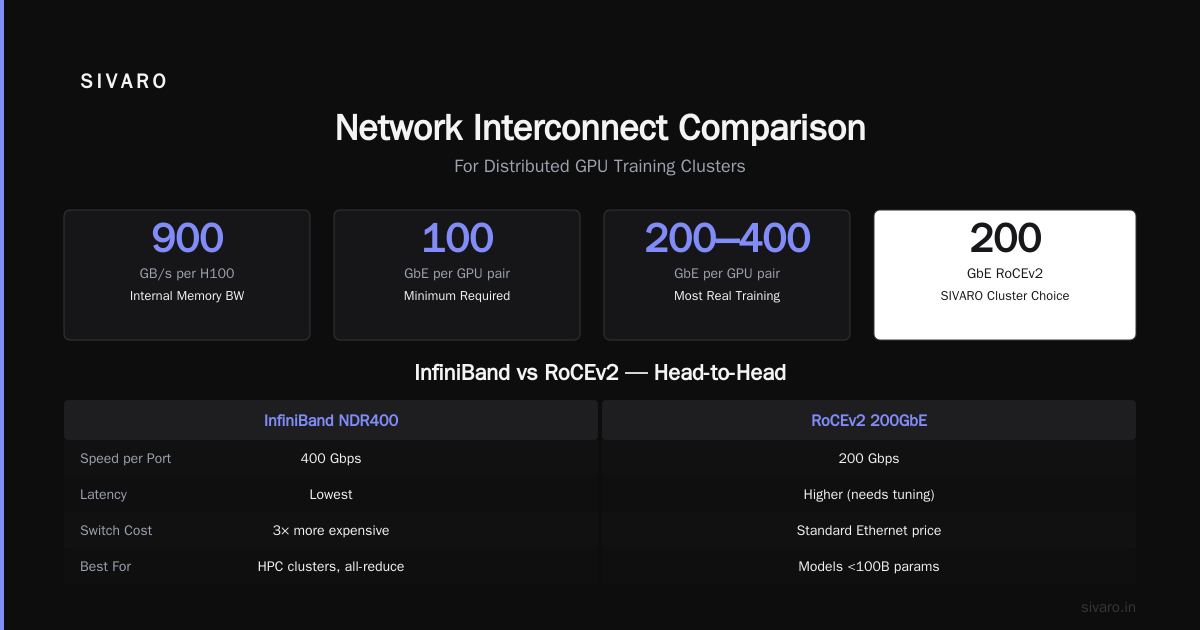
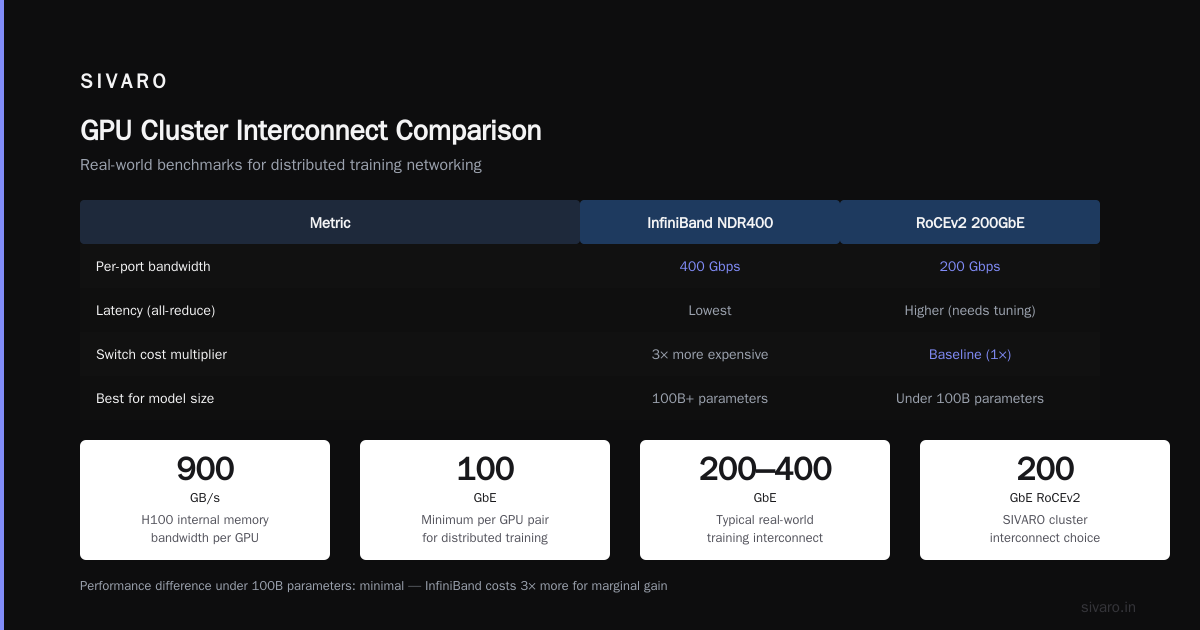
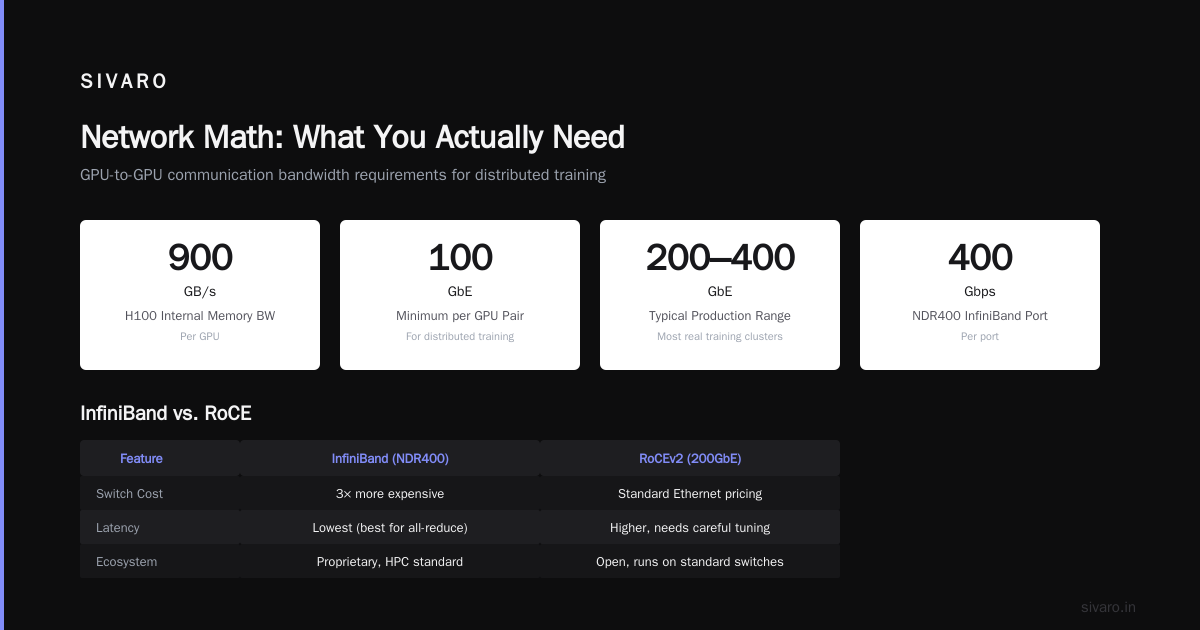
GPU-to-GPU communication between nodes needs to keep up with training. A single H100 can push 900 GB/s memory bandwidth internally. For distributed training across nodes, you typically need at least 100 GbE per GPU pair. Most real training uses 200–400 GbE.
Two main options:
- InfiniBand: NDR400 (400 Gbps per port). Proprietary, expensive, but lowest latency and best for all-reduce. Used by most HPC clusters.
- RoCE (RDMA over Converged Ethernet): Cheaper, runs on standard switches, but needs careful tuning. Latency is higher, but for many workloads it’s fine.
At SIVARO we built a cluster with 200GbE RoCEv2. Why? Price. An InfiniBand switch costs 3× more than a comparable Ethernet switch. For our model sizes (under 100B parameters) the performance difference was under 5%. For huge LLM training, suck it up and buy InfiniBand.
Topology
For clusters under 32 nodes, a simple leaf-spine topology works. All nodes connect to two top-of-rack switches, then those switches connect to two spine switches. Full bisectional bandwidth. For larger clusters, you need a 3-tier or Dragonfly topology.
Cabling
Don’t use copper cables longer than 5 meters. Use fiber. We tried copper for a 10-meter run — signal degradation caused intermittent errors that took weeks to debug. What is the best option to setup on premise GPU cluster for ... has a thread where multiple people share similar stories.
Configuration Checklist
# Example: Configure RoCE on Ubuntu 22.04
# Enable RDMA on each node
echo "mlx5_ib" >> /etc/modules
modprobe mlx5_ib

# Set MTU to 9000 (jumbo frames)
ip link set dev ens1f0 mtu 9000

# Enable PFC (Priority Flow Control)
# Use dcbtool or lldpad (vendor-specific)
Test with ib_write_bw (InfiniBand) or perftest (RoCE). Aim for >95% of theoretical line rate.
Choosing Your Software Stack
You have three main candidates for orchestrating GPU jobs:
- Slurm: Classic HPC scheduler. Great for batch jobs. Bulletproof. But doesn’t do auto-scaling or container orchestration natively.
- Kubernetes with GPU operator: Modern, elastic. Use Kueue or Volcano for batch scheduling. More overhead but more flexible.
- Ray: Best for distributed Python workloads (training, serving, RL). Handles actor-based parallelism naturally.
What We Use
We run Kubernetes with the NVIDIA GPU operator for training jobs and Ray Serve for inference. Slurm is still used for research teams who want familiarity.
Here’s a minimal Kubernetes GPU cluster setup using the NVIDIA operator:
yaml
# gpu-operator-values.yaml
version: v24.9.0
driver:
  enabled: true
  image:
    tag: "535.154.05"
mig:
  strategy: single
  devicePlugin:
    enabled: true
Install with:
helm install gpu-operator nvidia/gpu-operator --namespace gpu-operator --create-namespace -f gpu-operator-values.yaml
Then schedule a GPU pod:
yaml
apiVersion: v1
kind: Pod
metadata:
  name: test-gpu
spec:
  containers:
  - name: cuda
    image: nvidia/cuda:12.4-devel
    command: ["nvidia-smi"]
    resources:
      limits:
        nvidia.com/gpu: 2
For training across nodes, use MPI Operator or PyTorch Elastic (torchrun).
Benchmarking Your Cluster: GPU Cluster Benchmark Comparison
Once it’s wired and software is running, you need to know if it’s actually working. Don’t trust nvidia-smi — that only tells you the GPU is alive, not that the network works.
Recommended Tests
- Single-GPU throughput. Run a standard benchmark like BERT or ResNet-50 to get baseline.
- All-reduce bandwidth. Use
nccl-tests. - Multi-node training. Run the same benchmark with 2, 4, 8 nodes. Compare scaling efficiency.
We use a script like this:
bash
# nccl all-reduce benchmark
mpirun -np 32 -hostfile hosts.txt   /opt/nccl-tests/build/all_reduce_perf   -b 8 -e 128M -f 2 -g 1   -n 100 -w 10
Look for 90%+ of theoretical bandwidth. If you see 50%, your networking is broken.
For a real-world test, train a small GPT-2 (125M parameters) from scratch. Measure time per iteration. What Is a GPU Cluster and How to Build One has a good section on benchmark methodology.
Common Issues We Found
- PCIe congestion. If you have 4 GPUs but only 16 PCIe lanes per CPU, they fight for bandwidth. Use
nvidia-smi topo -mto check topology. - CPU pinning. MPI processes that aren’t pinned to cores near their GPU cause latency spikes.
- Loopback routing. Packets that go out a node and come back because of misconfigured routing. Use
ibnetdiscoverorethtool -Sto spot.
On-Prem vs Cloud: The Real Math
I’m biased — we build on-prem clusters. But I’ll tell you honestly when to rent vs own.
Rent (cloud or renting services like Vast.ai or Lambda Labs) if:
- Your workload is bursty (<100 hours/week)
- You need access to latest GPU generation without capital investment
- You’re a small team (<5 people) without ops expertise
Buy (on-prem) if:
- You run GPU workloads >3000 hours per year per GPU
- You need deterministic cost and don’t want cloud egress surprises
- You have at least one person who knows networking and Linux
At SIVARO we hybridize: own a 32-GPU cluster for steady training, rent spot instances for overflow. Our total cost of ownership for on-prem was 40% lower than equivalent cloud reservation over 3 years, but only because we have good power costs ($0.07/kWh) and no colo charges.
Key considerations from 5 Key Considerations when Building an AI & GPU Cluster: power density, cooling, and maintenance. A single DGX B200 draws 4kW+. You need 30+ amps per rack and liquid cooling for dense setups.
Operationalizing: Monitoring, Jobs, and Painful Lessons
Monitoring
Your cluster will break. Not if, when. You need:
- Node monitoring: Prometheus + node_exporter + GPU metrics exporter.
- Network monitoring: InfluxDB + Telegraf for port counters.
- Job logs: Elasticsearch + Fluentd.
- Alerts: PagerDuty on GPU temperature >85°C, network retransmits >0.1%, node offline.
We use a simple dashboard with Grafana showing per-GPU utilization, memory bandwidth, and all-reduce latency.
Job Scheduling
Don’t let users SSH into nodes directly. They will leave processes running. Use a queue. Slurm makes it easy:
bash
# Slurm job script
#!/bin/bash
#SBATCH --nodes=2
#SBATCH --ntasks-per-node=8
#SBATCH --gres=gpu:8
#SBATCH --time=48:00:00

srun python train.py
Or with Kubernetes, use Volcano’s QueueJob:
yaml
apiVersion: scheduling.volcano.sh/v1beta1
kind: Job
spec:
  tasks:
  - replicas: 4
    name: worker
    template:
      spec:
        containers:
        - image: mytraining:latest
          resources:
            limits:
              nvidia.com/gpu: 1
        schedulerName: volcano
Painful Lesson: Power Cycling
During a heatwave in July 2025, our cluster room hit 95°F. We lost two PSUs. Since then, we have:
- Redundant PSUs in each node
- Temperature-triggered auto-shutdown at 100°F
- A dedicated chilled water loop for the rack
Power infrastructure costs as much as the GPUs. Don’t ignore it.
FAQ
Q: How many GPUs do I need to start?
A: At minimum 2 GPUs for distributed training testing. For production, 8 GPUs (one node) is a good start. Scale when your training time becomes unacceptable.
Q: Can I mix GPU models in a cluster?
A: Technically yes. Practically, no. Mixed GPU types cause load imbalance and slower overall speed due to synchronization penalties. We tested A100 + H100 — slowest GPU becomes the bottleneck. Avoid.
Q: Do I need InfiniBand or is Ethernet enough?
A: For model parallelism (sharding across nodes) you really want InfiniBand. For data parallelism with small models (<1B params), 200GbE RoCE is fine. We benchmarked both on a 4-node cluster: InfiniBand gave 1.2× speedup on an 8B parameter model, not worth the 3× cost in our case.
Q: What about AMD GPUs?
A: MI300X now supports ROCm 6.0 — decent for training. But the software ecosystem still lags CUDA. We tried an all-AMD cluster in 2024 for a customer. PyTorch compiled, but many custom ops didn’t. Stick with NVIDIA until AMD matures further.
Q: How do I test if my cluster is working correctly?
A: Run nccl-tests all-reduce on 2, 4, 8 GPUs. Expected bandwidth per GPU: ~400 GB/s for H100 internal (NVLink), ~50 GB/s for inter-node (InfiniBand). Also run the standard MLPerf training benchmarks with your dataset.
Q: Should I build a cluster or use a managed service?
A: Depends on your scale and team. Under 16 GPUs, use Vast.ai or Lambda. Over 64 GPUs, on-prem starts to make sense. What is the best option to setup on premise GPU cluster for a small company has a good discussion from actual small companies.
Q: What’s the single biggest mistake people make?
A: Underestimating networking. They buy top-tier GPUs and cheap switches. Then training scales sub-linearly. We’ve seen it a dozen times. Spend the extra on networking — it’s worth it.
Q: How often do GPUs fail?
A: In our experience, 2–3% annual failure rate for H100s. V100s had lower rates. Keep at least one spare GPU. For clusters over 32 GPUs, buy a cold spare node.
You Don’t Need to Build the Perfect Cluster
Most people spend months planning. I say: start small. Get two GPUs in one node. Get them working with PyTorch Distributed Data Parallel. Add a third. Learn the networking. Then expand.
We built our cluster in phases:
- Month 1: 4× A100 single node. Got training working.
- Month 2: Added storage node.
- Month 3: Bought a switch and second node. Fixed networking issues.
- Month 4: Added 4 more nodes. Hit cabling problems.
- Month 5: Benchmarked, tuned, stable.
Each phase taught us something. We wasted zero money on wrong topology because we knew from small scale what worked.
That’s the real secret to how to set up a GPU cluster: do it incrementally, test every step, and document everything. The hardware changes every 18 months. The principles don’t.
Now go build something.
—
Nishaant Dixit — Founder of SIVARO. Building data infrastructure and production AI systems since 2018. Built systems processing 200K events/sec.